abigail
Health Uyari
- License — License: MIT
- Description — Repository has a description
- Active repo — Last push 0 days ago
- Low visibility — Only 9 GitHub stars
Code Gecti
- Code scan — Scanned 12 files during light audit, no dangerous patterns found
Permissions Gecti
- Permissions — No dangerous permissions requested
Bu listing icin henuz AI raporu yok.
Async Python CLI & library for FREE web AI services - No Login, No Api Key, No Browser Required
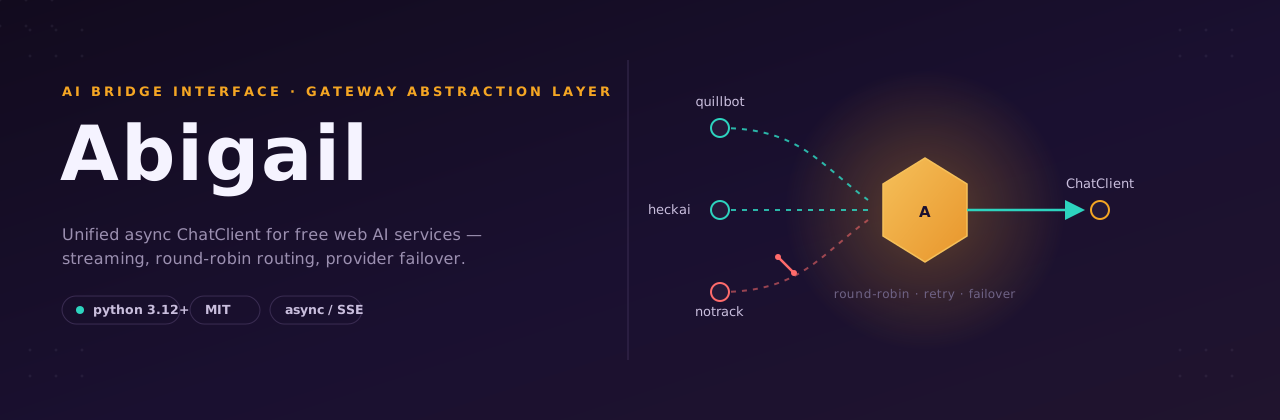
Abigail - AI Bridge Interface & Gateway Abstraction Layer
Async Python library that accesses free web AI services through a single ChatClient interface - with SSE streaming, per-model round-robin, cross-model and cross-provider fallback, per-call proxy, automatic retry, provider failover with a circuit breaker, and error classification.



[!CAUTION]
Disclaimer: This library reverse-engineers third-party public APIs. Use it in accordance with each service's Terms of Service.

Installation
Requires Python ≥ 3.12.
From PyPI (recommended):
pip install abigail
# or, with uv:
uv add abigail
From source (for development):
git clone https://github.com/iqbalmh18/abigail.git
cd abigail
uv sync
source .venv/bin/activate
Main dependencies: curl_cffi, pydantic.
CLI Usage
A Typer-based CLI is included - most everyday tasks work without writing any code. After uv sync (or installing the package), run abigail from your activated environment.
abigail --help
Commands
| Command | Description |
|---|---|
abigail chat PROMPT |
Send a message and stream the response. |
abigail shell |
Start an interactive chat session (/help, /exit). |
abigail providers |
List all registered providers and their capabilities. |
abigail models |
List all available models and aliases. |
abigail inspect <provider> |
Show provider metadata (capabilities, models, aliases). |
abigail benchmark [PROMPT] |
Benchmark providers/models with success rate and latency stats. |
abigail config get|set|reset |
View or manage ~/.config/abigail/config.toml. |
chat examples
# Stream with a specific provider + model
abigail chat "Explain quantum computing" -p heckai -m heckai/gpt-5.4-mini

# Use the notrack provider (supports file uploads / attachments)
abigail chat "Describe this file" -p notrack -f /path/to/image.jpg
abigail chat "What is in this PDF?" -p notrack -f sample.pdf

# Non-streaming JSON output
abigail chat "Hello" --no-stream --json

# Enable thinking / search, override timeout & proxy
abigail chat "Latest AI news" --thinking --search --timeout 60 --proxy socks5://host:port
Pipelines (stdin)
chat reads piped stdin and appends it to the prompt argument, so it composes with other Unix tools:
# Pipe a file's contents; the prompt argument becomes the instruction
cat main.py | abigail chat "Review this file in depth"

# Pipe command output
git diff | abigail chat "Write a commit message for this diff"

# stdin only (no prompt argument) - the piped text is used as the prompt
echo "Explain what a monad is" | abigail chat
When both a prompt argument and stdin are provided, the result is "<prompt>\n\n<stdin>". If neither is provided, the command exits with an error.
Common options for chat/shell: -p/--provider, -m/--model, --thinking, --search, --stream/--no-stream, -f/--files (repeatable), --proxy, --timeout, --verbose/-v, --json, -o/--output.
Auto file routing: when you pass
-f/--fileswithprovider="auto", Abigail picks only a provider that supports attachments (e.g.notrack). If you pin a provider that does not support attachments, it raises a clear error instead of silently dropping the file.
Configuration
Settings live in ~/.config/abigail/config.toml and are loaded automatically:
abigail config set provider notrack      # default provider
abigail config set model notrack/ChatGPT # default model
abigail config set timeout 120.0
abigail config set stream true
abigail config get
abigail config reset
| Key | Maps to | Type |
|---|---|---|
provider |
default_provider |
str |
model |
default_model |
str |
proxy |
proxy |
str |
timeout |
timeout |
float |
stream |
stream |
bool |
thinking |
thinking |
bool |
search |
search |
bool |
verbose |
verbose |
bool |
Proxy configuration
The proxy setting accepts several forms - a single URL, a comma/newline list (round-robin pool), or a file of one proxy per line:
# Single proxy URL
abigail config set proxy "http://127.0.0.1:8080"

# Proxy list file (one URL per line) - bare .txt path is auto-detected as a file
abigail config set proxy proxies.txt
abigail config set proxy "@/abs/path/proxies.txt"

# Comma-separated pool in one value
abigail config set proxy "http://a:1,http://b:2"
Per-request override is also available: abigail chat "Hi" --proxy socks5://host:port. To clear the proxy setting use abigail config set proxy "".
Controlling failover from the CLI
# Persist a default in ~/.config/abigail/config.toml
abigail config set failover "quillbot,heckai"   # ordered list
abigail config set failover false                 # disable auto-failover
abigail config set failover true                  # try all candidates

# Or per-command
abigail chat "Hi" --no-failover
abigail chat "Hi" --failover-order quillbot,heckai
Mid-stream failures are never marked completed. If a stream has already started emitting chunks and then fails (e.g. a curl
56reset), the client re-raises without retry/failover and never reports the partial result ascompleted.
Library Usage (Python)
Prefer the command line? Most everyday tasks work without writing code - see CLI Usage.
1. Stream Chat (Recommended)
import asyncio
from abigail import ChatClient

async def main():
    async with ChatClient() as client:
        async for chunk in client.stream_chat("Explain machine learning"):
            if chunk.event == "content":
                print(chunk.text, end="", flush=True)

asyncio.run(main())
2. Non-Streaming Chat
async with ChatClient() as client:
    response = await client.chat("What is Python?")
    print(response.text)
    print("thinking:", response.thinking)
3. Thinking (Reasoning) & Web Search
You can enable advanced model capabilities by passing thinking=True or search=True.
# Enable CoT (Chain of Thought) reasoning
await client.chat("Solve: if 2x + 3 = 11, what is x?", thinking=True)

# Enable web search / live internet access
await client.chat("Latest tech news?", search=True)
Capability selection rules:
provider="auto"(default) - the client automatically picks a provider and model that support the requested capabilities. If nothing supports them, the request fails fast with a clear error.- Explicit
providerormodelthat cannot satisfythinking/search- the client raises aNonRetryableErrortelling you exactly which provider/model and which capability is unsupported. It never silently downgrades to a non-thinking/non-search model.
# Raises: Provider 'quillbot' does not support thinking.
await client.chat("...", provider="quillbot", thinking=True)

# Raises: Model 'openai/gpt-5.4-mini' on provider 'heckai' does not support the requested capability: thinking.
await client.chat("...", provider="heckai", model="heckai/openai/gpt-5.4-mini", thinking=True)
When streaming with thinking=True and search=True, you can parse different event types:
from abigail import ChatEventType

async for chunk in client.stream_chat("Latest AI news", thinking=True, search=True):
    match chunk.event:
        case ChatEventType.thinking:
            print(chunk.thinking, end="")
        case ChatEventType.content:
            print(chunk.text, end="")
        case ChatEventType.sources:
            for s in chunk.search:
                print(s.title, s.url)
4. Pick Specific Provider or Model
By default (provider="auto"), ChatClient automatically routes your request to the best available provider/model. You can also explicitly choose a provider or model:
await client.chat("Hello!", provider="quillbot")
await client.chat("Explain quantum computing", provider="heckai", model="heckai/openai/gpt-5.4-mini")
Selection rules:
provider="auto",model="auto"- round-robin + failover across providers (only those that support the requestedthinking/search), then round-robin models within the chosen provider.provider="<name>"(explicit),model="auto"- no provider failover; the request stays on that provider and round-robins its models.provider="<name>",model="<model>"(both explicit) - no failover; the exact model is used.
Model IDs can be referenced in several forms - openai/gpt-5.4-mini, gpt-5.4-mini, heckai/gpt-5.4-mini, or heckai/openai/gpt-5.4-mini (provider-prefixed) - all resolve to the same model.
5. Proxy Configuration
You can configure proxies globally or per-request:
# Direct connection (avoids proxies that cut SSE streams)
async for chunk in client.stream_chat("...", proxy=None):
    ...

# Or a specific proxy for just this request
async for chunk in client.stream_chat("...", proxy="socks5://user:pass@host:port"):
    ...
To set a global proxy pool, initialize the client with a list: ChatClient(proxy_list=["..."]).
6. File Uploads / Attachments
For providers that support file uploads (like notrack), you can pass a list of file paths or Attachment objects via the files parameter:
Auto-routing: when
filesis provided withprovider="auto", the client only considers providers that declaresupports_attachments. If you pin a provider that cannot handle attachments, it raises aNonRetryableErrorinstead of silently dropping the file.
# Pass local file paths directly
await client.chat("Describe this image", files=["/path/to/image.jpg"])

# Or use the Attachment model to pass raw bytes
from abigail.types.requests import Attachment

my_file = Attachment(name="data.csv", data=b"a,b,c\n1,2,3")
await client.chat("Analyze this data", files=[my_file])
7. Resilience: Retries, Provider Failover & Circuit Breaker
ChatClient is built to survive flaky free endpoints. By default it:
- Retries within a provider - recovers from transient failures (
429,500/502/503/504, connection resets such as curl error56,SessionExpiredError) up tomax_retriestimes, with linear backoff (recovery_delay × attempt). - Fails over across providers - only when
provider="auto". When a provider exhausts its retries, the request is retried on the next-best capable provider (by priority). Up tomax_provider_failoversproviders are tried. If you pin an explicitprovider, failover is disabled - the request stays on that provider (round-robining its models) and any error is raised to you. - Skips unhealthy providers - a short-term circuit breaker opens for a provider after
circuit_max_failuresconsecutive failures, so healthy providers are preferred until the breaker cools down (circuit_windowseconds).
from abigail import ChatClient

# Tune resilience explicitly
client = ChatClient(
    max_retries=3,             # retries inside one provider
    recovery_delay=1.0,         # base backoff (seconds)
    max_provider_failovers=2,    # extra providers to try after the first
    total_timeout=30.0,         # hard deadline for the whole recovery chain
    circuit_window=30.0,         # breaker cool-down window (seconds)
    circuit_max_failures=3,      # consecutive failures before a provider is skipped
)
Error classification. Every failure is classified by classify_error() into:
| Class | Examples | Behavior |
|---|---|---|
RetryableError |
429, 5xx, curl 56 (recv/connection reset), SessionExpiredError |
Retry, then fail over |
NonRetryableError |
400, 401, 403, 404, 413, 422, upload rejected |
Abort immediately - no retry, no failover |
Controlling the failover flow
The failover behavior is configurable - you decide what happens on failure, the library never forces it:
failover=None(default /auto) - automatic, by provider priority, respecting the circuit breaker. Only active whenprovider="auto"; an explicitproviderdisables failover regardless of this setting.failover=False(--no-failover) - never fail over. The chosen provider is tried (with its in-provider retries) and if it still fails, the error is raised to you. You handle the fallback yourself.failover=True- automatic, but ignores themax_provider_failoverscap and tries every candidate.failover=["a", "b"](--failover-order a,b) - restrict and order the failover chain explicitly. When you pass a list, provider priority is ignored and your order wins. This still only applies whenprovider="auto"; an explicitproviderstays pinned.
from abigail import ChatClient

# Never auto-switch; I'll catch the error and decide
client = ChatClient(failover=False)

# Explicit, ordered chain: only try these two, in this order
client = ChatClient(failover=["quillbot", "heckai"])
# Persist a default in ~/.config/abigail/config.toml
abigail config set failover "quillbot,heckai"   # ordered list
abigail config set failover false                 # disable auto-failover
abigail config set failover true                  # try all candidates

# Or per-command
abigail chat "Hi" --no-failover
abigail chat "Hi" --failover-order quillbot,heckai
Mid-stream failures are never marked completed. If a stream has already started emitting chunks and then fails (e.g. a curl
56reset), the client re-raises without retry/failover and never reports the partial result ascompleted.
Multi-turn context is not carried across a failover. Each failover attempt opens a fresh session on the next provider and sends only the latest user message, so conversation history is not forwarded to the backup provider. If you depend on multi-turn context, pin a single healthy provider with
provider="..."or disable failover.
The ChatResponse exposes failover_count so you can detect when a backup provider was used:
resp = await client.chat("Hello!")
print(resp.provider, resp.model, resp.failover_count)
Supported Providers & Models
Capabilities are listed per model (✓ = supported, - = not supported). Attachment support is per provider.
| Provider | Model | Thinking | Search | Attachments |
|---|---|---|---|---|
quillbot |
quillbot/default |
- | - | - |
heckai |
heckai/gpt-5.4-mini |
- | - | - |
heckai |
heckai/gemini-3.1-flash-preview |
- | - | - |
heckai |
heckai/gemini-3-flash-lite |
- | - | - |
heckai |
heckai/deepseek-v4-flash |
✓ | ✓ | - |
heckai |
heckai/deepseek-v4-pro |
✓ | ✓ | - |
heckai |
heckai/hy3-preview |
✓ | ✓ | - |
heckai |
heckai/qwen3.7-plus |
✓ | ✓ | - |
heckai |
heckai/step-3.7-flash |
✓ | ✓ | - |
notrack |
notrack/default |
✓ | - | ✓ |
notrack |
notrack/minimax |
✓ | - | ✓ |
notrack |
notrack/chatgpt |
✓ | - | ✓ |
Notes:
- When you request
thinking=Trueorsearch=True, the client only routes to models that actually support that capability (provider-level flags are just a filter; the per-model flags above are authoritative).notrackis the only provider that supports file uploads/attachments. Withprovider="auto"and--files, it is selected automatically; pinning a non-attachment provider with files raises a clear error.- Google Gemini models on HeckAI do not support
search(the/searchendpoint returns 500), so they are excluded when you requestsearch=True.
Architecture & Internals (For Contributors)
This section explains the internal mechanics of abigail. It is intended for contributors and advanced users.
Request Flow
ChatClient._stream() builds a failover chain of providers via _failover_chain() (only when provider="auto"; an explicit provider yields a single-element chain with no failover). The chain is in priority order, filtered by capability/model support and the circuit breaker, then handed to RecoveryPolicy. For each provider the client resolves the model (raising a clear NonRetryableError if an explicit provider/model cannot satisfy the requested thinking/search), opens a fresh session (conversation_id is regenerated per provider so a backup never collides with the primary's session), and the provider builds its candidate model list, POSTs to the chat/search endpoint, and parses the SSE stream into ChatChunk objects. Within a provider, 429/5xx falls back to the next model; if all models fail it raises a classified RetryableError, which is retried and - once retries are exhausted - failed over to the next provider in the chain (auto only).
Round-Robin & Fallback
Load balancing happens at two levels, depending on how the caller selects the provider:
- Provider level (only when
provider="auto") -ProviderSelectorround-robins across the top-priority providers that support the requestedthinking/search, andRecoveryPolicyfails over to the next capable provider when retries are exhausted. - Model level - within a chosen provider,
ProviderSelector.pick_model()round-robins across the highest-priority models that support the requested capabilities, keyed by(provider, mode)wheremode ∈ {default, think, search, think+search}. Individually, a provider may additionally rotate its own candidate-model start position (e.g.HeckAIProvider._select_models()shifts bynext(self._rr_counter)) for thread-safe balancing across its models. This is a per-provider pattern, not aBaseProvidercontract - providers that don't implement it simply use the selector's choice.
If you pin an explicit provider, provider-level round-robin and failover are disabled - the client stays on that provider and only round-robins its models.
flowchart TD
    A["_failover_chain(provider, model, thinking, search)"] --> B{"provider == auto?"}
    B -->|yes| C["providers by priority, filtered by circuit breaker + capabilities"]
    B -->|explicit| D["single provider, no failover"]
    C --> E["for each provider: resolve model"]
    D --> E["round-robin provider models"]
    E --> F["provider._select_models() (per-provider)"]
    F --> G["filter by supports_thinking / supports_search"]
    G --> H["rotate start by next(_rr_counter)"]
    H --> I["loop POST each candidate model"]
    I -->|429 / 5xx| J["next model"]
    J --> I
    I -->|200| K["stream + parse"]
    I -->|all models failed| L["RetryableError"]
    L -->|retries left| I
    L -->|retries exhausted| M{"provider == auto?"}
    M -->|yes| N["fail over to next provider"]
    N --> E
    M -->|explicit| O["raise last error"]
    L -->|all providers exhausted| O
ChatChunk & Event Structure
Every chunk carries event: ChatEventType and section: str (the originating parser section). This decoupled structure ensures type safety without deep inheritance:
| Event | Populated field | Meaning |
|---|---|---|
content |
text |
Answer text (section="answer") |
thinking |
thinking |
Thinking/reasoning text (section="reason") |
sources |
sources / search |
Web sources (section="source") |
related |
raw_event |
Related questions (section="relate") |
status |
status |
processing / completed |
error |
raw_event |
Error payload, ignored (does not raise) |
title |
title |
Conversation title |
ChatResponse (from chat()) exposes text, thinking, sources, and search (alias of sources).
Adding a New Provider
Create a package under abigail/providers/<name>/ with metadata.py, session.py, parser.py, provider.py, then register it via @register_provider. No changes to ChatClient or the CLI are needed - both discover providers through the central registry (the client imports abigail.providers, and every CLI command calls import abigail.providers before reading registry.all()).
Once registered, your provider is automatically available to:
ChatClient.stream_chat(...)/ChatClient.chat(...)abigail chat -p <name>,abigail providers,abigail models,abigail inspect <name>, andabigail benchmark
1. metadata.py
from ...types.capabilities import Capability
from ...types.models import ModelInfo

MYPROVIDER_MODELS = [
    ModelInfo(
        id="myprovider-default",
        provider="myprovider",
        aliases=["myp"],
        capabilities={Capability.CHAT},
        supports_thinking=False,
        supports_search=False,
    ),
]
2. parser.py
import json
from ...core.parser import BaseParser
from ...types.responses import ChatChunk, ChatEventType

class MyProviderParser(BaseParser):
    async def _parse(self, response, *, conversation_id):
        async for raw in response.aiter_lines():
            if not raw: continue
            line = raw.decode("utf-8", errors="replace")
            if not line.startswith("data: "): continue

            try:
                event = json.loads(line[6:])
            except json.JSONDecodeError:
                continue

            yield ChatChunk(
                conversation_id=conversation_id,
                event=ChatEventType.content,
                section="answer",
                text=event.get("content"),
            )
3. provider.py
from ...core.provider import BaseProvider
from ...core.registry import register_provider
from ...types.capabilities import Capability
from .metadata import MYPROVIDER_MODELS
from .parser import MyProviderParser
from .session import MyProviderSession

@register_provider(
    name="myprovider",
    capabilities={Capability.CHAT},
    supports_thinking=False,
    supports_search=False,
    supports_attachments=False,
    models=MYPROVIDER_MODELS,
    priority=100,
)
class MyProviderProvider(BaseProvider):
    name = "myprovider"

    def __init__(self, *, proxy_manager=None, request_timeout=120.0):
        super().__init__(proxy_manager=proxy_manager, request_timeout=request_timeout)
        self.session = MyProviderSession(proxy_manager=proxy_manager, request_timeout=request_timeout)
        self.parser = MyProviderParser()

    def stream_chat(self, request):
        return self._stream(request)

    async def _stream(self, request):
        proxy = request.proxy if request.proxy is not None else self.session.next_proxy()
        if not self.session.is_ready:
            await self.session.initialize(proxy=proxy)
        else:
            await self.session.refresh(proxy=proxy)
        # ... POST + stream handling
4. providers/__init__.py
from .myprovider import provider as _myprovider # noqa: F401
The new provider is immediately available to the client and the CLI - no further wiring required.
Tip: Keep model IDs and aliases stable after release. The CLI
config set model <alias>and the--modelflag resolve throughProviderSelector, so any alias you list inmetadata.pyworks as a CLI argument out of the box.
Running Tests
uv run pytest tests/ -v
uv run pytest tests/ --cov=abigail --cov-report=term-missing
License
MIT License.
Yorumlar (0)
Yorum birakmak icin giris yap.
Yorum birakSonuc bulunamadi