serra
Health Warn
- License — License: MIT
- Description — Repository has a description
- Active repo — Last push 0 days ago
- Low visibility — Only 5 GitHub stars
Code Fail
- rm -rf — Recursive force deletion command in .github/workflows/release-publish.yml
Permissions Pass
- Permissions — No dangerous permissions requested
No AI report is available for this listing yet.
A bridge from your chat to the coding agents on your Mac (T3 Code: Claude, Codex…). Slack today; Discord, Telegram and more planned. macOS, alpha.
The coding agents on your Mac, in Slack
A Slack message becomes an agent run in its own worktree. The answer, or a draft PR, comes back to the thread.


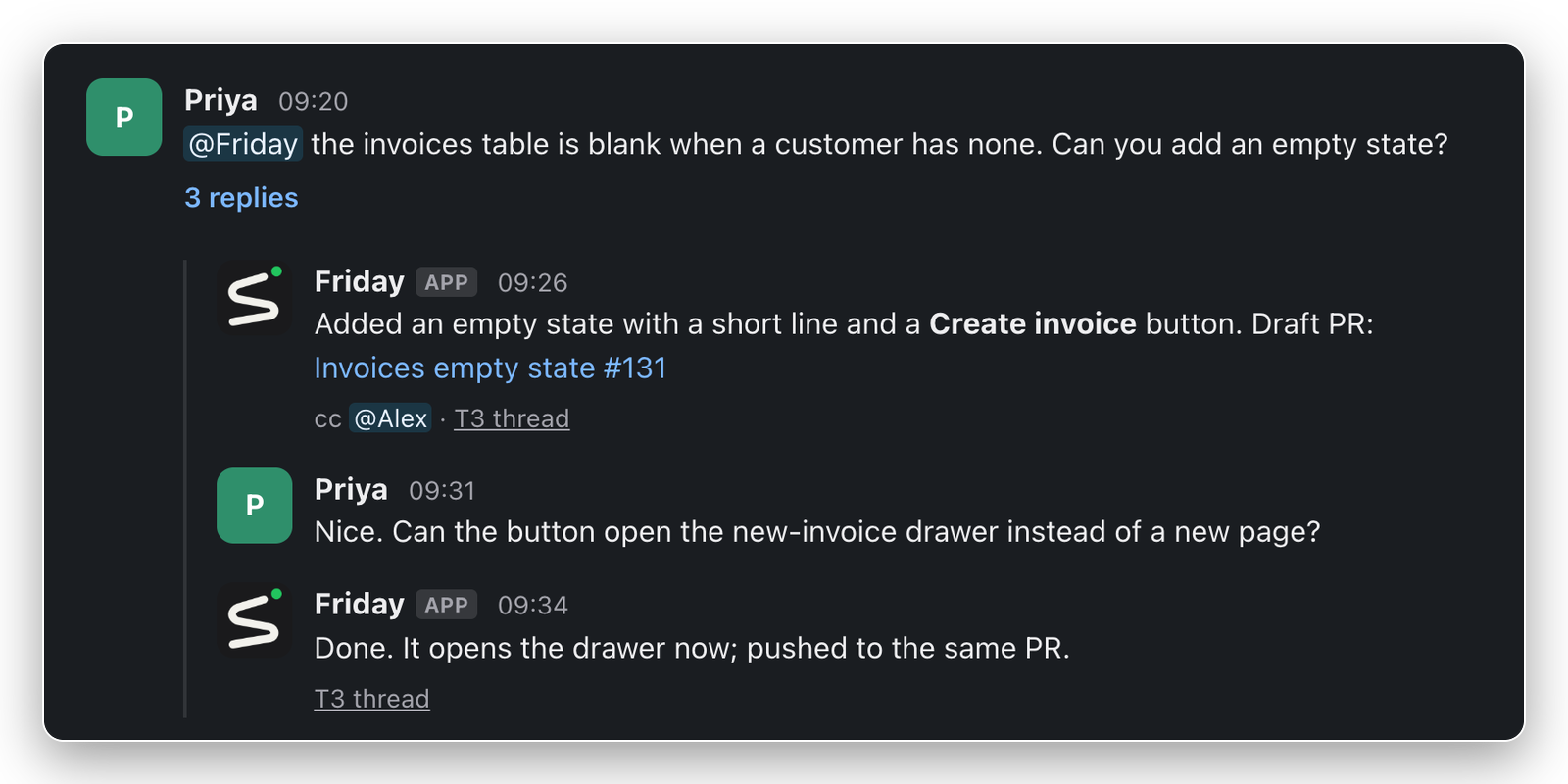
Demo workspace and data
Alpha (latest:
0.1.0-alpha.7). macOS on Apple silicon, Slack only, not notarized. Formats may change between
versions. Read Alpha limits before you point it at a repository that matters.
- What it does · Quick start · Agent backends · Knowledge
- Configuration · Updating · Alpha limits · Troubleshooting · Uninstall · Development
What it does
- Requests from Slack. Mention the bot or DM it; reply in the thread to keep going. 👀 means it saw the message.
- A fresh worktree per job. The agent works in a new Git worktree of your repository, as you, with your GitHub
login and your agent's own sign-in. No server, no provider keys. - Careful by default. The default brief asks for draft PRs and never to merge, force-push or touch production.
Change it in Settings › Brief & policy. - Questions and approvals as cards. When the agent asks something, the thread gets a card with buttons. The
requester or the owner can answer; a permission request only the owner can. - Jobs in the app. The menubar app lists what needs you, what's running and what finished today. Each job links to
its Slack thread, its PR and its Chat: the run's messages as they stream, tool calls, approvals, images, and a
box to answer or follow up. A run that failed shows as Failed with the reason, under Needs you. - Images both ways. A screenshot sent in Slack reaches the agent; an image the agent saves and names in its reply
is uploaded to the thread and shown in Jobs › Chat. - Pluggable agents. T3 Code by default, or Claude Code, Codex, OpenCode, Gemini CLI or any ACP agent you add.
- A knowledge base it learns. Pages about you and how you work, which every job reads. Nothing is added without
your approval. - Beyond mentions. Optional alert channels it investigates on its own, tasks started from the app (New task),
and meeting notes turned into proposals (docs/meetings.md).
Each engineer runs their own bot: their own Slack app, their own Mac, their own GitHub login.
Quick start
What you need
| What | Why | Check |
|---|---|---|
| A Mac with Apple silicon | Only an arm64 build is published. On Intel, build it yourself. |
Apple menu › About This Mac |
| T3 Code running, with a provider signed in | The default backend. Serra starts T3 threads through the t3 command line (default ~/.t3/bin/t3). Setup and Diagnostics check it even if you then pick an ACP agent. |
~/.t3/bin/t3 thread list --project /path/to/repo --json |
| Node.js 24+, or 22.18+ on the 22 line, with pnpm | The app builds and runs the background bot with your Node. | node -v, pnpm -v (corepack enable pnpm if missing) |
| Git and the GitHub CLI, signed in | The agent commits, pushes and opens PRs as you. | gh auth status |
| Permission to create a Slack app | Each bot is its own Slack app. | — |
Your repository must be a Git checkout with a remote (normally origin on GitHub), added as a project in T3 Code,
with Git user.name and user.email set.
1. Get the app
Open GitHub Releases. Every alpha is a pre-release: take the newest
at the top (todayv0.1.0-alpha.7), not one GitHub labels "Latest".Download
Serra-<version>-arm64.dmgandSHA256SUMSinto the same folder.Check the download:
cd ~/Downloads
shasum -a 256 -c SHA256SUMS --ignore-missing
You want
Serra-<version>-arm64.dmg: OK. Anything else: delete it and download again.
2. Install it
- Open the
.dmg, drag Serra to Applications, eject the disk image. - Open Serra. It isn't notarized, so macOS blocks the first launch. Allow it once:
- macOS 15 or later: Done on the warning, then System Settings › Privacy & Security › Open Anyway.
- macOS 14 or earlier: Control-click Serra in Applications › Open › Open.
Serra lives in the menubar. If macOS says the app "is damaged", see
docs/app/install.md.
3. First run
Serra opens on setup until it's done. It finds any existing profile (from pnpm run setup, an older app, or a setup
left halfway) and resumes at the first missing step.
| Step | What it asks for |
|---|---|
| You & repo | Your name, GitHub login and Slack member ID (Slack › your picture › Profile › ⋮ › Copy member ID), the repository folder, and the bot's name. |
| Connect Slack | Create in Slack opens Slack's "create from manifest" page with your manifest filled in. Install it, then paste the bot token (xoxb-…) and the app-level token (xapp-…, scope connections:write). They go to the Keychain, or 1Password or .env if you choose. |
| Confirm you | Nothing to type: Slack checks your member ID. |
| Install and start | Runs every check, installs the bot as a launchd service, and waits until it answers. If a check fails, nothing is installed. |
Then invite the bot to a test channel (/invite @friday) and ask @friday what does this repository do?.
If something fails, Settings › Diagnostics lists failing checks first, each with a button to the fix. Setup stays
under Serra › Set Up Serra… and ⌘K. Full setup details: docs/app/install.md.
Agent backends
Pick one in Settings › Worker › Agent; it applies to the next job, and a running job keeps the one it started on.
| Backend | What you need |
|---|---|
| T3 Code (default) | T3 running with a provider signed in. Provider and model under Settings › Worker. |
| Claude Code | claude installed and signed in. Serra ships the ACP adapter. |
| Codex | codex installed and signed in. Serra ships the ACP adapter. |
| OpenCode | opencode on your PATH. |
| Gemini CLI | gemini on your PATH. |
| Your own | Any command that speaks the Agent Client Protocol over stdio. |
Add your own with Add ACP agent on the same screen, or in the profile's agent-backend.json:
{ "agents": [{ "id": "my-agent", "name": "My agent", "command": "my-agent", "args": ["acp"], "env": {} }] }
An agent bound to one app, such as eve, takes a cwd (an absolute path). Serra then starts it in
that folder and runs every job there instead of a worktree, and every approval waits for a person.
How ACP runs differ from T3 (restarts, steering, permissions, images): docs/agent-backends.md.
Knowledge
The bot keeps a small knowledge base in the profile's knowledge/. Every job's brief carries what its audience may
hear (audience: owner | team | external).
- Knowledge › Proposals › Start interview: the agent interviews you about your role, workflows and limits. Each
summary you confirm becomes a proposal; approved, it becomes a page. docs/knowledge-interview.md - Overview: how many pages you have, how many replies they shaped, their health, and a Needs you list.
- Graph: your pages as a map, an island per area.
- About me and Pages: what jobs know about you, and every page with who may hear it.
- A weekly review suggests fixes; nothing changes until you approve. docs/knowledge-health.md
Configuration
Most settings are in the app. Each bot has one private profile folder, ~/.local/share/serra/<bot-id>/:
| File | What it holds |
|---|---|
profile.json |
Bot name and ID, owner, repositories, allowed people, worker, alert triggers |
secrets.json, .env |
Where each Slack token comes from (Keychain, 1Password), or the tokens themselves in .env |
brief.md, policy.md |
The instructions every job gets, and your own rules |
knowledge/ |
Knowledge pages and pending proposals |
agent-backend.json, agent-runs/ |
The backend you picked, models, custom agents, and each ACP run's transcript |
attachments/ |
Images and files sent to the bot in Slack |
state.json, logs/ |
Job state and logs (logs/bot.log) |
| Settings screen | What it changes |
|---|---|
| Bot & Slack, People, Repositories | The bot's name, who may ask it, and the repositories it works in |
| Worker | The agent backend, model, branch names, and developer updates |
| Alerts | Channels whose messages it investigates without a mention (messageTriggers) |
| Brief & policy, Meetings | Its instructions, and meeting capture (off by default) |
| Secrets, Tools | Where the Slack tokens are, and the MCP servers and CLIs jobs will have |
| Appearance, Updates, Diagnostics | The app itself |
Other places: Slack tokens in the Keychain (service dev.serra.<bot-id>), the service at~/Library/LaunchAgents/dev.serra.<bot-id>.plist, the app's preferences in~/Library/Application Support/serra/prefs.json. Every field and file: docs/configuration.md.
Include the profile in your private backups.
Updating
On alpha.3 or later, Serra updates itself from GitHub Releases: Settings › Updates › Download, checked
against SHA256SUMS, then Restart to update. The background bot moves to the new version once no job is running;
new requests wait (⌛) until it's back.
On alpha.2 or older, install the latest release by hand once: quit Serra (⌘Q in its window), then
get and install it, choosing Replace. Updates are automatic from then on.
Replacing the app keeps your profile, tokens and service. Running Serra from a checkout (pnpm run setup,pnpm bot activate)? Open the app: setup finds your profile and the bot moves onto the app's version. More:
docs/app/install.md.
Alpha limits
- macOS and Slack only, and only an Apple silicon build is published. One bot per Slack app.
- The bot acts with your GitHub login and your agent's sign-in. Anyone on the allowed list can have it read your
repository and open PRs as you. Keep the list short. - Your Mac and T3 Code must stay on. Messages sent while the bot is down aren't replayed.
- The app is ad-hoc signed and not notarized.
- The profile and state formats may change between alphas; the CHANGELOG says when.
Troubleshooting
Start with Settings › Diagnostics.
- "Serra can't be opened" or "is damaged": allow it as in Install it. If it says damaged, download
again and checkSHA256SUMS;xattr -dr com.apple.quarantine /Applications/Serra.appclears the download flag. - Tokens FAIL /
invalid_auth: both tokens must come from the same Slack app;xoxb-for the bot,xapp-withconnections:writefor the app. Reinstall the Slack app after changing scopes. - No reply in Slack: is the bot in the channel? Are you the owner or in Settings › People? See
logs/bot.log. - T3 checks FAIL: start T3 and add the exact repository folder as a T3 project. Set
t3Bininprofile.jsonift3lives elsewhere. - An ACP job shows Failed: Jobs › Chat says why (a sign-in, a usage limit). Fix it, then follow up in the thread.
- "No supported Node" or "neither pnpm nor corepack": install Node 24+ (or 22.18+), then
corepack enable pnpm. - Service stops naming
~/Documents,~/Desktopor~/Downloads: allownodeunder Privacy & Security › Files
and Folders, or keep the repository elsewhere. - Wrong profile, or none:
open -a Serra --args --profile "$HOME/.local/share/serra/<bot-id>".
Uninstall
BOT=friday                                                  # your bot ID (the profile's folder name)
launchctl bootout "gui/$(id -u)/dev.serra.$BOT"             # stop the background service
rm -f "$HOME/Library/LaunchAgents/dev.serra.$BOT.plist"
security delete-generic-password -s "dev.serra.$BOT" -a SLACK_BOT_TOKEN   # only if you used the Keychain
security delete-generic-password -s "dev.serra.$BOT" -a SLACK_APP_TOKEN
rm -rf "$HOME/.local/share/serra/$BOT"                      # the profile: settings, knowledge, state
Then quit Serra (⌘Q), move it to the Trash, remove ~/Library/Application Support/serra/, and delete the Slack app at
api.slack.com/apps. If you set serviceLabel in profile.json, use it instead ofdev.serra.$BOT. Worktrees stay behind: git worktree list, then git worktree remove <path> (ACP jobs make theirs
under ~/.serra/worktrees/).
Development
corepack enable pnpm
pnpm install --frozen-lockfile
pnpm check      # types, then lint
pnpm test       # no Slack, T3 or network needed
pnpm app:dev    # build and run the app
Running a bot from the checkout, building the .dmg and developer-mode updates: CONTRIBUTING.md.
Releases: docs/releasing.md. Security issues: SECURITY.md.
Serra is released under the MIT License. It isn't affiliated with Slack, T3 Code or any agent vendor.
Reviews (0)
Sign in to leave a review.
Leave a reviewNo results found