SculptForge
Health Pass
- License — License: GPL-3.0
- Description — Repository has a description
- Active repo — Last push 0 days ago
- Community trust — 10 GitHub stars
Code Pass
- Code scan — Scanned 12 files during light audit, no dangerous patterns found
Permissions Pass
- Permissions — No dangerous permissions requested
No AI report is available for this listing yet.
The free, open-source alternative to ZBrush. Sculpting for Linux, macOS and Windows with free built-in AI (image/text to 3D), Send to Unreal, game-ready LODs, Gaussian splats and OpenUSD.
SculptForge
The free, open-source alternative to ZBrush.
Digital sculpting for VFX, animation and games on Linux, macOS and Windows, with free built-in AI:
an AI brush creator and image/text to 3D.




Website & demo videos · Download · User guide · Features · Build from source · Contribute
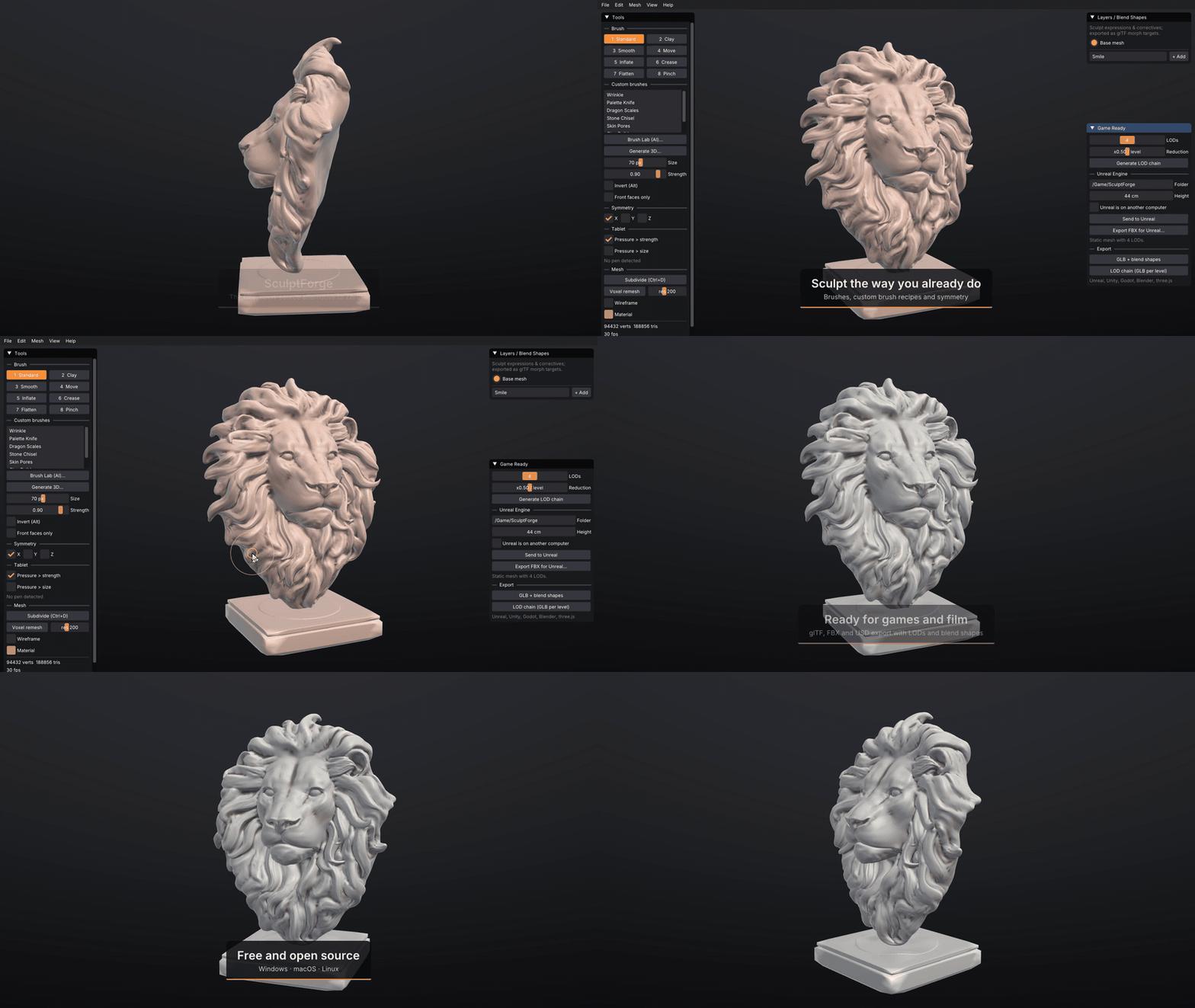
SculptForge is a free, open-source alternative to ZBrush: a focused sculpting app with the brushes, symmetry and
navigation ZBrush artists already know. It costs nothing, has no subscription, runs natively on Linux as well as
Windows and macOS, and comes with source code you can change. It starts instantly, works offline,
and fits into game and animation pipelines: sculpt a character, generate its LODs, sculpt blend shapes, and
send it straight into Unreal Engine. AI comes built in and free: describe a brush and the AI brush creator
(Brush Lab) builds it, or turn a sketch, concept art or a description into a sculptable model. No account or key is needed. Prefer your own?
Plug in Claude, fal.ai or Meshy, or run models entirely on your own machine.
Coming from ZBrush?
| SculptForge | ZBrush | |
|---|---|---|
| Price | Free, forever | Subscription |
| Source code | Open (GPL-3.0) | Closed |
| Linux | Native | Not available |
| Familiar brushes, symmetry, Alt/Shift modifiers | Yes | Yes |
| Send to Unreal, LOD chains, blend shapes → morph targets | Built in | Via plugins / export |
| Image or text → sculptable 3D model | Built in (free models) | No |
| Gaussian splats, OpenUSD / USDZ | Built in | No |
| AI agents (MCP), headless scripting | Built in | ZScript |
| Masking, polygroups, visibility (Ctrl / Ctrl+Shift, lasso or rectangle), polypaint, MatCaps | Yes | Yes |
| Polypaint layers with blend modes (Multiply, Overlay, Screen...) | Yes (new in 0.4) | Opacity only |
| Texture painting on UVs (1K-8K, same paint layers), automatic UV unwrap | Yes (new in 0.5) | Polypaint, converted to a texture |
| Automatic quad retopology (ZRemesher-style) and ProjectAll detail transfer | Yes (new in 0.5) | Yes |
| Quads kept from import, shown and exported as quads | Yes (new in 0.4) | Yes |
| SubTools (separate meshes: append, split, merge, solo, Alt+click to select) | Yes (new in 0.3) | Yes |
| Gizmo 3D: move, scale, rotate and pose (masked parts, soft joints, Transpose All) | Yes (new in 0.5) | Yes |
| GoZ exchange with ZBrush | Yes (new in 0.2; not yet tested against a live ZBrush) | Yes |
| Multiresolution (subdivision levels), dynamic topology, UV editing | Not yet (roadmap) | Yes |
SculptForge doesn't read ZBrush's proprietary .ZTL/.ZPR files directly. Bring models over with GoZ (.GoZ
files keep polygroups, mask and polypaint), as OBJ, FBX or GLB, or convert a ZTool library once with the
ZTool Export plug-in for ZBrush, after which SculptForge opens the .ZTL files.
Status: early release (v0.8). The core sculpting, pipeline and AI features work and are tested on every
commit. Version 0.8 adds dynamic topology (Sculptris Pro style: brushes add triangles where they need them),
vector displacement brushes, QRemesh Guides and sculpt layers on every subdivision level; 0.7 follows ZBrush's
keys and gestures by default and adds a Blender bridge add-on; 0.6 halved the memory and made the view twice as
fast on huge meshes (see the changelog).
Features
A ZBrush-style interface
- Shelves around the canvas, alphabetical palettes holding every tool, a LightBox (
,) of thumbnails, the
brush picker (B, type letters to pick), hold-Ctrl help on every button, a command palette (F3) and a script
console (`), and a fully customizable layout with Store Config. See docs/ui-design.md. - A built-in user guide (Help > User Guide, Shift+F1) with search, also on the
website; hold Ctrl over any control and press F1 to open its
chapter. Source: docs/guide.
Sculpting
- Standard, Clay, Smooth, Move, Inflate, Crease, Flatten, Pinch, Dam Standard, Clay Buildup, Snake Hook, Trim,
Layer and Nudge brushes; X/Y/Z symmetry; tablet pressure; ZBrush-style modifiers and navigation. - Stroke types (dots, drag-rect, spray, lazy mouse) and brush alphas (built-in or any grayscale image).
- Masking (Ctrl to paint, invert, blur, sharpen, grow/shrink, mask by cavity or polygroup) that every brush
respects. - Polygroups and visibility the ZBrush way: auto groups, Ctrl+Shift isolate / hide, rectangle hide, delete
hidden. - SubTools: keep the body, eyes, teeth and armour as separate meshes, each with its own undo history. You can
append a sphere, cube, plane or model file, show/hide, solo, reorder, duplicate, merge and split (by polygroup or
by piece), and Alt+click a SubTool to select it. Projects, OBJ, glTF, FBX, USD and GoZ keep them as separate
objects. - Gizmo 3D (W Move, E Scale, R Rotate): move, scale and rotate a SubTool, or only its unmasked part with a
soft falloff for posing a limb at its joint; Shift snapping, numeric entry, All SubTools, one undo step per drag. - Polypaint (Paint brush, RGB while sculpting, fills, cavity paint) and six MatCap materials.
- Texture painting on UV maps: Auto UV (xatlas) unwraps any sculpt, then the Paint brush paints a 1K-8K
texture with the same paint layers and blend modes; polypaint and texture convert both ways, and OBJ, glTF,
USD, FBX and GoZ exports write the PNG next to the model. - Project files (
.sfproj) that keep everything, with an unsaved-changes prompt, recent files and autosave. - Unlimited undo, Loop subdivision, voxel remesh (DynaMesh-style) and quadric decimation.
- QRemesh quad retopology (ZRemesher-style: target count, Adaptive Size, Keep Groups, polypaint density,
symmetry) and ProjectAll to bring the sculpted detail back onto the new topology. - Sculpt layers that work as blend shapes, with live weights and playback.
Free built-in AI: Brush Lab (describe a brush, AI builds it)
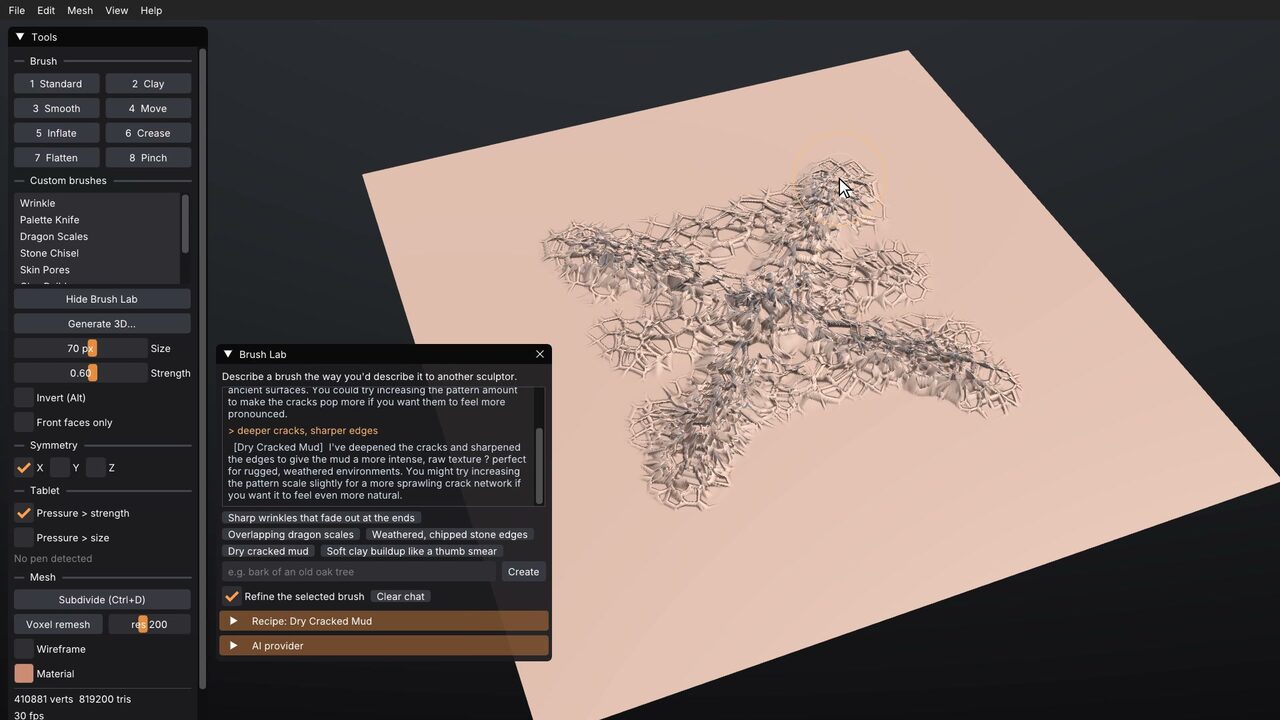
- "Dry cracked mud", "overlapping dragon scales", then "make it sharper". Brushes are recipes (data, never
code), with every value exposed as a slider. They're kept in your brush library; share them as.sfbrushfiles or one-line brush codes (right-click > Copy brush code, Ctrl+V to paste one). Studios share
a folder throughSCULPTFORGE_BRUSH_PATH, and the
community gallery installs brushes in one click
(Brush > Community brushes). See docs/brushes.md. - Free out of the box: no account or key. It uses an open model (GPT-OSS 20B) hosted by Pollinations.ai,
and falls back to a local Ollama when you're offline. - Or bring your own: Claude (Anthropic API) or any OpenAI-compatible endpoint, including private local
models through Ollama or LM Studio (5-minute setup for Windows, macOS and Linux).
Free built-in AI: Generate 3D from an image or text
- A sketch, a piece of concept art or a description becomes a full 3D model (limbs, back and all), then gets
remeshed so you can sculpt it straight away. - Free through the official Hugging Face demos of Hunyuan3D 2 / 2.1, TRELLIS.2 and Stable Fast 3D; or
your own ComfyUI (local or a studio GPU server) running any workflow, with ready-made Hunyuan3D 2.1
workflows included; or paid with your own fal.ai or Meshy key; or plug in any local model.
See AI services & model licences. - Offline tools as well: silhouette blockout, relief, and stamp-from-view.
ComfyUI, both ways
- Generate models in SculptForge with any ComfyUI workflow on your own machine or GPU server
(docs/comfyui.md). - The ComfyUI-SculptForge node pack brings SculptForge into ComfyUI graphs: voxel remesh, decimate, LOD chains,
and GLB / FBX / USD / OBJ / STL export, working with ComfyUI's own Hunyuan3D mesh nodes
(islandmed/ComfyUI-SculptForge; in ComfyUI-Manager use
Install via Git URL).
Game & animation pipelines
- One-click LOD chains; blend shapes survive on every level.
- Send to Unreal (Ctrl+U) imports or updates the asset in a running Unreal Editor, on this computer or
another one on your network, with no plugin to install. Static meshes come with LODs, skeletal meshes with
morph targets. See docs/unreal.md. - FBX (binary 7.4, LOD groups, blend shapes), glTF/GLB (morph targets), OpenUSD USDA/USDZ (UsdSkel
blend shapes), OBJ, PLY and STL. Exports are checked with the Khronos glTF validator and OpenUSD'susdchecker.
Blender bridge
- The SculptForge Bridge add-on for Blender 4.2+ (
addons/blender): select objects, Send to SculptForge,
sculpt, Send to Blender. The objects update in place, keeping transforms, materials and modifiers; quads, UVs,
colours, mask and face sets come across both ways. See the guide and
docs/blender.md.
ZBrush interchange
.GoZimport/export with polygroups, mask, polypaint and UVs, and a GoZ bridge (Send / Receive) on Windows and
macOS. Every visible SubTool goes over as its own ZBrush SubTool. See docs/goz.md; the live bridge hasn't been tested against a running ZBrush yet.
Gaussian splats
- Open phone captures (Polycam, Luma, Postshot, Scaniverse and others) as a sculpting reference, convert them
into watertight meshes, or turn a sculpt into splats. - Supports PLY (up to SH degree 3),
.splat, glTFKHR_gaussian_splattingand OpenUSDParticleField3DGaussianSplat.
Automation
sculptforge-cliruns every operation headless, for build farms and pipelines.- A built-in MCP server (
sculptforge-cli --mcp) lets Claude Code, Claude Desktop or any MCP client
sculpt, convert and export. - Headless thumbnail and turntable rendering, plus a scripted demo recorder (
--demo … --record).
 |
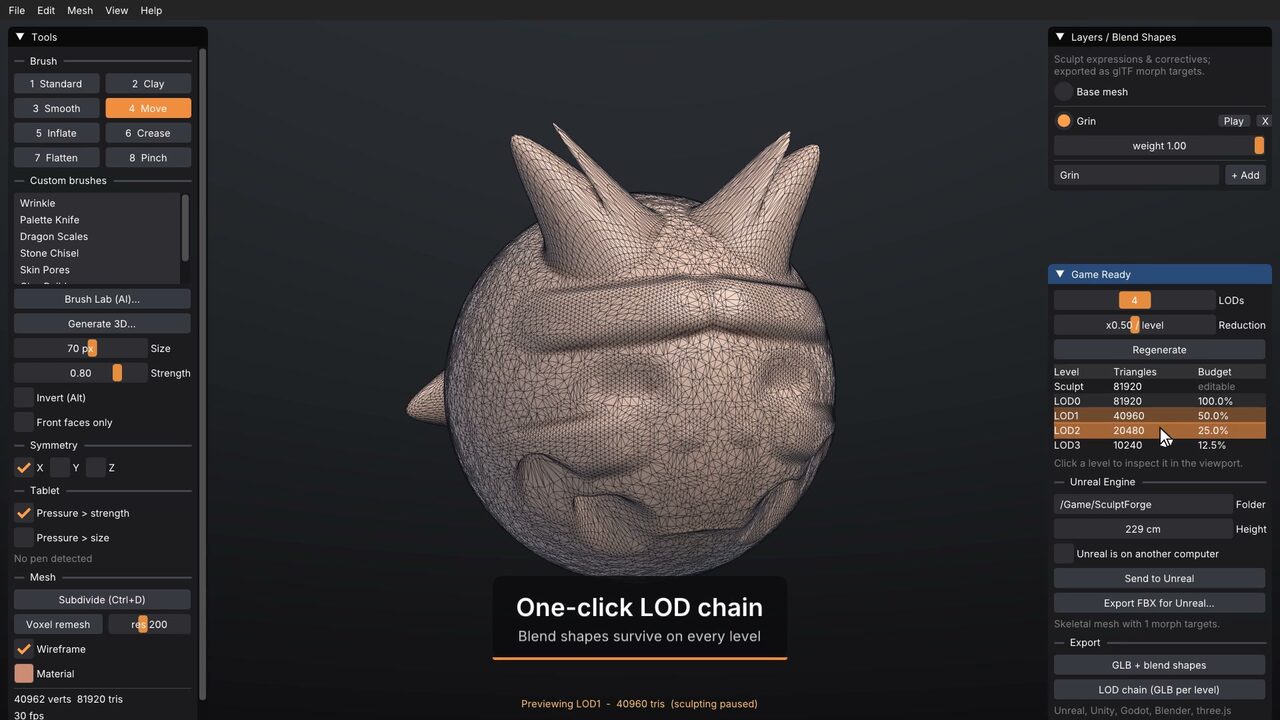 |
| Brush Lab: "dry cracked mud", designed by a local model | One-click LODs, blend shapes and Send to Unreal |
For studios and pipelines
Built for studios with their own pipelines: VFX Reference Platform CY2026/CY2027
builds (GCC 14, glibc 2.28/2.34, C++20, Python 3.13), a Python API (import sculptforge), a Rez
package, headless CLI and farm rendering, OpenUSD/FBX/glTF, native Linux, and no licence server. The GPL lets
you modify it in-house without publishing your changes. See docs/studios.md.
Install
Download for Windows ·
Download for macOS ·
Download for Linux (AppImage, x86_64)
Every link gets the newest version. install/ has the full list (.deb, .rpm, ARM64,
portable .zip, Arch) and what to do after downloading. Or install with one command:
# macOS / Linux
curl -fsSL https://raw.githubusercontent.com/islandmed/SculptForge/main/install/install.sh | sh
# Windows (PowerShell)
irm https://raw.githubusercontent.com/islandmed/SculptForge/main/install/install.ps1 | iex
The builds aren't code-signed yet. On macOS, right-click the app and choose Open the first time. On
Windows, if SmartScreen appears, choose More info → Run anyway. Studio builds (VFX Reference Platform,
Rez), older versions and checksums are on the
releases page.
Building
Requirements: CMake 3.24+ and a C++20 compiler (GCC 11+, Clang 14+, Xcode 15+ or Visual Studio 2022).
Dear ImGui, GLM and (if it isn't installed already) SDL3 are fetched automatically. AI features use libcurl
on Linux and macOS, and the built-in WinHTTP on Windows.
# Linux only: install compilers and X11/Wayland/GL/curl headers (Debian/Ubuntu or Fedora/RHEL)
sudo ./packaging/linux/install-build-deps.sh

cmake -S . -B build -DCMAKE_BUILD_TYPE=Release
cmake --build build --parallel
ctest --test-dir build --output-on-failure
./build/sculptforge            # Windows: build\Release\sculptforge.exe · macOS: open build/SculptForge.app
cpack in the build folder makes the platform's packages (.deb/.rpm/.tar.gz, .dmg, or installer and.zip).
Pipelines & automation
# LOD chain for a game asset
sculptforge-cli -c 'open path=rock.obj; export_lods path=out/rock.glb levels=4 ratio=0.5'

# Concept art or a description -> sculptable 3D model (free, via Hugging Face)
sculptforge-cli -c 'image_to_3d path=hero.png; export_usd path=hero.usdz'
sculptforge-cli -c 'text_to_3d prompt="a stylised dragon head"; export_glb path=dragon.glb'

# Sculpt -> Unreal (static mesh with 4 LODs, 2 m tall)
sculptforge-cli -c 'open path=statue.obj; unreal_send destination=/Game/Props height_cm=200 lods=4'

# Phone capture -> watertight base mesh
sculptforge-cli -c 'open path=scan.ply; splat_transform rotate_x=180 fit=true; splat_clean; splat_to_mesh resolution=256; export_glb path=base.glb'

# Design a brush (free, no key) and save it for the team
sculptforge-cli -c 'brush_ai prompt="weathered stone edges"; brush_save path=stone.sfbrush'

# ...or with a private local model
sculptforge-cli -c 'brush_ai prompt="weathered stone edges" provider=openai-compatible model=qwen3:4b-instruct'

# Review-sheet turntable (8 frames)
sculptforge model.glb --render review/model.png --turntable 8 --size 1024x1024
Run sculptforge-cli --list for every command.
Let an AI agent sculpt (MCP)
claude mcp add sculptforge -- /path/to/sculptforge-cli --mcp # Claude Code
For Claude Desktop or other MCP clients, add a stdio server whose command is sculptforge-cli with the
argument --mcp. The agent gets every command as a tool and works on one live scene per session.
Controls
The user guide has the full list (it's also in the
app: F1 for Controls, Shift+F1 for the guide).
| Action | Input |
|---|---|
| Sculpt | Left-drag on the model |
| Subtract / invert | Hold Alt |
| Smooth | Hold Shift |
| Rotate | Left-drag background, or right-drag |
| Pan | Alt + left-drag background, or middle-drag |
| Zoom | Mouse wheel, Ctrl + middle-drag, or Ctrl + left-drag background when nothing is masked |
| Paint / erase mask | Hold Ctrl / Ctrl+Alt while stroking |
| Invert / clear mask | Ctrl + click / Ctrl + drag on the background |
| Isolate / hide polygroup | Ctrl+Shift + click / Ctrl+Shift+Alt + click |
| Select a SubTool | Alt + click it |
| Show all | Ctrl+Shift + click on the background |
| Hide outside / inside a rectangle | Ctrl+Shift + drag / Ctrl+Shift+Alt + drag |
| Pen pressure | Strength (and optionally size); curve and test area in Preferences > Tablet |
| Pen eraser end | Inverts the brush (Ctrl + eraser erases mask); or Smooth / Erase mask |
| Pen side buttons | Lower: right-click (drag to rotate), upper: Alt (invert), third: pan; remappable |
| Brush size | [ / ] |
| Select brush | 1–9, 0 |
| Paint brush / pick colour | P / C |
| Toggle X symmetry / wireframe | X / Shift+F |
| Gizmo 3D: Move / Scale / Rotate / back to Draw | W / E / R / Q (Alt+drag: the gizmo only; Shift snaps) |
| Frame model | F |
| Subdivide | Ctrl+D |
| Undo / Redo | Ctrl+Z / Ctrl+Shift+Z |
| Open / Save project / Save as | Ctrl+O / Ctrl+S / Ctrl+Shift+S |
| Export GLB | Ctrl+E |
| Send to Unreal | Ctrl+U |
Graphics tablets (Wacom, XP-Pen, Huion ...) work through the system's tablet driver on Windows (Windows Ink),
macOS and Linux (Wayland / X11). Setup and mappings: docs/tablet.md.
Project layout
src/core     Mesh, BVH, brushes & recipes, layers, undo, subdivision, decimation,
             voxel remesh, Gaussian splats, image-to-3D, command registry (no GPU/UI)
src/io       File formats: OBJ, FBX, glTF/GLB (+ KHR_gaussian_splatting), PLY, .splat, USDA/USDZ
src/ai       AI services (free built-in and bring-your-own): HTTPS client, brush assistant, image/text-to-3D services, Gradio client
src/link     Live links to game engines (Unreal Python remote execution)
src/cli      sculptforge-cli and its MCP server
src/render   OpenGL 3.3 renderer, splat renderer, offscreen capture
src/app      SDL3 + Dear ImGui application, scripted demo recorder
src/python   Python module (import sculptforge)
packaging    Linux desktop/AppStream files, Windows resources, Arch PKGBUILD, Rez package
website      Project website (GitHub Pages)
tests        Unit tests
Privacy
SculptForge has no telemetry, no account and no servers of its own. AI features are optional and talk
directly to the service you choose. See docs/ai-services.md for exactly what is sent
where, and for the licences of the AI models.
Contributing
Contributions are welcome: bug reports, brushes, docs and code. Read CONTRIBUTING.md
and the Code of Conduct. Please report security issues privately (see
SECURITY.md).
License
Copyright © 2026 The SculptForge contributors.
SculptForge is free software, licensed under the GNU General Public License v3.0 or later. You own
everything you make with it; the GPL covers the program, not your models. Third-party components and their
licences are listed in THIRD_PARTY_NOTICES.md.
SculptForge is an independent project and is not affiliated with or endorsed by Maxon, Epic Games,
Autodesk, Pixar, the Khronos Group, Hugging Face, Tencent, Microsoft, Stability AI, Anthropic, fal or Meshy.
ZBrush is a trademark of Maxon. Unreal and Unreal Engine are trademarks of Epic Games, Inc. FBX is a trademark
of Autodesk, Inc. glTF is a trademark of the Khronos Group Inc. Other names are trademarks of their respective
owners.
Reviews (0)
Sign in to leave a review.
Leave a reviewNo results found