one-code
Health Gecti
- License — License: NOASSERTION
- Description — Repository has a description
- Active repo — Last push 0 days ago
- Community trust — 52 GitHub stars
Code Uyari
- fs module — File system access in .github/workflows/ci.yml
Permissions Gecti
- Permissions — No dangerous permissions requested
Bu listing icin henuz AI raporu yok.
Claude Code with the model slot left open. The full workflow, open source, on any model or provider.
One Code

Claude Code with the model slot left open. The full workflow, open source, on any model or provider.
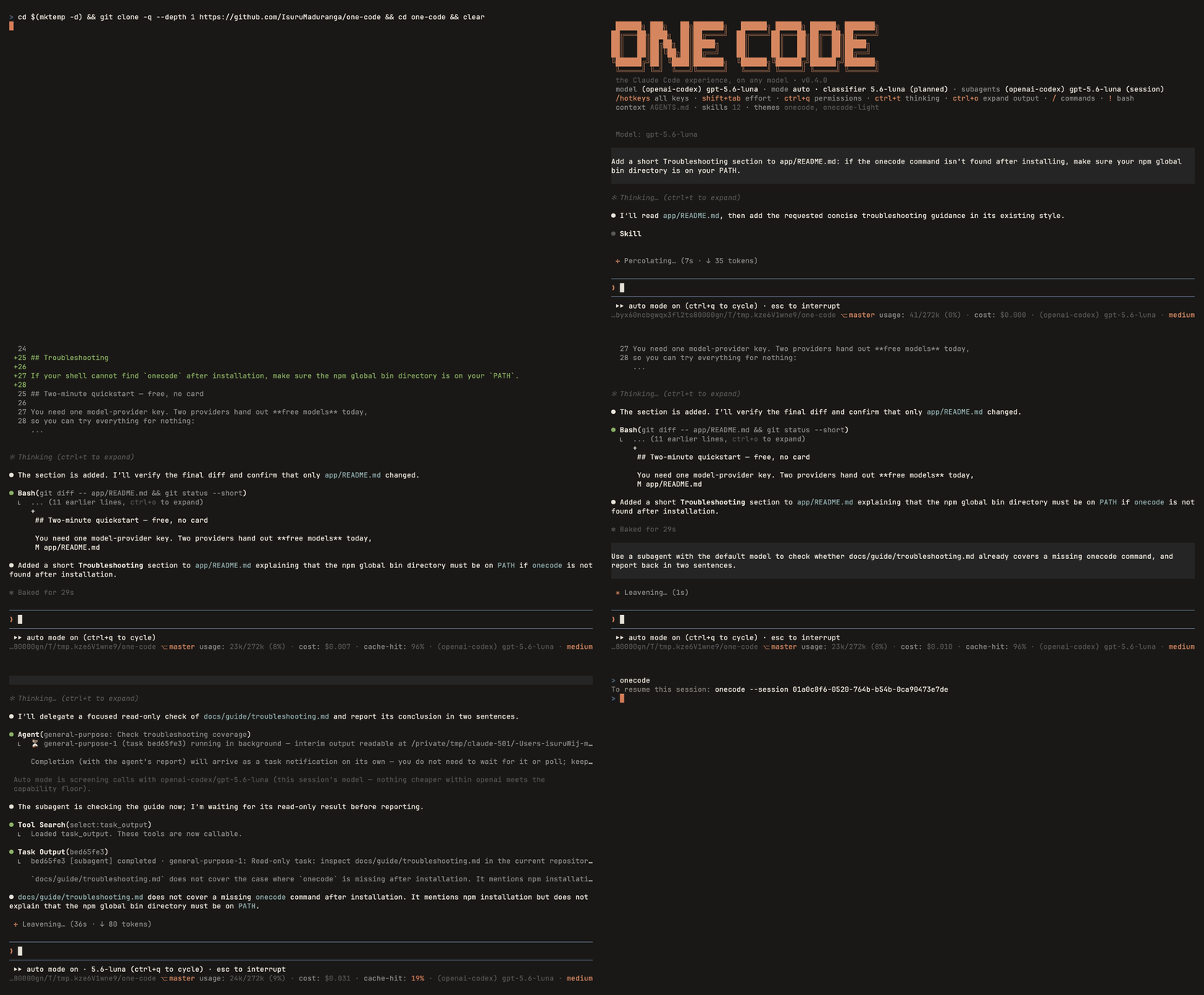
One Code rebuilds the Claude Code workflow around the model you choose.
Subagents, Git worktrees, auto mode, plan mode, permissions, and context
management all live in the harness, so they come along whatever model you
put in it. Your CLAUDE.md, skills, commands, agents, and permission rules
carry over with no import step.
If you already use Claude Code, nothing here needs relearning. Pick a model,
give it a task, review its plan, and let it work. Switch models mid-session,
or give each subagent its own model and provider: a frontier model on the
main task, a cheaper one for exploration and tests.
One Code is an independent, open-source implementation built on
pi. It recreates the coding workflow;
features that depend on Claude Code's hosted or desktop services are outside
its scope.
User guide ·
Reuse your Claude Code setup ·
Differences from Claude Code ·
Command reference
If One Code is useful to you, a ⭐ on GitHub helps other people find it.
🚀 Get started
Install Node.js 22.19 or later, then run:
npm install -g @one-ai/one-code
cd your-project
onecode
Inside One Code, run /login to connect a provider, then /model to choose a
model. You can also supply an API key through an environment variable such asANTHROPIC_API_KEY, OPENAI_API_KEY, or OPENROUTER_API_KEY.
One Code reads an existing CLAUDE.md and .claude/ configuration directly.
If a directory has no CLAUDE.md, it falls back to AGENTS.md. For a new
project, run /init to draft a CLAUDE.md.
To check your setup, run onecode doctor or /doctor report inside a session.
The report lists provider credentials, model assignments, detected configuration,
and missing programs. Run /doctor for a checkup with agent-assisted fixes.
One Code is developed on macOS and verified on macOS, Linux, and Windows.
WSL works too. For the native Windows setup and what has been checked there,
see the Windows guide.
One Code is free under the MIT license. Model access, usage charges, and rate
limits depend on your provider. See
Providers and models for connection options.
Other installation options
Homebrew, which installs Node.js for you:
brew install isurumaduranga/one-ai/onecode
Windows installer, which installs Node.js and One Code:
powershell -c "irm https://raw.githubusercontent.com/IsuruMaduranga/one-code/master/install.ps1 | iex"
Existing pi installation:
pi install npm:one-code-extension
The @one-ai/one-code
app package bundles a pinned version of pi and provides the onecode command.
The one-code-extension
package uses your existing pi installation and is tested against pi versions
1.0.0 through 1.5. For the extension package, use pi in place of onecode.
The app opens in a full-screen terminal interface by default. See the
installation guide for display settings and more
installation details.
✨ Why One Code?
- Choose models by task. Use Anthropic, OpenAI, Gemini, OpenRouter, or a
local model. Switch the main model mid-session with/model. - Mix providers in one session. Give the main agent and each subagent
their own model and provider, without configuring a routing gateway. - Reuse your Claude Code configuration. One Code reads project
instructions, skills, commands, agents, plugins, permission rules, and
Model Context Protocol (MCP) server configuration. There is no import step. - Adapt guidance to the model. Four capability tiers adjust prompting
and tool guidance, with more explicit instructions for smaller models. - Extend the harness. One Code is a
pi package built from extensions.
Add your own extensions, themes, and settings. - Inspect and change the code. The project is open source under the
MIT license.
🤔 Why not use Claude Code with a URL override?
You can point Claude Code at another endpoint with ANTHROPIC_BASE_URL.
If that endpoint supports the API Claude Code expects, this can be enough
to use an alternative model in a familiar interface.
The override changes where requests go. It does not, by itself, adapt the
prompts, provider features, authentication, or supporting model calls to
the model receiving them. Your endpoint or gateway has to bridge those gaps.
One Code builds that adaptation into the harness:
- Different providers for different agents. A URL override points
requests at one endpoint. To route those requests across providers, you
need a gateway. One Code connects each agent to its own provider directly.
The main agent can use a frontier model while subagents use a cheaper
model elsewhere. - Prompts matched to the model. Changing the endpoint does not change
the instructions sent to the model. One Code uses four capability tiers
to adjust prompting and tool guidance. Smaller and local models receive
more explicit playbooks. - Native caching support. Providers use different caching mechanisms.
An API-compatible response alone does not establish that a gateway
preserves caching behavior. One Code uses native provider integrations,
keeps prompt prefixes stable, and shows the cache hit rate in the footer. - Account sign-ins as well as API keys. Changing a URL does not add
a provider's sign-in flow. One Code signs in with the accounts you
already have (Claude Pro and Max, ChatGPT, GitHub Copilot, OpenRouter,
Kimi, xAI, and Radius), and you can mix them with API-key connections in
the same session. - Tools and supporting calls that account for the provider. Web search,
deferred tools, reasoning, and background model calls need more than an
endpoint change. One Code provides shared tool interfaces and selects
supporting models from the provider's catalog, subject to capability
requirements. - Auto mode on any provider. Claude Code's auto mode now sends each
tool call to the API server for a safety check, using a request field
the endpoint has to support. Claude Code keeps its local classifier as a
fallback only for a while (LiteLLM's notes
give October 23, 2026), so an endpoint without that support can leave
auto mode unavailable. One Code runs its own two-stage classifier on a
model from your provider, so auto mode works wherever your models run. - An open harness you can change. One Code's prompts, tools, and
workflows are implemented as pi extensions. You can inspect them,
change their behavior, and add your own.
Use a URL override when one compatible endpoint covers your needs. Use
One Code when you want the Claude Code workflow with model choice built
into the prompts, tools, authentication, and agent coordination.
See Differences from Claude Code
for the full comparison and compatibility boundaries.
🎛️ Use different models in one session
Keep your preferred model on the main task and delegate exploration, tests,
or review to another model or provider.
Choose the main model with
/model.Set the default model for subagents and workflow agents with
/subagent <provider/model-id>.Ask for delegated work. For example:
Use subagents to investigate the authentication code and its tests.
Have them report their findings, then make the fix in the main session.
Agent definitions in .claude/agents/ can specify their own model, tools,
and instructions. Use /agents to follow their progress and /model to
change the main model as the task changes.
Cost and output quality depend on the models, the task, and how much work
you delegate. See Subagents and workflows
for configuration details.
♻️ Reuse your Claude Code setup
One Code reads Claude Code configuration directly and keeps its own settings
separately. It treats ~/.claude as read-only, with one deliberate exception:
per-repository memory is written to Claude Code's own memory folder, so both
tools share it.
| Configuration | How One Code uses it |
|---|---|
CLAUDE.md |
Project instructions, including nested files and @path imports. Falls back to AGENTS.md when a directory has no CLAUDE.md. |
.claude/skills/ and .claude/commands/ |
Discoverable skills and slash commands. |
.claude/agents/ |
Subagent definitions with model, tool, and instruction settings. |
.claude/settings.json |
allow, deny, and ask permission rules, plus supported command hooks. |
.mcp.json |
MCP servers, with tools loaded on demand. |
| Installed Claude Code plugins | Plugin agents, skills, commands, and MCP servers, namespaced by plugin. |
Claude Code tool names such as Read, Bash, Edit, and Task work in
permission rules and hook matchers.
Compatibility covers configuration and workflows. Features and skills that
depend on Claude Code's hosted or desktop services are not included.
See Configuration compatibility
and Skills, plugins, and MCP.
⚙️ Plan and delegate work
Subagents and Git worktrees
Give an investigation its own context window and bring the results back to
the main conversation. Subagents run in the background, accept follow-up
messages, and can fork the conversation when they need its context.
One Code includes three agent definitions: general-purpose, explore,
and plan.
For parallel edits, give agents separate Git worktrees. You can also move
the whole session into a worktree with enter_worktree and leave it withexit_worktree.
Ultracode workflows
Include ultracode in a request for a broad audit, migration, or review.
The model writes a JavaScript workflow to coordinate agents in parallel.
Follow progress in /workflows, or use /effort ultracode to keep this
behavior enabled across turns.
When you resume an interrupted run, completed agent calls can be reused if
their inputs still match. Save reusable scripts in .claude/workflows/ to
call them by name.
Optional output-token targets stop new and queued agents when the target
is reached. Agents already running can finish above the target.
Permissions and planning
Auto mode is the default. A classifier evaluates actions that need
review, while permission rules and deterministic checks enforce the remaining
controls. deny rules take precedence over allow rules.
Project-provided hooks, MCP servers, and allow rules require trust approval.
Press ctrl+q, or alt+m on Windows and WSL, to cycle through manual,
accept-edits, plan, and auto modes. In plan mode, the agent investigates and
writes a plan file before you approve implementation.
Use /permissions to manage rules and approve calls auto mode blocked, and/auto-mode to configure the classifier.
The permission system provides application-level controls. For operating
system isolation, run One Code inside a container. See
Permissions and modes for
guarantees and known limitations, and Hooks for
hook configuration.
🧰 Everyday tools
| Capability | Included features |
|---|---|
| Code and files | File reading, writing, and editing; shell commands; background processes; repository search; and notebook editing. |
| Web | Search and fetch, using provider search or Brave, Tavily, and Exa fallbacks. |
| Diagnostics | Language server diagnostics after edits. Install the relevant server on your PATH. |
| Long sessions | Per-repository memory, a session scratchpad, and context compaction. |
| Task tracking | A pinned progress widget, background monitors, and scheduled wake-ups. |
| Tool discovery | Tools loaded on demand to reduce prompt overhead. |
| Artifacts | HTML pages the model writes (reports, dashboards, small tools), saved in ~/.onecode/artifacts/ with every version kept, and opened in your browser. |
| Reasoning and appearance | /effort or shift+tab to set reasoning effort; onecode and onecode-light themes. |
| Customization | pi extensions, themes, and settings. |
Bundled skills include simplify, code-review, security-review,fewer-permission-prompts, and artifact-design. A project skill with the
same name takes precedence.
For scripting and session management:
onecode -p "Explain how authentication works in this repository"
onecode -c                       # Continue the previous session.
onecode --mode json              # Output JSON events.
onecode --permission-mode plan   # Start in plan mode.
See Tools for available tools and the
command reference for commands, shortcuts, flags,
and environment variables.
💡 Platform and provider notes
- Provider coverage: End-to-end testing focuses on Anthropic, OpenAI,
and OpenRouter. Other providers have less test coverage. - Web search: For providers without native search, set
BRAVE_SEARCH_API_KEYorTAVILY_API_KEY. Without either key, One Code
falls back to Exa's rate-limited keyless endpoint and labels those results. - Native Windows: The shells, hooks, and the PowerShell tool follow
Claude Code's behavior. They pass on the Windows CI runner, where a real
model drives both shell tools, and they have been checked by hand on a
Windows Server 2025 machine: the interface in Windows Terminal, permission
prompts, plan mode, the PowerShell tool, background shells, and/doctor.
Windows 10 and 11 desktops have had less time in the field, so report what
you hit. WSL remains the longest-tested route.
🔧 Install from source
To install the local extensions into an existing pi installation, run:
git clone https://github.com/IsuruMaduranga/one-code
cd one-code
npm install
cd ..
pi install ./one-code
pi list
📚 Documentation and background
The user guide covers setup, configuration, providers,
permissions, workflows, tools, session management, and troubleshooting.
If you want to change One Code itself, the developer docs
cover the architecture, the rules extensions follow, and how to test.
For the ideas behind the project, read
Harness Engineering 101.
The sixteen-chapter series starts with a small coding agent and develops the
harness patterns used in One Code, with examples from this repository.
📄 License
MIT. Contributions are welcome.
Yorumlar (0)
Yorum birakmak icin giris yap.
Yorum birakSonuc bulunamadi