agent-usage
Health Warn
- License — License: MIT
- Description — Repository has a description
- Active repo — Last push 0 days ago
- Low visibility — Only 5 GitHub stars
Code Fail
- rm -rf — Recursive force deletion command in Scripts/build_app.sh
- rm -rf — Recursive force deletion command in Scripts/make_dist.sh
Permissions Pass
- Permissions — No dangerous permissions requested
No AI report is available for this listing yet.
macOS menu bar app for live Cursor and Claude Code usage — requests, spend, per-model and per-session costs. Zero config, all local.
Agent Usage
Your Cursor and Claude Code spend, live in the macOS menu bar.
Requests, dollars, per-model breakdowns, and per-session costs — without opening a dashboard.



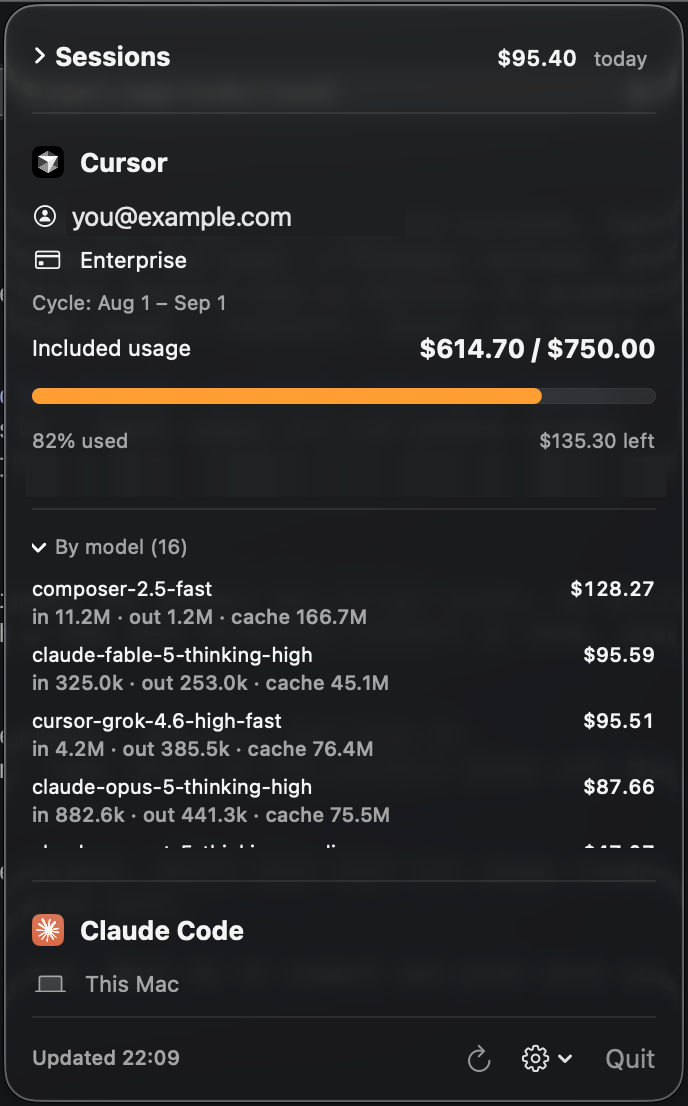
You burn through Cursor requests and Claude Code tokens all day, then find out
what it cost at the end of the month. Agent Usage puts the number in your
menu bar and keeps it there.
- 🧮 Both tools, one panel — Cursor and Claude Code side by side, the label cycling between them.
- ⚡ Zero config — reads your signed-in Cursor app and your local Claude Code logs. Nothing to paste.
- 🧵 Per-session costs — see what this conversation cost, not just the monthly total.
- 📦 Bundles — group the chats for one ticket and get a single price tag for the task.
- 🚦 Limits at a glance — the icon turns orange past 70% and red past 90% of your Cursor limit.
- 🔒 Stays on your Mac — no telemetry, no server, no account. Secrets live in the Keychain.
Install
brew tap itayshaked/agent-usage https://github.com/itayshaked/agent-usage.git
brew install --cask agentusage
Launch AgentUsage from Spotlight (or open -a AgentUsage) and a menu bar icon
appears. Update later with brew update && brew upgrade --cask agentusage.
Trust the tap once:
brew trust itayshaked/agent-usage
Or skip Homebrew entirely: grab the zip from the
latest release,
unzip it, and drag AgentUsage into /Applications.
Requires macOS 13+. Menu bar only — no dock icon.
What you get
Cursor
Works out of the box: it reads your already signed-in Cursor app, and only ever
talks to cursor.com.
| Account | Email and plan |
| Cycle | Current billing period |
| Requests | Used / limit, with a progress bar |
| Spend | Included usage and on-demand, this cycle |
| Models | Per-model breakdown by spend or request count |
Auth options, if auto-detection can't find your login[!NOTE]
Cursor's usage endpoints are unofficial — reverse-engineered from the
dashboard, and they may change without notice.
Gear menu → Cursor → Change token… offers three sources:
Auto (default) — reads the token from the signed-in Cursor app. Never expires while you stay logged in.
Team key — paste a Team API key with
admin:*scope from cursor.com/dashboard → team → API Keys.Cookie — paste a session token:
- Open https://cursor.com/dashboard/usage while logged in.
- DevTools (⌥⌘I) → Application → Cookies →
https://cursor.com. - Copy the value of
WorkosCursorSessionToken(user_01…%3A%3AeyJ…) and paste it in.
It's a JWT with an expiry — when it lapses you'll see an auth error, so paste a fresh one the same way.
Claude Code
Also zero config — it reads your local session logs in ~/.claude/projects/.
No auth, no tokens, nothing to paste. Costs are estimated from token counts
against Anthropic's published per-model pricing.
| Spend | Today and this month (estimated) |
| Tokens | Monthly totals, plus the input / output / cache split per model |
| Models | Per-model breakdown |
Want org-wide billing instead of just this Mac? Gear menu → Claude →
Set Admin API key… and paste an sk-ant-admin… key.
Sessions & bundles
Every Cursor conversation and Claude Code session shows up in one list with its
own price tag, and live ones are marked as still running. Cost is attributed
by the provider rather than measured with a stopwatch, so overlapping sessions
add up correctly instead of each claiming the same spend.
Group related sessions into a bundle — the planning chat, the CI chat, the
review subagents — and the bundle carries the rolled-up total. Bundles store
only session ids and recompute from live data, so they can't drift.
Tips
- Click the icon to expand either provider's per-model breakdown.
- Gear → Show in menu bar: pin the label to Cursor, to Claude, or keep it cycling.
- Gear → Launch at login to keep it running automatically.
- Auto-refreshes every 10 minutes; ↻ refreshes on demand.
Privacy
No analytics, no crash reporting, no account, no backend. Cursor stats come fromcursor.com, Claude's Admin API (only if you opt in) from api.anthropic.com,
and nothing else leaves your machine. Your Cursor token and Claude Admin key are
stored in the macOS Keychain, never on disk in plaintext.
Building from source
git clone https://github.com/itayshaked/agent-usage.git
cd agent-usage
./Scripts/build_app.sh
open build/AgentUsage.app
Scripts/make_dist.sh builds the release artifact and Scripts/cut_release.sh
publishes a version.
Found it useful? ⭐ Star the repo — it's how other people find it.
Reviews (0)
Sign in to leave a review.
Leave a reviewNo results found