claude-code-token-meter
Health Uyari
- License — License: MIT
- Description — Repository has a description
- Active repo — Last push 0 days ago
- Low visibility — Only 8 GitHub stars
Code Uyari
- network request — Outbound network request in src/claude_code_token_meter/static/app.js
Permissions Gecti
- Permissions — No dangerous permissions requested
Bu listing icin henuz AI raporu yok.
Local-first dashboard for Claude Code token usage. Parses ~/.claude/projects/*.jsonl and serves an interactive viewer on localhost. No API calls.
claude-code-token-meter
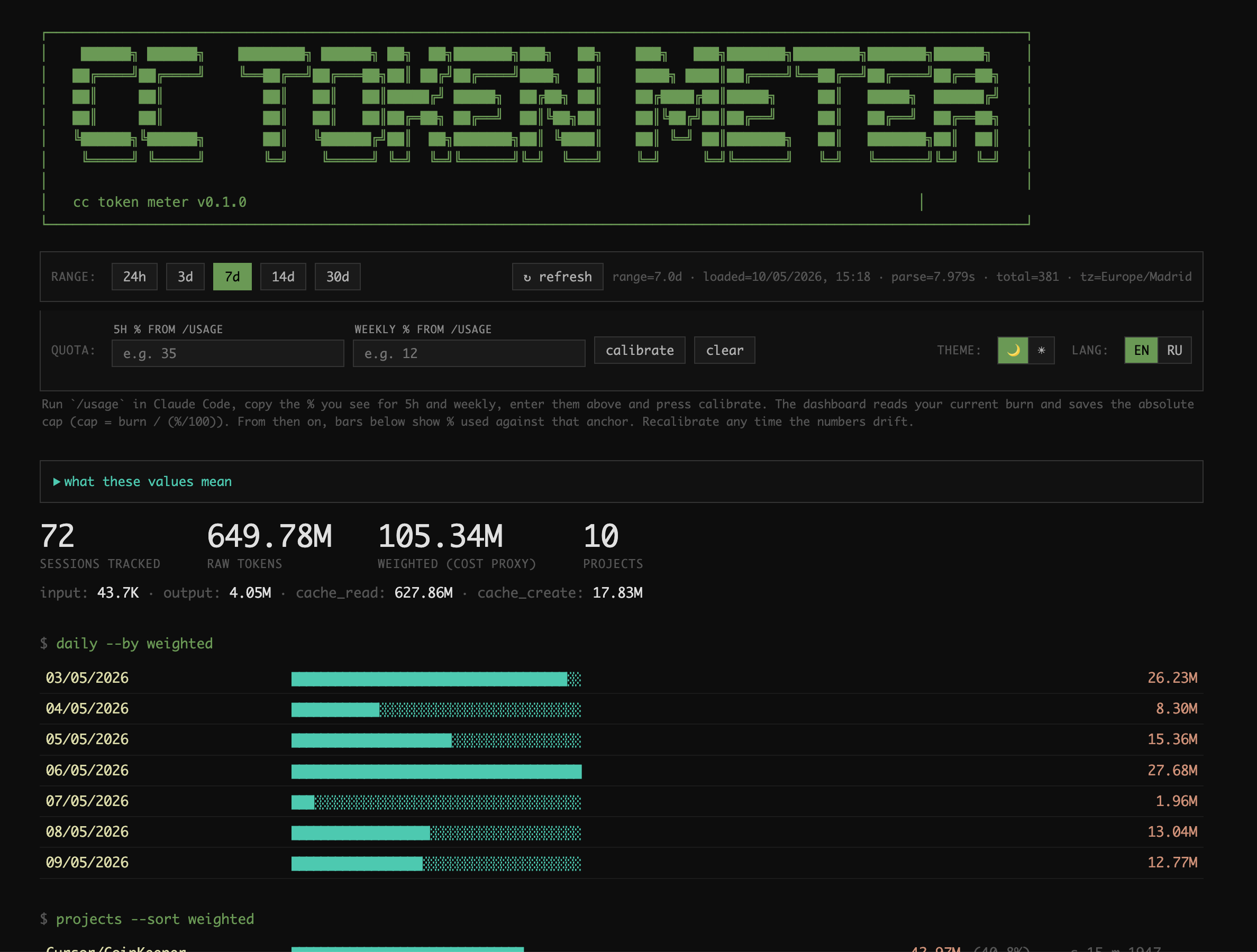
Local-first dashboard for Claude Code token usage.
Parses your local session logs (~/.claude/projects/*/*.jsonl) and serves an
interactive viewer on localhost. No API calls. Zero tokens spent on viewing.
Why
Claude Code writes a JSONL log per session under ~/.claude/projects/. Those
files contain everything you need to understand your usage — input, output,
cache-read and cache-create tokens per message — but there's no built-in way to
explore them.
This tool parses them, aggregates per session, and exposes:
- Daily breakdown — weighted tokens per day
- Project breakdown — share of usage by project
- Model share — opus / sonnet / haiku split
- Top 30 sessions — biggest individual sessions, with the rest collapsed
into a single "other sessions beyond top 30" line - Date filter — 24h / 3d / 7d / 14d / 30d, switched without page reload
- Burn rate — rolling 5h / 24h / 7d weighted totals + 24h hourly sparkline
- Quota calibration — anchor the dashboard to your plan via the
/usage%
you see in Claude Code (see below); also auto-calibrates from clustered
rate-limit hits stored locally - Theme + lang — light / dark, EN / RU, persisted in localStorage
The "weighted" number uses Anthropic's published cost ratios as a proxy:
weighted = input × 1 + output × 5 + cache_create × 1.25 + cache_read × 0.1
It's not a literal subscription-quota percentage (Anthropic doesn't publish
that formula), but it gives the right relative ranking of sessions and days.
Install
Requires Python 3.10+.
pipx install claude-code-token-meter
Or from source:
git clone https://github.com/itchernetski/claude-code-token-meter.git
cd claude-code-token-meter
python -m venv .venv
source .venv/bin/activate
pip install -e .
Run
claude-code-token-meter
claude-code-token-meter --port 8000
PORT=8000 claude-code-token-meter
claude-code-token-meter --projects-dir /path/to/.claude/projects
The --projects-dir flag is useful if your Claude Code state lives outside the
default ~/.claude/projects (e.g. on an external drive or in a customCLAUDE_CODE_HOME).
Or without installing globally:
python -m claude_code_token_meter
Then open the dashboard in your browser:
http://127.0.0.1:3378 (default — or http://127.0.0.1:<PORT> if you overrode it)
The first request triggers a one-time parse of all JSONL files (~5–15 s for
hundreds of sessions). Results are cached in memory; click ↻ refresh in the
UI to re-scan after new sessions.
Calibrate against your plan
Anthropic doesn't publish how the subscription quota maps to weighted tokens,
so the dashboard offers two ways to anchor the bars.
Manual (/usage-based): run /usage inside Claude Code, copy the two
percentages it shows for the 5h and weekly windows, paste them into the
QUOTA inputs at the top of the dashboard, and press calibrate. The tool
reads your current burn (weighted_5h, weighted_7d) and reverse-computes the
absolute caps:
cap = current_burn / (percent / 100)
The values are saved to ~/.config/claude-code-token-meter/config.json. From
then on, every progress bar shows % used against that anchor. Recalibrate
any time the numbers drift (Anthropic adjusts limits periodically).
Empirical (rate-limit hits): the parser also detects 5-hour limit reached
and weekly limit reached markers in the JSONL, clusters them, snapshots your
burn at the moment of the hit, and stores the rows in ~/.claude/token-meter.db
(SQLite). After ≥3 hits the dashboard offers a calibration bar built from the
median burn at hit time. This is automatic — nothing to configure.
The two modes are independent: a manual quota always wins over the empirical
estimate when both exist.
API
The dashboard fetches a small set of JSON endpoints — useful if you want to
script your own reports.
# Aggregated stats over a window
curl 'http://127.0.0.1:3378/api/stats?days=7' | jq '.summary'
curl 'http://127.0.0.1:3378/api/stats?start=2026-05-01&end=2026-05-08'
# Override quota for one request (does not persist)
curl 'http://127.0.0.1:3378/api/stats?quota_5h=80000000"a_weekly=600000000'
# Just the burn-rate windows + 24h sparkline
curl 'http://127.0.0.1:3378/api/burnrate' | jq '.burn_rate'
# Read or write the persisted quota anchors
curl 'http://127.0.0.1:3378/api/config'
curl -X POST 'http://127.0.0.1:3378/api/config' \
-H 'content-type: application/json' \
-d '{"quota_5h": 80000000, "quota_weekly": 600000000}'
# Force a re-parse of the JSONL files
curl -X POST 'http://127.0.0.1:3378/api/refresh'
Response shape of /api/stats:
{
  "summary": { "sessions_tracked": ..., "raw_total": ..., "weighted_total": ... },
  "daily":    [ { "date": "...", "weighted": ... } ],
  "projects": [ { "project": "...", "weighted": ..., "share_pct": ..., "sessions": ..., "msgs": ... } ],
  "models":   [ { "model": "...", "raw": ..., "share_pct": ... } ],
  "top_sessions":   [ { "session_id": "...", "title": "...", "date": "...", "project": "...", "msgs": ..., "weighted": ... } ],
  "other_sessions": { "count": ..., "weighted": ... },
  "range":       { "start": "...", "end": "...", "days": ... },
  "burn_rate":   { "now": "...", "last_5h": {...}, "last_24h": {...}, "last_7d": {...}, "hourly_24h": [...] },
  "calibration": { "n": ..., "ready": ..., "p5h": ..., "p_weekly": ..., "spread_pct_5h": ... },
  "quota":       { "quota_5h": ..., "quota_weekly": ... },
  "meta":        { "projects_dir": "...", "sessions_total": ..., "loaded_at": "...", "parse_seconds": ..., "version": "..." }
}
Files on disk
Everything lives under your home directory — no global state, no cloud:
| Path | Purpose |
|---|---|
~/.claude/projects/*/*.jsonl |
source data (Claude Code writes these) |
~/.claude/token-meter.db |
SQLite cache of clustered rate-limit hits + burn-rate snapshots, used for empirical calibration |
~/.config/claude-code-token-meter/config.json |
manual quota anchors set via the calibrate button |
Auto-start at login (macOS, optional)
Save as ~/Library/LaunchAgents/com.user.claude-code-token-meter.plist:
<?xml version="1.0" encoding="UTF-8"?>
<!DOCTYPE plist PUBLIC "-//Apple//DTD PLIST 1.0//EN" "http://www.apple.com/DTDs/PropertyList-1.0.dtd">
<plist version="1.0">
<dict>
  <key>Label</key><string>com.user.claude-code-token-meter</string>
  <key>ProgramArguments</key>
  <array>
    <string>/path/to/.venv/bin/claude-code-token-meter</string>
  </array>
  <key>RunAtLoad</key><true/>
  <key>KeepAlive</key><true/>
</dict>
</plist>
launchctl load ~/Library/LaunchAgents/com.user.claude-code-token-meter.plist
Develop
pip install -e ".[dev]"
pytest
CI runs pytest on Python 3.10–3.13 via GitHub Actions
(.github/workflows/test.yml).
License
MIT
Yorumlar (0)
Yorum birakmak icin giris yap.
Yorum birakSonuc bulunamadi