kraft
Health Warn
- License — License: Apache-2.0
- Description — Repository has a description
- Active repo — Last push 0 days ago
- Low visibility — Only 5 GitHub stars
Code Pass
- Code scan — Scanned 12 files during light audit, no dangerous patterns found
Permissions Pass
- Permissions — No dangerous permissions requested
No AI report is available for this listing yet.
A local orchestrator that takes your coding agent from spec to pull request, stopping only when a decision is yours.
Kraft





A local orchestrator that takes your coding agent from spec to pull request,
stopping only when a decision is yours.
Try the live demo: the web UI on sample
data, in your browser, with nothing to install.
Kraft isn't another coding agent. It runs the one you already use, and adds
what a single session can't: a process the agent can't skip, checks it doesn't
grade itself on, and a person at the decisions that matter.
Hand Kraft a task, start it and walk away. A new work item is filed paused,
in the web interface, on a phone and from the CLI alike, so nothing runs until
you start it. Your agent drafts the spec and the plan and
stops for your approval of each, or starts from a spec you wrote. It's for
developers tired of babysitting a session to the end of a task.
Kraft works with Claude Code out of the box, and you can drive it from Codex,
Cursor, Antigravity, OpenCode, Amp or Gemini CLI too. The shipped chains run
their agent steps on Claude Code, and any step can
switch to another agent.
New in 2.1: add-ons
that share chains, skills and agent profiles from a git repository;kraft console, a terminal UI for Kraft; and in-place items that run in the
repo's own checkout instead of a worktree. The
2.1.0 release notes
have the rest. Coming from 1.4? What's new in 2.0
says what to check before you upgrade.
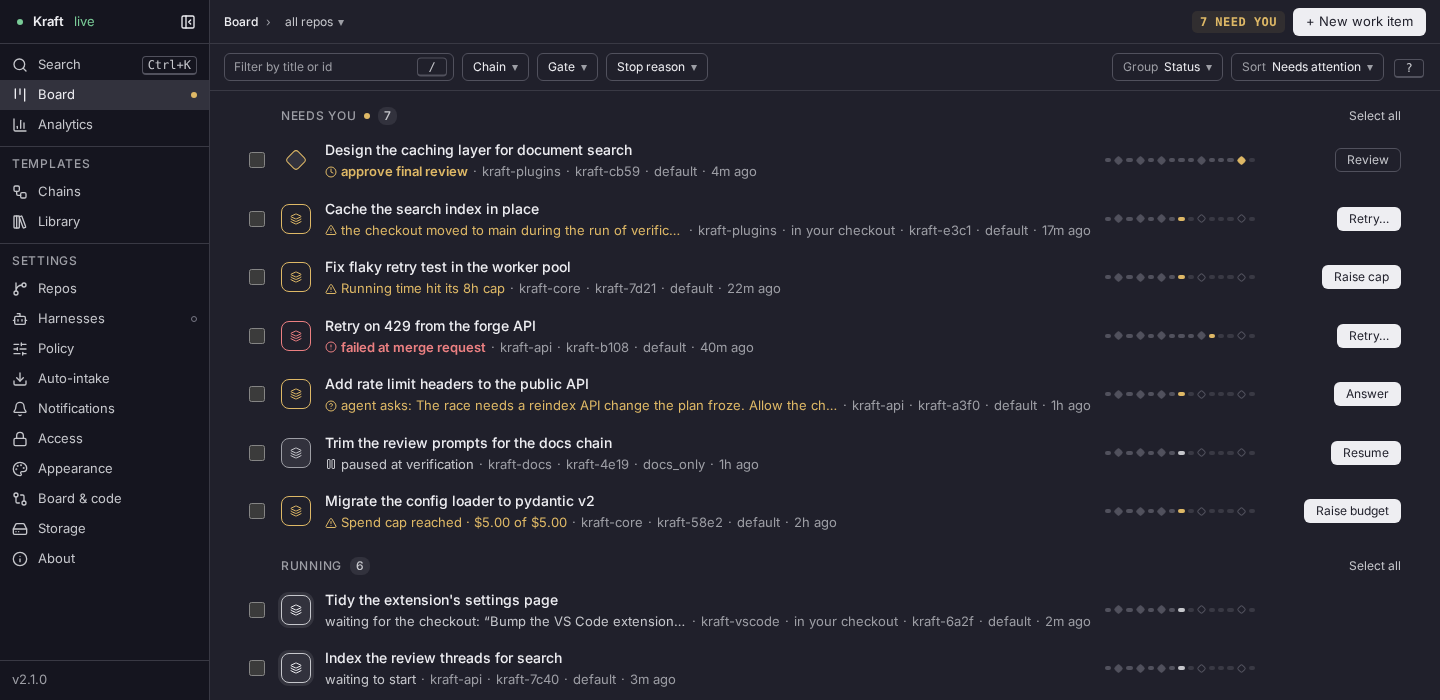
- Gates where a human decides. Kraft pauses at a spec, a plan, or a merge
request for your approval; request changes with a note and the node that wrote it
tries again. - Capped retries, not runaway loops. Attempts, wall-clock time, and spend
are all bounded. Hit a cap and the item stops and hands you the full trace
instead of quietly burning tokens. - Isolated git worktrees. Each work item runs on its own branch in its own
worktree by default, so your checkout stays as you left it and items run in
parallel. A repo whose setup is heavy can run its items in its own checkout
instead, one at a time. - Local. One process on your machine, bound to loopback by default — not a
hosted service. - A board you can check from your phone. Reach it from another device
through a tunnel.
New here? Why Kraft covers what it does that a session, a loop or a skill does not, and when not to use it.
Kraft is German for force; in English, its cousin craft means skill. Your agent brings the craft; Kraft is the force that carries it from spec to pull request.
A gate stops the chain where a human decides. Read what the agent wrote,
then approve, or request changes with a note that re-runs the node that wrote it.
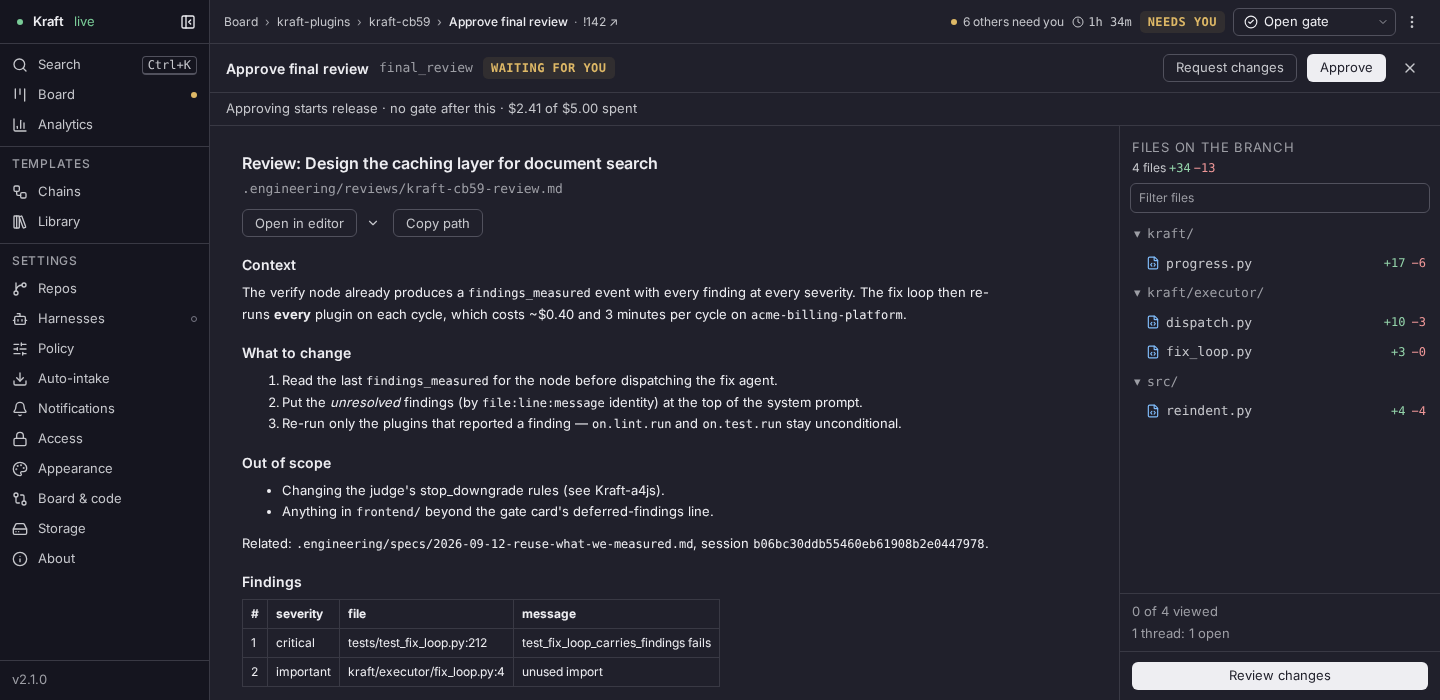
Read by name, not by id. Nodes show as "approve spec" and "chain revision",
and a chain too long to read whole gets an overview of all of it, one small
glyph per node with a frame on the part in view, above the full-size graph. The
board filters by chain, gate and stop reason, and retries or resumes a
selection in one go. Settings keeps code and board preferences on their own
Board & code page. Every page warns when Kraft is offline, and ? lists the
keyboard shortcuts.
|
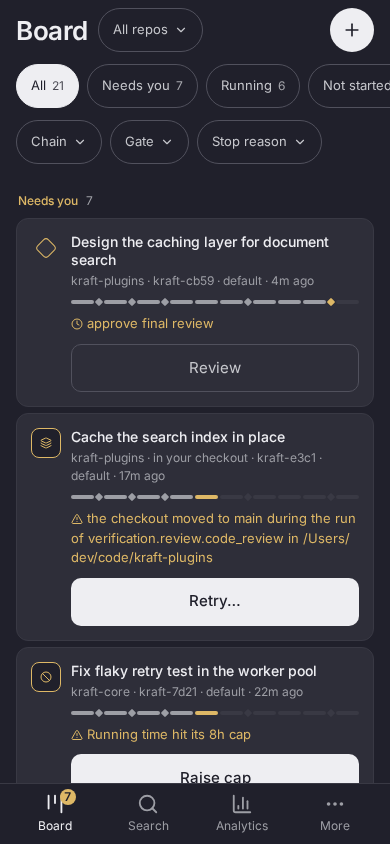
Same app, phone-sized. Below 768 pixels it switches to a phone layout on its own. A gate's card opens its review, so nothing is approved from the list, and Chains edits drafts there too. Reach it from another device through a tunnel; see |
|
Each work item follows a
chain: a list of
nodes such as write the spec, write the plan, implement, verify and open the
pull request. Some nodes run your coding agent, some run a command, and some
stop and wait for you. Chains are YAML files you can edit. A team can share
chains as Kraft add-ons,
which each instance installs from a git repository or a directory. How the
pieces fit together is in
Architecture.
Requirements
- macOS or Linux. CI runs on Linux, and
kraft admin install-service
supports launchd and systemd only. Windows is not supported, and WSL is
untested. git, withuser.nameanduser.emailset (globally, or in each repo
you connect). Kraft commits the agents' work under that identity.- uv, which uses a Python 3.12 or newer
already on your machine, or fetches one. Or Homebrew on macOS. - Claude Code, installed
and logged in. Every agent task in the shipped chains runs on it. ghorglab, logged in, for the nodes that open and merge the pull
request on GitHub or GitLab.
Supported agents: Claude Code, Codex, Cursor, Gemini, Antigravity, OpenCode
and Amp all run as harnesses.
The shipped chains use Claude Code only; to use another agent, edit the chains.
What it costs
Kraft is free and Apache-2.0 licensed. Your agent provider bills you for the
sessions Kraft runs. The shipped policy.yaml caps spend at $10 per work item
and $50 per day across all items, and kraft item create --budget USD sets one
item's cap. A cap stops the next agent task from starting, so spend can go over
it by the cost of the task already running. In testing, a small fix on thequick-task chain cost a few cents. See
Caps and budgets.
Install
Install Kraft with uv, or with Homebrew on macOS:
uv tool install kraft-sdlc
# or
brew tap itsOmidKarami/kraft && brew install kraft
To drive Kraft from Claude Code, install the plugin:
claude plugin marketplace add itsOmidKarami/kraft
claude plugin install kraft@kraft
Codex, Cursor and Antigravity install the same plugin; their commands are on
the install guide's agent tabs.
If you drive Kraft from one of them, install the Claude Code plugin (or runkraft admin init) as well: the shipped chains run their workers on Claude
Code.
Start the server and leave it running in its own terminal:
kraft              # http://127.0.0.1:8765
kraft --version    # in another terminal: confirms what you installed
Then open a Claude Code session in your repo, run this, and follow what it
asks. It needs the server running:
/kraft:onboard
To clear gates and review diffs from VS Code, install the
Kraft extension from the
VS Code Marketplace,
or from Open VSX in VSCodium
and Cursor (publisher kraft-sdlc on both). You can also downloadkraft-<version>.vsix from the latest
GitHub release and runcode --install-extension kraft-<version>.vsix.
Every install path, connecting your agent, and updating are in the
install guide. Coming
from 1.4? Update with uv tool install, not kraft admin update: see
Upgrading from 1.4.
First run
Open http://127.0.0.1:8765. With no repo connected, a short setup walks you
through connecting one, the chain and policy, and a first work item, which is
created paused. Then follow the
first-work-item tutorial
to file your first work item.
Analytics
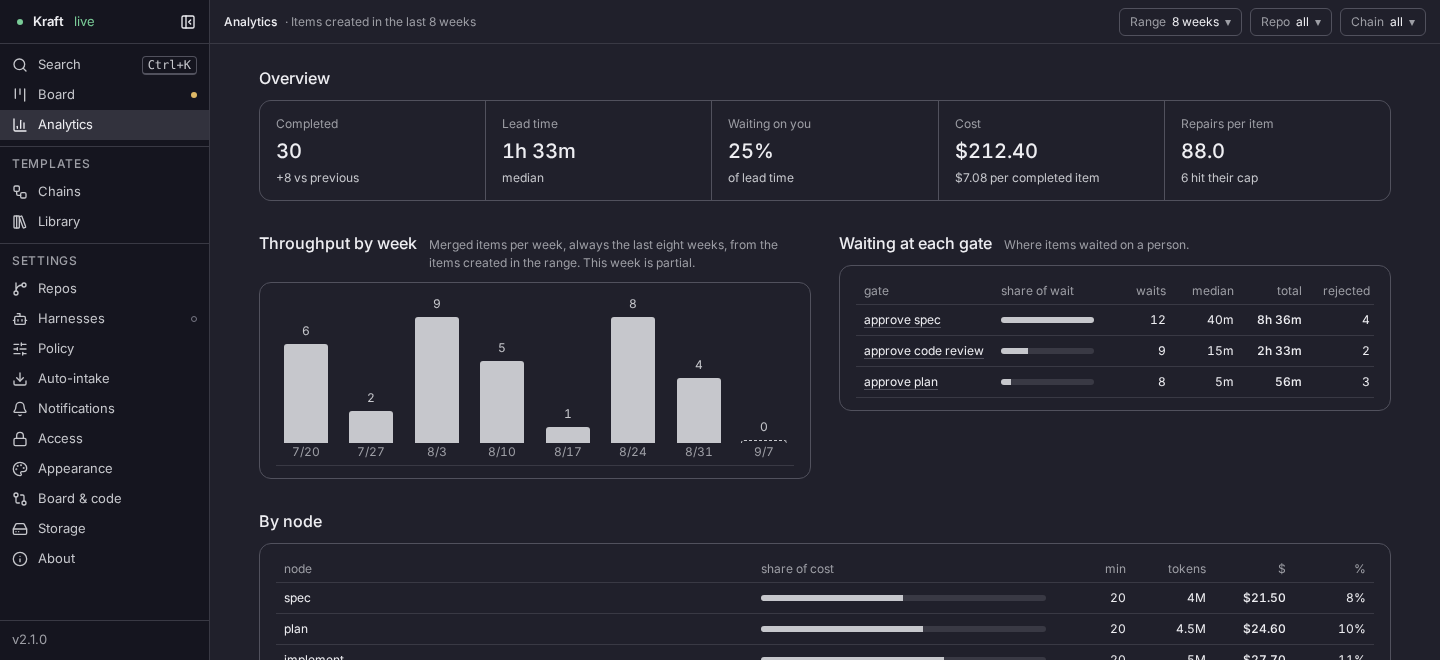
Lead time, cost, and where both go — by node and by repo, over a Range you pick:
7 days, 30 days, 8 weeks (the default) or 90 days, the same menu on a desktop and a phone. Built from the same events the
board renders live, not a separate pipeline.
Where to go next
- Concepts: work items, chains, nodes, gates, caps.
- CLI reference: every
kraftverb. - Configuration:
repos.yaml,policy.yaml,access.yaml, and the state directory ($KRAFT_HOME). - Agent integration: MCP tools and skills.
- Share chains with add-ons: publish chains, skills and agent profiles from a git repository, and install a team's.
- Remote access: reach the board from a phone or another machine.
- Triggers: start a chain from a schedule or an HTTP call.
- Security: threat model; report vulnerabilities per SECURITY.md.
Kraft Lite, a separate plugin, runs a chain inside a single
agent session with no service; see the Kraft Lite guide.
Project status
Kraft is young. Expect rough edges and frequent releases. Report bugs and ask
questions in GitHub issues.
Report security problems as SECURITY.md describes.
Contributing
Set-up, the just recipes, tests, and the pull request rules are in
CONTRIBUTING.md. Releases are described in
RELEASING.md. Everyone taking part follows the
Code of Conduct.
Reviews (0)
Sign in to leave a review.
Leave a reviewNo results found