CLIProxyAPI-Rust
Health Uyari
- License — License: Unlicense
- Description — Repository has a description
- Active repo — Last push 0 days ago
- Low visibility — Only 5 GitHub stars
Code Uyari
- network request — Outbound network request in ui/app.js
Permissions Gecti
- Permissions — No dangerous permissions requested
Bu listing icin henuz AI raporu yok.
Your Claude, ChatGPT and Gemini subscriptions as one fast API. A single Rust binary with OpenAI, Anthropic and Gemini compatible endpoints, WebSockets and a built-in dashboard.

CLIProxyAPI-Rust
All your AI subscriptions. One fast API.
A single Rust binary that exposes OpenAI, Anthropic and Gemini compatible endpoints, backed by the accounts you already pay for:
Claude, ChatGPT, Gemini, Antigravity, Grok, Kimi, Meta, Devin and Vertex AI.
Point Claude Code, Codex, your editor or any SDK at one URL and stop caring which account answers.





Quick start · Coming from CLIProxyAPI · Connect your tools · Dashboard · Configuration · FAQ
Why CLIProxyAPI-Rust
- One small binary. About 8 MB with the dashboard inside, around 13 MB of memory in our tests. No Docker, no Node, no runtime to install.
- Any model from any tool. Use GPT inside Claude Code, Claude inside Codex, or Gemini behind the OpenAI SDK. Requests are translated between formats automatically. When the client and the provider already speak the same format, the request passes through untouched.
- Ten providers. Subscription sign-in for Claude, ChatGPT (Codex), Antigravity, Grok, Kimi, Meta and Devin; service accounts for Vertex AI; API keys for Anthropic, OpenAI, Gemini, Vertex, Kimi, xAI, Meta and anything OpenAI-compatible.
- Images and video too.
/v1/images/generationsand/v1/images/editswork with ChatGPT accounts, OpenAI and xAI keys, Vertex Imagen and Gemini image models. xAI video generation is behind/v1/videos. - WebSockets. Codex WebSocket sessions are relayed to ChatGPT's own WebSocket upstream, so
previous_response_idworks on the server side. Switch to a Claude or Gemini model mid-session and CLIProxyAPI-Rust carries the conversation over. - Many accounts, no babysitting. Requests rotate across accounts (round-robin or fill-first). A rate limit cools down only that model on that account, until the reset time the provider reports. Failed requests move to the next account, and OAuth tokens refresh themselves.
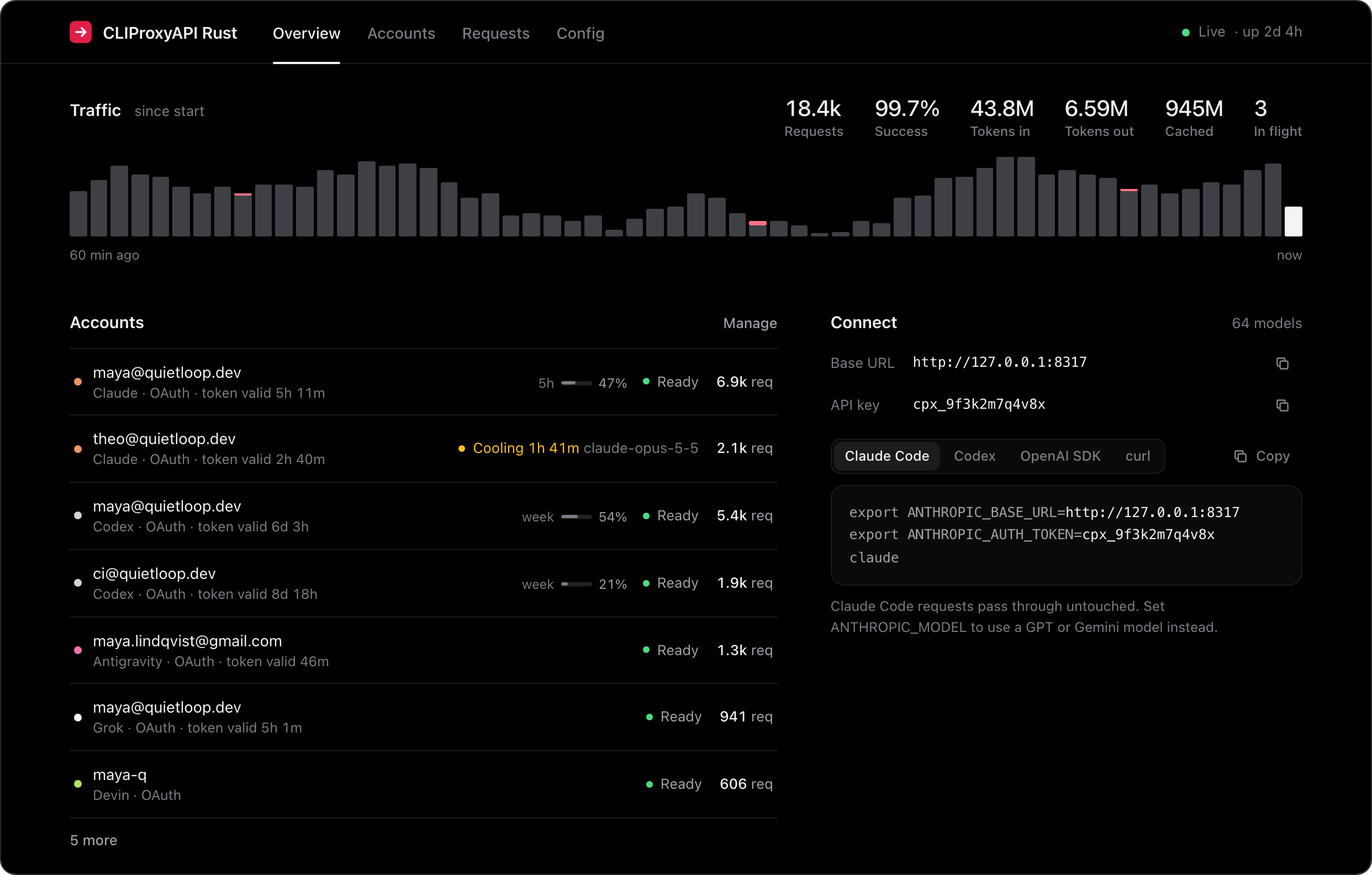
- A dashboard you'll actually open. Pure black, live over WebSocket: traffic, account health with countdown timers, sign-in flows, a request log and a config editor.
- Drop-in for CLIProxyAPI users. Same credential files, same
config.yaml(both of its layouts), same Docker paths and flags. Swap the image and keep everything else.
Quick start
1. Get the binary. Download it for macOS, Linux or Windows from Releases, or build it with Rust 1.88 or newer:
cargo install --git https://github.com/IuCC123/CLIProxyAPI-Rust
Or run it with Docker (for amd64 and arm64):
touch config.yaml && mkdir -p auths
docker run -d --name cliproxyapi-rust -p 8317:8317 \
  -v ./config.yaml:/CLIProxyAPI/config.yaml -v ./auths:/root/.cli-proxy-api \
  ghcr.io/iucc123/cliproxyapi-rust
2. Start it.
cliproxyapi-rust
The first run writes a commented config.yaml in the current directory and serves everything on http://127.0.0.1:8317. That address is also the dashboard.
3. Add an account. Click Connect account in the dashboard, or use the terminal:
cliproxyapi-rust login claude        # Claude Pro / Max
cliproxyapi-rust login codex         # ChatGPT Plus / Pro / Team
cliproxyapi-rust login antigravity   # Google account with Antigravity
cliproxyapi-rust login xai           # SuperGrok / X Premium (shows a code to confirm)
cliproxyapi-rust login kimi          # Kimi Code (shows a code to confirm)
cliproxyapi-rust login meta          # Meta Muse (shows a code to confirm)
cliproxyapi-rust login devin         # Devin / Windsurf
cliproxyapi-rust login vertex --file key.json --location global   # Vertex AI service account
API keys (Anthropic, OpenAI, Gemini, Vertex, Kimi, xAI, Meta, OpenRouter, Ollama, …) can be added from the dashboard or in config.yaml.
Coming from CLIProxyAPI
Your config, your sign-ins and your Docker setup carry over as they are.
Docker. Keep your docker-compose.yml, config.yaml and auths/ folder. Add one line to the .env next to the compose file and restart:
echo "CLI_PROXY_IMAGE=ghcr.io/iucc123/cliproxyapi-rust:latest" >> .env
docker compose up -d
The image uses the same paths (/CLIProxyAPI/config.yaml, /root/.cli-proxy-api) and port, and ./CLIProxyAPI still works inside the container. To go back, delete the line.
Binary. Point it at your existing file: cliproxyapi-rust --config /path/to/config.yaml. CLIProxyAPI's flags work too: -config, -claude-login, -codex-login, -antigravity-login, -kimi-login, -xai-login, -meta-login, -devin-login, -vertex-import, -no-browser.
Check before you switch. This prints the accounts it found per provider, where it will listen, and any settings it will ignore, without starting the server:
cliproxyapi-rust --config config.yaml check
| From CLIProxyAPI | |
|---|---|
Credential files in auth-dir |
Read and written in the same format, for every provider |
config.yaml |
Both layouts: v8 (server:, access:, grouped api-keys:) and the older flat one |
Client keys, management key (plain or bcrypt-hashed), allow-remote, TLS, proxy, routing strategy, retries |
Used as is |
| API keys for Claude, Codex, Gemini, Vertex, xAI, Meta and OpenAI-compatible providers | Used with their base-url, proxy-url (including direct), headers, model aliases, prefix and excluded-models |
oauth-model-alias, oauth-excluded-models, per-file prefix and model_aliases |
Used as is |
Payload rules, plugins, Redis usage queue, weighted routing, session affinity, the /v0/management API |
Not supported. The built-in dashboard replaces the separate management panel. |
Changes made from the dashboard keep your file's layout and every setting this binary doesn't use, so you can switch back at any time. Rewriting a file drops its YAML comments, so the first change saves the original as config.yaml.bak.
Connect your tools
Claude Code
export ANTHROPIC_BASE_URL=http://127.0.0.1:8317
export ANTHROPIC_AUTH_TOKEN=<one of your api-keys, or anything if you set none>
claude
Want GPT in Claude Code? export ANTHROPIC_MODEL=gpt-6-astra.
Codex in ~/.codex/config.toml
model = "gpt-6-astra"
model_provider = "cliproxyapi-rust"

[model_providers.cliproxyapi-rust]
name = "CLIProxyAPI-Rust"
base_url = "http://127.0.0.1:8317/v1"
wire_api = "responses"
env_key = "CLIPROXYAPI_RUST_KEY"   # only needed if you set api-keys
OpenAI SDK, or any tool with a custom OpenAI base URL
from openai import OpenAI

client = OpenAI(base_url="http://127.0.0.1:8317/v1", api_key="<key>")
client.chat.completions.create(
    model="claude-sonnet-5-5",
    messages=[{"role": "user", "content": "Hello"}],
)
curl
curl http://127.0.0.1:8317/v1/messages \
  -H "x-api-key: <key>" -H "content-type: application/json" \
  -d '{"model": "gemini-3.8-flash", "max_tokens": 512, "messages": [{"role": "user", "content": "Hello"}]}'
Endpoints
| Endpoint | Speaks |
|---|---|
POST /v1/chat/completions |
OpenAI Chat Completions |
POST /v1/responses · GET /v1/responses (WebSocket) |
OpenAI Responses |
POST /v1/responses/compact |
Responses compaction (ChatGPT, xAI) |
POST /backend-api/codex/responses (+ WebSocket) |
Codex's native path |
POST /v1/messages · POST /v1/messages/count_tokens |
Anthropic Messages |
POST /v1beta/models/{model}:generateContent · :streamGenerateContent |
Gemini |
POST /v1/images/generations · POST /v1/images/edits (JSON or multipart) |
OpenAI Images |
POST /v1/videos/generations · /edits · /extensions · GET /v1/videos/{id} |
xAI video |
POST /v1/completions |
Legacy OpenAI completions |
GET /v1/models · GET /v1beta/models |
Model lists |
Clients authenticate with Authorization: Bearer, x-api-key, x-goog-api-key or ?key=.
Providers
| Provider | Sign-in | Models | Speaks upstream |
|---|---|---|---|
| Claude | OAuth (Pro / Max) or API key | claude-* |
Anthropic Messages |
| Codex / ChatGPT | OAuth (Plus / Pro / Team) or OpenAI API key | gpt-*, o*, codex-*, gpt-image-* |
Responses (+ WebSocket) |
| Gemini | API key | gemini-*, gemma-* |
Gemini |
| Vertex AI | Service account or express API key | gemini-*, imagen-* |
Gemini |
| Antigravity | Google OAuth | Gemini and Claude models such as gemini-3.8-flash-high, claude-opus-4-6-thinking |
Cloud Code (Gemini) |
| Grok (xAI) | Device code (SuperGrok / X Premium) or API key | grok-*, grok-imagine-* |
Responses |
| Kimi | Device code (Kimi Code) or API key | kimi-* |
Chat, Anthropic or Responses, whichever the client speaks |
| Meta | Device code or API key | muse-* |
Responses |
| Devin | OAuth (Devin / Windsurf) | Claude, GPT, Gemini, Grok, Kimi, GLM, DeepSeek and SWE models | Connect protobuf |
| OpenAI-compatible | API key or none (OpenRouter, Ollama, LM Studio, vLLM, …) | whatever you list, with optional aliases | Chat Completions |
When more than one provider has a model, the vendor's own accounts answer first and Antigravity or Devin take the overflow when those are rate limited. To choose a provider yourself, prefix the model: antigravity/claude-sonnet-4-6, devin/gpt-6-astra, vertex/gemini-3.1-pro.
Reasoning effort, from the model name
Append an effort level or a token budget to any model:
gpt-6-astra(high)                  effort level
claude-opus-5-5(max)               adaptive thinking at max effort
claude-sonnet-4-5-20250929(16000)  thinking budget in tokens
gemini-2.5-pro(0)                  thinking off
Images
curl http://127.0.0.1:8317/v1/images/generations \
  -H "authorization: Bearer <key>" -H "content-type: application/json" \
  -d '{"model": "gpt-image-2", "prompt": "a lighthouse at night, film photo", "size": "1536x1024"}'
gpt-image-* runs on a ChatGPT account through Codex's image tool (or an OpenAI key), grok-imagine-* on xAI, imagen-* on Vertex, and Gemini image models such as gemini-3.1-flash-image-preview on Gemini, Vertex or Antigravity. Image models also work in chat: the picture comes back as an image part in whatever format the client speaks.
The dashboard
Everything is served from the binary at /, with no external requests.
 |
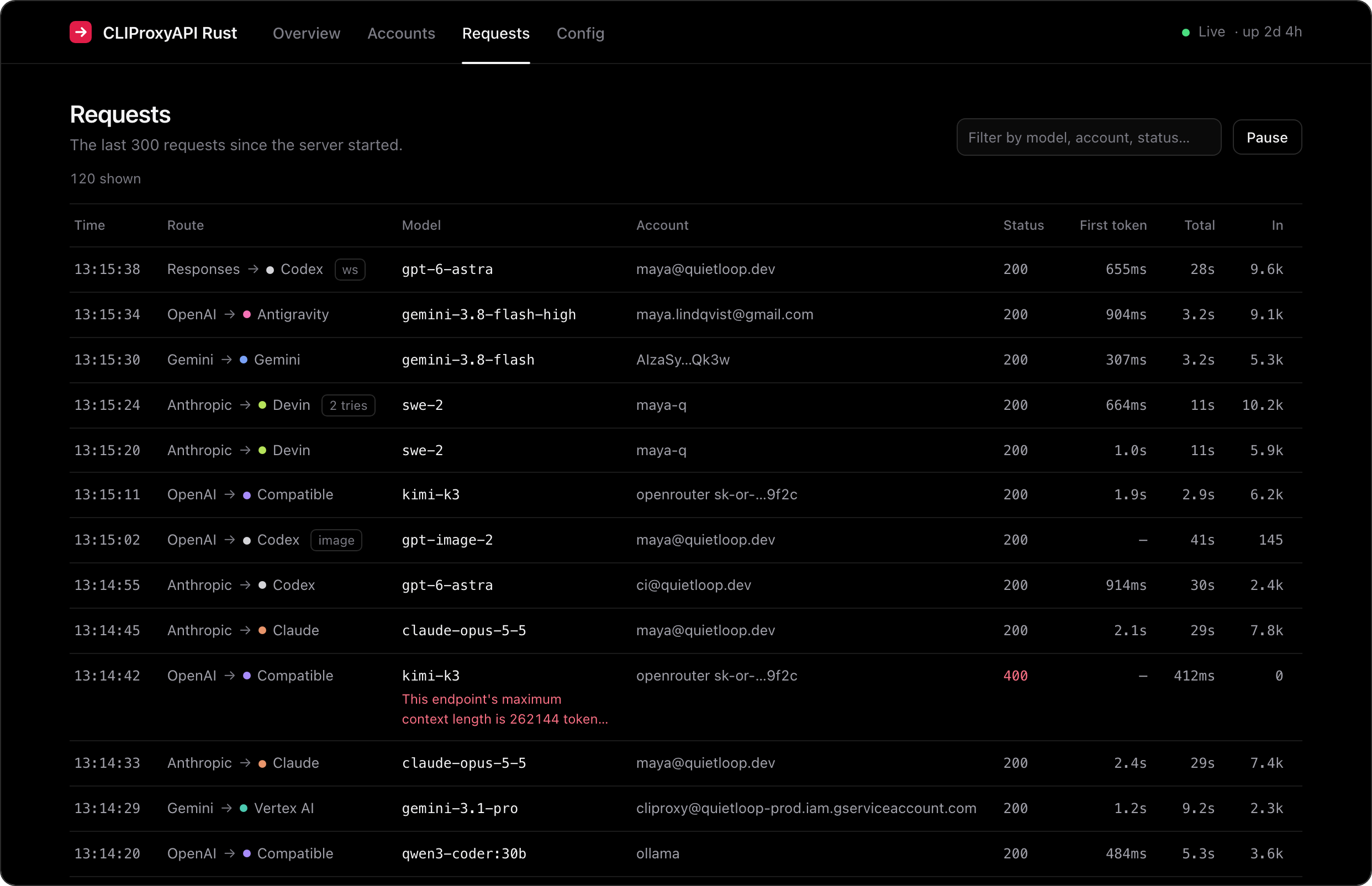 |
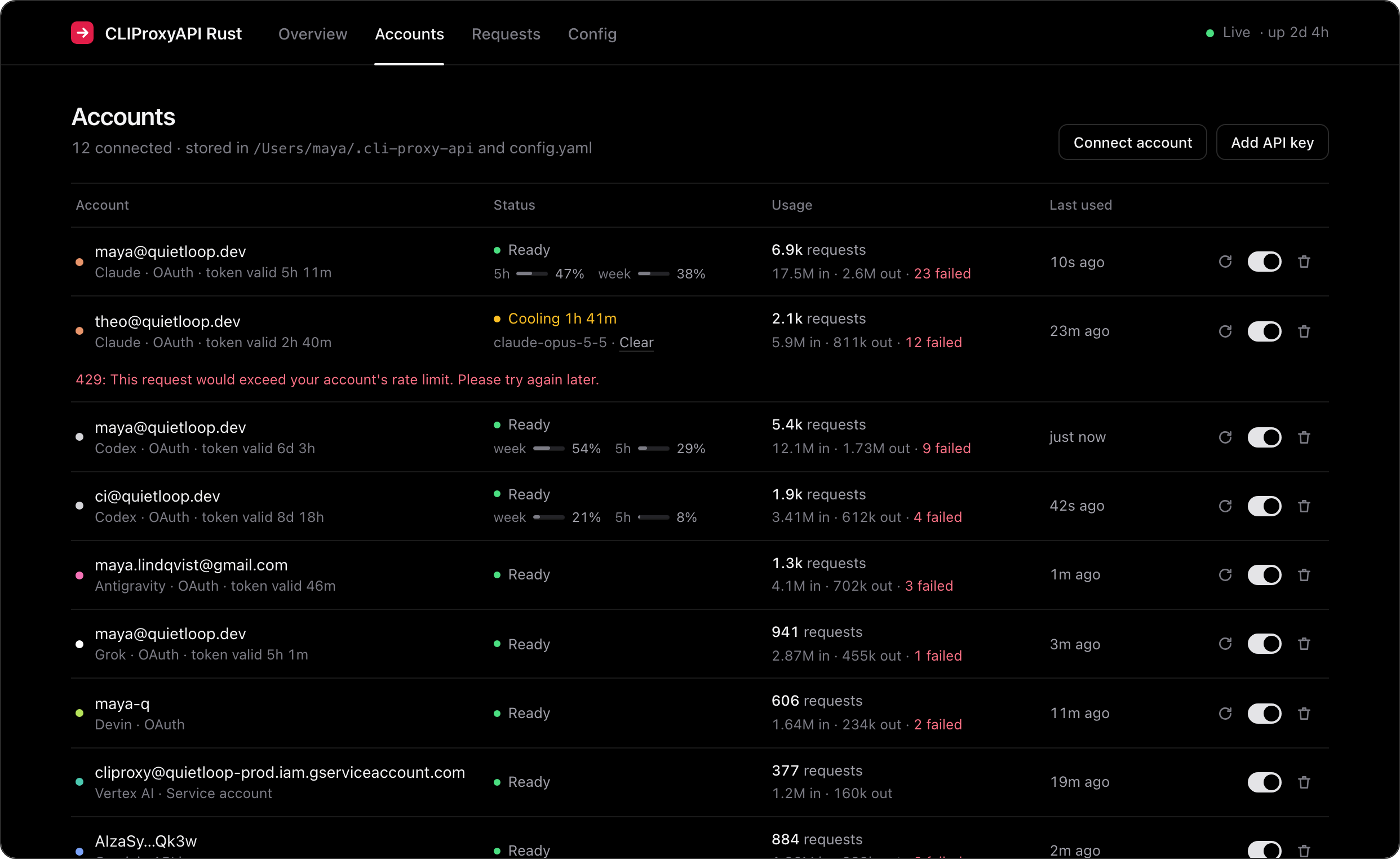
| Accounts: token expiry, cooldown timers per model, usage, and one-click enable, refresh or remove. | Requests: every request as it happens, showing which client format went to which provider, time to first token, and tokens. |
 |
|
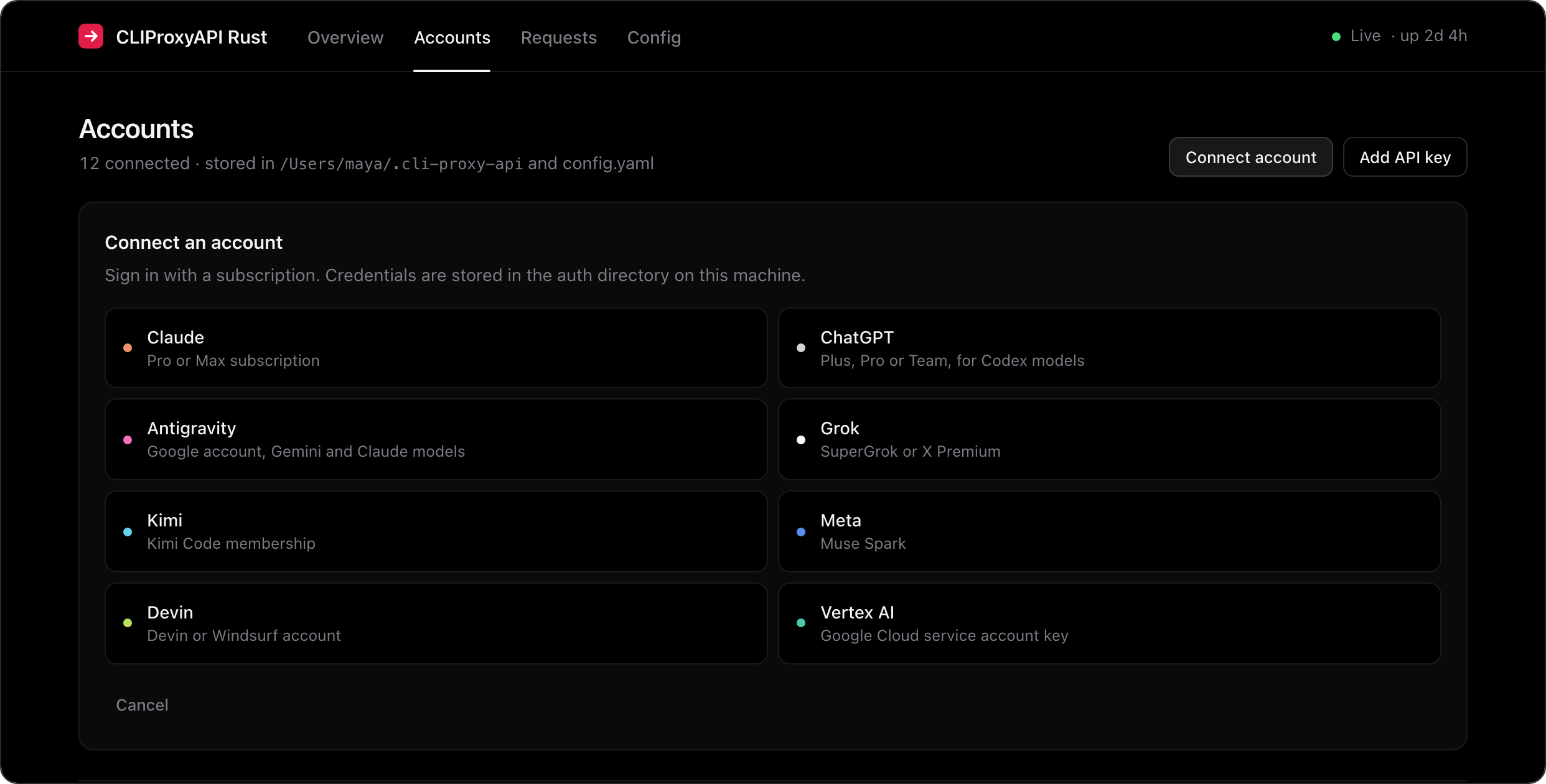
| Connect anything: browser sign-in, device codes for Grok, Kimi and Meta, or a Vertex service account key. On a server, approve in your browser and paste the redirect URL it lands on. The dashboard also works on a phone. |
Screenshots use sample data.
Configuration
config.yaml reloads automatically when it changes, and the dashboard edits the same file.
host: "127.0.0.1"             # 0.0.0.0 to expose it (set api-keys first)
port: 8317
auth-dir: "~/.cli-proxy-api"  # OAuth credential files, shared with CLIProxyAPI
api-keys: ["sk-pick-anything"] # keys your clients must send; empty = open
management-key: ""            # empty = dashboard only from localhost
proxy-url: ""                 # optional http://, https:// or socks5:// upstream proxy
request-retry: 3              # accounts to try before giving up
routing: round-robin          # or fill-first
codex-websockets: true        # native WebSocket relay to ChatGPT
claude-cloak: true            # present non-Claude-Code clients as Claude Code on OAuth accounts

claude-api-key:
  - api-key: "sk-ant-..."
codex-api-key:
  - api-key: "sk-..."
gemini-api-key:
  - api-key: "AIza..."
vertex-api-key:               # Vertex express mode (service accounts go in auth-dir)
  - api-key: "AQ..."
kimi-api-key:
  - api-key: "sk-kimi-..."    # Kimi Code; Moonshot platform keys need base-url
xai-api-key:
  - api-key: "xai-..."
meta-api-key:
  - api-key: "..."
openai-compatibility:
  - name: openrouter
    base-url: "https://openrouter.ai/api/v1"
    api-keys: ["sk-or-..."]
    models:
      - name: "moonshotai/kimi-k3"
        alias: "kimi-k3"
  - name: ollama
    base-url: "http://127.0.0.1:11434/v1"
    models:
      - name: "qwen3-coder:30b"
Running it on a server
Set host: "0.0.0.0", an api-keys entry for your clients, and a management-key for the dashboard. In Docker the dashboard also needs a management-key, because browser requests reach the container from outside localhost. Then keep it running, for example with systemd:
# /etc/systemd/system/cliproxyapi-rust.service
[Unit]
Description=CLIProxyAPI-Rust
After=network-online.target

[Service]
ExecStart=/usr/local/bin/cliproxyapi-rust --config /etc/cliproxyapi-rust/config.yaml
Restart=always

[Install]
WantedBy=multi-user.target
To sign in accounts on a server, open the dashboard, click Connect account, approve in your browser, then paste the localhost URL the browser lands on (it won't load, which is expected). Grok, Kimi and Meta use device codes, so they work from anywhere with nothing to paste. cliproxyapi-rust login <provider> on the server works the same way.
How it works
client request ──parse──▶ shared request model ──build──▶ provider request ──▶ upstream
client stream  ◀─render── shared event stream  ◀─parse─── provider stream  ◀──┘
Each wire format (src/formats/{chat,responses,claude,gemini}.rs) knows how to parse requests, build requests, decode streams and render streams. Adding a format means writing four functions instead of a translator for every pair.
| File | What it does |
|---|---|
src/proxy.rs |
Picks an account, translates, retries on the next account, streams back, records usage |
src/ws.rs |
Responses over WebSocket: native Codex relay, or local history for other providers |
src/upstream.rs |
Per-provider URLs and headers, including the request shape Claude OAuth accounts expect |
src/accounts.rs |
Credential files, API keys, routing and cooldowns |
src/oauth.rs · src/device.rs |
Browser and device-code sign-in, token refresh for every provider |
src/antigravity.rs · src/schema.rs |
Cloud Code envelope, project onboarding and the JSON Schema down-leveller it needs |
src/devin.rs |
Devin's Connect protobuf: request encoding, stream decoding, model ids |
src/vertex.rs |
Service account JWT signing |
src/media.rs |
Image, video and compaction endpoints |
src/compat.rs |
CLIProxyAPI's config layouts, in-place config edits and command-line flags |
ui/ |
The dashboard: plain HTML, CSS and JS, compiled into the binary |
Compared with CLIProxyAPI
CLIProxyAPI-Rust is a smaller rewrite of CLIProxyAPI, not a port.
| CLIProxyAPI-Rust | CLIProxyAPI | |
|---|---|---|
| Language | Rust, one binary | Go |
| Dashboard | Built in | Separate web panel |
| Codex WebSockets | Yes, native relay | Yes |
| Claude, ChatGPT, Antigravity, Grok, Kimi, Meta, Devin sign-in | Yes | Yes |
| Vertex service accounts, API keys, OpenAI-compatible | Yes | Yes |
| Images, xAI video, Responses compaction | Yes | Yes |
| Go plugins, Redis usage queue | No | Yes |
| Credential files, config, Docker image layout, CLI flags | Compatible with CLIProxyAPI's | — |
Plugins are Go shared libraries loaded into CLIProxyAPI's process, and the Redis queue feeds its separate usage service. Neither applies to a single Rust binary that keeps its own stats.
FAQ
Is this allowed? CLIProxyAPI-Rust is not affiliated with Anthropic, OpenAI, Google, xAI, Moonshot, Meta or Cognition. Using subscription accounts through third-party tools may be against a provider's terms, and providers can rate-limit or suspend accounts. You are responsible for how you use it.
Does it work with my CLIProxyAPI setup? Yes. See Coming from CLIProxyAPI: credential files, both config layouts, the Docker image paths and the command-line flags all carry over. Run cliproxyapi-rust check to see exactly what it picks up.
Where are my credentials stored? In auth-dir (~/.cli-proxy-api by default), one JSON file per account, written with 0600 permissions. Nothing leaves your machine except requests to the providers you use.
Does it phone home? No. There is no telemetry and the dashboard loads no external assets.
Claude sign-in fails or gets blocked. Some Anthropic endpoints sit behind bot protection that CLIProxyAPI works around with a browser TLS fingerprint. CLIProxyAPI-Rust uses standard rustls. If token exchange fails for you, please open an issue with the error from the dashboard.
Are usage stats saved? They're kept in memory and reset when CLIProxyAPI-Rust restarts.
Development
cargo test            # translator and protocol tests
cargo clippy --all-targets
cargo run -- --config dev.yaml
The dashboard lives in ui/ and is embedded with include_str!, so rebuild after editing it.
License
Unlicense: public domain. Copy it, change it, sell it, ship it, no attribution required.
Yorumlar (0)
Yorum birakmak icin giris yap.
Yorum birakSonuc bulunamadi