ClaudeCodeUsage
Health Pass
- License — License: MIT
- Description — Repository has a description
- Active repo — Last push 0 days ago
- Community trust — 33 GitHub stars
Code Pass
- Code scan — Scanned 12 files during light audit, no dangerous patterns found
Permissions Pass
- Permissions — No dangerous permissions requested
No AI report is available for this listing yet.
A VSCode extension that monitors Claude Code usage and costs directly in your status bar.
Claude Code Usage



The Claude Code coach in your status bar. Not a billing tool. Not a
multi-provider monitor. A focused token tracker that uses AI to help you
use Claude Code better.
What this is: A VS Code status-bar monitor that reads your local
Claude Code conversation logs and shows token-derived usage and cost
estimates — plus an optional AI advisor that suggests how to improve
your prompts and reduce waste.What this is not: a billing tool. All amounts are estimates based
on public per-million-token rates. Refer to your Anthropic account for
actual charges.
看清你的 Claude Code 用量,让 AI 帮你用得更好。
简介:一个 VS Code 状态栏小工具,读取本地 Claude Code 对话日志,
按 token × 公开单价估算用量与成本;并提供可选的 AI 建议功能,帮你优化
提示词、减少不必要的 token 消耗。它不是什么:账单工具。显示金额均为估算值,实际费用请以官方账单为准。
🌐 Multi-language documentation:
English ·
繁體中文 ·
简体中文 ·
日本語 ·
한국어
Screenshots
Status bar

Today's cost · current-session cost · 5-hour and weekly quota utilisation.
Hover the quota indicator for a breakdown:
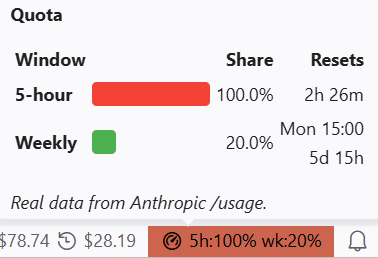
Real /usage data — utilisation percent, reset countdown, and the
weekly reset weekday and time.
Dashboard
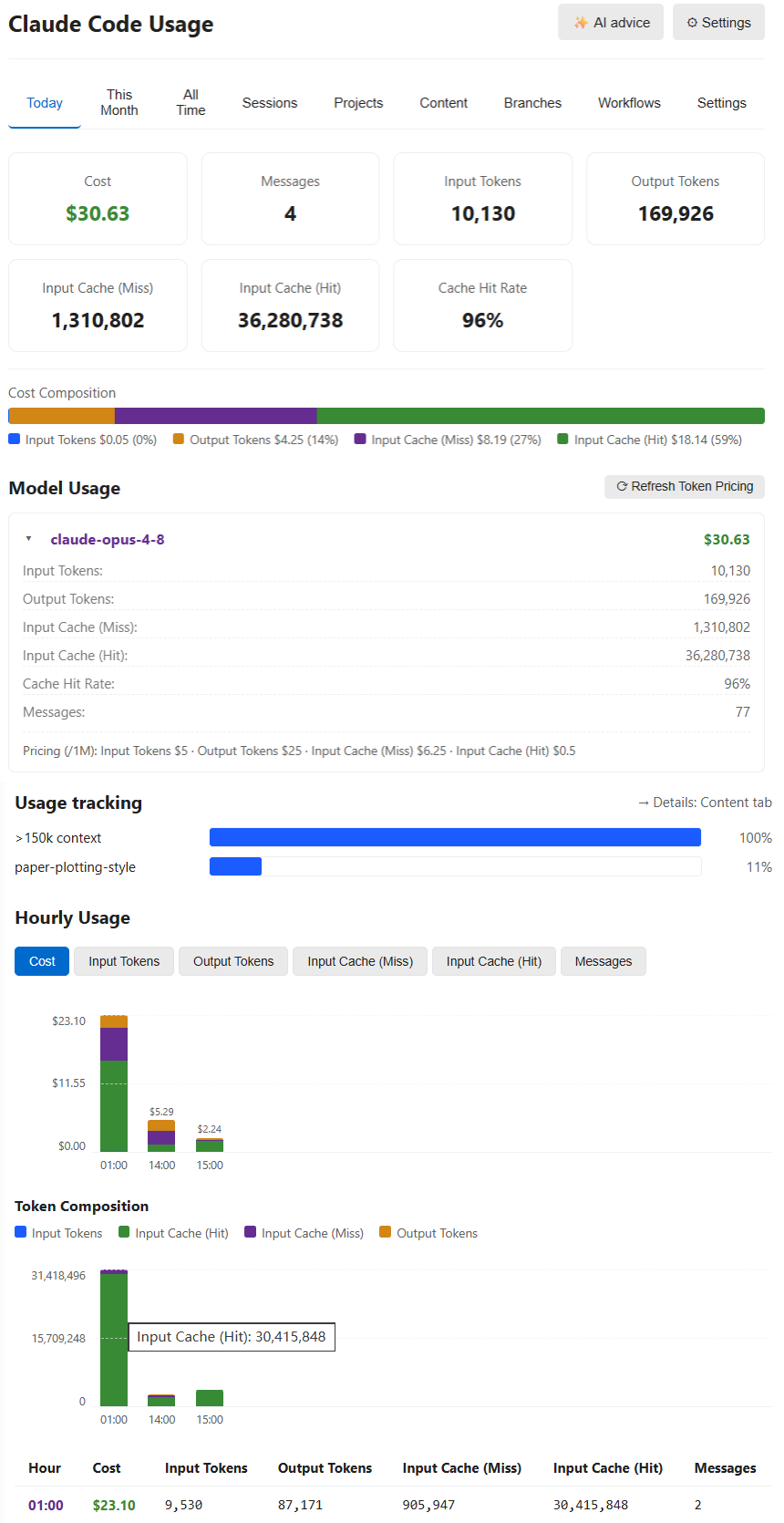
Click the status bar to open the full dashboard. Stacked token-composition
chart, hourly breakdown, cache hit rate, cost composition by token type,
plus per-model and per-day tables below.
Content tab — where your tokens actually go
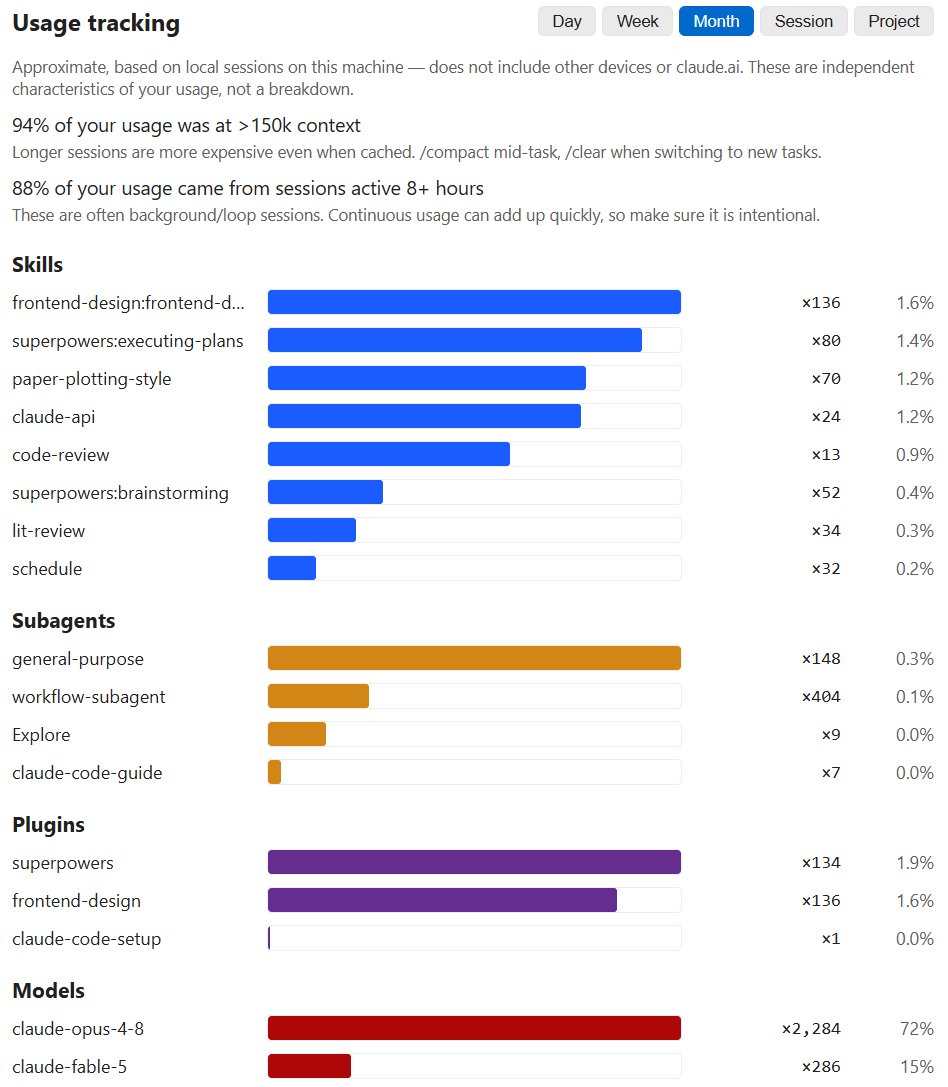
Estimated breakdown of which content consumes tokens — your prompts vs.
tool results (by tool) vs. assistant output / thinking. This is the lever
for optimising your usage. Scoped to the last 30 days.
AI advice (opt-in)
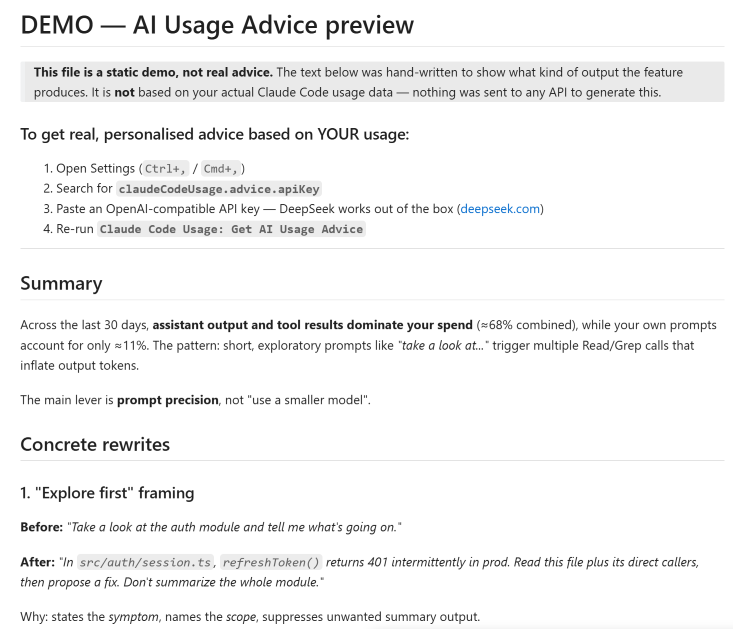
Optional AI advisor sends your aggregates + a sample of your prompts
to an OpenAI-compatible API (DeepSeek V4 Pro by default) and suggests
concrete rewrites. Bring your own key — or click Preview demo
on the warning prompt to see a static example first.
What's new in 2.0
- Real 5-hour and weekly quota in the status bar — reads Claude Code's
existing OAuth session from~/.claude/.credentials.jsonor the macOS
Keychain, zero config.
Adapted from upstream PR #9
by @Dobidop. - Four new tabs: Sessions, Projects, Content, Branches — all sortable.
- Token-composition stacked chart with Y-axis and reference lines.
- AI advice command (DeepSeek V4 Pro default,
reasoning_effort=max)
with a demo-mode fallback when no API key is configured. - Multi-vendor pricing: Opus 4.x, Sonnet 4.x, Haiku 4.5 (verified
against Anthropic's public pricing); reference rates for proxied setups
(OpenAI, Gemini, DeepSeek, Kimi, GLM, Qwen) with family-aware fallback.Refresh Token Pricingpulls live LiteLLM data as runtime overrides. - Custom timezone for date display (
claudeCodeUsage.timezone). - Light-theme tab readability fixed.
- Locale-aware numbers and dates throughout (German
., English,). - Real-time status bar via
fs.watch(1.5 s debounce) + idle-aware
refresh + non-blocking loader (yields every 25 files).
Full changelog: CHANGELOG.md.
Closes upstream issues
#7,
#10,
#11,
#13.
Install
VS Code Marketplace
Search for Claude Code Usage in the Extensions view (Ctrl+Shift+X),
or:
ext install GrowthJack.claude-code-usage
Cursor / Windsurf / Antigravity (Open VSX)
Same extension is published at the Open VSX Registry:
GrowthJack.claude-code-usage.
From a .vsix file
Ctrl+Shift+P → Extensions: Install from VSIX... → pick the
downloaded .vsix.
Configuration
Open Settings (Ctrl+,) and search for Claude Code Usage. All
settings are optional; defaults preserve upstream behaviour where
reasonable.
| Setting | Default | What it does |
|---|---|---|
refreshInterval |
60 |
Refresh interval in seconds (min 30). |
dataDirectory |
"" |
Custom Claude data dir; empty = auto-detect. |
language |
"auto" |
UI language: auto / en / zh-TW / zh-CN / ja / ko. |
decimalPlaces |
2 |
Decimal places in cost display (0–4). |
compactNumbers |
false |
Show 1.2M / 345K instead of full numbers. |
timezone |
"" |
IANA timezone for date display (e.g. Asia/Hong_Kong). |
usageLimitTracking |
true |
Show real 5h / weekly quota in the status bar. |
showOpusWeekly |
false |
Also show the weekly Opus limit (opus:NN%) in the status bar, after the 5h / weekly figures. |
showCost |
true |
Show today's cost item in the status bar. |
showContext |
true |
Show the current session's context-window fill (like /context). Set this, showCost, or usageLimitTracking to false to hide that status-bar item. |
enableContentAnalysis |
true |
Run the Content tab token analysis. |
projectGroupingMode |
"git" |
Projects tab grouping: git / folder / flat. |
advice.apiKey |
"" |
API key for the AI advice feature (OpenAI-compatible). |
advice.apiUrl |
https://api.deepseek.com/chat/completions |
Chat-completions endpoint. |
advice.model |
"deepseek-v4-pro" |
Model name. |
advice.reasoningEffort |
"max" |
Reasoning effort (DeepSeek V4: high / max). |
How costs are calculated
The status-bar cost is Σ (tokens × per-million rate) across input,
output, cache-write and cache-read, summed by model.
- Per-million rates come from the bundled pricing table, which is
verified against the public Anthropic pricing page and supplemented
with reference rates for non-Anthropic models that may appear in
proxied setups. Refresh Model Pricing(command + button in the dashboard) pulls
live prices from LiteLLM's public dataset
as runtime overrides.- Unknown model snapshots are priced against the current tier of
their detected family (Opus / Sonnet / Haiku / GPT / Gemini /
DeepSeek / Kimi / GLM / Qwen) instead of falling back blindly.
What the status bar does not know:
- Your actual Anthropic invoice (discounts, free credits, plan caps).
- Whether your proxy provider charges different rates.
- Anything not recorded in your local
.jsonllog files.
The 5h / weekly quota indicator is different — it queries Claude
Code's real /usage endpoint via the OAuth session and shows the actual
percentage Anthropic is tracking for your account. That number is
authoritative.
Privacy
- All token / cost / session analysis runs locally by reading your
~/.claude/projects/**/*.jsonlfiles. - The quota indicator calls
api.anthropic.com/api/oauth/usageusing
Claude Code's existing OAuth token. No additional credentials are sent. - The AI advice command is the only feature that calls an external
service — and only when you trigger it. It sends an aggregate summary
of your usage plus a sample of your recent user prompts to whatever
endpoint you configured inadvice.apiUrl. Bring your own key;
nothing is shipped with the extension. If no key is configured, the
command opens a hand-written demo instead of calling any API.
Troubleshooting
"No Claude Code Data"
- Make sure Claude Code is installed and you have used it at least once.
- Check the
dataDirectorysetting; auto-detection looks at~/.claude/projectsand~/.config/claude/projects.
Quota row shows 5h:--% wk:--%
- Claude Code's OAuth token is missing or expired. Log in to Claude Code
once; the extension reads~/.claude/.credentials.jsonwhere present, or
the macOS Keychain entry used by Claude Code, and refreshes the bearer if
needed.
Get AI Usage Advice returns 404
- DeepSeek's current endpoint does not use a
/v1prefix. Usehttps://api.deepseek.com/chat/completions. The extension auto-strips/v1if present.
Get AI Usage Advice shows demo instead of real advice
- That means no API key is configured under
claudeCodeUsage.advice.apiKey.
The demo file is filename-marked…-DEMO-…with a prominent banner.
Add a key in Settings and re-run the command.
Sluggish refresh on large histories
- 2.0 yields to the event loop every 25 files; idle ticks skip recompute.
If you still hit issues, raiserefreshIntervalor setenableContentAnalysistofalse.
Usage history disappears or is missing older months
- Claude Code automatically deletes conversation logs older than
cleanupPeriodDays(default: 30 days). Once deleted, those records
cannot be recovered. To retain more history, add this to your~/.claude/settings.json:
This only affects logs kept from now on; already-deleted logs cannot be{ "cleanupPeriodDays": 365 }
restored. Thanks to @nickearnshaw for
documenting this (PR #21).
Token counts appear lower than the model provider's own dashboard
- If you use Claude Code with a third-party proxy that routes requests
through sub-agents or background workflows (e.g. ultracode / dynamic
workflows), each agent writes its own.jsonllog file inside a
sub-directory. The extension reads all these files, but some proxy
configurations may not write agent-level records at all. Until native
workflow attribution is added in a future release, the total shown here
may be lower than the provider's upstream count. Your actual spend is
always on your provider's billing page.
Credits
Forked from jack21/ClaudeCodeUsage. MIT-licensed.
- @Dobidop —
PR #9, the OAuth
approach for reading real/usagedata. The quota indicator in this
release is adapted from that work. - @nickearnshaw —
PR #8 locale-aware
number/date formatting;
PR #20 fix for
webview/status-bar getting stuck on "Loading…" (re-entrancy guard +
spinner only on cold start);
PR #21 docs
explainingcleanupPeriodDaysfor retaining usage history. - @brenoneill —
PR #14, custom
data directory (merged into upstream 1.0.8). - @mxzinke — Opus 4.5 / Haiku 4.5 prices
- German translation (upstream 1.0.8).
Many code changes in this fork were drafted with assistance from
Claude Code (commits includeCo-Authored-By: Claude <[email protected]>).
Changelog
The current changelog lives in CHANGELOG.md. The
most recent 2.0 entry summarises every feature, fix and personalisation
option in this release.
v1.0.8 (2025-11-28)
- Converted code comments from Traditional Chinese to English.
- Improved internationalisation standards.
- Pricing: added Opus 4.5 / Haiku 4.5 (thanks @mxzinke).
- Added German (de-DE) translation (thanks @mxzinke).
v1.0.7 (2025-11-28)
- Multilingual translation for hourly usage labels.
- Removed hardcoded Chinese text; switched to i18n.
v1.0.6 (2025-08-10)
- Added support for Claude Opus 4.1 pricing.
v1.0.5 (2025-01)
- Hourly usage statistics + visualisation.
v1.0.4 (2025-01)
- All-time data calculation; "All Time" translations.
v1.0.3 (2025-01)
- Repository URL migration + README image link fixes.
v1.0.0 (2025-01)
- Initial complete release.
Contributing
Issues and pull requests are welcome on the
GitHub repository.
License
Reviews (0)
Sign in to leave a review.
Leave a reviewNo results found