claude-meter
Health Uyari
- License — License: MIT
- Description — Repository has a description
- Active repo — Last push 0 days ago
- Low visibility — Only 6 GitHub stars
Code Basarisiz
- exec() — Shell command execution in src/claude_usage_widget/app.py
- exec() — Shell command execution in src/claude_usage_widget/main.py
Permissions Gecti
- Permissions — No dangerous permissions requested
Bu listing icin henuz AI raporu yok.
Windows taskbar widget for live Claude usage tracking. Per-model breakdown, reset countdowns, single .exe.

Claude Meter
See exactly how much of your Claude plan you've used — at a glance, in your Windows taskbar.
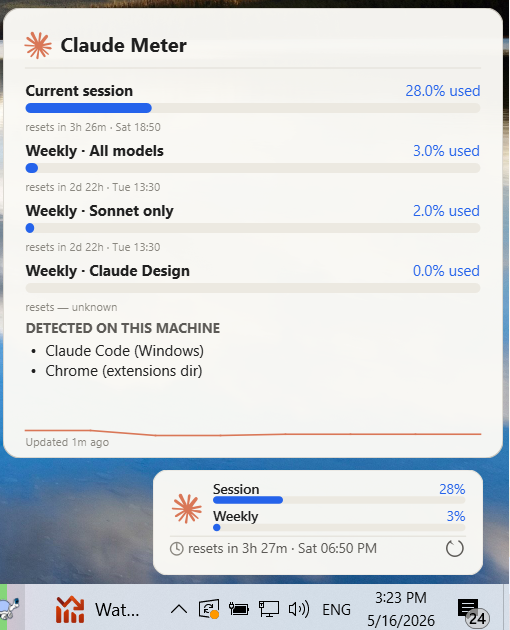
Every quota that lives on claude.ai/settings/usage — Current session, Weekly · All models, Sonnet only, Opus only, Claude Design, daily routine runs, overage — rendered as a quiet, glanceable pill above your taskbar. Click for an instant refresh. Hover for the full breakdown.




Why this exists
Anthropic gives you a usage allowance but no built-in dashboard. You hit a limit, you wait, you guess when it resets. Claude.ai has a usage page now — but it's a webpage you have to open. Claude Meter puts the same numbers, live, in your peripheral vision.
Highlights
- Every quota the usage page shows — Current session (5h), Weekly · All models (7d), Weekly · Sonnet only, Weekly · Opus only, Weekly · Claude Design, Daily routine runs, plus extra-usage overage. Auto-detects your plan ("Max 5×", "Pro", …).
- Tray icon shows the live percentage — color-coded blue → orange → red. Glance like you'd glance at the clock.
- Pinned ticker above the taskbar — Session + Weekly bars with a reset countdown (
resets in 4h 48m · Sat 2:50 AM) and a refresh button right on the widget. - Hover for the full breakdown — every quota row + sparkline of the last 14 days, in a Claude-team-grade light theme with the Claude asterisk.
- Resilient — keeps the last good data on screen when the API rate-limits, with a small amber dot to acknowledge the failure. No more "API rate-limited" wiping your dashboard.
- Adaptive polling — 7 min normal, 20 min idle, exponential back-off on 429. One quick refresh button click; 15-second cooldown so you can't spam.
- Auto-detects your credentials — reads the Claude Code OAuth token from
%USERPROFILE%\.claude\.credentials.jsonor WSL's~/.claude/.credentials.json. No setup if you've ever runclaudeonce. - Single .exe, no installer, no Python required for end-users. Run-at-startup with one click in the tray menu.
Install (30 seconds)
- Grab
ClaudeMeter.exefrom the Releases page. - Drop it in
C:\Tools\(or anywhere). Double-click. - Right-click the tray icon → Run at startup so it's there next reboot.
If you've ever logged in with the Claude Code CLI on this machine — that's it, you're done. Otherwise: Settings… in the tray menu, paste an sk-ant-api… key from console.anthropic.com.
How it differs from the alternatives
There are several great Windows widgets out there. Here's an honest comparison:
| Claude Meter | Zrnik | sr-kai's claudeusagewin | CodeZeno | |
|---|---|---|---|---|
| Stack | Python + PySide6 | C# / WPF | C# / WPF + WPF-UI | Rust + Win32 GDI |
| Per-model breakdown (Sonnet/Opus/Design) | ✅ | ❌ (unified only) | ⚠️ (Sonnet only) | ❌ (unified only) |
| Daily routine runs | ✅ | ❌ | ❌ | ❌ |
| Overage tracking | ✅ (when API exposes) | ❌ | ✅ | ❌ |
| Plan auto-detect | ✅ | ❌ | ✅ | ❌ |
| Light Claude-brand theme | ✅ | ❌ | ⚠️ (Fluent dark/light) | ⚠️ (dark/light) |
| Keeps last data on API errors | ✅ | ❌ | ⚠️ | ❌ |
| Drop-in logo override | ✅ | ❌ | ❌ | ❌ |
| End-user .exe size | ~70 MB | ~5 MB (needs .NET 8) | ~6 MB (needs .NET 8) | ~3 MB |
| Multi-account | (roadmap) | ✅ | ❌ | ❌ |
If you want the absolute smallest binary, CodeZeno's Rust version is great. If you want multi-account side-by-side, Zrnik's is your tool. Claude Meter is for people who want the full claude.ai/settings/usage page replicated in their taskbar, with a quiet design that feels like Anthropic could have shipped it.
How it works
GET https://api.anthropic.com/api/oauth/usage
Authorization: Bearer <accessToken from ~/.claude/.credentials.json>
anthropic-beta: oauth-2025-04-20
That single call returns the same JSON the /settings/usage page consumes. The widget parses every {utilization, resets_at} row it sees and renders them — including new fields Anthropic adds later, without code changes (defensive humanizer for unknown keys).
The endpoint is rate-limit-sensitive, so the poller backs off aggressively (7 min normal, 20 min idle, doubles on 429, cap 60 min). Each probe burns essentially no quota.
Using your own / official logo
The widget loads its logo from the first matching file in:
%APPDATA%\ClaudeMeter\claude_logo.svg(or.png)<exe dir>\assets\claude_logo.svg- The bundled SVG in
assets/ - Falls back to a programmatic Claude asterisk
Drop the official Anthropic mark into any of those paths and the widget picks it up on next launch.
Configuration
Right-click the tray icon → Settings…:
- Refresh interval (default Auto — 7 / 20 min adaptive)
- Manual API-key override
- Toast notifications when crossing 75 % / 90 % / 95 %
- Auto-hide on real fullscreen apps (off by default — won't trigger on maximized windows)
- Position offsets from system tray / taskbar
Settings live in %APPDATA%\ClaudeMeter\settings.json.
Usage history (for the sparkline) lives in %APPDATA%\ClaudeMeter\history.json — 14 days, ~10-minute buckets.
Build it yourself
git clone https://github.com/JackBhanded/claude-meter
cd claude-meter
build-exe.cmd      :: produces dist\ClaudeMeter.exe
:: …or run from source:
run.cmd
Requires Python 3.10+ on PATH. PySide6 is the only heavy dependency.
Roadmap
- Multi-account side-by-side (cycle through
.credentials.jsonprofiles) - Live-tile-style taskbar icon on Windows 11 (Win+W panel via MSIX)
- Linux build (KDE/GNOME tray support is already in Qt)
- Optional Excel/CSV export of the 14-day history
- Localization
PRs welcome.
Credits & inspiration
Standing on the shoulders of giants. Big thank you to:
- Zrnik — proved the header-based approach works
- Sasha Kai (sr-kai) — popularized the tray-icon-as-percentage UX and the overage card
- CodeZeno — Rust prior art, taught me sensible polling intervals
- hamed-elfayome's Claude-Usage-Tracker — best documentation of the API field shapes
- f-is-h/Usage4Claude — first to expose per-model rows
About the author

|
Built by Jack Bhanded, Lead developer and architect at SawYouAtSinai. Devotee of innovative technologies and gadgets. Built this because he uses Claude Code daily and wanted to know how much quota was left without leaving the editor. |
Changelog
See CHANGELOG.md for the version-by-version list of changes.
License
MIT — do whatever you want, just keep the copyright notice.
Yorumlar (0)
Yorum birakmak icin giris yap.
Yorum birakSonuc bulunamadi