open-multi-agent
Health Gecti
- License — License: MIT
- Description — Repository has a description
- Active repo — Last push 0 days ago
- Community trust — 6083 GitHub stars
Code Basarisiz
- spawnSync — Synchronous process spawning in .github/brand/render-readme-hero-gif.mjs
- process.env — Environment variable access in examples/basics/multi-model-team.ts
- network request — Outbound network request in examples/basics/multi-model-team.ts
- process.env — Environment variable access in examples/cookbook/contract-review-dag.ts
- process.env — Environment variable access in examples/cookbook/incident-postmortem-dag.ts
- process.env — Environment variable access in examples/cookbook/personalized-interview-simulator.ts
Permissions Gecti
- Permissions — No dangerous permissions requested
This tool is a lightweight, TypeScript-native orchestration engine that coordinates multiple AI agents to achieve a specific goal. It automatically decomposes a user's objective into a task list, executes independent tasks in parallel, and synthesizes the final result in a single function call.
Security Assessment
Overall risk: Low. The project does not request dangerous permissions, execute arbitrary shell commands, or contain hardcoded secrets. Outbound network requests and environment variable access are present in the codebase, but these are appropriately restricted to example files. Specifically, the examples demonstrate connecting to external LLM APIs (like OpenAI or Anthropic) and reading API keys securely from the local environment. Beyond these necessary outbound calls for the engine to function, the tool is remarkably lean, relying on only three runtime dependencies, which significantly minimizes the potential attack surface.
Quality Assessment
Quality is excellent. The project is highly active, with its most recent code push occurring today. It is fully licensed under the permissive MIT standard, making it suitable for most personal and commercial projects. Furthermore, it enjoys a strong level of community trust, as evidenced by over 5,700 GitHub stars. The repository is well-documented, transparent about its philosophy, and boasts 88% test coverage.
Verdict
Safe to use — it is a highly trusted, actively maintained, and structurally secure framework with minimal and carefully managed dependencies.
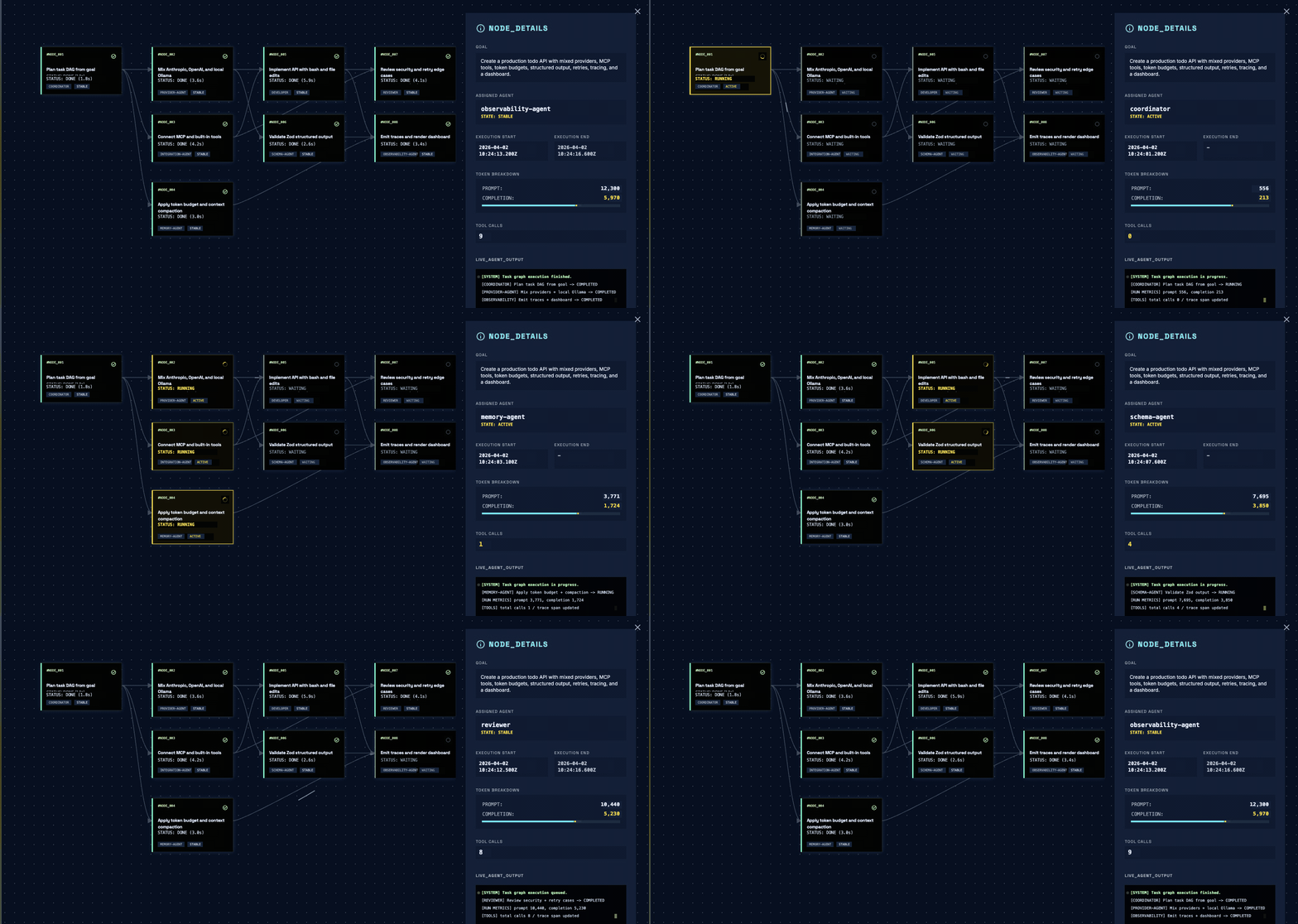
From a goal to a task DAG, automatically. TypeScript-native multi-agent orchestration with MCP and live tracing. Three runtime dependencies.

Open Multi-Agent
From a goal to a task DAG, automatically.
TypeScript-native multi-agent orchestration. Three runtime dependencies.





English · 中文
open-multi-agent is a multi-agent orchestration framework for TypeScript backends. Give it a goal; a coordinator agent decomposes it into a task DAG, parallelizes independents, and synthesizes the result. Three runtime dependencies, drops into any Node.js backend.
Your engineers describe the goal, not the graph.
Quick Start
Requires Node.js >= 18.
Use it in your project
npm install @jackchen_me/open-multi-agent
import { OpenMultiAgent, type AgentConfig } from '@jackchen_me/open-multi-agent'

const agents: AgentConfig[] = [
  { name: 'architect', model: 'claude-sonnet-4-6', systemPrompt: 'Design clean API contracts.', tools: ['file_write'] },
  { name: 'developer', model: 'claude-sonnet-4-6', systemPrompt: 'Implement runnable TypeScript.', tools: ['bash', 'file_read', 'file_write', 'file_edit'] },
  { name: 'reviewer', model: 'claude-sonnet-4-6', systemPrompt: 'Review correctness and security.', tools: ['file_read', 'grep'] },
]

const orchestrator = new OpenMultiAgent({
  defaultModel: 'claude-sonnet-4-6',
  onProgress: (event) => console.log(event.type, event.task ?? event.agent ?? ''),
})

const team = orchestrator.createTeam('api-team', { name: 'api-team', agents, sharedMemory: true })
const result = await orchestrator.runTeam(team, 'Create a REST API for a todo list in /tmp/todo-api/')

console.log(result.success, result.totalTokenUsage.output_tokens)
Run an example locally
git clone https://github.com/JackChen-me/open-multi-agent && cd open-multi-agent
npm install
export ANTHROPIC_API_KEY=sk-...
npx tsx examples/basics/team-collaboration.ts
Three agents collaborate on a REST API while onProgress streams the coordinator's task DAG:
agent_start coordinator
task_start design-api
task_complete design-api
task_start implement-handlers
task_start scaffold-tests         // independent tasks run in parallel
task_complete scaffold-tests
task_complete implement-handlers
task_start review-code            // unblocked after implementation
task_complete review-code
agent_complete coordinator        // synthesizes final result
Success: true
Tokens: 12847 output tokens
Local models via Ollama need no API key, see providers/ollama. For hosted providers (OPENAI_API_KEY, GEMINI_API_KEY, etc.), see Supported Providers.
Three Ways to Run
| Mode | Method | When to use | Example |
|---|---|---|---|
| Single agent | runAgent() |
One agent, one prompt | basics/single-agent |
| Auto-orchestrated team | runTeam() |
Give a goal, let the coordinator plan and execute | basics/team-collaboration |
| Explicit pipeline | runTasks() |
You define the task graph and assignments | basics/task-pipeline |
Preview the coordinator's task DAG without executing agents:
const plan = await orchestrator.runTeam(team, goal, { planOnly: true })
For MapReduce-style fan-out without task dependencies, use AgentPool.runParallel() directly. See patterns/fan-out-aggregate.
For shell and CI, use the JSON-first oma binary. See docs/cli.md.
Features
| Capability | What you get |
|---|---|
| Goal-driven coordinator | One runTeam(team, goal) call. The coordinator decomposes the goal into a task DAG, parallelizes independents, and synthesizes the result. |
| Mix providers in one team | 10 built-in: Anthropic, OpenAI, Azure, Bedrock, Gemini, Grok, DeepSeek, MiniMax, Qiniu, Copilot. Ollama / vLLM / LM Studio / OpenRouter / Groq via OpenAI-compatible. (full setup) |
| Tools + MCP | 6 built-in (bash, file_*, grep, glob), opt-in delegate_to_agent, custom tools via defineTool() + Zod, stdio MCP servers via connectMCPTools(). (tool config) |
| Streaming + structured output | Token-by-token streaming on every adapter; Zod-validated final answer with auto-retry on parse failure. (structured-output) |
| Observability | onProgress events, onTrace spans, post-run HTML dashboard rendering the executed task DAG. (observability guide) |
| Pluggable shared memory | Default in-process KV; swap in Redis / Postgres / your own backend by implementing MemoryStore. (shared memory) |
Production controls (context strategies, task retry with backoff, loop detection, tool output truncation/compression) are covered in the Production Checklist.
Examples
examples/ is organized by category: basics, cookbook, patterns, providers, integrations, and production. See examples/README.md for the full index.
Real-world workflows (cookbook/)
End-to-end scenarios you can run today. Each one is a complete, opinionated workflow.
contract-review-dag: four-task DAG for contract review with parallel branches and step-level retry on failure.meeting-summarizer: three specialised agents fan out on a transcript, an aggregator merges them into one Markdown report with action items and sentiment.competitive-monitoring: three parallel source agents extract claims from feeds; an aggregator cross-checks them and flags contradictions.translation-backtranslation: translate EN to target with one provider, back-translate with another, flag semantic drift.
Patterns and integrations
basics/team-collaboration:runTeam()coordinator pattern.patterns/structured-output: any agent returns Zod-validated JSON.patterns/fan-out-aggregate: MapReduce-style fan-out viaAgentPool.runParallel().patterns/agent-handoff: synchronous sub-agent delegation viadelegate_to_agent.integrations/trace-observability:onTracespans for LLM calls, tools, and tasks.integrations/mcp-github: expose an MCP server's tools to an agent viaconnectMCPTools().integrations/with-vercel-ai-sdk: Next.js app combining OMArunTeam()with AI SDKuseChatstreaming.- Provider examples: scripts under
examples/providers/covering hosted providers, OpenAI-compatible endpoints, and local models.
Run any script with npx tsx examples/<path>.ts.
How is this different from X?
A quick router. Mechanism breakdown follows.
| If you need | Pick |
|---|---|
| Fixed production topology with mature checkpointing | LangGraph JS |
| Explicit Supervisor + hand-wired workflows | Mastra |
| Python stack with mature multi-agent ecosystem | CrewAI |
| AI app toolkit with broad model-provider support | Vercel AI SDK |
| TypeScript, goal to result with auto task decomposition | open-multi-agent |
vs. LangGraph JS. LangGraph compiles a declarative graph (nodes, edges, conditional routing) into an invokable. open-multi-agent runs a Coordinator that decomposes the goal into a task DAG at runtime, then auto-parallelizes independents. Same end (orchestrated execution), opposite directions: LangGraph is graph-first, OMA is goal-first.
vs. Mastra. Both are TypeScript-native. Mastra's Supervisor pattern requires you to wire agents and workflows by hand; OMA's Coordinator does the wiring at runtime from the goal string. If the workflow is known up front, Mastra's explicitness pays off. If you'd rather not enumerate every step, OMA's runTeam(team, goal) is one call.
vs. CrewAI. CrewAI is the mature multi-agent option in Python. OMA targets TypeScript backends with three runtime dependencies and direct Node.js embedding. Roughly comparable orchestration surface; the choice is the language stack.
vs. Vercel AI SDK. AI SDK provides the LLM-call layer — provider abstraction, streaming, tool calls, and structured outputs. It does not orchestrate goal-driven multi-agent teams. The two are complementary: AI SDK for app surfaces and single-agent calls, OMA when you need a team.
Ecosystem
open-multi-agent launched 2026-04-01 under MIT. Known users and integrations to date:
In production
- temodar-agent (~60 stars). WordPress security analysis platform by Ali Sünbül. Uses our built-in tools (
bash,file_*,grep) directly inside a Docker runtime. Confirmed production use. - Cybersecurity SOC (home lab). A private setup running Qwen 2.5 + DeepSeek Coder entirely offline via Ollama, building an autonomous SOC pipeline on Wazuh + Proxmox. Early user, not yet public.
Using open-multi-agent in production or a side project? Open a discussion and we will list it here.
Integrations
- Engram — "Git for AI memory." Syncs knowledge across agents instantly and flags conflicts. (repo)
- @agentsonar/oma — Sidecar detecting cross-run delegation cycles, repetition, and rate bursts.
Built an integration? Open a discussion to get listed.
Featured partner
For products and platforms with a deep open-multi-agent integration. See the Featured partner program for terms and how to apply.
Architecture
┌─────────────────────────────────────────────────────────────────┐
│  OpenMultiAgent (Orchestrator)                                  │
│                                                                 │
│  createTeam()  runTeam()  runTasks()  runAgent()  getStatus()   │
└──────────────────────┬──────────────────────────────────────────┘
                       │
            ┌──────────▼──────────┐
            │  Team               │
            │  - AgentConfig[]    │
            │  - MessageBus       │
            │  - TaskQueue        │
            │  - SharedMemory     │
            └──────────┬──────────┘
                       │
         ┌─────────────┴─────────────┐
         │                           │
┌────────▼──────────┐    ┌───────────▼───────────┐
│  AgentPool        │    │  TaskQueue             │
│  - Semaphore      │    │  - dependency graph    │
│  - runParallel()  │    │  - auto unblock        │
└────────┬──────────┘    │  - cascade failure     │
         │               └───────────────────────┘
┌────────▼──────────┐
│  Agent            │
│  - run()          │    ┌────────────────────────┐
│  - prompt()       │───►│  LLMAdapter            │
│  - stream()       │    │  - AnthropicAdapter    │
└────────┬──────────┘    │  - OpenAIAdapter       │
         │               │  - AzureOpenAIAdapter  │
         │               │  - BedrockAdapter      │
         │               │  - CopilotAdapter      │
         │               │  - GeminiAdapter       │
         │               │  - GrokAdapter         │
         │               │  - MiniMaxAdapter      │
         │               │  - DeepSeekAdapter     │
         │               │  - QiniuAdapter        │
         │               └────────────────────────┘
┌────────▼──────────┐
│  AgentRunner      │    ┌──────────────────────┐
│  - conversation   │───►│  ToolRegistry        │
│    loop           │    │  - defineTool()      │
│  - tool dispatch  │    │  - 6 built-in tools  │
└───────────────────┘    │  + delegate (opt-in) │
                         └──────────────────────┘
Core Concepts
- Tools + MCP. Built-ins cover
bash,file_read,file_write,file_edit,grep, andglob; custom tools usedefineTool()+ Zod; stdio MCP servers connect throughconnectMCPTools(). See tool configuration. - Observability. Wire
onProgressfor live lifecycle events,onTracefor structured spans, andrenderTeamRunDashboard(result)for a static DAG dashboard. See observability. - Shared memory. Use the default in-process KV or bring Redis, Postgres, Engram, or any
MemoryStore. See shared memory. - Context management. Use sliding windows, summarization, rule-based compaction, or a custom compressor for long-running agents. See context management.
Supported Providers
Change provider, model, and set the env var. The agent config shape stays the same.
const agent: AgentConfig = {
  name: 'my-agent',
  provider: 'anthropic',
  model: 'claude-sonnet-4-6',
  systemPrompt: 'You are a helpful assistant.',
}
| Kind | How to configure | Services |
|---|---|---|
| Built-in shortcuts | Set provider to anthropic, gemini, openai, azure-openai, copilot, grok, deepseek, minimax, qiniu, or bedrock; the framework supplies the endpoint. |
Anthropic, Gemini, OpenAI, Azure OpenAI, GitHub Copilot, xAI Grok, DeepSeek, MiniMax, Qiniu, AWS Bedrock |
| OpenAI-compatible endpoints | Set provider: 'openai' plus baseURL and, when needed, apiKey. |
Ollama, vLLM, LM Studio, llama.cpp server, OpenRouter, Groq, Mistral |
See docs/providers.md for env vars, model examples, local tool-calling, timeouts, and troubleshooting.
Production Checklist
Before going live, wire up the controls that protect token spend, recover from failure, and let you debug.
| Concern | Knob | Where it lives |
|---|---|---|
| Bound the conversation | maxTurns per agent + contextStrategy (sliding-window / summarize / compact / custom) |
AgentConfig |
| Cap tool output | maxToolOutputChars (or per-tool maxOutputChars) + compressToolResults: true |
AgentConfig and defineTool() |
| Recover from failure | Per-task maxRetries, retryDelayMs, retryBackoff (exponential multiplier) |
Task config used via runTasks() |
| Hard-cap spend | maxTokenBudget on the orchestrator |
OrchestratorConfig |
| Catch stuck agents | loopDetection with onLoopDetected: 'terminate' (or a custom handler) |
AgentConfig |
| Trace and audit | onTrace to your tracing backend; persist renderTeamRunDashboard(result) |
OrchestratorConfig |
Contributing
Issues, feature requests, and PRs are welcome. Some areas where contributions would be especially valuable:
- Production examples. Real-world end-to-end workflows. See
examples/production/README.mdfor the acceptance criteria and submission format. - Documentation. Guides, tutorials, and API docs.
- Translations. Help translate this README into other languages. Open a PR.
Contributors
Framework features
- @ibrahimkzmv (token budget, context strategy, dependency-scoped context, tool presets, glob, MCP integration, configurable coordinator, CLI, dashboard rendering, trace event types)
- @apollo-mg (context compaction fix, sampling parameters)
- @tizerluo (onPlanReady, onAgentStream)
- @CodingBangboo (planOnly mode)
- @Xin-Mai (output schema validation)
- @JasonOA888 (AbortSignal support)
- @EchoOfZion (coordinator skip for simple goals)
- @voidborne-d (OpenAI mixed content fix)
- @NamelessNATM (agent delegation base implementation)
- @MyPrototypeWhat (reasoning blocks, reasoning_effort, sampling parity, trace input/output)
- @SiMinus (streaming reasoning events)
Provider integrations
- @ibrahimkzmv (Gemini)
- @hkalex (DeepSeek, MiniMax)
- @marceloceccon (Grok)
- @Klarline (Azure OpenAI)
- @Deathwing (GitHub Copilot)
- @JackChiang233 (Qiniu)
- @CodingBangboo (AWS Bedrock)
Examples & cookbook
- @mvanhorn (research aggregation, code review, meeting summarizer, Groq example, Mistral example)
- @Kinoo0 (code review upgrade)
- @Optimisttt (research aggregation upgrade)
- @Agentscreator (Engram memory integration)
- @fault-segment (contract-review DAG)
- @HuXiangyu123 (cost-tiered example)
- @zouhh22333-beep (translation/backtranslation)
- @pei-pei45 (competitive monitoring)
- @mmjwxbc (interview simulator)
- @binghuaren96 (incident postmortem DAG)
- @DaiMao-UT (paper replication triage)
- @oooooowoooooo (rare disease information triage)
- @CodingBangboo (Express customer support pipeline)
Docs & tests
- @tmchow (llama.cpp docs)
- @kenrogers (OpenRouter docs)
- @jadegold55 (LLM adapter test coverage)
Star History
License
MIT
Yorumlar (0)
Yorum birakmak icin giris yap.
Yorum birakSonuc bulunamadi