Limo-CAD
Health Pass
- License — License: LGPL-2.1
- Description — Repository has a description
- Active repo — Last push 0 days ago
- Community trust — 15 GitHub stars
Code Fail
- rm -rf — Recursive force deletion command in .github/workflows/desktop-packages.yml
- rm -rf — Recursive force deletion command in .github/workflows/pages-knowledge.yml
Permissions Pass
- Permissions — No dangerous permissions requested
No AI report is available for this listing yet.
Local-first, open-source mechanical CAD
| English | 简体中文 | Español | Deutsch |
Limo CAD
Design with understanding. Limo CAD, formerly noBS CAD.
Easy-to-use parametric CAD that is free and open source, and always will be.
Design mechanical parts, assemblies and drawings on your own machine, by hand
or with your AI agent, and keep every sketch and feature editable.



Pre-alpha · Release 0.2.2
· Release notes and checks
· Installation help
| Platform | Download |
|---|---|
| Windows 11 | x64 ZIP · ARM64 ZIP |
| macOS (Apple silicon) | DMG, signed and notarized |
| Linux | Ubuntu 26.04 DEB · AppImage |
Windows code signing is in progress. Until it lands, SmartScreen may warn on
first launch; choose More info → Run anyway. Keep backups of important
projects while the application is pre-alpha.
Why Limo CAD
- Free and open source, for good. No paid tier, no feature gates. The code
is LGPL 2.1 or later, so it stays open. - Easy to use. Ease of use is one of the project's three priorities, next to
reliability and performance. The first-part lesson
takes a few minutes. - Local and yours. No account, subscription or cloud service. A whole
project (parts, assemblies and drawings) lives in one.nbcadfile. - Real parametric history. Constrained sketches drive solid features;
change a dimension and everything downstream rebuilds. - Agent-ready. A built-in MCP server lets any MCP-compatible agent build and
edit models, and what it makes is the same editable history you would make by hand. - Open formats. STEP, STL and 3MF export; drawings to DXF and print-to-PDF.
Made in Limo CAD
Each design was built from a blank document through MCP, and its sketches,
features and assembly relationships remain editable. Watch plays the build
recording; Build loop is a short accelerated excerpt.
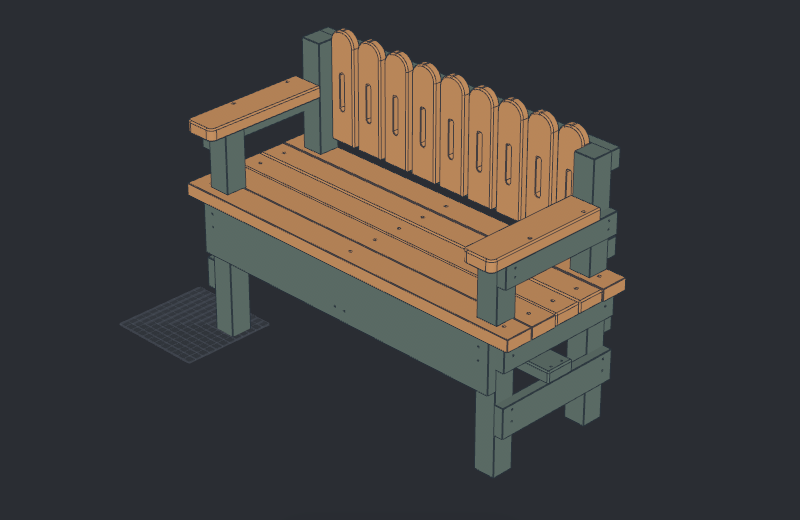 Garden bench Change one picket dimension and the whole back updates. Frame, arms and joints stay editable. |
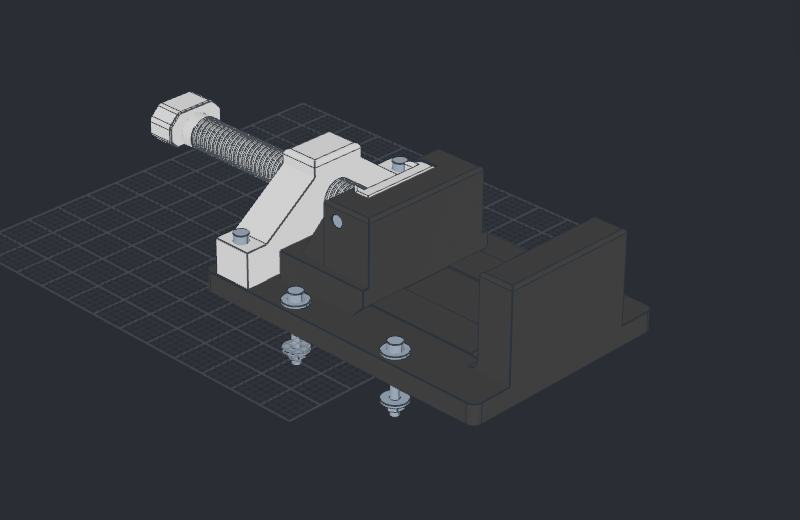 Vise Turn the screw and the jaw follows. 100 mm jaws, 90 mm travel, six printed parts plus hardware. |
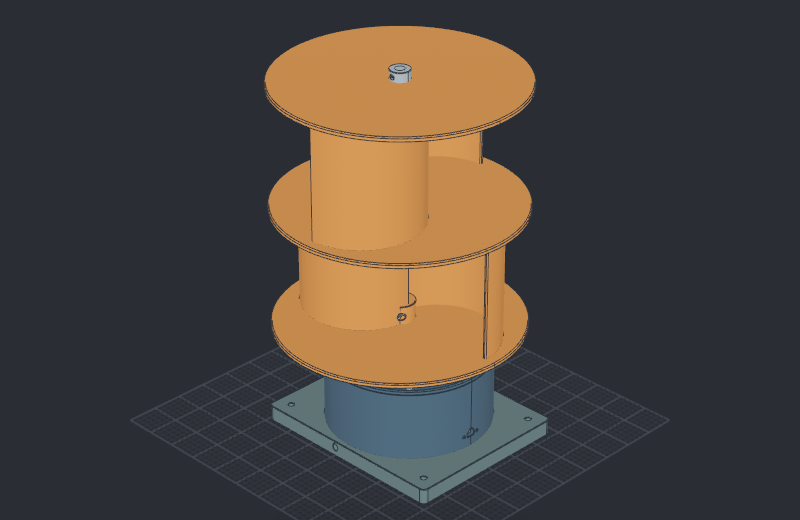 Vertical-axis turbine Two Savonius stages on a bearing-supported shaft, driving a generator through a 4:1 drive. |
|
Watch
· Open recipe Source · .nbcad · Build loop · MP4 |
Watch
· Open recipe Source · .nbcad · Build loop · MP4 |
Watch
· Open recipe Source · .nbcad · Build loop · MP4 |
Recipe links load source into Scripts for review before running. To inspect
a completed design immediately, download its .nbcad and use File → Open.
These are development examples; physical fit and load qualification remain open.
Designs, drawings and validation · All recipes
Make your first part
After installing CAD, open Scripts, choose
Sketch, extrude, ease the edges, and select Run in new design.
The lesson builds a 60 × 30 × 12 mm block with rounded top edges.
When it finishes, double-click the extrusion in the feature history and change
its Distance from 12 to 18 mm. Save the result as first-part.nbcad,
then reopen it to continue editing. Step-by-step instructions
Design, assemble, draw
Constrained sketches and reference geometry drive editable solid features.
Reuse parts in assemblies, define joints and check their motion and interference.
Keep the parts, assemblies and drawings together in one .nbcad project.
Assign per-body materials and colors, then export 3MF for your slicer.
Material labels and color metadata assist the handoff; choose the actual print
profile in the slicer. STEP carries exact geometry and STL supplies mesh
export. Drawing sheets export to DXF and print/PDF.
Assemblies · Drawings and export coverage
Work with an agent
Local stdio MCP is always available in the installed application. Bring your preferred
MCP-compatible agent and model to build a part, edit an existing feature, inspect
an assembly or replay a demonstration. CAD keeps the same editable project
whether you use the tools yourself or ask an agent to use them.
Connect your agent, then try:
Use Limo CAD to run the fillet-basics lesson in a new design in the open CAD
window. Preserve my existing documents. After the final checks pass, change
the stock extrusion from 12 to 18 mm, inspect the result and keep it open.
An agent is optional. Scripts can build a bundled example, explain its
chapters and show the construction with captions, camera moves and playback
controls. You can inspect and edit the recipe before running it.
MCP interface · Recipes and playback
· Engineering knowledge
Help build it
Contributions are welcome. Our priorities are reliability, performance and
ease of use, in that order. Bring a part, a reproducible bug or a focused
improvement. Contributing · Developer setup
· Documentation
Questions, ideas, or something you made? Start a thread in
Discussions. If Limo CAD
is useful to you, a star helps other people find it.
We are working toward guided design lessons and conversational wizards, and
developing an early 3-axis CAM foundation with toolpath generation, stock
simulation and machine-aware posts. It is not production-safe CAM; review the
CAM guides and safety limits. Strength analysis remains a
future capability. Project direction
Open-source foundations
- Open CASCADE Technology — geometry and CAD interchange.
- Bevy and wgpu — native rendering.
- Rust — modeling, assemblies and recipe execution.
- Tauri and React — desktop shell and interface.
- OpenCascade.js — browser development builds.
Thanks also to FreeCAD and the wider open-source CAD community.
License
GNU LGPL 2.1 or later. Free to use, inspect and improve.
Third-party notices and 3D mouse supportDependency licenses and attribution live in Third-party notices.
Icon sources are recorded in Icon provenance.
Peer CAD projects have their own licenses; see contribution guidance.
Limo CAD supports 3Dconnexion SpaceMouse devices. The optional browser-development
driver bridge loads only after the user enables it.
Limo CAD is independent and is not affiliated with, endorsed by or certified by
3Dconnexion. 3Dconnexion and SpaceMouse are trademarks or registered trademarks
of 3Dconnexion. 3D input device development tools and related technology are
provided under license from 3Dconnexion. © 3Dconnexion 1992–2020. All rights reserved.
Reviews (0)
Sign in to leave a review.
Leave a reviewNo results found