OpenPawlet
Health Pass
- License — License: MIT
- Description — Repository has a description
- Active repo — Last push 0 days ago
- Community trust — 101 GitHub stars
Code Pass
- Code scan — Scanned 12 files during light audit, no dangerous patterns found
Permissions Pass
- Permissions — No dangerous permissions requested
Security Assessment: Overall risk: Medium. As a web framework designed to manage AI agents, this tool inherently handles sensitive data, including chat session transcripts and API tokens. While the automated code scan found no hardcoded secrets, dangerous code patterns, or dangerous system permissions, the application does make network requests. It exposes a local web server (via FastAPI) with open API documentation endpoints (/docs, /redoc) by default. Users should ensure these endpoints are properly secured or hidden before exposing the tool to untrusted networks.
Quality Assessment: The project is actively maintained, with its last code push occurring today. It uses the permissive MIT license, which is ideal for open-source development and commercial use. Additionally, the repository has garnered 101 GitHub stars, indicating a solid foundation of early community trust and user interest.
Verdict: Safe to use, provided you secure the exposed API endpoints and avoid running the web console on public, untrusted networks.
OpenPawlet (PyPI package name open-pawlet) is a single-process web console for the OpenPawlet ecosystem. It exposes an HTTP API, a browser UI, an OpenAI-compatible /v1/* surface and the embedded agent runtime
OpenPawlet
Languages: 中文说明
What it is
OpenPawlet (PyPI package name open-pawlet) is a single-process web console for the OpenPawlet ecosystem. It exposes an HTTP API, a browser UI, an OpenAI-compatible /v1/* surface and the embedded agent runtime (agent loop, channels, cron, heartbeat) over a single FastAPI port so you can manage bot-related resources locally or in deployment.
Stack: FastAPI backend (consistent error envelope and OpenAPI; Swagger/ReDoc/openapi.json are served by default at /docs, /redoc, /openapi.json — set each *_url to empty to hide) and a Vite frontend under src/console/web (HMR in development, production build supported).
Feature areas
The console roughly covers the areas below (see the UI and OpenAPI for the exact surface):
| Area | Capabilities |
|---|---|
| Bots & agents | Inspect and manage bots and agents |
| Chat & channels | Sessions, chat, channels; debug with gateway WebSocket and realtime events |
| Config & env | Console and bot configuration, environment variables, bot file access (e.g. bot_files) |
| Tools & extensions | Tools, MCP servers, skills, memory |
| Automation | Cron jobs |
| Ops & observability | Status, health, health audit, usage, alerts, activity; control endpoints where applicable |
| Workspace | Workspace browsing and management |
| Session transcripts | Optional append-only JSONL logs (OpenPawlet) under workspace transcripts/ when agents.defaults.persistSessionTranscript is true; transcriptIncludeFullToolResults controls full tool payloads in the log |
Typical use: start console start; the embedded OpenPawlet runtime comes up in the same process so you can immediately inspect status, debug sessions, and manage these resources from the console without supervising a separate gateway.
Screenshots
The OpenPawlet web UI (branded “OpenPawlet · AI Assistant” in the console) provides a sidebar for Chat, Control, Agent, and Management areas, plus a top bar for workspace selection, language, theme, and gateway status.
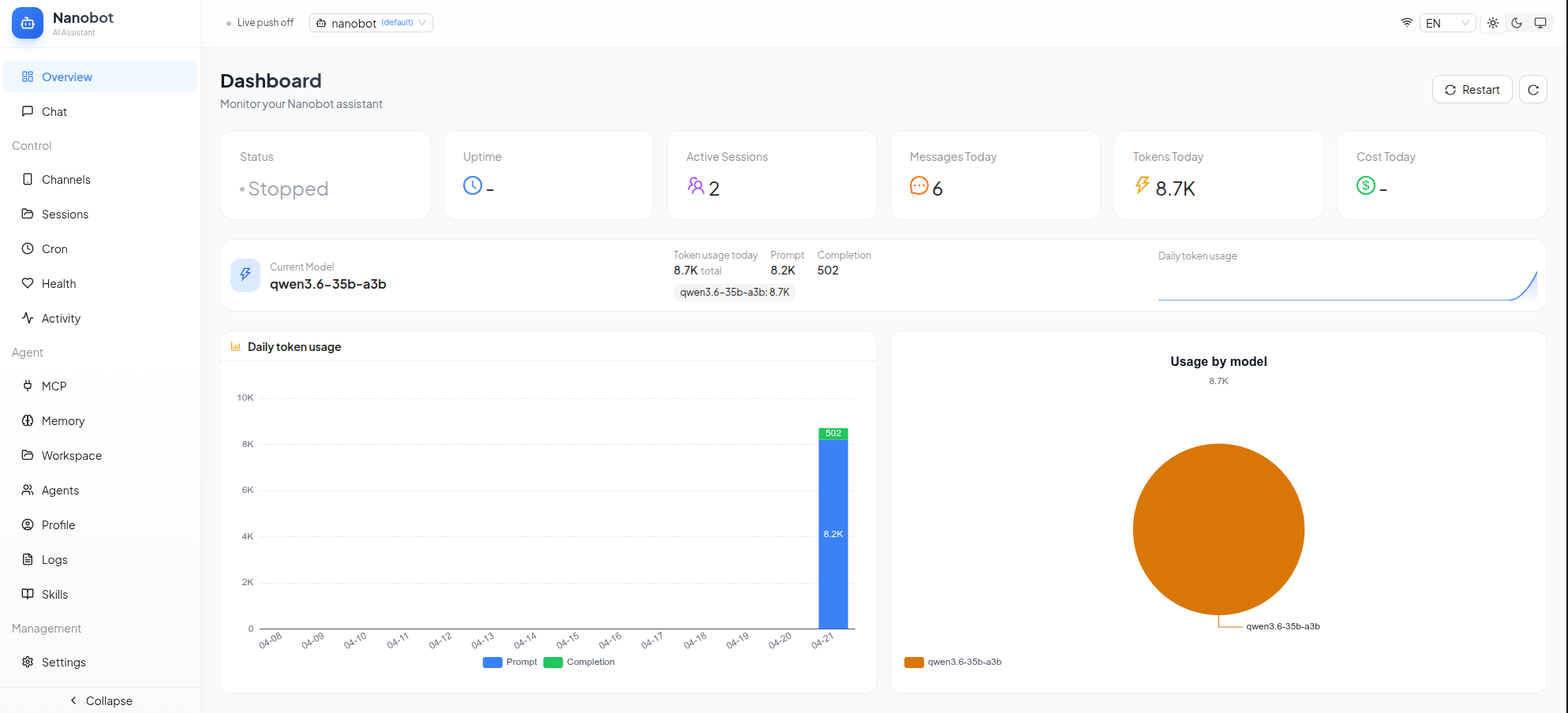
Dashboard overview
The overview page surfaces key metrics (status, uptime, active sessions, messages, tokens, cost), the current model, and charts such as daily token usage and usage by model—useful for at-a-glance monitoring in local or deployed setups.
Chat
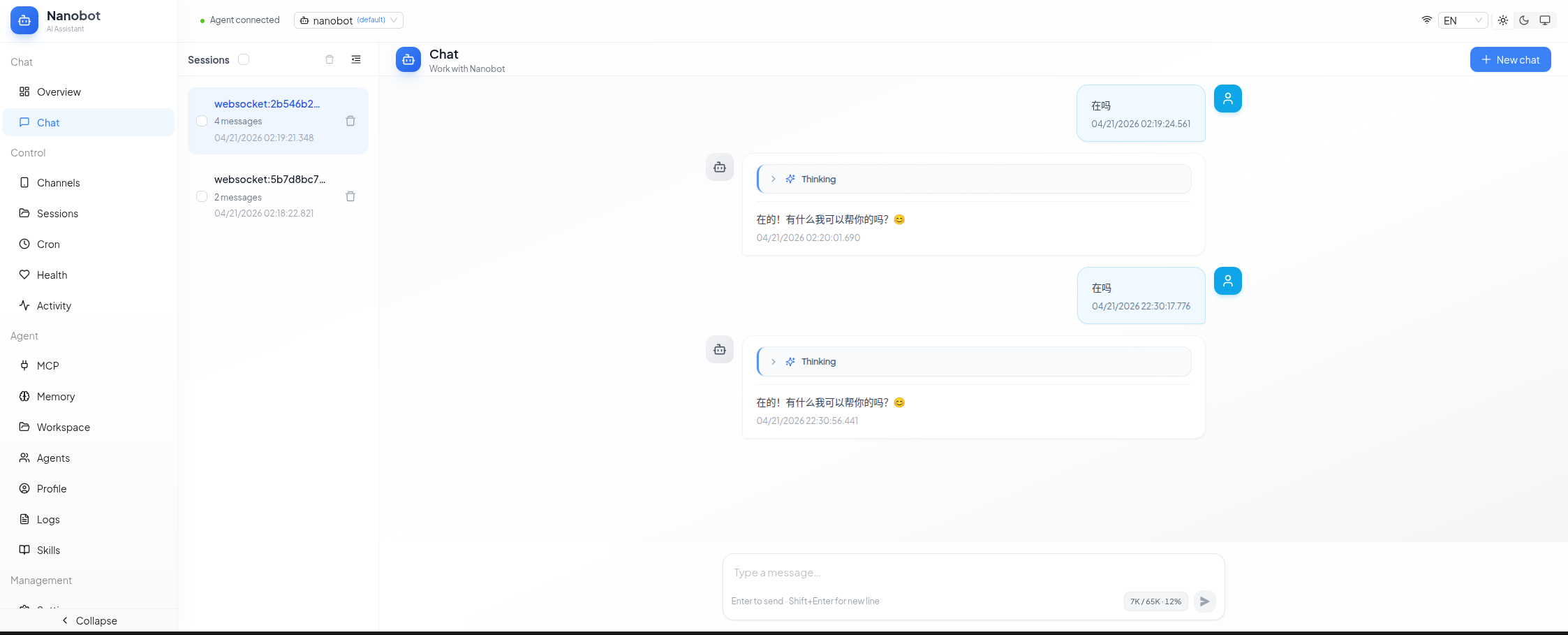
The chat view supports multiple sessions (list with message counts and last activity), streaming-style replies with optional thinking / progress indicators, and an input area with token budget hints. Navigation to channels, MCP, memory, workspace, agents, skills, and related tools stays one click away in the sidebar.
Channels
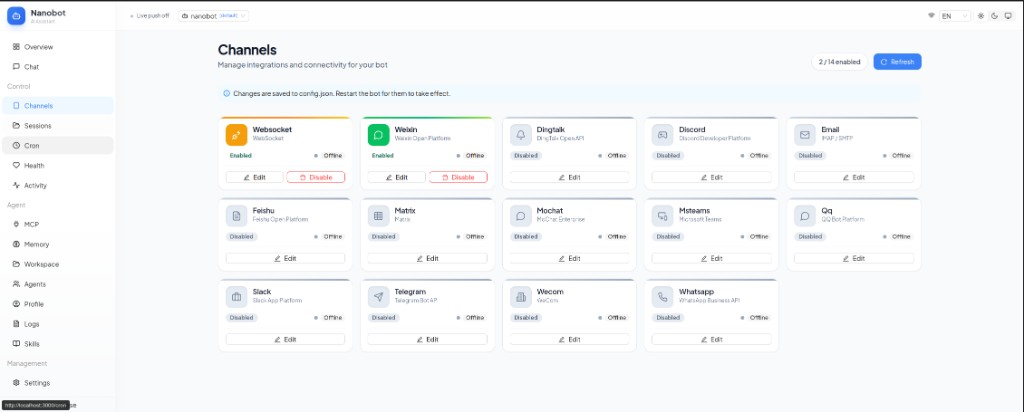
Channels lists integrations for your bot (for example WebSocket, Weixin, DingTalk, Discord, Email, Feishu, Matrix, MoChat, Microsoft Teams, QQ, Slack, Telegram, WeCom, and WhatsApp). You can enable or edit each channel from the grid; the UI notes that changes are saved to config.json and that you should restart the bot for them to take effect.
Architecture notes
- Backend: FastAPI-based OpenPawlet service with a consistent error envelope and OpenAPI documentation.
- Frontend: Vite app under
src/console/web, with HMR in development and a production build path.
Tech stack
| Layer | Technology |
|---|---|
| Runtime | Python ≥ 3.11 |
| Backend | FastAPI, Uvicorn, Pydantic v2, Loguru |
| OpenPawlet agent framework | Bundled in this repo (src/openpawlet); installed as part of open-pawlet |
| Frontend | Node.js + npm (see src/console/web) |
| Single-process entrypoint | console start (unified FastAPI service) |
Quick start
1. Virtual environment and install
A project-local .venv is recommended:
python3.11 -m venv .venv
source .venv/bin/activate   # Windows: .venv\Scripts\activate
pip install --upgrade pip
pip install -e ".[dev]"
The openpawlet Python package ships inside this repository; pip install -e ".[dev]" installs the console and agent framework together.
2. Frontend dependencies
cd src/console/web && npm install && cd ../../..
3. Run
consoleandopen-pawletare the same command (both entry points map
toconsole.cli:main). Use whichever name you prefer; the examples below use
the shorterconsolealias.Since 0.3.x all services are collapsed into a single FastAPI process:
REST API, SPA, OpenAI-compatible/v1/*, queues admin/queues/*,
WebSocket/openpawlet-ws/*and the embedded OpenPawlet runtime (AgentLoop,
Channels, Cron, Heartbeat) share the same event loop and expose one HTTP
port. The legacy standalonegateway/servecommands,open-pawlet-queue-manager,Procfileandhonchoentrypoints have all
been removed.
Single-command production (recommended for local use)
npm --prefix src/console/web run build
console start   # open http://localhost:8000
console start runs the unified FastAPI server, mounts the prebuilt SPA
from src/console/web/dist (so the UI and /api/v1/* share a single origin
and port) and starts the OpenPawlet runtime in the same event loop (no
subprocess fork; no ZeroMQ broker). All WebSocket / channel / cron tasks
live inside the FastAPI lifespan. On first launch run openpawlet onboard once
if ~/.openpawlet/config.json is missing. Press Ctrl+C to gracefully stop the
process.
Flags:
--no-spa— skip mounting the prebuilt SPA. Useful for headless API-only
deployments where the UI is hosted elsewhere.
Re-run npm run build (or console web build) after frontend changes.
Frontend dev mode (hot reload)
Run the unified server and the Vite dev server in two terminals:
console start         # single process: FastAPI + embedded OpenPawlet, on http://localhost:8000
console web dev       # Vite dev server on http://localhost:3000 (open this for the UI)
Open the Vite URL (http://localhost:3000); Vite proxies /api/*,/v1/*, /queues/* and /openpawlet-ws/* to :8000. You no longer need a
separate gateway or queue-manager process.
Cross-platform notes
- The single-process layout runs unchanged on Windows and Linux; the
CLI flips toWindowsSelectorEventLoopPolicyautomatically on Windows. - Signal handling lives in
console.server.signals: Linux usesloop.add_signal_handler, Windows falls back tosignal.signal. pytest -qpasses on both platforms (only one ExecTool case unrelated to
this repository is skipped on Windows becausesleepis not onPATH).
Configuration
Settings are resolved with the following priority (highest first):
- Environment variables prefixed with
OPENPAWLET_SERVER_(e.g.OPENPAWLET_SERVER_PORT=9000) - Optional
.envfile in the working directory ~/.openpawlet/openpawlet_web.jsonunder the top-levelserverkey- Built-in defaults (see
console.server.config.schema.ServerSettings)
The JSON file is opt-in: it is no longer written automatically on first
boot. Create a starter file with console init-config when you want to
persist non-default values to disk.
Version history (timeline)
Major releases for the open-pawlet PyPI package (matches [project] version in the root pyproject.toml). The console is built for the OpenPawlet stack; the agent framework lives under src/openpawlet and ships with each install. Newest at the top; older entries below. Add new rows at the top when you cut a release.
2026-04-26 ──●── 0.3.0  Unified single-process FastAPI: console + OpenPawlet OpenAI API + queues admin + gateway collapsed into one entrypoint; ZMQ broker / Procfile / honcho removed; in-process MessageBus; cross-platform Win/Linux hardening; new unified-app end-to-end tests
              │
2026-04-20 ──●── 0.2.2  OpenPawlet WebSocket (session lifecycle, delta stream, busy state); tests/docs; UI & dashboard
              │
2026-04-19 ──●── 0.2.1  Aligned versions (pyproject, API schema, web); OpenPawlet framework + console version metadata
              │
2026-04-19 ──●── 0.2.0  Deps & packaging; README; bundled OpenPawlet framework; WhatsApp bridge under bridge/
              │
2026-04-19 ──●── 0.1.0  First release: FastAPI console for the OpenPawlet agent, CLI, workspace, README / Procfile
| Date | Version | Summary |
|---|---|---|
| 2026-04-26 | 0.3.0 | Architecture collapse: all services (REST / SPA / OpenAI-compatible /v1/* / queues admin / WebSocket / OpenPawlet runtime) merged into a single FastAPI process; removed legacy standalone gateway / serve, open-pawlet-queue-manager, Procfile and the ZeroMQ broker; in-process MessageBus replaces ZMQ; unified Win/Linux event-loop policy and signal handling; introduced EmbeddedOpenPawlet runtime and unified-app end-to-end tests. |
| 2026-04-20 | 0.2.2 | OpenPawlet: WebSocket session lifecycle, delta streaming, and busy-state handling in gateway and UI; broader framework test coverage and channel docs. Console: dashboard/charts, activity filters, workspace and bot-profile flows, ErrorBoundary, layout and control tweaks; CI and Vitest hardening. |
| 2026-04-19 | 0.2.1 | Single source of truth for version strings (Python package, server API version, frontend package.json) so OpenPawlet installs report consistent versions end-to-end. |
| 2026-04-19 | 0.2.0 | Dependency and optional extras cleanup, install docs; OpenPawlet framework bundled in-repo; bridge/ (including WhatsApp-related pieces). |
| 2026-04-19 | 0.1.0 | Initial OpenPawlet web console: FastAPI backend, console CLI, workspace features, docs, and Honcho/Procfile entry points. |
License
MIT — see LICENSE in the repository root.
Reviews (0)
Sign in to leave a review.
Leave a reviewNo results found