forgectl
Health Uyari
- License — License: MIT
- Description — Repository has a description
- Active repo — Last push 0 days ago
- Low visibility — Only 5 GitHub stars
Code Gecti
- Code scan — Scanned 12 files during light audit, no dangerous patterns found
Permissions Gecti
- Permissions — No dangerous permissions requested
Bu listing icin henuz AI raporu yok.
A harness for Agentic Coding Agents. Driven by spec driven development.
Forgectl
Forgectl is a spec driven development harness. Takes plan to implementation completeness.
Specs are the source of truth, the new form of code. Agents take diffs in the specs and generate code from it, just like compilers take C or Golang code and generate assembly.
Forgectl is a compiler of specs into executable code, built for Agents.
Use with Claude Code
Install the binary
- install Golang
- run
make install-global - run
forgectl --versionto confirm it works
Install the Claude Code plugin (recommended)
The skills and commands ship as a Claude Code plugin. Add the marketplace and install:
/plugin marketplace add jackstine/forgectl
/plugin install forgectl@forgectl
This makes the spec-driven development skills (planner, specs, implementation_planning,implementation, implement_from_specs, reverse_engineering) and the meta, q, and review
commands available — namespaced under the forgectl plugin. The plugin is defined by.claude-plugin/plugin.json and published via .claude-plugin/marketplace.json.
Legacy install (symlinks)
- install using
scripts/install-claude.sh <path>for now.- this creates a
.claudefolder with symlinks, it will not delete an existing.claudefolder. - you will need to remove your
.claudeor move it, to use for now.
- this creates a
Workflow
Take a plan and pipe it into your LLM coding agent.
The agent will then
- crete/update specs according to the changes in the plan
- create a implementation plan
- create implementation from the plan
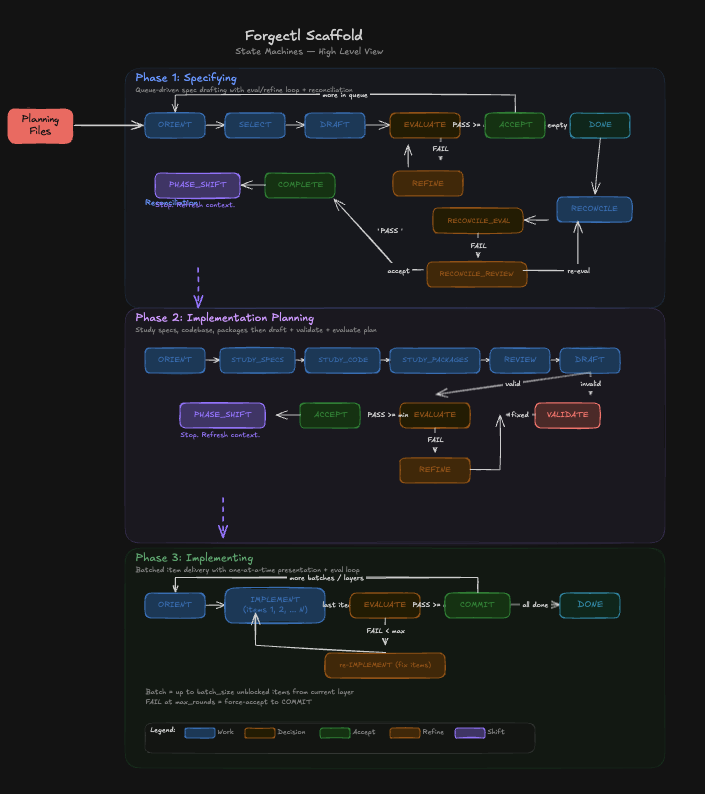
The Forgectl pipeline: transforming plans into specifications, then into implementation plans, and finally into production code through coordinated agent workflows.
View the diagram in Excalidraw
Pipelines
- Specify - take a plan and align specs to the plan
- Implemenation Planning - Plan how to implement the changes in specs to the existing code base.
- Implement - take an implementation plan, and implement it.
Future Work
- Reverse Engineer implemenation into Specs for brownfield development repos
- Front End Implementation Agents
- using playwright agents
- Currently Eval agents are general_purpose, so create multiple eval agents for their specific tasks
Skills
Planner
Use the Planner Skill to plan, this allows you to currently create plans that will shape your specs.
It will help you tailor plans that have less defects and more accurate and solid logic.
- used to table ideas in the
tabledsection of the workspace
Implement From Specs
If you updated the specs already, just use this to make a quick implementation. The idea here is you want to make a quick implementation update, after changing the specs.
Specs
Use this when you want to
- update the specs
- have a plan and want to embed into the specifications
- want to refactor your specifications
Implementation Planning
Used to view the diff in specs and generate a plan of implementation. Add your own references and agents to help out with creating notes on implementation details for particular parts of the specs that need to be implemented.
This pipeline of the process is involved with generating a plan to implement.
Implement
Take a implementation plan, and implement it. Simple as that. This is where your agent is on auto pilot, and reinforces the spec generation into the codebase.
Examples
Spec Planning Session
Here is full conversation showing how I iteratively review, discuss, and update specifications (on forgectl) and cross-spec consistency. This is what a real planning session looks like using the specs skill.
See: docs/examples/example_of_working_and_planning_in_specs.txt
Diagrams
Detailed ASCII art diagrams of the full workflow, state machines, CLI commands, and data flow are in docs/diagrams/.
Schemas
JSON schema documentation for all files forgectl reads, writes, and validates are in docs/schemas/.
Thanks and References
- Clayton Farr and Geoffery Huntley for implementation of a spec driven development workflow ralph playbook, and helping me harness AI potential. how-to-ralph-wiggum
- Jack Clark at Anthropic for helping me understand Anthropics work on scaffolding in late December that started this search for AI improvements. https://jack-clark.net/ .
Yorumlar (0)
Yorum birakmak icin giris yap.
Yorum birakSonuc bulunamadi