mindmap-markmap-viewer
Health Pass
- License — License: MIT
- Description — Repository has a description
- Active repo — Last push 0 days ago
- Community trust — 28 GitHub stars
Code Warn
- network request — Outbound network request in assets/vendor/markmap-view.min.js
Permissions Pass
- Permissions — No dangerous permissions requested
No AI report is available for this listing yet.
A Claude Code skill that turns Markdown outlines into interactive, offline mind maps with markmap.js — white-on-dark, searchable (match + ancestors), with a zoom / expand / export toolbar.
mindmap-markmap-viewer
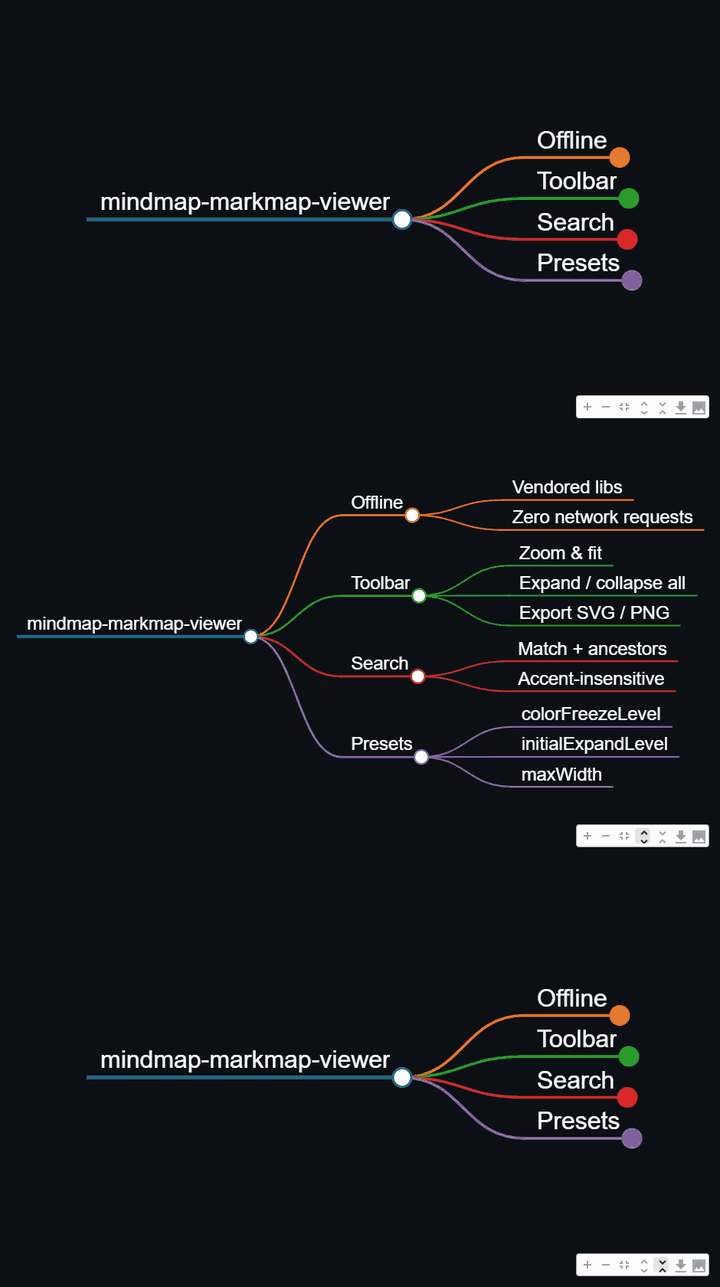
A Claude Code skill that turns hierarchical Markdown into an interactive SVG mind map with markmap.js — readable white-on-dark by default, with expand-by-level control and a search that filters the tree to matches plus their ancestors and descendants (so a hit always shows up in context, not floating alone). Works standalone or embedded in Streamlit.
Why this exists
markmap renders a Markdown outline as a zoomable mind map, but three things need a layer on top to be genuinely usable:
- Visibility — a white font is invisible on the white default surface; the renderer paints its own dark backdrop so the map is readable everywhere, not just in a dark host.
- Expand control — collapse to N levels or expand everything, without rebuilding the map.
- Search that keeps context — filtering to just the matching nodes loses the path that explains where a hit lives; this keeps ancestors and the matched subtree.
Features
- One call to a single self-contained HTML file (
build_html/write_mindmap) — the markmap stack (vendored locally and pinned exact) is inlined into the page, so the one.htmlopens offline anywhere with no CDN, no network, and no sibling files to keep alongside it. - Built-in navigation toolbar: zoom in/out, fit-to-window, expand-all / collapse-all, and export to SVG / PNG (2× raster, current fold state).
- Expand-by-level (
set_expand_level), including expand-all (-1). - Accent-insensitive, context-preserving search (
filter_markmap). - HTML-safe:
<,>,&in node text (List<String>,a < b) round-trip correctly instead of breaking the page. - Zero runtime dependencies for the core — Python standard library only. Streamlit is an optional import, used only when you embed.
Install
Ask Claude Code to install it from this repo:
Install this skill from https://github.com/Jaderson-bit/mindmap-markmap-viewer
Or, as a developer, clone it into your skills directory:
git clone https://github.com/Jaderson-bit/mindmap-markmap-viewer.git ~/.claude/skills/mindmap-markmap-viewer
Or copy a folder you already have:
cp -r mindmap-markmap-viewer ~/.claude/skills/
Usage
import sys; sys.path.insert(0, "scripts")
from render_markmap import build_html, set_expand_level, filter_markmap

src = open("assets/example.md", encoding="utf-8").read()
# optional: src, n = filter_markmap(src, "branch b")   # search + keep context
# optional: src = set_expand_level(src, -1)             # expand all
open("mindmap.html", "w", encoding="utf-8").write(build_html(src, height=850))
Inside Streamlit:
import sys; sys.path.insert(0, "scripts")
from render_markmap import render_markmap, set_expand_level
render_markmap(set_expand_level(src, 2), height=850)
See SKILL.md for the source format and authoring rules.
Layout
mindmap-markmap-viewer/
├── SKILL.md                     # operational guide (loads when the skill triggers)
├── scripts/render_markmap.py    # build_html / set_expand_level / filter_markmap
├── assets/
│   ├── example.md               # minimal sample outline
│   └── vendor/                  # pinned markmap + d3 libs, loaded locally (offline)
├── evals/                       # dependency-free regression suite + eval prompts
└── references/
    ├── internals.md             # how the helpers work and why
    └── lessons.md               # real-world lessons + adversarial counter-review
Tests
python evals/test_render_markmap.py
A dependency-free suite; every check is labeled with the bug it locks down.
Battle-tested
The renderer and text transforms were hardened against a multi-agent adversarial review (12 confirmed findings, each verified by a second agent that tried to refute it). The findings — and the process — are documented in references/lessons.md.
Reviews (0)
Sign in to leave a review.
Leave a reviewNo results found