rigby2d
Health Uyari
- License — License: Apache-2.0
- Description — Repository has a description
- Active repo — Last push 0 days ago
- Low visibility — Only 5 GitHub stars
Code Gecti
- Code scan — Scanned 12 files during light audit, no dangerous patterns found
Permissions Gecti
- Permissions — No dangerous permissions requested
Bu listing icin henuz AI raporu yok.
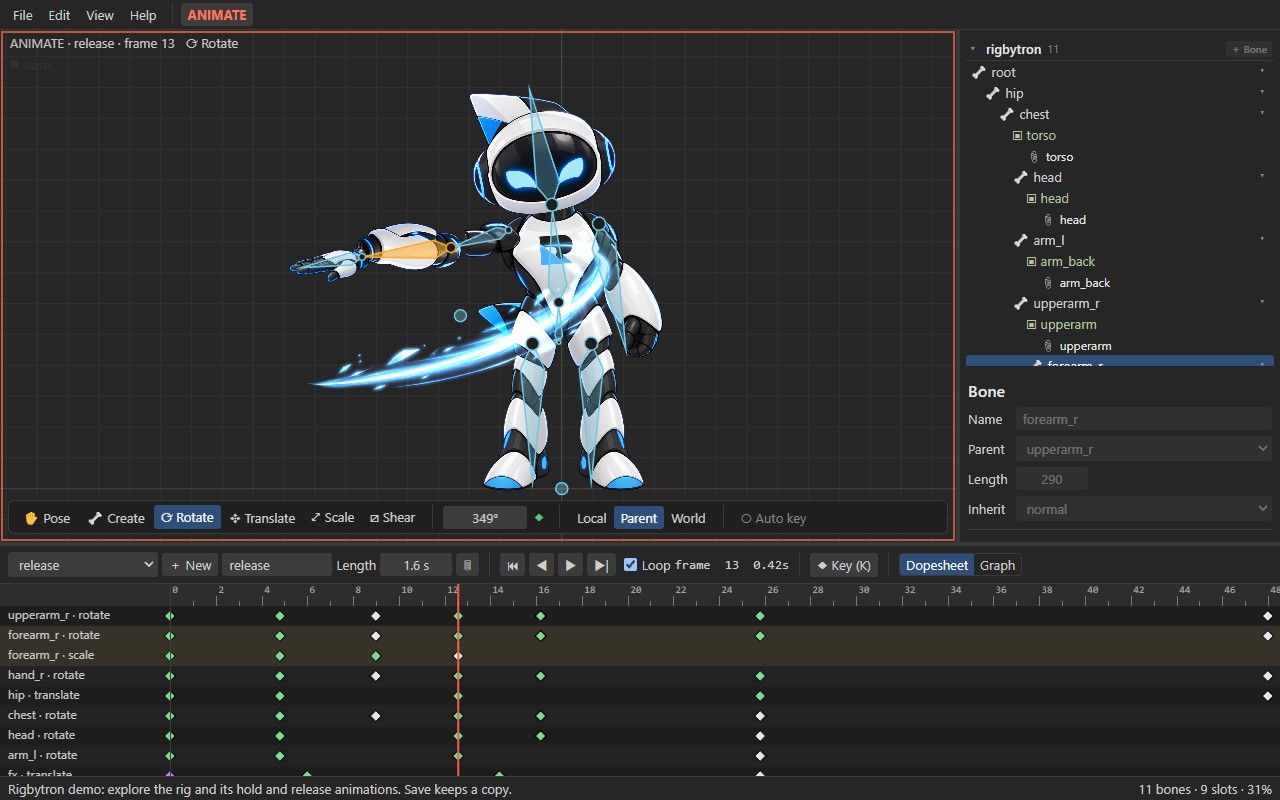
Open-source 2D skeletal animation for games, films and interactive experiences. Rig PSD/PNG art, animate, export JSON/.skel + atlas. Built-in MCP server for AI assistants.

Open-source 2D skeletal animation for games, films and interactive experiences.
Rig your art with bones and meshes, animate it, and play it anywhere with the included runtime.
Built-in MCP server: AI assistants can inspect, validate and animate your projects.







Built for AI assistants (MCP)
Rigby2D ships a Model Context Protocol server, so assistants such
as Claude can work directly on your animation projects, not just talk about them:
- Understand a rig: list bones, slots, skins, constraints and animations with their keys.
- Check it: evaluate any pose with the real runtime, find missing images and export problems.
- Animate it: add bones and animations, set eased keys, image swaps and events.
- Ship it: convert between skeleton JSON 3.8 / 4.2 / 4.3 and binary
.skel.
Ask things like "Which images are missing from hero.skel?" or "Add a 1-second wave animation to
rigbytron.rigby that raises the right arm and fires a 'hi' event at the end." Edits save in the
file's own format and stay inside the folders you allow. Setup is one line, no packages to install
(details):
claude mcp add rigby2d -- node /path/to/rigby2d/src/mcp/server.js --root /path/to/your/projects
Features
- AI assistant support (MCP): a built-in Model Context Protocol server lets assistants such as Claude inspect, validate, sample, edit and convert projects. See Built for AI assistants.
- Art import: PSD files (every pixel layer becomes a part, layout preserved) or individual PNGs.
- Rigging: draw bone chains directly in the viewport, reparent, attach images to bones, reorder draw order, turn images into meshes (add, move and delete vertices), bind meshes to bones and paint weights, create linked meshes, set up image sequences, and edit bounding box, clipping and path shapes.
- Constraints, skins and events: create IK, transform, path, physics and slider constraints from the selected bones and edit every setting; key their mixes and values in Animate mode; key mesh deformation and image sequence frames; create skins (with skin bones and constraints) and events with keyed values; add bounding box, clipping, point and path attachments.
- Animation: Setup and Animate modes, pose / rotate / translate / scale / shear tools, key buttons and optional auto key, switchable shortcut presets.
- Dopesheet and graph editor: multi-key selection, moving and retiming keys, curve presets, bezier handle editing, image-swap keys.
- WebGL viewport with a Canvas 2D fallback (View menu).
- Undo / redo for every edit, with unsaved-change tracking.
.rigbywork file: one self-contained file with the whole project and its images (like a.blend).- Skeleton import/export: opens and exports the widely used skeleton formats:
.json(3.8, 4.2, 4.3) and binary.skel(4.3), with.atlastexture atlases. Meshes, weights, skins, constraints, events, deform and draw-order keys round-trip losslessly. - Runtime included: a small dependency-free JavaScript runtime (
src/core) with animation tracks, events, image sequences, IK, transform, path, physics and slider constraints, plus a reference WebGL renderer (src/webgl). - Demo project: the editor opens with Rigbytron, the Rigby2D mascot, rigged and animated, so you can explore a real rig right away (File ▸ Open demo (Rigbytron) reopens it). File ▸ New sample (robot) gives a simpler character drawn by the editor.
In progress
Rigby2D is in early alpha. Work under way:
- Godot and Unity runtimes: a Rust runtime with full feature support, starting with Godot.
- Offline renderer: export transparent PNG sequences, WebM and MP4.
- Audio tracks and lip-sync.
- Cameras and scene composition.
- Facial controllers and pose libraries.
- Resolution and frame-rate controls.
- Animation batch renderer.
Getting started
Download
Windows installers (MSI and setup .exe) are on the
Releases page. They are not code-signed
yet, so Windows SmartScreen may warn before running them (More info ▸ Run anyway). Each release
lists the SHA-256 checksums of its files; compare them before installing:
Get-FileHash .Rigby2D_0.1.0_x64_en-US.msi -Algorithm SHA256
To build from source instead, follow the steps below.
Prerequisites
- Node.js 20 or newer
- Tauri's system prerequisites for your OS, see https://tauri.app/start/prerequisites/
- Windows: Microsoft C++ Build Tools ("Desktop development with C++") and WebView2 (preinstalled on Windows 10/11)
- macOS: Xcode Command Line Tools
- Linux: WebKitGTK and build essentials
Run
git clone https://github.com/jaisurya-dev-art/rigby2d.git
cd rigby2d
npm install
npm run dev
Build a release
npm run build
The app is written to src-tauri/target/release/ and the installers (MSI and NSIS setup .exe) tosrc-tauri/target/release/bundle/.
Test
npm test
Using Rigby2D
The editor opens with the Rigbytron demo; File ▸ New starts an empty project.
- Import art: File ▸ Import PSD… or File ▸ Import PNG images…
- Draw bones: pick the Create tool in the viewport toolbar and drag. Select a bone first to chain children from it.
- Attach images: select an image and choose its Bone in the inspector.
- Animate: switch to Animate mode, move the time cursor and pose bones, then set keys with the key buttons (or turn on Auto key). The Help menu lists the keyboard shortcuts.
- Save: File ▸ Save writes your work file
name.rigby. Reopen it any time with File ▸ Open. - Export: File ▸ Export JSON + atlas… or Export .skel + atlas writes the skeleton plus
name.atlasandname.pngfor runtimes. File ▸ Open also imports existing.json/.skelexports.
Playing animations in your game or app
The runtime plays Rigby2D animations in games, interactive web pages, apps and kiosks, anywhere
JavaScript runs. Copy src/core/ into your project (no dependencies). With WebGL, also copy src/webgl/ for a
ready-made renderer (one batched draw call per texture and blend mode, two-color tint, clipping):
import { AnimationState, Pose, parseAtlas, readSkeletonJson } from './core/index.js';
import { WebGLRenderer } from './webgl/renderer.js';

const { skeleton } = readSkeletonJson(JSON.parse(jsonText), 'hero'); // hero.json
const pose = new Pose(skeleton);
const state = new AnimationState();
state.play(skeleton, 'walk', true, 0.2);              // track 0, 0.2 s crossfade
state.setAnimation(skeleton, 1, 'shoot', false, 0.1); // track 1 layers on top
state.addAnimation(skeleton, 0, 'idle', true, 0.3);   // queued after walk
state.addListener({ event: (entry, e) => playSound(e.audio ?? e.name) });

const renderer = new WebGLRenderer(gl);
const textures = renderer.atlasTextures(parseAtlas(atlasText), { 'hero.png': pageImage });

function frame(dt) {
  state.update(skeleton, dt);
  state.apply(skeleton, pose);
  renderer.begin(canvas.width, canvas.height, { x: 0, y: 200, zoom: 1 });
  renderer.drawSkeleton(skeleton, pose, textures);
  renderer.end();
}
With another renderer, draw pose.quads(skeleton): world-space positions (Y up), UVs, tint and
blend mode for every visible region and mesh. examples/webgl.html is a small player: runnpm run web:dev and open /examples/webgl.html.
File formats
.rigby: Rigby2D's work file: a ZIP holdingproject.json(the complete document) andimages/*.png. Use it for saving work in progress.- Skeleton
.json/.skel: the interchange formats runtimes load. Bones are listed so
parents come first, slots are in draw order, attachments live in skins, and animations hold bone,
slot, deform, draw-order, IK and event timelines with keys relative to the setup pose. Images
come from a.atlastexture atlas or loose files in the skeleton'simagesfolder. - Binary
.skelsupport covers format 4.3 skeletons with IK, transform, path, physics and
slider constraints, skins, region and mesh attachments with image sequences, linked mesh,
bounding box, path and clipping attachments, and bone, slot, IK, transform, path, physics,
slider, deform, sequence, draw-order and event keys. Rigs using other features (point
attachments, separate RGB/alpha color keys, …) export to.jsoninstead. - The runtime evaluates IK, transform, path, physics and slider constraints and plays image
sequences (hold, once, loop, ping-pong and reverse modes). Physics uses Rigby2D's own
spring model driven by the stored settings (inertia, strength, damping, mass, wind, gravity,
limit, mix), so motion can differ slightly from other tools. It simulates while animations play
(AnimationStatepasses the elapsed time);pose.resetPhysics()starts it over.
MCP server reference
Tools: inspect_project, describe_rig, describe_animation, sample_pose, validate_project
and convert_project read and convert; add_bone, set_bone_setup, add_animation,set_bone_key, delete_bone_key, set_attachment_key and set_event_key edit. The server only
reads and writes inside the --root folders, and edits save atomically in the file's own format
(or to a copy). See docs/mcp.md for Claude Desktop and other clients, every tool
and the security model.
Performance benchmark (0.1.0)
Measured on a desktop PC in Chromium and Node 20; numbers vary with hardware. Rigs are described
by size: M has 67 bones and 276 mesh vertices, L 76 bones and 667 weighted mesh vertices
with 9 IK constraints, XL 143 bones and 879 mesh vertices with 21 transform and path
constraints.
Runtime (src/core): animating one character for one frame (apply the animation, solve
constraints, compute world transforms and vertices), median of 2000 frames:
| Rig | Time per frame | Characters per 16 ms frame |
|---|---|---|
| M | 47 µs | ~330 |
| L | 72 µs | ~220 |
| XL | 184 µs | ~85 |
WebGL renderer (src/webgl): 50 XL characters, each animated and drawn every frame, take
21.6 ms per frame including the GPU (0.43 ms per character) in a single draw call.
Editor viewport: drawing one animation frame with WebGL, median and 95th percentile of 120
frames:
| Rig | Median | 95th percentile |
|---|---|---|
| M | 0.4 ms | 0.5 ms |
| L | 0.5 ms | 0.7 ms |
| XL | 1.0 ms | 1.6 ms |
Project structure
src/core/       Runtime: data model, skeleton JSON/.skel + atlas I/O, pose evaluation, constraints, playback
src/editor/     Editor UI: viewport, tree, properties, dopesheet, graph editor, import/export
src/webgl/      Reference WebGL renderer for the runtime
src/splash/     Splash screen (plays the Rigbytron animation with the runtime)
src/mcp/        Model Context Protocol server for AI assistants
branding/       Logo, lockups, icons and Rigbytron (proprietary, see TRADEMARKS.md)
examples/       WebGL player example
src-tauri/      Native desktop shell (editor and splash windows, file dialog/fs plugins only)
test/           node:test suites
docs/           Screenshot and the MCP server guide
Contributing
Contributions are welcome! Please read CONTRIBUTING.md for the development setup,
coding style and pull request process.
License
Rigby2D's source code is licensed under either of
at your option. © 2026 jaisurya-dev-art
Unless you state otherwise, any contribution you submit for inclusion in Rigby2D is licensed under
both licenses as above, without any additional terms or conditions.
Trademarks
Rigby2D, Hoverlabs and Rigbytron, and the Rigby2D logo, lockups, icons and the Rigbytron
mascot in branding/, are proprietary trademarks of Hoverlabs. They are not covered by the MIT or Apache 2.0 licenses. Forks
and modified versions must use their own name and branding. See TRADEMARKS.md.
Disclaimer
Rigby2D is an independent open-source project. It is not affiliated with, endorsed by, or sponsored by the makers of any other animation software. All trademarks belong to their respective owners.
Rigby2D reads and writes the skeleton JSON, binary .skel and texture atlas file formats solely for interoperability, so that users can work with their own exported files. This support was implemented clean-room:
- JSON and atlas formats: implemented from publicly available documentation.
- Binary
.skelformat: implemented from the publicly documented binary layout of earlier versions and by comparing JSON and binary exports of the same skeleton (black-box observation of exported data).
No third-party source code, runtimes, editor files or assets are used or distributed with Rigby2D. Compatibility with files from any particular editor or runtime version is provided as-is and is not guaranteed.
Yorumlar (0)
Yorum birakmak icin giris yap.
Yorum birakSonuc bulunamadi