claude-grammar
Health Warn
- License — License: MIT
- Description — Repository has a description
- Active repo — Last push 0 days ago
- Low visibility — Only 6 GitHub stars
Code Fail
- process.env — Environment variable access in docs/measure-cost.ts
- network request — Outbound network request in docs/measure-cost.ts
- spawnSync — Synchronous process spawning in docs/render-tour.ts
- process.env — Environment variable access in docs/render-tour.ts
- network request — Outbound network request in docs/render-tour.ts
- exec() — Shell command execution in hooks/check.ts
- exec() — Shell command execution in hooks/config.ts
Permissions Pass
- Permissions — No dangerous permissions requested
No AI report is available for this listing yet.
Checks the English of each prompt you send to Claude Code, shows the fixes under it, and keeps them so /grammar stats and /grammar review show the mistakes you make most
grammar

A Claude Code plugin that checks the English of each prompt you send and shows the fixes right under it.
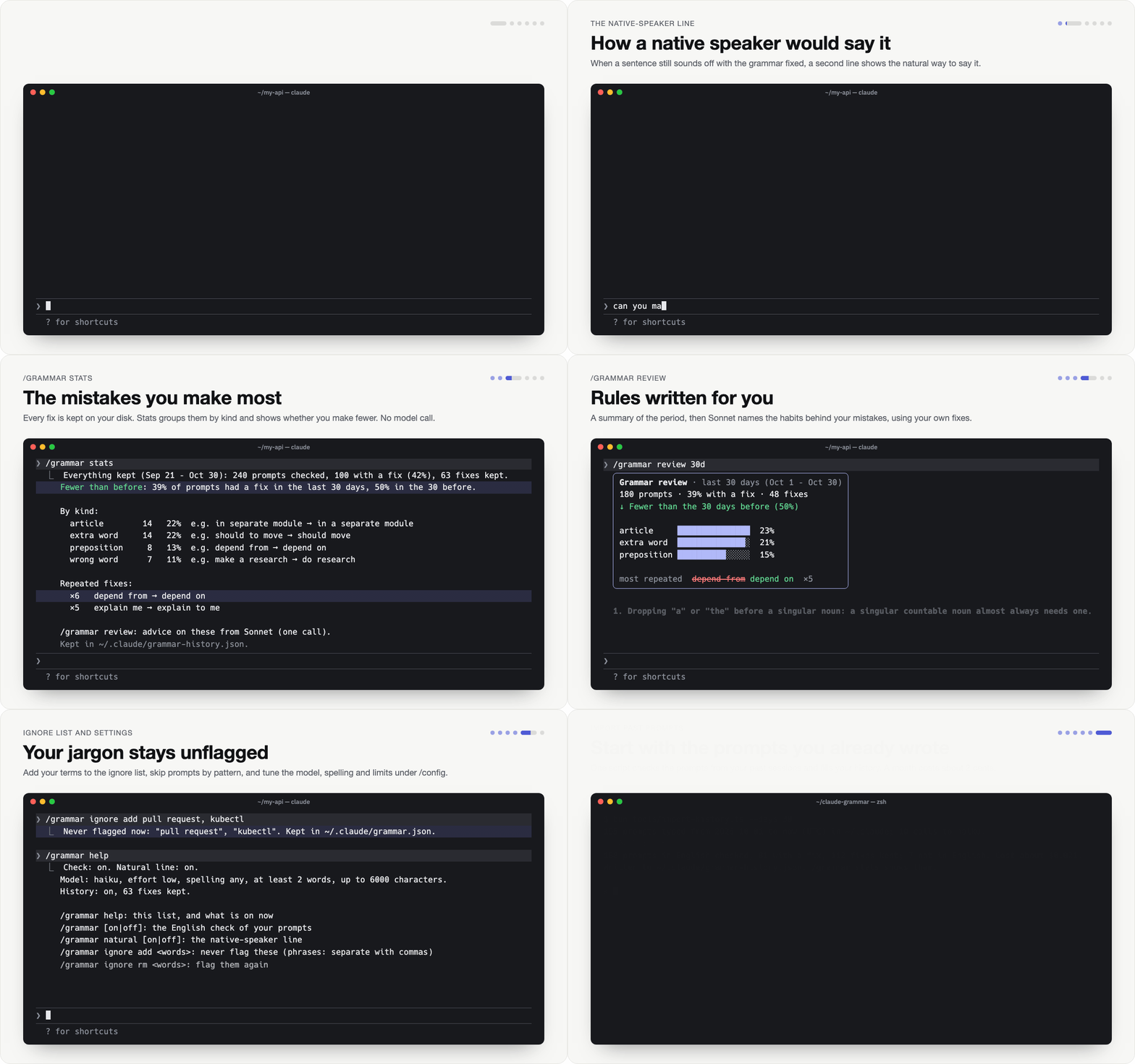
If English is not your first language, you write a lot of it in your prompts, and nobody tells you where it goes wrong. Claude understands you anyway, so the same mistakes stay. With this plugin, Haiku proofreads each prompt after you send it, and a dim line under that prompt shows what to fix: the wrong words struck through in red, the fixes in green, and a few words on why. When a sentence still sounds off once the grammar is fixed, a second line shows how a native speaker would say it.
Over time it keeps your fixes, so /grammar stats shows the mistakes you make most and /grammar review turns them into a few rules written for you, with your own mistakes as the examples.
How it was measured: Privacy and cost.
Install
/plugin marketplace add jaklimoff/claude-grammar
/plugin install grammar@grammar
Or in one step from the shell (v2.1.292+):
claude plugin install grammar --marketplace jaklimoff/claude-grammar
Use
Send prompts as usual. The fixes show under each one a few seconds later, while Claude works. Each prompt keeps its own lines, so scrolling back shows them all for the session.
| Command | What it does |
|---|---|
/grammar help |
Lists the commands and shows what's on now: the check, the natural line, the model and the limits. |
/grammar |
Turns the check on or off. |
/grammar on, /grammar off |
Sets it. on also resumes checks paused after 3 failures in a row. |
/grammar natural on|off |
Switches only the native-speaker line. |
/grammar ignore add <words> |
Never flags these words. Separate phrases with commas: pull request, kubectl. |
/grammar ignore rm <words> |
Flags them again. |
/grammar ignore |
Shows the ignore and skip lists and the files they're in. |
/grammar stats [period] |
Your mistakes by kind, the fixes you keep repeating, and whether you're making fewer. No model call. |
/grammar review [period] |
A summary card, then the 3 to 5 habits behind most of your mistakes from one Sonnet call, with your own fixes as examples. Needs 20 kept fixes in the period. |
/grammar history on|off |
Keeps your fixes, or stops keeping new ones. |
/grammar history clear |
Empties the history file. |
/grammar history |
Shows whether it's on, how many fixes are kept, and where. |
A period is 7d or 30d (the last N days, today included), or since 2026-10-01. Without one, both commands cover everything kept. Days are UTC dates.
The on/off switches are settings, so they last across sessions and show under /config too.
Settings
Under /config, or in settings.json under pluginConfigs → grammar@grammar (the plugin as you installed it: grammar@<marketplace>) → options:
| Setting | Default | What it does |
|---|---|---|
enabled |
true |
Checks your prompts. Same as /grammar on|off. |
natural |
true |
The native-speaker line. Same as /grammar natural on|off. |
model |
haiku |
haiku or sonnet. Sonnet catches more and costs more. |
effort |
low |
low, medium or high. |
dialect |
any |
any accepts US and UK spelling. us or uk flags the other one's spellings. |
min_words |
2 |
Shorter prompts (ok, yes, continue) aren't checked. |
max_chars |
6000 |
How much of a long prompt is checked and sent, cut at a word boundary. |
icons |
true |
Terminal only: off draws plain characters for terminals without a Nerd Font. The desktop app always draws plain characters. |
show_why |
true |
The short reason after each fix. |
desktop |
band |
band, line, toast or off. The desktop app doesn't draw the line under the prompt: band shows the newest check in color in a band above the prompt box (with a Hide button) and also adds the dim transcript line, line only the transcript line, toast shows them briefly as a toast, off shows nothing there. |
history |
true |
Keeps each fix for /grammar stats and /grammar review. Same as /grammar history on|off. |
Ignore and skip lists
Put a grammar.json in your Claude Code folder (~/.claude/grammar.json, or $CLAUDE_CONFIG_DIR/grammar.json) for every project. Put one in a project's .claude/grammar.json for that project only. Both files are read on every prompt, and their lists are combined.
{
  "ignore": ["kubectl", "pnpm", "pull request", "/^[A-Z]+-\\d+$/"],
  "skip": ["^(ok|yes|continue|go on)\\b", "^deploy "],
  "history": false
}
ignore: words and phrases never flagged, matched as whole words in any case. Plain words are also passed to the model so it leaves them alone. Wrap an entry in slashes for a regex, which is matched against each fix.skip: regexes, case-insensitive. A prompt that matches one isn't checked or sent.history:falsekeeps no fixes while you work in that project, even with the setting on. Use it in a project's file for work that should leave no trace.
/grammar ignore add|rm edits the global file and keeps everything else in it. A file that doesn't parse is skipped, with one notice.
What it checks
- Checked: spelling, grammar (tense, agreement, articles, prepositions, word order), a wrong word, a missing word.
- Left alone: lowercase, punctuation style, dropped apostrophes (
lets,dont), slang and short forms (smth,pls,btw), code, paths, logs and pasted text. - No line at all: a clean prompt, a prompt that is not English, slash commands, and anything in
claude -por the SDK, where nothing would show it.
The native-speaker line is rare on purpose. It shows only when a sentence is clearly unidiomatic even with the grammar fixed, not for style.
Your mistakes over time
Each checked prompt adds to grammar-history.json in your Claude Code folder (~/.claude/, or $CLAUDE_CONFIG_DIR): its fixes, each with the words, the fix, the reason, the kind of mistake and the time, plus a count per day of prompts checked and prompts with a fix. The first session that keeps fixes starts with a notice naming the file; it shows once. The model labels each fix with one kind: spelling, tense, agreement, article, preposition, word order, wrong word, missing word, extra word or other. Days are UTC dates, the same on every machine. If two sessions write the file at the same moment, at most one entry is lost. If a write is cut short, the lines that still parse are kept and the next check writes the file whole again; the day counts come first in the file, so what a cut loses is the newest fixes.
Not kept: the prompt itself, the native-speaker line (it is a whole sentence), fixes longer than 60 characters, fixes that only change case or spacing, fixes that look like code or a path (/, _, brackets, file.ts), and fixes for words on your ignore list. The file keeps 90 days (today and the 89 before, UTC) and at most 2000 fixes, so it stays under about 300 KB.
/grammar stats
Everything kept (Sep 21 – Oct 30): 240 prompts checked, 100 with a fix (42%), 63 fixes kept.
Fewer than before: 39% of prompts had a fix in the last 30 days, 50% in the 30 before.

By kind:
  article         14   22%  e.g. in separate module → in a separate module
  extra word      14   22%  e.g. should to move → should move
  preposition      8   13%  e.g. depend from → depend on
  ...

Repeated fixes:
  ×6   depend from → depend on
  ×5   explain me → explain to me
  ...
With a period, the trend compares it with the stretch just before it of the same length: /grammar stats 7d says "Fewer than the 7 days before (71%)". Without one, it compares the last 30 days with the 30 before.
/grammar review sends the period's grouped fixes (6× depend from → depend on (preposition; verb takes on), one line each, most frequent first, at most 300 lines) to Sonnet once. In the terminal it draws a card with the period's figures, then the habits Sonnet found, each example struck through in red with the fix in green, the same way as under a prompt:
╭────────────────────────────────────────────────────╮
│ Grammar review · last 7 days (Oct 24 – Oct 30)     │
│ 142 prompts · 59% with a fix · 119 fixes           │
│ ↓ Fewer than the 7 days before (71%)               │
│                                                    │
│ spelling     ███████████████  38%                  │
│ article      █████████░░░░░░  23%                  │
│ missing word ████░░░░░░░░░░░  11%                  │
│                                                    │
│ most repeated  explain me explain to me  ×4        │
╰────────────────────────────────────────────────────╯
1. Dropping articles (a, an, the) before singular nouns. A singular countable noun almost always needs a, an,
or the in front of it.
   spawn fable subagent spawn a fable subagent
   in future in the future
2. ...
sonnet, from 119 fixes
The row also holds the same as plain text, which is what the model sees in the conversation and what surfaces that don't draw the card show. The card's figures are never sent in the review's call. After a resumed session, earlier reviews show as that plain text.
When your account can't use Sonnet, it asks the model in your model setting instead. Words you add to the ignore list later drop out of both commands, and stats count fixes the same however you capitalized or spaced them.
Import your past prompts
The history starts with your next prompt, but Claude Code's transcripts still hold the prompts you typed before. tools/import-history.ts checks those with the plugin's own prompt and adds their fixes, each with the time the prompt was sent:
git clone https://github.com/jaklimoff/claude-grammar && cd claude-grammar
bun tools/import-history.ts --dry-run       # how many prompts, no model calls
bun tools/import-history.ts --days 30       # the last 30 days (default 7, at most 90)
- It reads only prompts you typed, sent at once or queued while Claude worked: no slash commands, no Claude's replies or tool output, no subagents. It uses your settings and both
grammar.jsonfiles, the way the plugin does, soskip,ignoreand"history": falseall apply. - It checks about 20 prompts per call through
claude -pwith your own login (Haiku at low effort unless your settings say otherwise). The calls run in safe mode from an empty folder, so no CLAUDE.md, plugins, hooks, MCP servers or tools come along, and they save no session. A prompt a reply skips gets one more call. 195 prompts took 10 calls, 40 seconds and about $0.02. --days Ncovers the same days as the periodNd: today and the N − 1 days before, UTC. It prints how many prompts were checked, how many weren't English, and how many got no usable answer.- It imports only the days before the history's first day, so running it again adds nothing twice.
- For another config folder, pass
--config-dir(it defaults to$CLAUDE_CONFIG_DIR, then~/.claude). It needs Bun.
Privacy and cost
Each prompt you type (its first 6000 characters by default, pasted text included) goes to Haiku (or the model you set) through Claude Code's own model access, on the same account and provider as the rest of your session. That is one small call per prompt (Haiku at low effort, unless you change model or effort), counted in your usage like any other call. /grammar review, only when you run it, sends your grouped fixes (not your prompts) to Sonnet the same way. Nothing goes anywhere else.
The fixes are kept on your disk in grammar-history.json (see Your mistakes over time). They are short bits of what you typed, from every project. /grammar history off stops keeping them, /grammar history clear empties the file, and "history": false in a project's .claude/grammar.json keeps nothing from that project.
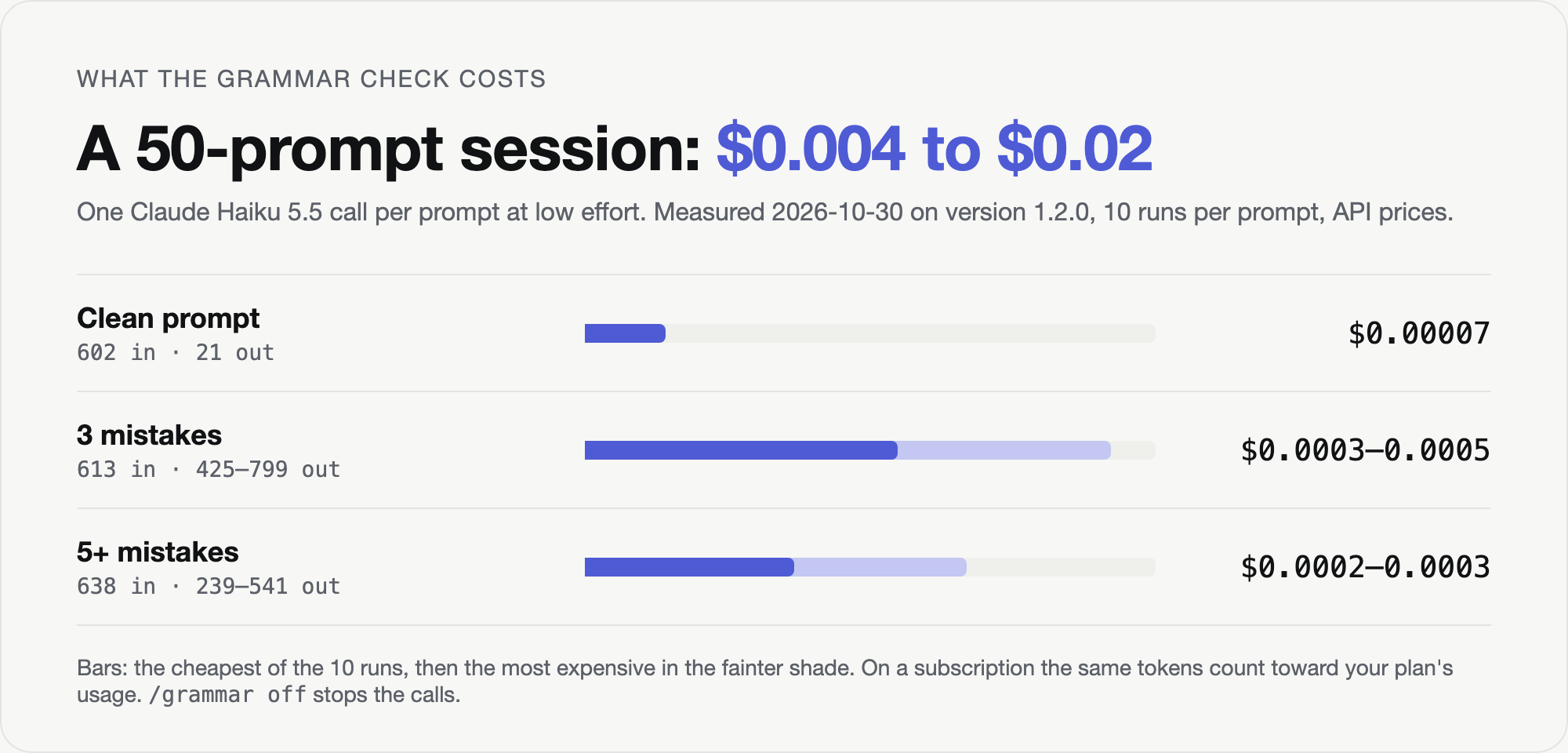
What one check costs, measured on 2026-10-30 with the 1.2.0 system prompt (default settings: natural phrasing on, and the history on, so each fix's kind is asked for), Claude Haiku 5.5 at low effort, 10 runs per prompt, through the same $.model.complete call the plugin makes.
| Prompt | Input tokens | Output tokens | Cost at API prices |
|---|---|---|---|
| Clean, 35 characters | 602 | 21 | ~$0.00007 |
| 3 mistakes, 80 characters | 613 | 425 to 799 | ~$0.0003 to $0.0005 |
| 5+ mistakes, 200 characters | 638 | 239 to 541 | ~$0.0002 to $0.0003 |
About 580 of the input tokens are the mod's instructions. Asking for each fix's kind added 82 of them in 1.2.0; with the history off, the check leaves the kind out and sends 1.1.0's shorter prompt (520 tokens for the clean prompt). A clean prompt costs almost nothing to answer. When Haiku finds mistakes, it writes out the fixes and often thinks first, and that is most of the output. How much it thinks varies more than the number of mistakes does: in these runs the 200-character prompt with five mistakes came out cheaper than the 80-character one with three. A session of 50 prompts comes to roughly 31K tokens if you write clean and up to about 70K if every prompt has mistakes: about $0.004 to $0.02 at Haiku's API prices ($0.10 per 1M input tokens, $0.50 per 1M output). On a subscription the same tokens count toward your plan's usage instead. /grammar off stops the calls.
One /grammar review over 119 kept fixes (115 grouped lines) sent 2,900 tokens and got back 425 to 515 in 3 runs: about $0.01 at Sonnet 5.5's API prices ($2 per 1M input tokens, $10 per 1M output). At the 300-line cap it sends about 6K tokens, roughly $0.02. It runs only when you type it.
A mod is code that runs inside Claude Code with your permissions, so read it before you install it. This one uses only:
| API | For |
|---|---|
$.model.complete |
The Haiku call, and the Sonnet call of /grammar review. |
$.state |
The checks and reviews, in memory for the session. |
$.config.list, $.config.set |
Finding the settings' keys, and saving /grammar on|off, natural on|off and history on|off as settings. |
$.store |
Reading and clearing where 1.0 kept the two switches, once, and noting that the history notice has shown. |
$.command.register |
/grammar. |
$.fs.exists, $.fs.read, $.fs.write, $.env.get, $.session.root |
Finding and reading your grammar.json files, and keeping grammar-history.json. Writes go only to two files in your Claude Code folder: the global grammar.json on /grammar ignore add|rm, and the history after each check and on /grammar history clear. |
$.clock.now |
The time on each kept fix. |
$.ui.toast |
The one notice for a file that doesn't parse, the one naming the history file until it exists, and each check's fixes in the desktop app when desktop is toast. |
$.ui.log |
Each check's fixes as a dim transcript line in the desktop app, where the line under the prompt isn't drawn (the desktop setting, band by default, which adds the colored band too). |
$.session.surfaces |
Skipping runs that draw nowhere. |
$.clock.after, $.ui.resolve |
Running the check off the prompt's path, and drawing the lines. |
No other files, no processes, no other network. claude plugin validate . prints the same list for any mod. The full note is in PRIVACY.md.
Requirements
- Claude Code with mods. Tested with v2.1.314, in the terminal. Mods can change between releases, so if the line stops showing after an update, check the changelog.
- A Nerd Font in your terminal for the icons. Without one, they show as empty squares; set
iconsto off for plain characters. - Not drawn in the VS Code extension or in
claude -p. In the desktop app the line under the prompt isn't drawn either, so the newest check shows in color in a band above the prompt box, with a dim transcript line as the record (thedesktopsetting;line,toastoroffalso work).
How it works
The plugin is four files: hooks/grammar.tsx (the hooks, commands and drawing), hooks/check.ts (the check's prompt and the reply's parsing), hooks/config.ts (settings and ignore lists) and hooks/history.ts (the kept fixes, stats and the review's prompt). tools/import-history.ts uses the same check.ts and history.ts outside Claude Code. It is a Claude Code mod: a plugin whose hooks/hooks.json lists a module that runs inside Claude Code (mods docs). It hooks these events:
| Event | What it does |
|---|---|
session.start |
Sets the switches from the settings (moving 1.0's from $.store once) and registers /grammar. |
command.run |
Handles /grammar. |
prompt.submit |
Queues a check of the prompt on a timer, so the prompt is never held up, and passes it on unchanged. Once the check is drawn, its fixes go into the history. |
ui.render (UserMessage) |
Draws the fixes and the native-speaker line under the transcript row of the prompt they belong to. |
ui.render (AbovePrompt) |
Draws the newest check's fixes in a band above the prompt box in the desktop app, with a Hide button (the desktop setting). |
ui.render (CommandOutput) |
Draws the /grammar review card in place of its plain text. |
The check asks Haiku for JSON:
{ "english": true, "fixes": [{ "from": "...", "to": "...", "why": "...", "kind": "preposition" }], "natural": null }
Fixes for words that aren't in the prompt, or are on your ignore list, are dropped before they're drawn. The system prompt is at the top of hooks/check.ts, so tune it there.
Works well beside open-questions: the answers it sends or appends for you are not checked, since they quote Claude's own words.
Development
claude --plugin-dir .          # run Claude Code with your working copy
claude plugin test .           # the tests in tests/grammar.test.ts, with Haiku mocked
claude plugin validate --strict .
bun docs/render-tour.ts        # record the tour GIFs from docs/tour.html; they live on the media branch
bun docs/measure-cost.ts ...   # measure a check's tokens for the cost table (usage in the file)
docs/render-cost.sh brand      # render the cost card PNGs; they live on the media branch
Contributing
Issues and PRs welcome: CONTRIBUTING.md has the setup, the checks to run and how releases work. Report security problems privately: SECURITY.md. What changed in each version: CHANGELOG.md.
License
Reviews (0)
Sign in to leave a review.
Leave a reviewNo results found