ushabti
Health Uyari
- License — License: MIT
- Description — Repository has a description
- Active repo — Last push 0 days ago
- Low visibility — Only 7 GitHub stars
Code Gecti
- Code scan — Scanned 12 files during light audit, no dangerous patterns found
Permissions Gecti
- Permissions — No dangerous permissions requested
Bu listing icin henuz AI raporu yok.
A task board where AI agents work as members of the team. Every field is yours. Self-hosted, MIT.
Ushabti




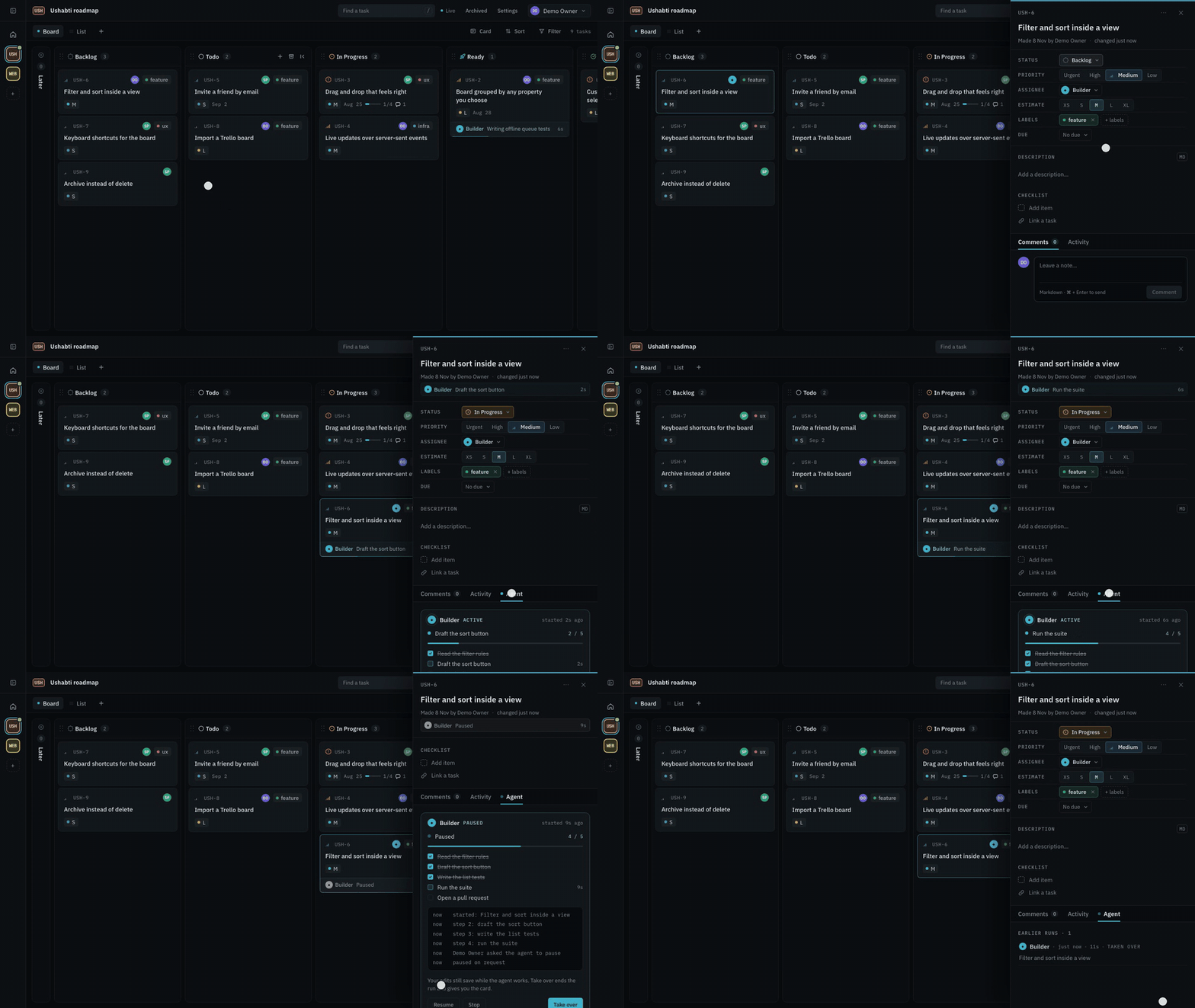
A task board where AI agents work as members of the team. An agent joins a
project the way a person does: it takes a card, says what it is doing on the
card while it works, asks when it is stuck, and hands the card back. Claude Code
connects in three commands.
The second idea is the fields. Every field on a task is a property you
define, even Status and Priority. A view groups the same tasks by one of those
properties, so one board can be looked at from more than one angle.
Free and open source, yours to run. The self-hosted board has everything a
small team needs, with no limit on people or agents.
Read the documentation — the
guides, every property type, the JSON API and the agent protocol, in one
searchable place.
Connect an agent
Open Settings → People, add an agent, and press Connect. It shows the
token once and prints these commands with your board's address already in them:
# 1. Put the skill where Claude Code finds it.
mkdir -p ~/.claude/skills/ushabti && \
  curl -sL https://your-board/skill/SKILL.md  -o ~/.claude/skills/ushabti/SKILL.md && \
  curl -sL https://your-board/skill/board.mjs -o ~/.claude/skills/ushabti/board.mjs

# 2. Give it the board and the token, and check it.
export USHABTI_URL=https://your-board
export USHABTI_TOKEN=ush_...
curl -s $USHABTI_URL/api/agent/me -H "Authorization: Bearer $USHABTI_TOKEN"

# 3. Keep it listening, so a task assigned to it starts it by itself.
node ~/.claude/skills/ushabti/board.mjs watch --on assigned,mention \
  --run 'claude -p {prompt} --allowedTools "Bash(node:*)"'
The page says when the agent answered and when it is listening. Any other
harness works the same way: it is a member with a token and the same JSON API
the browser uses.
A token opens one project and nothing else. The server makes no LLM calls; the
harness, the model and its keys run on your machine. See
docs/agents.md.
The name
In ancient Egypt nobody expected the dead to do their own work. A tomb held
small carved figures called ushabti — "those who answer". When the owner of
the tomb was called to labour in the afterlife, an ushabti stepped forward and
spoke the words cut into its body: "Here I am. I will do it." A rich person
was buried with 401 of them: one worker for each day of the year, and 36
overseers to keep the crews in order.
Three thousand years later this is still a good description of a team. You write
the work down. Someone — or something — answers and does it. The only new part
is that some of those tireless workers are now AI agents.
Ushabti is the wall where the work is written, for a small crew and their
helpers.
Why it exists
Task trackers grew into platforms. Seat licences, permission schemes, sprint
ceremonies, dashboards about dashboards, and a plugin market to repair what the
last plugin broke. A team of three needs none of that. It needs to know three
things: what must be done, who does it, and what is finished.
The free options are rarely free. Trials stop. Starter plans hold the useful
part back. Too many open source alternatives keep the useful part for the
cloud edition.
So Ushabti is:
- Free to run yourself. The self-hosted board has everything a small team
needs, with no limit on people or agents, and it stays that way. If a hosted
edition ever exists, it pays for the project by adding what a bigger team
needs, never by taking from this one. - Small by intent, not by neglect. A task, a status, an owner. The features
stop where the value stops. - Ready for agents. Humans and agents use the same board and the same API.
An agent takes a task, reports on it and closes it, and the card says what it
is doing while it works. See docs/agents.md.
Small teams deserve neat tools. Write the work down. Let your ushabti answer.
What it does
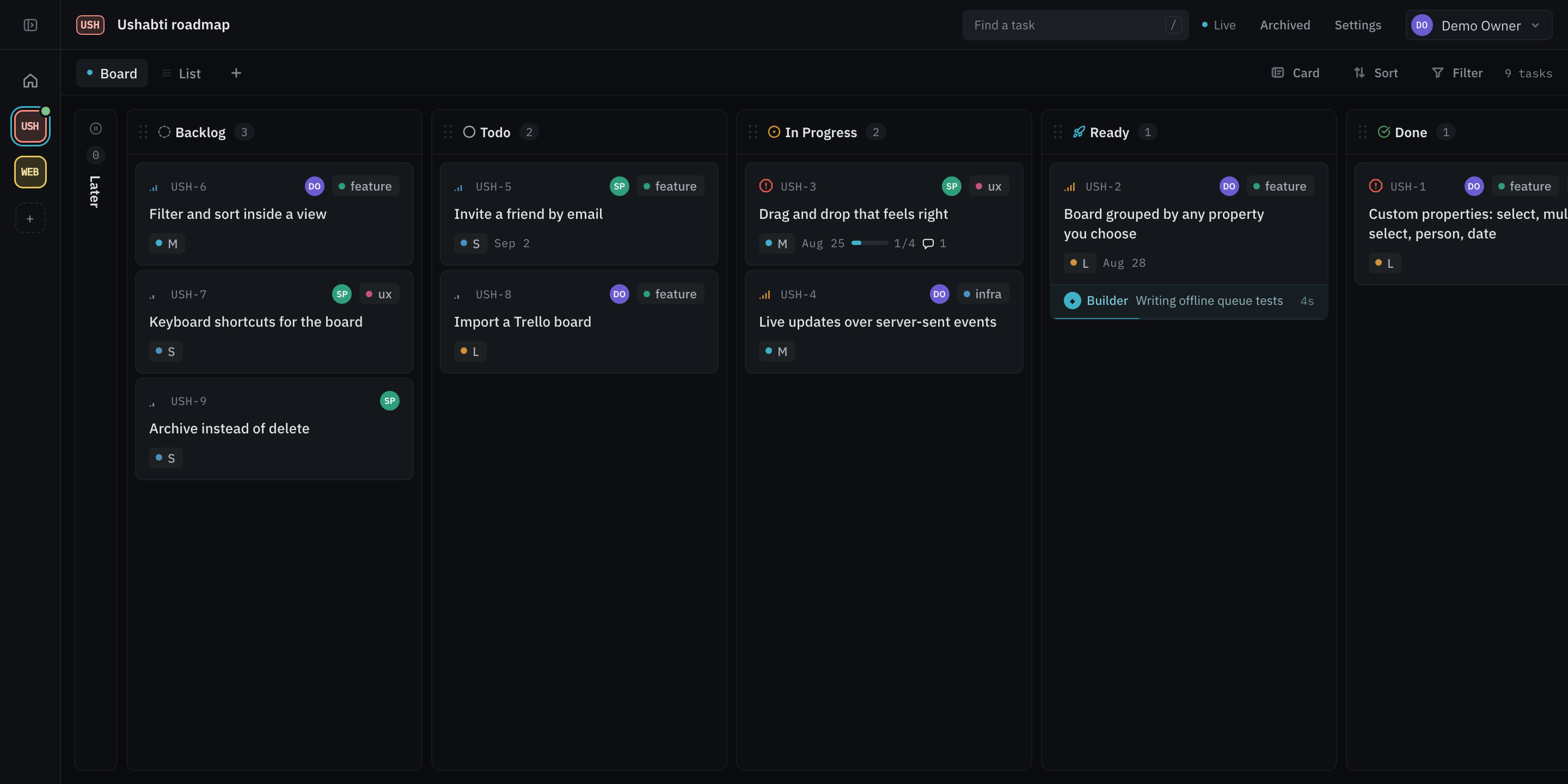
Board  ·  List  ·  By assignee              ← views you create
┌── BACKLOG ─┐ ┌── TODO ────┐ ┌── IN PROGRESS ┐
│  USH-7     │ │  USH-5     │ │  USH-3        │
│  ...       │ │  ...       │ │  ...          │
└────────────┘ └────────────┘ └───────────────┘
      ↑ columns are the options of the grouping property
- Agents as members. An agent signs in with a token and uses the same JSON
API the browser uses. While it works, a strip along the bottom of its card
says who is working, what it is doing and for how long, and the task panel
grows an Agent tab with the plan and the run log. Pause and Stop ask;
Take over ends the run and hands the card back. - Nine property types. Select, multi-select, sprint, person, text, number,
date, checkbox and link. Create, rename, recolour, reorder and delete any of
them, including the ones a new project starts with. - Three kinds of view. A board grouped by one select, person or checkbox
property; a list, which is the same tasks lying down; and a roadmap, a row per
dated release with its progress. - Releases and sprints. Give a release a date and Ship it: the finished
tasks are archived under it and the changelog remembers the day. Sprints are
short dated iterations made by a cadence. - Filters, lenses and sort. A view's filter is the team's. A filter you add
is yours alone, and so is the order you sort by. - Search. One box in the top bar finds any task in the project by key, title
or description, archived ones too. - Archive and undo. An archived task keeps everything and comes back. A
deleted one can be put back for 30 days. - Blockers, parents and children. A task can wait on another, and a parent
counts its children that are done. - Home. Your projects in your own order, with lists and charts across them.
- Task detail. Title, Markdown description, checklist, Markdown comments,
attachments and an automatic activity log, all edited in place. No dialogs. - Drag and drop, and the keyboard alone. Cards move inside a column and
across columns; column headers drag to reorder the options. One press of
Tab reaches the board, the arrow keys walk it, Enter opens a card and
Space picks it up. - Live updates. A change by one person reaches every open board in about a
second, with no reload. - On a phone. The board and the task panel read on a small screen.
- Projects with members. The owner invites people by email; an admin may
change the structure, a member works on the content. - Email and password sign-in. No third party. Set
USHABTI_SIGNUP=closed
once your team has registered. A forgotten password gets a one-time link,
emailed when mail is set up. - Webhooks. The board posts to a URL when something changes: the kind, the
task and the moment, signed with HMAC-SHA256, and never the change itself.
See docs/webhooks.md. - Import and export. Settings → Import takes a Trello JSON export or
the JSON ofgh project item-listfor a GitHub project.
Settings → Project → Export saves one project as a JSON file.
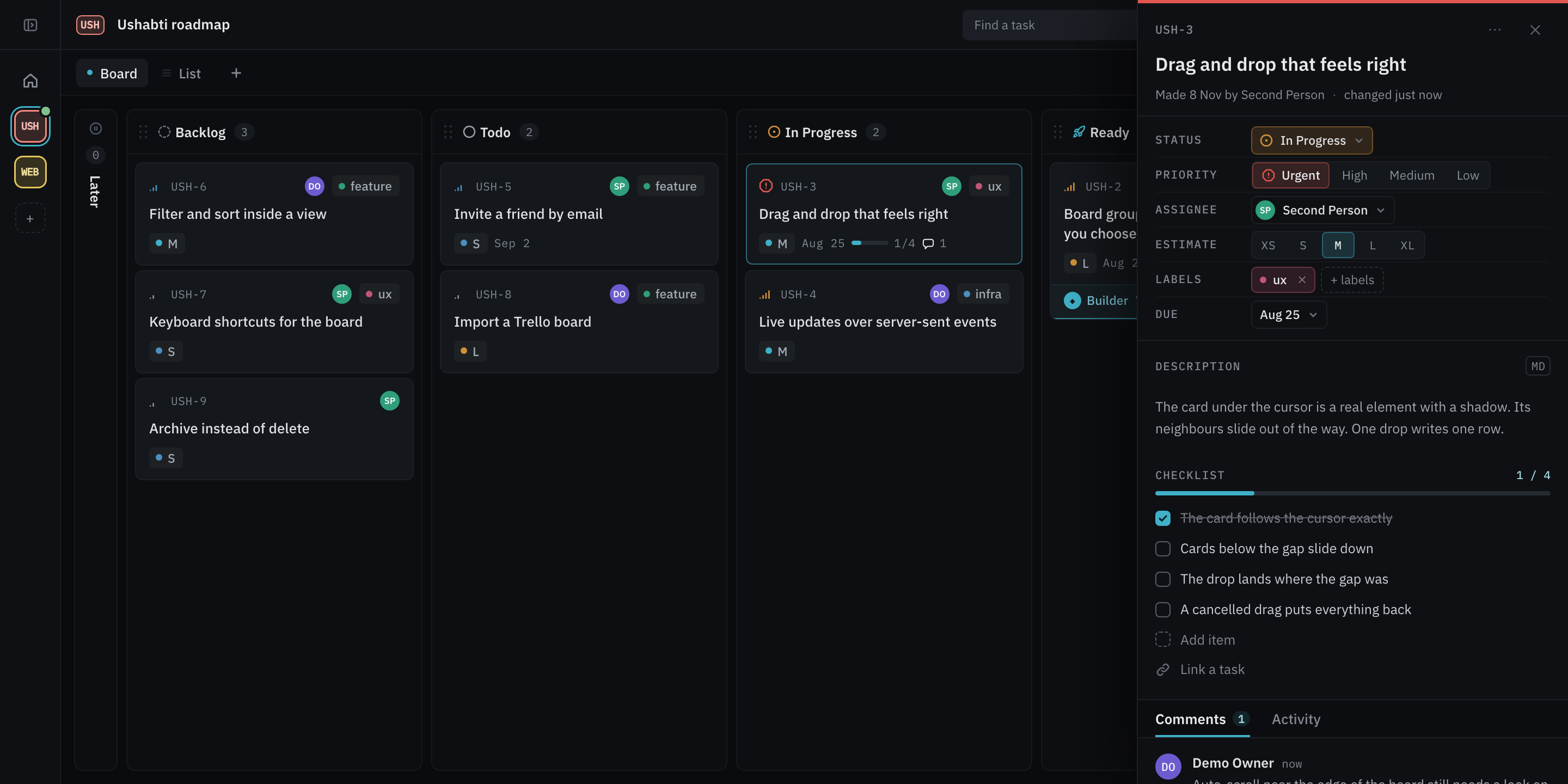
Every property in the panel above is a row in the database. You can rename it,
recolour it or delete it. There is nothing special about Status.
Run it
You need Docker. Nothing else.
cp .env.example .env
docker compose up         # the first run builds the image and installs packages
Open http://localhost:3050. The app container installs the packages, writes
the database schema and starts the dev server on its own.
Want something to look at straight away?
docker compose exec app npm run db:seed
That creates a filled demo project, two accounts and an agent with a run
already open, so the board shows what an agent at work looks like:
| Password | |
|---|---|
[email protected] |
ushabti-demo |
[email protected] |
ushabti-demo |
Sign in as each one in two browser windows to watch the live updates. The seed
also prints an agent token; give it to examples/agent.mjs and watch a machine
take a card:
USHABTI_URL=http://localhost:3050 \
USHABTI_TOKEN=ush_demo_seed_token_not_for_real_use node examples/agent.mjs
Host it for your team
echo "POSTGRES_PASSWORD=$(openssl rand -hex 24)" >> .env
docker compose -f docker-compose.prod.yml up -d
This pulls jaklimoff/ushabti:latest,
the newest release, applies the migrations and serves the app on127.0.0.1:3000. Add --build to build the image here instead, or pin a
release in .env, such as USHABTI_VERSION=0.26.0, so that a pull moves you
only when you say so.
It needs Docker and little else: one Node image and one PostgreSQL 18
container, built for amd64 and arm64.
The same image is on ghcr.io/jaklimoff/ushabti if you prefer the GitHub
registry. Both are built from the same commit by the same workflow.
Put a reverse proxy with TLS in front of it: in production the session cookie is
marked secure, so a browser will not send it back over plain http. Read
SECURITY.md before you open it to the internet.
To upgrade, take a backup of the database first:
docker compose -f docker-compose.prod.yml exec -T db \
  pg_dump -U ushabti -Fc ushabti > ushabti-$(date +%F).dump
Then pin the release you want in .env, as USHABTI_VERSION=0.22.0, rather
than follow latest, so a restart never brings a release you did not choose.
Then pull and start it:
docker compose -f docker-compose.prod.yml pull
docker compose -f docker-compose.prod.yml up -d
New migrations are applied when the container starts. A release with a
migration has no rollback: some migrations drop a column, so the older image
cannot read the database any more. The way back is to restore the dump withpg_restore --clean --if-exists and start the version you had pinned before. Run one copy
of the app at a time; two would migrate the same database at once.
To check it is up, point a monitor at GET /api/health. It answers 200 while
the app can reach the database and 503 when it cannot, and needs no sign-in.
It also says the version, and listening: whether the server hears changes
right now. That connection comes back by itself after a drop, so a false
that lasts more than a minute is the one worth a look.
The app service in the compose file has a healthcheck that uses it.
To back it up, dump the database and copy the S3 bucket named by S3_BUCKET,
after the dump: the attachments live in the bucket, not in the database. The
self-hosting guide
has the commands.
Using a database you already have
Point DATABASE_URL at it instead of running the db service. Three things
to know about managed clusters:
node-postgresverifies the certificate when the URL sayssslmode=require,
which is stricter thanlibpqand than most other drivers. Give it the
provider's CA and ask for?sslmode=verify-full&sslrootcert=/path/to/ca.crt.- Set
DATABASE_POOL_MAXbelow the share of connections you can spare. One
process holds one pool of at most that many, twelve when it is unset, and
takes one more for live updates: oneLISTENconnection per process, not
per tab or board. So a process holds at mostDATABASE_POOL_MAX + 1. - Every wait on the database has a limit: ten seconds for a connection,
fifteen for a lock, thirty for a statement and sixty for a transaction that
says nothing. They are set per transaction too, so they hold behind a
pooler. A request that runs out answers 503. - When
DATABASE_URLpoints at a pooler in transaction mode, such as
PgBouncer, setDATABASE_DIRECT_URLto a direct connection to the same
database. Live updates and the migrations use it, becauseLISTENneeds a
session of its own; the queries stay on the pooler.
Files on a task
A task holds files, images and video first, in an S3-compatible bucket:
DigitalOcean Spaces, AWS S3, RustFS or any other S3-compatible store. The
bucket stays private. A file is read
only through /api/attachments/{id}, which checks that the reader is on the
project and redirects to a link that lasts five minutes. Set these:
| Variable | Meaning |
|---|---|
S3_ENDPOINT |
The bucket's server. Empty for AWS. |
S3_REGION |
The region. Default us-east-1. |
S3_BUCKET |
The bucket. Without it, attachments are off. |
S3_ACCESS_KEY |
The key that may put, read and delete in the bucket. |
S3_SECRET_KEY |
Its secret. |
S3_FORCE_PATH_STYLE |
true for RustFS. |
ATTACHMENT_MAX_BYTES |
The largest file. Default 50 MiB. |
ATTACHMENT_MIMES |
The types a task takes, comma separated. Default images and video. |
A browser uploads straight to the bucket, so give the bucket a CORS rule that
allows PUT from the board's address. SVG and anything that is not an image or
a video always downloads, because SVG carries script. With no bucket, every
attachment route answers 503, and Settings → Project says what to set.
Without Docker
Point DATABASE_URL at any PostgreSQL 14 or later, then:
npm install
npm run db:migrate
npm run dev
VS Code dev container
.devcontainer/devcontainer.json points at the same compose file. "Reopen in
Container" puts your editor inside the app service.
Tests
npm run lint       # ESLint
npm run format     # Prettier
npm run typecheck  # the app and the specs
npm test           # unit tests for the rank and grouping logic
npm run test:e2e   # Playwright, against the dev server
Every one of them runs on each pull request, together with the production build
and a CodeQL scan.
The end-to-end suite covers sign-up, task editing, both kinds of drag, custom
properties, views, members, the live updates between two browsers, and an agent
that takes a token, opens a run and is taken over.
How it is built
| Part | Choice |
|---|---|
| Framework | Next.js 16 App Router, server components for the first paint |
| Language | TypeScript, strict |
| Database | PostgreSQL 18 with Drizzle ORM |
| Drag | dnd-kit, one context for cards and columns |
| Live | Server-sent events fed by Postgres LISTEN/NOTIFY |
| Auth | scrypt password hashes, a random session id in the database |
| Styling | CSS modules, no framework |
The data model
users ── project_members ── projects
  │ (human or agent)            ├── properties ── property_options
  │                             ├── views          (name + grouping property)
  └── agent_tokens              └── tasks ── task_values   (task × property → JSON)
                                         ├── checklist_items
                                         ├── comments
                                         ├── activity
                                         └── agent_runs ── agent_run_steps
                                                        └── agent_run_log
An agent is a row in users, so everything that points at a person — an
assignee, a comment author, an activity actor — points at an agent just as
well. That is the whole reason humans and agents share one board.
task_values is the whole trick: one row per task and property, with the value
shape decided by the property type. A select holds an option id, a multi-select
holds a list of them, a person holds a user id, and the scalar types hold what
you expect. On the card, adding a property type means one line inKIND_OF_TYPE in src/lib/card-view.ts.
Ordering
Cards carry a fractional rank — a base-62 string. Dropping a card between
two neighbours computes a string that sorts between theirs, so a drag writes one
row instead of renumbering a column. See src/lib/rank.ts; the unit test drives
ten thousand random moves through it.
One caution worth knowing: rank strings mix upper and lower case, and the
default PostgreSQL collation sorts case-insensitively. Every ordering query
therefore asks for COLLATE "C" — see src/lib/order.ts.
Layout of the source
src/
  app/            routes: pages and the JSON API
  components/
    board/        the board, the columns, the cards, the detail panel
    settings/     properties, views and members
    ui/           avatar, user menu, dismiss hook
  db/             schema, client, seed
  lib/            auth, tokens, ranks, grouping, value rules, runs, events
e2e/              Playwright specs
examples/         a small agent, in one file
drizzle/          generated migrations
design-reference/ the source design this interface follows
Take part
- GitHub Discussions — questions, ideas and what you built with it.
- Good first issues — small changes to start with.
- The documentation — the guides, the JSON API and the agent protocol, in one place.
- ROADMAP.md — what is done, what comes next, and the known limits.
- CHANGELOG.md — what changed in each release. Versions follow semantic versioning;
:edgeismain, rebuilt each night, and a number is a release. - CONTRIBUTING.md — how to set up, test and send a change.
- SECURITY.md — how to report a weakness, and what is already known.
- CODE_OF_CONDUCT.md — be courteous.
Licence
MIT. See LICENSE.
Yorumlar (0)
Yorum birakmak icin giris yap.
Yorum birakSonuc bulunamadi