compose-bridge
Health Pass
- License — License: Apache-2.0
- Description — Repository has a description
- Active repo — Last push 0 days ago
- Community trust — 10 GitHub stars
Code Pass
- Code scan — Scanned 12 files during light audit, no dangerous patterns found
Permissions Pass
- Permissions — No dangerous permissions requested
No AI report is available for this listing yet.
Real-time on-device visual editor for Jetpack Compose + MCP Server for AI agents. Live UI tuning, AST-guided surgical source splicing, and standalone AI-driven code edits — no phone needed.
ComposeBridge 🌉
Real-time on-device visual editor for Jetpack Compose.
Live UI tuning + schema-driven screen compiler + AST-guided source splicing.






📰 Featured In
ComposeBridge is a developer tooling suite that bridges a running Android app on a physical device with your IDE over a local WebSocket. You can:
- 🎯 Tap any Composable on the phone to inspect it in real time
- 🎨 Tune colors, dimensions, and paddings live at 60fps — no Gradle build required
- 💾 Persist tweaks to your Kotlin source (
AppDimens.kt,AppColors.kt) via a surgical byte-splice that preserves file formatting - 🧩 Generate full Compose screens from a declarative JSON schema
- 🔍 Navigate the runtime tree — tap a parent, drill into children
Live preview is truly zero-rebuild. Persisting the change into the final APK artifact still requires one standard rebuild, after which the new value becomes the source of truth.
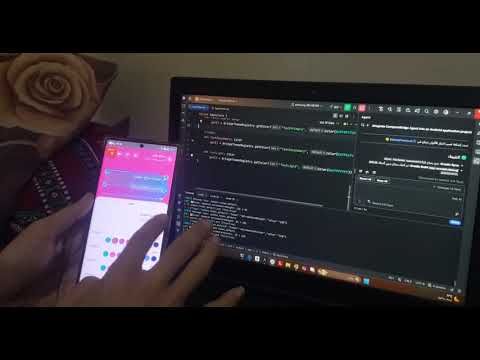
🎬 See it in action
Click the preview below to watch ComposeBridge visually edit a running Jetpack Compose UI and persist the change back to Kotlin source.
🚀 Key Features
| Feature | Description |
|---|---|
| ⚡ Zero-Rebuild Preview | Tweak colors, paddings, corner radii, and font sizes at <50ms latency while the app runs. |
| 🎯 On-Device Visual Inspector | Tap any Composable to see its source file, line number, and used design tokens. |
| 💾 AST-Guided Source Splicing | Locates the exact byte range via Tree-sitter, then performs a surgical replace that keeps a single-line git diff. |
| 🧩 Dynamic UI Compiler | Feed it a JSON schema (dashboard.json) — get a full, production-ready Compose screen with theme, components, and tokens wired up. |
| 🌳 Runtime Tree Navigation | Walk the composition tree from parent to children — no XML, no reflection. |
| 🔌 Local WebSocket Daemon | A lightweight Python bridge between the runtime agent and your file system. |
📦 Repository Structure
composebridge/
├── cli/         # JSON → Compose screen compiler
├── agent/       # Android runtime library (:composebridge-agent)
├── server/      # Python WebSocket daemon + source byte-splicer
├── examples/    # Complete reference app (StudentApp)
└── docs/        # Architecture + setup guides
Three components, one workflow:
- CLI — generates a full project from JSON
- Agent — captures touches and pushes live updates on the device
- Server — coordinates messages + writes changes back to
.ktfiles
✅ Compatibility
| Component | Version |
|---|---|
| Kotlin | 2.1.20+ |
| Jetpack Compose | 1.7.3+ |
| Compose Multiplatform | 1.7.3+ |
| Gradle | 8.5+ |
| Android Gradle Plugin | 8.5+ |
| Min SDK | 24 |
| Python | 3.10+ |
| Target | Android (real device or emulator) |
🛠️ Quick Start
1. Start the local server
cd server
pip install -r requirements.txt
python server.py
2. Generate a Compose project
cd cli
python generate.py screens/dashboard.json
The CLI will produce a full Android project under output/ — including:
- ✅ Theme files (
AppColors.kt,AppDimens.kt,AppTypography.kt,AppStrings.kt) - ✅ UI components (
HeroCard,StatCard,DashboardHeader, ...) - ✅ The full
DashboardPage.kt - ✅ The
composebridge-agentmodule - ✅ The
bridge/Python server, wired to the new project's path - ✅
MainActivity.ktwith the agent already wired up - ✅
AndroidManifest.xmlwithINTERNETpermission
3. Open in Android Studio
Open the generated project, deploy it to a physical device, then:
adb reverse tcp:8711 tcp:8711
Tap the 🔧 floating button → Design Mode ON.
Tap any element → the panel opens → slide/tap to tune live.
🤔 Why not just wait for Compose Hot Reload?
| Compose Hot Reload (JetBrains) | ComposeBridge | |
|---|---|---|
| Availability | Preview / experimental | ✅ Works today |
| Target | Emulator-first | ✅ Real device |
| Persistence | Preview only | ✅ Writes back to source |
| Interaction | Textual | ✅ Visual — tap elements |
| Code safety | Full reload | ✅ Single-line git diff |
⚡ Performance
| Metric | Value |
|---|---|
| Live preview latency | <50ms (localhost WebSocket) |
| Recomposition scope | Localized — only targeted Composable re-executes |
| AST splicing | Asynchronous — doesn't block UI thread |
| Source diff | Single-line — byte-offset patch via Tree-sitter |
Runtime tuning and disk persistence are fully decoupled.
🧠 Under the Hood
- Bidirectional runtime-to-source mapping — every visual change is traceable to its exact Kotlin byte range.
- AST-guided inspection and byte-splice editing — Tree-sitter locates the exact edit site; regex and byte replacement update the file without disturbing formatting.
- Deterministic layout compilation — the CLI emits structured, tokenized Compose code with stable output.
- Low-latency WebSocket daemon — sub-50ms round-trip between the device and the local editing server.
🤖 MCP Server (AI Agents)
ComposeBridge exposes its tools to AI agents via the Model Context Protocol (MCP).
🆕 v0.4.0 — MCP works independently of the phone
Important: As of v0.4.0, the MCP Server operates standalone —
it does not require the phone, the WebSocket bridge, oradb reverse.Use it directly from Antigravity IDE, Claude Desktop, or any
MCP-compatible client to edit your Compose project files.
Two Operation Modes
| Mode | Requires Phone? | Use Case |
|---|---|---|
| Manual (WebSocket) | ✅ Yes | Live UI tuning on device |
| MCP (Standalone) | ❌ No | AI-driven code edits |
Supported Clients
- ✅ Antigravity IDE (Gemini)
- ✅ Claude Desktop
- ✅ Cursor
- ✅ Cline / Continue
Setup
1. Install dependencies
cd server
pip install -r requirements.txt
2. Configure your AI client
Antigravity IDE — edit ~/.gemini/config/mcp_config.json:
{
  "mcpServers": {
    "composebridge": {
      "command": "python",
      "args": ["C:\path\to\composebridge-en\server\mcp_server.py"]
    }
  }
}
Claude Desktop — edit %APPDATA%\Claude\claude_desktop_config.json:
{
  "mcpServers": {
    "composebridge": {
      "command": "python",
      "args": ["C:\path\to\composebridge-en\server\mcp_server.py"]
    }
  }
}
3. Restart your AI client
Available Tools
| Tool | Description |
|---|---|
find_token_by_color |
Reverse lookup: hex → token name |
set_token |
Surgically edit a token value (single-line diff) |
rollback_last |
Undo last edit (persistent across restarts) |
Example
In Antigravity chat:
@composebridge set_token("welcomeCardHeight", "300")
Result in AppDimens.kt:
- val welcomeCardHeight: Dp get() = BridgeDimensionRegistry.get("welcomeCardHeight", 240.dp)
+ val welcomeCardHeight: Dp get() = BridgeDimensionRegistry.get("welcomeCardHeight", 300.dp)
= Single-line git diff. No phone required.
Persistent Journal
Every edit is journaled to .composebridge-journal.json.
If your AI client crashes or restarts, rollback_last still works.
Why Standalone MCP Matters
- No need to build & deploy the app to edit code
- AI can work on Compose projects during design phase
- Fully local — no network, no telemetry
⚠️ Status: v0.4.0-alpha — under active development.
🔒 Security
- Debug Builds Only: Agent bundled with
debugImplementation - Token Authentication: WebSocket requires token on handshake
- ⚠️ v0.1.0 uses a fixed local token. QR-based pairing planned for v0.2.0.
- Journal Rollback: Auto-rollback on AST validation failure
⚠️ Limitations
- AST Validation: Surgical edits are restricted to simple literal values (
integer_literal,float_literal,string_literal,simple_identifier,long_literal) to prevent parser syntax corruption. - Correspondence: ~70% on production apps (inline composables may misalign). Compose Compiler plugin is on the roadmap.
- UTF-16/UTF-8: Edge cases with emoji-heavy files are still being handled. Full precision on the roadmap.
- Generated Code: Files from KSP/Kapt may need manual exclusion today. Auto-detection is on the roadmap.
🤖 Coming Soon
- AI-Powered Suggestions (Qwen integration) — describe a change in natural language; the tool finds the right token and applies it.
- Natural Language Editing — "Make this card taller." "Use the gold accent here."
- MCP Server — expose ComposeBridge as a tool for Claude Desktop, Cursor, and other AI agents.
- More component templates — e-commerce, forms, profile screens.
- Typography tokens — full typography token live editing.
🔎 Search Terms This Project Solves
If you've searched for any of these, this project is for you:
- Jetpack Compose edit without recompile
- Compose hot reload alternative
- Interactive layout inspector for Android
- Live UI tweaking on a real Android device
- Sync design tokens to Kotlin source
- Generate Compose UI from a JSON schema
📜 License
Distributed under the Apache License 2.0.
Reviews (0)
Sign in to leave a review.
Leave a reviewNo results found