growth-agents
Health Gecti
- License — License: NOASSERTION
- Description — Repository has a description
- Active repo — Last push 0 days ago
- Community trust — 14 GitHub stars
Code Basarisiz
- process.env — Environment variable access in skills/seo-audit/scripts/audit_batch.mjs
- spawnSync — Synchronous process spawning in skills/seo-audit/scripts/audit_page.mjs
- process.env — Environment variable access in skills/seo-audit/scripts/audit_page.mjs
- network request — Outbound network request in skills/seo-audit/scripts/audit_page.mjs
- process.env — Environment variable access in skills/seo-audit/scripts/discover_urls.mjs
- network request — Outbound network request in skills/seo-audit/scripts/discover_urls.mjs
Permissions Gecti
- Permissions — No dangerous permissions requested
Bu listing icin henuz AI raporu yok.
An operating system for a growth team of Claude agents: a goal cascade, an experiment log that chases you, and the skills that run each step

The Agentic Growth OS for your coding agent: growth skills, routines that hold you to your goals, pattern-spotting on how you work, and the tools to run it all.
James McAulay used this setup to take his startup from inception to £100k+ months in 96 days.
This repo is the same setup with his business data removed.
Works with any coding agent




Claude Code · Codex · Hermes · OpenClaw
Install · What changes · Why · Roles · Questions
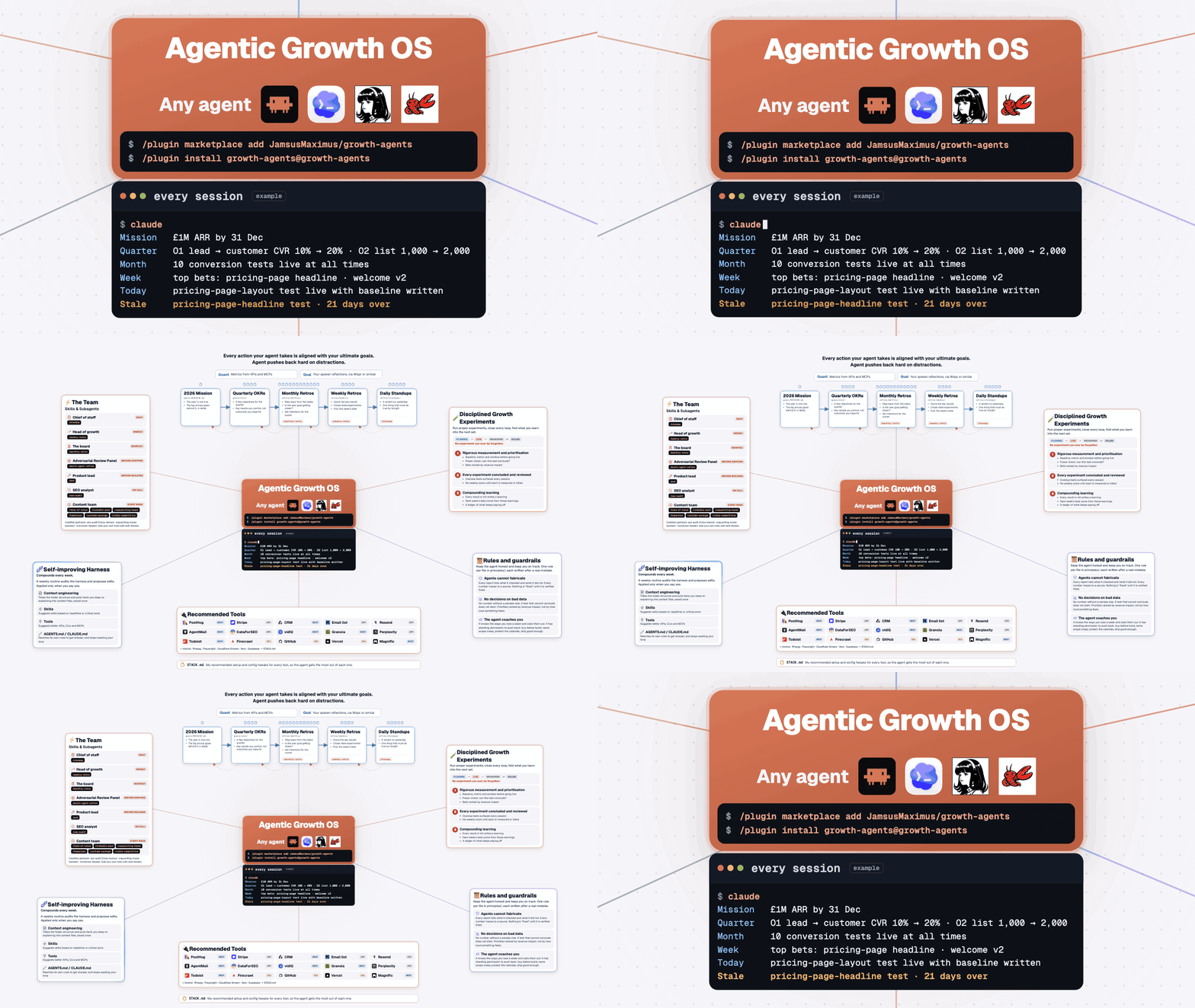
Built by James McAulay (LinkedIn, X), who teaches teams how to accelerate their growth with agents at agentaccelerator.ai.
Install growth-agents and set up your first week in five minutes
In Claude Code:
/plugin marketplace add JamsusMaximus/growth-agents
/plugin install growth-agents@growth-agents
On Codex, Hermes, OpenClaw or another coding agent: clone this repo anywhere, make a separate folder for your goals, then open your agent in that folder and paste this as your first message:
Read /path/to/growth-agents/AGENTS.md and follow it. My work folder is the one we are in.
AGENTS.md tells the agent how to run the briefing and which skill file each command maps to.
- Open your agent in the folder where your goals and experiments will live: a new folder, or your own work repo. The first session prints the example briefing, every line marked
(example). - Run
/growth-setup. Rapid mode takes five to ten minutes: where any goals you already have live, then a few plain questions about your year, this quarter, this week and today. You finish with today's plan on screen. Full mode is an hour-long interview on your goals. - Check the files it writes: your mission, OKRs, derailers and first experiment. It reads your folder first, follows any rules in your own CLAUDE.md, and picks a profile (solo, growth lead, product marketing, SEO or content).
- Run
/standupon each day you work on growth, and/weekly-retroon the last one of your week. Setup asks which days those are.
What changes once growth-agents is installed
| Your coding agent on its own | Your coding agent with growth-agents | |
|---|---|---|
| 🌅 Starting a session | A blank prompt. It does whatever you ask first, even when that is a distraction. | It opens with your mission, this week's bets, the one thing that must be true by tonight and anything overdue. If a request serves none of them, it tells you. |
| 🧪 Experiments | A test goes live and quietly expires. Three weeks later nobody can say whether it worked. | An experiment cannot go live until its baseline, metric and window are written down. An A/B test needs a power check first. Anything past its window comes back every session until it is measured or killed. |
| 🎯 Goals | The annual goals sit in a doc you reopen in December. | Mission → quarter OKRs → 2–3 bets a week → one thing that must be true by tonight. The next morning opens with the verdict. A slip that repeats becomes one of next week's bets. |
| 🔌 Your tools | You paste numbers from five tabs into the chat. | The standup reads your calendar, tasks, inbox and experiments through the tools you connect. |
| 🚢 Shipping | One pass, and you find the holes after launch. | The critic bench runs 3–4 sceptical sub-agents before anything ships. |
| 🔁 Mistakes | You correct the same thing every week. | Every rule cites the incident that created it. Each week a self-improvement prompt proposes edits to the rules, and you approve or reject each one. |
| 📏 Numbers | It writes "conversion up 12%" and you cannot tell where that came from. | Every report ends with a coverage ledger of what was checked. Every retro line is labelled observed, asked or unobserved. You type each result yourself, and it keeps asking until you do. |
An overdue experiment comes back every session because James once left one live for ten weeks
The baseline was written down and the metric was fixed up front. Then the window closed and nobody opened the file for ten weeks. The test produced no result anyone could use.
That is why one of the three experiment rules exists. An experiment past its window is named at the start of every session. /weekly-retro will not score the week until that experiment is measured or killed. The full story is in experiments/README.md.
James runs his business on this every day
Every morning James runs /standup. Every Friday afternoon he spends about an hour on /weekly-retro, sometimes longer. The retro asks two kinds of question. How does he feel about the week's progress, and where should he focus next? What do the numbers say, and what would move the needle most next week?
The answers are grounded in data because his whole second brain sits beside the system. The agent reads what he shipped, his Stripe transactions and his PostHog data. The second brain is just a docs/ folder in the same repo as his code, so the agent reads the notes and the code together. None of it relies on the agent's memory: everything lives in files it reads each session.
It is messy. Files are not always in the right place, and some weeks the retro runs long. That is normal when you work with an agent every day. This repo is the skeleton of that setup with everything personal taken out.
Seven roles run your week, and each one is a skill
What each role reads and writes: ROSTER.md.
| Role | Skill | When |
|---|---|---|
| 🧭 Onboarding | /growth-setup |
once, then each quarter |
| ☕ Chief of staff | /standup |
each day you work on growth |
| 📈 Head of growth | /weekly-retro |
the last work day of your week (Friday by default) |
| 🏛️ The board | /monthly-retro |
first week of the month |
| ⚖️ Critic bench | /multi-agent-refine |
before anything ships |
| 📋 Product lead | /prd |
before anything is built |
| 📟 On call | /seo-audit, /tone-of-voice, /linkedin-post, /copywriting-hooks, /humanizer, /youtube-package, /vidiq-competitive, /skill-iterator |
when you ask |
It needs no code and never sends anything for you
- Do I need to code? No. Everything is Markdown files and slash commands.
- Will it email or post on my behalf? No. The agent has no send capability. It drafts, and you send.
- I already have a task manager. Keep it. The standup reads your tasks through the tools you connect.
stack/todoist.mdshows one setup. - Does it only work in Claude Code? No. It runs on Codex and other coding agents too. Point them at AGENTS.md. The plugin commands above are the quick install for Claude Code.
- Does it rely on the agent's memory? No. Everything lives in files in your folder, so a new session, a new agent or a new teammate starts from the same place.
- Where should the folder live? In your work repo or a personal one, wherever your notes already are. James keeps his second brain as a
docs/folder in the same repo as his code. If your files go in a subfolder such as agrowthfolder insidedocs/, setup leaves a one-line.growth-agentspointer so you can keep opening the same folder. - Can my team share it? Yes.
/growth-setuphandles one shared repo or a folder each: one mission for the team, derailers and standup files per person, and an owner on each experiment. - What are all the EXAMPLE files? They show the shape of each file. The agent treats them as documentation, never as your data, and your own files take their place.
- Already have your own
/standupskill? Ask for themorning-standupskill by name and you get this one. - Updating from an earlier version?
principles/is nowrules/. If you edited a file inprinciples/, move it intorules/. - Can I use it at work? Yes, for yourself and inside your team. The CC BY-NC 4.0 licence rules out reselling the templates. See
LICENSES.md.
Your goals, experiments and retros live in six plain folders
| Folder | What it holds | Start with |
|---|---|---|
experiments/ |
One file per experiment, moving planned → live → measured or killed, plus the three rules the skills enforce. |
experiments/README.md |
goals/ |
Your mission, quarterly OKRs and derailers (the agent's notes on how you lose a week). | goals/MISSION.md |
retros/ |
Daily, weekly and monthly templates, plus the compounding ledger of what now pays off without you. | retros/weekly/TEMPLATE.md |
rules/ |
One file per rule, each with the incident that created it. | rules/README.md |
stack/ |
Twenty-one tool pages: what each is for, MCP or API or CLI, setup and quirks. | STACK.md |
reference/ |
The self-improvement prompt, path-scoped rules and a link checker. | reference/README.md |
Eleven skills were written for this repo and three are vendored from credited authors
Written here: growth-setup, morning-standup, weekly-retro, monthly-retro, multi-agent-refine, prd, tone-of-voice, linkedin-post, youtube-package and vidiq-competitive (both need the vidIQ MCP), and skill-iterator (how to add a role of your own; builds on Anthropic's skill-creator).
Vendored, MIT: seo-audit (Corey Haines, pinned at the version the scripts were written against), copywriting-hooks (samber) and humanizer (blader). Each keeps its own licence; details in LICENSES.md. The /standup and /growth-setup aliases live in commands/standup.md and commands/growth-setup.md.
Related
- ROSTER.md - who does what
- GLOSSARY.md - the fixed vocabulary every file uses
- CLAUDE.md - the read order and the standing rules for the agent
- experiments/README.md - the spine that chases
- rules/README.md - the rules and their incidents
Yorumlar (0)
Yorum birakmak icin giris yap.
Yorum birakSonuc bulunamadi