trainingpeaks-mcp
Health Gecti
- License — License: MIT
- Description — Repository has a description
- Active repo — Last push 0 days ago
- Community trust — 29 GitHub stars
Code Gecti
- Code scan — Scanned 12 files during light audit, no dangerous patterns found
Permissions Gecti
- Permissions — No dangerous permissions requested
Bu listing icin henuz AI raporu yok.
TrainingPeaks MCP server for Claude Desktop, Code and Cowork. No API approval needed - works with any account. Query workouts, CTL/ATL/TSB fitness data, power PRs via natural language.
TrainingPeaks MCP Server
Connect TrainingPeaks to Claude and other AI assistants via the Model Context Protocol (MCP). Query workouts, build structured intervals, manage your calendar, track fitness trends, and control your training through natural conversation.
No API approval required. The official Training Peaks API is approval-gated, but this server uses secure cookie authentication that any user can set up in minutes. Your cookie is stored in your system keyring, never transmitted anywhere except to TrainingPeaks.
What You Can Do
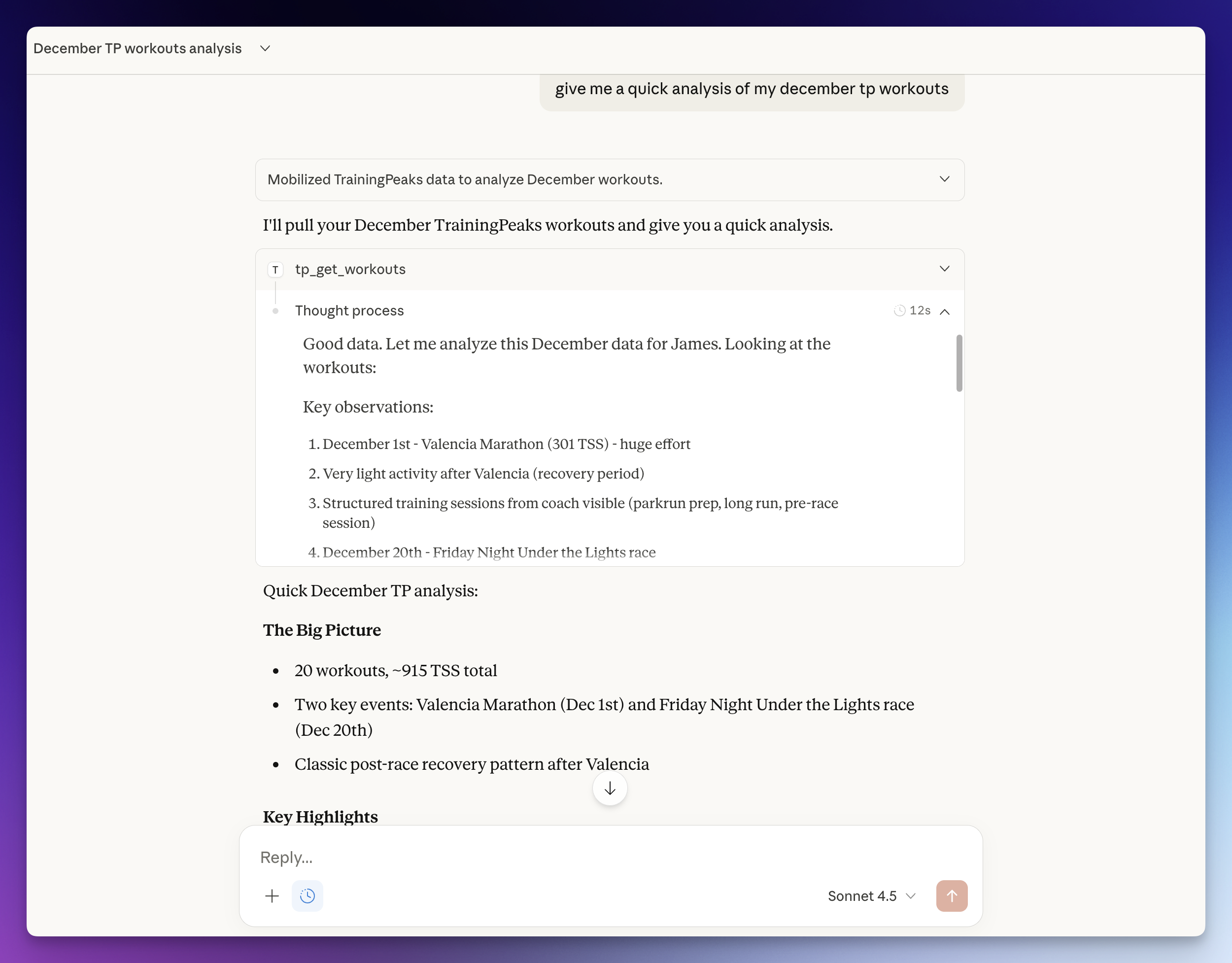
Ask your AI assistant things like:
- "Build me a 4x8min threshold session for Tuesday with warm-up and cool-down"
- "Compare my FTP progression this year vs last year"
- "Copy last week's long ride to this Saturday"
- "Log my weight at 74.5kg and sleep at 7.5 hours"
- "What's my weekly TSS so far? Am I on track for my ATP target?"
- "Show my race calendar and how many weeks until my A race"
- "Set my FTP to 310 and update my power zones"
- "Add a calendar note for next Monday: rest day, travel"
Tools (52)
Workouts
| Tool | Description |
|---|---|
tp_get_workouts |
List workouts in a date range (max 90 days) |
tp_get_workout |
Get full details for a single workout |
tp_create_workout |
Create a workout with optional interval structure, auto-computed IF/TSS |
tp_update_workout |
Update any field of an existing workout |
tp_delete_workout |
Delete a workout |
tp_copy_workout |
Copy a workout to a new date (preserves structure and planned fields) |
tp_reorder_workouts |
Reorder workouts on a given day |
tp_validate_structure |
Validate interval structure without creating a workout |
tp_get_workout_comments |
Get comments on a workout |
tp_add_workout_comment |
Add a comment to a workout |
Analysis & Performance
| Tool | Description |
|---|---|
tp_analyze_workout |
Detailed analysis with time-series data, zones, and laps |
tp_get_peaks |
Power PRs (5s-90min) and running PRs (400m-marathon) |
tp_get_workout_prs |
PRs set during a specific session |
tp_get_fitness |
CTL, ATL, and TSB trend (fitness, fatigue, form) |
tp_get_weekly_summary |
Combined workouts + fitness for a week with totals |
tp_get_atp |
Annual Training Plan - weekly TSS targets, periods, races |
Athlete Settings
| Tool | Description |
|---|---|
tp_get_athlete_settings |
Get FTP, thresholds, zones, profile |
tp_update_ftp |
Update FTP and recalculate Coggan 5-zone model |
tp_update_hr_zones |
Update heart rate zones |
tp_update_speed_zones |
Update run/swim pace zones |
tp_update_nutrition |
Update daily planned calories |
tp_get_pool_length_settings |
Get pool length options |
Health Metrics
| Tool | Description |
|---|---|
tp_log_metrics |
Log weight, HRV, sleep, steps, SpO2, pulse, RMR, injury |
tp_get_metrics |
Get health metrics for a date range |
tp_get_nutrition |
Get nutrition data for a date range |
Equipment
| Tool | Description |
|---|---|
tp_get_equipment |
List bikes and shoes with distances |
tp_create_equipment |
Add a bike or shoe |
tp_update_equipment |
Update equipment details, retire |
tp_delete_equipment |
Delete equipment |
Events & Calendar
| Tool | Description |
|---|---|
tp_get_focus_event |
Get A-priority focus event with goals |
tp_get_next_event |
Get nearest future event |
tp_get_events |
List events in a date range |
tp_create_event |
Add a race/event with priority (A/B/C) and CTL target |
tp_update_event |
Update event details |
tp_delete_event |
Delete an event |
tp_create_note |
Create a calendar note |
tp_delete_note |
Delete a calendar note |
tp_get_availability |
List unavailable/limited periods |
tp_create_availability |
Mark dates as unavailable or limited |
tp_delete_availability |
Remove availability entry |
Workout Library
| Tool | Description |
|---|---|
tp_get_libraries |
List workout library folders |
tp_get_library_items |
List templates in a library |
tp_get_library_item |
Get full template details including structure |
tp_create_library |
Create a library folder |
tp_delete_library |
Delete a library folder |
tp_create_library_item |
Save a workout template |
tp_update_library_item |
Edit a template |
tp_schedule_library_workout |
Schedule a template to a calendar date |
Reference & Auth
| Tool | Description |
|---|---|
tp_get_workout_types |
List all sport types and subtypes with IDs |
tp_get_profile |
Get athlete profile |
tp_auth_status |
Check authentication status |
tp_refresh_auth |
Re-authenticate from browser cookie |
Setup Options
Option A: Auto-Setup with Claude Code
If you have Claude Code, paste this prompt:
Set up the TrainingPeaks MCP server from https://github.com/JamsusMaximus/trainingpeaks-mcp - clone it, create a venv, install it, then walk me through getting my TrainingPeaks cookie from my browser and run tp-mcp auth. Finally, add it to my Claude Desktop config.
Claude will handle the installation and guide you through authentication step-by-step.
Option B: Manual Setup
Step 1: Install
git clone https://github.com/JamsusMaximus/trainingpeaks-mcp.git
cd trainingpeaks-mcp
python3 -m venv .venv
source .venv/bin/activate  # Windows: .venv\Scripts\activate
pip install -e .
Step 2: Authenticate
Option A: Auto-extract from browser (easiest)
If you're logged into TrainingPeaks in your browser:
pip install tp-mcp[browser]  # One-time: install browser support
tp-mcp auth --from-browser chrome  # Or: firefox, safari, edge, auto
macOS note: You may see security prompts for Keychain or Full Disk Access. This is normal - browser cookies are encrypted and require permission to read.
Option B: Manual cookie entry
- Log into app.trainingpeaks.com
- Open DevTools (
F12) -> Application tab -> Cookies - Find
Production_tpAuthand copy its value - Run
tp-mcp authand paste when prompted
Other auth commands:
tp-mcp auth-status  # Check if authenticated
tp-mcp auth-clear   # Remove stored cookie
Step 3: Add to Claude Desktop
Run this to get your config snippet:
tp-mcp config
Edit ~/Library/Application Support/Claude/claude_desktop_config.json (macOS) or %APPDATA%\Claude\claude_desktop_config.json (Windows) and paste it inside mcpServers. Example with multiple servers:
{
  "mcpServers": {
    "some-other-server": {
      "command": "npx",
      "args": ["some-other-mcp"]
    },
    "trainingpeaks": {
      "command": "/Users/you/trainingpeaks-mcp/.venv/bin/tp-mcp",
      "args": ["serve"]
    }
  }
}
Restart Claude Desktop. You're ready to go!
Structured Workouts
Create workouts with full interval structure. The server auto-computes duration, IF, and TSS from the structure:
{
  "date": "2026-03-01",
  "sport": "Bike",
  "title": "Sweet Spot Intervals",
  "structure": {
    "primaryIntensityMetric": "percentOfFtp",
    "steps": [
      {"name": "Warm Up", "duration_seconds": 600, "intensity_min": 40, "intensity_max": 55, "intensityClass": "warmUp"},
      {"type": "repetition", "reps": 4, "steps": [
        {"name": "Sweet Spot", "duration_seconds": 480, "intensity_min": 88, "intensity_max": 93, "intensityClass": "active"},
        {"name": "Recovery", "duration_seconds": 120, "intensity_min": 50, "intensity_max": 60, "intensityClass": "rest"}
      ]},
      {"name": "Cool Down", "duration_seconds": 600, "intensity_min": 40, "intensity_max": 55, "intensityClass": "coolDown"}
    ]
  }
}
The LLM builds this JSON naturally from conversation - just say "build me 4x8min sweet spot with 2min rest".
What is MCP?
Model Context Protocol is an open standard for connecting AI assistants to external data sources. MCP servers expose tools that AI models can call to fetch real-time data, enabling assistants like Claude to access your Training Peaks account through natural language.
Security
TL;DR: Your cookie is encrypted on disk, exchanged for short-lived OAuth tokens, never shown to Claude, and only ever sent to TrainingPeaks. The server has no network ports.
This server is designed with defence-in-depth. Your TrainingPeaks session cookie is sensitive - it grants access to your training data - so we treat it accordingly.
Write access: v2.0 adds full calendar management (create, update, delete workouts, events, notes, equipment, settings). All mutations go through Pydantic validation. The server cannot access billing or payment info.
Cookie Storage
| Platform | Primary Storage | Fallback |
|---|---|---|
| macOS | System Keychain | Encrypted file |
| Windows | Windows Credential Manager | Encrypted file |
| Linux | Secret Service (GNOME/KDE) | Encrypted file |
Your cookie is never stored in plaintext. The encrypted file fallback uses AES-256-GCM authenticated encryption with a PBKDF2-derived key (600,000 iterations) and a machine-specific salt.
Cookie Never Leaks to AI
The AI assistant (Claude) never sees your cookie value. Multiple layers ensure this:
- Return value sanitisation: Tool results are scrubbed for any keys containing
cookie,token,auth,credential,password, orsecretbefore being sent to Claude - Masked repr(): The
BrowserCookieResultandCredentialResultclasses override__repr__to showcookie=<present>instead of the actual value - Sanitised exceptions: Error messages use only exception type names, never full messages that could contain data
- No logging: Cookie values are never written to any log
Domain Hardcoding (Cannot Be Changed)
The browser cookie extraction only accesses .trainingpeaks.com:
# From src/tp_mcp/auth/browser.py - HARDCODED, not a parameter
cj = func(domain_name=".trainingpeaks.com")
Claude cannot modify this via tool parameters. The only parameter is browser (chrome/firefox/etc), not the domain. To change the domain would require modifying the source code.
No Network Exposure
The MCP server uses stdio transport only - it communicates with Claude Desktop via stdin/stdout, not over the network. There is no HTTP server, no open ports, no remote access.
Open Source
This server is fully open source. You can audit every line of code before running it. Key security files:
src/tp_mcp/auth/browser.py- Cookie extraction with hardcoded domainsrc/tp_mcp/auth/encrypted.py- AES-256-GCM credential encryptionsrc/tp_mcp/tools/_validation.py- Pydantic input validationsrc/tp_mcp/tools/refresh_auth.py- Result sanitisationtests/test_tools/test_refresh_auth_security.py- Security tests
Authentication Flow
The server uses a two-step authentication process:
- Cookie to OAuth Token: Your stored cookie is exchanged for a short-lived OAuth access token (expires in 1 hour)
- Automatic Refresh: Tokens are cached in memory and automatically refreshed before expiry
This means:
- You only need to authenticate once with
tp-mcp auth - API calls use proper Bearer token auth, not cookies
- If your session cookie expires (typically after several weeks), use
tp_refresh_authin Claude or runtp-mcp authagain
Development
pip install -e ".[dev]"
pytest tests/ -v
mypy src/
ruff check src/
Licence
MIT
Yorumlar (0)
Yorum birakmak icin giris yap.
Yorum birakSonuc bulunamadi