openusage
Health Gecti
- License — License: MIT
- Description — Repository has a description
- Active repo — Last push 0 days ago
- Community trust — 13 GitHub stars
Code Gecti
- Code scan — Scanned 12 files during light audit, no dangerous patterns found
Permissions Gecti
- Permissions — No dangerous permissions requested
OpenUsage is a terminal-based dashboard that automatically detects installed AI coding tools and local API key environment variables to display live usage, quota, and cost tracking data.
Security Assessment
The tool inherently accesses sensitive data by scanning for local environment variables and reading local directories (e.g., `~/.claude`) to find your API keys. Because it displays billing and usage metrics, it makes outbound network requests to various AI provider APIs (like OpenRouter, Anthropic, etc.) using your keys. The automated code scan found no dangerous code patterns, hardcoded secrets, or dangerous permission requests. However, the README explicitly recommends running an un-piped web script (`curl | bash`) for installation, which is always a slight security concern. Overall risk is rated as Low.
Quality Assessment
The project is in very active development (last push was today) and uses the highly permissive MIT license. While the repository has a small community footprint with only 13 GitHub stars, this is not unusual for a new, niche developer utility. The rule-based code scan successfully analyzed 12 files and found no issues, indicating a clean and straightforward codebase.
Verdict
Safe to use.
The one dashboard you’ve been looking for — track spend and usage across Claude, Cursor, OpenRouter, Copilot, Gemini, Codex, and more.

The coding agent usage dashboard you've been looking for.
Install · Providers · Config · Keybindings · Development
OpenUsage auto-detects AI coding tools and API keys on your workstation and shows live quota, usage, and cost data in your terminal. Zero config required — just run openusage.
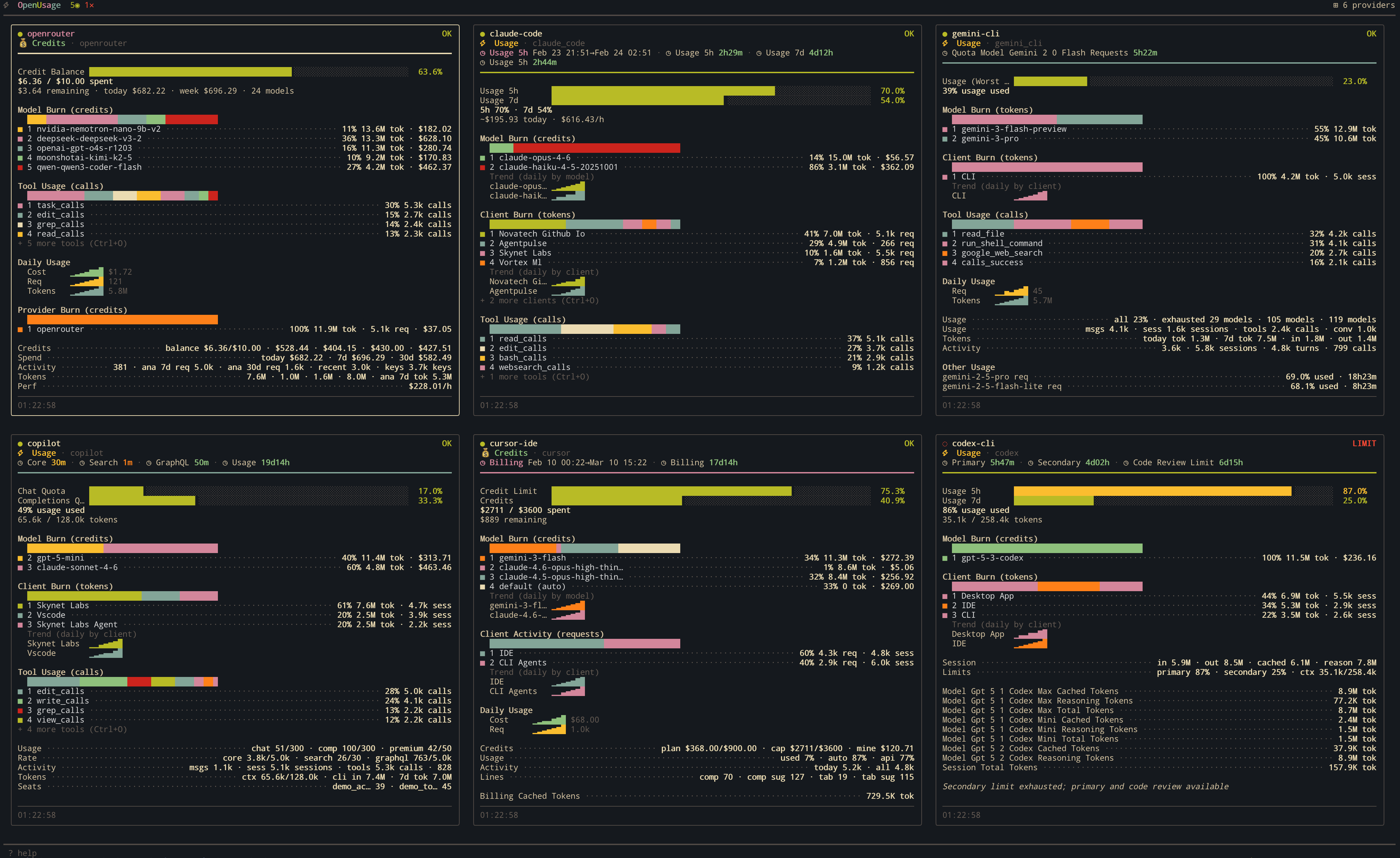
Run it side-by-side with your coding agent:
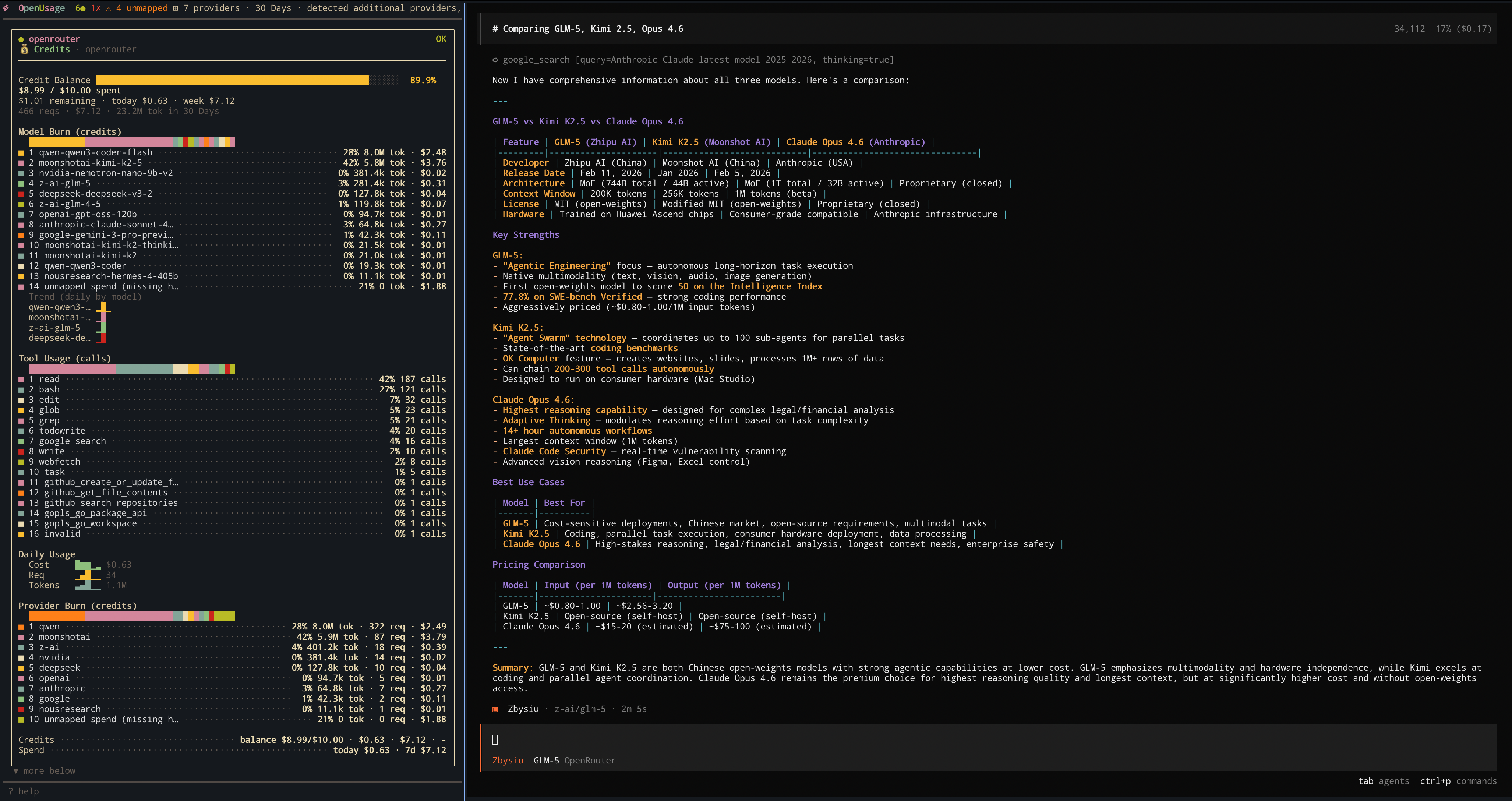
OpenUsage running alongside OpenCode monitoring live OpenRouter usage.
Install
macOS (Homebrew, recommended)
brew install janekbaraniewski/tap/openusage
All platforms (quick install script)
curl -fsSL https://github.com/janekbaraniewski/openusage/releases/latest/download/install.sh | bash
From source (Go 1.25+)
go install github.com/janekbaraniewski/openusage/cmd/openusage@latest
Requires CGO (CGO_ENABLED=1). Pre-built binaries are also available on the Releases page.
Run
openusage
Auto-detection picks up local tools and common API key env vars. No config needed.
Features
- Zero config — auto-detects your AI tools and API keys, just run it
- Live dashboard — see spend, quotas, rate limits, and per-model usage at a glance
- 17 providers — covers coding agents (Claude Code, Cursor, Copilot, Codex, Gemini CLI), API platforms (OpenAI, Anthropic, OpenRouter, and more), and local tools (Ollama)
- Background tracking — collects data continuously, even when the dashboard is closed
- Deep cost insights — combine providers like OpenCode + OpenRouter for breakdowns by model, tool, and hosting provider
- Tool integrations — optional hooks for Claude Code, Codex CLI, and OpenCode provide richer, real-time usage data
- Customizable — 15+ built-in themes, adjustable time windows, configurable thresholds, provider reordering, plus external theme files
Supported providers
17 provider integrations covering coding agents, API platforms, and local tools. See docs/providers.md for all providers with detailed descriptions and screenshots.
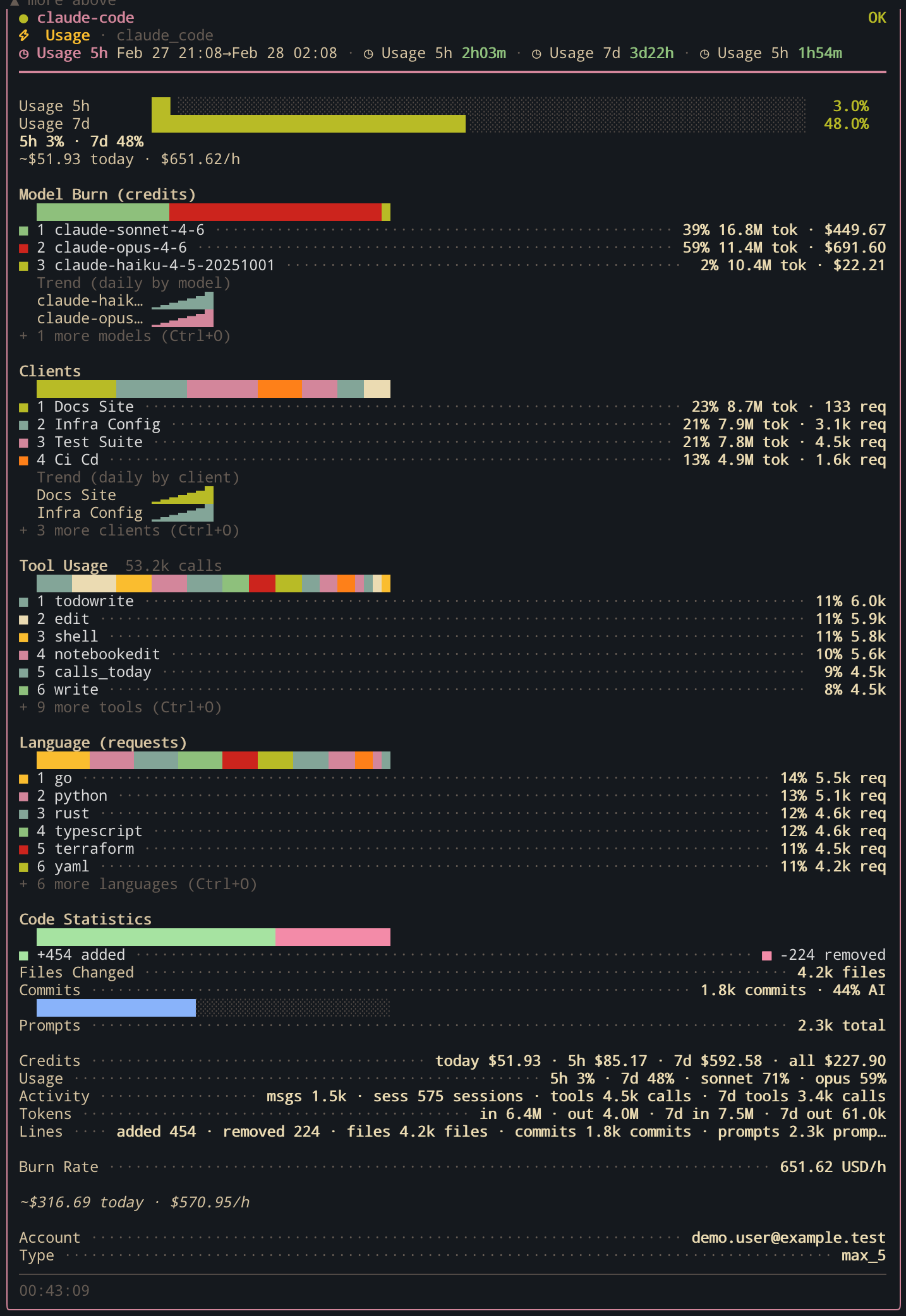
Claude Code
Detection: claude binary + ~/.claude directory
Tracks daily activity, per-model token usage, 5-hour billing block computation, burn rate, and cost estimation.
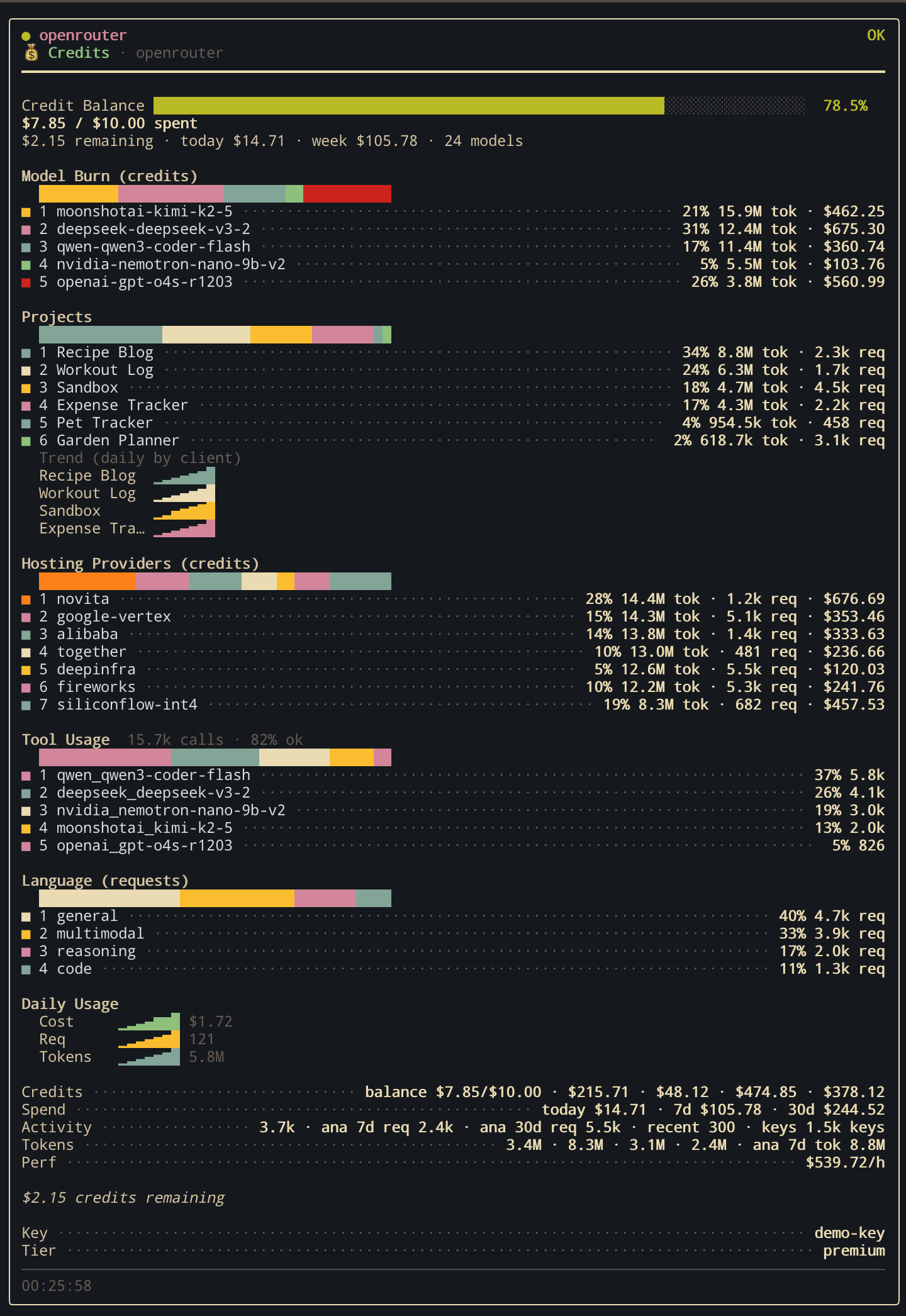
OpenRouter
Detection: OPENROUTER_API_KEY environment variable
Tracks credits, activity, generation stats, and per-model breakdown across multiple API endpoints.
All providers
Coding agents & IDEs
| Provider | Detection | What it tracks |
|---|---|---|
| Claude Code | claude binary + ~/.claude |
Daily activity, per-model tokens, billing blocks, burn rate |
| Cursor | cursor binary + local SQLite DBs |
Plan spend & limits, per-model aggregation, Composer sessions |
| GitHub Copilot | gh CLI + Copilot extension |
Chat & completions quota, org billing, session tracking |
| Codex CLI | codex binary + ~/.codex |
Session tokens, per-model breakdown, credits, rate limits |
| Gemini CLI | gemini binary + ~/.gemini |
OAuth status, conversation count, per-model tokens |
| OpenCode | OPENCODE_API_KEY / ZEN_API_KEY |
Credits, activity, generation stats |
| Ollama | OLLAMA_HOST / binary |
Local models, per-model usage |
API platforms
| Provider | Detection | What it tracks |
|---|---|---|
| OpenAI | OPENAI_API_KEY |
Rate limits via header probing |
| Anthropic | ANTHROPIC_API_KEY |
Rate limits via header probing |
| OpenRouter | OPENROUTER_API_KEY |
Credits, activity, per-model breakdown |
| Groq | GROQ_API_KEY |
Rate limits, daily usage windows |
| Mistral AI | MISTRAL_API_KEY |
Subscription, usage endpoints |
| DeepSeek | DEEPSEEK_API_KEY |
Rate limits, account balance |
| xAI (Grok) | XAI_API_KEY |
Rate limits, API key info |
| Z.AI Coding Plan | ZAI_API_KEY / ZHIPUAI_API_KEY |
Coding plan quotas, model/tool usage, daily trends |
| Google Gemini API | GEMINI_API_KEY / GOOGLE_API_KEY |
Rate limits, model limits |
| Alibaba Cloud | ALIBABA_CLOUD_API_KEY |
Quotas, credits, per-model tracking |
Configuration
No config file needed — auto-detection handles everything. Override or extend via:
- macOS/Linux:
~/.config/openusage/settings.json - Windows:
%APPDATA%\openusage\settings.json
{
  "auto_detect": true,
  "ui": { "refresh_interval_seconds": 30 },
  "accounts": [
    {
      "id": "openai-personal",
      "provider": "openai",
      "api_key_env": "OPENAI_API_KEY",
      "probe_model": "gpt-4.1-mini"
    }
  ]
}
Full reference: configs/example_settings.json
External themes
You can define custom themes as JSON files loaded at startup from:
~/.config/openusage/themes/*.json(macOS/Linux)%APPDATA%\\openusage\\themes\\*.json(Windows)- Any extra directory in
OPENUSAGE_THEME_DIR(path-list separated)
Theme files use the same color token fields as built-ins. See the full grayscale example:configs/themes/grayscale.json
Additional example presets:
- Slate:
configs/themes/slate.json - Warm:
configs/themes/warm.json
Daemon
Background data collection, even when the dashboard isn't open:
openusage telemetry daemon                # Run in foreground
openusage telemetry daemon install        # Install as system service (launchd / systemd)
openusage telemetry daemon status         # Check status
openusage telemetry daemon uninstall      # Uninstall
Manage tool integrations:
openusage integrations list [--all]       # List integration statuses
openusage integrations install <id>       # Install hook/plugin
openusage integrations uninstall <id>     # Remove
Keybindings
| Key | Action |
|---|---|
Tab |
Switch views |
j / k, Up / Down |
Move cursor |
h / l, Left / Right |
Navigate panels |
Enter / Esc |
Open detail / back |
PgUp / PgDn |
Scroll tile |
[ ] |
Switch detail tabs |
r |
Refresh all |
/ |
Filter providers |
t |
Cycle theme |
w |
Cycle time window |
, |
Open settings |
Shift+J / Shift+K |
Reorder providers |
? |
Help |
q |
Quit |
Development
make build    # Build binary to ./bin/openusage
make test     # Run tests with -race and coverage
make lint     # golangci-lint
make run      # go run cmd/openusage/main.go
make demo     # Preview with simulated data (no API keys needed)
Debug mode: OPENUSAGE_DEBUG=1 openusage
License
Yorumlar (0)
Yorum birakmak icin giris yap.
Yorum birakSonuc bulunamadi