helmstudio
Health Uyari
- License — License: Apache-2.0
- Description — Repository has a description
- Active repo — Last push 0 days ago
- Low visibility — Only 7 GitHub stars
Code Basarisiz
- process.env — Environment variable access in .github/workflows/release-images.yml
- fs module — File system access in .github/workflows/release-images.yml
- Hardcoded secret — Potential hardcoded credential in contract_tests/fake_hub/server.py
Permissions Gecti
- Permissions — No dangerous permissions requested
Bu listing icin henuz AI raporu yok.
Wire the models. Direct the film. A local-first AI studio for images, video and voice on your own Mac and NVIDIA machines (alpha).

helmstudio alpha
Wire the models. Direct the film.
A local-first AI studio for images, video and voice. It runs open-weight models on your own Mac and NVIDIA
machines, and keeps every take with how it was made.
Alpha: helmstudio is in early development. Expect rough edges and breaking changes between releases; please report what breaks.




Install · What is helmstudio · Models · Use it from Claude · Architecture
What you can do
- Create images, video and voice. Pick a model, write a prompt, make takes. Call characters and places by name
with@, and set a look (film, camera, colour, lighting) once. Each setting chip under the prompt opens a small
popup; one button opens them all. - Work with the Assistant. An in-app assistant drives every screen: it fills the form, wires the graph, places
clips and asks before anything that costs GPU time. Each step it takes has its own Undo. It sees the images you
attach or@-mention, shows takes right in its answers, keeps your film's shot list across chats, and reads each
model's guide (its good settings and pitfalls) before it uses it. Open it from the Assistant drawer, dock it or
drag it anywhere on the screen; the first launch opens it with a setup message. - Set up AI in one place. Admins get Hub (the Assistant, In pipelines with the default model for pipeline AI
steps, Providers, Plugins) and System (Users, Hosts, API keys). - Let it run in Auto mode. Turn on Auto in a chat and the Assistant makes safe local takes and safe saves
without asking, within caps an admin sets. It still asks before deletes, overwrites and anything that leaves your
machines; every auto step has Stop and Undo. - Edit takes with media tools. Crop, resize, rotate or convert an image; trim, speed up or re-sound a video;
trim, level or join audio. Each edit is a new take with Undo, from the Gallery or by asking the Assistant. - Extend it with plugins and skills. Hub › Plugins turns on model providers and Assistant tools such as web
search (no key needed), or, on the Mac, your own Claude plan through Claude Code you sign in to yourself (off
by default, only for you, no key to paste). Skills teach the Assistant a craft (Animator, Cinematic filmmaker); add your own by
dropping a folder into~/.helm/plugins/. - See a workflow two ways. Every workflow is a small graph of typed steps, shown as a Studio form or as a
Graph on a node canvas. Editing one edits the other. - Run pipelines while you are away. Chain workflows and run them over a list. Agent nodes judge each take
against your checklist, rewrite the prompt and retry, and learn from the takes you keep. - Keep everything in the Gallery. Every take keeps the exact settings and inputs that made it. Send any take to
Create, a pipeline or the timeline. - Cut on the Timeline. Put takes in a sequence, direct new shots and voice lines in place, trim, blade and
ripple, and export an MP4. Clone a sequence to try another cut; an untitled one is named from its shots. - Right-click anything. Clips, takes, nodes, chat answers, models and list rows each have their own menu with
its shortcuts; text fields get Cut, Copy, Paste and Insert @…. - Manage models. Download weights per machine, pick variants (Base, Turbo, Distilled, community fp8 / int8),
add optional add-ons, and upload LoRAs to a shared library. Each host's memory budget is Automatic (the Mac's GPU
limit) or your own number. - Use it from Claude.
helm mcpgives Claude Code, Claude Desktop and other MCP clients the same tools as the
Assistant. Costly or destructive tools ask first. - Host it for a team. Self-hosted and multi-user. An admin adds accounts; each person sees only their own work.
Nothing you make leaves your machines. - Install it your way. On a Mac,
helmstudio.appruns the whole studio with a menu-bar item and updates itself
(Apple Silicon, no Docker needed). On Windows and Linux, Docker and onecompose.ymlrun the release images (Intel/AMD
and ARM). Releases.
A look inside
 |
 |
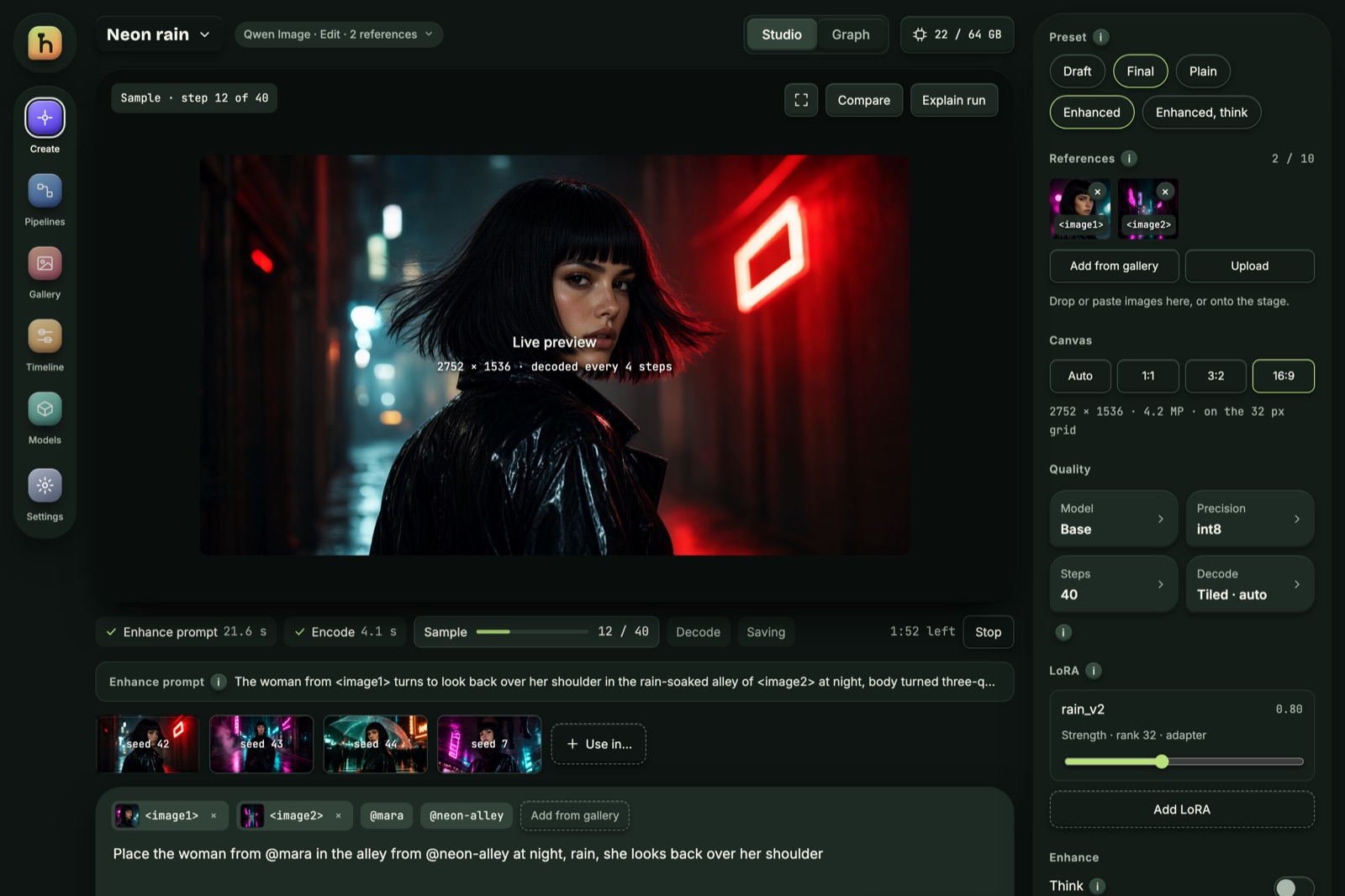
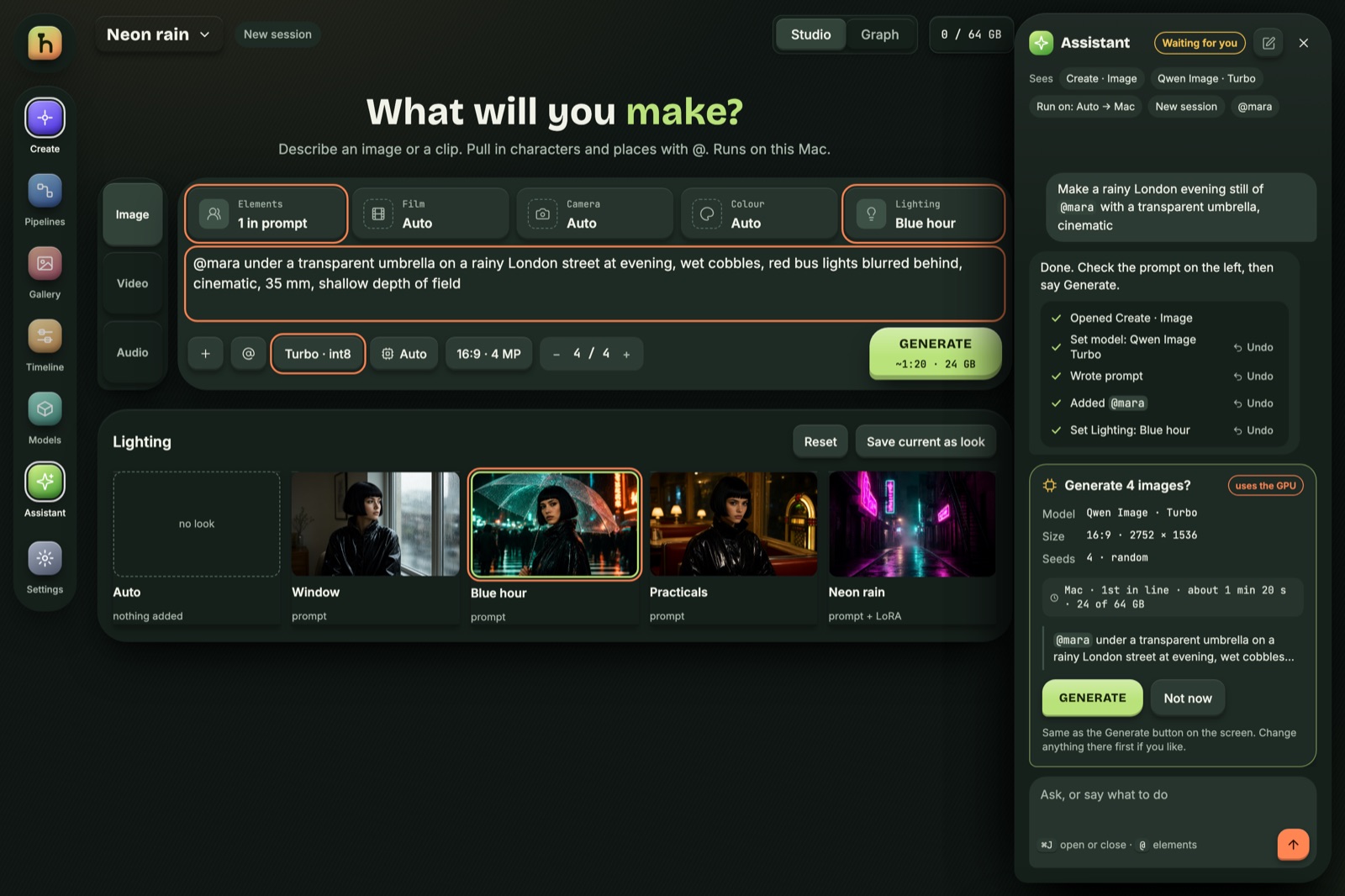
| Create + Assistant. Ask for a rainy neon still of @mara: the Assistant fills the form, rings what it changed, and asks before it uses the GPU. | Timeline. Cut the Winter fox film with Select, Trim, Blade, Range and Overwrite, snap and zoom, and direct a new shot into a gap. |
 |
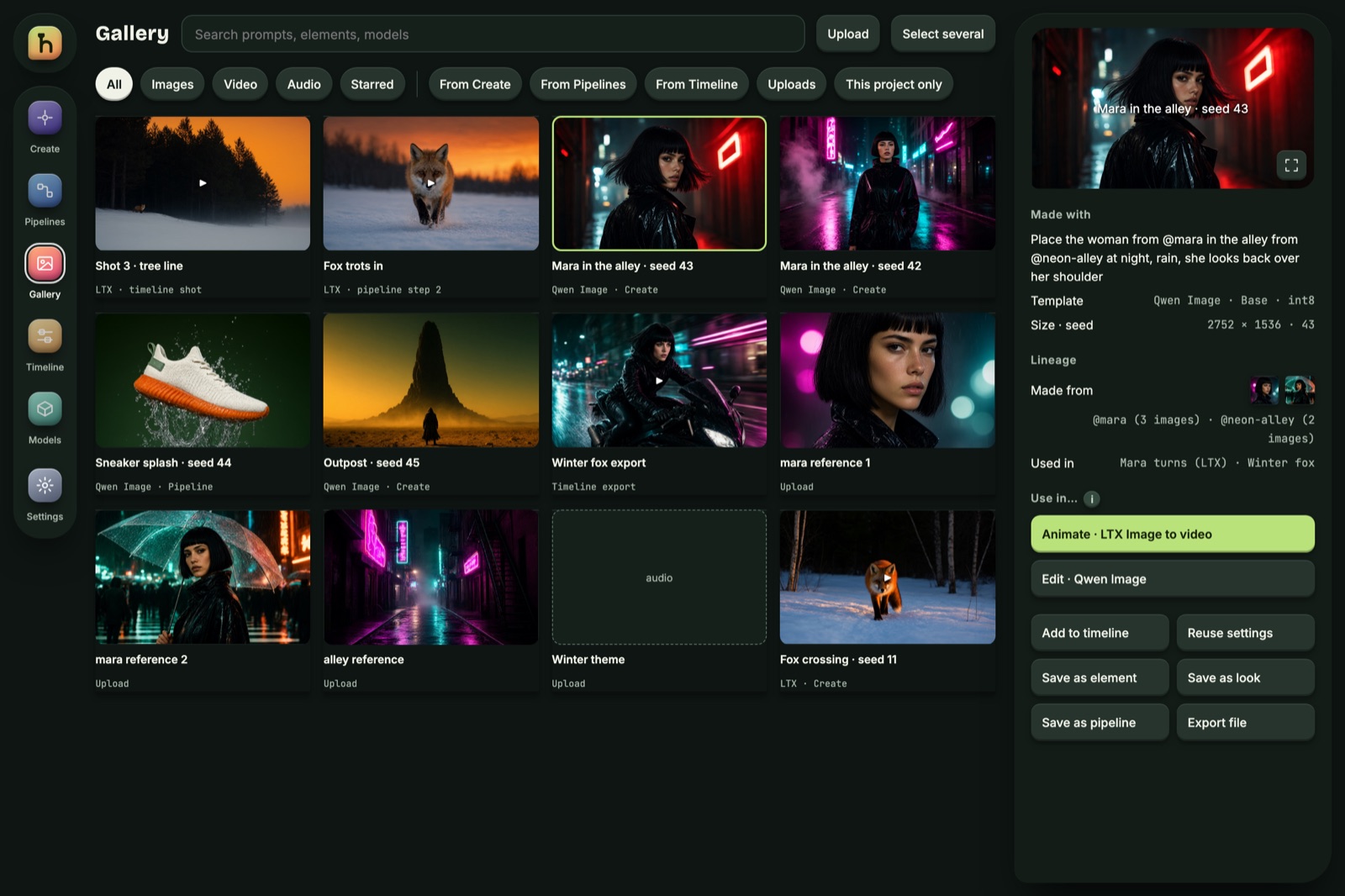 |
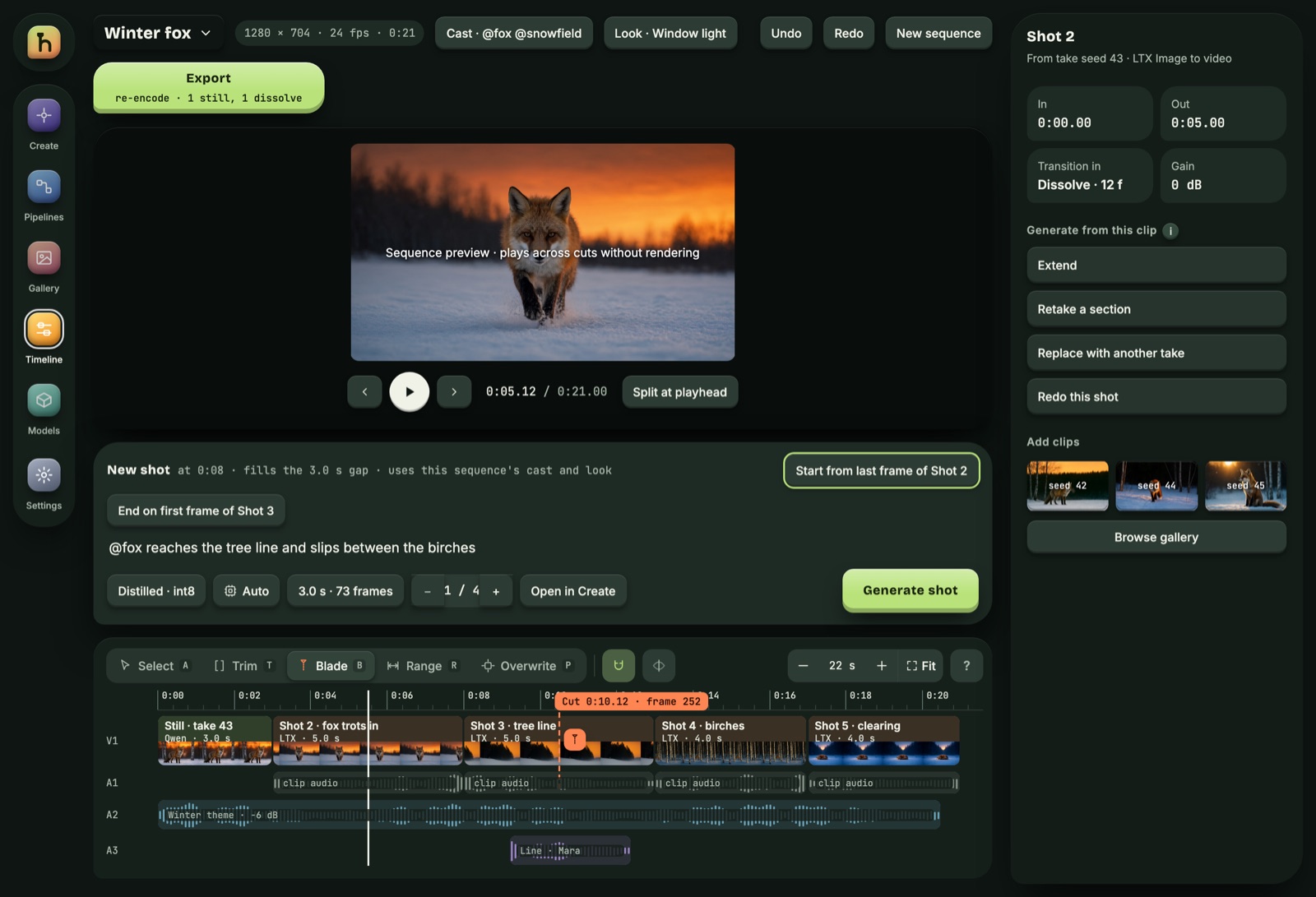
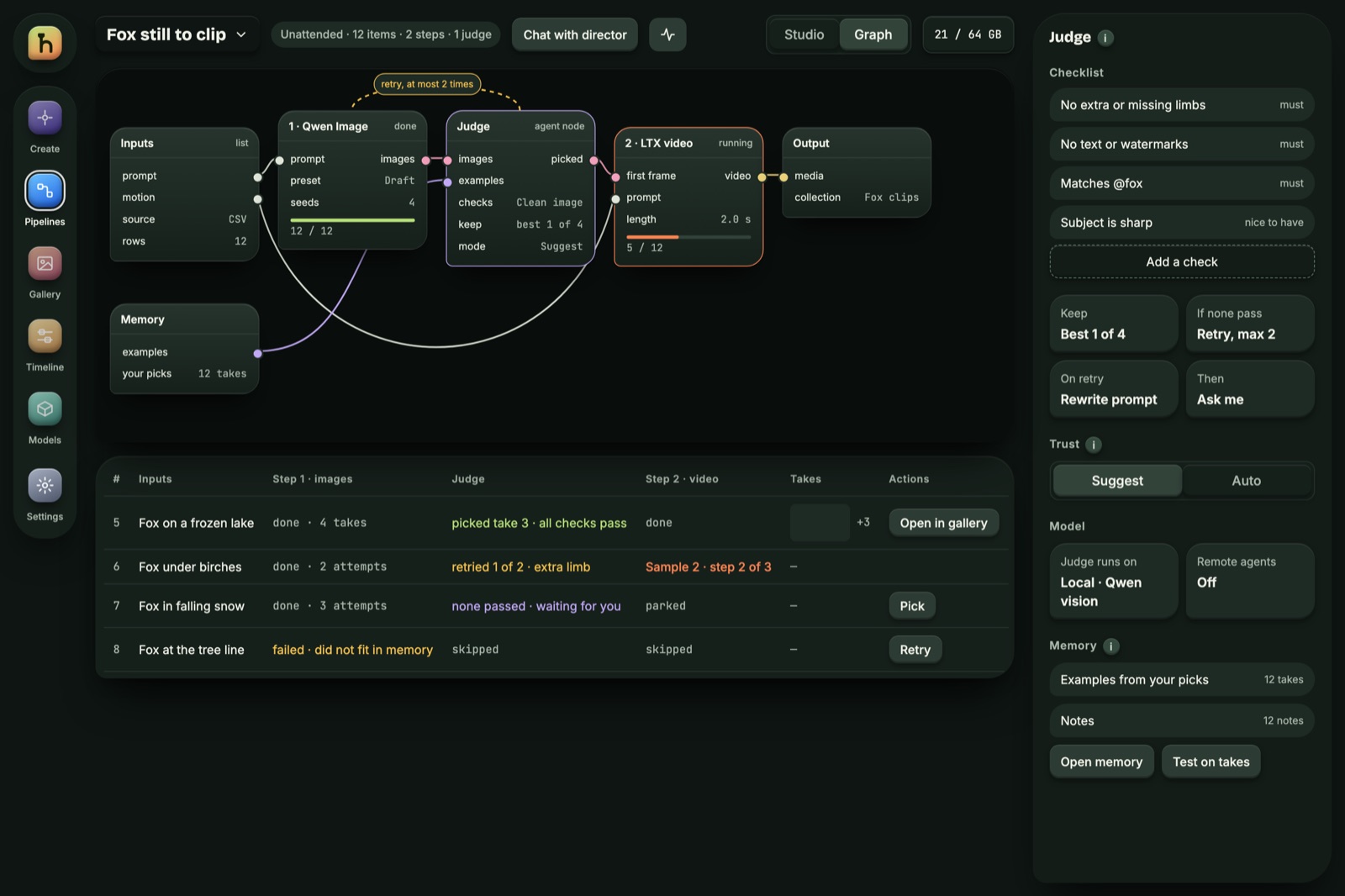
| Pipelines. Fox stills become clips while you are away. A judge checks each take, keeps the best, retries the rest, and waits for you when none pass. | Gallery. Every take, from every campaign, with what made it, where it came from, and where it was used. |
 |
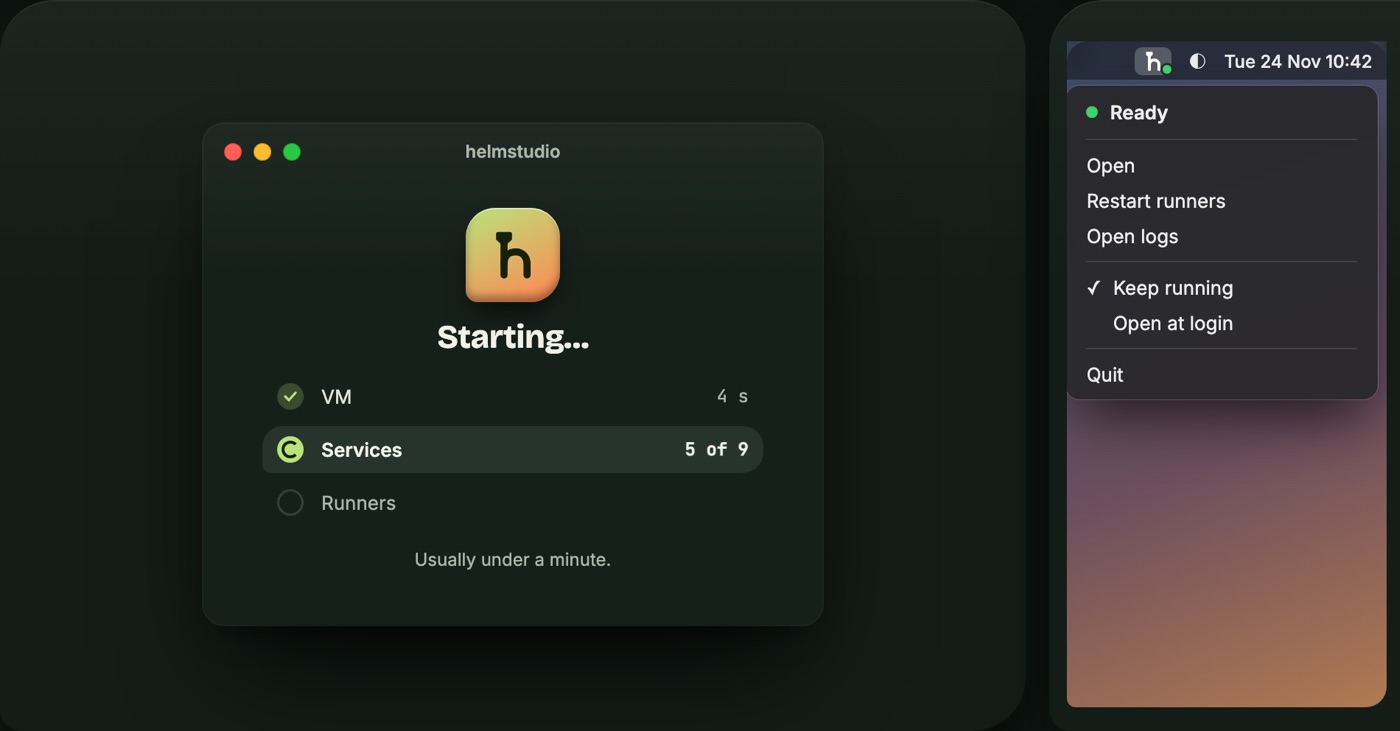 |
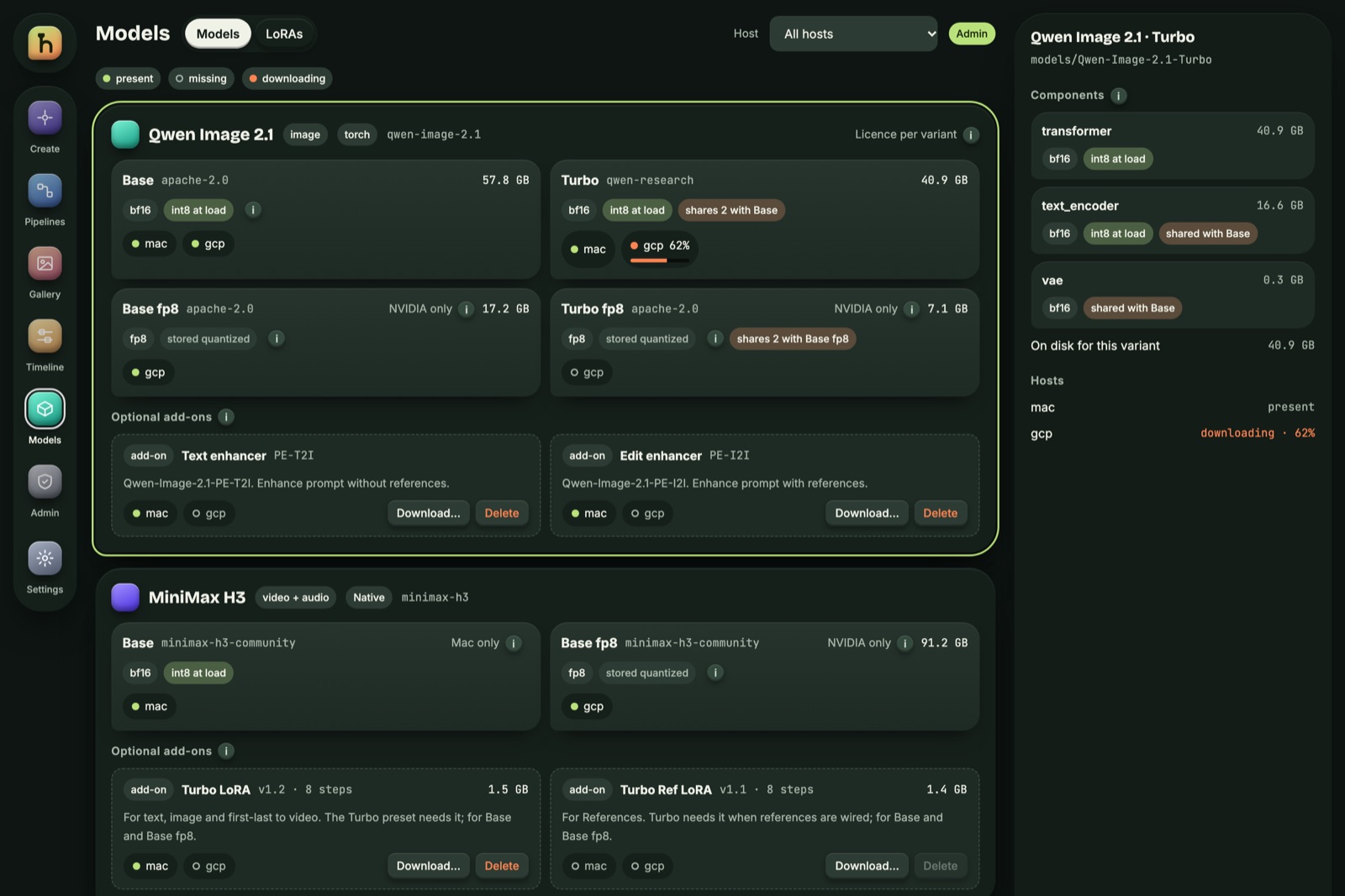
| Models. Variants, sizes, licences and which machine has them; downloads per host. | Mac app. One window to start the studio, and a menu-bar item that keeps it running. |
Screens are from the approved design boards in docs/mock. Every picture in them was made by helmstudio with Qwen Image Turbo.
Models
Weights are never in this repository. An admin downloads them per machine on the Models screen, and each keeps its
own licence.
| Family | Makes | Mac | NVIDIA |
|---|---|---|---|
| Qwen Image 2.1 | Images, edits | Base, Turbo | Base, Turbo, fp8 |
| MiniMax H3 Image | Images, edits | Base | Base, fp8 |
| LTX-2.5 | Video with sound | Distilled, Dev (MLX) | Distilled fp8, Dev int8 |
| MiniMax H3 | Video with sound | Base (native h3) |
Base fp8 (SGLang) |
| Qwen3-TTS | Voice-over, voice design, dialogue | Custom voice, Voice design | Custom voice, Voice design |
| ZONOS3 | Voice-over, dialogue | Mini | Mini |
| Ask | Text answers about takes | Qwen3.8 27B, Qwen3-VL 8B | Qwen3-VL 8B |
Variants, precision, add-ons, LoRAs and licences: helmstudio.in/models.
Documentation
The full docs are at helmstudio.in.
The design plan and decisions live in docs/.
Install
Mac: download the .dmg from the latest release (Apple
Silicon; right-click › Open the first time).
Windows and Linux: install Docker (Docker Desktop on Windows, with WSL2), download the release's compose.yml
into a folder, and in that folder:
[email protected] HELMSTUDIO_ADMIN_PASSWORD='10 characters or more' docker compose up -d --wait
Then open http://localhost:8300. (On Windows put the two values in a .env file beside compose.yml and rundocker compose up -d --wait.) With an NVIDIA card, run the GPU runners on the machine itself:
docs/guides/nvidia-linux.md. Details:
deploy/release/README.md.
From source
The steps below run it from the source on a Mac.
Needs a Mac with Apple Silicon, Docker with Compose 2.20 or later (OrbStack or Docker Desktop), make and openssl.
The native runners also need uv, the Xcode Command Line Tools, CMake and Rust.
git clone https://github.com/janishar/helmstudio.git && cd helmstudio
make envs                 # the .env files from their examples
# now set ADMIN_EMAIL and ADMIN_PASSWORD in auth_service/.env
make up                   # makes the secrets, builds, starts, waits until healthy
open http://localhost:8300
Sign in as the admin and add people on System › Users (there is no public sign-up). The stack ships a test host with an Echo workflow, so you
can try the studio before any model is installed. For real models, start the runners on this Mac:
HELMSTUDIO_MODELS=~/models make runners # torch, mlx and native, in the background
Weights are read from HELMSTUDIO_MODELS and never downloaded into an image. Download them on the Models screen.
| Command | What it does |
|---|---|
make up / make down |
Start the stack and wait until healthy / stop it (the data stays) |
make logs s=studio · make ps |
Follow one service's logs (no s: all) · show what is running |
make runners / make runners-stop |
Start / stop the native runners of this Mac |
make prod |
Run the checkout as production next to the dev stack (Kong on 8400) |
To use the studio from Claude Code, build the CLI, sign in once in a real terminal (it asks for the password), and
add it as an MCP server (details):
make -C cli build
cli/bin/helm login --url http://localhost:8300 --email <your ADMIN_EMAIL> \
  --api-key-file deploy/secrets/helm_api_key
claude mcp add -s user helmstudio -- "$PWD/cli/bin/helm" mcp
Add an NVIDIA machine: Hosts and runners. Production on a Mac:
Run in production.
Test stack. make test runs the black-box contract suite through Kong on its own stack, helmstudio-test
(Kong 8390, Postgres 5464, NATS 4323, S3 8434 and 8444). make test T="tests/test_x.py" runs only those; make test-down stops it. make resilience restarts each service mid-run and checks the stack recovers..tools/test-db gives the services' DB tests a Postgres. Tests never touch the dev stack.
Native runners. On Apple Silicon there are three envs, each its own process: torch (PyTorch MPS; uv projectrunner_service/), mlx (MLX; uv project runner_service/envs/mlx) and native (packs that run a native binary
as a child process, such as MiniMax H3 video through the vendored h3 in runner_service/vendor/h3c). They join
the stack over loopback: NATS on 4322 as runner_mac_<env> (each may only consume its own cmd.run.mac.<env>)
and the S3 API on 8433. Each has a pid file and a log in runner_service/.run/, a GET /health (torch 8091,
mlx 8092, native 8093), and a small supervisor that restarts it after a stall. One Mac is one memory budget:
studio admits a run only when its planned peak fits, and otherwise asks the env holding the least recently used
components to unload them first.
GPU hosts. A Linux machine with an NVIDIA GPU joins as another host; only its runner runs there, in a container
with the NVIDIA runtime (deploy/gpu-host/, with its own README). It reaches only NATS and the object store, over
TLS, with its own NATS user and S3 identity. make gpu-host-secrets GPU_HOSTS=<h> makes its credentials (the
running stack reloads); set STACK_TLS=on in deploy/.env and make up; make gpu-host-tunnel opens an SSH
reverse tunnel.
Ports. Published on 127.0.0.1 only, set in deploy/.env: Kong 8300, Postgres 5463, NATS 4322, S3 8433
(and S3 https 8443 with STACK_TLS=on). Production uses 8400, 5465, 4324 and 8435.
An older data volume. A pgdata18a volume that predates a service's database gets it once fromdeploy/postgres/init.sh (idempotent):
.tools/make-secrets
docker compose -f deploy/docker-compose.yml -f deploy/compose/fake.yml up -d --wait postgres
docker compose -f deploy/docker-compose.yml -f deploy/compose/fake.yml \
  exec -T postgres sh /docker-entrypoint-initdb.d/init.sh
make up
Architecture
helmstudio is a set of small services behind one gateway (Kong). Go services own sign-in, users and API keys
(auth_service), the studio's API and the run dispatcher (studio_service) and signed file links
(files_service). Python runners load the models and make takes (runner_service), and a LangGraph service runs
batches, agent nodes and the Assistant (pipelines_service). Postgres holds the data with row-level security per
user, NATS JetStream carries commands and events, and an S3 store holds the media. The web app is Next.js
(web_service) and cli/ builds the helm command and its MCP server. More:
Architecture and docs/plan/13-services.md.
contracts/         openapi.yaml, NATS message schemas, registry schema, fixtures, check.py
contract_tests/    black-box suite through Kong: the gate for every change
helmgo/            shared Go framework
kong/              gateway config and the API-key plugin
auth_service/      Go: sign-in, users, roles, API keys
studio_service/    Go: /v1/studio (sessions, workflows, runs, events, hosts, batches, timelines)
files_service/     Go: signed /files links from the object store
runner_service/    Python: runs workflows (native envs torch, mlx and native; the fake runner in Docker)
pipelines_service/ Python, LangGraph: batches, agent nodes, the Assistant
web_service/       Next.js app and its BFF
cli/               Go: the helm command and helm mcp
plugins/           built-in plugins: skills, media tools (a container in the stack), web search, Claude subscription
deploy/            compose files, Postgres init, NATS config, secrets (git-ignored), gpu-host/
.tools/            make-secrets, copy-envs, nats-setup, storage-setup, test-db, create-admin, gpu-host-tunnel
docs/              the plan, guides, brand and the approved design boards
Contributing
Issues and pull requests are welcome. The working rules are in CLAUDE.md; in short:
- Contracts first. contracts/ is the single source for everything that crosses a service
boundary. Change it first, then the services, then runmake contracts-check. - Services are isolated. Each service has its own dependencies, lockfile,
.env.example, Dockerfile and
Makefile (make test lint). Services never import each other's code. - Tests gate the work. Run the touched service's
make test lint,make contracts-check, and the contract tests
your change touches (make test T="tests/test_x.py"). Run the fullmake testonce when a feature is done. - No secrets in git. Secrets are files in
deploy/secrets/, made by.tools/make-secrets.
Licence
Apache-2.0 (see LICENSE and NOTICE). Bundled third-party code keeps its own MIT or Apache-2.0
licence. Model weights are not in this repository and keep their own licences.
Yorumlar (0)
Yorum birakmak icin giris yap.
Yorum birakSonuc bulunamadi