agent-root
Health Warn
- License — License: MIT
- Description — Repository has a description
- Active repo — Last push 0 days ago
- Low visibility — Only 9 GitHub stars
Code Fail
- rm -rf — Recursive force deletion command in test/agent-root_test.sh
Permissions Pass
- Permissions — No dangerous permissions requested
No AI report is available for this listing yet.
Let your coding agent ask for root, and say why.
agent-root
Let your coding agent ask for root, and say why.
Coding agents like Claude Code and Codex have no terminal to type a password in, so when one needs root it runs pkexec, and your desktop shows a password dialog. On Omarchy that dialog already shows who is asking and what: since omacom/omarchy#20103 it has the agent's icon and says "Authorize Claude to run '/usr/bin/pacman -S --noconfirm valkey'". It doesn't say why.
agent-root adds the why. The agent runs agent-root "<why>" <command> instead of pkexec <command>, and the reason goes in the dialog, above the command:
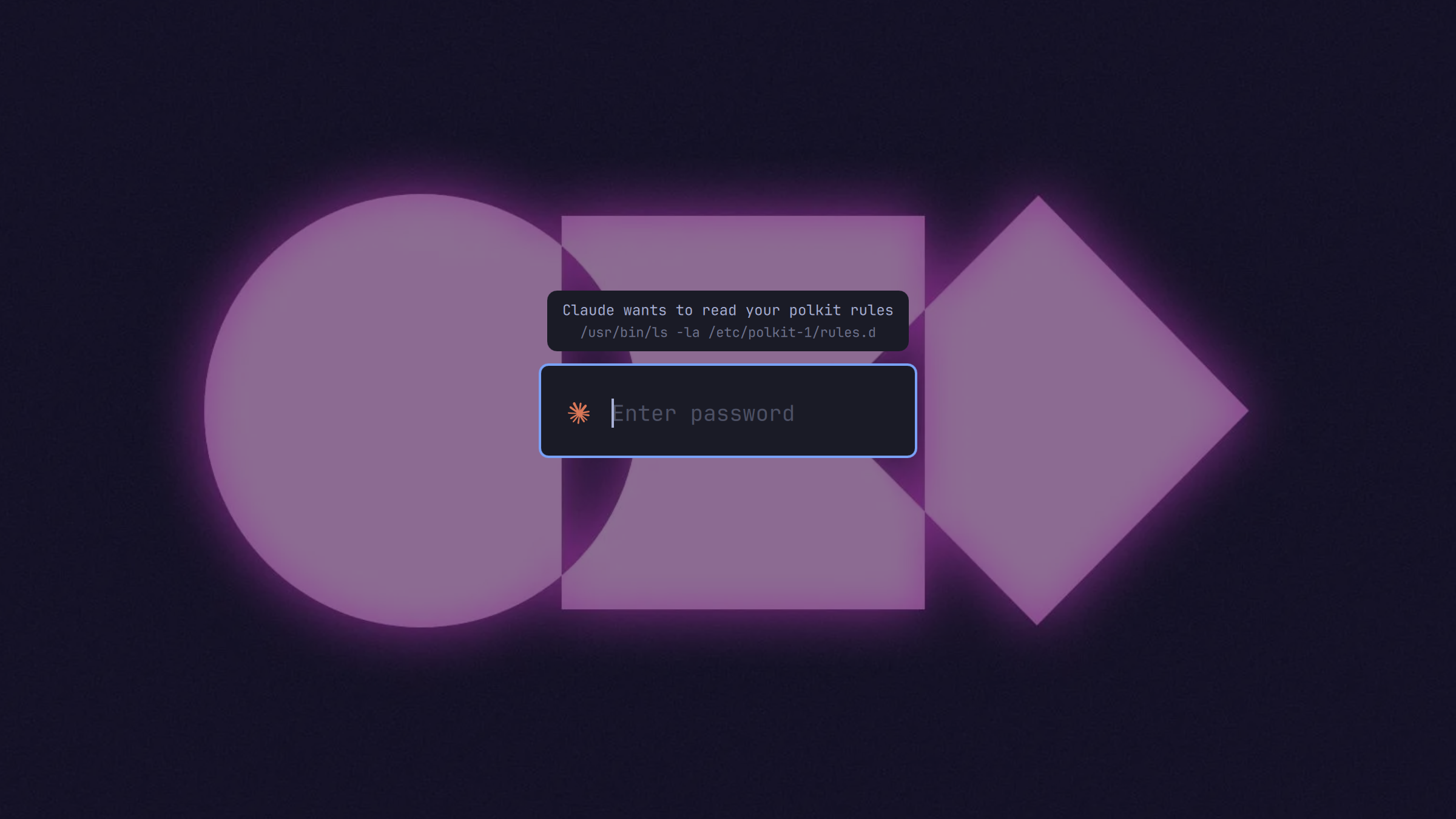
The reason is the agent's, the dimmer line under it is the command pkexec will run. Approve it with your password, your fingerprint or a touch of your security key, or press Escape and the agent gets exit code 126.
Why use it
- The reason. Omarchy shows one only for a prompt that
omarchy-shell omarchy.polkit expectannounced in the minute before, with the command line exactly as pkexec will show it. No agent knows to do that; agent-root does it for every command. - An instruction for your agent that teaches it to ask well: one program per request, everything at once, no
sh -c, and stop when you say no. - A guard against approving a program you can change yourself, like a script the agent just wrote in
/tmp. - yay and paru can use it as their sudo.
If you don't need to know why, plain pkexec is enough. And if Omarchy gets a command of its own that passes a reason along, that is the better place for this.
agent-root is one bash script around pkexec, made for Omarchy. On another Linux desktop with polkit it works the same, but the dialog there shows only the command.
Install
mkdir -p ~/.local/bin
curl -fsSL https://raw.githubusercontent.com/jankeesvw/agent-root/main/agent-root -o ~/.local/bin/agent-root
chmod +x ~/.local/bin/agent-root
agent-root "Try agent-root" whoami
The last line shows the dialog; approve it and whoami prints root. You can also clone the repository and link the script, so git pull updates it. To uninstall, remove the file.
Then put this in your CLAUDE.md, AGENTS.md or whatever your agent reads:
## Root access

When a command needs root, don't use sudo and don't ask me to run it. Run it with `agent-root "<why>" <command>`: I get a system dialog with the command and your reason, and approve it there. Keep the reason under 50 characters and write it so it makes sense without reading the chat, and say in the chat that a dialog is coming. It waits until I answer, so give it a long timeout.

Run one program with its arguments, not `sh -c` or a script you wrote, because I can't see what those do. Ask for as much as one command can do at once, like several packages in one pacman call, so I approve as few as possible, but keep the command line under 80 characters where you can, because the dialog shows only the start and end of a longer one. pkexec starts in /root with a minimal environment, so pass files as absolute paths. There is no terminal to answer prompts, so use flags like `pacman --noconfirm`. Exit code 126 means I declined: don't retry, ask me what to do instead. For AUR helpers use `AGENT_ROOT_REASON="<why>" yay --sudo agent-root -S --noconfirm <package>`, never export AGENT_ROOT_REASON, and never run yay itself as root.
In Claude Code, also add Bash(agent-root:*) to permissions.allow in ~/.claude/settings.json, so it doesn't ask you in the terminal first.
Approve or decline
Approve, and the command runs as root and its output goes back to the agent. Decline, and the agent knows it didn't happen. Here Claude installed Valkey for Sidekiq and then wanted it to start on every boot as well. Dismissing that second dialog gave it exit code 126, so it stopped and asked how to go on:
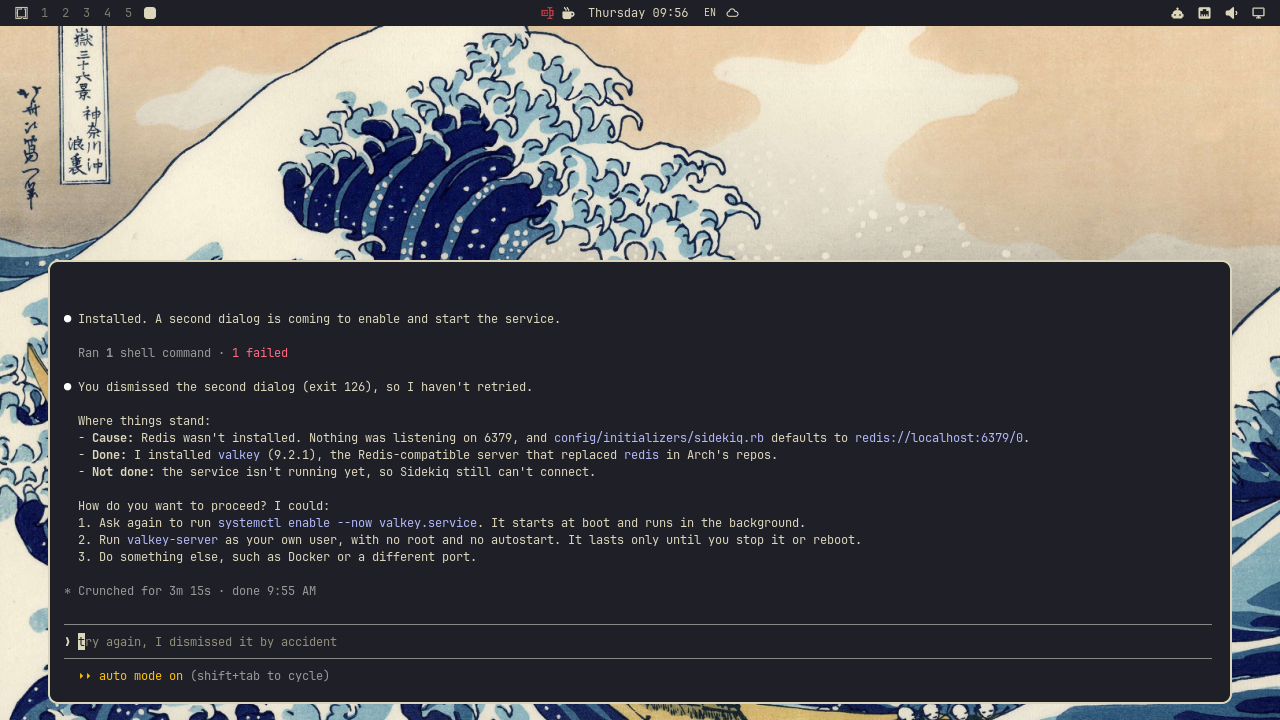
The exit code is the command's own when it ran, 126 when you declined, 127 when no dialog came, authentication failed or the command doesn't exist, 64 when agent-root refused to start it, and 143 when the agent gave up after a timeout, which closes the dialog too. Every command asks again: polkit doesn't remember an approval the way sudo remembers a password.
Security keys
With pam_u2f in /etc/pam.d/polkit-1 a touch of your FIDO key is enough; on Omarchy omarchy-setup-security-fido2 sets that up. Omarchy's dialog still shows a password field then, so export AGENT_ROOT_HINT="Touch your security key" in your ~/.bashrc adds a line for it after the reason.
yay and paru
They call sudo with nothing but the command, so the reason comes from the environment. Set it on the one command and never export it:
AGENT_ROOT_REASON="Install the Valkey server" yay --sudo agent-root -S --noconfirm valkey
Security
agent-root doesn't make your agent safe: it runs as you, so it can already read your SSH keys. What agent-root adds is a person between the agent and root, and that only helps when the person reads.
- Read the command, not the reason. Only the dimmer line comes from pkexec. The reason is the agent's, and the icon is a guess: any program can call itself claude.
- The dialog cuts a command line longer than 80 bytes down to its start and end. Decline when the hidden part could matter.
sh -c,bash script.sh,make installorpacman -Uwith a package the agent built run whatever they turn out to run. agent-root refuses a program you can change yourself, butAGENT_ROOT_ALLOW_USER_PATHS=1lets it through, so it guards against mistakes, not against an agent that wants in.- One approval runs one command, as long as polkit keeps its default for
org.freedesktop.policykit.exec. - The real risk is getting used to it. Tell the agent to ask for everything at once, and decline what you don't understand.
Why not sudo
sudo -n fails whenever a password or a touch is needed, plain sudo asks on a terminal the agent doesn't have, and NOPASSWD gives the agent root for everything without you seeing what it does with it.
Troubleshooting
- "No authentication agent found" (exit 127). The agent has to run in your desktop session, where the polkit agent listens. Over SSH or in a container there is none.
- No reason in the dialog. Update Omarchy; the reason shows since omacom/omarchy#20103, merged on 25 November 2026.
- A padlock instead of the agent's icon. Omarchy knows a list of agents: Claude Code, Codex, Grok, OpenCode, Cursor, Copilot, Antigravity and a few more.
- The dialog closes by itself. The agent gave up, after two minutes by default in Claude Code. The instruction above asks it for a long timeout.
Tests
test/agent-root_test.sh runs the script against stand-ins for pkexec and omarchy-shell. CI runs it and ShellCheck on every push.
License
MIT
Reviews (0)
Sign in to leave a review.
Leave a reviewNo results found