llm-wiki-cli
Health Gecti
- License — License: Apache-2.0
- Description — Repository has a description
- Active repo — Last push 0 days ago
- Community trust — 28 GitHub stars
Code Basarisiz
- rm -rf — Recursive force deletion command in install.sh
Permissions Gecti
- Permissions — No dangerous permissions requested
Bu listing icin henuz AI raporu yok.
Agent-driven proactive memory CLI for AI agents — autonomously recall, maintain, and evolve persistent, source-grounded knowledge across sessions.
LWC — Proactive Memory for AI Agents
Agent-driven · Persistent · Source-grounded





lwc is an agent-driven proactive memory CLI for AI agents. It lets Agents
autonomously recall, maintain, and evolve persistent, source-grounded knowledge
across sessions.
Works with Claude Code, Codex, Cursor, OpenCode, Gemini CLI, Kiro, Hermes,
Antigravity, and pi.
LWC turns curated documents into a durable Wiki. Agents reason and synthesize;lwc preserves sources, pages, citations, links, indexes, and history so
knowledge compounds instead of being rediscovered from raw chunks on every
query.
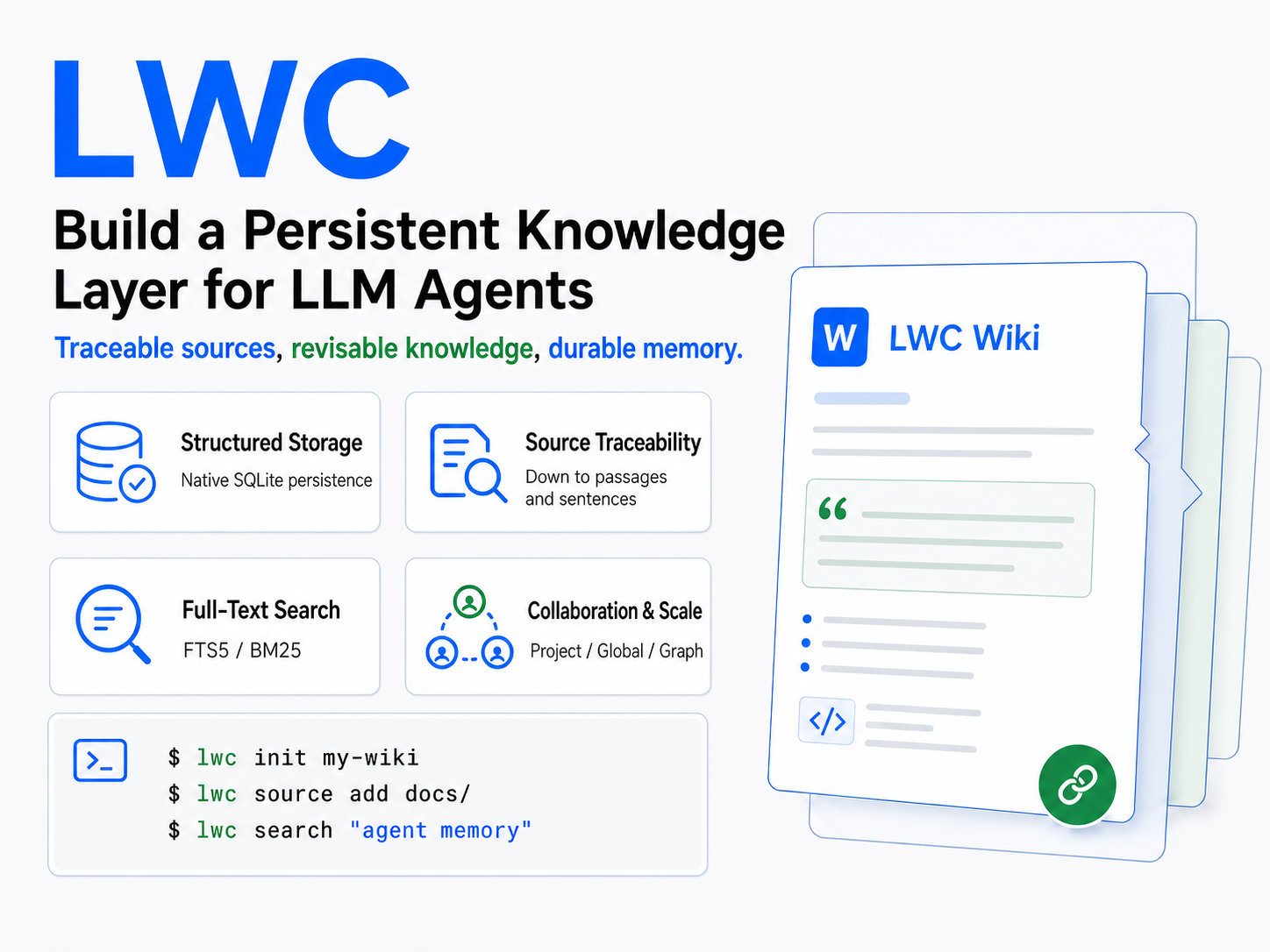
LWC Is Agent Memory, Not RAG
RAG and LWC can both help an LLM work with external documents, but they keep
state in different places. A typical RAG request retrieves raw chunks and builds
one answer at query time:
query -> retrieve chunks -> generate answer
LWC keeps the useful work between requests:
task -> recall maintained Wiki -> reason from sources and prior synthesis
     -> write durable improvements back
Retrieval is one operation inside LWC, not its organizing principle. The durable
artifact is a source-grounded Wiki whose pages, citations, links,
contradictions, and history are revised as knowledge changes. LWC therefore
does not require embeddings or a vector database, and it does not discard each
synthesis after answering. It can complement RAG, but it is not query-time RAG.
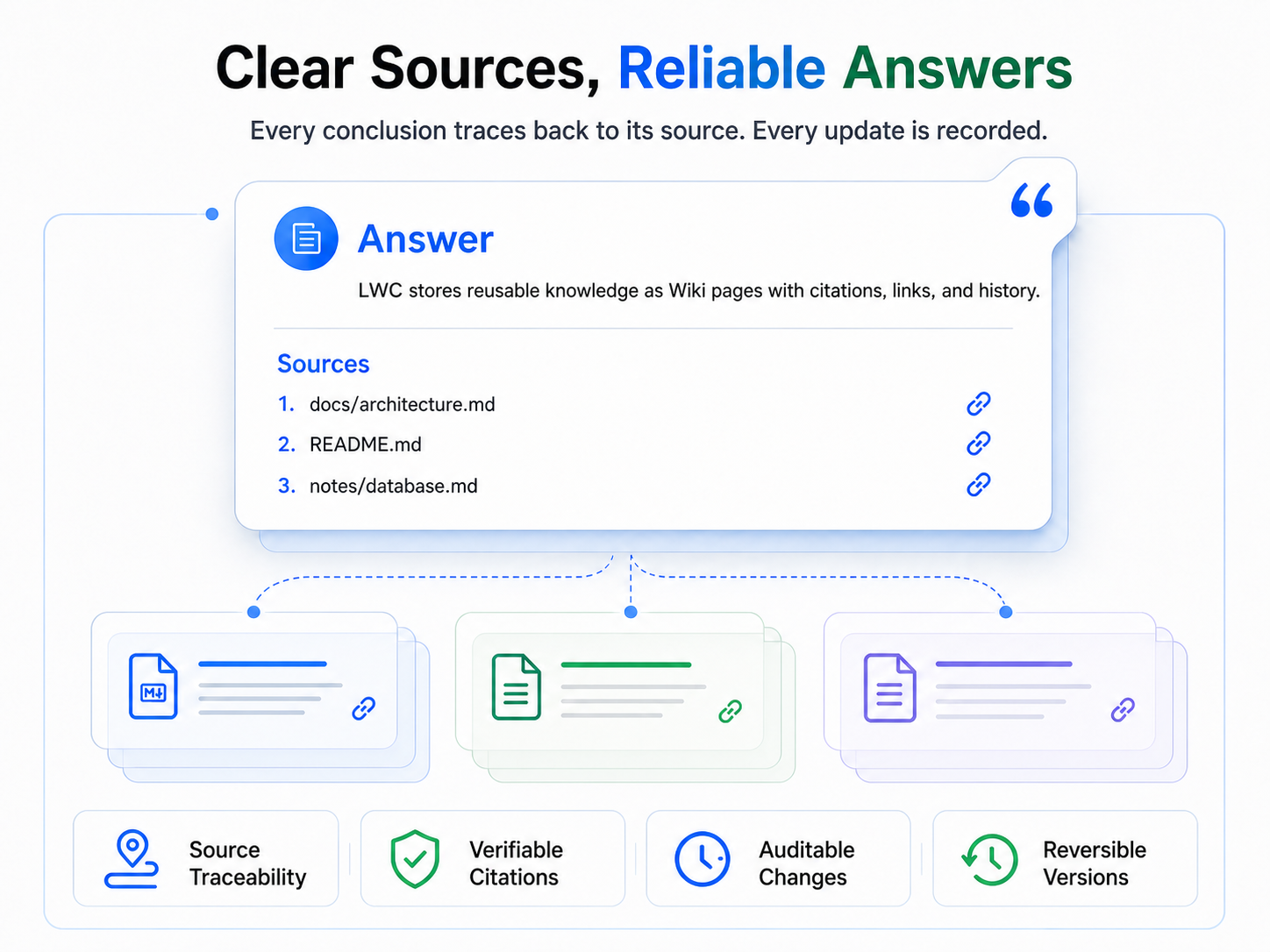
The Agent operates LWC
lwc is a machine interface for Agents, not a human-facing note-taking app. In
normal use, a human selects sources, states goals, asks questions, and reviews
answers or the projected Markdown. The Agent runs the CLI, manages scope,
integrates sources, maintains citations and links, and decides what is worth
recalling or writing back.
Do not manually drive the routine lwc workflow unless you are developing or
debugging the tool. Ask your Agent to activate the bundled canonicalusing-lwc Skill instead—usually as $using-lwc.
Recommended: Ask Your Agent to Set Up LWC
Paste this prompt into the Agent you use. It installs the global CLI, delegates
all supported host configuration to LWC's idempotent AgentTarget installer, and
uses native self-configuration only for an unregistered Agent.
Configure LWC completely for this user. Perform and verify the work; do not
merely describe commands for me to run.

Source of truth:
- https://github.com/JanYork/llm-wiki-cli
- https://github.com/JanYork/llm-wiki-cli/tree/main/skills/using-lwc

Requirements:
1. Read this README, `SECURITY.md`, and `skills/using-lwc/SKILL.md`. Install the
   official checksum-verified release if `lwc` is not globally callable; never
   prefix routine commands with a private binary path or `LWC_PROJECT_ROOT`.
2. Run `lwc --version`, initialize global memory once with
   `lwc --scope global init` when missing, then run `lwc agent install --yes`.
   This command detects installed supported Agents and safely installs their
   MCP, Skill, Hook and Instructions using official locations. Do not recreate
   that logic manually or install a native package for the same Agent as well.
3. Inspect `lwc agent status --target all --location global`. Restart affected
   Agents and complete their normal Hook trust review where required. Do not
   initialize a project Wiki or either graph without explicit project consent.
4. If the current runtime is not one of LWC's registered AgentTargets, use its
   official user-level conventions to install the canonical `using-lwc` Skill,
   an additive instruction block, `lwc serve --mcp`, and a bounded session Hook
   only where those surfaces are officially supported. Preserve existing
   configuration, remain idempotent, and report unsupported surfaces instead of
   inventing paths or keys.

Finish with the LWC version, detected and configured Targets, status results,
files changed, unsupported surfaces, and any restart or trust action remaining.
Origin and Acknowledgements
lwc implements the LLM Wiki
pattern proposed by Andrej Karpathy: an LLM incrementally builds and maintains a
persistent, interlinked Wiki instead of reconstructing knowledge from raw
documents for every query. The CLI architecture and selected implementation
details also draw inspiration fromnashsu/llm_wiki.
This project adapts those ideas into an agent-first Rust CLI backed by SQLite.
Core Design
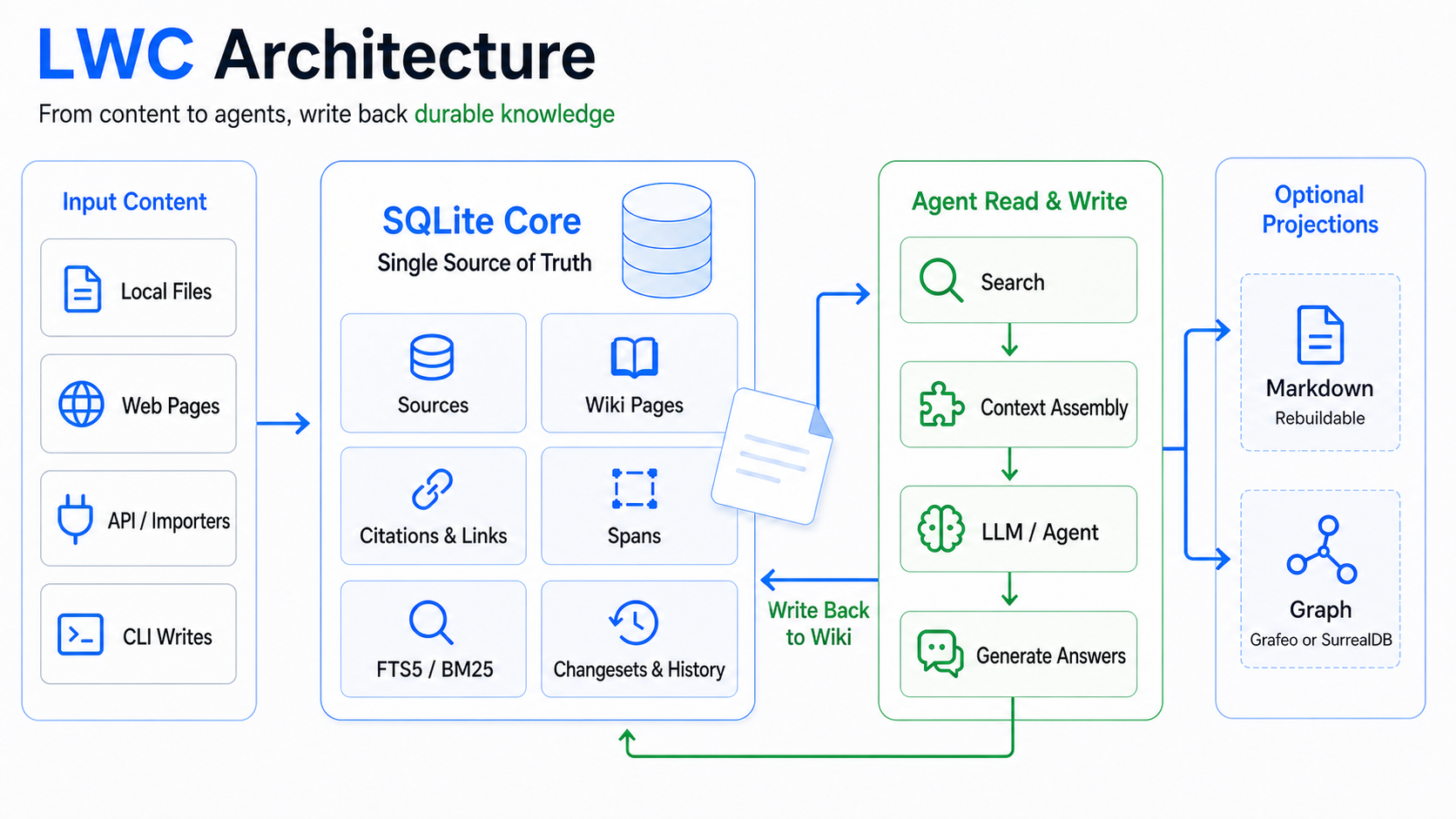
The persistent knowledge model has three logical layers:
| Layer | Contents | Contract |
|---|---|---|
| Raw sources | Immutable snapshots of curated input | Add through source; never rewrite source truth. |
| Wiki | Agent-maintained pages, citations, links, and provenance | Update through page; cite sources and classify durable non-source knowledge. |
| Schema and purpose | Maintenance rules and project intent | Guide every future ingest and revision. |
SQLite is canonical. The Markdown tree is a rebuildable projection for people
and tools such as Obsidian. Agents mutate knowledge through lwc, not by editing.lwc/wiki.db or projected Markdown directly. Successful commands return JSON
on stdout; failures return structured JSON on stderr.
Read commands keep current-format stores read-only. When an older writable
store is opened by a newer CLI, its schema is migrated transactionally once
before the read proceeds.
Hierarchical Recall and Knowledge Graph
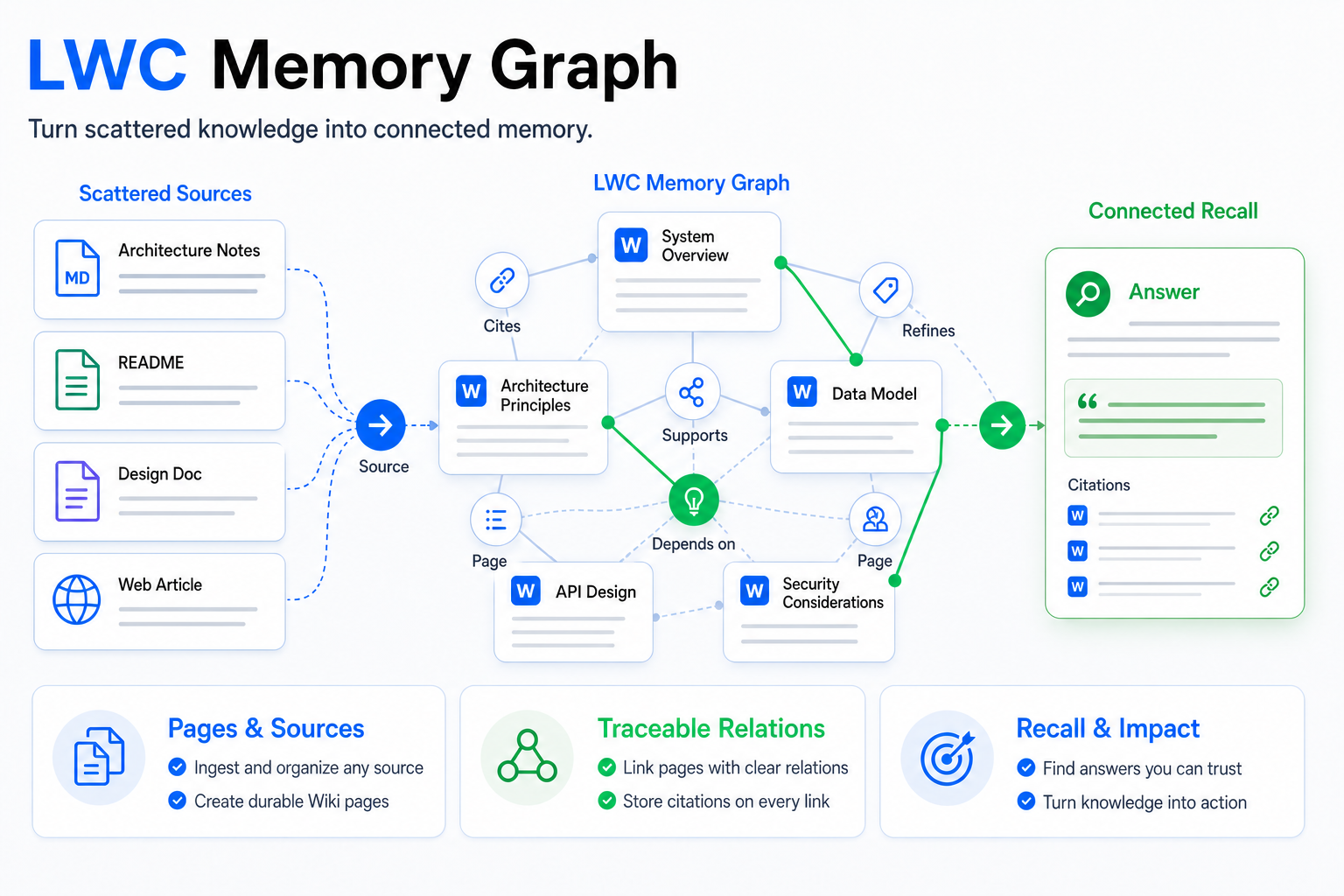
Every current Source and Wiki page is deterministically indexed as passages and
sentences. SQLite remains authoritative; span FTS and an optional external
document graph are rebuilt indexes. Existing search stays document-only
unless a granularity is requested:
lwc search "projection consistency" --granularity sentence --type page
lwc search "projection consistency" --granularity passage
lwc search "projection consistency" --granularity all --group-by document
lwc span get <SPAN_ID>
lwc span expand <SPAN_ID> --before 1 --after 1 --children 20
Span locators contain the document fingerprint and segmentation version. A
locator from a replaced body fails with stale_span and reports prior/current
metadata; LWC never silently remaps it to similar text.
Use the bounded, typed graph API for exploration without requiring keywords:
lwc graph explore                         # representative macro view
lwc graph node page:projection-policy
lwc graph neighbors page:projection-policy --direction outgoing
lwc graph path page:implementation page:policy --max-depth 6
lwc graph impact page:policy --max-depth 4
lwc graph overview
lwc graph status
lwc graph verify
Automatic edges are limited to structural/evidential facts. Semantic claims
must be explicit and auditable:
lwc graph relation set page:implementation DEPENDS_ON page:policy \
  --provenance source-grounded --source 12 \
  --reason "Source 12 states the required policy" --confidence 0.95
lwc graph relation list --from page:implementation
lwc graph relation retract page:implementation DEPENDS_ON page:policy \
  --reason "The dependency was superseded"
Relation reasons are durable content: never put credentials, secrets, or raw
chain-of-thought in them.
SQLite documents remain authoritative. Graph storage is disabled by default;
enable exactly one external engine when traversal is needed. Configuration is
layered from built-in defaults through global and project files:
lwc config show
lwc config set --graph grafeo
lwc config set --graph surrealdb
lwc config set --graph disabled
lwc config unset --graph
Markdown conversion is a separate opt-in operation. lwc init reports the
same machine-readable setup guidance, but never installs or enables a
converter. Install one adapter, select it explicitly, convert to a new local
Markdown file, review it, and only then ingest it:
# Choose one adapter; both are disabled unless configured.
npm install --global @firecrawl/anydoc
lwc config set --trans anydoc

# Or:
python3 -m pip install 'markitdown[all]'
lwc config set --trans markitdown

lwc trans INPUT --output OUTPUT.md
lwc source add OUTPUT.md
Configuration accepts --trans-timeout 1..900 and repeated--trans-arg=<value> options for the selected adapter. LWC invokes the fixed
adapter executable directly, never falls back to the other adapter, accepts
local files only, caps input and output at 64 MiB, and never overwrites an
existing output. Keep credentials in the adapter's environment rather than in
LWC configuration. See the official Anydoc
and MarkItDown documentation for
supported formats and optional flags.
Grafeo and embedded SurrealDB use disposable sidecars under .lwc/. Eachgraph-project Work commits one current Source/Page and its owned links,
citations, and explicit relations before starting the next document. Updates
and deletions enqueue only touched documents; rebuild and resume use the same
document units. Historical source revisions remain immutable and are never
re-tokenized or projected. Use work list, work status, or work watch to
observe progress and work resume after interruption. graph status reports
the selected engine and projected document count; graph verify compares its
current document keys with SQLite.
Installation
Most users should use the Agent setup prompt above. The manual commands below
are for maintainers, debugging, or Agent environments that cannot install the
companion Skill.
Install with npm (Node.js 22+):
npm install --global @i-xor/lwc
Install from GitHub:
curl --proto '=https' --tlsv1.2 -fsSL https://github.com/JanYork/llm-wiki-cli/releases/latest/download/install.sh | sh
The installer supports x86_64/aarch64 macOS, glibc Linux, and Windows Git Bash,
verifies the release checksum, and installs or updates lwc.
It uses ~/.local/bin by default, or updates an existing copy in~/.local/bin or ~/.cargo/bin. To choose another directory:
curl --proto '=https' --tlsv1.2 -fsSL https://github.com/JanYork/llm-wiki-cli/releases/latest/download/install.sh | LWC_INSTALL_DIR="$HOME/bin" sh
Alternatively, build and install from GitHub with Cargo:
cargo install --locked --git https://github.com/JanYork/llm-wiki-cli
Or install a local checkout:
git clone https://github.com/JanYork/llm-wiki-cli.git
cd llm-wiki-cli
cargo install --locked --path .
Companion Agent Skill
The repository includes skills/using-lwc, an Agent Skill
that makes lwc a proactive memory layer for substantive sessions. Install it
in the current Agent runtime's user-level Skills directory. For Codex, from a
local checkout:
mkdir -p "$HOME/.agents/skills"
cp -R skills/using-lwc "$HOME/.agents/skills/"
The canonical invocation is $using-lwc.
When triggered, the Skill:
- finds a compatible CLI or installs the official checksum-verified release;
- initializes global memory in
~/.lwc/once; - recalls bounded global and project context before repeated investigation;
- initializes the active project on explicit invocation, otherwise asks first;
- refuses project writes outside the current authorized workspace root;
- separates project facts from reusable global knowledge;
- integrates sources and writes durable answers back into the Wiki.
SKILL.md is a short router rather than a monolithic manual. It links one
focused teaching document for basic memory, trigger timing, active memory,
physical document graph, bounded Word Graph, CodeGraph, strong tags, document
conversion, Agent onboarding, and recovery/maintenance. Each document states
when to use and skip the capability, its minimum workflow, consent boundary, and
completion evidence.
The Skill normally discovers the active project from the current directory and
invokes the globally installed lwc command directly. LWC_PROJECT_ROOT is an
explicit boundary for a deliberately targeted project, not a prefix to export
for routine commands in the project you are already working in.
Set LWC_AUTO_INSTALL=0 to disable automatic CLI installation. Automatic
installation executes the reviewed installer bundled in the Skill, trusts this
repository and its GitHub Release publishing boundary, and verifies the
downloaded archive against SHA256SUMS; the checksum is integrity protection,
not publisher code signing. Release binaries cover x86_64/aarch64 macOS, glibc
Linux, and Windows through Git Bash. SKILL.md follows the Agent Skills
resource layout, whileagents/openai.yaml supplies OpenAI/Codex metadata. The CLI itself is
runtime-neutral: any Agent that can execute it and load or adapt the Skill's
instructions can use LWC. Skill commands, global instructions, and Hooks remain
runtime-specific, so the setup prompt detects and configures the current host.
Native Agent setup
LWC can detect supported Agents and install one unified read-only LWC MCP.
All 12 registered AgentTargets are strong adapters: each installs every
official file-based MCP, Skill, Hook, and Instructions surface available for
that host and scope, while UI-owned, preview, or unsupported surfaces are
reported explicitly.
lwc agent install --yes
lwc agent status --target all --location global
lwc agent install --print-config codex
lwc agent refresh --target codex,claude
lwc agent uninstall --target codex,claude --yes
--yes selects detected Agents, global scope, and each target's default
lifecycle/prompt Hooks. Use --no-prompt-hook to omit Claude's per-prompt Hook. The installed
entry is lwc -> serve --mcp; its single lwc_explore
tool defaults to bounded Wiki memory and accepts explicit code/all modes.
The requested projectPath must stay inside the workspace where the MCP host
started LWC. It never downloads or initializes CodeGraph. Repeated install and refresh are
byte-idempotent; uninstall restores only owned state and leaves project indexes
intact. Optional Codex, Claude Code, and Pi packages live under integrations/;
installing a package does not grant or bypass native trust. Do not combine the
direct installer and native package for the same Agent. Each native package
bundles the complete using-lwc Skill, so installation does not depend on a
third-party Skill manager or any maintainer-specific environment.
Pi exposes LWC MCP through its official extension bridge because Pi has no
built-in MCP. Other Targets register only lwc serve --mcp; CodeGraph stays an
internal LWC code-context plane and is never registered as a second Agent MCP.
Officially UI-owned trust and permission settings remain user-managed. Preview
surfaces are labeled as such, and partial project scopes install the supported
surfaces instead of weakening or rejecting the whole Target. Kiro global paths
honor KIRO_HOME.
The target interface, registry order, detection rules, and MCP paths follow
CodeGraph's MIT-licensed installer adapter design; LWC adds the unified LWC MCP,
per-surface capability reporting, Skills and Hooks, shared-file ownership, and
exact rollback.
See THIRD_PARTY_NOTICES.md.
Fresh project lwc init output and session/compaction Hooks expose boundedLWC_READINESS facts for the Wiki, physical document graph, CodeGraph runtime
and project index, plus Agent integration commands. Physical graph readiness
distinguishes configured consent from a pending or failed projection. Detection
is read-only and never enables or initializes a graph. When both graphs need
authorization, the portable baseline is plain text, so Agents without checkbox
support behave the same way:
1. Enable physical document graph and CodeGraph (recommended)
2. Enable physical document graph only
3. Enable CodeGraph only
4. Later
After explicit choice 1, the Agent initializes a missing project Wiki, enables
Grafeo, waits for and verifies its projection Work, initializes CodeGraph, and
checks both results independently. Later changes nothing and does not block
the primary task. Native plugins may render the same choice IDs with their own
UI, but checkbox support is never required.
Strong tags provide bounded full-page loading for core rules and runbooks:
lwc tag set "operations" incident-response --priority 100 --reason "primary runbook"
lwc load tag "operations" --limit 3
lwc tag autoload "operations" --enable --priority 100 --limit 3 \
  --max-chars 50000 --reason "required at session boundaries"
This is an explicit strong-load mechanism, not token-derived search: limits and
character budgets are applied before complete pages enter Agent context.
Quick Start
This section documents the CLI protocol that the Agent executes. Humans do not
need to run these commands during normal use.
1. Initialize a project Wiki
cd your-project
lwc init
printf '# Schema\nEvery page declares provenance; source-grounded claims cite sources.\n' | lwc schema set -
printf '# Purpose\nBuild a durable project Wiki.\n' | lwc purpose set -
Project initialization adds the project-relative .lwc/ path to Git's localinfo/exclude file when needed, without changing the repository .gitignore.
Use lwc init --no-git-exclude only when the Wiki is intentionally versioned.
2. Add source material
lwc source add-dir docs/
Files without an explicit title use their source origin as a stable,
human-readable fallback. Identical bytes are deduplicated by SHA-256.
Project sources that resolve outside the active Wiki root require--allow-external-source. High-confidence credential markers are rejected
unless the reviewed source is explicitly acknowledged with--acknowledge-sensitive-source.
Each successful add also records the observed file path and its current
immutable snapshot. Check only the sources relevant to the task before relying
on file-backed evidence:
lwc source status 7 12
The command streams each live file through SHA-256 and reports path lineage
(current or superseded) separately from filesystem state (current,modified, missing, unreadable, oversized, or unstable). It is
read-only. Use source status --all only for explicit maintenance because its
cost is proportional to the bytes in all tracked files. Inspect a modified path
before updating knowledge:
lwc source diff 7
lwc source refs 7 --limit 1000
source diff compares the immutable source with its live file, or with another
snapshot via --to-source. It returns a bounded unified diff: at most 8 MiB and
200,000 lines per side, 20,000 Unicode output characters by default, and
100,000 with --max-chars. If one source was observed at multiple paths, select
an exact --path. A truncated diff is only a preview. source refs lists
directly citing review candidates; it does not prove which pages are
semantically affected. Re-run source add only after review when the same path
contains a meaningful new revision. An A -> B -> A sequence remains three path
observations even though content A reuses its original source ID. External live
paths require --allow-external-source again; flagged live text also requires--acknowledge-sensitive-source after inspection.
Sources migrated from older stores remain explicitly untracked because LWC does
not guess historical paths; re-add the intended file once to establish its
first tracked revision. If a file or path head changes during the check, LWC
returns source_status_unstable; retry instead of trusting a mixed-time result.
For a curated atomic import, paths in a JSON manifest resolve from the
manifest's directory:
{
  "sources": [
    {"path": "ARCHITECTURE.md", "title": "Architecture contract"},
    {"path": "src/store.rs", "title": "SQLite store"}
  ]
}
lwc source add-manifest lwc-sources.json
3. Analyze and integrate one source
lwc ingest next --context-limit 50 --source-max-chars 100000
lwc ingest analyze 1 --file analysis.md
Use lwc ingest claim 7 when a manifest or scheduler already selected an exact
pending source ID.
If source_window.has_more is true, continue reading fromsource_window.next_offset_chars:
lwc source show 1 --offset-chars 100000 --max-chars 100000
Create a cited source-summary page and integrate its contribution into at least
one non-source page before completing the ingest task:
lwc page put source-1 \
  --title "Source 1 Summary" \
  --kind source \
  --summary "What this source contributes" \
  --file source-summary.md \
  --source 1

lwc page put durable-concept \
  --title "Durable Concept" \
  --kind concept \
  --summary "How this source changes shared knowledge" \
  --file concept.md \
  --source 1

lwc ingest complete 1
Both layers are required: the source page is a navigation and provenance aid;
the non-source page makes knowledge compound. If a source genuinely changes no
shared page, complete it with a specific audited explanation:
lwc ingest complete 1 \
  --no-derived-pages-reason "Duplicate evidence; existing synthesis already covers every supported claim"
Source citations automatically expose source-grounded provenance. For
durable knowledge that comes from the user, an Agent observation, or an
explicit hypothesis, repeat --provenance as needed instead of inventing a
source:
lwc page put architecture-decision \
  --title "Architecture decision" \
  --kind query \
  --summary "Accepted constraint and remaining uncertainty" \
  --file decision.md \
  --provenance user-provided \
  --provenance hypothesis
page put replaces the complete citation and explicit-provenance sets. Read
the existing page first, then repeat every still-valid --source and
non-source --provenance value. Do not pass source-grounded explicitly; it is
derived from citations. Provenance is returned by page reads, context, search,
source references, and Markdown projection, but does not change search ranking.
4. Query the accumulated Wiki
lwc context --limit 50
lwc search "question keywords" --limit 20
lwc search "question keywords" --limit 20 --explain
lwc search "concept only" --type page --kind concept
lwc search "exact evidence" --type source
lwc page show source-1
Agent Workflow
The intended workflow is:
- Collect immutable sources.
- Claim one ingest task with bounded
lwc ingest next, oringest claim <ID>
when the source was selected explicitly. - Read every returned source window, plus the schema, purpose, and bounded context.
- Analyze before generating pages.
- Write or revise a source summary and shared durable pages with explicit
--sourcecitations. - Complete only after both integration gates pass, or record why no shared page should change.
- Put a multi-command ingest or broad revision in one changeset, validate the
draft, then publish it atomically. - Use
search,context,graph, andlintto keep the Wiki coherent over time.
See docs/agent-workflow.md for the full operating contract.
Run lwc --help or lwc <command> --help for Agent-oriented preconditions,
state transitions, side effects, and next actions.
Atomic Multi-command Changes
A single source or page command is transactional. Use a changeset when one
logical update needs several commands and must not expose a partial Wiki:
lwc --scope project changeset begin architecture-refresh
lwc --scope project --changeset architecture-refresh source add-manifest sources.json
lwc --scope project --changeset architecture-refresh ingest claim 1
# Analyze, write cited pages, and complete ingest with the same selector.
lwc --scope project --changeset architecture-refresh lint
lwc --scope project --changeset architecture-refresh search "expected answer" --limit 5
lwc --scope project changeset show architecture-refresh
lwc --scope project changeset commit architecture-refresh
Draft reads see staged writes, while live SQLite and Markdown stay unchanged.
The draft database starts as a small sparse overlay; it does not copy or
checkpoint the live Wiki. changeset show reports staged operations, revisions,
and readiness without running lint. Commit validates and applies only
touched entities, so unrelated live writes survive; a same-entity revision conflict
fails without overwriting either side. Commit rejects empty drafts and lint
issues; there is no force or automatic merge. Use--allow-lint-issues --reason "reviewed pre-existing debt" only for audited
debt that the changeset did not introduce. After commit, rerun the same fixed
retrieval checks against live state. Commit freezes the reviewed draft before
publication; changeset_frozen blocks any later staged write. Retry the same
commit for recovery, or discard after a reported conflict—never add more work
to a frozen draft.
lwc --scope project changeset discard architecture-refresh
lwc --scope project changeset rollback <CHANGESET_ID>
Discard touches only an uncommitted draft. Commit writes a checksummed inverse
patch containing only touched entities and returns the exact rollback ID;
rollback restores only those entities and refuses if one changed again. Project
and global changesets are separate, --scope all is invalid, and init,maintenance, checkpoint, and nested changeset commands reject--changeset. Drafts never create a second Markdown projection. If a structured
error reports committed=true with cleanup or materialization work remaining,
do not repeat the knowledge changes; run the returned recovery action.
Sparse commit currently has exact patches for Source add/ingest, Page
put/remove, schema, purpose, and recorded search operations. Retrieval-weight
and explicit semantic-relation mutations fail before checkpointing or taking a
live write lock with changeset_sparse_unsupported; apply those as direct
single-entity transactions until their sparse inverse patches are available.
Scopes
lwc supports three scopes:
| Scope | Store | Use |
|---|---|---|
project |
Nearest ancestor .lwc/wiki.db |
Default, project-specific knowledge |
global |
~/.lwc/wiki.db |
Reusable cross-project knowledge |
all |
Project and global stores | Combined search and context only |
Examples:
lwc --scope global init
lwc --scope global source add shared.md
lwc --scope all search "shared term"
lwc --scope all context
Knowledge writes are explicit. all does not create implicit cross-store citations
or links; search --record only appends the query operation to each selected store.
Search and CJK
Search is lexical and deterministic.
- Search terms are plain text, not raw FTS syntax.
--type autois the default: compiled pages rank first, paired raw sources
are hidden, and raw sources provide fallback recall.- Use
--type page,--type source, or--type allto select a layer.
Repeat--kindto restrict page results, such as--kind concept --kind synthesis. - Multi-character CJK query terms use adjacent bigrams; the index also retains
non-stopword unigrams so one-character queries remain searchable. - Latin text is tokenized into lowercased alphanumeric terms.
- Ranking keeps title, source filename, path/slug, summary, and body evidence
distinct. Exact/partial title and path matches receive bounded boosts. - README/index/overview documents and explicit navigation hubs are
query-conditionally downweighted in favor of specific feature documents;
asking for the README or overview disables that penalty. - Page candidates may receive a bounded direct-link or shared-source graph
boost. Common-neighbor-only relationships cannot change search order, and a
broad navigation hub receives a bounded graph penalty. --explainreturns the exact score arithmetic, including lexical, generic,
graph, manual-weight, and query-feedback signals. It does not record the
query;--recordremains the only search-history opt-in.- Fixed coefficients and lower-is-better ranks keep project and global results
comparable under--scope all.
This is intentionally dictionary-free. The goal is stable behavior for product names, code names, mixed-language terms, and emerging vocabulary without depending on a word-segmentation dictionary.
Explicit retrieval weights and feedback
Use a document weight for a durable, query-independent judgment about a page
or source. Use feedback for one exact ordered-token query fingerprint:
lwc weight set page payment-rules \
  --value 2 \
  --reason "Canonical payment rules specification" \
  --provenance agent-observed
lwc weight list page payment-rules

lwc weight feedback page payment-rules \
  --query "payment reconciliation rules" \
  --signal relevant \
  --reason "Verified against the expected answer" \
  --provenance agent-observed

lwc weight feedback-clear page payment-rules \
  --query "payment reconciliation rules" \
  --provenance agent-observed
lwc weight clear page payment-rules --provenance agent-observed
Document values are -2, -1, 1, or 2; use clear for zero. Both
mechanisms only rerank lexical candidates and cannot make a nonmatching
document appear. A user-provided row takes precedence over anagent-observed row while both remain auditable. Feedback stores the SHA-256
fingerprint, not the raw query, and does not transfer to paraphrases with
different tokens. Reasons and operation records are durable, so never copy a
sensitive query into --reason. Mutations require an explicit project orglobal scope; --scope all is rejected.
Read-only Viewer and CodeGraph
lwc view starts a foreground, loopback-only project inspector and opens the
browser. It serves one embedded TS + Lit application—no CDN and no Node runtime
at use time—and exposes GET/HEAD APIs only. Pages, sources, Markdown, the
knowledge graph, and the optional code graph are read from the current project
without migration, refresh, or graph construction:
lwc view
lwc view --port 4173 --no-open
The viewer starts in English. Use the 中文 / EN control to switch languages;
the browser remembers the selection while Wiki content remains in its authored
language. Graphs use a single Obsidian-inspired 3D relationship view with small
nodes, persistent labels, thin links, rotation, and zoom.
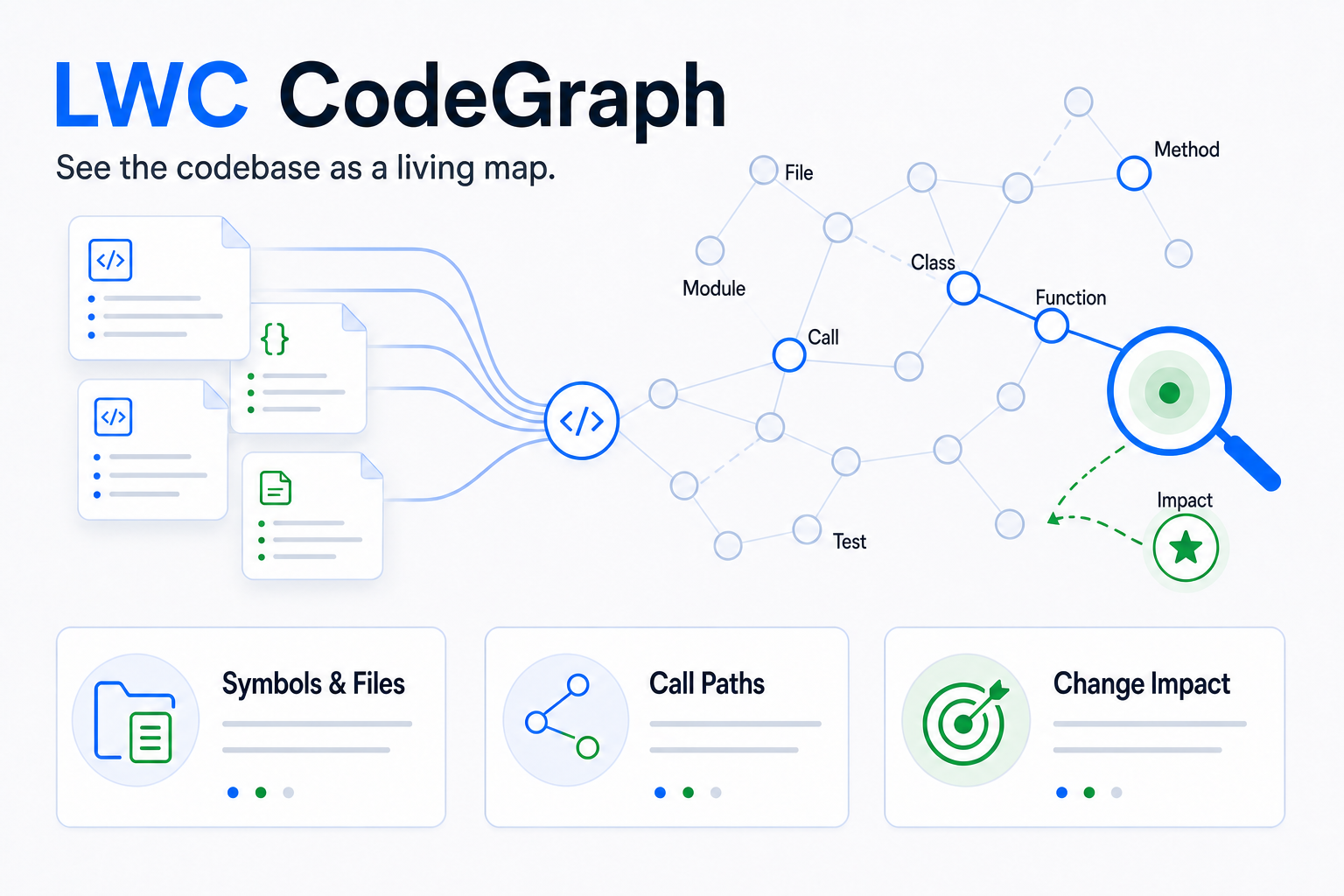
Code indexing is project-only and disabled until explicitly initialized. The
pinned LWC CodeGraph fork is downloaded once from its GitHub Release, verified
with SHA-256, and cached under ~/.lwc/runtime/codegraph/<PIN>/<TARGET>/; each
project keeps only its index under .lwc/codegraph. Telemetry is always off and
no .codegraph state is used.
lwc cg status
lwc cg init                 # download once, then index one complete file at a time
lwc cg sync
lwc cg query UserService
lwc cg node UserService
lwc cg callers UserService
lwc cg callees UserService
lwc cg impact UserService
lwc cg files
All CodeGraph query capabilities are forwarded by lwc cg. Global lifecycle
commands (install, uninstall, upgrade, telemetry, daemon, daemons)
are blocked. The exact lwc cg serve --mcp bridge remains for legacy manual
compatibility; new Agent integrations use lwc serve --mcp, which fuses
bounded Wiki and CodeGraph exploration behind one read-only tool. LWC owns the
runtime and enforces the project boundary. Initial,
incremental, full, update, delete, reference-resolution, and recovery writes
commit one owner file completely before the next; the current graph remains
readable and historical document revisions are never refreshed.
Maintenance and Projection
Useful maintenance commands:
lwc lint
lwc maintenance reindex
lwc maintenance materialize
lwc maintenance compact
lwc work list
lwc work status <WORK_ID>
lwc work watch <WORK_ID>
lwc work cancel <WORK_ID>
lwc work resume <WORK_ID>
lwc checkpoint create before-large-update
lwc checkpoint list
lwc log --limit 20
Notes:
- Maintenance commands return a durable
workimmediately. Read progress withwork status, or usework watchand inspectwork.resultafter success.
Schema v10 to v11 migration uses the same mechanism automatically, so normal
commands never perform that migration inline. lintis read-only by default. Add--recordonly when the lint pass belongs
in durable operation history.maintenance reindexrebuilds derived search artifacts from SQLite.maintenance materializerebuilds the projected Markdown tree from SQLite.maintenance compactonly attempts a WAL truncate checkpoint; it does not
hide a full FTS optimization. Run it while the Wiki is idle and inspectbusyplusafter_bytes. A busy reader returns promptly without changing
canonical content.- Search queries are private by default; add
--recordonly when you want the query wording stored in the durable operation log.
lwc checkpoint create <NAME> uses SQLite's online backup API. Restore withlwc checkpoint restore <NAME>; LWC first creates a pre-restore-* safety
checkpoint and then rebuilds the projection. Use source remove <ID> andpage remove <SLUG> for guarded deletion: sources with citations and pages
with inbound links are refused. Removing the current source for a tracked path
stops tracking that path instead of silently exposing an older revision as
current.
For a multi-source ingest or broad page replacement, prefer a changeset over a
manual checkpoint: successful commit writes a sparse inverse patch, publishes
only touched canonical entities in one transaction, and incrementally
materializes changed Markdown. Commit attempts a WAL truncate after publication;wal_checkpointed=false means an active reader prevented it and does not mean
the canonical commit failed.
For an external filesystem backup, stop active lwc commands and copy the
complete .lwc/ directory. Do not copy only wiki.db while a writer may still
be using its WAL files.
Benchmark Suite
The opt-in benchmark imports a local UTF-8 corpus into a temporary Wiki and
reports import time, search P50/P95, Recall@5/10, MRR, and storage before/after
compaction. Ground truth is a JSONL file of queries and expected
corpus-relative paths:
cargo build --release
LWC_BENCH_CORPUS=/path/to/sanitized-corpus \
LWC_BENCH_QUERY_SET=/path/to/query-set.jsonl \
LWC_BENCH_BINARY="$PWD/target/release/lwc" \
cargo test --test search_benchmark -- --ignored --nocapture
Normal cargo test --all-targets covers page-first search, type/kind filters,
UTF-8 source windows, ingest completion gates, graph precision, migrations,
lint, and WAL compaction. See benchmarks/README.md for
the workload contract and fair before/after comparison rules.
Limits and Non-Goals
Current design constraints:
- single-machine, single-user knowledge base;
- UTF-8 text workflow;
- bounded input size of 64 MiB per schema, purpose, source, or page body;
- lexical search, not semantic vector retrieval.
Deliberate non-goals for this CLI:
- no built-in LLM calls;
- no vector database;
- no daemon or background service;
- no web UI or desktop UI;
- no direct database editing contract.
If the projected Markdown drifts, rebuild it. If the SQLite schema is wrong, fix it through the CLI and migrations, not by hand.
Contributing
Issues and pull requests are welcome, especially around:
- agent workflow ergonomics;
- deterministic projection behavior;
- durable citation and page maintenance contracts;
- search quality for multilingual technical corpora.
Please read CONTRIBUTING.md before opening a pull request.
Report security issues according to SECURITY.md.
License
Licensed under the Apache License 2.0.
Yorumlar (0)
Yorum birakmak icin giris yap.
Yorum birakSonuc bulunamadi