barehands
Health Uyari
- License — License: NOASSERTION
- Description — Repository has a description
- Active repo — Last push 0 days ago
- Low visibility — Only 7 GitHub stars
Code Gecti
- Code scan — Scanned 4 files during light audit, no dangerous patterns found
Permissions Gecti
- Permissions — No dangerous permissions requested
Bu listing icin henuz AI raporu yok.
Move things on your screen with your bare hands. A webcam-powered, hand-tracked interface for your AI. No headset. No controllers.
barehands
Never used Claude Code? Start at jaredrhod.com: pick your situation and it routes you to the right path.
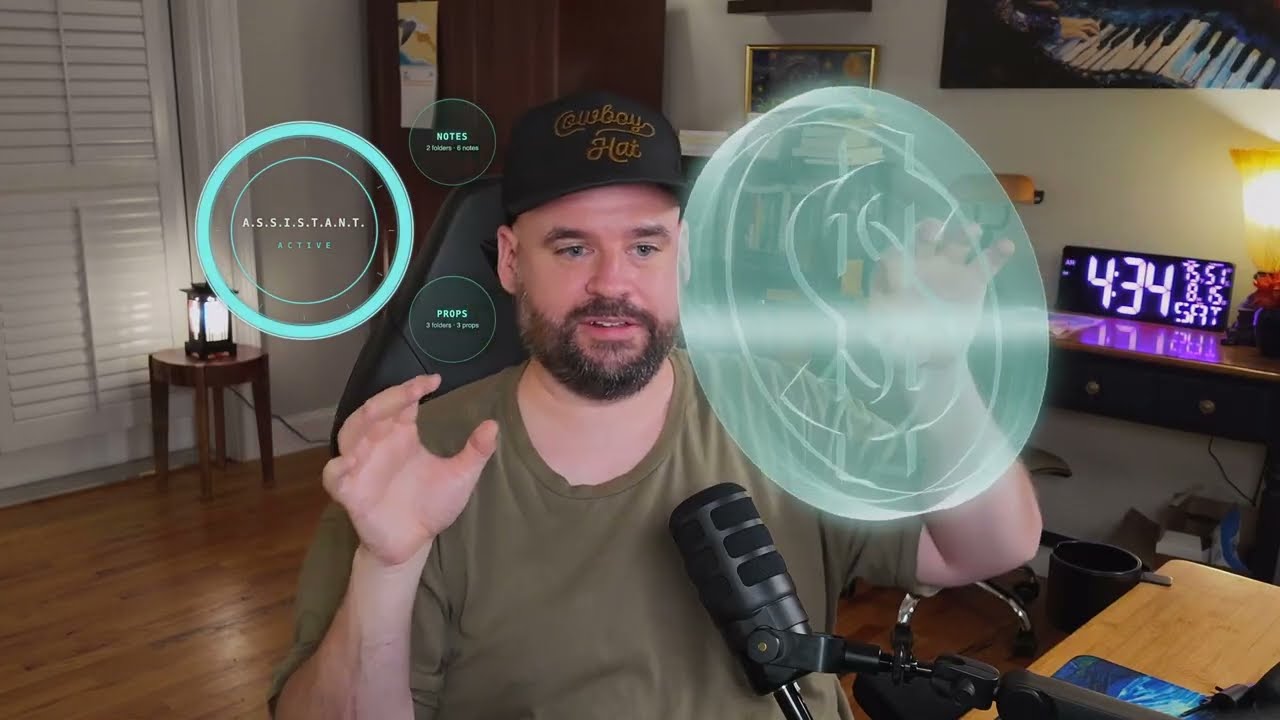
Move things on your screen with your bare hands. barehands turns your webcam into a hand-tracked interface: notes, images, and 3D models float over your camera as glass cards — you pinch them, throw them, stretch them, force-pull them across the room, and blow an engine apart into its exploded view with a drag of two fingers. No headset. No controllers. No gloves. Bare hands.
And it's a body waiting for a brain: wire in your AI and the on-screen ring becomes its face, while two small scripts give it hands and eyes on your board. Free to use, share, and build on — just not to resell (see LICENSE).
Watch it in action:
Run it (nothing needed)
git clone https://github.com/jaredrhod/barehands
cd barehands
python3 server.py
Open http://127.0.0.1:8794/stage.html in Chrome, allow the camera, and wave. That's the whole install — the server is stdlib Python, and the page loads its hand tracking (Google MediaPipe) and 3D (three.js) from CDNs on first run.
Tap the ring → orbs bloom → tap an orb → your files unfold on glass. The sample notes teach the gestures from inside the board itself.
Give it your notes
The "vault" on the board is just a folder of markdown — which means an Obsidian vault works as-is, and so does any folder of .md files. Point an orb at it in barehands.json:
{
  "name": "Assistant",
  "orbs": [
    { "title": "Notes", "path": "~/Documents/MyVault", "kind": "notes" },
    { "title": "Props", "path": "media",               "kind": "media" }
  ]
}
One line per orb — add more folders, rename them, point them anywhere. The media orb is the props airlock: drop images in media/misc/, transparent props in media/fx/, 3D models in media/models/ — or in media/holo/, where the same model renders as a blue hologram wireframe. Only files inside media/ can ever appear on the board; that jail is a safety feature.
Wire in your AI
The easy way: open the repo in Claude Code and say "read barehands.md and set me up." The setup wizard interviews you, writes the config, and wires your assistant in end to end.
The manual way — barehands speaks two dead-simple protocols:
- The ring is a face. It reads tiny files in
state/: writethinking(oridle/listening/speaking) tostate/stateand the ring reacts. No files, no problem — it idles beautifully. Claude Code users: two hooks insettings.jsonmake the ring mirror your real sessions (the wizard pastes them for you). - The board is a stage.
bin/board.sh '{"a":"add_card","title":"HELLO"}'and a card materializes.add_img,hand,explode,yank,hover— the server enforces an action allowlist and the media jail, so it's safe to hand to an assistant.bin/board-state.shis the reverse: it prints what's on the board, so your AI can look before it talks.
Anything that can write a file or curl localhost can be the brain: Claude, a local LLM, a cron job, a Stream Deck button.
If your assistant doesn't have a memory yet, pair this with ai-memory-vault — the vault it builds becomes a notes orb on this board.
The gestures
Tap (quick pinch) opens and closes. Pinch-drag moves. Hold still while carrying to rotate in 3D. Two hands scale. Flick to throw. Clap — palms together, fingers up — sweeps the board clean. The claw: flash your hand open, claw, aim at something across the screen, let it strain and shake for two seconds, then snap the claw shut — it rips through the air into your hand. An empty pinch dragged sideways scrubs a 3D model's exploded view apart and back together.
Every threshold was tuned on a real hand across weeks of live use — and because the gates measure hand shape as ratios, not size, they hold at any camera distance. The full cheat sheet is on the board: Getting Started → The Gestures. If a gesture ever misfires for your hand or setup, TROUBLESHOOTING.md ships the tuning clinic: the built-in debug overlay and pose sampler, plus the exact method for your AI to fit the gates to your hand.
Streaming / recording (advanced)
Two pages, one scene: the tracker page owns your camera; stage.html?role=render is a truly transparent mirror of it, built for an OBS browser source — the glass composites over your camera feed with real alpha. &cursors=0 hides the finger rings (bare-hands sorcery), &ss=2 renders at 2× for razor-sharp cards, and ?portrait=1 on the tracker flips the whole rig to vertical 9:16 for Shorts and TikTok. ?res=3840x2160 bumps the tracker's capture for a 4K self-view (1280x720 rescues slow machines) — in an OBS rig your broadcast camera is OBS's own source, so tracking happily stays at the default. Details in the sample notes' Field Guide.
Credits
Hand tracking by Google MediaPipe (Apache 2.0). 3D rendering by three.js (MIT). Both load from public CDNs; this repo redistributes neither.
Support
Free to use, and always will be. If this helped you out, you can buy me a coffee:

License
Copyright (c) 2026 Jared Rhodenizer.
The contents of this repository are licensed under the Creative Commons Attribution-NonCommercial-ShareAlike 4.0 International License (CC BY-NC-SA 4.0). You are free to share and adapt them, with attribution, for noncommercial purposes, as long as you license your contributions under these same terms. Full terms are in the LICENSE file and at https://creativecommons.org/licenses/by-nc-sa/4.0/
Yorumlar (0)
Yorum birakmak icin giris yap.
Yorum birakSonuc bulunamadi