jmux
Health Warn
- License — License: MIT
- Description — Repository has a description
- Active repo — Last push 0 days ago
- Low visibility — Only 8 GitHub stars
Code Warn
- process.env — Environment variable access in config/new-session.sh
Permissions Pass
- Permissions — No dangerous permissions requested
This tool is a terminal-based orchestration layer built on top of tmux. It allows developers to run multiple coding agents (like Claude Code or Codex) in parallel, providing a persistent sidebar to monitor active sessions, logs, and completed tasks.
Security Assessment
Overall risk: Low. The tool functions as a terminal workspace manager, so it natively executes shell commands and interacts with your local environment to manage tmux sessions. The automated scan flagged environment variable access via `process.env` in a setup script (`new-session.sh`), which is standard behavior for a CLI tool configuring its operating environment. There are no hardcoded secrets detected, no dangerous permissions requested, and no indications of unauthorized outbound network requests.
Quality Assessment
The project is licensed under the permissive MIT license. It is actively maintained, with repository activity as recent as today. However, it currently has very low community visibility with only 8 GitHub stars. This means that while the project is actively developed by its creator, it has not yet been widely vetted or battle-tested by a large open-source audience.
Verdict
Safe to use, but keep in mind it is a young, low-visibility project.
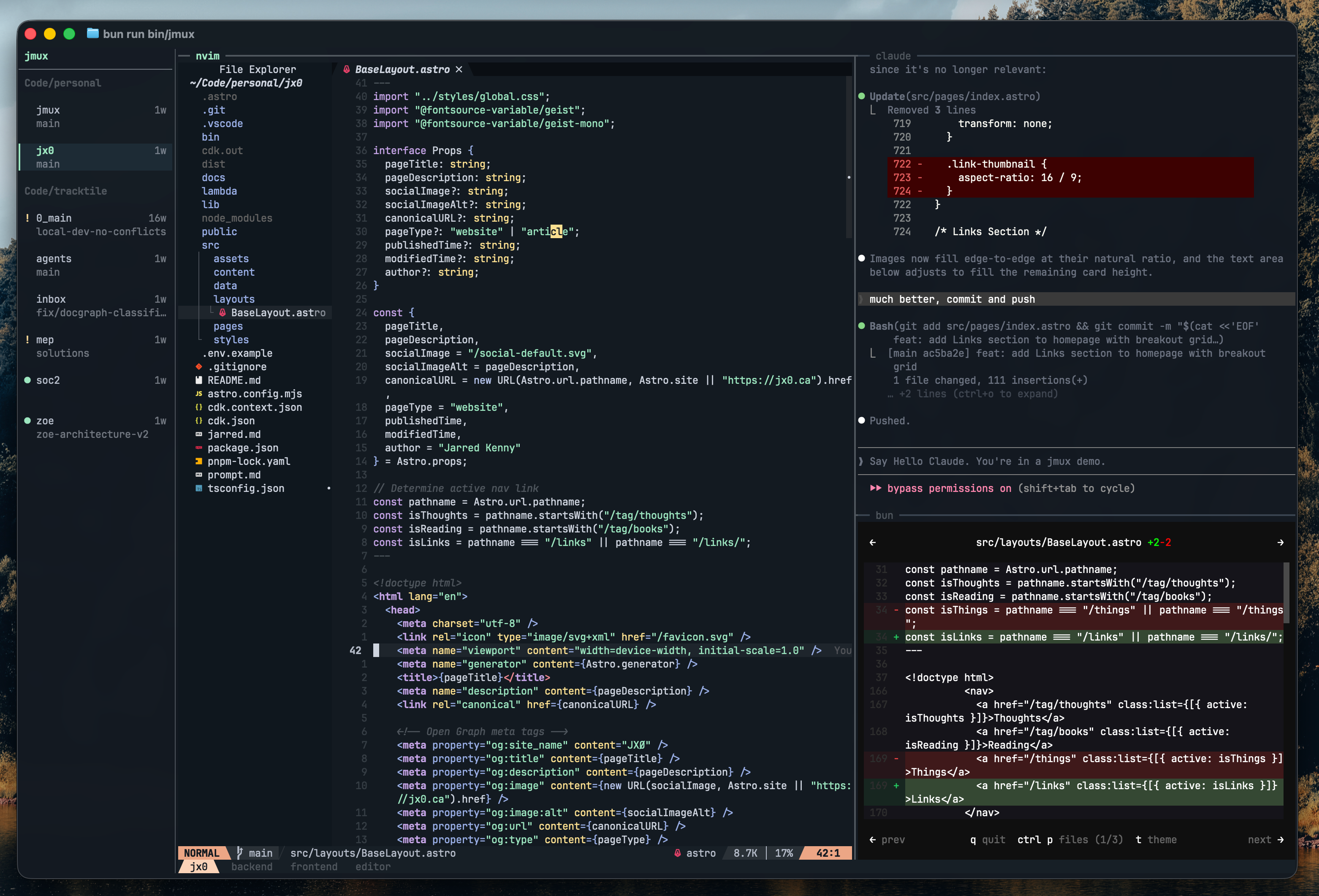
A tmux environment built for running coding agents in parallel — with a persistent sidebar that shows every session, what's running, and what needs your attention.
jmux
The terminal workspace for agentic development.
Agents, editors, servers, logs. All running. All visible. One terminal.
Run Claude Code, Codex, or aider in parallel — jmux shows you which agents are working, which finished, and which need your review. No Electron. No lock-in. Just your terminal.


Install
bun install -g @jx0/jmux
jmux
Requires Bun 1.2+, tmux 3.2+, fzf, and optionally git for branch display. jmux will offer to install tmux and fzf for you on first run.
New to tmux? See the Getting Started guide — no prior tmux knowledge needed.
Why
GUI agent orchestrators are 100MB+ Electron apps that lock you into their editor, their diff viewer, their Git workflow. They work on one platform. They'll charge you eventually.
jmux takes the opposite approach: it's a thin orchestration layer over tmux — the tool you already know. Your editor, your Git workflow, your shell, your tools. jmux just makes them visible and navigable when you're running 10+ agents in parallel.
| jmux | GUI orchestrators | |
|---|---|---|
| Size | ~0.3 MB | ~100+ MB |
| Platform | Anywhere tmux runs (macOS, Linux, SSH, containers) | macOS only |
| Editor | Yours (vim, emacs, VS Code, whatever) | Built-in (take it or leave it) |
| Git | git, gh, lazygit, wtm, your workflow |
Built-in GUI (their workflow) |
| Agents | Any (Claude Code, Codex, aider, custom) | Bundled subset |
| Lock-in | None — it's tmux underneath | Proprietary workspace format |
| Cost | Free, open source | Free today, VC-funded |
Features
Session Sidebar
Every session visible at a glance — name, window count, git branch. Sessions sharing a parent directory are automatically grouped under a header. Mouse wheel scrolling when sessions overflow.
- Green
▎marker + highlighted background on the active session - Green
●dot for sessions with new output - Orange
!flag for attention (e.g., an agent finished and needs review)
Smart Window & Pane Titles
Window tabs auto-name to the working directory. Pane borders show the running command with automatic detection for tools like Claude Code. No more tabs full of zsh or garbled version strings.
Instant Switching
Ctrl-Shift-Up/Down moves between sessions with zero delay. No prefix key, no menu, no mode to enter. Or just click a session in the sidebar. Indicators only clear when you actually interact with a session — not when you're cycling through.
New Session Modal
Ctrl-a n opens a two-step fzf flow: fuzzy-search your git repos for a directory, then name the session. Pre-filled with the directory basename.
Bring Your Own Everything
jmux works with your existing ~/.tmux.conf. Your plugins, theme, prefix key, and custom bindings carry over. jmux applies its defaults first, then your config overrides them. Only a small set of core settings are enforced.
Use any editor. Any Git tool. Any AI agent. Any shell. jmux doesn't replace your tools — it organizes them.
Works Great With
- wtm — Git worktree manager. Create isolated worktrees for each agent, one session per branch.
wtm create feature-auth --from main+ jmux = parallel agents on parallel branches. - Claude Code — AI coding agent with built-in attention flag support.
- lazygit — Terminal Git UI. Run it in a jmux pane alongside your agent.
- gh / glab — GitHub and GitLab CLIs for PRs, issues, and reviews without leaving the terminal.
Agent Integration
Built for running multiple coding agents in parallel. One command sets up attention notifications:
jmux --install-agent-hooks
When Claude Code finishes a response, the orange ! appears on that session in the sidebar. Switch to it, review the work, move on. Works with any agent that can run a shell command on completion. See docs/claude-code-integration.md for details.
Keybindings
Sessions
| Key | Action |
|---|---|
Ctrl-Shift-Up/Down |
Switch to prev/next session |
Ctrl-a n |
New session |
Ctrl-a r |
Rename session |
Ctrl-a m |
Move window to another session |
| Click sidebar | Switch to session |
| Scroll wheel (sidebar) | Scroll session list |
Windows
| Key | Action |
|---|---|
Ctrl-a j |
fzf window picker |
Ctrl-a c |
New window |
Ctrl-Right/Left |
Next/prev window |
Ctrl-Shift-Right/Left |
Reorder windows |
Panes
| Key | Action |
|---|---|
Ctrl-a | |
Split horizontal |
Ctrl-a - |
Split vertical |
Shift-Left/Right/Up/Down |
Navigate panes (vim-aware) |
Ctrl-a Left/Right/Up/Down |
Resize panes |
Ctrl-a P |
Toggle pane border titles |
Utilities
| Key | Action |
|---|---|
Ctrl-a k |
Clear pane + scrollback |
Ctrl-a y |
Copy pane to clipboard |
Ctrl-a i |
Settings |
Configuration
Config loads in three layers:
config/defaults.conf      <- jmux defaults (baseline)
~/.tmux.conf              <- your config (overrides defaults)
config/core.conf          <- jmux core (always wins)
Override any default in your ~/.tmux.conf — prefix key, colors, keybindings, plugins. Only core settings the sidebar depends on are enforced (mouse on, detach-on-destroy off, window naming, status-left).
See docs/configuration.md for the full guide.
Architecture
Terminal (Ghostty, iTerm, etc.)
  +-- jmux (owns the terminal surface)
       +-- Sidebar (26 cols) -- session groups, indicators
       +-- Border (1 col)
       +-- tmux PTY (remaining cols)
            +-- PTY client ---- @xterm/headless for VT emulation
            +-- Control client - tmux -C for real-time metadata
~1800 lines of TypeScript. No opinions about what you run inside tmux.
License
Reviews (0)
Sign in to leave a review.
Leave a reviewNo results found