claude-code-iterm2-tab-status
Health Gecti
- License — License: MIT
- Description — Repository has a description
- Active repo — Last push 0 days ago
- Community trust — 23 GitHub stars
Code Basarisiz
- rm -rf — Recursive force deletion command in tests/test_bootstrap.sh
- rm -rf — Recursive force deletion command in tests/test_hooks.sh
Permissions Gecti
- Permissions — No dangerous permissions requested
Bu listing icin henuz AI raporu yok.
Claude Code plugin that shows live session status (⚡ running / 💤 idle / 🔴 attention) in your iTerm2 tab title — no config needed, just install and go.
Claude Code iTerm2 Tab Status


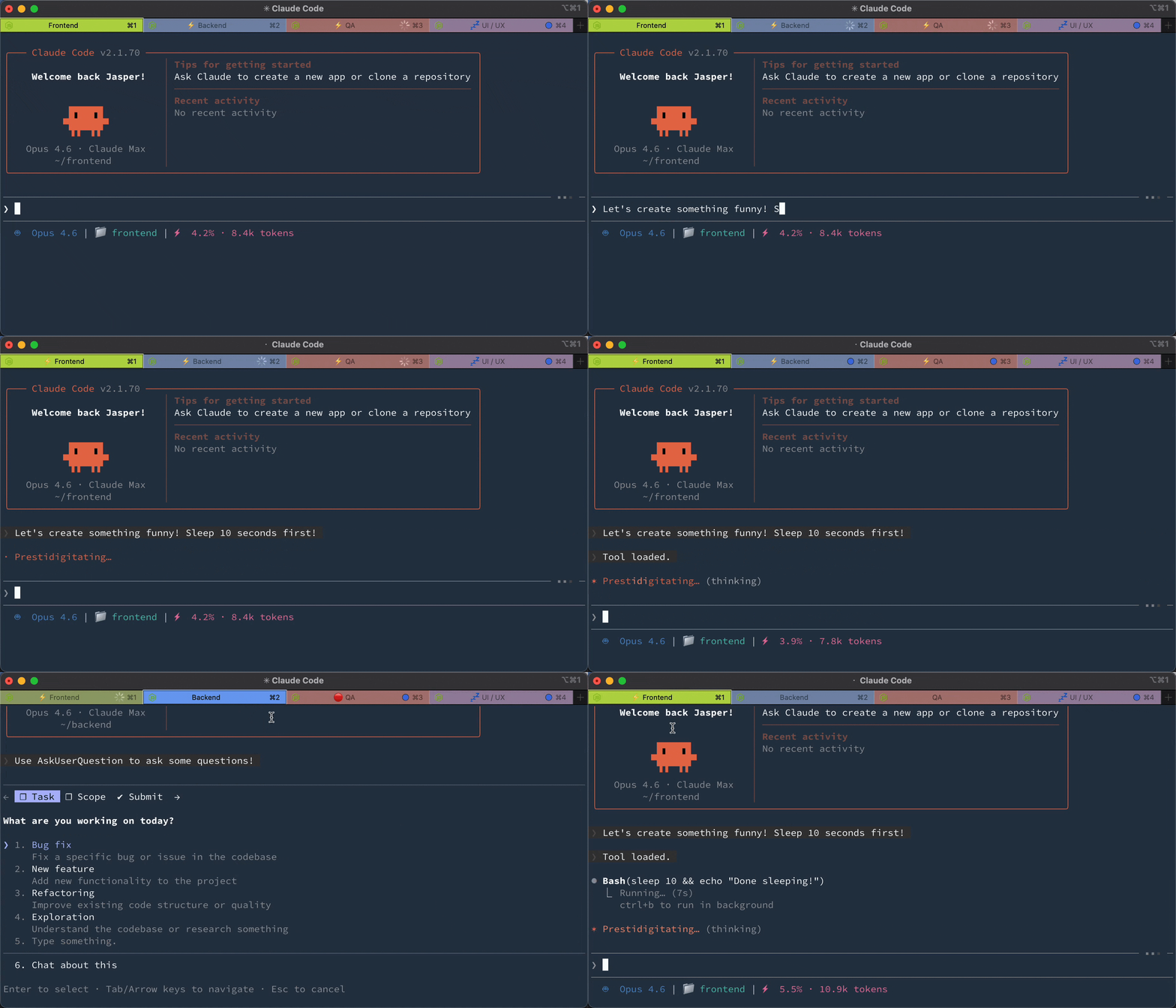
See what every Claude Code session is doing. Each iTerm2 tab shows a status prefix. ⚡ running, 💤 idle, or 🔴 needs attention (with flashing).
Installation
Claude Code (via Plugin Marketplace)
In Claude Code, register the marketplace first:
/plugin marketplace add JasperSui/jaspersui-marketplace
Then install the plugin from this marketplace:
/plugin install iterm2-tab-status@jaspersui-marketplace
On first session start, the plugin automatically:
- Creates an iTerm2 Python runtime (if not already installed)
- Deploys the adapter script to iTerm2 AutoLaunch
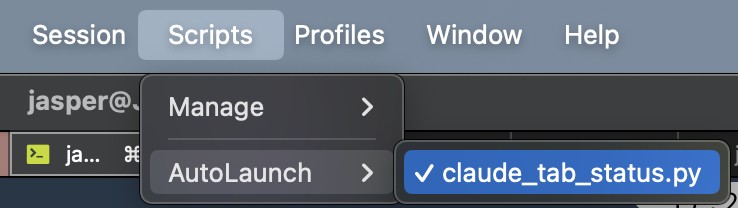
After the first session, restart iTerm2 (or toggle Scripts → AutoLaunch → claude_tab_status.py twice).
Manual Setup
If auto-bootstrap didn't work, run:
/iterm2-tab-status:setup
Uninstall
Run in Claude Code:
/iterm2-tab-status:uninstall
Then remove the plugin:
claude plugin uninstall iterm2-tab-status
Three states
| State | Prefix | Tab Color | Badge | Dismiss on Focus |
|---|---|---|---|---|
| Running — Claude is processing | ⚡ | No change | No | No |
| Idle — Claude finished | 💤 | No change | No | No |
| Attention — needs permission | 🔴 | Flashes orange | Yes | Yes |
Lifecycle: User submits → ⚡ → Claude finishes → 💤 → User submits → ⚡ → Claude needs permission → 🔴 flash! → User focuses → cleared
Your original tab color, title, and badge are saved and restored.
How it works
Claude Code hooks → JSON signal file → iTerm2 adapter → tab status
No screen scraping. Claude Code's official hooks API writes a signal file on every event. The unified hook handles both UserPromptSubmit (→ running) and Notification (→ idle/attention). The iTerm2 adapter polls for signal files and sets the matching tab's prefix, color, and badge by TTY. Only the attention state flashes and shows a badge — running and idle are informational prefixes that persist.
Configuration
The easiest way to configure is with the slash command in Claude Code:
/iterm2-tab-status:config
This opens an interactive prompt to change flash color, prefixes, badge, notifications, and more.
Config file
Settings are stored in ~/.config/claude-tab-status/config.json. Example with all keys and their defaults:
{
  "dir": "/tmp/claude-tab-status",
  "color_r": 255,
  "color_g": 140,
  "color_b": 0,
  "interval": 0.6,
  "prefix_running": "⚡ ",
  "prefix_idle": "💤 ",
  "prefix_attention": "🔴 ",
  "display_target": "title",
  "subtitle_activity_source": "off",
  "badge": "⚠️ Needs input",
  "badge_enabled": true,
  "notify": false,
  "sound": ""
}
The config file is hot-reloaded — changes take effect within ~1 second, no restart needed.
Priority order
Settings are resolved in this order (highest wins):
- Environment variable (e.g.
export CLAUDE_ITERM2_TAB_STATUS_COLOR_R=255) - Config file (
~/.config/claude-tab-status/config.json) - Built-in defaults
Environment variables are useful for CI or per-machine overrides without touching the config file.
Display target
By default, status is shown as a tab title prefix.
Set "display_target": "subtitle" to leave the main tab title alone and write status to the iTerm2 user variable user.claudeStatus. In iTerm2, open Settings > Profiles > General and set Subtitle to:
\(user.claudeStatus)
Use "display_target": "both" to update both the title prefix and subtitle variable.
Set "subtitle_activity_source": "prompt" to append a compact, sanitized activity snippet
to the subtitle, such as ⚡ Run tests. The default is "off", which keeps subtitle
output status-only and does not persist prompt text in signal files. Prompt snippets are
opt-in because Claude Code's UserPromptSubmit hook payload includes the submitted
prompt.
Claude Code can also set terminal titles. If you want iTerm2 to control the main title while this plugin updates the subtitle, add this to your shell startup file:
export CLAUDE_CODE_DISABLE_TERMINAL_TITLE=1
| Variable | Default | Description |
|---|---|---|
CLAUDE_ITERM2_TAB_STATUS_DIR |
/tmp/claude-tab-status |
Signal file directory |
CLAUDE_ITERM2_TAB_STATUS_COLOR_R |
255 |
Flash color red (0-255) |
CLAUDE_ITERM2_TAB_STATUS_COLOR_G |
140 |
Flash color green (0-255) |
CLAUDE_ITERM2_TAB_STATUS_COLOR_B |
0 |
Flash color blue (0-255) |
CLAUDE_ITERM2_TAB_STATUS_INTERVAL |
0.6 |
Flash interval in seconds |
CLAUDE_ITERM2_TAB_STATUS_PREFIX_RUNNING |
⚡ |
Running state prefix |
CLAUDE_ITERM2_TAB_STATUS_PREFIX_IDLE |
💤 |
Idle state prefix |
CLAUDE_ITERM2_TAB_STATUS_PREFIX_ATTENTION |
🔴 |
Attention state prefix |
CLAUDE_ITERM2_TAB_STATUS_DISPLAY_TARGET |
title |
Where to show status: title, subtitle, or both |
CLAUDE_ITERM2_TAB_STATUS_SUBTITLE_ACTIVITY_SOURCE |
off |
Subtitle activity source: off or prompt |
CLAUDE_ITERM2_TAB_STATUS_BADGE |
⚠️ Needs input |
Badge text (attention only) |
CLAUDE_ITERM2_TAB_STATUS_BADGE_ENABLED |
true |
Enable/disable badge (attention only) |
CLAUDE_ITERM2_TAB_STATUS_NOTIFY |
false |
macOS notification (attention only) |
CLAUDE_ITERM2_TAB_STATUS_SOUND |
(empty) | Sound file path (attention only) |
CLAUDE_ITERM2_TAB_STATUS_LOG |
WARNING |
Log level (DEBUG, INFO, WARNING, ERROR) |
Troubleshooting
Tab doesn't show status — Check that the iTerm2 Python Runtime is installed. Verify signal files are created: ls /tmp/claude-tab-status/ after Claude goes idle. Set export CLAUDE_ITERM2_TAB_STATUS_LOG=DEBUG and check iTerm2's script console (Scripts → Manage → Console).
Wrong tab gets prefix — The TTY in the signal file doesn't match the iTerm2 session. Restart iTerm2.
Contributing
See CONTRIBUTING.md.
License
If this plugin saves you tab-switching time, consider giving it a ⭐!
Yorumlar (0)
Yorum birakmak icin giris yap.
Yorum birakSonuc bulunamadi