explainroo-ui
Health Warn
- License — License: MIT
- Description — Repository has a description
- Active repo — Last push 0 days ago
- Low visibility — Only 5 GitHub stars
Code Fail
- exec() — Shell command execution in dist/workbox-835c8c05.js
- network request — Outbound network request in dist/workbox-835c8c05.js
- rm -rf — Recursive force deletion command in package.json
- process.env — Environment variable access in server.cjs
- fs module — File system access in server.cjs
- network request — Outbound network request in server.cjs
- process.env — Environment variable access in server.ts
- network request — Outbound network request in src/components/explainroo/AIGeneratorModal.tsx
Permissions Pass
- Permissions — No dangerous permissions requested
No AI report is available for this listing yet.
Visual UI for Explainroo. Explainer videos and product demos made by your AI agent. Free and open source: a local voice (Kokoro), word timing (Whisper) and a canvas renderer turn a script into a narrated MP4.

Explainroo UI
Visual No-Code Web Studio for Animated Technical Explainer Videos
Direct Download • Quickstart • How It Works • Themes • Components • Exports • Sponsor • Roadmap
Web • React 19 • TypeScript 5.8 • Rough.js • Node.js 18+
Built as an open-source visual web studio for the Explainroo programmatic video engine.





Sponsored with ❤️ by FondPeace.com
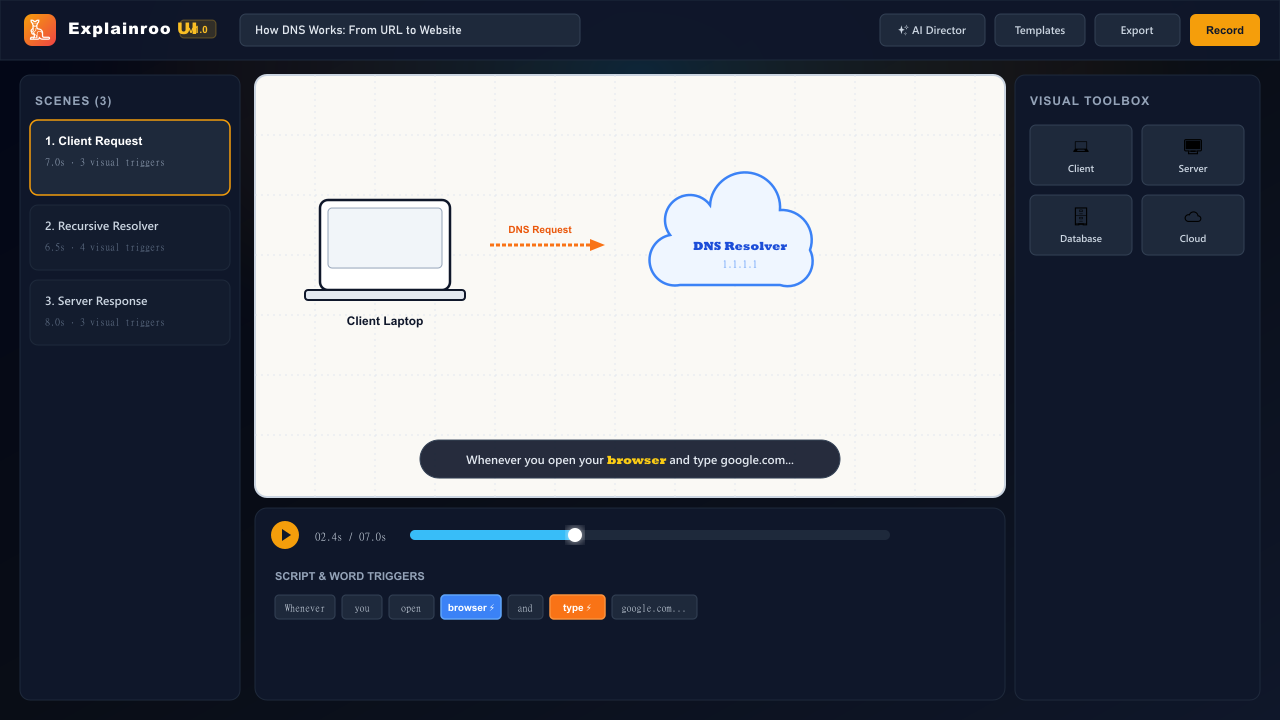
Turn system architectures, developer workflows, distributed systems, and code algorithms into narrated, animated explainer videos — with hand-drawn Rough.js vector physics, real-time audio ducking, word-synchronized triggers, and 1-click video recording.
📥 Direct Download & 1-Click Run
You don't need Git or complex command lines to download and run Explainroo UI:
| Platform / Method | Direct Download Link | How to Run |
|---|---|---|
| Windows | 📥 Download Studio ZIP | Unzip ➔ Double-click start.bat (auto-installs & opens browser) |
| macOS / Linux | 📥 Download Studio ZIP | Unzip ➔ Run ./start.sh |
| Developer Git | git clone https://github.com/jastfan/explainroo-ui.git |
cd explainroo-ui && npm install && npm run dev |
| Standalone Web Player | Inside Studio ➔ Click Download / Export ➔ Standalone Player | Downloads a zero-dependency .html that plays offline anywhere |
⚡ 3-Step Instant Launch for Anyone:
- Download: Click 📥 Download Latest ZIP.
- Extract: Right-click the downloaded
.zipand choose Extract All. - Run:
- On Windows: Double-click
start.bat. - On macOS / Linux: Open Terminal and run
./start.sh. - Explainroo UI auto-installs dependencies and opens your browser at
http://localhost:3000automatically!
- On Windows: Double-click
⚡ How It Works
Explainroo UI coordinates narration text, speech audio, and vector animations into a synchronized 16:9 canvas:
[ Narration Script ] ──> Word Timing Alignment Engine ──> Spoken Timestamp Triggers
                                                                 │
[ Visual Toolbox ]   ──> Hand-Drawn Architecture Nodes ──────────┼──> 16:9 Video Canvas
                                                                 │           │
[ Audio Engine ]     ──> Web Speech TTS + Generative Ducking ────┘           ▼
                                                                        Export Options:
                                                                        • Direct WebM / MP4
                                                                        • Headless CLI Bundle
                                                                        • PNG Poster Frame
The 3-Step Creation Flow
- Write or Prompt Narration: Paste your voiceover script into the editor, or click AI Director to let Google Gemini generate a multi-scene breakdown from any software topic or repo.
- Anchor Visuals to Words: Click any spoken word in your script (e.g. "browser", "database", "cloud") to attach diagram components. The element animates onto the canvas the exact split-second that word is spoken.
- 1-Click Video Recording: Preview with synchronized voiceover narration and auto-ducking ambient music. Export directly to WebM / MP4 video or download a CLI project bundle (
script.md+scenes.js).
🎨 4 Visual Themes
Switch the entire video's artistic personality with a single click. Every theme renders with custom pencil, marker, and hatch-fill strokes:
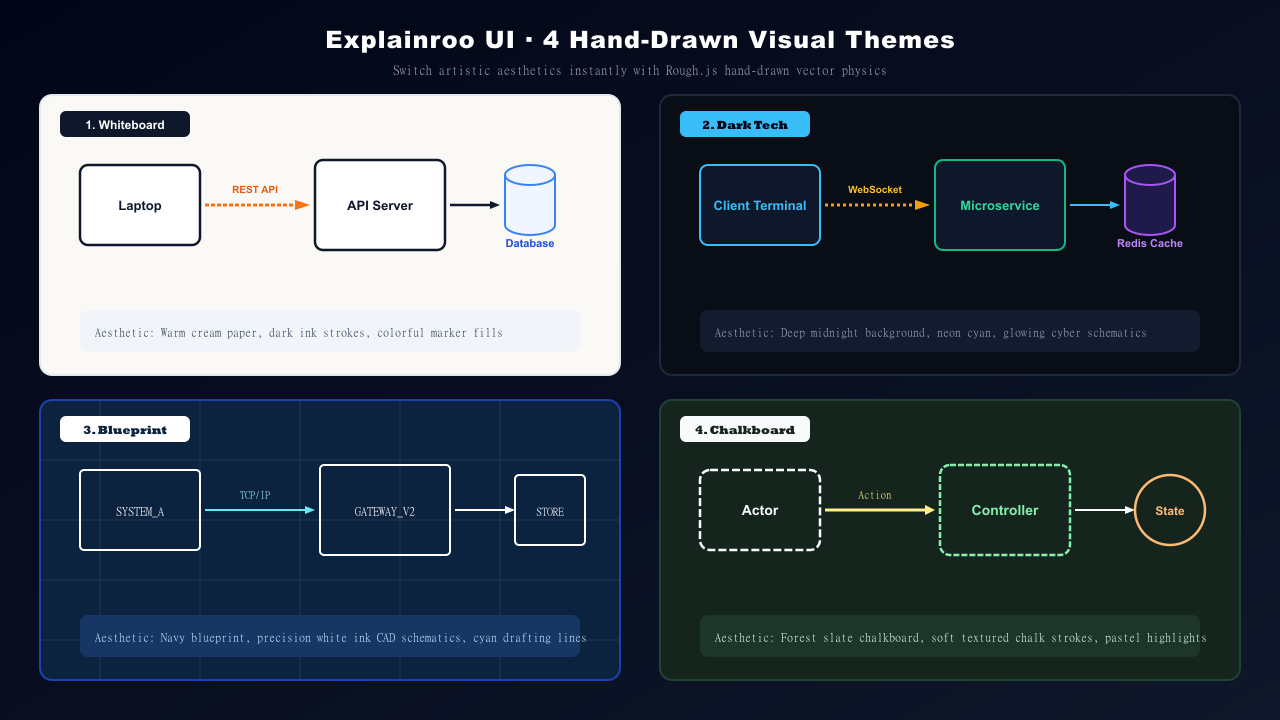
- 📝 Whiteboard — Warm cream paper (
#faf9f5), slate ink strokes, and textured colored fills. Ideal for system design and architecture tutorials. - ⚡ Dark Tech — Deep midnight canvas (
#090d16) with glowing neon cyan cyber schematics. Built for cloud architecture and microservices. - 📐 Blueprint — Navy engineering blueprint (
#0c2340) with crisp white drafting lines and grid measurements. Perfect for low-level protocols and compiler internals. - 🎓 Chalkboard — Classroom slate (
#15251d) with soft textured chalk strokes and pastel highlights. Great for computer science algorithms and math.
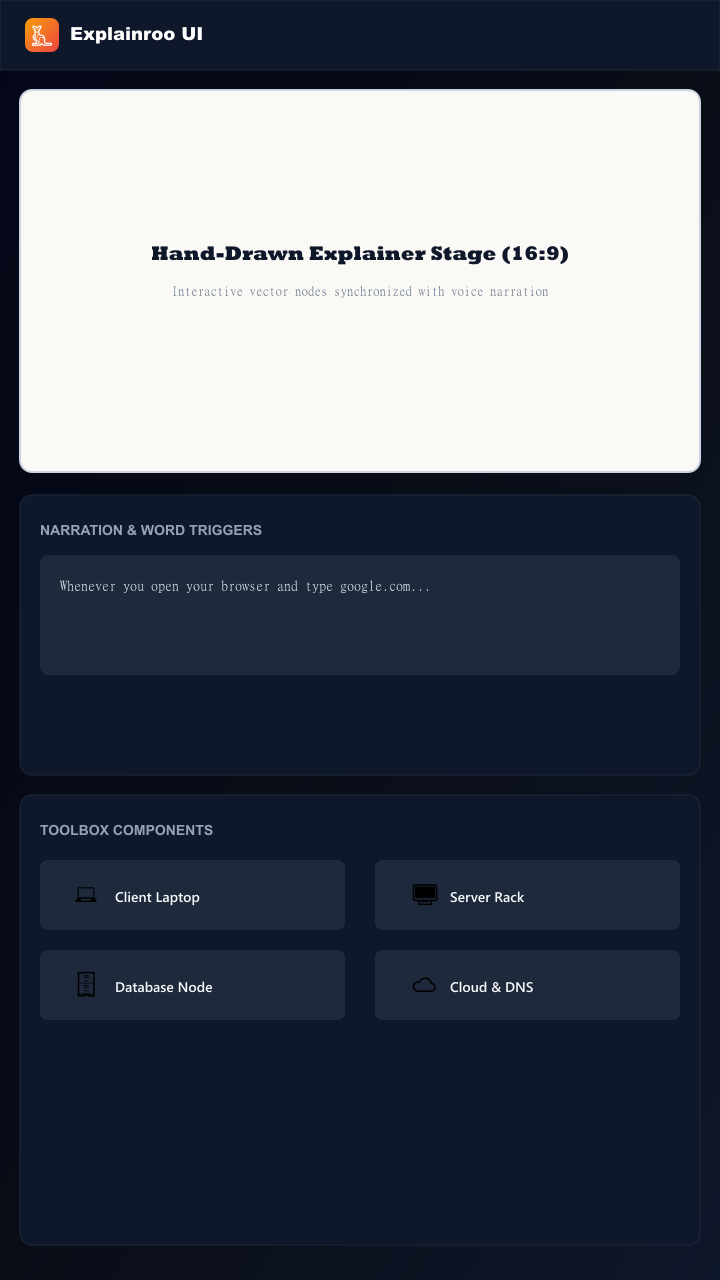
📱 Mobile & PWA Experience
Explainroo UI is an installable Progressive Web App (PWA) with responsive touch controls and offline precaching:
🚀 Key Features
- 🎨 Hand-Drawn Vector Aesthetics: Powered by Rough.js with natural pencil wobbles, marker strokes, and cross-hatch fill physics.
- ⚡ Word-Level Synchronization: Tie any visual element (server, database, terminal, arrow) to a specific word. It pops into view at that exact millisecond.
- 🎙️ Web Audio Narration Engine: In-browser speech synthesis with customizable speech rate, pitch, and voice selection.
- 📁 Custom Voiceover Audio Import: Upload external
.mp3or.wavvoiceover tracks per scene with live playback preview and instant audio ducking. - 🎵 Auto-Ducking Background Music: Generative ambient harmonic chords that dynamically lower volume whenever the narrator speaks.
- 💬 Whisper-Style Dynamic Captions: Sleek floating subtitle pill that highlights the active spoken word in glowing yellow without obscuring the canvas.
- 🤖 Built-in AI Director: Generate complete multi-scene explainer video projects from any prompt or repository using Google Gemini.
- 💾 One-Click Video Recording: Record and download
.webmor.mp4video directly in your browser with zero external dependencies.
🧰 Component Library
Place pre-built, responsive diagram blocks onto the canvas with a single click:
- Architecture Nodes: Client Laptop, Server Rack, Database, Cloud / DNS Cluster, API Gateway, Message Queue.
- UI Mockups: macOS Browser Window with live URL bar, Unix Terminal Window with active prompt, Mobile Smartphone viewport.
- Infrastructure Icons: Redis Cache (
⚡), Auth Bearer Token (🔑), Edge CDN (🌐), End User Actor (👤). - Dynamic Connectors: Hand-drawn straight and curved animated arrows with request/response labels.
📦 Export & Download Formats
- 🌐 Standalone Offline HTML Player (.html): 1-click single-file download with all scenes, vector animations, Whisper subtitles, and voice synthesis embedded. Zero-dependency, offline-ready, double-click to play anywhere.
- 🎬 WebM / MP4 Video: Direct client-side video capture ready for YouTube, Twitter/X, LinkedIn, and product demos.
- 📦 Headless CLI Bundle (.zip): Complete package containing
standalone-player.html,project.explainroo.json,script.md, andscenes.jscompatible withnode bin/explainroo.js render. - 💾 Project Backup (.json): Save and reload full project state into Explainroo UI anytime.
- 📸 PNG Frame Poster: High-resolution 1280x720 canvas snapshot for documentation, thumbnails, and blog posts.
⌨️ Studio Shortcuts
| Key | Action |
|---|---|
| Space | Toggle video playback (Play / Pause) |
| Alt + → | Jump to next scene |
| Alt + ← | Jump to previous scene |
| Esc | Close active modal |
🛠️ Quickstart
Prerequisites
- Node.js 18+ or 20+
- npm or bun
1. Clone & Install
git clone https://github.com/jastfan/explainroo-ui.git
cd explainroo-ui
npm install
2. Configure Environment (Optional for Gemini AI)
cp .env.example .env
Add your Gemini API key in .env:
GEMINI_API_KEY=your_gemini_api_key
PORT=3000
3. Launch Development Studio
npm run dev
Open http://localhost:3000 in your browser.
🗺️ Roadmap
- Multi-Track Drag & Drop Timeline: Draggable element cues with magnetic snapping to spoken word markers.
- Neural TTS Voiceover: Integration with ElevenLabs and Edge Neural voices for ultra-realistic narration.
- Cloud Persistence: User accounts and project sync with Supabase / PostgreSQL.
- Hardware-Accelerated WebAssembly Export: Direct
@ffmpeg/ffmpegWASM rendering for 60 FPS deterministic H.264 MP4 export. - Developer Logo Library: Native rough-sketch logos for Docker, Kubernetes, AWS, React, Python, and PostgreSQL.
🤝 Contributing
Contributions, bug reports, and suggestions are welcome!
- Fork the repository on GitHub
- Create your feature branch (
git checkout -b feature/amazing-feature) - Commit your changes (
git commit -m "feat: add amazing feature") - Push to the branch (
git push origin feature/amazing-feature) - Open a Pull Request
💖 Sponsor
Explainroo UI is proudly supported and sponsored by:

FondPeace.com — Promoting inner peace, mindful wellness, and calm productivity for modern creators and developers.
📄 License
This project is open-source and licensed under the MIT License.
Reviews (0)
Sign in to leave a review.
Leave a reviewNo results found