ccm
Health Warn
- License — License: MIT
- Description — Repository has a description
- Active repo — Last push 0 days ago
- Low visibility — Only 6 GitHub stars
Code Fail
- fs.rmSync — Destructive file system operation in bin/ccm.js
- spawnSync — Synchronous process spawning in src/doctor.js
- fs.rmSync — Destructive file system operation in src/doctor.js
- spawnSync — Synchronous process spawning in src/launch.js
- fs.rmSync — Destructive file system operation in src/launch.js
- process.env — Environment variable access in src/launch.js
- fs.rmSync — Destructive file system operation in src/memory.js
- network request — Outbound network request in src/oauth.js
- os.homedir — User home directory access in src/paths.js
- process.env — Environment variable access in src/paths.js
- fs.rmSync — Destructive file system operation in src/pin.js
Permissions Pass
- Permissions — No dangerous permissions requested
No AI report is available for this listing yet.
The departure board for your Claude Code accounts — unlimited profiles, simultaneous sessions, live quota meters in a split-flap TUI. Zero dependencies.
ccm
The departure board for your Claude Code accounts.
Unlimited named accounts. All running at the same time. Every quota on one board.




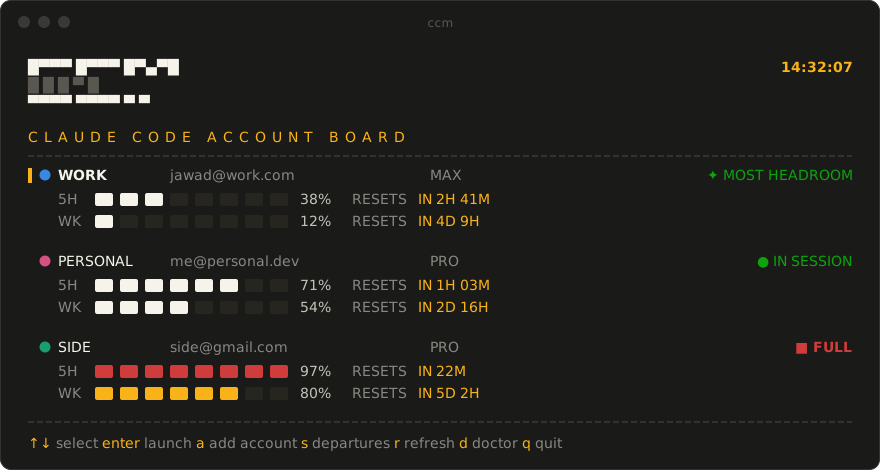
A real full-screen terminal app — cells flip and settle left-to-right like a Solari airport board.
Dark-committed: departure boards have no light mode.
Why
You're deep in a session. The 5-hour window hits 100% and Claude stops mid-thought. You have a second account — but switching means logging out, logging back in, losing your place, and doing the same dance again two hours later.
ccm makes that wall visible before you hit it. Every account is a permanent, isolated profile — launching is switching. The board shows which account has headroom before you start, and because every profile is its own CLAUDE_CONFIG_DIR, any number of accounts run simultaneously in different terminals with no swap step and no shared state to corrupt.
If that's a problem you have, a ⭐ helps other multi-account people find this.
30-second start
git clone https://github.com/Jawad-Adas/ccm && cd ccm
npm install -g .

ccm import work        # adopt your current ~/.claude login as profile "work"
ccm add personal       # opens Claude Code once — log in with account #2, then /exit
ccm                    # the board. pick a row, press enter.
Requires Node 18+ and Claude Code on PATH. Zero dependencies. Your ~/.claude and the plain claude command are never touched — ccm is purely additive.
What you get
- Launching is switching.
ccm workstarts Claude Code on the work account.ccm personalin another tab starts the second one. Both run at once. - The board. Full-screen split-flap TUI: accounts as rows, quota windows as tile meters, amber reset clocks, status chips (
✦ MOST HEADROOM,▲ ALMOST FULL,■ FULL). Add accounts, resume sessions, and run health checks without leaving it. - A web twin.
ccm uiserves the same board on127.0.0.1and launches accounts into Windows Terminal tabs. - Quota-aware picker. Accounts sort most-headroom-first, so picking the account with room is the default gesture — switching stays your explicit choice.
- Move a session across accounts. Hit a limit mid-conversation?
ccm move-session personalcopies the session to another account and resumes it there. The original stays put. - Configure once. Shared
settings.json,CLAUDE.md, skills, agents, and MCP servers are composed into every profile at launch, with per-profile overrides (ccm override work model=opus). - Copy MCP servers between accounts. Set up an MCP server once and copy it to another account — from the board (
x), the web dashboard, orccm mcp copy. Reads the real.claude.jsonlocations, so both user- and project-scoped servers show up; you choose where each copy lands (everywhere, or local to a project). - Shared auto-memory. What Claude learns about a repo is pooled across accounts — the memory follows the project, not the login.
- Inside Claude Code too.
ccm statusline installshows● work · 5h 43% · wk 12%in your session — and when you near a limit, a→ ccm move-session <best>escape hatch right where you're looking. - Windows toasts when any account crosses 80% / 95%, and again when a limit resets ("fresh again").
- Pin an account to a folder.
ccm pin work— from then on,ccmin that folder (and subfolders) launches work directly.
How it compares
| log out / log in | hand-rolled CLAUDE_CONFIG_DIR |
ccm | |
|---|---|---|---|
| Accounts running simultaneously | ✗ | ✓ | ✓ |
| See quota before committing to an account | ✗ | ✗ | ✓ live board |
| Shared settings / skills / MCP across accounts | — | copy by hand | composed at launch |
| Move a live session to another account | ✗ | ✗ | ccm move-session |
| New account setup | repeat every switch | manual dirs + env vars | ccm add name |
Commands
| Command | What it does |
|---|---|
ccm |
Launches the pinned account for this folder, or shows the board |
ccm <name> [args…] |
Launch that account; args pass through to claude |
ccm ui |
The board in your browser (local only, 127.0.0.1) |
ccm pick |
Force the picker (ignores any pin) |
ccm import [name] |
Adopt the current ~/.claude login, including session history so --resume sees past conversations |
ccm add <name> |
New profile + first login |
ccm list |
Profiles at a glance (email, plan, running/last-used) |
ccm remove <name> |
Delete a profile (confirms; refuses if running) |
ccm status [--fresh|--json] |
Usage bars, reset times, severity for every account |
ccm move-session <to> [id] |
Copy the latest session for this folder (or a given id) to another account and resume it there |
ccm override <name> [key=value…] |
Per-profile settings merged over the shared layer at launch |
ccm mcp list / share / unshare |
Shared MCP servers injected into every profile; a profile's own servers always win |
ccm mcp copy <name> --from <p> --to <p> [--scope user|local] |
Copy one account's MCP server (user- or project-scoped) to another account — also on the board (x) and web dashboard |
ccm doctor |
Health check: claude binary, tokens, junctions (auto-repairs), stale locks, integrations |
ccm notify on|off|test |
Windows toasts on 80% / 95% and on limit reset |
ccm wt install |
One Windows Terminal profile per account, colored tabs, auto-synced |
ccm pin <name> / ccm unpin |
This folder always uses that account |
ccm statusline install |
Live account + quota readout inside Claude Code |
How it works
~/.ccm/
  config.json            profile registry
  cache/usage.json       cached quota data
  profiles/<name>/       a full CLAUDE_CONFIG_DIR: credentials, sessions, history
  shared/                settings.json, CLAUDE.md, agents/, skills/, commands/, hooks/
- Shared config: directories are junction-linked into every profile (no admin needed on Windows);
settings.json/CLAUDE.md/ MCP servers are composed into each profile at launch — shared base + per-profile overrides from~/.ccm/overrides/. A newer-mtime rule means changes made inside a session (/config) survive until the shared or override sources actually change. - Shared auto-memory: per-project memory (
projects/<slug>/memory) is pooled in~/.ccm/shared/memoryand linked into every profile at launch. Originals are kept asmemory.bakwhen first pooled. Opt an account out withccm override <name> memory=private. - Quota data comes from the same OAuth usage endpoint Claude Code's own
/usageuses, fetched live when the board opens. ccm refreshes each profile's access token the way Claude Code does, so numbers are accurate even for accounts that aren't running. If a profile's token can't be refreshed, ccm borrows a valid token from another source on the same account (read-only, never rotated — usage is per-account, so the number is identical). Only when no live token exists anywhere does the board fall back to the last reading, clearly marked stale ("as of Xh ago") — never a stale number dressed up as live. - Session lists match
/resume: subagent / SDK transcripts (the many small files a workflow fan-out spawns) are hidden, so a folder with one real chat and 400 subagent runs shows one session, not 401. Titles come from the first real prompt — the injected/resume//compactcaveat blocks are skipped, images collapse to a tidy[img], and content-less resume-shells don't clutter the list. - Pinning:
ccm pin workwrites a.ccmrc;ccmwalks up from the current folder and auto-launches the nearest pin.
FAQ
Is this against Anthropic's ToS?
ccm deliberately does not auto-rotate accounts when quota runs out — rotating to evade rate limits is against Anthropic's ToS. ccm shows you your accounts and their real usage; switching is always your explicit choice.
Will it touch my existing ~/.claude?
Never. ccm is purely additive — ccm import copies your login into a profile; the original and the plain claude command keep working untouched.
macOS / Linux?
Built and daily-driven on Windows. The core (profiles, board, picker, quota, move-session) is plain Node with no Windows-only APIs, but other platforms are untested — Windows Terminal tabs and toast notifications are Windows-only. Reports and PRs welcome.
What if Anthropic changes the usage endpoint?
Only the quota columns degrade. Profiles, launching, session moves, and everything else keep working.
Why zero dependencies?
A tool that wraps your API credentials should be auditable in an afternoon. Every line that runs is in this repo.
If ccm ever saves you from a rate-limit wall, ⭐ star it — it's how other multi-account people find it.
Found a bug or want your platform supported? Open an issue.
MIT © Jawad Adas
Reviews (0)
Sign in to leave a review.
Leave a reviewNo results found