claude-codex-bridge
Health Warn
- License — License: MIT
- Description — Repository has a description
- Active repo — Last push 0 days ago
- Low visibility — Only 8 GitHub stars
Code Fail
- spawnSync — Synchronous process spawning in .claude/skills/claude-codex-bridge/scripts/send-file-to-codex.mjs
- process.env — Environment variable access in .claude/skills/claude-codex-bridge/scripts/send-file-to-codex.mjs
- spawnSync — Synchronous process spawning in .claude/skills/claude-codex-bridge/scripts/send-to-codex.mjs
- process.env — Environment variable access in .claude/skills/claude-codex-bridge/scripts/send-to-codex.mjs
- spawnSync — Synchronous process spawning in agent-bridge/bridge.mjs
- process.env — Environment variable access in agent-bridge/bridge.mjs
- spawnSync — Synchronous process spawning in plugins/claude-codex-bridge/scripts/send-file-to-claude.mjs
- process.env — Environment variable access in plugins/claude-codex-bridge/scripts/send-file-to-claude.mjs
- spawnSync — Synchronous process spawning in plugins/claude-codex-bridge/scripts/send-to-claude-for-audit.mjs
- process.env — Environment variable access in plugins/claude-codex-bridge/scripts/send-to-claude-for-audit.mjs
- spawnSync — Synchronous process spawning in plugins/claude-codex-bridge/scripts/send-to-claude.mjs
- process.env — Environment variable access in plugins/claude-codex-bridge/scripts/send-to-claude.mjs
- spawnSync — Synchronous process spawning in plugins/claude-codex-bridge/scripts/send-to-codex.mjs
- process.env — Environment variable access in plugins/claude-codex-bridge/scripts/send-to-codex.mjs
Permissions Pass
- Permissions — No dangerous permissions requested
No AI report is available for this listing yet.
Local CLI-first bridge for bidirectional Claude Code and Codex review loops.
Claude-Codex Bridge
中文介绍: README.zh-CN.md
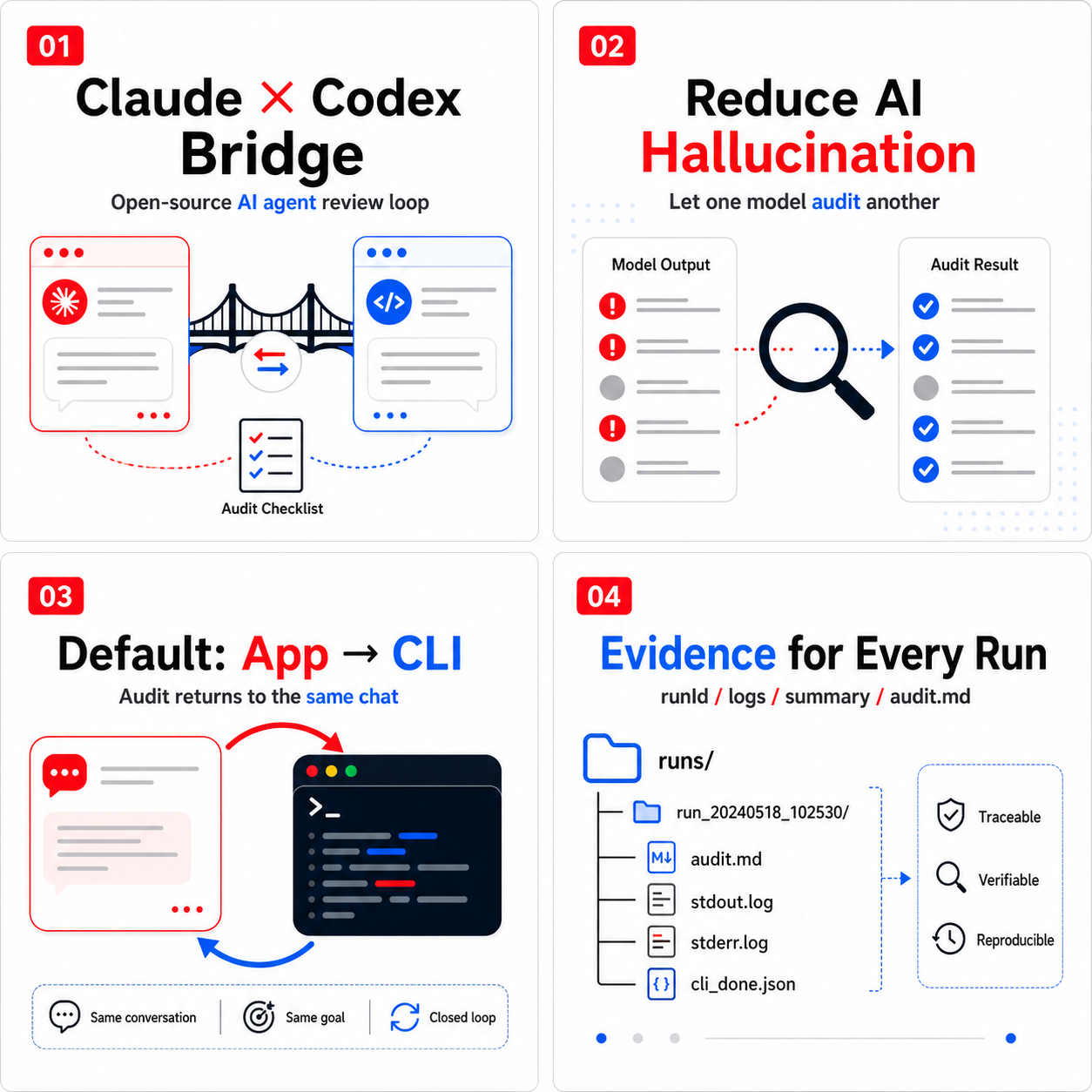
Claude-Codex Bridge is an open-source audit and verification bridge for Claude
Code and Codex. It lets one agent review another agent's work, helping reduce
model hallucination, missing evidence, unverified "done" claims, and overlooked
edge cases.
It supports:
- Claude execution -> Codex audit.
- Codex execution -> Claude audit.
- App to CLI: the default mode. Stay in the same Claude/Codex conversation,
invoke the other agent through its CLI, and receive the audit result back in
the current conversation. - App to App: optional desktop App delivery modes for specialized workflows.
- CLI to CLI: scriptable command-line review loops for automation and
engineering validation.
The recommended default is App to CLI because it does not depend on desktop
window focus, manual send buttons, or new conversations.
Why This Exists
Claude Code and Codex are both capable coding agents, but complex agentic tasks
still fail in familiar ways:
- The agent says the task is complete without running verification.
- Files are changed, but edge cases or rollback paths are missed.
- Failed commands are hidden or summarized too optimistically.
- The final answer claims more certainty than the evidence supports.
- Long multi-step work produces hallucinated status summaries.
Claude-Codex Bridge turns second-model review into a repeatable workflow instead
of a manual copy-paste ritual.
Default Workflow
When you work in Claude Code:
Claude current conversation
  -> package the latest work as a handoff
  -> call Codex CLI
  -> Codex audits the result
  -> audit returns to the same Claude conversation
When you work in Codex:
Codex current conversation
  -> package the latest work as a handoff
  -> call Claude CLI
  -> Claude audits the result
  -> audit returns to the same Codex conversation
No App switching is required for the default CLI path.
Highlights
- Open-source under the MIT License.
- Bidirectional Claude/Codex second-opinion review.
- App-to-CLI by default, with optional App-to-App modes.
- Same-conversation audit return when using the CLI path.
- Durable run evidence under
.agent-bridge/runs/<runId>/. - Streamed stdout/stderr logs to avoid child-process buffer failures.
doctorcommand for CLI/auth checks and installation guidance.- No runtime npm dependencies.
Installation
Recommended GitHub install:
npm install -g github:Jayden-X-L/claude-codex-bridge
claude-codex-bridge doctor
claude-codex-bridge install
This uses npm as the installer, but it installs directly from GitHub and does
not require the package to be published on npmjs.com.
doctor checks the local Claude/Codex CLI setup. install adds the Claude
skill, Codex plugin, and bridge runtime files to your home directory.
From a source checkout:
git clone https://github.com/Jayden-X-L/claude-codex-bridge.git
cd claude-codex-bridge
npm run check
node agent-bridge/bridge.mjs doctor
node agent-bridge/bridge.mjs install
Restart Claude Code and Codex after installation so they discover the skill and
plugin.
Prerequisites
- macOS.
- Node.js 18 or newer.
- Claude Code CLI.
- Codex CLI, or Codex Desktop with its bundled CLI.
If you are not sure whether your machine is ready, run:
claude-codex-bridge doctor
doctor checks:
- Node.js.
- Bridge runtime.
- Codex CLI from
AGENT_BRIDGE_CODEX_BIN. - Codex CLI from
PATH. - Codex Desktop bundled CLI at:
/Applications/Codex.app/Contents/Resources/codex
- Claude CLI.
- Claude auth via
claude auth status.
If something is missing, it prints the next command to run.
Common fixes:
npm install -g @openai/codex
npm install -g @anthropic-ai/claude-code
claude auth login
claude auth status
Usage From Claude
In Claude Code, ask:
Use claude-codex-bridge to send this work to Codex for audit.
Claude packages the current work, calls Codex CLI, and receives Codex's audit
back in the same conversation.
Usage From Codex
In Codex, ask:
Use claude-codex-bridge to send this work to Claude for audit.
Codex packages the current work, calls Claude CLI, and receives Claude's audit
back in the same conversation.
Manual Tests
Claude -> Codex audit:
printf 'Claude result to audit' | node agent-bridge/bridge.mjs to-codex --stdin --delivery cli
Codex -> Claude audit:
printf 'Codex result to audit' | node agent-bridge/bridge.mjs to-claude --mode audit-codex --stdin --delivery cli
Dry run without calling a model:
printf 'handoff preview' | node agent-bridge/bridge.mjs to-codex --stdin --dry-run
Delivery Modes
Default mode:
--delivery cli
This invokes the target agent through its CLI and returns the audit to the
current conversation.
Optional desktop App modes:
--delivery current
--delivery new
--delivery ax
These modes can paste into the current App conversation, open a new App
conversation, or use macOS Accessibility automation. They may require macOS
permissions and are less reliable than the CLI path.
Run Evidence
Every CLI run gets a runId and a durable evidence directory:
.agent-bridge/runs/<runId>/
  handoff.md
  audit.md
  stdout.log
  stderr.log
  summary.json
  summary.md
  cli_done.json or bridge_error.json
Use:
cat .agent-bridge/runs/latest.json
to inspect the latest run.
Interpretation:
status: successandcli_done.jsonexists: the audit completed.status: errorandbridge_error.jsonexists: the audit failed, and the
error was recorded.status: started: the run is still in progress or was interrupted.
The legacy latest files are also maintained:
.agent-bridge/outbox/latest-codex-audit.md
.agent-bridge/outbox/latest-claude-audit.md
Who This Is For
This project is useful if you:
- Regularly use Claude Code and Codex for non-trivial engineering tasks.
- Want a second model to challenge the first model's output.
- Want fewer hallucinated success summaries.
- Want missing verification, failed commands, and residual risk called out.
- Want each review round to leave local evidence that can be inspected later.
What This Is Not
This is not a full multi-agent runtime.
It does not replace human judgment, tests, or code review. It standardizes the
handoff between Claude and Codex, asks for a structured second opinion, and keeps
evidence for each run.
Documentation
- Runtime details: agent-bridge/README.md
- Contributing: CONTRIBUTING.md
- Security: SECURITY.md
- Changelog: CHANGELOG.md
- Publishing checklist: PUBLISHING.md
License
MIT License. See LICENSE.
Reviews (0)
Sign in to leave a review.
Leave a reviewNo results found