glean
Health Warn
- License — License: MIT
- Description — Repository has a description
- Active repo — Last push 0 days ago
- Low visibility — Only 5 GitHub stars
Code Pass
- Code scan — Scanned 12 files during light audit, no dangerous patterns found
Permissions Pass
- Permissions — No dangerous permissions requested
No AI report is available for this listing yet.
Self-hosted, pluggable personal agent that gleans signal from RSS, scraping, search, and APIs — processes it with any LLM, then delivers on a schedule to whatever sink you wire up

Self-hosted, pluggable personal agent that gleans signal from RSS, scraping, search, and APIs — processes it with any LLM, then fans out scheduled digests to whichever sinks you wire up.
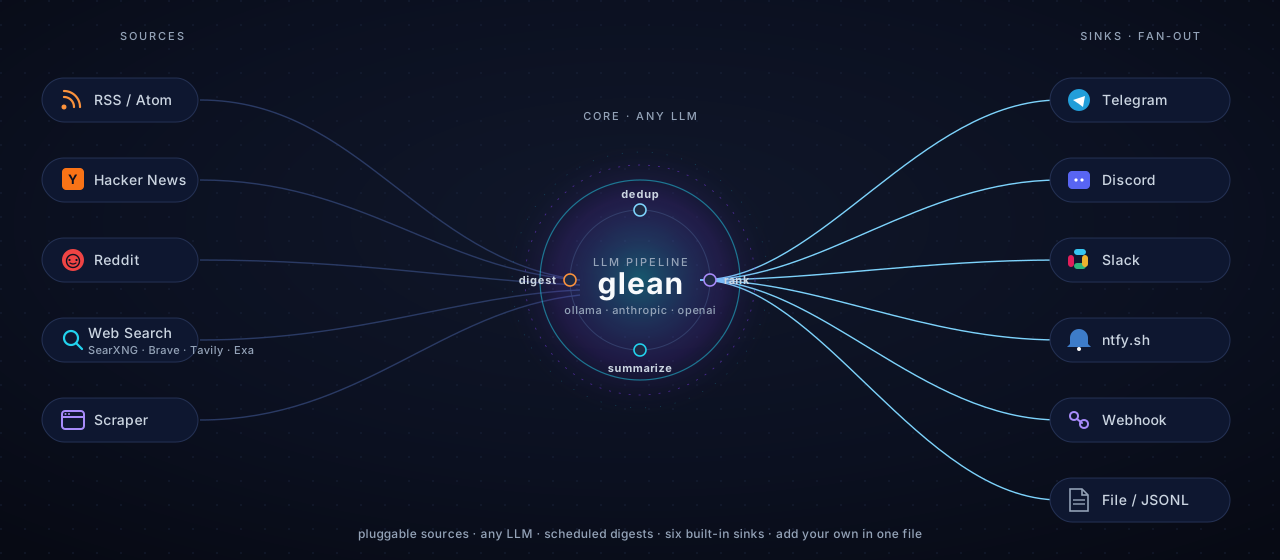







glean is a small Python daemon that runs as a Docker container. You describe feeds in a YAML file — each one is a recipe of sources → LLM pipeline → sinks → schedule. It deduplicates, ranks, summarizes, and posts a clean digest. One container, many topics, many sinks.
Status
v1.1 — stable core + full management web UI. Eight shipped sinks (Dashboard, Email (SMTP), Telegram, Discord, Slack, ntfy.sh, Webhook, File), six search backends (SearXNG self-hosted + Brave / Tavily / Serper / Exa / MWMBL), three LLM providers (Ollama, Anthropic, OpenAI), per-source LLM dispatch (each source can use its own model), reusable structured skills that produce JSON output, a four-layer plugin system (Source, Sink, LLM Provider, Search Backend), and a built-in web UI with live SSE dashboard, visual feed/skill editors, first-run setup wizard, settings, and digest history — all behind an auto-generated API key.
See DESIGN.md for the long view.
Why
The use case that started it: drop the agent in your "AI news" Telegram group, and once an hour it posts a tight 10-item digest summarized by your local Ollama. Add a second feed for security CVEs that runs daily and uses Claude. Add a third for r/LocalLLaMA top-of-day. The agent doesn't care what the topic is — sources, prompts, models, sinks are all config.
The longer game: any "periodically pull X, process with an LLM, deliver to Y" workflow — research clipping, deal scraping, job monitoring, GitHub release tracking, on-call digests — should be a few lines of YAML, not a custom script.
Features
Core pipeline
- Per-feed pipeline — declare stages in YAML:
dedup → rank → summarize → apply_skill → digest. Reorder freely. Skip stages you don't want. - Smart dedup — SQLite-backed (WAL mode), persists across restarts. New feed? Indexed silently on first tick — no surprise 200-item dump.
- Friendly schedules —
every 1h,every 15m,daily 09:00, or raw cron. - Failure-aware — exponential backoff in-tick, ops-chat alert after N consecutive failures, auto-clear on recovery. Optional sinks don't trigger alerts.
Pluggable layers
- Sources — RSS/Atom, web scraping, Hacker News, Reddit, web search (SearXNG / Brave / Tavily / Serper / Exa / MWMBL). Add your own in one file. See
docs/plugins/source.md. - Sinks — Dashboard (built-in digest history), Email (SMTP), Telegram, Discord, Slack, ntfy.sh, generic Webhook, and File (text/JSONL/markdown). Fan out a single feed to multiple sinks; mark some as
required: falseto swallow non-critical failures. Seedocs/plugins/sink.md. - LLM providers — Ollama (default), Anthropic, OpenAI. Per-feed provider/model. See
docs/plugins/llm.md. - Web search backends — six engines including the self-hosted SearXNG for users who don't want cloud API keys. See
docs/plugins/search.md.
LLM intelligence
- Per-source LLM models — each source within a feed can use its own LLM. Cheap local model for noisy RSS, Claude Haiku for the curated subreddit, premium Sonnet for the security feed. Cost-optimize without splitting feeds. See
docs/config/per-source-llm.md. - Reusable structured skills — define named extraction templates with JSON output schemas, reference them from any feed via the
apply_skillstage. Each provider uses its native structured-output mode (Ollamaformat=schema, Anthropic forced tool-use, OpenAIresponse_formatjson_schema). Built-in examples: deal-finder, CVE extractor, paper digest, job posting. Seedocs/config/skills.md. - LLM precedence —
Skill LLM > Source LLM > Feed LLM > Defaults LLM. Skills can demand specific models for tasks that require them; sources can route to cheap or premium tiers based on signal-to-noise.
Built-in web UI
- Live dashboard — feed cards with status pills, run-now buttons, summary strip (total / running / healthy / alerts), and a live SSE connection that updates as runs start, complete, or fail.
- Visual editors — feed editor with split-pane live YAML preview; skill editor for the structured-extraction templates with field-by-field schema builder.
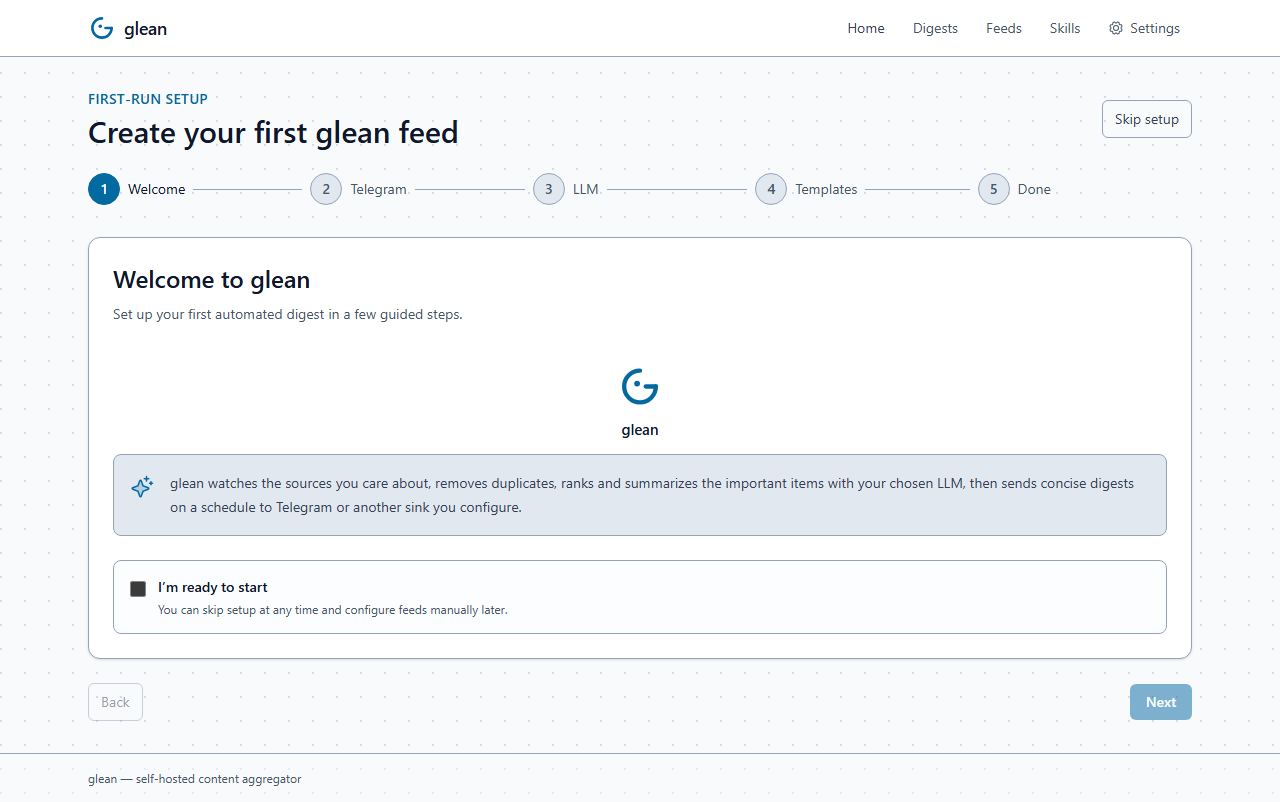
- First-run setup wizard — five-step guided onboarding (welcome → Telegram → LLM → templates → done) with six starter feed templates (AI/ML news, Reddit pulse, web search briefing, engineering blogs, GitHub trending, custom).
- Settings page — defaults editor, API key rotation, density toggle, system info.
- API-first — every UI action is a documented
/api/v1/*REST call with auto-generatedX-Glean-Api-Keyauth (Sonarr-style). The CLI uses the same shared service layer, so they never disagree on truth.
Distribution & operations
- Cross-platform — runs as a Docker container or a standalone binary. Linux (x86_64 + arm64), macOS (arm64), and Windows (x86_64) builds attached to every release.
- Hardened release — multi-arch container (
ghcr.io/jaypetez/glean), cosign-signed by digest, SBOM generated..deb,.rpm, and.apkpackages produced via nfpm. - One container —
docker compose up. Ollama is bundled in the compose file; bring your own if you prefer.
Quickstart (5 minutes)
git clone https://github.com/jaypetez/glean.git
cd glean

# 1. Get a Telegram bot token from @BotFather, add the bot to a group, get the chat id
#    (one easy way: send a message in the group then visit
#     https://api.telegram.org/bot<TOKEN>/getUpdates )

# 2. Configure
cp .env.example .env                 # fill in TELEGRAM_BOT_TOKEN + chat IDs
cp feeds.example.yaml feeds.yaml     # tweak feeds, prompts, schedules

# 3. Run
docker compose up -d

# 4. Pull an Ollama model the first time
docker exec -it glean-ollama ollama pull qwen2.5:7b

# 5. Sanity-check a feed without sending
docker exec -it glean glean test-feed ai-news-daily
Want self-hosted web search too? See Web search setup — uncomment SearXNG in docker-compose.yml and you're done in two more commands.
One-command setup with a curated example
Pick the example closest to what you want:
| Example | Use case | Run |
|---|---|---|
01 web-search-local-llm |
Hourly self-hosted web search → markdown file + browser viewer | cd examples/01-web-search-local-llm && ./setup.sh |
02 ai-news-discord |
Daily AI news → Discord channel | cd examples/02-ai-news-discord && ./setup.sh |
03 github-releases-slack |
Track 5+ GitHub repos for new releases → Slack | cd examples/03-github-releases-slack && ./setup.sh |
04 arxiv-skill-ntfy |
Daily arXiv papers (structured) → phone push + JSONL | cd examples/04-arxiv-skill-ntfy && ./setup.sh |
05 reddit-cloud-telegram |
Hourly Reddit ML digests via cloud LLM → Telegram | cd examples/05-reddit-cloud-telegram && ./setup.sh |
06 weekly-newsletter |
Weekly AI digest → email (Mailpit local + Gmail/SES) | cd examples/06-weekly-newsletter && ./setup.sh |
GPU support is automatic. Examples that use Ollama detect your NVIDIA / AMD / native Ollama setup and configure the stack accordingly. See examples/README.md → GPU acceleration for the full matrix.
Every example bundles its own docker-compose.yml and writes to a relative ./data/, so they coexist with a real glean install and with each other. Windows users: use ./setup.ps1. Full menu and conventions in examples/.
Documentation
Full docs at jaypetez.github.io/glean.
| 📚 Tutorials | Step-by-step walkthroughs for new users |
| 🧠 Concepts | The mental model of feeds, pipelines, and plugins |
| 🔧 How-to guides | Task-focused recipes per integration |
| 📖 Reference | CLI, REST API, config schema |
| 🔌 Plugin authoring | Add your own source, sink, LLM, or search backend |
| 🔒 Security | Threat model, hardening, key rotation |
| 📋 Changelog | Release notes |
Web UI
Open http://localhost:9090 after docker compose up and you get a full management UI served by the same FastAPI process. Every action goes through the documented /api/v1/* REST surface — the CLI shares the same code path, so they always agree.
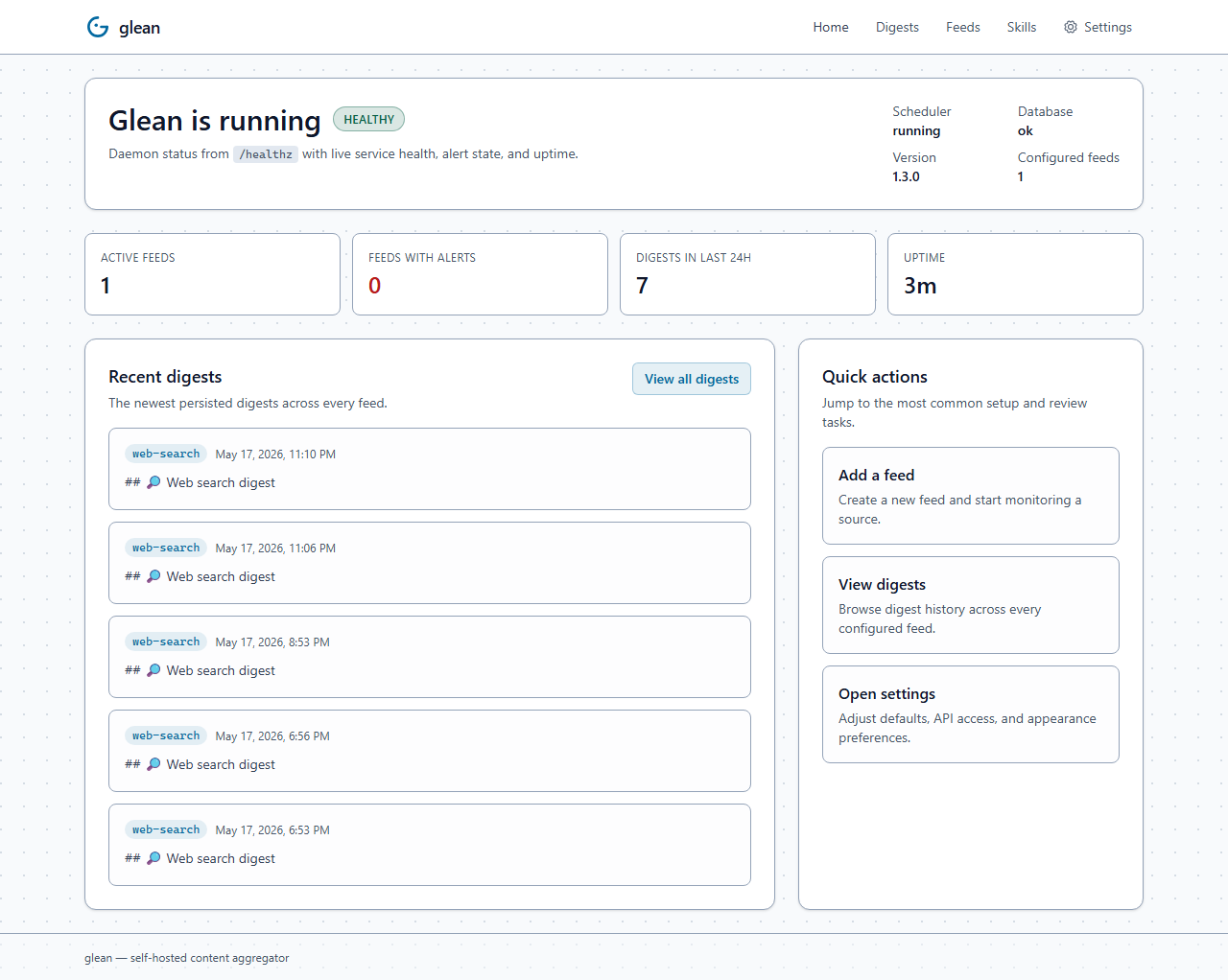
Home
System-overview landing page: daemon health card, active feeds count, alert count, the 5 most-recent digests across all feeds, plus quick links to common actions. Updates over SSE as feeds tick.
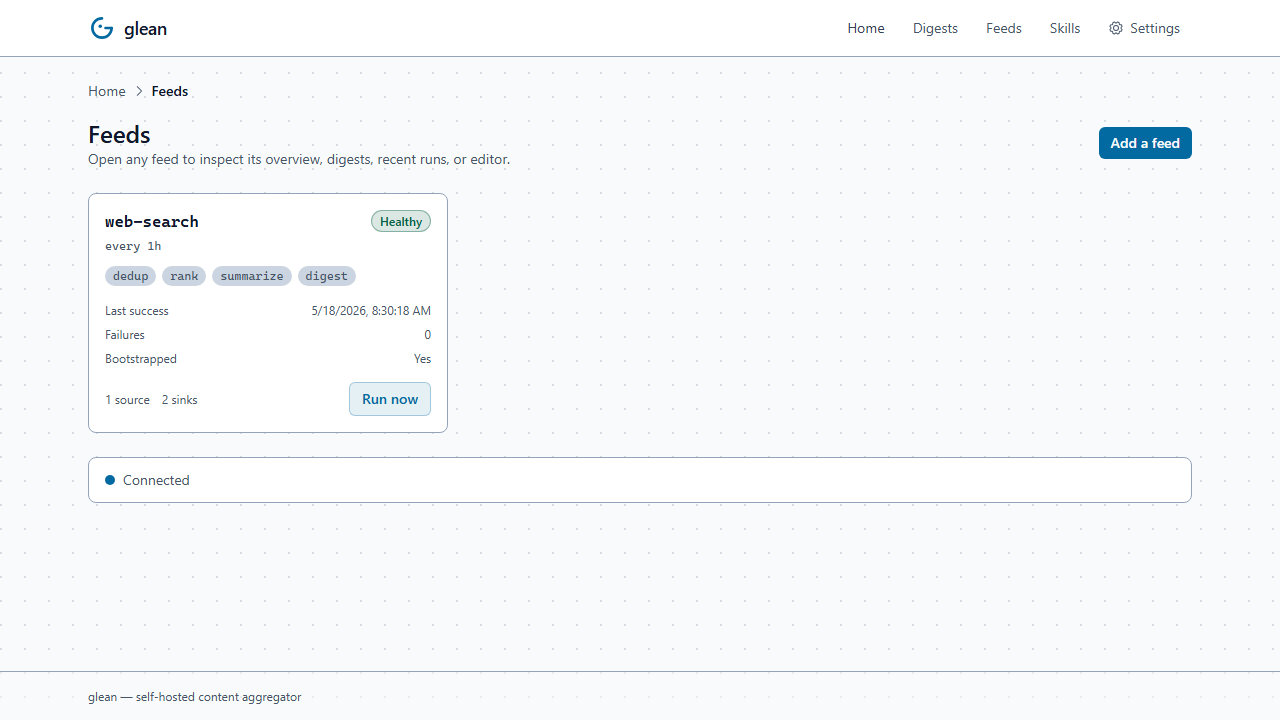
Feeds
The feeds index — every configured feed as a status card. Status pills update over SSE as runs start, complete, or fail; the "Run now" button kicks an off-schedule run. Click a card to open that feed's detail page.
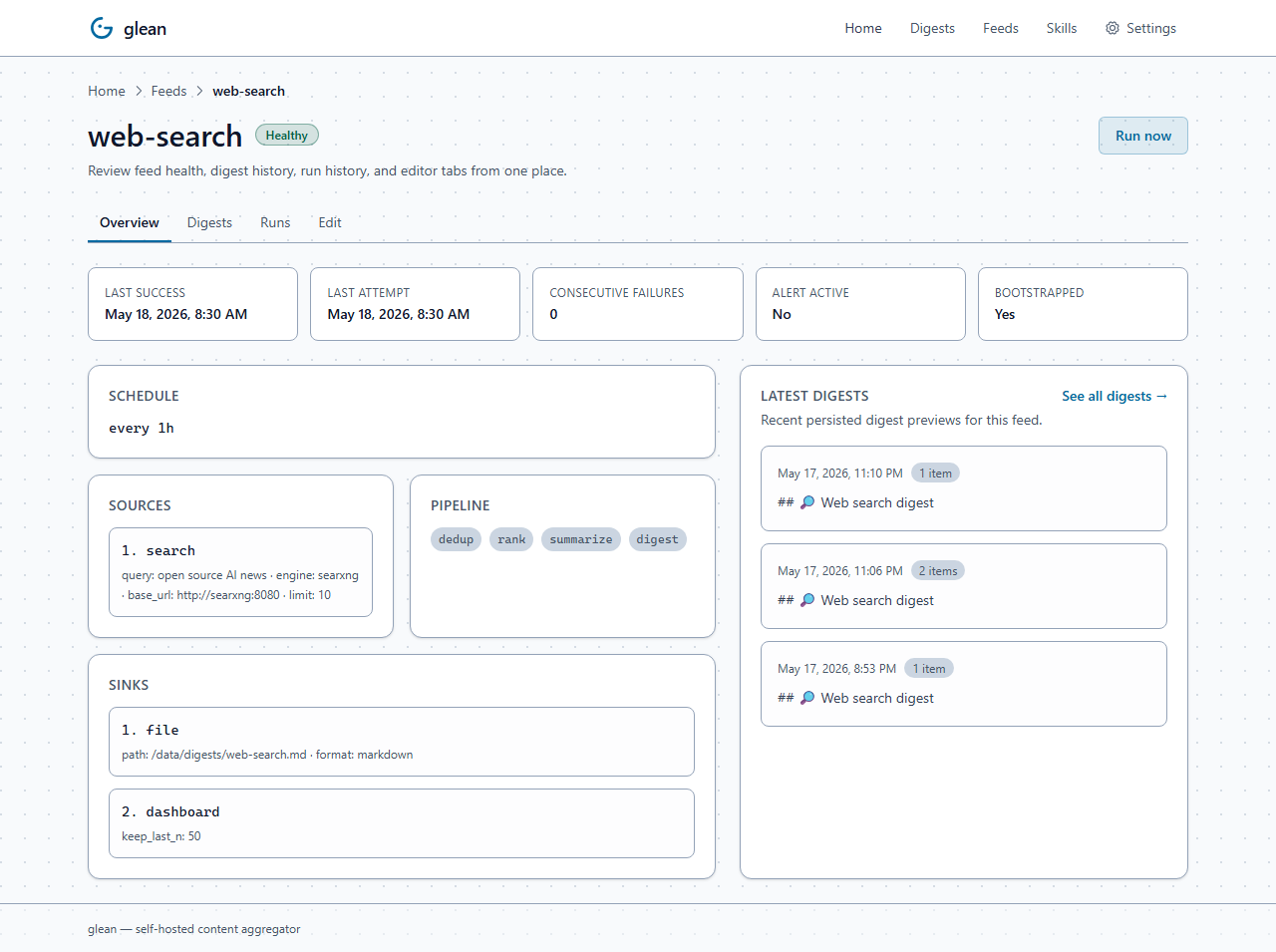
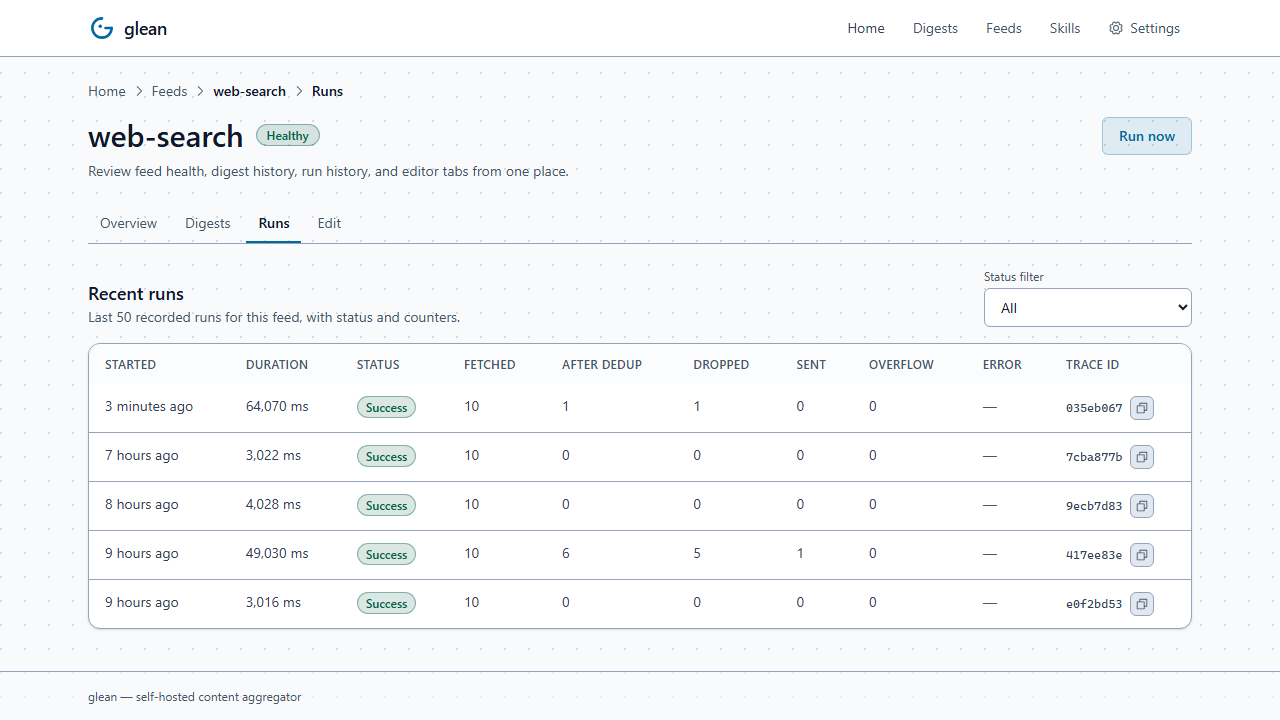
Per-feed detail (Overview / Digests / Runs / Edit)
Click any feed to land on its detail page with four tabs:
- Overview — status block, schedule, sources, pipeline, sinks, and a preview of the most-recent digests
- Digests — the same digest browser as the cross-feed page, pre-filtered to this feed
- Runs — per-tick history with status badges (success / skip / failure), counts, duration, error preview, and
trace_idfor log correlation - Edit — embedded
feeds.yamleditor with live YAML preview
The Runs tab is fed by a new per-tick history table (feed_run_history, last 200 ticks per feed) so you can audit exactly what each run did — including dry-runs and no-op ticks that didn't send anything.
Digests
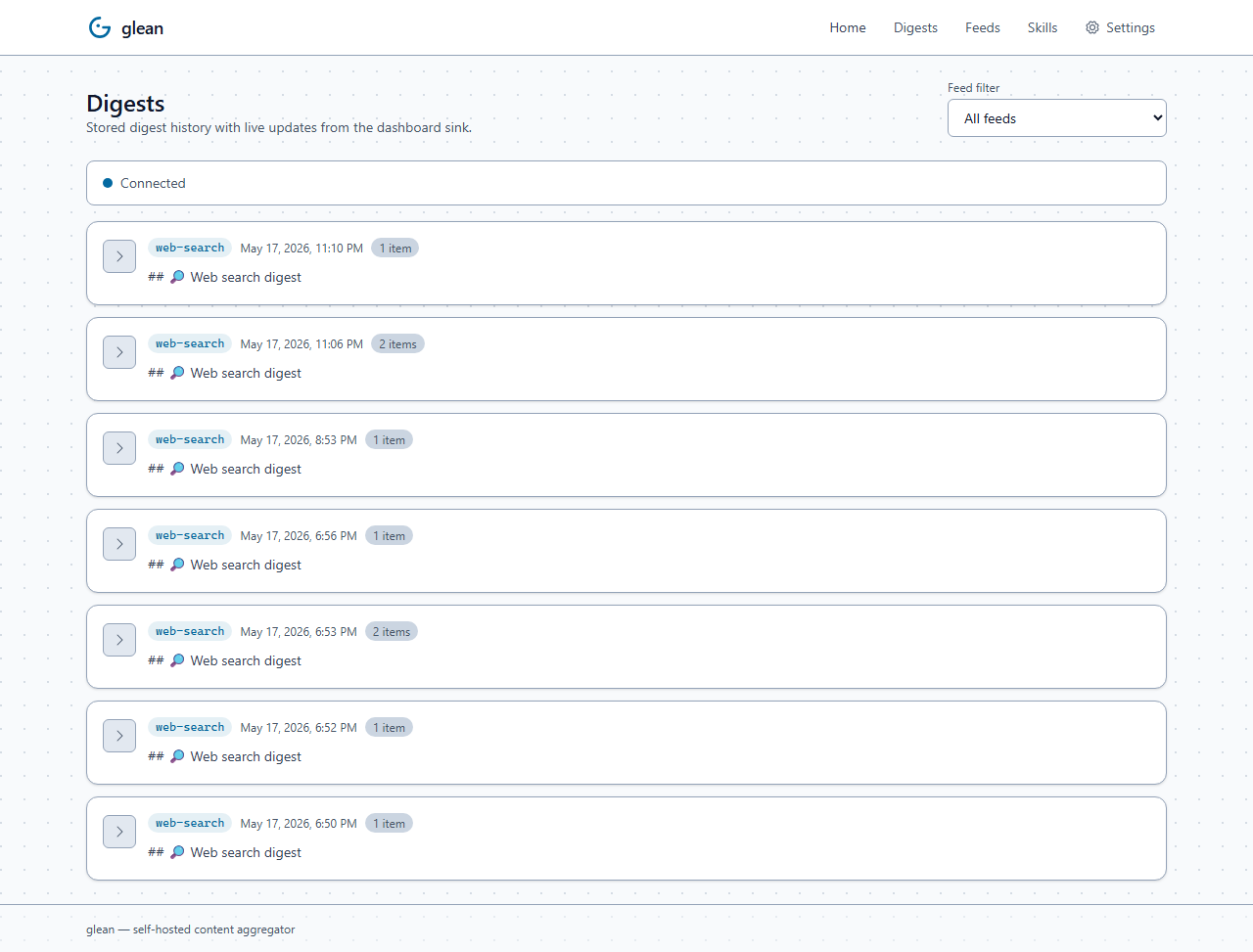
Cross-feed digest browser with per-feed filter dropdown. Style-aware rendering (HTML via DOMPurify sanitization, markdown via markdown-it, plain via <pre>). New digests appear automatically via SSE — no refresh needed.
Feed editor
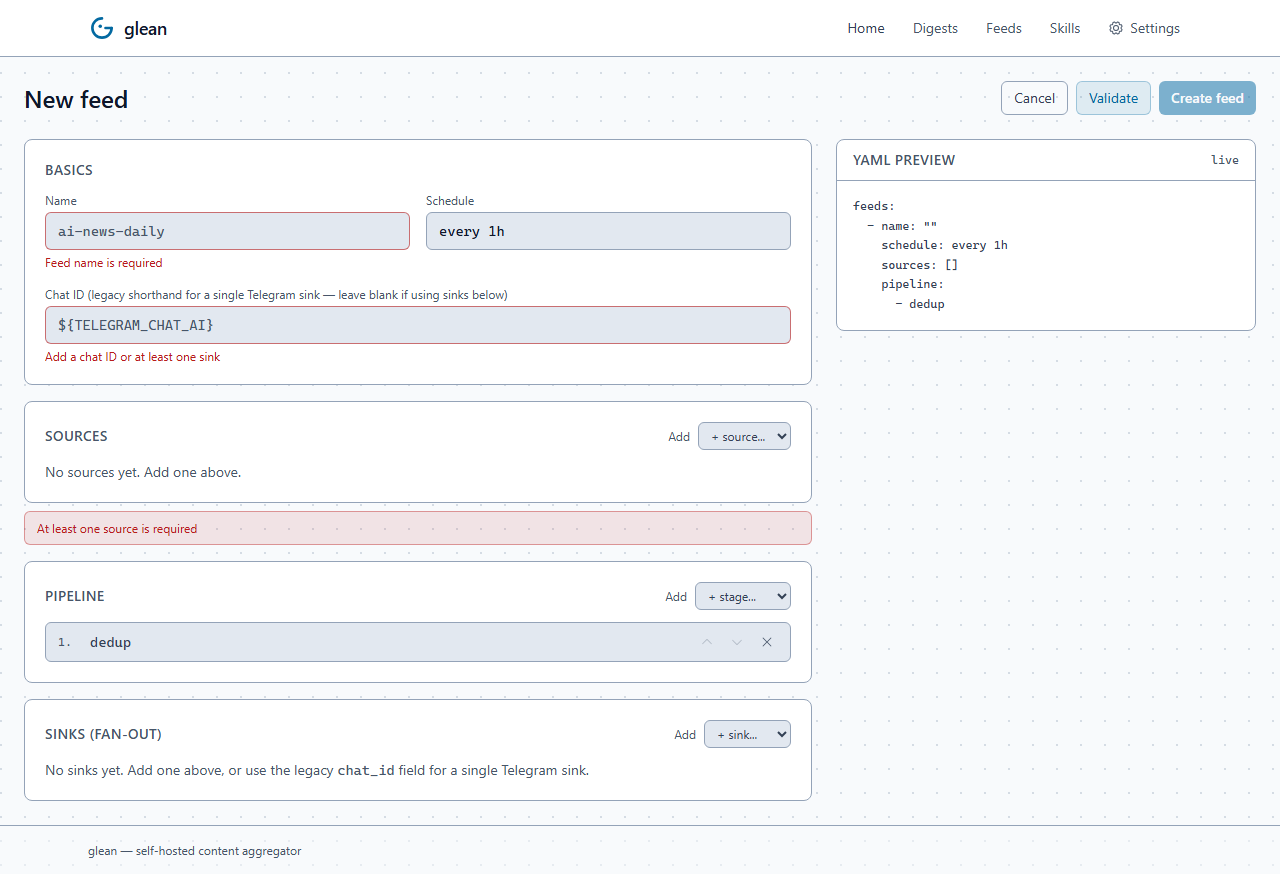
Form on the left, live YAML preview on the right. Sources, sinks, and pipeline stages each have type-aware fields with inline validation. The YAML re-renders on every keystroke so you can see exactly what's being persisted before you save.
Skills
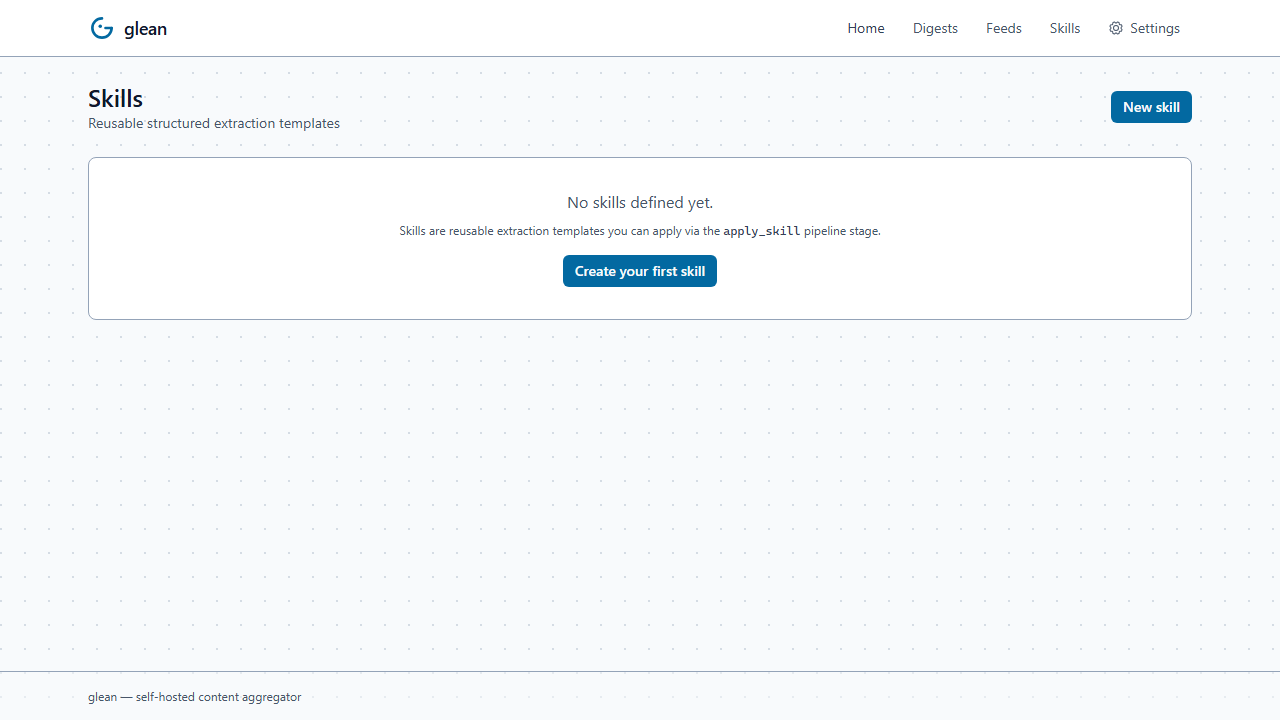
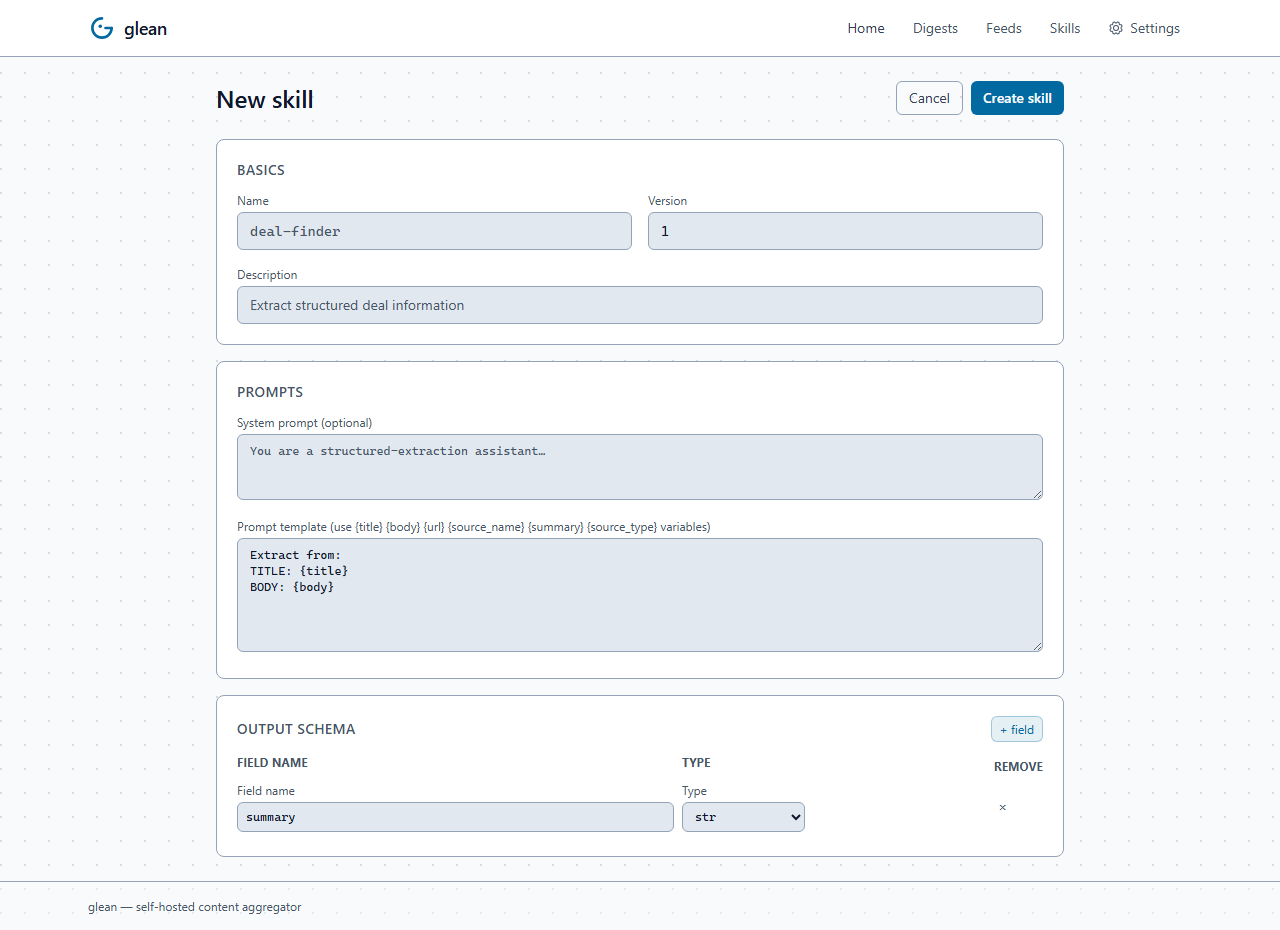
Manage the structured-extraction templates — prompt, system prompt, output schema with field-by-field type picker. Reference any saved skill from a feed pipeline with apply_skill.
First-run setup wizard
When the config is empty, navigating to the dashboard redirects to a five-step guided wizard: welcome → Telegram credentials → LLM provider → starter template → done. Six starter templates cover the most common use cases (AI/ML news, Reddit pulse, web search briefing, engineering blogs, GitHub trending, custom blank).
Settings
Four sub-tabs: API & auth (current key state + rotation), Defaults (read-only view of pipeline / LLM / render defaults from feeds.yaml), Appearance (density toggle — glean is light-mode only), Health (auto-refreshing /healthz card with version, uptime, feed count, alert state). Each tab deep-links via URL hash (/settings#health).
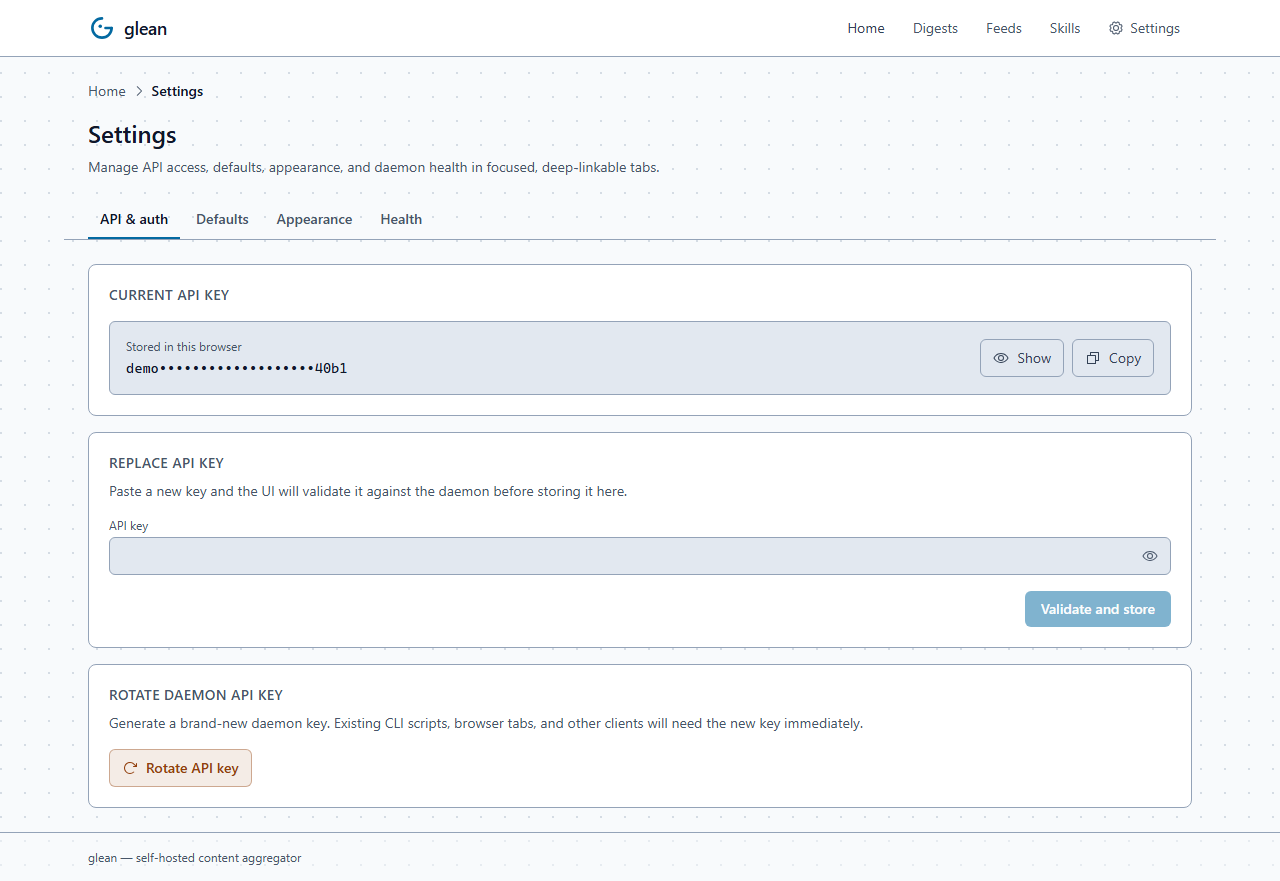
The UI authenticates with a single-user API key and sends it as X-Glean-Api-Key for REST calls. On first run, copy the generated key from the container logs:
docker logs glean | grep GLEAN_INITIAL_API_KEY
Paste that key into the UI modal. Alternatively, set GLEAN_API_KEY in your environment for a fixed externally-managed key. Keep port 9090 on loopback or behind a trusted reverse proxy unless you provide your own auth layer.
Configuration
Two files, two responsibilities:
.env— secrets (bot tokens, API keys, chat IDs). Never committed.feeds.yaml— feeds, sources, prompts, schedules, sinks. Safe to commit. References${ENV_VARS}.
See feeds.example.yaml for a working starter.
Minimum feed
defaults:
  llm:
    provider: ollama
    model: qwen2.5:7b
    base_url: http://ollama:11434

feeds:
  - name: ai-news-daily
    schedule: "every 1h"
    chat_id: ${TELEGRAM_CHAT_AI}
    sources:
      - type: rss
        url: https://simonwillison.net/atom/everything/
    pipeline:
      - dedup
      - summarize:
          prompt: "One-sentence summary."
      - digest:
          intro: "🧠 <b>AI news this hour</b>"
Advanced feed: per-source LLM + skill + multi-sink fan-out
A single feed can mix sources with different LLMs, run a structured-extraction skill, and deliver to multiple destinations with mixed required/optional semantics:
skills:
  - name: deal-finder
    prompt: |
      Extract deal info from:
      Title: {title}
      Content: {body}
    output_schema:
      sale_price: "str | None"
      discount_percent: "float | None"
      deal_quality: str           # excellent / good / skip
      summary: str                # auto-fills llm_summary

feeds:
  - name: pc-deals
    schedule: "every 30m"
    sources:
      - type: reddit               # cheap local model for noisy subreddit
        subreddit: buildapcsales
        sort: new
        llm: { provider: ollama, model: qwen2.5:7b }

      - type: rss                  # premium model for curated newsletter
        url: https://www.dealnews.com/feed.xml
        llm: { provider: anthropic, model: claude-haiku-4-5 }
    pipeline:
      - dedup
      - apply_skill: { skill: deal-finder }
      - rank:
          prompt: "Score 0-1: is this an excellent deal?"
          min_relevance: 0.6
      - digest:
          intro: "🛒 <b>Today's deals</b>"
    sinks:
      - type: telegram
        chat_id: ${TELEGRAM_CHAT_DEALS}
      - type: discord
        webhook_url: ${DISCORD_WEBHOOK}
        required: false            # don't alert if Discord webhook is dead
      - type: file
        path: /data/deals-archive.jsonl
        format: jsonl              # structured fields preserved on disk
This single feed:
- Pulls from two sources, each summarized by its own LLM
- Extracts structured
{sale_price, discount_percent, deal_quality, summary}per item via thedeal-finderskill (each item still uses its source's LLM unless the skill itself overrides) - Ranks based on the skill output
- Fans out to Telegram (required), Discord (optional), and a JSONL archive file
Source types
| Type | Args |
|---|---|
rss |
url, max_response_bytes (default 10485760, 10 MiB) |
scraper |
urls: [list of article URLs], max_response_bytes (default 10485760, 10 MiB) |
hn |
query, tags (default story), min_points, window_hours |
reddit |
subreddit, sort (top/new/hot), timeframe, limit |
search |
query, engine, limit, plus engine-specific kwargs (6 backends) |
Pipeline stages
| Stage | Effect |
|---|---|
dedup |
Drop already-seen items (by canonical URL hash). |
rank |
LLM scores each item; drops below min_relevance (0..1). |
summarize |
LLM writes a 1-line summary, attached to each item. |
apply_skill |
Run a named skill (structured extraction); attaches JSON fields to Item.structured and auto-fills llm_summary from a summary/one_liner/tldr field. |
digest |
Sets the digest header. Optionally LLM-synthesized. |
Sinks (fan-out)
A feed can deliver to multiple sinks in parallel. chat_id at the feed level is shorthand for a single Telegram sink; use sinks: for explicit fan-out.
# under a feed:
sinks:
  - type: telegram
    chat_id: ${TELEGRAM_CHAT_AI}
  - type: discord
    webhook_url: ${DISCORD_WEBHOOK_URL}
  - type: ntfy
    topic: my-topic
  - type: slack
    webhook_url: ${SLACK_WEBHOOK_URL}
  - type: file
    path: /data/glean-archive.jsonl
    format: jsonl
    required: false       # failure here doesn't trigger ops alerts
  - type: webhook
    url: https://example.com/hook
    auth_bearer: ${WEBHOOK_TOKEN}
    required: false
| Sink | Notes |
|---|---|
dashboard |
Persist rendered digest fragments in SQLite for browsing in the built-in web UI |
telegram |
Bot API; HTML/MarkdownV2/plain; auto-retry on rate limits |
discord |
Webhook POST; markdown; 2000-char chunking |
slack |
Incoming webhook; mrkdwn; 3000-char chunking |
ntfy |
Plain text body + X-Title/X-Priority/X-Tags headers |
webhook |
Generic HTTP POST with JSON payload (configurable headers + bearer/basic auth) |
file |
Append-only writes — text, jsonl, or markdown formats |
Full per-sink reference: docs/config/feeds.md.
Schedules
| String | Meaning |
|---|---|
every 30s |
Every 30 seconds |
every 15m |
Every 15 minutes |
every 1h |
Every hour |
daily 09:00 |
Every day at 09:00 ($TZ) |
@hourly, @daily |
Cron presets |
0 */2 * * * |
Any 5-field cron expression |
Installation options
| Method | Best for | Where |
|---|---|---|
| Docker | Self-hosters with docker compose |
ghcr.io/jaypetez/glean (multi-arch, cosign-signed) |
| Standalone binary | Users without Python or Docker | Releases: Linux (x86_64/arm64), macOS (arm64), Windows (x86_64) |
.deb / .rpm / .apk |
Distro-native installs with systemd unit | Releases (built via nfpm) |
| From source | Contributors | uv venv && uv pip install -e ".[dev]" |
Verify Docker image signatures with cosign before deploying a release:
cosign verify ghcr.io/jaypetez/glean:v1.1.0 \
  --certificate-identity-regexp 'https://github.com/jaypetez/glean/.github/workflows/release.yml@.*' \
  --certificate-oidc-issuer https://token.actions.githubusercontent.com
CLI
glean run                       # daemon; container entrypoint
glean test-feed <name>          # dry-run; prints would-be message
glean test-feed <name> --send   # like above but actually sends
glean send-now <name>           # immediate run, send for real
glean list-feeds                # feeds + last-run state
glean validate-config           # exit 0/1; prints errors
glean version
All commands accept --config <path> (default /etc/glean/feeds.yaml) and --db <path> (default /data/state.db).
Operating notes
- Bootstrap is silent. First run of any new feed indexes current items into the seen-set without sending — only genuinely-new items go out next tick. Override with
bootstrap: send-last-Nif you want a primer. - State lives at
/data/state.db. Mount a volume. SQLite (WAL mode), inspectable with thesqlite3CLI. - Health endpoint:
GET /healthzon port 9090 (loopback only by default). - Web UI/API auth: expose port 9090 only on loopback or behind a trusted reverse proxy. On first boot, read the generated key with
docker logs glean | grep GLEAN_INITIAL_API_KEY, paste it into the UI modal, and the browser stores it locally. Restarts persist only a verifier. SetGLEAN_API_KEYfor a fixed externally-managed key; in that mode UI key rotation is disabled. - Logs: structured key=value to stderr in dev, JSON when
LOG_FORMAT=json. - Telegram rate limits: the sender retries on
RetryAfterautomatically. - LLM failures during ranking: items with failed scores are dropped (treated as
0.0). Summarize failures fall back to the source-provided summary. - Optional sinks (
required: false) log warnings on failure but don't trigger ops alerts.
Security model
See the full security model and deployment guide for the threat model, reverse proxy examples,
file-permission requirements, and post-audit protections.
- Single-user trust boundary: the Web UI and REST API are designed for one trusted operator. The API key is the sole gate for API access; anyone with it can manage feeds and rotate the key.
- Do not use
GLEAN_DISABLE_AUTHon a public port, shared host, or network with untrusted clients. It is only for loopback-only testing or a trusted reverse proxy that supplies its own authentication. - Protect
/data/: mount it as a private volume and usechmod 700 /data. The API key verifier at/data/api_keymust staychmod 600; startup warns on world-accessible data directories and fails if a verifier is not private. - Bootstrap the API key: on first boot, read the one-time plaintext key with
docker logs glean | grep GLEAN_INITIAL_API_KEY, paste it into the UI, then store it in a password manager or rotate it. - Use a reverse proxy + TLS before exposing the UI/API beyond localhost. Terminate HTTPS at the proxy, keep port 9090 private, and apply any organization auth/rate limits there.
Stability guarantee
From v1.0, the following surfaces are stable within major versions:
feeds.yamlschema — field names, types, and defaults. New optional fields may be added; no removal without a deprecation cycle.- CLI commands and flags — command names and option names are stable. No renames without a deprecated alias for one minor version.
- Plugin protocols —
Source.fetch,LLMProvider.rank/summarize/digest,Sink.send, andSearchBackend.searchmethod signatures are locked. New optional methods get default implementations. - Environment variable names —
GLEAN_CONFIG,GLEAN_DB,TELEGRAM_BOT_TOKEN, etc.
Breaking changes require a major version bump and are documented in release notes with a migration guide.
Roadmap
- More first-party sinks: email (SMTP), Matrix.
- Inbound Telegram (and other) commands —
/pause <feed>,/run <feed>from the chat itself. - Embedding-based semantic dedup ("we already covered this story 2 days ago").
- Per-feed prompt versioning + A/B testing.
- LLM tool-use integration — let providers query the search layer for grounded answers.
Plugin authoring
Glean has four plugin layers, all following the same @register_* decorator pattern:
| Plugin | Protocol method | Decorator | Author guide |
|---|---|---|---|
| Source | async fetch(ctx) -> list[Item] |
@register_source("type") |
docs/plugins/source.md |
| LLM Provider | rank / summarize / digest / extract / aclose |
@register_provider("name") |
docs/plugins/llm.md |
| Sink | async send(ctx) -> None / aclose |
@register_sink("type") |
docs/plugins/sink.md |
| Search Backend | async search(query, *, http, limit) -> list[SearchResult] |
@register_backend("name") |
docs/plugins/search.md |
For each plugin: implement the protocol, decorate with the appropriate registration call, add an import to _import_builtins() in the corresponding registry.py, and ship a unit test.
Skills (config-time, not code)
Skills are reusable extraction templates defined entirely in feeds.yaml — no Python required. Each skill declares a prompt, an output JSON schema, and (optionally) a specific LLM. Reference them from any feed with the apply_skill pipeline stage. See docs/config/skills.md for the schema and feeds.example.yaml for four ready-to-use examples (deal-finder, CVE extractor, paper digest, job posting).
Development
uv venv
uv pip install -e ".[dev]"
ruff check src tests
mypy src

# Standard tests (>200 unit tests, ≥80% coverage required)
uv run pytest -q

# End-to-end against mock services in Docker (mock-telegram, mock-ollama,
# mock-rss, mock-searxng) — no real API calls, fully isolated
docker compose -f docker-compose.e2e.yml up --build
curl http://localhost:8001/__messages | jq    # see what glean sent
docker compose -f docker-compose.e2e.yml down -v
Testing the web UI
The Svelte UI has a Playwright suite with browser CRUD flows, axe-core accessibility checks, and visual snapshots. Its harness starts a local API with GLEAN_TEST_MODE=1; the /api/v1/test/* helpers are not registered in production. Run it locally after installing UI dependencies:
cd ui
npm ci
npx playwright install chromium
npx playwright test
CI runs lint + type-check + the full unit suite, the Playwright UI suite, and the Docker E2E stack on every PR.
Contributing
Issues and PRs welcome. For non-trivial changes please open an issue first to align on direction. See CONTRIBUTING.md for dev setup, testing expectations, and the Copilot code review workflow.
License
MIT.
Reviews (0)
Sign in to leave a review.
Leave a reviewNo results found