cc-token
Health Uyari
- License — License: MIT
- Description — Repository has a description
- Active repo — Last push 0 days ago
- Low visibility — Only 5 GitHub stars
Code Basarisiz
- rm -rf — Recursive force deletion command in uninstall.sh
Permissions Gecti
- Permissions — No dangerous permissions requested
This is a Python-based plugin for SwiftBar that creates a macOS menu bar dashboard. It displays your Claude Code usage statistics, token consumption, plan limits, API-equivalent costs, and usage trends.
Security Assessment
Overall risk: Medium. The tool accesses and aggregates sensitive local data by scanning all `~/.claude/projects/` session JSONL files. To provide live plan limits, it reads your OAuth access token directly from the macOS Keychain and makes network requests to the Anthropic API. The automated install and update mechanism relies on piping `curl` directly into `bash`, which is common but carries inherent supply chain risks. However, the static code scan found no dangerous hidden patterns, no hardcoded secrets, and no dangerously broad system permissions.
Quality Assessment
The project is actively maintained, with its most recent push happening today. It uses the standard, permissive MIT license. While the light automated code scan is a positive sign, community trust is currently very low. The repository is relatively new and lacks community vetting, evidenced by having only 5 GitHub stars.
Verdict
Use with caution — the script handles sensitive OAuth credentials and uses basic installation methods, so you should review its lightweight codebase yourself before executing it.
Claude Code usage dashboard in your macOS menu bar — costs, tokens, plan limits, trends, multi-machine sync

cc-token
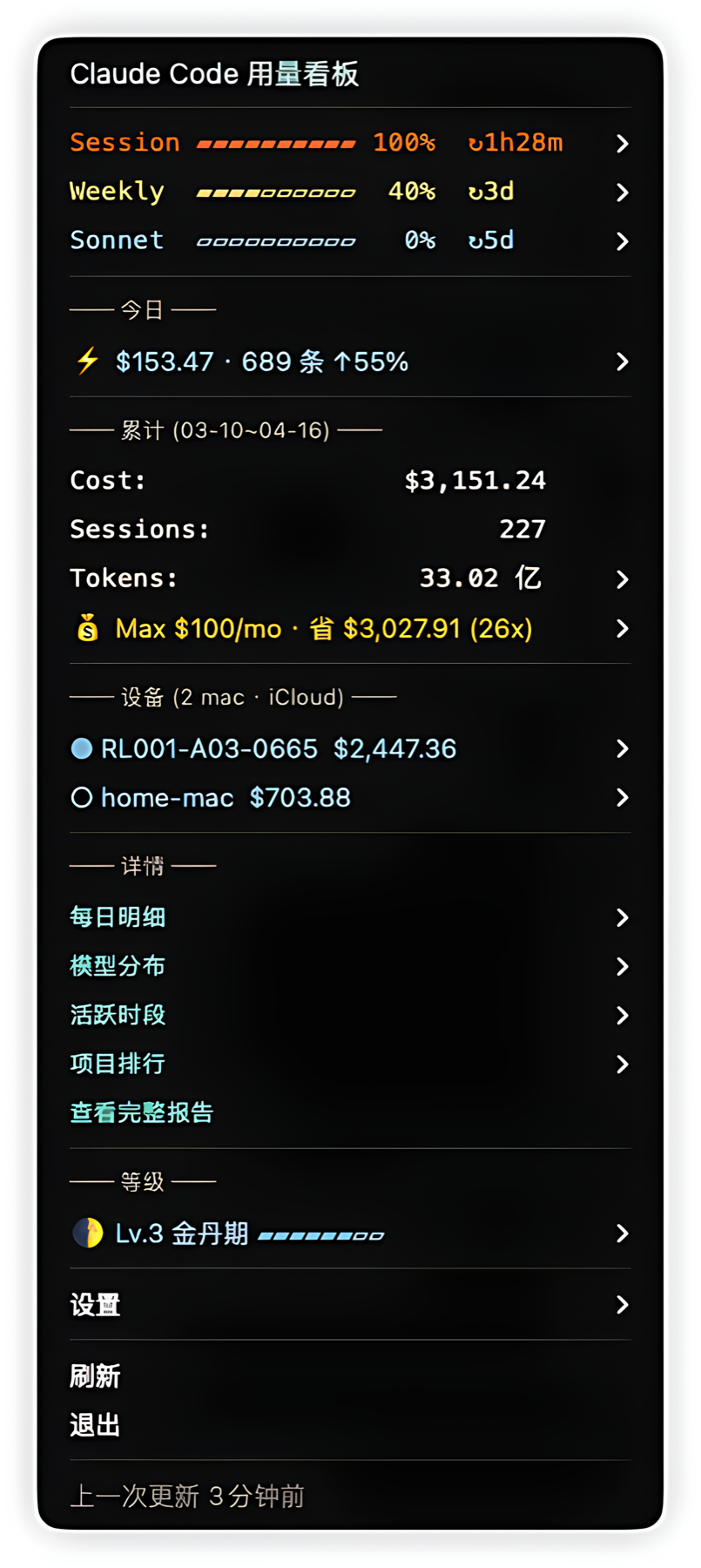
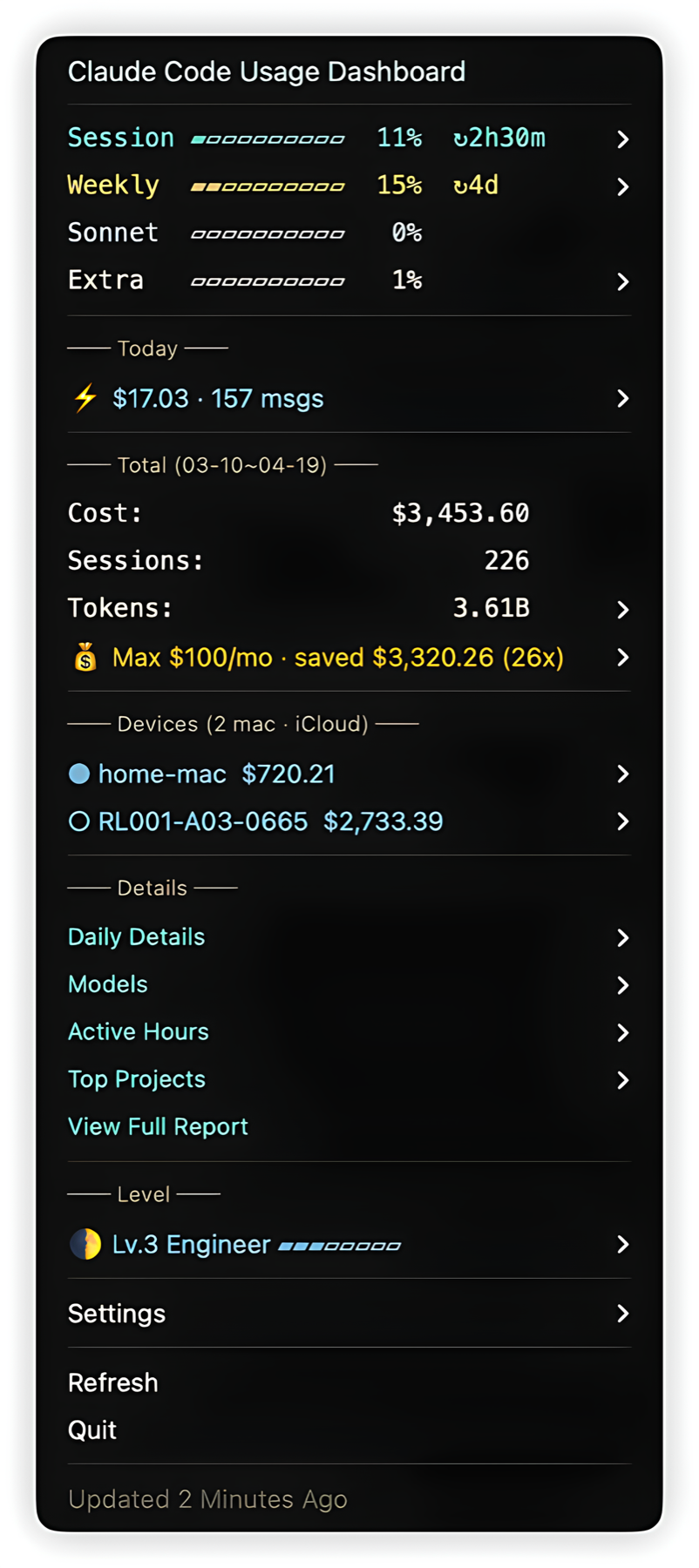
Claude Code usage dashboard in your macOS menu bar.
Costs, plan limits, trends, user level — all in one click.



Quick Install
curl -fsSL https://raw.githubusercontent.com/jayson-jia-dev/cc-token/main/install.sh | bash
No dependencies to install manually. SwiftBar is auto-installed if missing.
Why cc-token?
| cc-token | CLI tools | Web dashboards | |
|---|---|---|---|
| See limits at a glance | Menu bar, one click | Run a command | Open browser |
| Official plan limits | 5h/7d from Anthropic API | Most don't have | Some have |
| Burn rate warning | Auto-alert when approaching limit | No | No |
| Multi-machine sync | iCloud, zero config | No | No |
| Install effort | One command, no server | npm/pip install | Docker + server |
| User level system | 5-dimension scoring | No | No |
Features
| Feature | Description |
|---|---|
| Plan Usage Limits | Live 5h session & 7d weekly quotas with color-coded progress bars (Session/Weekly/Sonnet/Opus/Extra) |
| Burn Rate Alert | Warns when session pace projects to hit rate limit within 30 minutes |
| Cost & Token Overview | API-equivalent cost, session count, total tokens with input/output/cache breakdown |
| Today + Trend | Today's spending with trend vs 30-day active-day average (↑12% when above average) |
| Subscription ROI | How much your Pro/Max/Team plan saves vs API pricing, with daily/monthly projections |
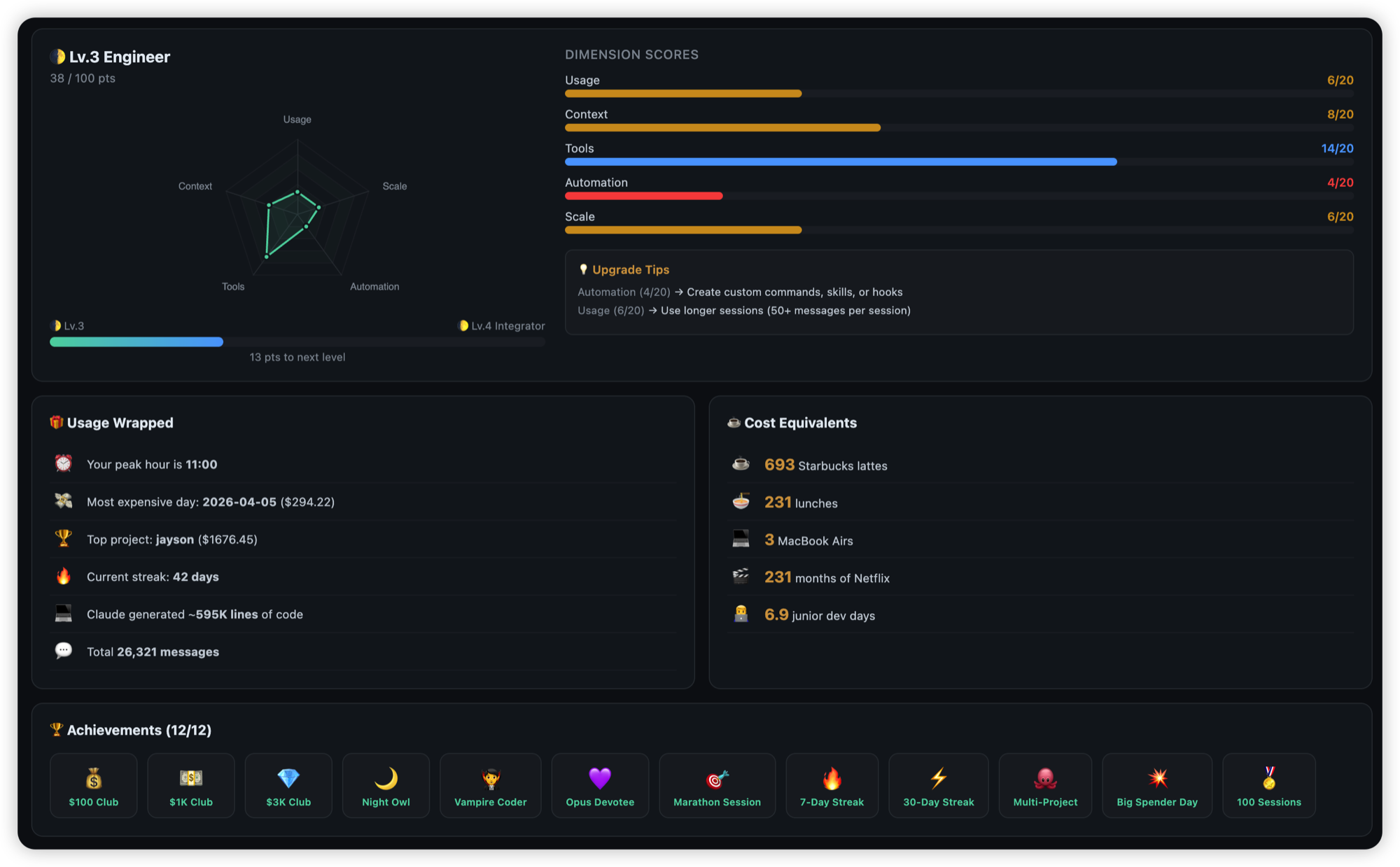
| User Level | 🌑→🌒→🌓→🌔→🌕→👑 rank with progress bar and upgrade hints. Hostname shown on level card and submenu so you know which Mac the stats reflect |
| Achievement Badges | 25+ badges across cost milestones ($100 Club → $1M Club) and behavior (Night Owl, Opus Devotee, Cache Master, Marathon Session, Multi-Project, etc.). Locked badges show desaturated icons with hover tooltip explaining unlock condition |
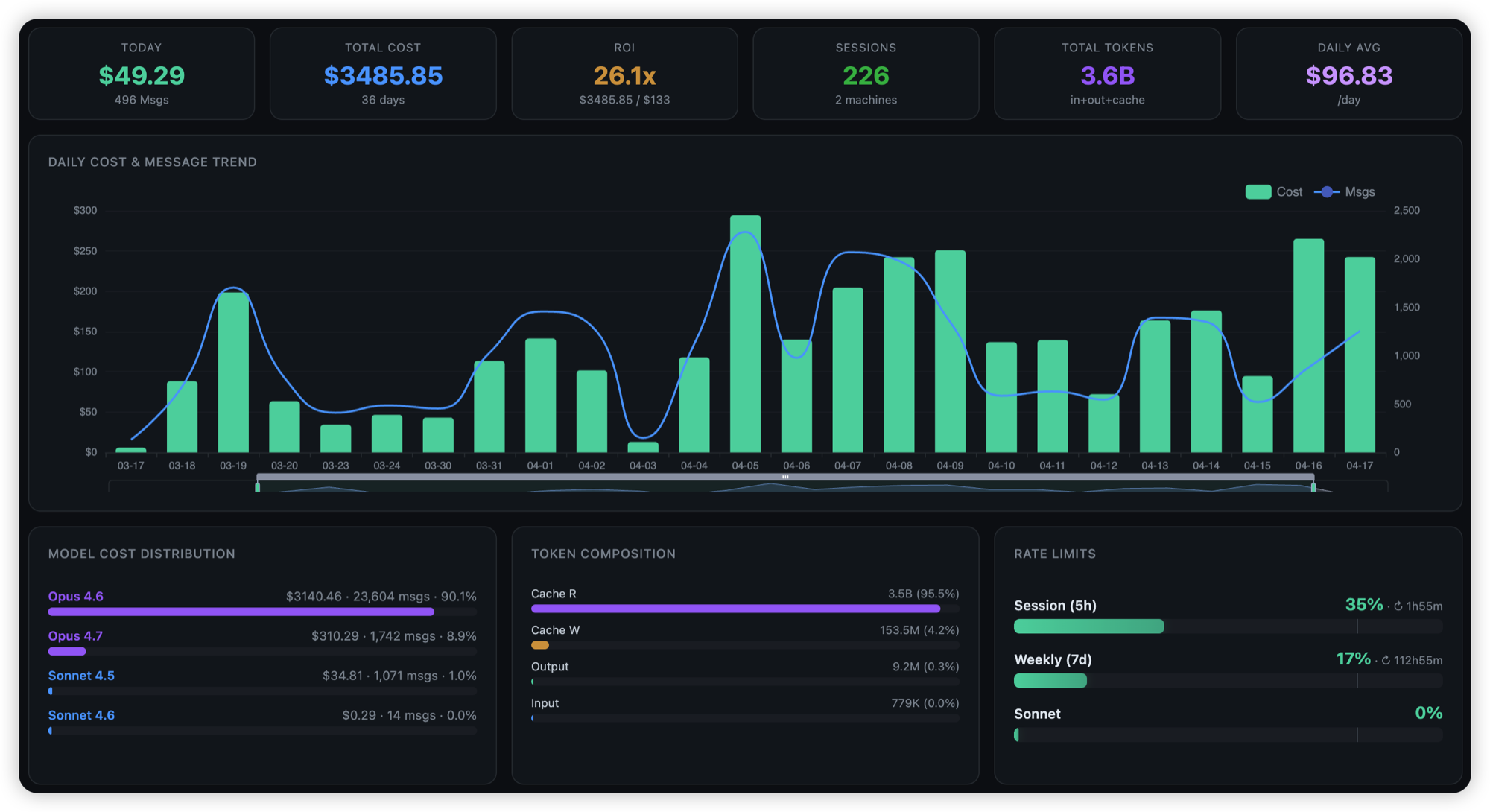
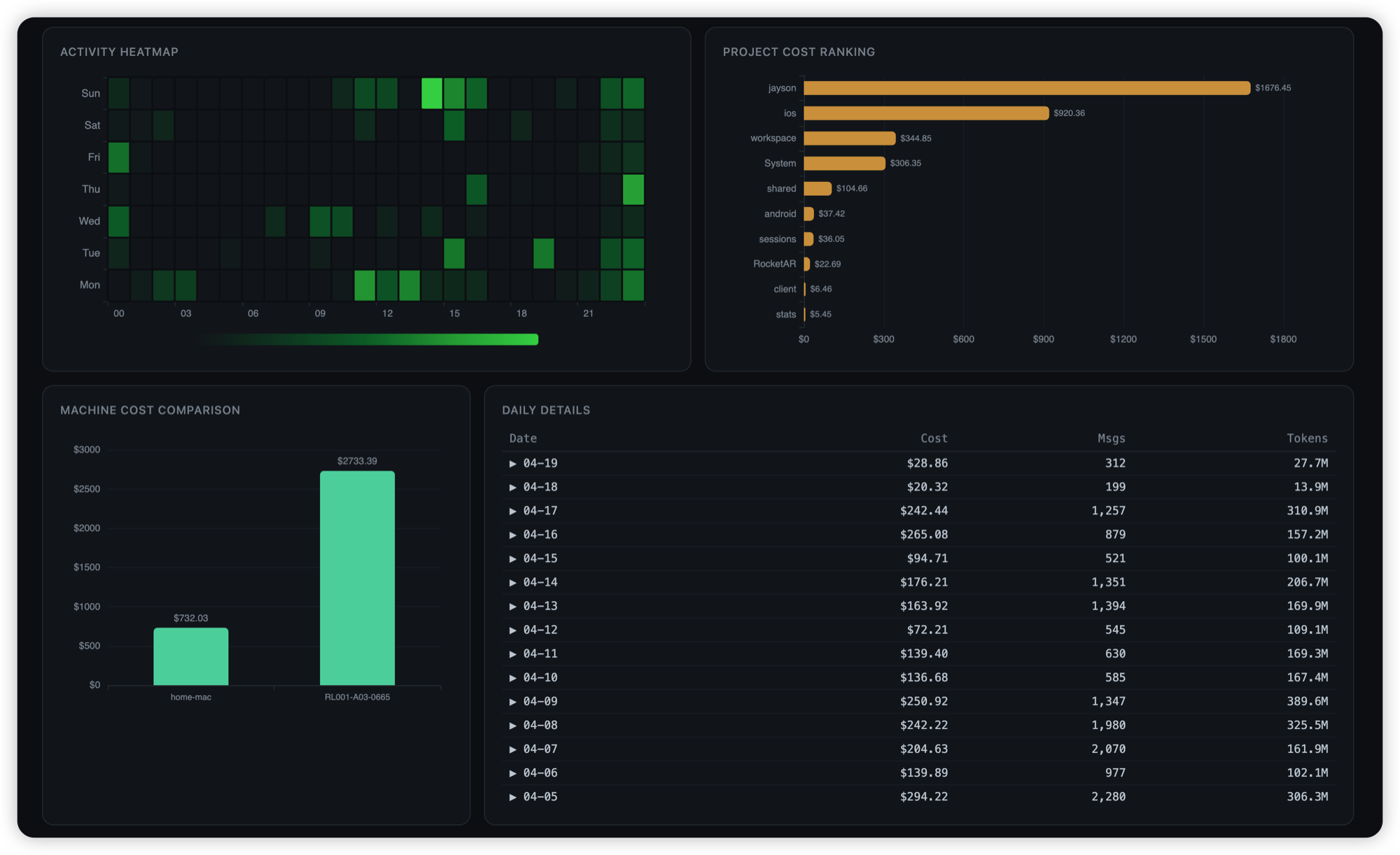
| Visual Dashboard | Click to open 12-panel ECharts report in browser: cost trend, model distribution, hourly activity, project ranking, token composition, rate limit gauges, machine comparison, daily detail table. Robust to .html file-association hijacks (VS Code etc.) |
| Daily Details | Full cost history (newest first, older dates collapsible) |
| Model Breakdown | Per-model usage (Opus / Sonnet / Haiku) with percentages |
| Hourly Activity | Sparkline charts: ▅▇██▇▄ shows which hours you're most active |
| Project Ranking | Which projects consume the most tokens |
| Multi-Machine Sync | iCloud Drive auto-sync across Macs — zero config |
| Usage Alerts | One macOS push per escalation (80 → 95 → 100 + burn). No re-firing on window rollover or same-tier repeats. Burn is suppressed once already at 100% |
| Extra Usage | Shows extra usage gauge with spent amount, monthly limit, and on/off status when enabled |
| Session Retention Protection | Claude Code by default silently deletes ~/.claude/projects/**/*.jsonl older than 30 days, wiping your cost history. On every refresh we patch cleanupPeriodDays to 99999 so your data stays put. Background |
| Accurate Cost (msg.id dedup) | Claude Code re-logs the same API response on session resume/continue. Without dedup, cost inflates 40–80%. Plugin deduplicates globally by msg.id so numbers match Anthropic's billing |
| Fleet Aggregation | With iCloud sync, menu's Daily / Hourly / Projects / Models panels aggregate across all your Macs. The Machines panel and User Level (per-machine, hostname shown on card & submenu) stay per-device |
| TTL-Aware Cache Pricing | Reads usage.cache_creation.ephemeral_{5m,1h}_input_tokens and prices each TTL at its official rate ($×1.25 for 5m, $×2 for 1h) |
| Auto-Update | Daily background check + on-demand "Manual Update" menu button. SHA256-verified, proxy-aware (system HTTP/HTTPS proxy), downgrade-protected, atomic replace, self-heals stray plugin copies on every run |
| 5 Languages | EN, 中文, ES, FR, 日本語 — auto-detected from system |
| Dark & Light Mode | Adapts color scheme to macOS appearance |
User Level System
Multi-dimension scoring based on your Claude Code usage maturity:
🌑 Lv.1  Starter      练气期
🌒 Lv.2  Planner      筑基期
🌓 Lv.3  Engineer     金丹期
🌔 Lv.4  Integrator   元婴期
🌕 Lv.5  Architect    化神期
👑 Lv.6  Orchestrator 大乘期
Scored across 5 dimensions (100 points total):
- Usage depth — median session length, activity density
- Context management — CLAUDE.md, memory system, rules
- Tool ecosystem — MCP servers, plugins (work tools discounted)
- Automation — self-built commands, hooks, skills (framework installs weighted at 30%)
- Scale — substantial projects, worktrees, tenure
How It Works
┌──────────────────────────────────────────────────────────────────┐
│  SwiftBar (5-min refresh)                                        │
│   ↓                                                              │
│  cc-token.5m.py                                            │
│   ├─ ensure_cleanup_disabled() → patch cleanupPeriodDays → 99999 │
│   ├─ scan()        → parse ~/.claude/projects/**/*.jsonl         │
│   │                  (recurses into subagents/ — most parsers    │
│   │                   miss this and lose ~50% of history;        │
│   │                   msg.id dedup + TTL-aware pricing           │
│   │                   + incremental mtime fingerprint cache)     │
│   ├─ get_usage()   → Anthropic OAuth API (9-min fresh, 2h stale) │
│   │                  ↳ macOS Keychain → OAuth token              │
│   ├─ save_sync()   → write full state to iCloud Drive            │
│   ├─ load_remotes()→ trust other machines' written values        │
│   ├─ auto_update() → GitHub + SHA256 (24h throttle)              │
│   └─ check_and_notify() → one push per escalation, no spam       │
└──────────────────────────────────────────────────────────────────┘
- Session retention protection — before anything else, patches
~/.claude/settings.jsonso Claude Code's 30-day default auto-deletion can't wipe your cost history - Token & cost — recurses
~/.claude/projects/**/*.jsonlso Task-tool subagent sessions (undersubagents/) are counted, not silently dropped like in most parsers. Globally deduplicates by Anthropicmsg.idso session resume/continue rewrites are counted once. Splits cache-write pricing by TTL (ephemeral_5m× 1.25 vsephemeral_1h× 2 of input rate). Incremental mtime fingerprint cache only re-parses changed files - Plan limits — reads OAuth token from macOS Keychain, queries
api.anthropic.com/api/oauth/usagewith smart caching (9-min fresh + 2-hour stale fallback, HTTP 429 graceful degradation) - Rate-limit alerts — one notification per escalation per limit-type;
state = {limit_key: {tier, at}}survives 5h/7d window rollovers so the same threshold doesn't re-fire. Burn-rate prediction suppressed once already blocked - Auto-update — daily GitHub check with SHA256 verification, atomic tmp+rename, system proxy fallback, downgrade-protected; failures logged to
~/.config/cc-token/.update.logfor diagnosis - Multi-machine sync — writes full stats (including
daily_models,daily_hourly,sessions_by_day) to iCloud Drive; reads peers' written values as-is (no re-pricing approximation) so header and Daily合计 stay exactly consistent - Dashboard — generates self-contained HTML with embedded ECharts, opens in browser (12 panels, all data from local caches)
- Refresh — SwiftBar executes the plugin every 5 minutes
Pricing
| Model | Input | Output | Cache Write (1h) | Cache Read |
|---|---|---|---|---|
| Opus 4.5 / 4.6 / 4.7 | $5 | $25 | $10 | $0.50 |
| Sonnet 4.5 / 4.6 | $3 | $15 | $6 | $0.30 |
| Haiku 4.5 | $1 | $5 | $2 | $0.10 |
USD per 1M tokens. Official pricing
Configuration
Edit ~/.config/cc-token/config.json or use the in-app Settings menu:
| Key | Description | Default |
|---|---|---|
subscription |
Monthly plan cost in USD | 0 |
subscription_label |
"Pro", "Max", "Team" |
"" |
language |
"auto", "en", "zh", "es", "fr", "ja" |
"auto" |
notifications |
Usage limit alerts | true |
auto_update |
Daily background update check (menu button "Check for Updates Now" still works when off) | true |
sync_mode |
"auto" / "off" |
"auto" |
machine_labels |
Custom device names, e.g. {"RL001":"Office"} |
{} |
Update
Three paths, same SHA256 verification and atomic replace:
- Automatic — daily background check, no action needed (default)
- Menu button — Settings → "Check for Updates Now" (bypasses the 24h throttle, shows result as a notification)
- Reinstall script:
curl -fsSL https://raw.githubusercontent.com/jayson-jia-dev/cc-token/main/install.sh | bash -s -- --update
Stuck on an old version?
The dropdown title shows your current version (e.g. v1.5.18). If auto-update has silently failed for 3+ days, a ⚠️ appears in the title and you'll get a one-shot macOS notification. To force-repair from any state:
curl -fsSL https://raw.githubusercontent.com/jayson-jia-dev/cc-token/main/install.sh | bash
Update diagnostics live at ~/.config/cc-token/.update.log (rotated at 50 KB).
Versioning
Standard 3-segment SemVer:
- MAJOR — breaking config or behavior change
- MINOR — new user-facing feature (menu item, setting, dashboard panel)
- PATCH — bug fix or internal hardening
See Releases for per-version notes.
Uninstall
curl -fsSL https://raw.githubusercontent.com/jayson-jia-dev/cc-token/main/uninstall.sh | bash
Requirements
- macOS
- Claude Code
- Python 3.8+
- SwiftBar (auto-installed)
License
MIT
Yorumlar (0)
Yorum birakmak icin giris yap.
Yorum birakSonuc bulunamadi