skytwin
Health Uyari
- License — License: Apache-2.0
- Description — Repository has a description
- Active repo — Last push 0 days ago
- Low visibility — Only 6 GitHub stars
Code Uyari
- network request — Outbound network request in apps/api/src/__tests__/about-me-adaptive.test.ts
- network request — Outbound network request in apps/api/src/__tests__/about-me-routes.test.ts
- network request — Outbound network request in apps/api/src/__tests__/assistant-install-suggestion.test.ts
Permissions Gecti
- Permissions — No dangerous permissions requested
Bu listing icin henuz AI raporu yok.
A digital twin that learns what you'd want — and does it. Delegated judgment with safety constraints, explanations, and progressive trust.
SkyTwin
A digital twin that learns what you'd want — and does it.





Every personal assistant today has amnesia. You tell it you prefer aisle seats three times. It asks again. You archive the same newsletter every morning. It keeps notifying you. Every interaction starts from scratch.
SkyTwin is different. It builds a structured model of your preferences, risk tolerances, and decision patterns — a digital twin — then uses that model to act on your behalf. When it's confident, it just handles things. When it's not, it asks the right question instead of the wrong one.
The core principle: ask the twin before asking the user.
How It Works
  Gmail, Calendar, etc.
         │
         ▼
  ┌──────────────┐
  │   Connectors  │  Ingest signals from your accounts
  └──────┬───────┘
         ▼
  ┌──────────────┐
  │   Decision    │  "What's happening? What would
  │   Engine      │   the user want here?"
  └──────┬───────┘
         ▼
  ┌──────────────┐
  │  Twin Model   │  Your preferences, patterns,
  │  + Memory     │  and episodic memory (gbrain default,
  │               │  MemPalace optional)
  └──────┬───────┘
         ▼
  ┌──────────────┐
  │   Policy      │  Spend limits, trust tiers,
  │   Engine      │  safety constraints
  └──────┬───────┘
         ▼
    ┌────┴────┐
    ▼         ▼
 Auto-     Escalate
 execute   with context
    │         │
    ▼         ▼
 Explain   You decide
    │         │
    └────┬────┘
         ▼
  ┌──────────────┐
  │  Feedback     │  Your response trains the twin
  │  Loop         │  to be better next time
  └──────────────┘
Every path produces an explanation. Every outcome feeds back into the twin. The system gets better at predicting what you want over time.
Screenshots
|
Onboarding 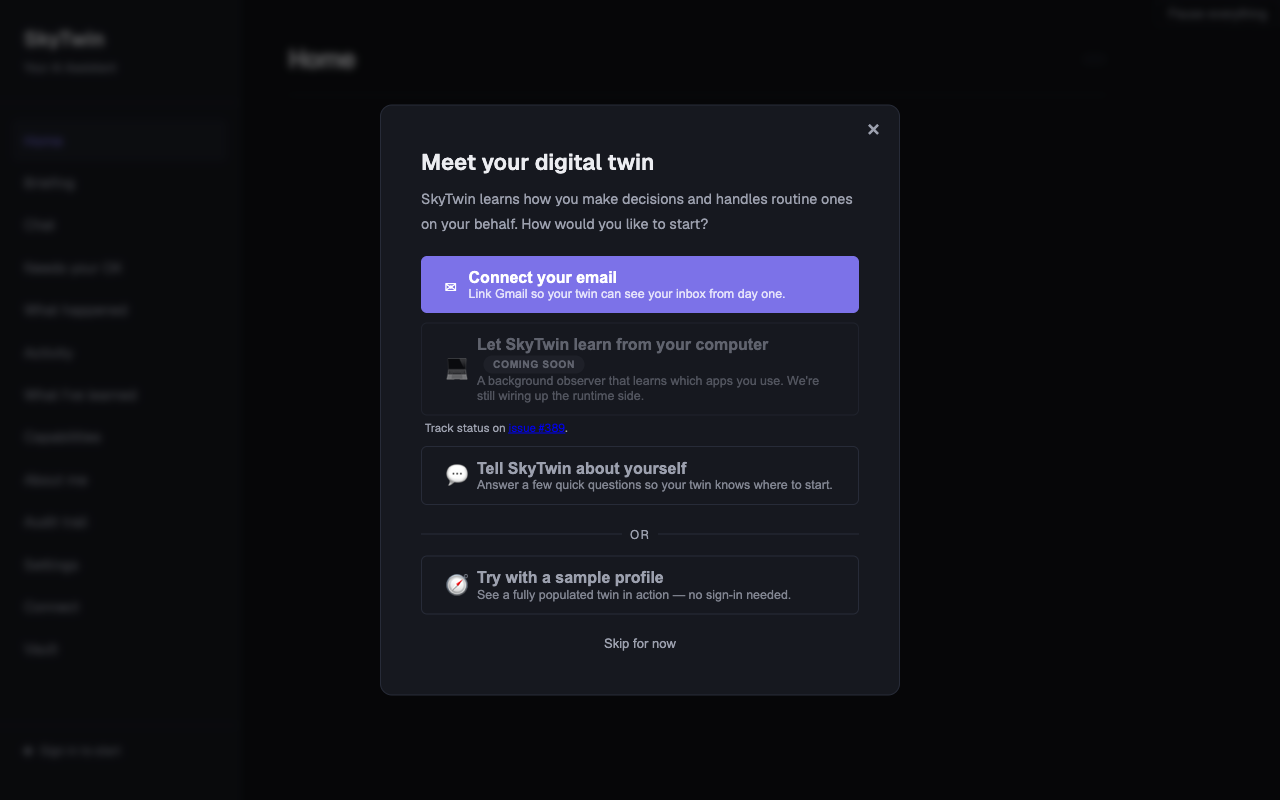
|
Dashboard 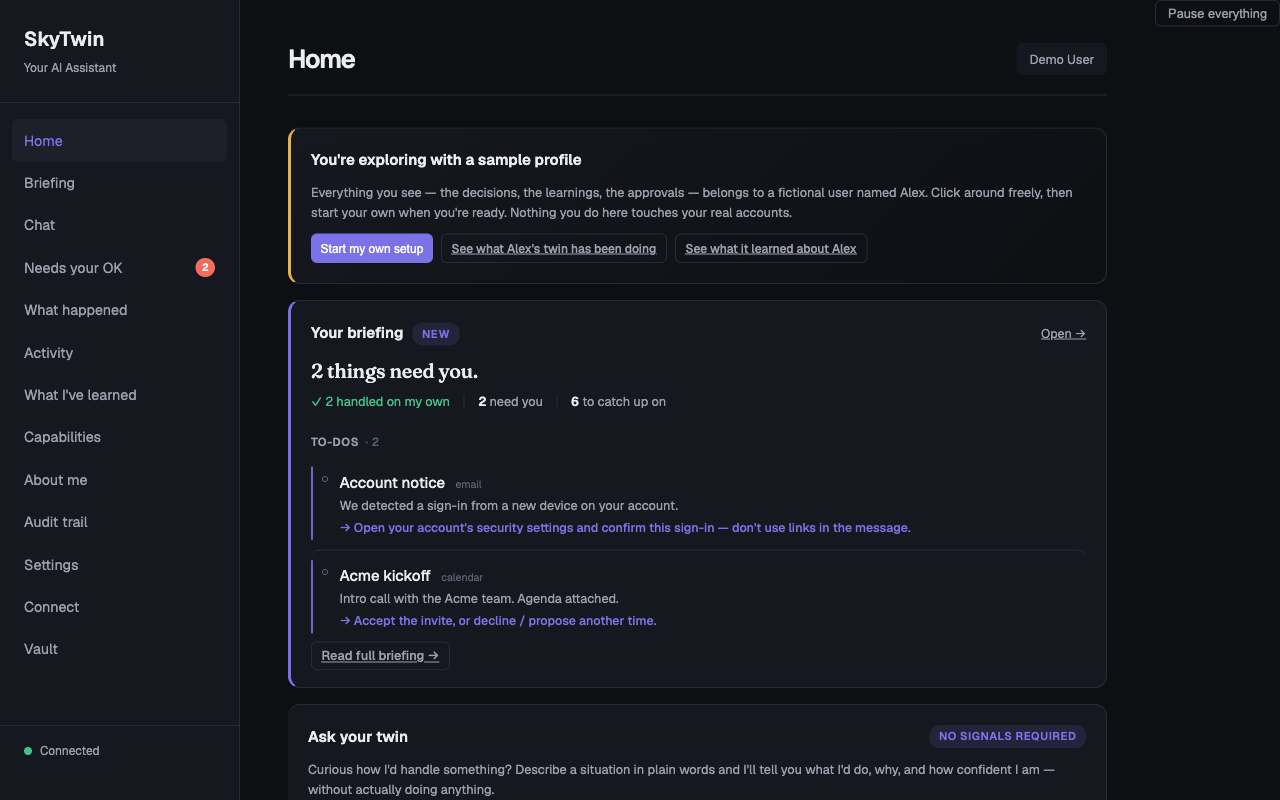
|
|
Approvals 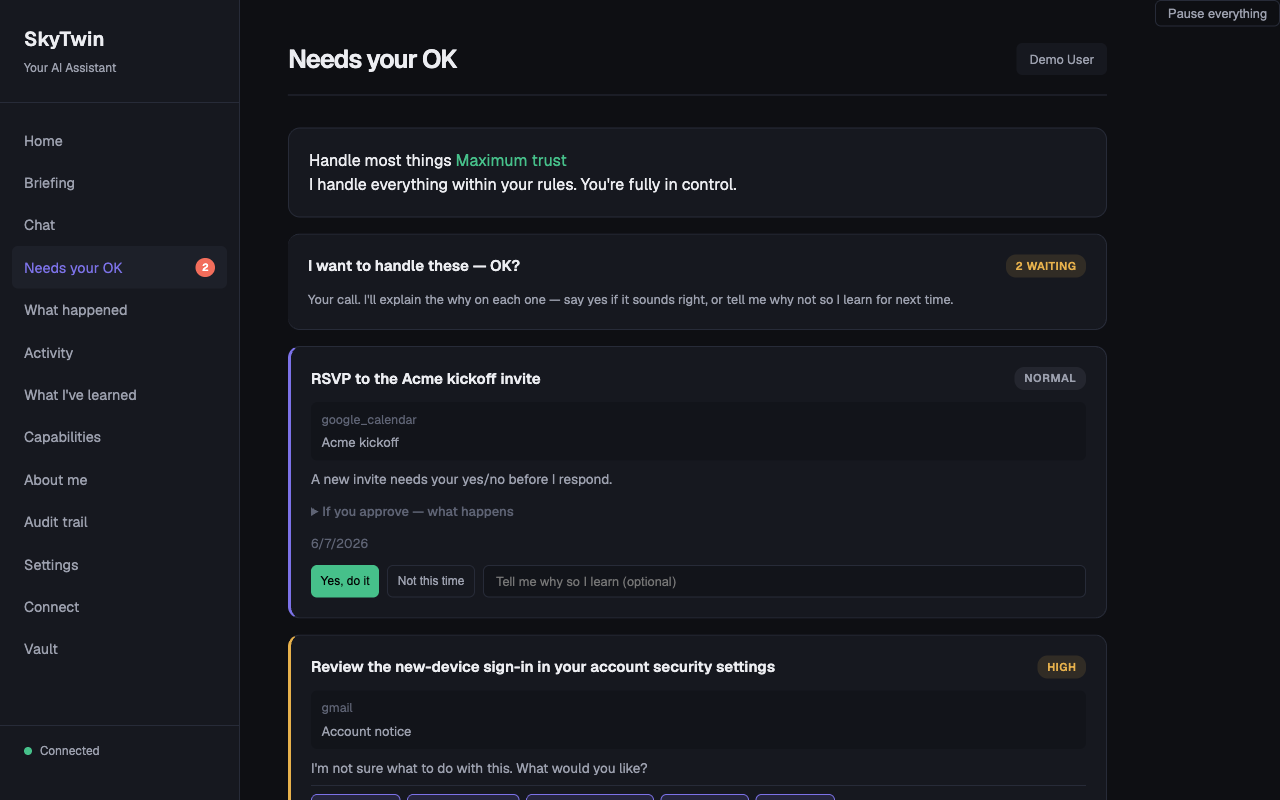
|
Decision History 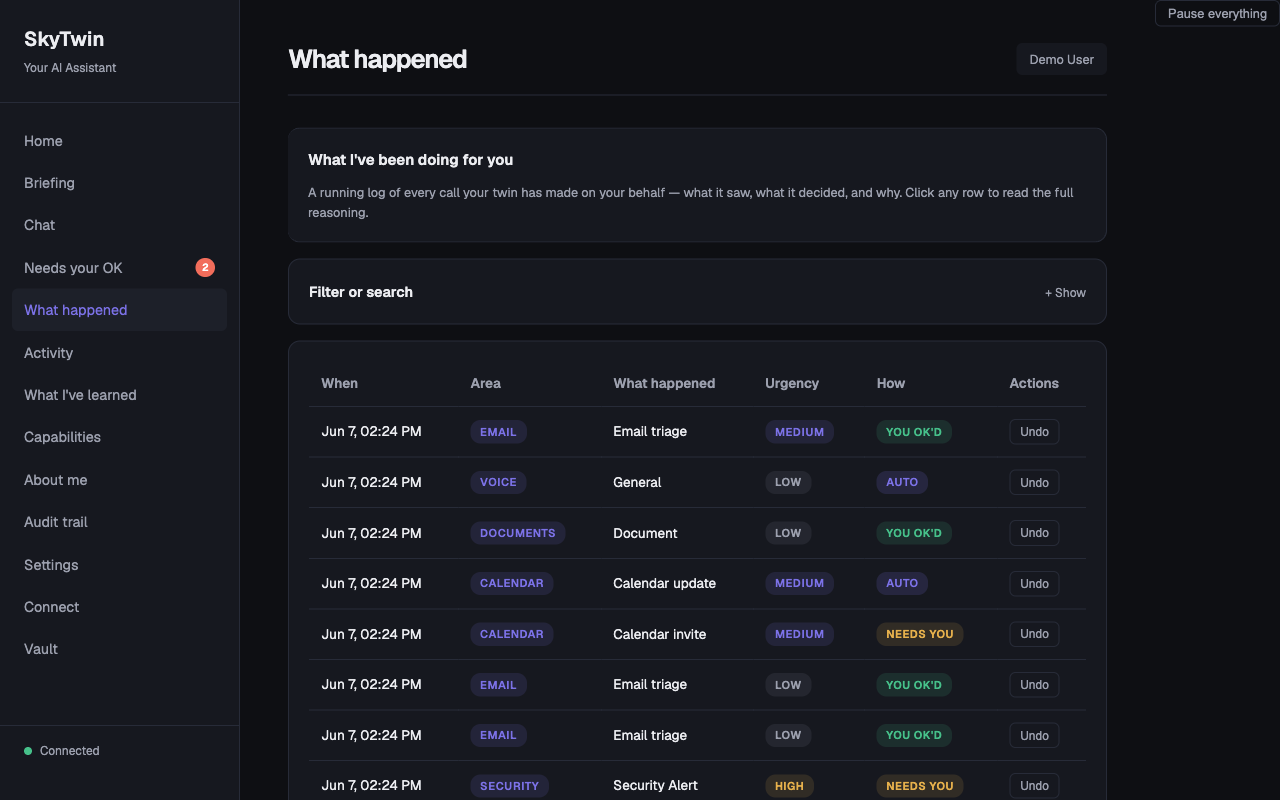
|
|
Setup & Credentials 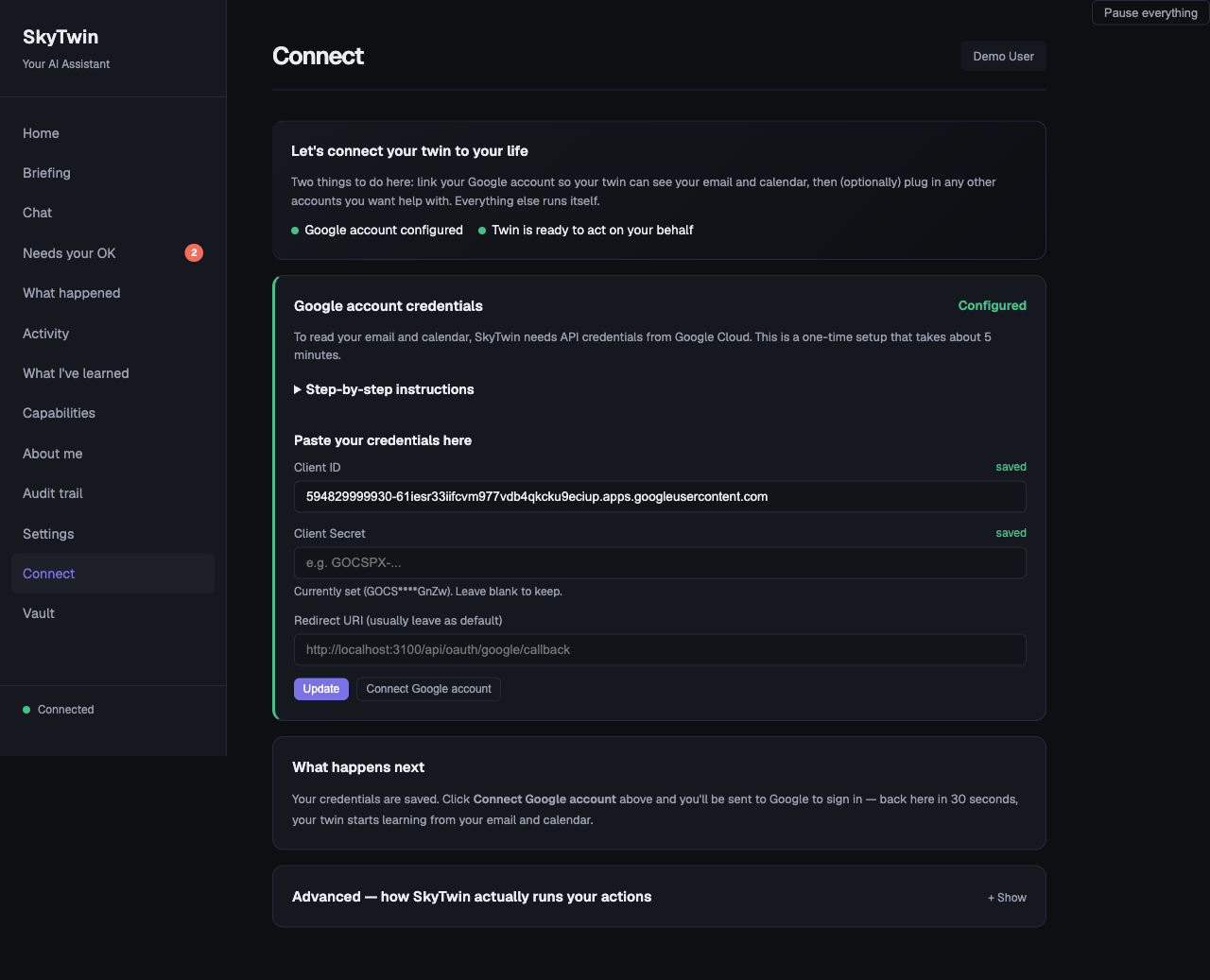
|
Settings 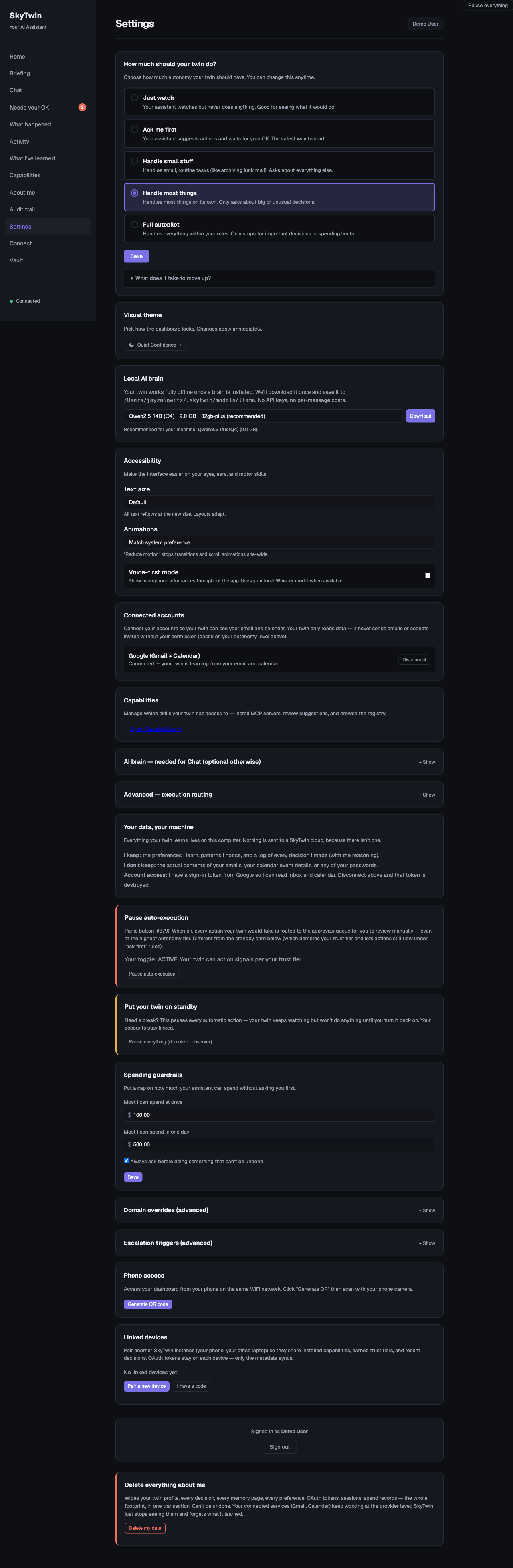
|
|
My Learnings 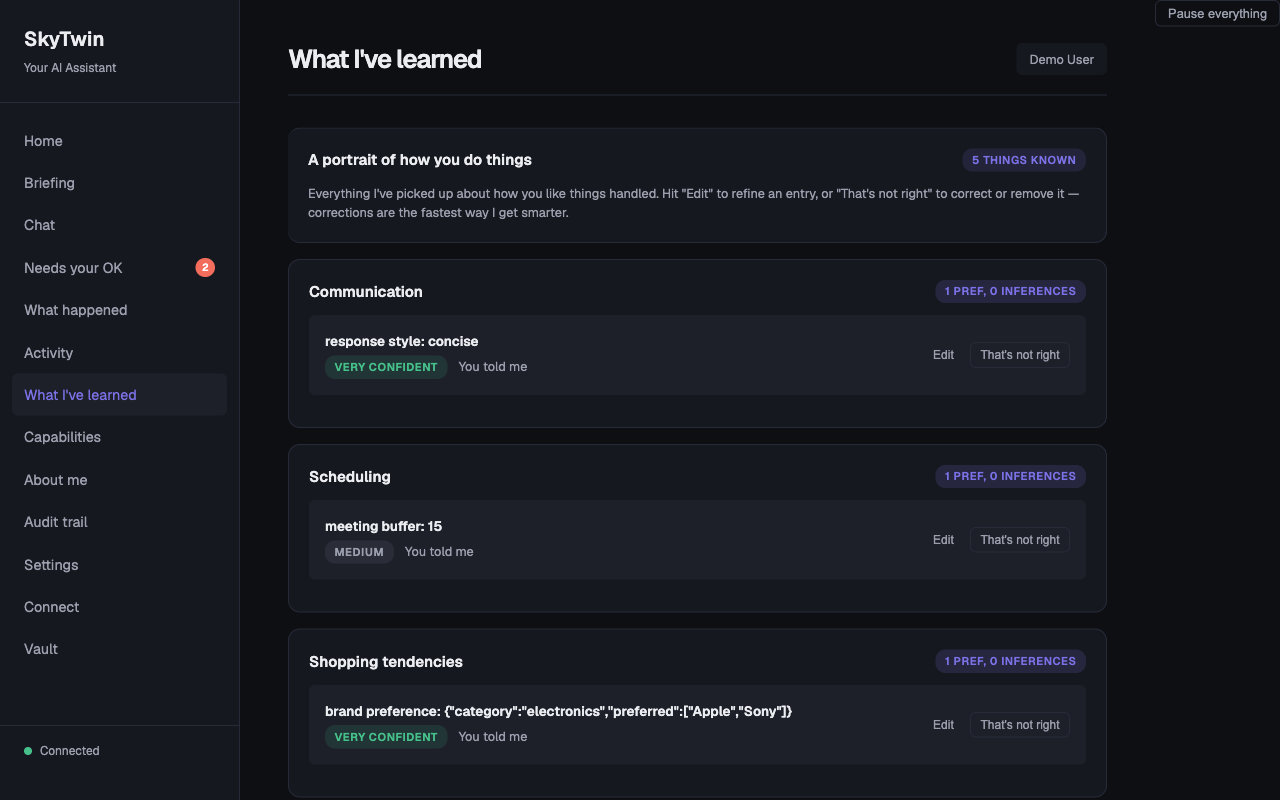
|
Daily Briefing 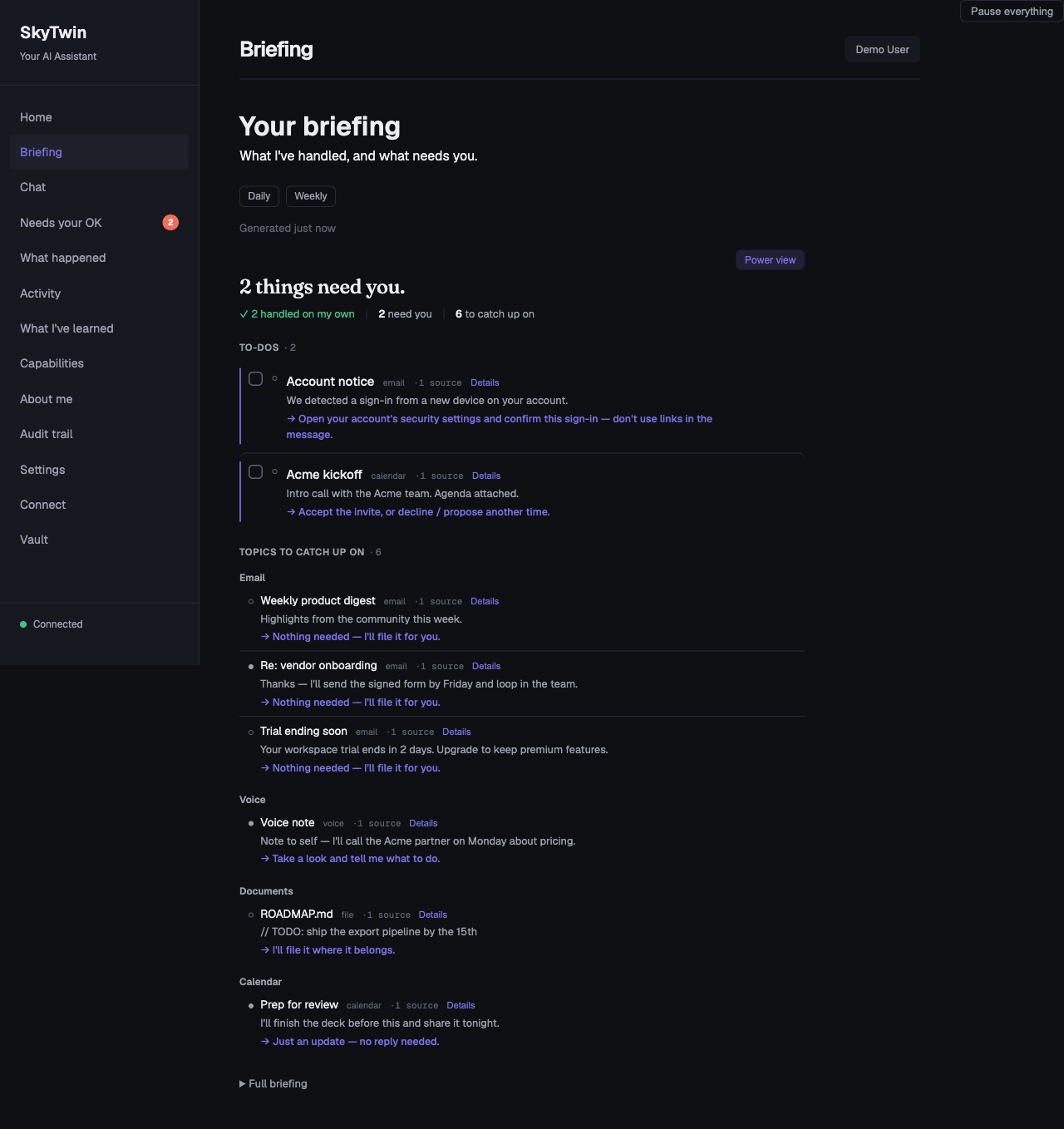
|
Concrete Examples
| Scenario | What SkyTwin Does |
|---|---|
| Newsletter arrives | Your twin knows you archive these without reading. Auto-archived. Explanation logged. You never see it. |
| Calendar conflict | You always prioritize skip-level 1:1s over standups. Standup rescheduled with a note to the organizer. |
| Subscription renewal | $15.99/mo streaming service, used 3x this month, 18 months of renewals. Auto-renewed within your spend norms. |
| Grocery reorder | Repeats your last order with your substitution rules. Flags the one item that jumped 15% in price. |
| Flight booking | Finds the United aisle seat, morning departure, direct, $380. At high trust: books it. At low trust: presents top 3 options. |
| Unknown sender email | Low confidence. Escalates with a one-line summary so you can decide in 5 seconds instead of 5 minutes. |
What Makes This Different
It's not a chatbot. SkyTwin is operational, not conversational. It doesn't wait for you to type a prompt — it watches your connected accounts and acts when opportunities arise.
It earns trust incrementally. New users start at observer — the system only suggests. As you approve and correct, it earns autonomy domain by domain. Trust in email triage doesn't mean trust with your calendar.
Safety constraints are the product. Every action passes through a policy engine with hard spend limits, trust tier gating, reversibility checks, and sensitivity classification. The system can be inspected, overridden, narrowed, and shut off at any time. Read the full safety model →
Every action is explainable. No black boxes. Every automated decision produces an explanation record: what happened, what evidence was used, what preferences were invoked, why this action over alternatives, and how to correct it.
Your twin is inspectable. It's not a vector embedding or a bag of keywords. It's a typed, versioned data structure where every preference has a confidence level, supporting evidence, and provenance. Contradictions are tracked, not hidden.
Memory knows who said what. Signals from supported connectors arrive stamped with an authoring tier — content you wrote vs. a newsletter vs. an inbound stranger — and tier-weighted retrieval lets self-authored content outrank broadcast noise. The twin feels like it knows you instead of just having read your inbox.
Quick Start
Download and install (no terminal)
⬇ Download the latest release →
Grab the installer for your OS, double-click, and you're in. No terminal, no Docker, no Ollama, no .env. CockroachDB ships inside the bundle as a hash-verified native binary and an embedded llama.cpp model is the default LLM — nothing else to install.
Release boundary: published installers currently predate the guarded,
account-free sample session in this source tree. Check the release notes for
the exact features in an artifact. Desktop builds produced from current source
can open a short-lived, read-only sample; simulated approve, reject, correct,
and learn interactions in that packaged path are later work.
| OS | Installer on the release page |
|---|---|
| macOS (Apple Silicon) | SkyTwin-…-arm64.dmg |
| Windows | SkyTwin.Setup.….exe |
| Linux | SkyTwin-….AppImage, .deb, or .rpm |
⚠ Unsigned builds (for now). Code-signing certs (Apple Developer + Windows EV) are a pending launch step, so your OS warns on first launch:
- macOS: right-click the app → Open → Open (clears Gatekeeper once).
- Windows: SmartScreen → More info → Run anyway.
Signing lands before the public launch; until then this is the expected first-run experience.
Build from source (one-command, macOS / Linux / WSL)
curl -fsSL https://raw.githubusercontent.com/jayzalowitz/skytwin/main/install.sh | bash
The installer detects your OS, installs anything missing (Homebrew on mac, Node 20+, pnpm), fetches the official CockroachDB single-node binary (hash-verified), clones the repo to ~/skytwin, runs the bootstrap, starts the services, and opens the dashboard at http://localhost:3200 once it's up. Re-running pulls latest and restarts.
No Docker required. Before v0.6.56 the installer pulled Docker Desktop and ran CockroachDB inside a container — by far the heaviest dependency on the list, with its own EULA and a "open it once after install" gotcha. The default path now installs the CRDB binary directly into ~/.local/share/skytwin/bin/cockroach and spawns it as a child process. Docker remains supported via SKYTWIN_USE_DOCKER=true for users who already have a Docker workflow.
To stop later: cd ~/skytwin && ./bin/skytwin-dev --stop.
The first 60 seconds in a development/source run:
- The dashboard opens. Type any situation into "Ask your twin" — the agent reasons out loud and explains what it would do, with confidence and alternatives. No accounts connected yet, no signals required.
- After
pnpm db:seed, click "Just show me around" on the welcome screen to skip OAuth and use the development demo seed. Alex has recent decisions, a daily briefing, four pending approvals, "What I've learned", Capabilities, Search, and a trust bar climbing toward "handle most things". The development seed also includes Pat (a power user) and Carol (a brand-new user), so the dev "Switch user" button tells three stories. This development path can exercise mock approval actions; it is separate from the narrower, read-only sample authority used by packaged desktop builds. - The welcome screen also shows a one-line "your AI runs privately on this computer — we'll use
<model>" — the app detects your machine's RAM and free disk and picks the best local model that fits, so a non-technical user never has to choose a model or paste an API key. "Change" opens Settings → AI (and the local memory backend). - Want to look around first? Press Esc, click the × in the modal corner, or hit Skip for now — the dashboard chrome stays navigable behind the modal, and a "Sign in" button on the placeholder gets you back into the wizard whenever you're ready.
- When you're ready to wire up your own, the in-app walkthrough handles the Google API setup in about 5 minutes — paste your client ID, click "Save and connect now," and you're at Google's sign-in.
Advanced env vars
The defaults give you a working SkyTwin without any LLM API keys or Docker. Power users can opt into:
| Env var | Effect |
|---|---|
SKYTWIN_USE_DOCKER=true |
Run CockroachDB inside Docker instead of as a native binary. Useful for users who already have Docker and prefer container lifecycle. |
SKYTWIN_DOCKER_SQL_PORT, SKYTWIN_DOCKER_ADMIN_PORT, SKYTWIN_DOCKER_API_PORT |
Override Docker Compose host ports for SQL, the Cockroach admin UI, and the optional API container. Useful when another Conductor workspace or local stack already owns 26257, 8080, or 3000. |
TURBO_DEV_CONCURRENCY |
Override the pnpm dev Turbo concurrency. The default is 50, high enough for the current persistent dev task count. |
SKYTWIN_DEV_SKIP_PORT_PREFLIGHT=1 |
Bypass the pnpm dev port preflight. Use only when you intentionally want Turbo to try starting even though a required dev port is already listening. |
SKYTWIN_WITH_OLLAMA=true |
Install Ollama + pull the gemma4 model (~9.6GB). The default install uses the embedded llama.cpp provider, which doesn't require this. |
SKYTWIN_DISABLE_EMBEDDED=1 |
Skip the embedded LLM provider in the API's provider chain. Pair with hosted-only keys (e.g. ANTHROPIC_API_KEY) for reproducible evaluation runs. |
SKYTWIN_CRDB_VERSION |
Pin a non-default CockroachDB version. Refresh the hash tables in bin/skytwin-db and apps/desktop/scripts/build-single-binary.sh together. |
Manual setup
If you'd rather drive each step yourself:
Prerequisites
- Node.js >= 20
- pnpm >= 9
- That's it. CockroachDB is fetched as a native binary by
bin/skytwin-db install. No Docker, no system DB install.
git clone https://github.com/jayzalowitz/skytwin.git && cd skytwin
pnpm install

# Fetch + start CockroachDB (native binary, hash-verified)
./bin/skytwin-db install
./bin/skytwin-db start
./bin/skytwin-db ensure-db

# Configure
cp .env.example .env   # edit with your values

# Migrate and seed
pnpm db:migrate
pnpm db:seed

# Build and run
pnpm build
pnpm dev
The API starts on localhost:3100, the web dashboard on localhost:3200.pnpm dev preflights the API, web, OpenClaw bridge, and Twin MCP ports before
Turbo starts. If another process owns a required port, it prints the owning
PID/command/cwd; if this same workspace is already healthy, it exits cleanly
instead of starting a duplicate dev stack.
The OpenClaw bridge is supervised during pnpm dev, so a one-off child
SIGKILL/exit 137 restarts the bridge without tearing down API/web/worker; fast
crash loops still fail visibly.
Validating the install path
Before shipping, regression-check the install end-to-end across a matrix
of Linux distros:
./bin/validate-installs              # Ubuntu 22.04, Debian 12, Fedora 40
./bin/validate-installs ubuntu       # one distro
./bin/validate-installs --keep-on-fail ubuntu  # leave container alive on failure
Each run spawns a fresh OS container, untars a snapshot of the working
tree, runs install.sh exactly the way a real user would, and asserts
the dashboard responds at localhost:3200. macOS/Windows are exercised
via the same install.sh and bin/skytwin-db codepaths but need a real
machine to verify the platform-specific bits (Homebrew, NSIS, etc.).
Running Tests
pnpm test # 4,800+ tests across 400+ files in 30 packages + 8 apps
Architecture
SkyTwin is a TypeScript monorepo (pnpm + Turborepo) with 30 packages and 8 apps:
apps/
  api/                HTTP API — decisions, user management, webhooks, /api/voice/*
  web/                Dashboard — review decisions, manage preferences, configure policies
  worker/             Background jobs — async execution, briefing generation, memory action loop, tier backfill
  idle-miner-runner/  Desktop-managed child that scans approved project roots only while the machine is idle
  desktop/            Electron app — macOS (.dmg), Windows (.exe), Linux (.AppImage)
  mobile/             React Native (Expo) — QR pairing, push notifications, SSE, voice capture
  openclaw-bridge/    OpenClaw proxy — bridges local API to OpenClaw execution service
  twin-mcp-server/    MCP server exposing the twin's read-only surface to external clients

packages/
  shared-types/                   TypeScript interfaces — the dependency root for everything
  config/                         Env var loading and validation
  core/                           Retry logic, circuit breaker, error types, logging
  db/                             CockroachDB client, migrations, repositories
  twin-model/                     Twin profile CRUD, preference learning, confidence scoring
  decision-engine/                Event interpretation, candidate generation, action selection
  policy-engine/                  Trust tiers, spend limits, domain policies, safety checks
  policy-prompts/                 Versioned LLM prompts with JSON schema validation and deterministic fallbacks
  ironclaw-adapter/               Execution adapter with HMAC auth, retries, circuit breaker
  execution-router/               Adapter selection, fallback chains, risk modifiers, plugin discovery
  llm-client/                     Unified LLM client — Anthropic / OpenAI / Google / Ollama / embedded
  embedded-llm/                   Local-first: llama.cpp text, whisper.cpp STT, Piper TTS — spawn-based
  explanations/                   Human-readable explanation generation
  connectors/                     Gmail / Google Calendar / Outlook mail+calendar / mock connectors with OAuth, stamps AuthoringTier
  assistant/                      Stateless chat service wrapping LlmClient with context enrichment
  capability-engine/              Infers user app capabilities from signals (keyword v1 + LLM verification)
  credential-vault/               Envelope encryption for OAuth tokens (AES-256-GCM + scrypt KDF)
  idle-miner/                     Filesystem scanner that extracts project metadata during idle time
  mcp-host/                       Manages MCP servers (stdio/HTTP/SSE) with circuit breakers + telemetry
  dxt/                            Serializes/deserializes DXT artifacts (packed MCP server configs)
  observability/                  In-memory metrics + ring-buffered rollup for the capability loop
  registry-client/                Loads curated MCP registry entries with OAuth quirks and service lookup
  routines/                       No-code Watches: plain-language → read-only digest/notify with scheduler, run history, briefing/chat/web surfaces
  mempalace/                      Legacy memory: episodic, knowledge graph, 4-layer retrieval (opt-in backend)
  memory-port/                    Backend-agnostic MemoryPort interface + capability negotiation
  memory-gbrain/                  Default memory backend — vector + tsvector RRF on CRDB brain_* tables
  memory-gbrain-crdb-adapter/     CRDB driver for gbrain — tier-weighted RRF, pin/hide, embedding providers
  memory-hybrid/                  Composes any two MemoryPort impls — per-capability read routing
  memory-mempalace/               MemoryPort adapter for the legacy mempalace classes
  evals/                          Decision quality evaluation and regression testing
Tech Stack
| Layer | Technology |
|---|---|
| Language | TypeScript (strict, ES2022) |
| Database | CockroachDB (PostgreSQL wire protocol) |
| Runtime | Node.js >= 20 |
| Package Manager | pnpm with workspaces |
| Build | Turborepo |
| Desktop | Electron + electron-builder |
| Mobile | React Native + Expo |
| Testing | Vitest (4,800+ tests) |
| CI/CD | GitHub Actions |
| Execution | IronClaw, OpenClaw (via local bridge), and a Direct fallback — trust-ranked with automatic failover |
Deployment
Reverse proxies and TRUST_PROXY_HOPS
The API uses req.ip for every IP-keyed check: the session-auth
localhost dev-bypass, the OAuth new-user rate limit, the/api/v1/demo/preview per-IP bucket, and any future per-client limit.
Behind any reverse proxy, req.ip is the proxy's address by default —
which collapses every per-IP limit into a single shared bucket. You
need TRUST_PROXY_HOPS set to the exact number of trusted hops between
the Node process and the real client.
The number you want is "trusted proxies between this Node process and the
actual client" — count every box that legitimately appends toX-Forwarded-For on its way in, including any platform-injected router
your provider sits behind.
| Topology | TRUST_PROXY_HOPS |
|---|---|
| Direct (no proxy, or untrusted upstream) | 0 (default) |
| Single reverse proxy (your own nginx, Caddy, ELB target) | 1 |
| Single platform hop (Fly's edge, Render's router, Heroku's app router, an AWS ALB on its own) | 1 |
| CDN → your reverse proxy (Cloudflare → nginx → Node, no platform router) | 2 |
| CDN → platform router → Node (Cloudflare → Fly/Render/Heroku → Node) | 2 |
| CDN → platform router → your reverse proxy → Node (Cloudflare → Fly → nginx → Node) | 3 |
| Multi-hop edge (Cloudflare → AWS WAF → ALB → Node) | 3+ |
If you can't draw the topology from memory, prefer Express's array/CIDR
form for trust proxy (set per-network, not per-hop) — see the
Express docs. Hop
counts are simple but brittle when a platform inserts a hop you didn't
know about.
Setting this too high is a security hole. A client-controlledX-Forwarded-For becomes req.ip and bypasses every per-IP limit by
header rotation. When in doubt, prefer fewer hops.
Verify after deploy:
curl -H 'X-Forwarded-For: 1.2.3.4' https://your-api/api/health/live
# response includes {"clientIp": "..."} — should NOT be "1.2.3.4"
# unless 1.2.3.4 is actually a trusted upstream
If clientIp in the response matches the spoofed header, yourTRUST_PROXY_HOPS is too permissive and rate-limit bypass is open.
Public demo preview (/api/v1/demo/preview)
The public LLM-backed preview endpoint has three layers of protection:
| Env var | Default | Purpose |
|---|---|---|
DEMO_PREVIEW_DISABLED |
unset | Set to 1 to return 503 unconditionally — operator kill switch when the endpoint gets abused. |
DEMO_PREVIEW_GLOBAL_LIMIT_PER_HOUR |
500 |
Hard global cap across all callers. Survives misconfigured TRUST_PROXY_HOPS and rotated-IP abuse. |
| Per-IP bucket | 20 / 5 min | Built in. Effectiveness depends on TRUST_PROXY_HOPS resolving the real client IP. |
The per-IP bucket and the global cap are process-local. If you run
multiple API replicas, the global cap multiplies by replica count.
For unauthenticated public deployments at scale, replace the
in-memory counter with Redis or a DB row with atomic increment
(tracked in TODOS.md as a P3).
Trust Tiers
SkyTwin uses a progressive trust model. Autonomy is earned, not assumed.
| Tier | What It Means |
|---|---|
observer |
Default for new users. The twin proposes actions and surfaces them as approval requests — you approve, reject, or edit. Never auto-executes. |
suggest |
Drafts actions for your review. You approve or edit before anything happens. |
low_autonomy |
Auto-executes low-risk, reversible actions in trusted domains. Escalates everything else. |
moderate_autonomy |
Handles most routine decisions. Escalates novel situations and high-cost actions. |
high_autonomy |
Acts on your behalf across domains. Still respects hard limits and irreversibility checks. |
Trust is domain-specific. You might be at moderate_autonomy for email but suggest for calendar. A bad decision in one domain can reduce trust in that domain without affecting others.
Documentation
| Document | What's Inside |
|---|---|
| The Deck | 22 slides: every capability claim paired with the mechanism that constrains it. Each claim-and-gate slide carries a collapsible source block citing the file and lines it came from; the "why now" and positioning slides cite external sources instead, and three narrative slides carry no citation block (source) |
| Product Spec | Vision, target user, operating principles, example workflows |
| Technical Spec | Architecture, data flow, API endpoints, database schema |
| Safety Model | Threat model, trust tiers, defense layers, safety philosophy |
| Decision Engine | Situation interpretation, risk assessment, confidence scoring |
| IronClaw Integration | Execution adapter, HMAC auth, failure handling |
| CockroachDB Architecture | Schema design (18+ tables), query patterns, versioning |
| Evals | Evaluation harness, scenario simulation, calibration metrics |
| Launch Plan | Procurement + sequencing to public download links |
| Launch-Readiness Report | Current launch-blocker status: what's code-done vs. external |
| Release Procedure | How to cut a release (tag → build.yml → draft → publish) + signing and clean-artifact verification gates |
Project Status
SkyTwin is in Tier 1 launch polish (see docs/launch-plan.md) — signed binaries, a verified packaged experience, the mobile cut, and safety/privacy debt remain pre-launch work tracked under epic #357. The 2026-06-14 source audit (docs/launch-readiness-report.md) verified the development tree at that revision; it was not certification of the currently published installers or of every public-launch gate. Published releases lag the current source, and the packaged account-free sample in this release candidate is deliberately read-only. The report retains the code-signing, OAuth review, mobile, artifact-validation, and encryption/key-management blockers. Core decision pipeline, twin model, policy engine, and swappable memory layer are functional in source; Gmail and Google Calendar connectors run with real OAuth; desktop packaging targets all three platforms; and the mobile source supports QR pairing and voice capture. Consult the release badge, CHANGELOG.md, and each release's notes for what a downloadable artifact actually contains.
Free and open-source forever for personal use. Team and hosted tiers are planned for organizations that need shared policies, audit logs, or managed infrastructure — see docs/launch-plan.md for the split.
What works in the development/source tree today:
- One-command install (
curl | bash) on macOS, Linux, and WSL — installs every dependency, clones the repo, starts the services, opens the dashboard - "Ask your twin" widget on the dashboard — type any situation, get a predicted action with reasoning and confidence, no accounts required
- A fully populated development demo seed with mock approval actions, plus a separate guarded, read-only sample-session foundation for packaged desktop builds. The current published installers predate the packaged sample, and interactive packaged simulation remains follow-up work.
- Inbox-Intelligence briefing — a daily/weekly digest that splits to-dos (act) from topics (FYI), cites the source signal behind every item, persists memory-derived action opportunities, routes them through policy plus IronClaw/OpenClaw/Direct execution, reports queued/executed/blocked/learning-needed outcomes, and offers a "Power view" toggle for the technical detail behind each call
- Full decision pipeline: signal → interpret → decide → policy check → execute/escalate → explain → learn
- LLM-powered decisions via configurable provider chain (Claude, GPT, Gemini, Ollama) with automatic fallback to built-in rules
- Twin model with versioned profiles, confidence scoring, and preference learning
- Policy engine with spend limits, trust tiers, and domain-specific rules
- Swappable memory backend: gbrain (default — vector + tsvector RRF on CRDB) plus optional hybrid mode that adds the legacy spatial Memory Palace (#197). Selectable per-installation via
MEMORY_BACKENDand per-user via the dashboard. Seedocs/memory-swap.md. - Web dashboard for reviewing decisions, managing preferences, configuring AI providers, and auditing
- Desktop app (macOS, Windows, Linux) with system-browser OAuth for Google accounts
- Mobile app (iOS, Android) with QR pairing, push notifications, and voice capture that ships audio to the paired desktop for transcription
- Embedded local LLM stack: llama.cpp text, whisper.cpp STT, Piper TTS (
/api/voice/transcribeand/api/voice/synthesize) — runs entirely on-device when binaries + models are present - SSRF-safe URL validation for all LLM provider endpoints, with DNS rebinding protection
- Dynamic adapter discovery for third-party execution plugins
- 4,800+ tests with CI/CD on GitHub Actions
What's next:
- More connectors (Slack, Notion, bank feeds)
- Hosted version with multi-tenant support
- Improved preference learning from implicit signals
Contributing
We welcome contributions. See CONTRIBUTING.md for guidelines on getting started, running tests, and submitting pull requests.
Security
Found a vulnerability? See SECURITY.md for responsible disclosure instructions.
License
Apache License 2.0 — use it, modify it, build on it.
How this stays alive
Free and open source forever for personal use. Future Team and Hosted tiers are planned for organizations that need shared policies, audit logs, or managed infrastructure. Personal features will never be paywalled.
No prices today — we're not ready to commit numbers, and overpromising on a backlog you haven't shipped is the easiest trust to lose. The shape of the future, not the price list.
Yorumlar (0)
Yorum birakmak icin giris yap.
Yorum birakSonuc bulunamadi