ai-website-cloner-template
Health Gecti
- License — License: MIT
- Description — Repository has a description
- Active repo — Last push 0 days ago
- Community trust — 6121 GitHub stars
Code Gecti
- Code scan — Scanned 12 files during light audit, no dangerous patterns found
Permissions Gecti
- Permissions — No dangerous permissions requested
Bu listing icin henuz AI raporu yok.
Clone any website with one command using AI coding agents
AI Website Cloner Template



A reusable template for reverse-engineering any website into a clean, modern Next.js codebase using AI coding agents.
Recommended: Claude Code with Opus 4.6 for best results — but works with a variety of AI coding agents.
Point it at a URL, run /clone-website, and your AI agent will inspect the site, extract design tokens and assets, write component specs, and dispatch parallel builders to reconstruct every section.
Demo
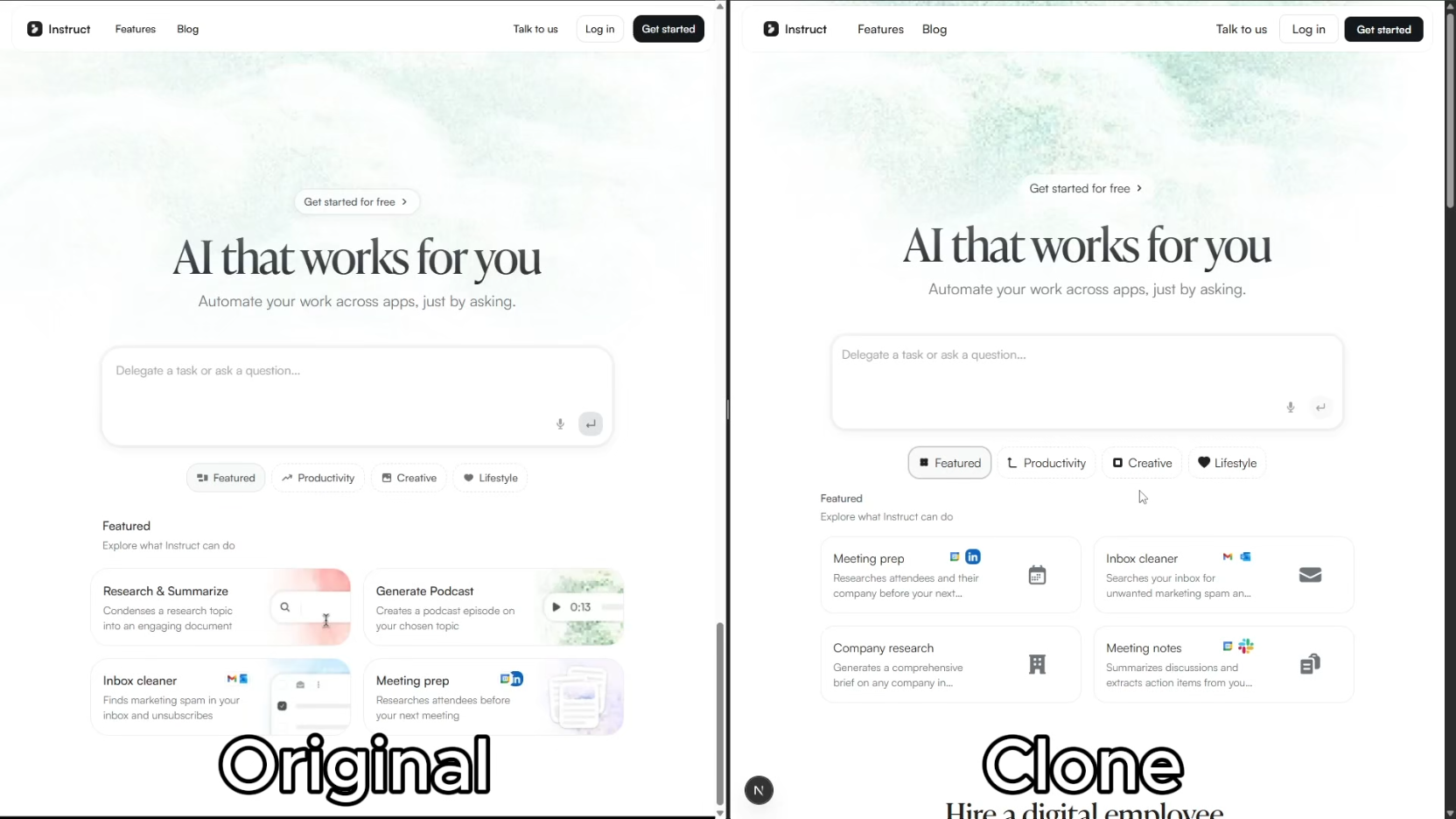
Click the image above to watch the full demo on YouTube.
Quick Start
- Clone this repository
git clone https://github.com/JCodesMore/ai-website-cloner-template.git my-clone cd my-clone - Install dependencies
npm install - Start your AI agent — Claude Code recommended:
claude --chrome - Run the skill:
/clone-website <target-url1> [<target-url2> ...] - Customize (optional) — after the base clone is built, modify as needed
Using a different agent? Open
AGENTS.mdfor project instructions — most agents pick it up automatically.
Supported Platforms
| Agent | Status |
|---|---|
| Claude Code | Recommended — Opus 4.6 |
| Codex CLI | Supported |
| OpenCode | Supported |
| GitHub Copilot | Supported |
| Cursor | Supported |
| Windsurf | Supported |
| Gemini CLI | Supported |
| Cline | Supported |
| Roo Code | Supported |
| Continue | Supported |
| Amazon Q | Supported |
| Augment Code | Supported |
| Aider | Supported |
Prerequisites
- Node.js 24+
- An AI coding agent (see Supported Platforms)
Tech Stack
- Next.js 16 — App Router, React 19, TypeScript strict
- shadcn/ui — Radix primitives + Tailwind CSS v4
- Tailwind CSS v4 — oklch design tokens
- Lucide React — default icons (replaced by extracted SVGs during cloning)
How It Works
The /clone-website skill runs a multi-phase pipeline:
- Reconnaissance — screenshots, design token extraction, interaction sweep (scroll, click, hover, responsive)
- Foundation — updates fonts, colors, globals, downloads all assets
- Component Specs — writes detailed spec files (
docs/research/components/) with exact computed CSS values, states, behaviors, and content - Parallel Build — dispatches builder agents in git worktrees, one per section/component
- Assembly & QA — merges worktrees, wires up the page, runs visual diff against the original
Each builder agent receives the full component specification inline — exact getComputedStyle() values, interaction models, multi-state content, responsive breakpoints, and asset paths. No guessing.
Use Cases
- Platform migration — rebuild a site you own from WordPress/Webflow/Squarespace into a modern Next.js codebase
- Lost source code — your site is live but the repo is gone, the developer left, or the stack is legacy. Get the code back in a modern format
- Learning — deconstruct how production sites achieve specific layouts, animations, and responsive behavior by working with real code
Not Intended For
- Phishing or impersonation — this project must not be used for deceptive purposes, impersonation, or any activity that breaks the law.
- Passing off someone's design as your own — logos, brand assets, and original copy belong to their owners.
- Violating terms of service — some sites explicitly prohibit scraping or reproduction. Check first.
Project Structure
src/
  app/              # Next.js routes
  components/       # React components
    ui/             # shadcn/ui primitives
    icons.tsx       # Extracted SVG icons
  lib/utils.ts      # cn() utility
  types/            # TypeScript interfaces
  hooks/            # Custom React hooks
public/
  images/           # Downloaded images from target
  videos/           # Downloaded videos from target
  seo/              # Favicons, OG images
docs/
  research/         # Extraction output & component specs
  design-references/ # Screenshots
scripts/
  sync-agent-rules.sh  # Regenerate agent instruction files
  sync-skills.mjs      # Regenerate /clone-website for all platforms
AGENTS.md           # Agent instructions (single source of truth)
CLAUDE.md           # Claude Code config (imports AGENTS.md)
GEMINI.md           # Gemini CLI config (imports AGENTS.md)
Commands
npm run dev    # Start dev server
npm run build  # Production build
npm run lint   # ESLint check
npm run typecheck # TypeScript check
npm run check  # Run lint + typecheck + build
If using docker
docker compose up app --build # build and run the app
docker compose up dev --build # run the app in dev mode on port 3001
Updating for Other Platforms
Two source-of-truth files power all platform support. Edit the source, then run the sync script:
| What | Source of truth | Sync command |
|---|---|---|
| Project instructions | AGENTS.md |
bash scripts/sync-agent-rules.sh |
/clone-website skill |
.claude/skills/clone-website/SKILL.md |
node scripts/sync-skills.mjs |
Each script regenerates the platform-specific copies automatically. Agents that read the source files natively need no regeneration.
Star History
License
MIT
Yorumlar (0)
Yorum birakmak icin giris yap.
Yorum birakSonuc bulunamadi