PyMemoryEditor
Health Gecti
- License — License: MIT
- Description — Repository has a description
- Active repo — Last push 0 days ago
- Community trust — 214 GitHub stars
Code Gecti
- Code scan — Scanned 12 files during light audit, no dangerous patterns found
Permissions Gecti
- Permissions — No dangerous permissions requested
Bu listing icin henuz AI raporu yok.
A pure-Python library that lets you inspect, modify and search the memory of any running process in a few lines of Python :snake: .
PyMemoryEditor
A pure-Python library (built on ctypes) that lets you inspect, modify and search the memory of any running process in a few lines of Python — Cheat Engine workflows on Windows, Linux and macOS!

Read, write and scan the memory of any process — straight from Python.
One unified API. Three operating systems. No C compiler. No native build step.




Runs on Windows · Linux · macOS — 32-bit and 64-bit.
Tweak a value in a running game · inspect a live program's state · harvest data straight from RAM.
Install
pip install PyMemoryEditor
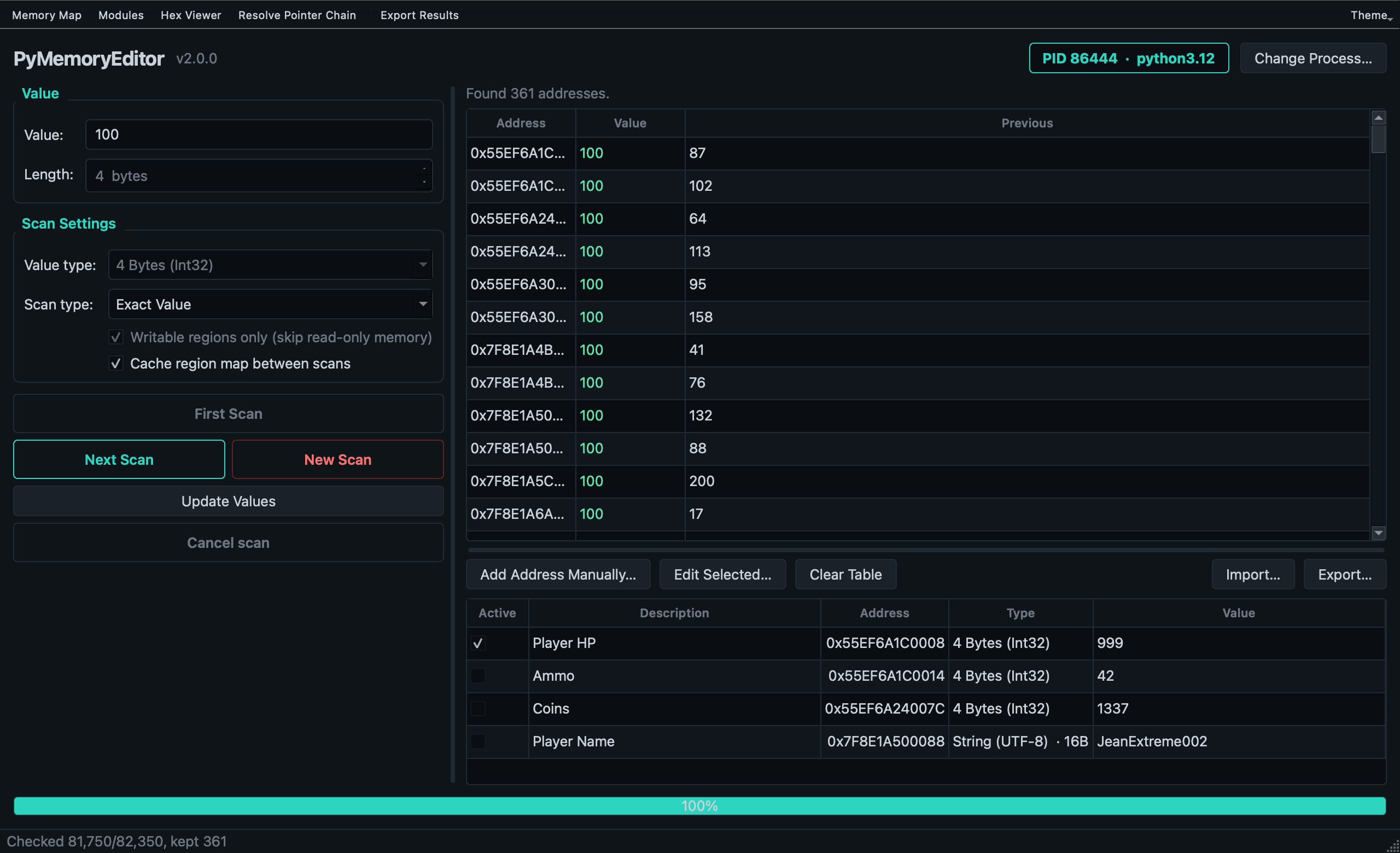
To also install the bundled GUI app (a Cheat Engine-style scanner), use the app extra:
pip install "PyMemoryEditor[app]"
pymemoryeditor
For faster scans on large processes, add the speed extra. It pulls in NumPy
and automatically vectorizes the numeric scan comparison loop — ~10–30× faster on
selective scans:
pip install "PyMemoryEditor[speed]"
To let an AI assistant drive the library over the Model Context Protocol, use
the mcp extra (see below):
pip install "PyMemoryEditor[mcp]"
📖 Full guide at Read the Docs.
See it in action
from PyMemoryEditor import OpenProcess

with OpenProcess(name="game.exe") as process:

    # Scan the whole process for every address holding the value 100.
    for address in process.search_by_value(int, value=100):
        print(f"Found at 0x{address:X}")

    # Read the current value, then write a new one back.
    current = process.read_int(address)
    process.write_int(address, current + 500)
That's it — read, write or scan another process in three lines, the same way on every platform.
Let an AI assistant do it (MCP)
PyMemoryEditor ships a Model Context Protocol server, so an AI assistant can run the whole loop itself:
"Find the health value in my game. It's 100 right now."
It scans, asks you to take damage, refines the matches, and hands you the address.
pip install "PyMemoryEditor[mcp]"
claude mcp add pymemoryeditor -- pymemoryeditor-mcp
Or in any client that reads mcpServers JSON (Claude Desktop, editors, …):
{
  "mcpServers": {
    "pymemoryeditor": {
      "command": "pymemoryeditor-mcp",
      "args": []
    }
  }
}
Fourteen tools cover the full workflow, with scan results kept server-side behind a handle, so a 40 000-hit first scan costs a few tokens instead of your whole context.
Read the MCP guide to learn more.
📖 Documentation
Full documentation lives at pymemoryeditor.readthedocs.io — installation, the Cheat Engine workflow, every method and parameter, the GUI app guide, platform notes and troubleshooting.
A quick map of where to go:
| Quick Start | Open a process, read, write and run your first scan. |
| Searching memory | Value scans, ranges, refining results, the Cheat Engine loop. |
| Pattern scan | Find code/data with byte signatures (AOB) and regex. |
| Pointers | Multi-level pointer chains and the live RemotePointer. |
| Pointer scan | Find static pointers that survive ASLR. |
| The GUI app | The bundled Cheat Engine-style scanner. |
| The MCP server | Let an AI assistant drive the scan/refine loop. |
| API reference | Every public class, method and parameter. |
| Platform notes | Permissions and quirks on Windows, Linux and macOS. |
| Troubleshooting | Common errors and how to fix them. |
What can I build with this?
- 🎮 Game modding & speedrunning tools — the classic Cheat Engine use case.
- 🔬 Debugging & introspection — inspect live state without attaching a debugger.
- 📊 Observability tooling — sample variables in a running process for telemetry.
- 🔐 Security & reverse-engineering research — on systems you own or are authorized to test.
- 🎓 Learning — the bundled app is a great teaching tool for how memory scanning works.
[!NOTE]
Responsible use. PyMemoryEditor talks to other processes through OS-level APIs.
Only point it at processes you own or have explicit permission to inspect.
🤝 Contributing
Pull requests, bug reports and feature ideas are very welcome. ReadCONTRIBUTING.md for the development setup, test layout and
the small set of platform-specific quirks to be aware of.
If PyMemoryEditor helped your project, please ⭐ the repo — it's the easiest way to
support the work and to help others discover the library.
License
Released under the MIT License — free for personal and commercial use.
Yorumlar (0)
Yorum birakmak icin giris yap.
Yorum birakSonuc bulunamadi