jc
Health Gecti
- License — License: MIT
- Description — Repository has a description
- Active repo — Last push 0 days ago
- Community trust — 35 GitHub stars
Code Basarisiz
- rm -rf — Recursive force deletion command in scripts/bundle.sh
- rm -rf — Recursive force deletion command in scripts/update-gpui-component.sh
Permissions Gecti
- Permissions — No dangerous permissions requested
Bu listing icin henuz AI raporu yok.
Claude Code orchestrator in one window

jc
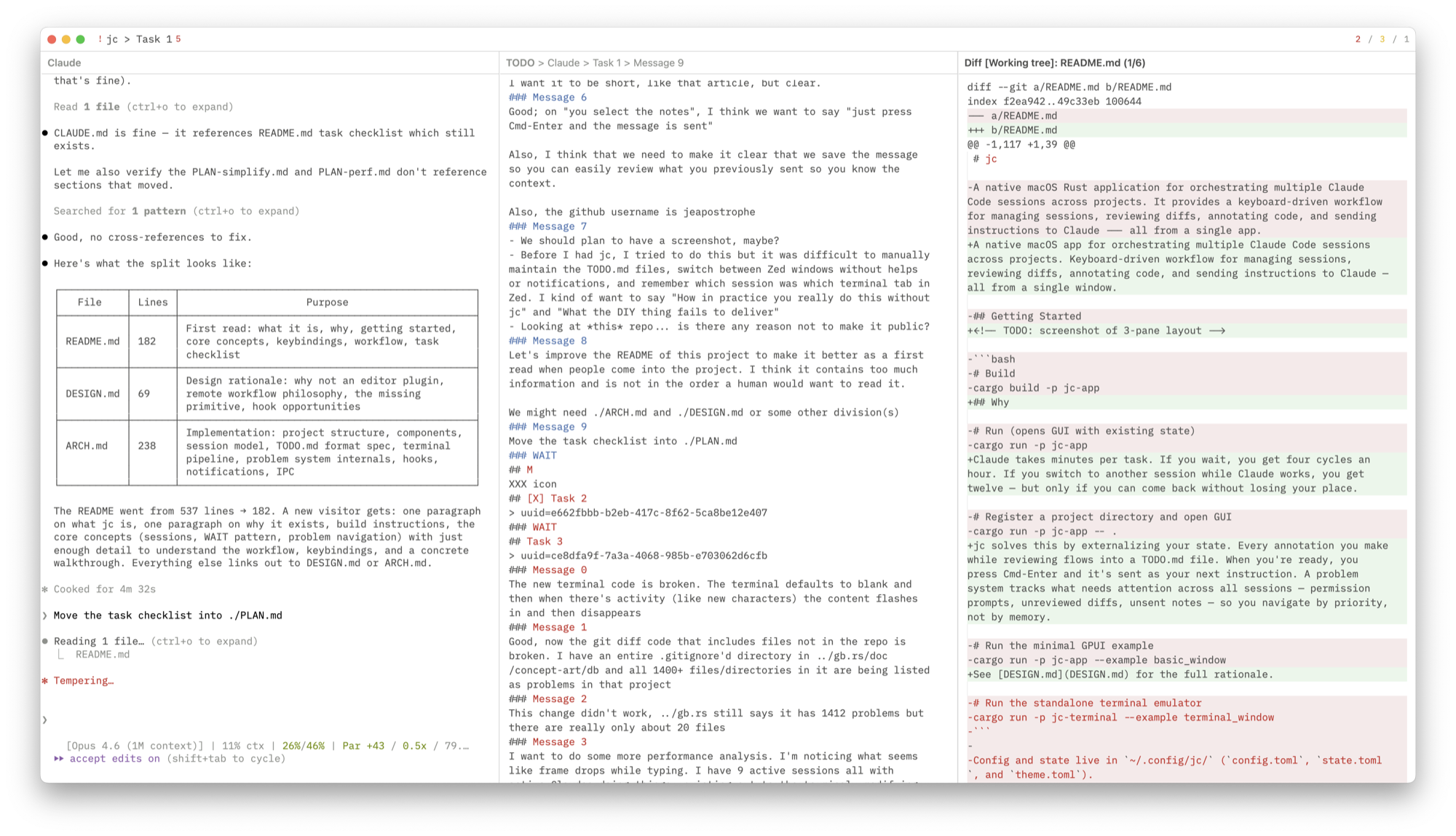
Orchestrate multiple Claude Code sessions across projects.
Review diffs, annotate code, send instructions — all from one window.




Why · Getting Started · Keybindings · Design · Architecture
Why
Claude takes minutes per task. If you wait, you get four cycles an hour. If you switch to another session while Claude works, you get twelve — but only if you can come back without losing your place.
jc solves this by externalizing your state. Every annotation you make while reviewing flows into a TODO.md file. When you're ready, you press Cmd-Enter and it's sent as your next instruction. A problem system tracks what needs attention across all sessions — permission prompts, unreviewed diffs, unsent notes — so you navigate by priority, not by memory.
See DESIGN.md for the full rationale.
Getting Started
# Build and run as macOS .app bundle
./make.sh

# Or run directly via cargo
cargo run -p jc-app

# Register a project directory
cargo run -p jc-app -- .
Config and state live in ~/.config/jc/ (config.toml, state.toml, theme.toml).
Core Concepts
Projects and Sessions
A project is a code repository registered with jc. Each project has one or more sessions — ongoing Claude Code conversations. Sessions are defined in the project's TODO.md:
# Claude
## Refactor auth module
> uuid=abc123-def456-...
### Message 0
first instruction sent to claude
### Message 1
second instruction
### WAIT
Notes for next message go here.
The ### WAIT marker separates what you've sent from what you're drafting. Annotations from any view (diff, terminal, code) accumulate below WAIT. When you send (Cmd-Enter), the notes become a numbered message and WAIT moves below it — so you always have a full history of what you asked.
Sessions are resumed automatically on startup via claude --resume <uuid>. New sessions get their UUID from Claude Code's hook system. /clear is handled transparently.
Problem Navigation
The app tracks problems — things that need your attention:
| Priority | Examples | Meaning |
|---|---|---|
| L0 (urgent) | Permission prompt, API error | Claude is blocked |
| L1 (review) | Unreviewed diffs, terminal bell, script errors | Work to review |
| L2 (send) | Unsent notes below WAIT | Ready to send next instruction |
| L3 (idle) | Session finished, nothing queued | Start new work |
Cmd-; cycles through problems in priority order across all sessions. You don't pick a session — you pick the next problem. Permission prompts in other projects surface immediately.
See ARCH.md for the full problem system internals.
Views
The window has 1, 2, or 3 panes (Cmd-1/2/3). Any view can go in any pane via Cmd-O.
| View | Description |
|---|---|
| Claude Terminal | Claude Code CLI in an embedded terminal. Notifications on stop/permission. |
| General Terminal | Separate shell per session for running tests, inspecting output. |
| TODO Editor | Markdown editor for session notes. Drafting area below WAIT, message history above. |
| Git Diff | Working tree diff with file-by-file review (Cmd-R to mark reviewed). |
| Code Viewer | Syntax-highlighted source with tree-sitter outline navigation. |
| Global TODO | Read-only view of ~/.claude/TODO.md. |
Per-session pane layouts are saved and restored on session switch.
Keybindings
Press Cmd-? for the in-app overlay.
Global
| Key | Action |
|---|---|
| Cmd-1 / 2 / 3 | Set pane layout |
| Cmd-[ / ] | Focus previous / next pane |
| Cmd-O | Open picker (pane views + files) |
| Cmd-Shift-O | Drill-down picker (symbols / modified files / headings) |
| Cmd-P | Session picker (all projects) |
| Cmd-Shift-P | Project actions |
| Cmd-F | Search lines in current editor |
| Cmd-K | Comment — annotate selection, appended below WAIT |
| Cmd-Shift-K | Snippet picker (~/.claude/jc.md) |
| Cmd-S | Save file |
| Cmd-Enter | Send notes to Claude terminal |
| Cmd-Shift-C | Copy Claude's reply (/copy → clipboard → .jc/replies/) |
| Cmd-; | Next problem |
| Cmd-. | Jump to WAIT |
| Cmd-` | Rotate to next project |
| Cmd-D | Toggle Code ↔ Diff for current file |
| Cmd-Shift-E | Open in external editor (Zed) |
| Cmd-Alt-↑/↓ | Scroll other pane |
| Cmd-? | Keybinding help |
View-Specific
| Key | Action | View |
|---|---|---|
| Cmd-R | Reload from disk | Code |
| Cmd-R | Mark file reviewed | Diff |
| Cmd-C / Cmd-V | Copy / Paste | Terminal |
| Cmd-= / - / 0 | Font size +/-/reset | Terminal |
Picker
| Key | Action |
|---|---|
| Enter | Confirm |
| Escape | Cancel |
| ↓ / Ctrl-N | Next |
| ↑ / Ctrl-P | Previous |
| Cmd-Shift-Backspace | Disable session |
Workflow
Review → Annotate → Send
- Claude finishes. Desktop notification fires.
- Cmd-; jumps to the most urgent problem.
- Review the diff (Cmd-D). Highlight a region, Cmd-K, type a note → it appears below WAIT.
- Check the terminal output. Cmd-K on selected text → appended below WAIT.
- Cmd-R to mark files reviewed.
- Open the TODO editor. Review accumulated notes. Cmd-Enter to send.
- Switch to another session (Cmd-P) or wait.
Navigate Code
- Cmd-O → fuzzy file search.
- Cmd-Shift-O → tree-sitter symbol outline.
- Cmd-K to annotate. Cmd-Shift-E to open in Zed.
Manage Sessions
jc .from a repo to register a project.- Cmd-P to switch sessions across all projects. Problem counts shown inline.
- New sessions get UUIDs automatically via hooks.
/clearupdates the UUID transparently.
Contributing
PRs welcome. Preferably have your Claude open one against mine — I don't accept human-authored code.
Further Reading
Don't Wait for Claude — Article explaining the workflow philosophy behind jc
PLAN.md — Task checklist
DESIGN.md — Design principles, why not an editor plugin, remote workflow philosophy
ARCH.md — Implementation details: session lifecycle, terminal pipeline, problem system, hooks, TODO.md format
Star History
Yorumlar (0)
Yorum birakmak icin giris yap.
Yorum birakSonuc bulunamadi