hangar
Health Gecti
- License — License: MIT
- Description — Repository has a description
- Active repo — Last push 0 days ago
- Community trust — 12 GitHub stars
Code Gecti
- Code scan — Scanned 12 files during light audit, no dangerous patterns found
Permissions Gecti
- Permissions — No dangerous permissions requested
Bu listing icin henuz AI raporu yok.
All your coding agents in one place: Claude Code, Codex, Pi, omp and Kimi Code, on desktop and phone. Not affiliated with Anthropic, OpenAI, Moonshot AI or the Pi project.

All your coding agents in one hangar.
Claude Code, Codex, Pi, omp and Kimi Code in one native window and on your phone.
The agents keep running on your machines; Hangar is the control tower.
hangar.dev.br · Download · User guide · MIT
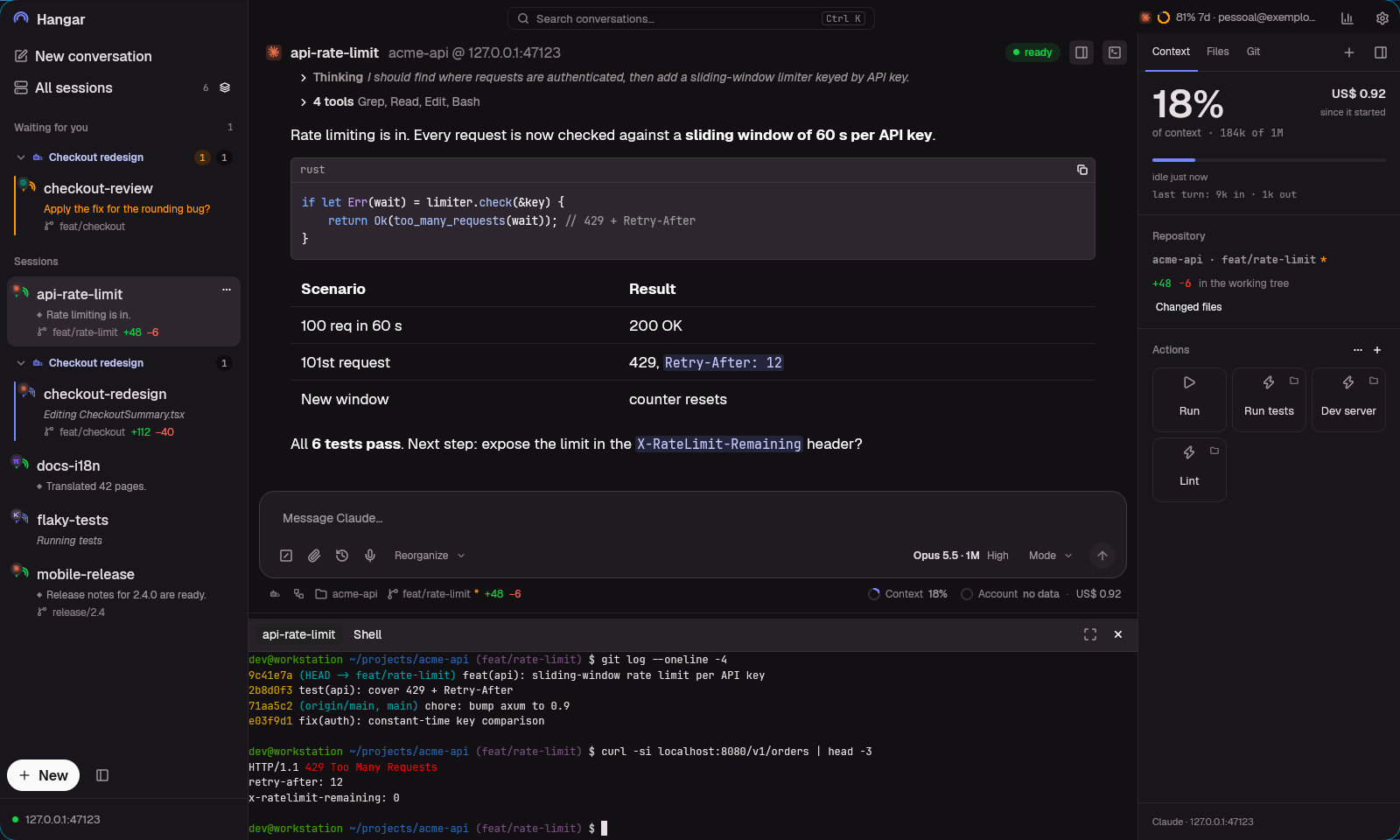
Independent tool. Not affiliated with or endorsed by Anthropic, OpenAI, Moonshot AI or the Pi
project. Screenshots and clips use synthetic demo data.
Quick install
# Linux or macOS
curl -fsSL https://raw.githubusercontent.com/jeffer1312/hangar/main/bootstrap.sh | bash
# Windows (PowerShell)
irm https://raw.githubusercontent.com/jeffer1312/hangar/main/bootstrap.ps1 | iex
Prefer an app, or want to read the files first? See Install.
Why
One agent session is easy. Hangar is for when there are ten: some working, some waiting on a
question, some on another machine, one of them on your phone while you're out for lunch.
- Your terminal stays your terminal. Hangar doesn't reimplement any agent. Each session is the
original CLI, with your skills, hooks and accounts, running in tmux. Runclaudein a terminal
and it shows up in the app;tmux attachand you're back in the same conversation. - Or no terminal at all. Claude and Codex can run as a Hangar-managed process: permissions and
questions arrive as cards, and restarting the app never cuts a turn. - Nothing leaves your machine. Self-hosted, over your LAN or your VPN. There is no Hangar cloud
in the middle.
What you get
 |
 |
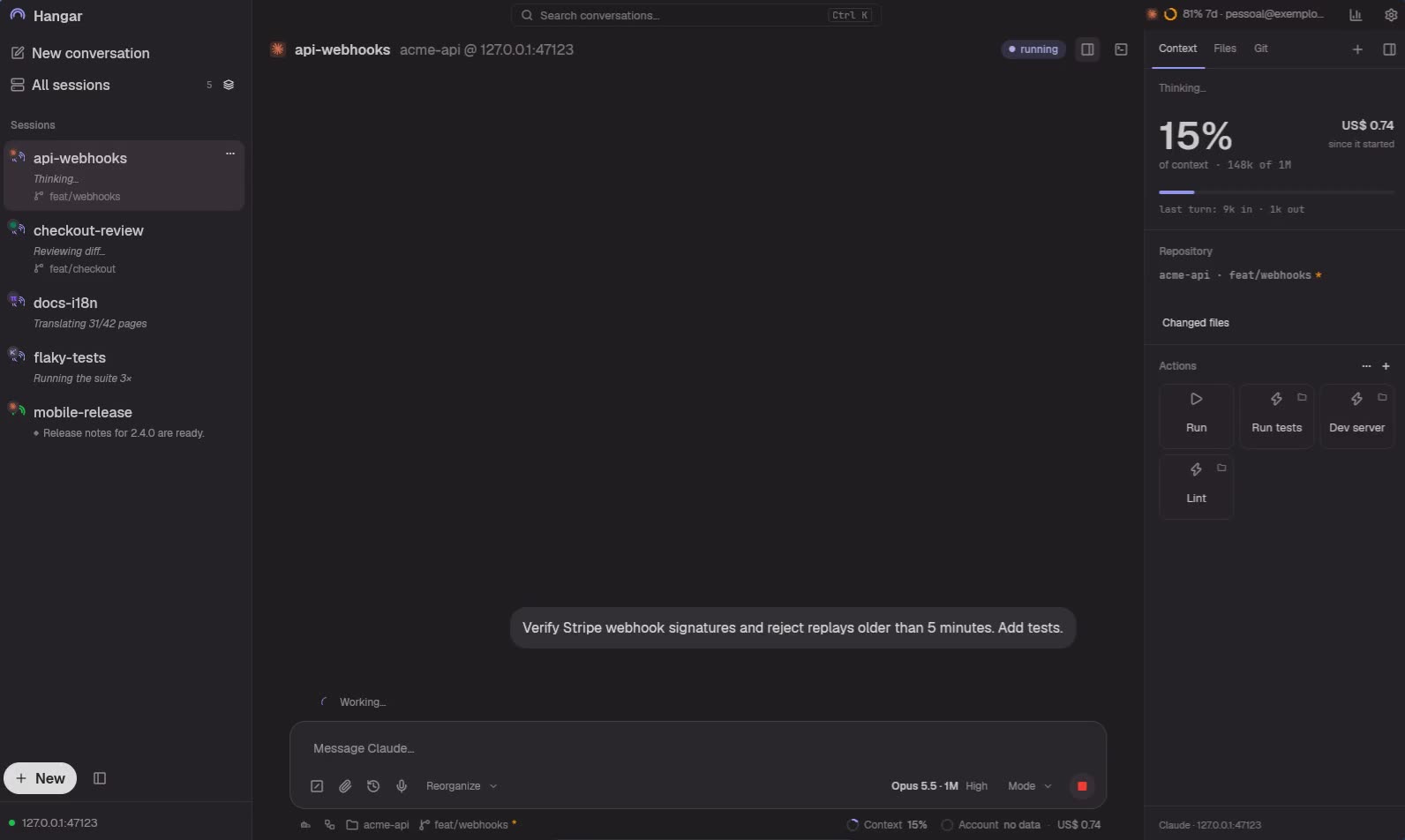
| Many agents, one list. Claude writes the webhook while Pi translates, Kimi runs the tests and Codex calls you from the sidebar. Sessions that need you float to the top. | Sessions that talk. One agent messages another, agrees on a shared contract and reports when it's done. Pair two sessions or build a working group. |
 |
 |
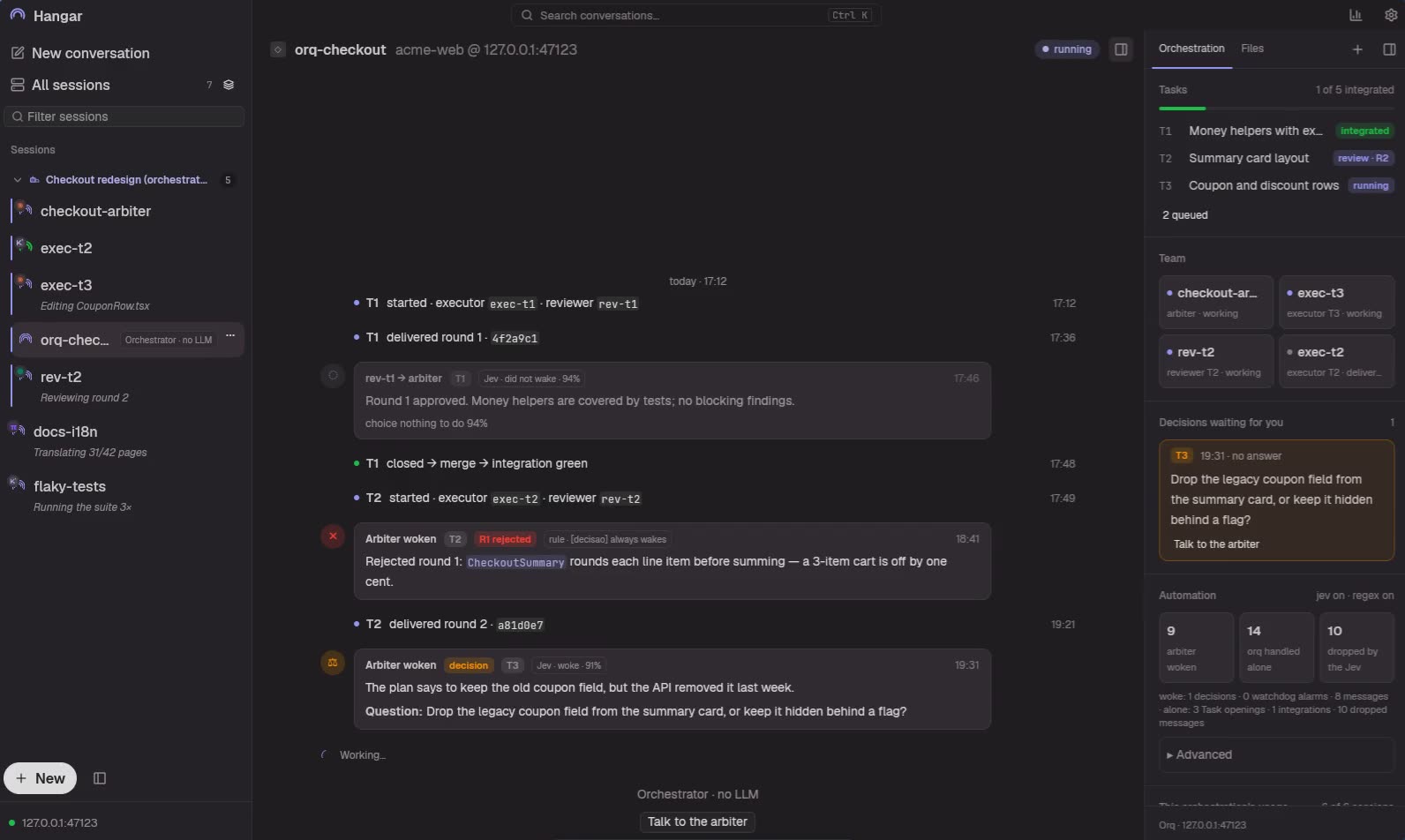
| Orchestration with review. Planner, executor and an independent reviewer, each in its own session, even on different models. A gate between tasks and a final branch review before push. | What each agent spent. Tokens and estimated cost by day, provider, source and project. An estimate, not an invoice. |
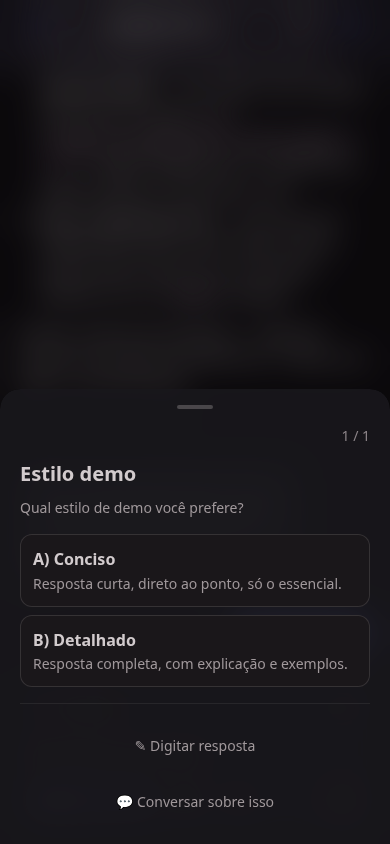
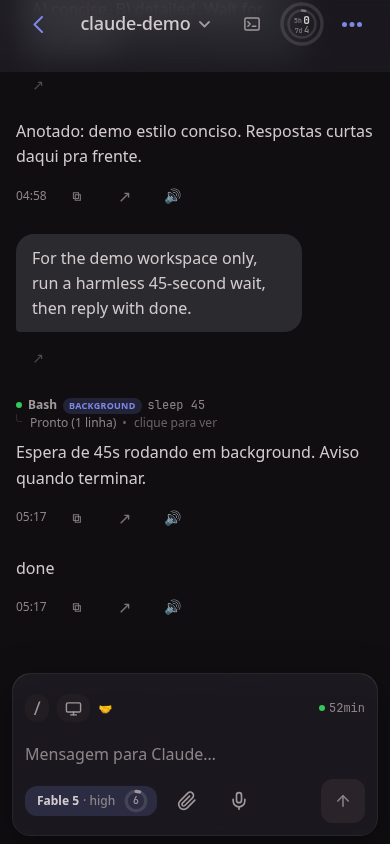
Left your desk? The session comes along. Answer the question that blocked the agent, approve a
permission, interrupt, queue the next prompt or dictate it, on your home Wi-Fi or anywhere over
Tailscale. The phone uses the installable web app (PWA).
And also
- Native desktop app in Rust. GPU-rendered, no browser underneath; tray icon and self-update
from the top bar. Linux, Windows and macOS. - A real terminal, built in. Open the session's tmux pane under the conversation, on desktop or
phone. - A browser per session. The agent opens the page it just changed, clicks, fills the form and
takes the screenshot while you watch next to the conversation. - Across machines. Link your desktop, laptop and server over LAN or Tailscale: every session
in one list, and an agent on one machine messages or creates a session on another, and working
groups span machines, with one shared contract. - Pass the baton. Out of quota mid-task? One button opens a new session on another account,
model or CLI, already knowing what the current one was doing. Each account's quota stays in
the top bar. - Git without leaving the chat. Checkbox staging, per-file discard, history with graph and
search, cherry-pick and revert. Start a session in a fresh worktree. - Search every conversation, live and closed, and resume an old one on the right account.
- Speak and listen. Dictation that keeps file names intact; answers read aloud. A live voice
assistant asks what an agent came up with or sends a task to another session (needs Codex and a
Codex account on the server). - Other models in Claude Code. Run a Claude session on another provider and keep skills, hooks
and history. - Agents drive it too. Through the
hangarMCP server and thehangar-sendCLI, an agent
creates sessions, lists its group, messages the others and drives its browser. - Share a session with someone through a link, without exposing the rest of the machine.
- Board and canvas layouts, stuck-session notifications, plan progress, checkpoints for Pi and
omp, and a Portuguese/English interface.
Install
The installer sets up the Hangar server where your agents run, installs the session shortcuts,
downloads the native app for your platform and ends with a QR code for your phone. It asks two
questions (the phone password and whether you'll use it away from home) and installs whatever is
missing: Python, Node, uv, tmux (psmux on Windows) and, if you have no agent yet, Claude Code.
With the app (Linux and Windows)
Download the app from the latest release
and open it. On a machine without Hangar it offers to install the server for you in a few screens,
no terminal needed.
| Platform | File |
|---|---|
| Windows x64 | Hangar-windows-x86_64.zip (contains Hangar.exe) |
| Linux x86_64 | Hangar-linux-x86_64.tar.gz, .deb or .rpm |
| macOS Apple Silicon | Hangar-macos-aarch64.zip (install the server from the terminal first) |
Binaries are unsigned. On Windows, SmartScreen warns the first time: More info → Run anyway. On
macOS, right-click → Open the first time.
From the terminal
Linux or macOS
curl -fsSL https://raw.githubusercontent.com/jeffer1312/hangar/main/bootstrap.sh | bash
Windows (PowerShell, regular or admin)
irm https://raw.githubusercontent.com/jeffer1312/hangar/main/bootstrap.ps1 | iex
Both clone into ~/hangar and run the installer. Other folder: bash -s -- ~/apps/hangar on
Linux/macOS, $env:CP_DESTINO = 'D:\hangar' before the command on Windows.
Prefer to read the files first?
git clone https://github.com/jeffer1312/hangar
cd hangar
./install.sh            # Windows: .\install.ps1
Useful options: --avancado (pick each extra), --agentes=codex,pi (which agents to set up),--check (only report what's missing), --update. On Windows: -Avancado, -Agentes codex.
Something didn't start? hangar-doctor says what's missing and how to fix it.
Requirements: tmux (installed for you) and at least one agent: Claude Code, Codex, Pi, omp or
Kimi Code. Setup details, Tailscale, the phone and every feature are in the
user guide.
How it works
 Native app (desktop)     PWA (phone)
            │                 │
            └──── HTTPS / SSE / WebSocket ────┐
                                               ▼
                         hangar-server (Rust, :8765)
                          lists, live state, history, costs, groups,
                          accounts, session attachments, sharing
                          (guest port :8766 via Funnel, invites,
                          external pairs)
                                               │
                         Python backend (loopback, behind it)
                          sessions, adapters, MCP
                                               │
        ┌──────────────┬──────────────┬────────┴─────┬──────────────┐
   Claude Code       Codex          Pi / omp       Kimi Code     your browser
   JSONL + tmux     app-server     JSONL + ext.    wire.jsonl    per session
   or headless      + TUI or       sidecars        + hooks
                    headless
Chat content comes from each agent's structured transcript, never from scraping the terminal. The
tmux pane is used only for live state and input of sessions that have a terminal; headless Claude
and Codex run as managed processes with durable sidecars. The CLIs and providers you configure may
still send data according to their own policies.
The backend moves to Rust part by part. With the Rust server up, Claude and Codex accounts
(catalog, preparation, login, state, logout, quotas, Claude renewal and the guarded Codex reset)
the session attachment vault, and session sharing (the guest port 8766, invites and external
pairs) are served by it; Python keeps guest-user logins, session and configuration facts,
transcription and the fallback when the supervisor turns Rust off. Without the Rust server the
guest port stays closed. Contracts
and limits: accounts and attachments.
Repository map: crates/ (Rust server), backend/ (Python, FastAPI), desktop-native/ (Rust
desktop app), frontend/ (Svelte PWA), mobile/ (Expo app, in development), packages/core
(shared TypeScript), site/ (hangar.dev.br), skills/ (agent skills shipped with Hangar).
API de artefatos (Rust, somente o dono): GET /api/sessions/{name}/artifacts retornaitems com referências de artefatos Claude (id, url, title e version opcional).
A consulta é passiva e não publica conteúdo.
Security model
Treat Hangar like a remote shell: whoever holds the token drives your agents with your user's
permissions.
- The server binds to loopback by default. Point
CP_LAN_BIND_IPonly at a trusted LAN or VPN
address (Tailscale is the easy path). It refuses to bind beyond loopback with the default token. - Never expose the main port (8765) through a router port-forward or a public tunnel.
- Sharing a session uses a separate guest port (8766, served by the Rust server and published
through Tailscale Funnel) that refuses the owner's token and only reaches the shared session. - Keep tokens, cookies and provider keys out of screenshots and issues.
Development
# Backend on loopback
cd backend && CP_AUTH_TOKEN="$(openssl rand -hex 24)" CP_LAN_BIND_IP=127.0.0.1 uv run python -m app.main

# Web app (PWA)
npm ci --workspace=@hangar/core --workspace=frontend
npm --prefix frontend run dev

# Checks
cd backend && uv run pytest
npm run check                      # svelte-check + tsc for every TypeScript package
scripts/verificar-local            # what CI would run for the current commit

# Rust targets keep the previous copy of every test executable and incremental session
scripts/podar-target crates/target desktop-native/target
Contributor notes, architecture rules and the decisions behind them are inCLAUDE.md and docs/decisoes/.
License
Yorumlar (0)
Yorum birakmak icin giris yap.
Yorum birakSonuc bulunamadi