agent-monitor-for-claude
Health Warn
- License — License: MIT
- Description — Repository has a description
- Active repo — Last push 0 days ago
- Low visibility — Only 5 GitHub stars
Code Pass
- Code scan — Scanned 12 files during light audit, no dangerous patterns found
Permissions Pass
- Permissions — No dangerous permissions requested
No AI report is available for this listing yet.
Local Windows desktop monitor for your running Claude Code agents - live status, estimated cost, model, host and one-click focus, grouped by project. Read-only and fully offline.
Agent Monitor for Claude
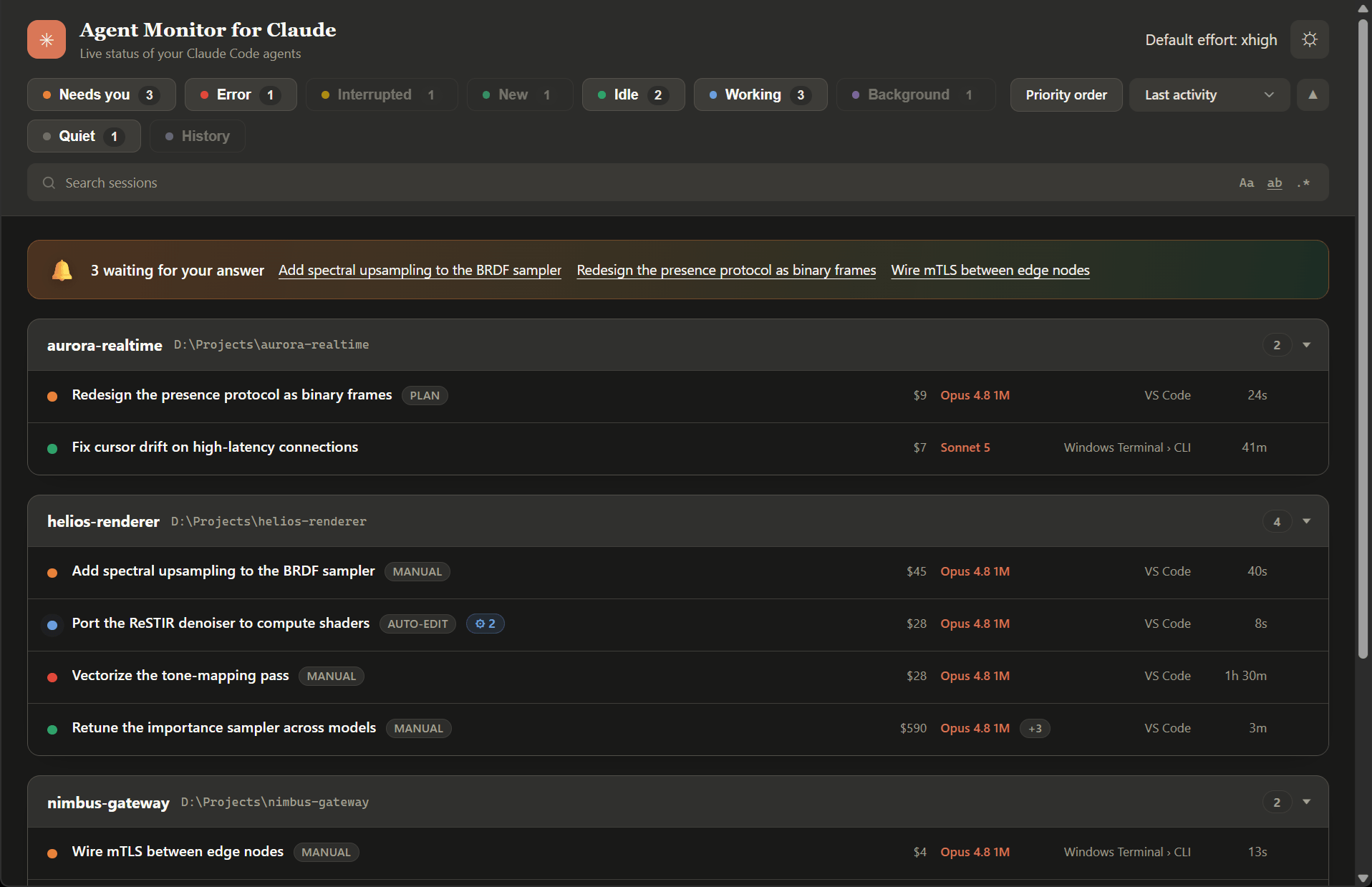
A local desktop window that shows every running Claude Code agent at a glance - grouped by project, with each agent's live status: working, waiting for you, blocked on a permission prompt, or finished.
If you run many Claude Code agents across several projects, you cannot tell from the IDE which one is actually doing something and which is quietly waiting for you. Agent Monitor answers that in one glance.
[!IMPORTANT]
This project is still in an early stage. Detailed issue reports - with steps to reproduce, what you expected, and what actually happened - are very welcome and help a lot.
Features
It just works
- Portable - a single Windows executable, no installation.
- Zero configuration - it finds your Claude config directory automatically (honors
CLAUDE_CONFIG_DIR).
What you see every day
- Live agent overview - every running Claude Code agent, grouped by the project it belongs to, refreshed every few seconds.
- Know who needs you - a banner lists the agents blocked on a question, plan review, or permission prompt, with a one-click jump to each, so you never leave one hanging.
- Status at a glance - each agent shows working, waiting for you, permission needed, interrupted (you stopped it mid-turn), error (the turn hit a usage/session limit or other API error and cannot continue), or finished, with the time since its last activity.
- Filter and sort to what matters - the status chips (needs you, error, interrupted, new, idle, working, background, quiet, attention-first order) start all on, and you uncheck the ones you want to hide; each chip's colored dot doubles as the key to what the row dots mean, and hovering a chip explains what that status means and when it occurs; sort by activity, usage, model, host, or status. Your filter and sort choices are remembered across restarts.
- Search session content - a search box narrows the view to the sessions whose transcript contains what you type. As in your editor, three toggles refine it: match case, match whole word, and use a regular expression (an invalid pattern turns the box red); your choices are remembered. It searches only the sessions the active filter chips currently show (so it stays fast and covers exactly what you see), newest sessions first, running locally on demand with a progress bar and streaming results in as they are found; the chip counts update to match. Results stay current as your agents work - a running session that newly contains the text shows up on its own. Press Escape to clear it. The search reads transcript text only to answer "does this session contain the string?" - it reports back only which sessions matched, never any of their content, and nothing ever leaves your machine.
- Urgent projects on top - across all projects, the ones blocked on a prompt float above those actively working, which sit above the idle and finished ones; within each band the order stays stable so panels do not jump around on every status change. A toggle turns this off for a plain A-Z layout.
- See where it runs - each agent shows its host application (VS Code, JetBrains IDEs, terminals, and more), with a CLI marker for terminal-driven agents.
- Cost at a glance - each agent shows an estimated dollar cost (computed per model, so cheaper subagent models are priced right), with the full per-tier token breakdown - base input, output, cache read, and 5m/1h cache writes - one half-second hover away. Prices live in an editable
pricing.json(see docs/configuration.md); you can even enter a future price change under its start date and it applies on its own. - Subagents in flight - a badge shows how many subagents an agent is running right now (and how many recently finished), with a hover listing what each is doing.
- Background processes - a badge shows the OS processes an agent is running (a watched build, a scan), named on hover.
- Jump right to it - click an agent and its hosting window comes to the foreground; for VS Code extension sessions the exact session tab is focused via the extension's official deep link. Click a project's path in its panel header to open that folder in Windows Explorer.
- Revisit and clean up past sessions - a History chip (off by default) lists finished sessions that are no longer running - the ones
claude --resumewould show - grouped under their projects and loaded on demand. From a past session's row menu you can, after a confirmation, permanently delete its transcript and subagent files from disk. This deletion is the one thing the tool ever writes; everything else is strictly read-only, and a running session is never touched.
Reach and preferences
- Light and dark - follows your system theme, with a one-click toggle in the header.
- 13 languages - auto-detected from your system locale (English, German, Spanish, French, Hindi, Indonesian, Italian, Japanese, Korean, Brazilian Portuguese, Ukrainian, Simplified and Traditional Chinese).
- Customizable - an optional settings file tunes the poll interval and window size.
Requirements
- Windows 10 / 11
- Microsoft Edge WebView2 runtime (pre-installed on current Windows)
- Claude Code (this tool reads the session data it writes under
~/.claude/) - Python 3.10 or newer - only to run or build from source; the prebuilt executable bundles its own Python
Getting started
Prebuilt executable
Download AgentMonitorForClaude.exe from the latest release and run it. No installation.
From source
python -m venv .venv
.venv\Scripts\pip install -r requirements.txt
.venv\Scripts\python -m agent_monitor_for_claude
Configuration
All settings are optional. See docs/configuration.md for the full reference and the settings-file search order.
How it works
Agent Monitor reads the session registry and transcript metadata that Claude Code writes locally, and derives each agent's state from the last assistant turn's stop reason plus process liveness. See docs/how-it-works.md for the details.
Building
.venv\Scripts\python build.py
Produces dist/AgentMonitorForClaude.exe.
Developing
Iterate the UI in a browser, no Python or live session needed: openagent_monitor_for_claude/ui/index.html?mock (or the file directly via file://).
It renders the showcase data from ui/dev-mock.js - a dev-only file that never
ships in the built executable.
License
MIT (c) Jens Duttke
Reviews (0)
Sign in to leave a review.
Leave a reviewNo results found