jentic-one
Health Pass
- License — License: Apache-2.0
- Description — Repository has a description
- Active repo — Last push 0 days ago
- Community trust — 186 GitHub stars
Code Fail
- rm -rf — Recursive force deletion command in .github/workflows/ci.yml
Permissions Pass
- Permissions — No dangerous permissions requested
No AI report is available for this listing yet.
Self-hosted execution layer for AI agents: connect any agent to real APIs, scope exactly what it can touch, and keep credentials out of the agent's hands.

A self-hosted execution layer for AI agents.
Connect an agent to any API you need, and enforce exactly what it is allowed to call.
Quickstart · First brokered call · API Directory · Security · Discussions










[!NOTE]
Public Beta. Schemas and CLI commands can change between 0.x releases. Pin a version if
you need stability. Contributions are welcome: see CONTRIBUTING.md and the
open issues.
What Jentic One is
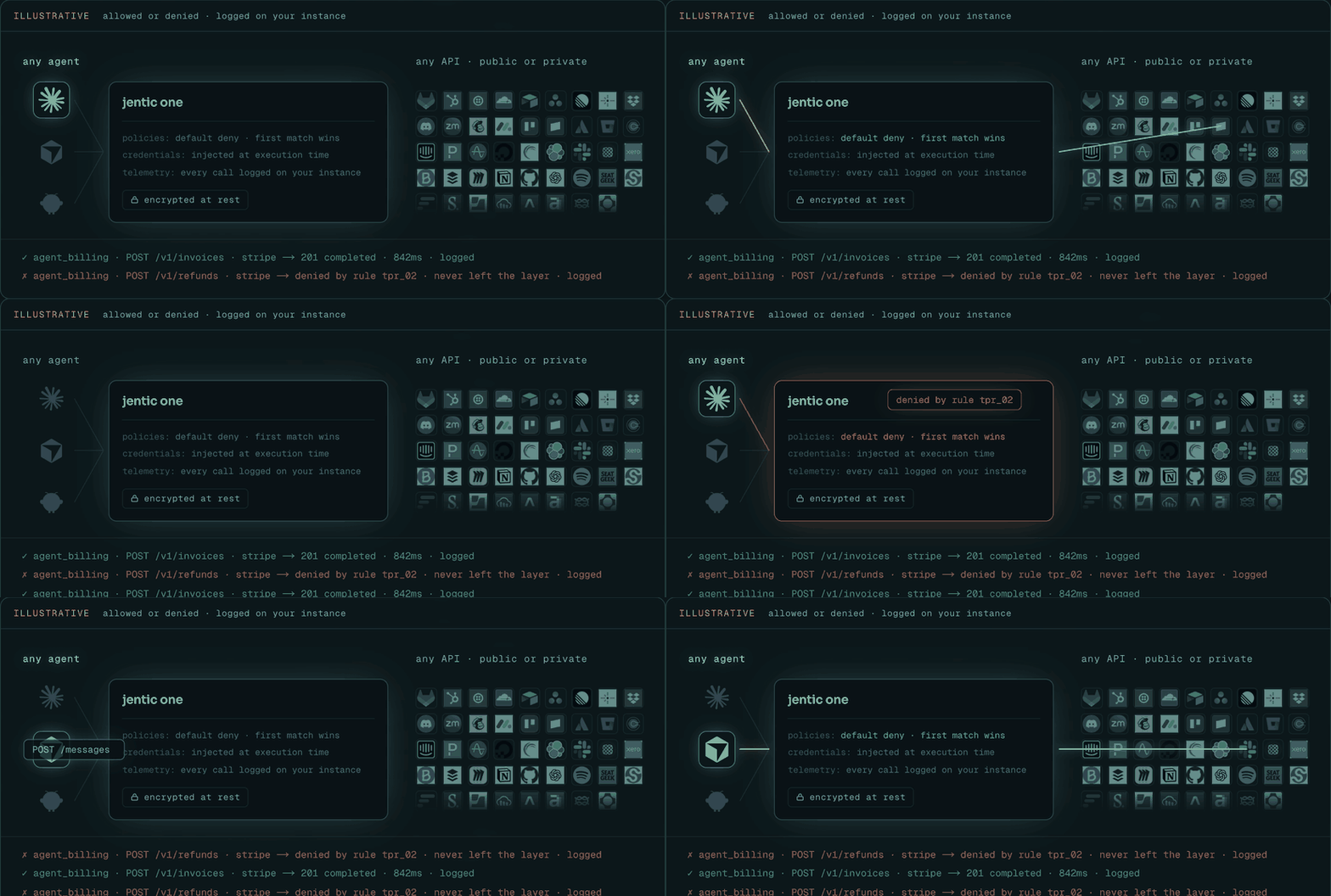
Giving an agent API access normally means giving it an API key. Jentic One removes that step.
Register the APIs an agent may use, store the credentials once, and the agent makes its calls through the Broker. The Broker checks the agent's permissions, attaches the credential at execution time, and writes an execution record. Your agent never sees your keys.
Agents integrate through the jentic CLI, a generated skill, the local jentic mcp server,
or plain HTTP. Every path terminates at the credential-injecting Broker: the MCP server runs beside the
agent as a thin client and holds no upstream credentials — those never leave your Broker.
Who it's for: developers running a coding agent locally (Claude Code,
Codex, Cursor, Cline, or one you built) that needs real API access; small
teams running agents in a private network or VPC; anyone who needs to pass a
security review before an agent touches production credentials.
Quickstart
The open-source build is the real thing, not a trial — the same code,
broker, and security model as every other install shape. Every path below
runs on Linux and macOS; on Windows, follow the
Windows guide (WSL2 + native jentic.exe).
Self-hosted (Docker)
One image (ghcr.io/jentic/jentic-one-app) runs both the control plane and the
broker. The quickstart shape below keeps everything in SQLite files on one
volume and runs with development-mode secrets — don't point it at a real
credential (the quickstart config also ships no encryption keyset, so storing
one fails until you configure credentials.encryption):
docker pull ghcr.io/jentic/jentic-one-app:latest
docker volume create jentic-data

# Grab the quickstart config (SQLite on the volume; fetched from main) — tweak it, or use as is
curl -fsSLO https://raw.githubusercontent.com/jentic/jentic-one/main/config/quickstart.env

# Migrate, then start the two roles
docker run --rm --env-file quickstart.env -v jentic-data:/data \
  ghcr.io/jentic/jentic-one-app:latest python -m jentic_one.migrations.run
docker run -d --name jentic-app --env-file quickstart.env -v jentic-data:/data \
  -p 127.0.0.1:8000:8000 ghcr.io/jentic/jentic-one-app:latest      # control plane (UI + APIs)
docker run -d --name jentic-broker --env-file quickstart.env -e JENTIC__APPS=broker -v jentic-data:/data \
  -p 127.0.0.1:8100:8000 ghcr.io/jentic/jentic-one-app:latest      # data plane (agents call this)

# First admin (prompts for a password), then sign in at http://127.0.0.1:8000
docker run --rm -it --env-file quickstart.env -v jentic-data:/data \
  ghcr.io/jentic/jentic-one-app:latest python -m jentic_one create-admin --email [email protected]

curl -fsS http://127.0.0.1:8000/health   # verify the control plane is up
Prefer one file? The
quickstart compose file has
the same settings built in and runs the migrations, the control plane and the
broker as one stack:
curl -fsSLO https://raw.githubusercontent.com/jentic/jentic-one/main/deploy/docker/quickstart/docker-compose.yaml
docker compose up -d
docker compose exec app python -m jentic_one create-admin --email [email protected]
quickstart.env turns on anonymous product telemetry
(JENTIC__TELEMETRY__ENABLED=true). To opt out, set it to false in the
file. what is sent).
Something failed? Troubleshooting
indexes recoveries by symptom.
The production shape — external Postgres, image pinned and verified by digest,
real secrets, TLS — is in docs/installation/docker.md.
Self-hosted (build from source)
Prerequisites: git, uv, and Docker
running (the dev bring-up starts Postgres and the observability stack in
containers).
# Build and start the service
git clone https://github.com/jentic/jentic-one.git && cd jentic-one
make install   # install dependencies and git hooks
make dev       # idempotent local bring-up: fixtures + migrations + UI, then run the app
curl -fsS http://127.0.0.1:8000/health   # verify it's up
open http://127.0.0.1:8000               # macOS; Linux: xdg-open

# Build the CLIs
cd cli && make build
./jenticctl    # operator CLI — install, manage, admin
./jentic       # agent CLI — search, inspect, execute
Install the CLI
brew install --cask jentic/tap/jentic    # macOS / Linux
winget install Jentic.Jentic             # Windows

jentic register   # connect this machine to the instance
register waits for an operator to approve the agent — approve it in the UI at/app.
Without a package manager: manual download, checksum + signature verification, and
air-gapped transfer are in docs/installation/cli.md
— along with our Scoop bucket, which carries brand-new releases before winget
review completes.
Managed install
AWS Marketplace — buy and run the listed product on EKS
(prerequisites, zero-touch install, license-check behaviour).
For commercial use, get in touch: jentic.com/contact.
Next: make your first brokered call.
How it works
Jentic One handles secure third-party API execution for agents. It deploys as two peer units
above a shared database. App is the control plane and contains the Registry, Control,
Admin and Auth surfaces. Broker is the data plane. Configuration happens through App; the agent
talks only to the Broker.
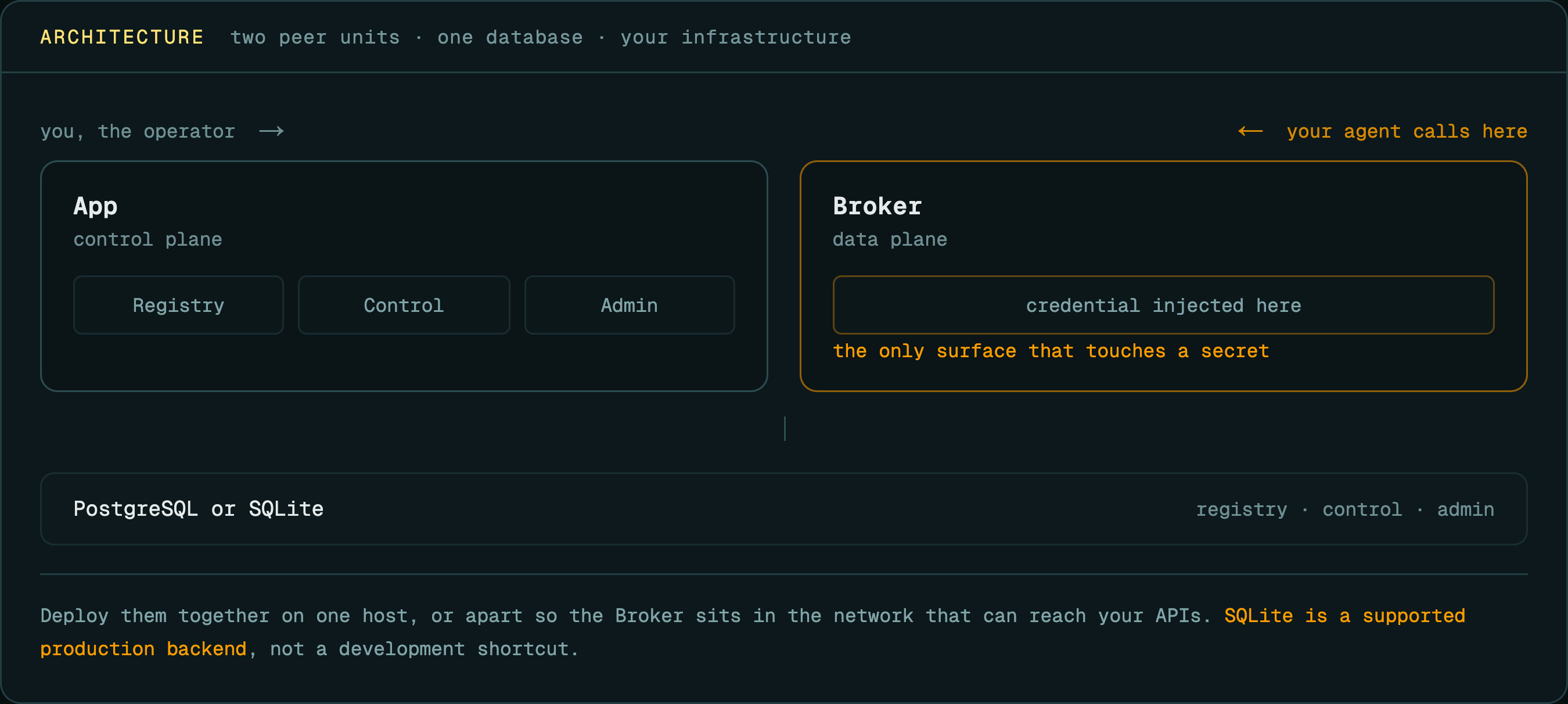
On each call the Broker checks the agent's permissions, attaches the stored credential,
forwards the request, and writes an execution record. The credential is added inside the Broker,
after the permission check, and is never returned to the caller.
For the next level of detail — the five surfaces, the process shapes, the broker's
execution pipeline, and the data model — see docs/architecture/.
Why we built Jentic One
Agents are getting API access the worst way we know how: keys pasted into env vars,
MCP configs, and dotfiles on every machine an agent runs on. Anything in the agent's
context — a prompt injection, a poisoned tool description, a plain bug — can read
those keys and exfiltrate them. And once an agent holds the key itself, there is no
scoping it to this endpoint, no record of what it called, and no way to revoke one
agent without rotating the key everywhere.
We think the fix is structural, not better prompting: the agent should never hold the
credential at all. In Jentic One the key is stored once, encrypted, on your
infrastructure; the agent gets an identity instead, and every call goes through the
Broker's permission check. A compromised agent can only make the calls it was allowed
to make anyway — and you can see every one of them, and cut that one agent off
without touching the key. One boundary to know before you rely on that: the broker
protects credentials from agents running as other OS users or on other machines —
an agent running as the same OS user as its own credential-holding CLI state can
read that state; the same-host hardening guide
covers when and how to split them.
Documentation
The full index is at docs/README.md.
- Installation — Docker, systemd, Helm, AWS Marketplace
- First brokered call — from a running instance to a real API response
- CLI —
jentic(agent) andjenticctl(operator) - Deploying securely — read before pointing an instance at a real credential
- Configuration reference — every config key, default, and env var
- Endpoint & scope reference — every HTTP route and who may call it
- Local development — running from a source checkout
Anonymous telemetry is on in the shipped install examples and pre-selected
in the interactive installer; set telemetry.enabled: false to opt out. A
config that omits the telemetry block sends nothing
(details). Vulnerability
reports: SECURITY.md. Support channels and what's covered:
SUPPORT.md.
Agents can read llms.txt for a machine-oriented map of the project.
Contributing
Contributions are welcome — see CONTRIBUTING.md and the
open issues. Questions and proposals go in
Discussions.
Links
License
Jentic One is licensed under Apache 2.0; see
NOTICE for third-party attributions.
Reviews (0)
Sign in to leave a review.
Leave a reviewNo results found