serialbot
Health Uyari
- License — License: GPL-3.0
- Description — Repository has a description
- Active repo — Last push 0 days ago
- Low visibility — Only 5 GitHub stars
Code Gecti
- Code scan — Scanned 12 files during light audit, no dangerous patterns found
Permissions Gecti
- Permissions — No dangerous permissions requested
Bu listing icin henuz AI raporu yok.
⚡ 轻量跨平台串口调试助手,内置 MCP 服务,让 AI 也能操作串口 · Lightweight cross-platform serial port assistant with a built-in MCP server for AI agents

SerialBot
The verification loop for embedded hardware: a lightweight serial assistant whose built-in MCP server lets AI agents flash, read and verify real boards themselves 🔌🤖




English · 简体中文 · 🌐 serialbot.aiany.cc
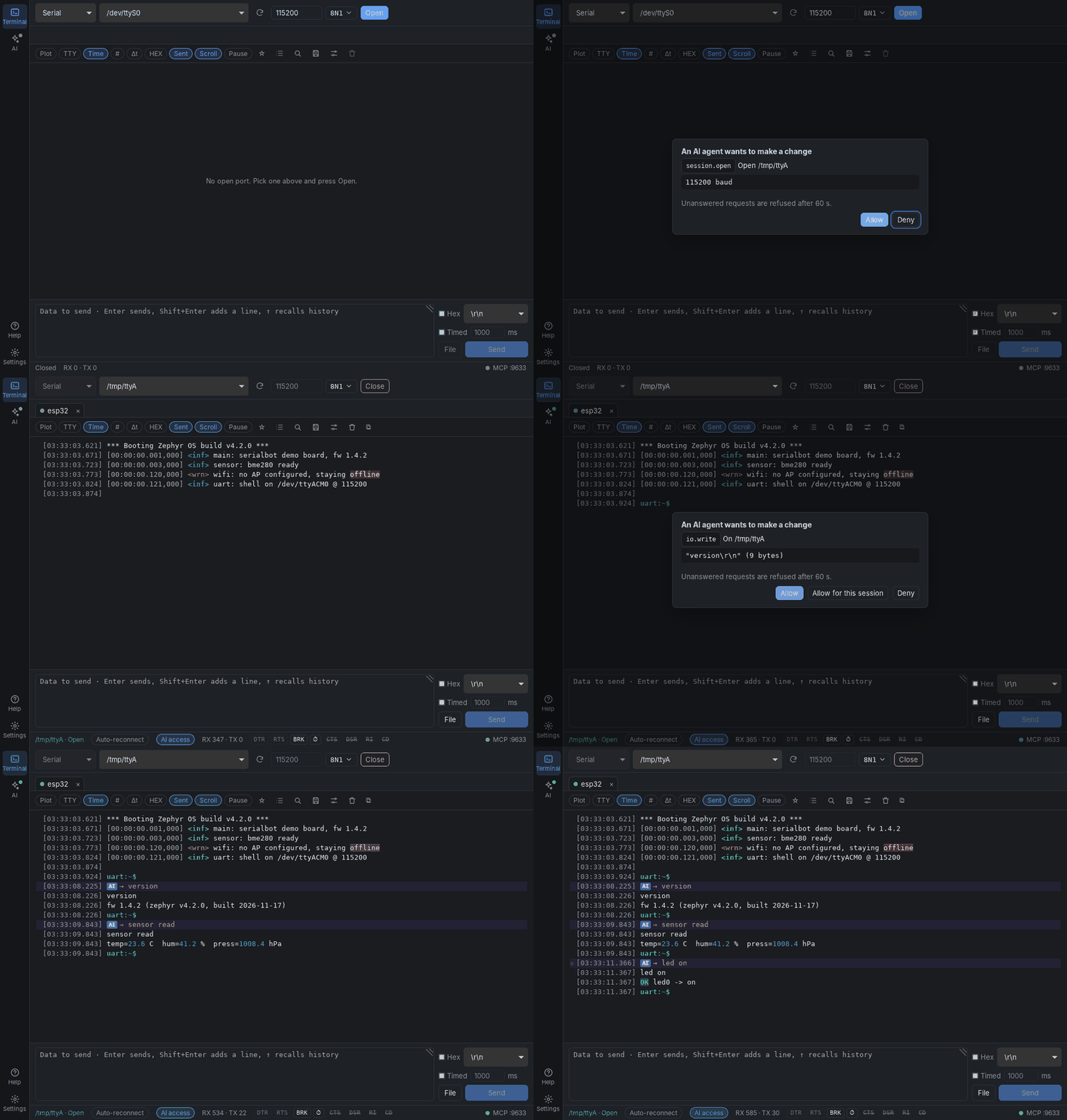
☝️ An AI agent opens a dev board's port over MCP and sends commands. You approve, and every step shows up in the window, tagged AI.
[!NOTE]
🧪 Beta. The features planned for the first release are in, and real hardware checks are under way. Please try it and report problems.
💡 Why SerialBot
SerialBot is the verification loop for embedded hardware.
Coding agents earn trust by checking their own work. The teams getting the most out of them treat verification as the core of the job: Lauren Tan (@poteto), who builds Grok Bot, describes letting agents run the app, take traces and test it the way a user would, and keep going until it really works. Closing that loop is what makes their output trustworthy.
Firmware has had no such loop. Whether embedded code works is decided on the board, and the board speaks through its serial port. So a person sits in the middle: flash, watch the log, copy the interesting lines into the chat, explain what happened. The agent can write the code, but it cannot see what the code does.
SerialBot is the missing piece. The agent works on the device directly:
- 🔥 Flashes the board: it hands the port to your flashing tool, then takes it back. The log continues.
- 👀 Reads the log itself: it waits for the line it expects, or gives up after a timeout.
- 🐛 Verifies its own work: it adds debug prints, rebuilds, flashes and reads again, until the log shows the firmware does what it should.
You stay in charge. Every change to a port needs your approval, and every line the agent sent is marked in the window.
SerialBot only moves the data; your skills bring the knowledge. SerialBot passes raw bytes between the device and the model, with timestamps, markers and waits, and nothing more. What to run, in which order, and what a log line means depends on the chip, the board and the project: datasheets, boot sequences, error codes, house rules. That knowledge belongs in your repository, as skills (for example Claude Code skills or a CLAUDE.md), where you can version it and share it with your team.
✨ Features
Light and everywhere
- 🪶 A Windows installer of about 4.5 MB, or a portable exe of about 19 MB that runs without installing.
- 💻 Windows, macOS (Apple Silicon and Intel) and Linux (x64 and arm64, Raspberry Pi included).
Connect
- 🗂️ Many ports at once: one tab per port, each with its own log and counters; double-click a tab (or ⧉) to watch that port in a window of its own.
- 🌐 TCP client, TCP server (several clients at once; sending goes to all of them, and the log shows who sent what) and UDP besides serial ports; pick the type at the left of the connection bar.
- 🔁 Unplug and replug the adapter and the session carries on; the port list follows hot-plug.
- 🎛️ DTR / RTS switches, CTS / DSR / RI / CD lamps, BRK for a BREAK, and ⏱ for a timed DTR/RTS sequence such as
DTR=0 RTS=1, 100, RTS=0(a reset pulse). Every change is marked in the log.
Receive
- 🌈 Text or HEX with millisecond timestamps, ANSI colors (Zephyr, ESP-IDF and other colored logs), and encodings such as UTF-8, GBK, GB18030, Big5 and Shift_JIS.
- ✂️ Auto frame split by gap; Δt shows the time since the line before, so in HEX view you see the gaps between frames.
- 🔎
Ctrl/Cmd+Fsearch, "only matching lines" filter, and keyword highlight (ERROR,WARN, … in ⚙️). - 📈 Plot: numbers in received lines (
temp=23.6 hum=41, or1.2, 3.4, 5.6) become live curves, each on its own scale. - 🖥️ Terminal mode (TTY): a full terminal emulator on any session (cursor, colors,
top,vi); keys go straight to the device, so you can log in to a Linux board's shell. - 🔢 Line numbers (#) and ★ bookmarks: mark the lines that matter and jump back to them.
- ⏸️ Pause, and smooth scrolling through tens of thousands of lines.
- 💾 Save the log once, or keep writing it to a file as data arrives.
Send
- ✍️ Multi-line text or HEX with a choice of line ending.
Entersends,Shift+Enteradds a line,↑recalls history. Data goes out as raw bytes, exactly as typed: only the line ending you pick is added. - 🧮 Checksums appended to HEX data: CRC-8, CRC-16 (Modbus, CCITT), CRC-32, XOR, SUM8, LRC.
- ⏲️ Timed send, 📋 saved command lists (click to send, or run a group in order; ⧉ opens them in their own window with its own target port), and 📄 file send in chunks.
AI agents, under your control
- 🤖 A built-in MCP server lets Claude Code, Claude Desktop and other agents list and open ports, send data, wait for replies and drive DTR / RTS, on the same sessions you see in the window.
- ✅ Before an agent sends data, toggles a line or opens, closes or reconfigures a port, SerialBot asks you: allow once, allow for the session, or deny (unanswered requests are refused after 60 s).
- 🟣 Everything an agent did is tagged AI in the log; AI access in the status bar keeps a session away from agents.
- 🔒 The server is off until you turn it on, listens on
127.0.0.1only and needs a token.
Comfortable
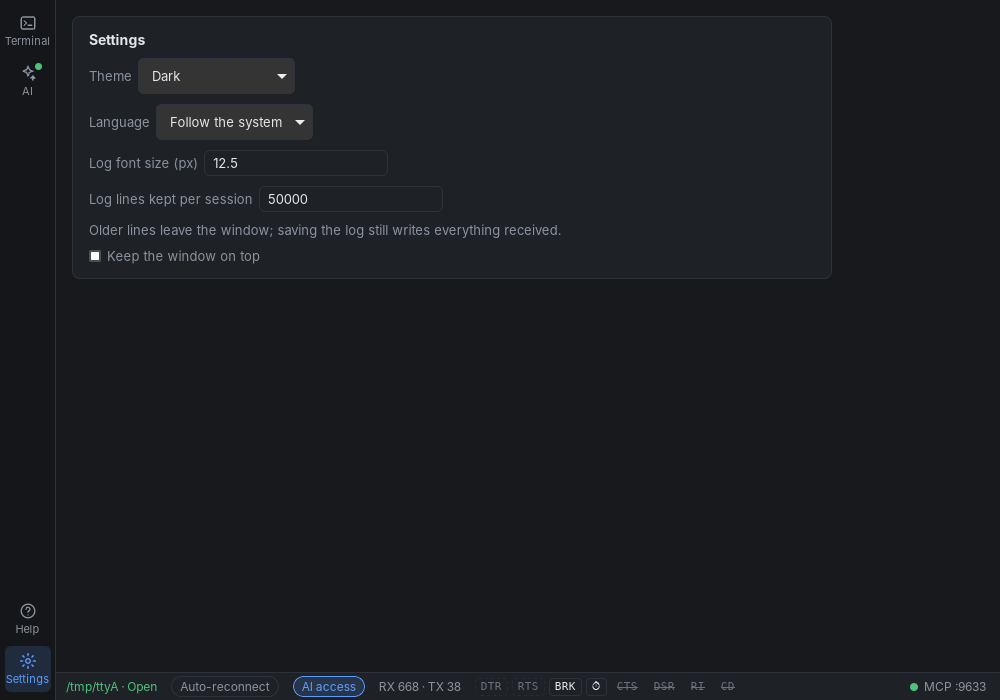
- 🌗 Light, dark or system theme; log font size; lines kept per session; keep the window on top.
- 🌏 English and Chinese, following the system or chosen in Settings.
- ❓ A Help page in the app: what SerialBot is for, first steps, every control, connecting an AI agent, and keys.
📸 Screenshots
| Dark | Light |
|---|---|
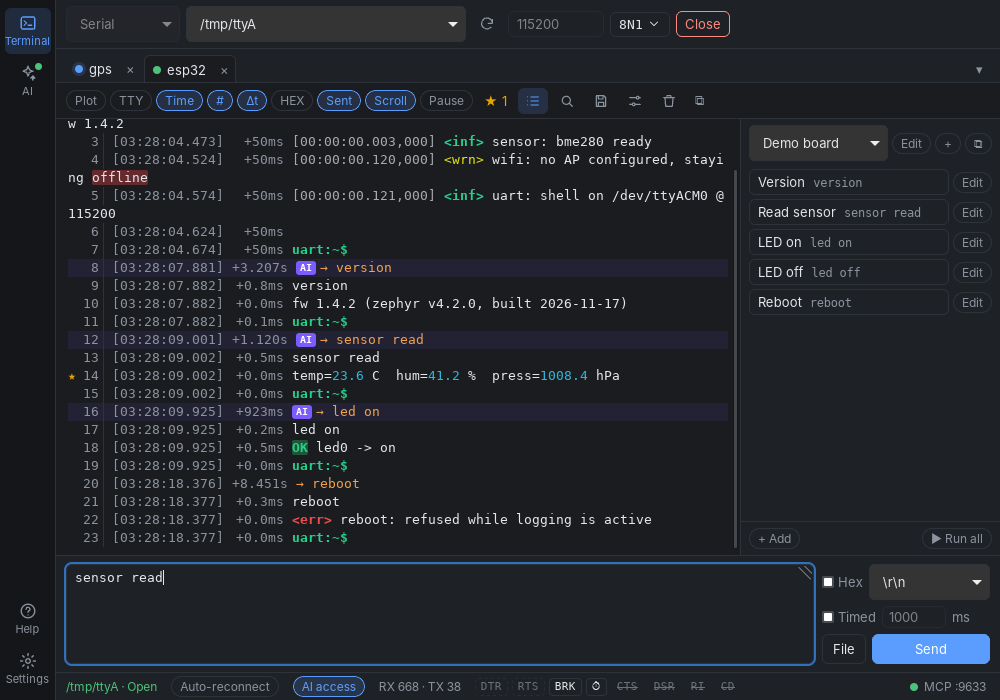 |
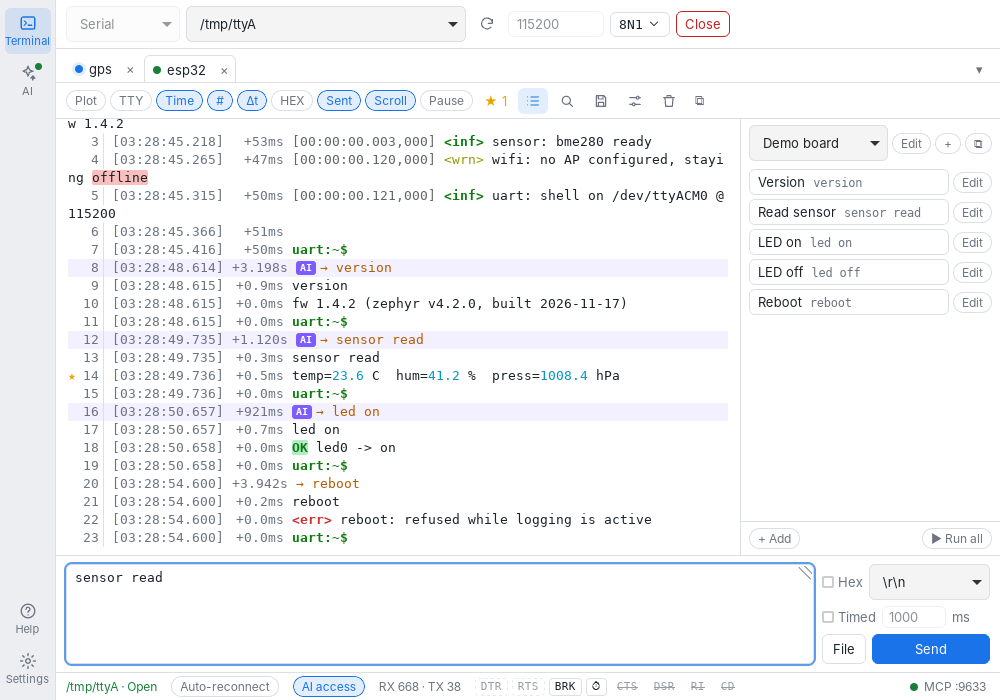 |
| 📈 Plot | 🖥️ Terminal mode |
|---|---|
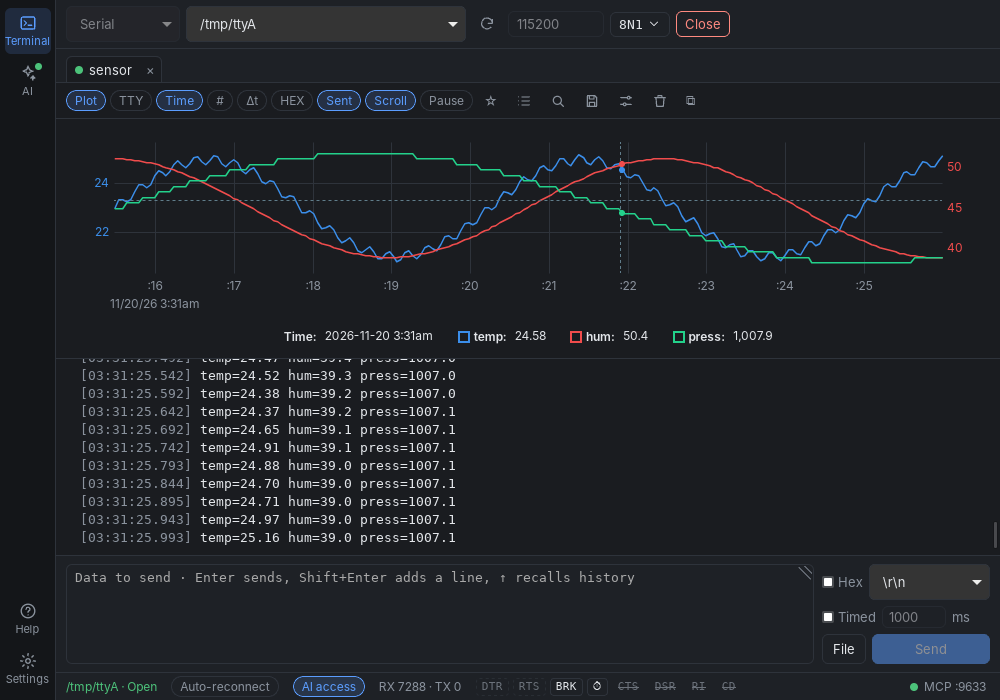 |
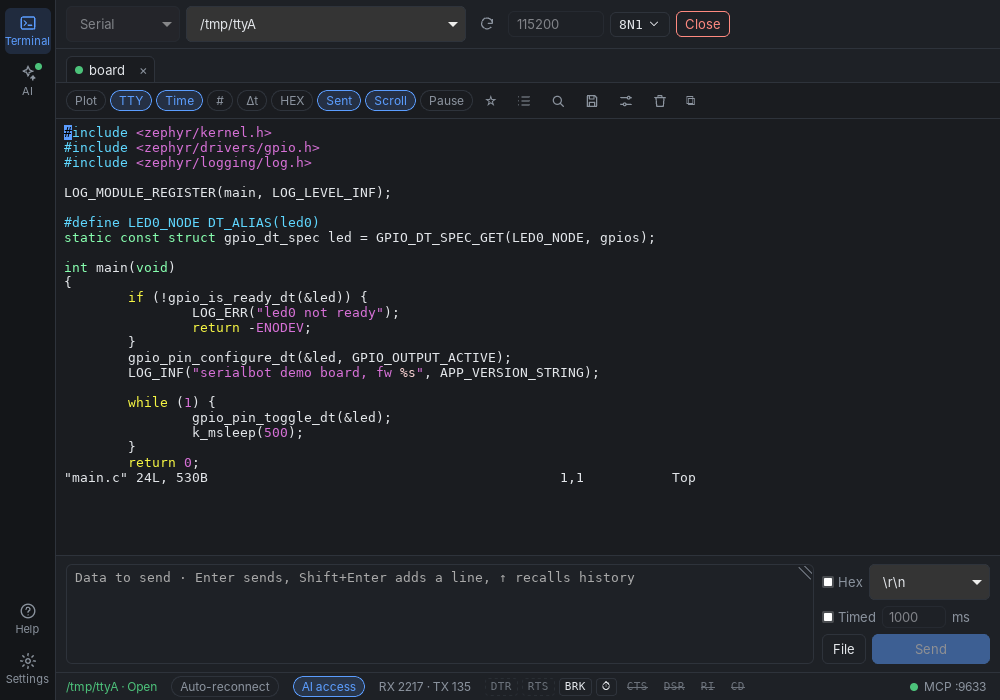 |
| 📋 Command list in its own window | ❓ Help page |
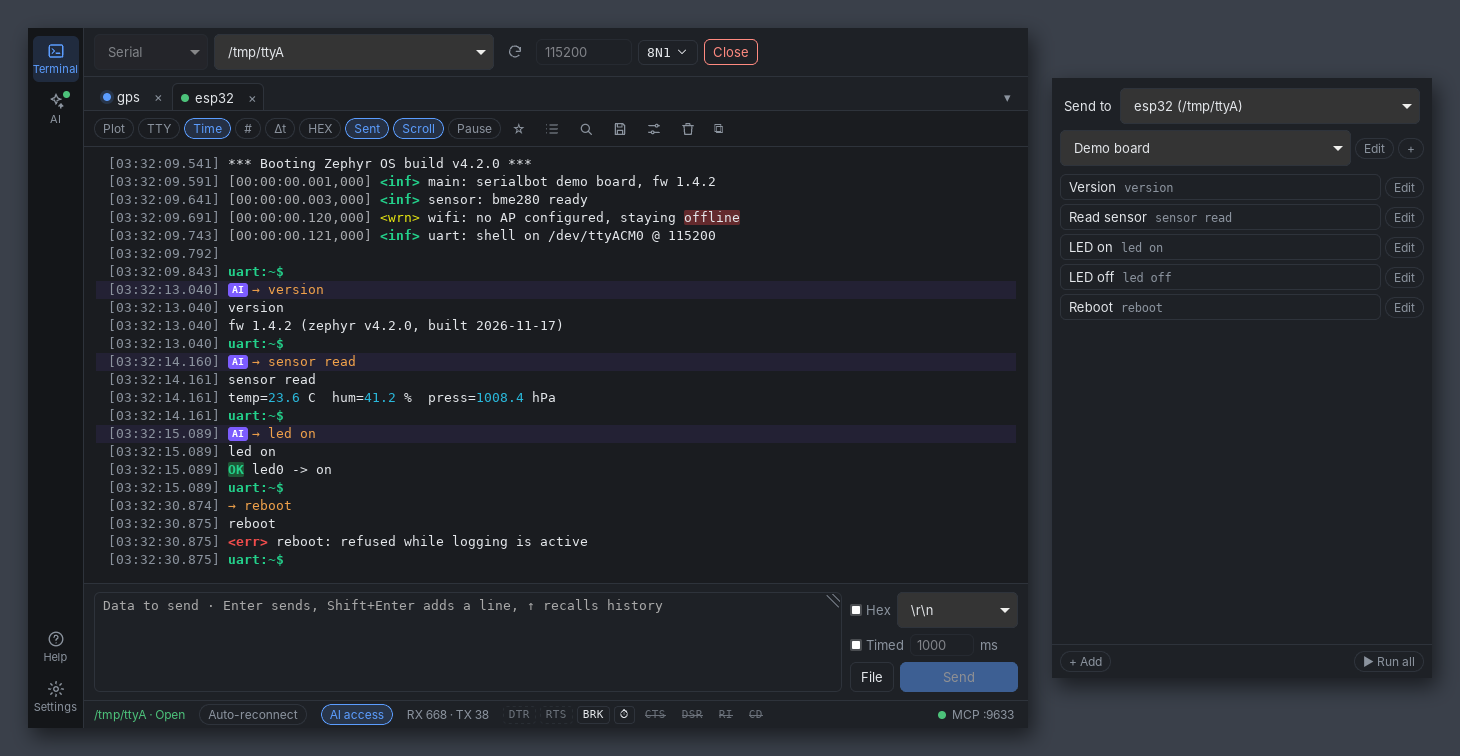 |
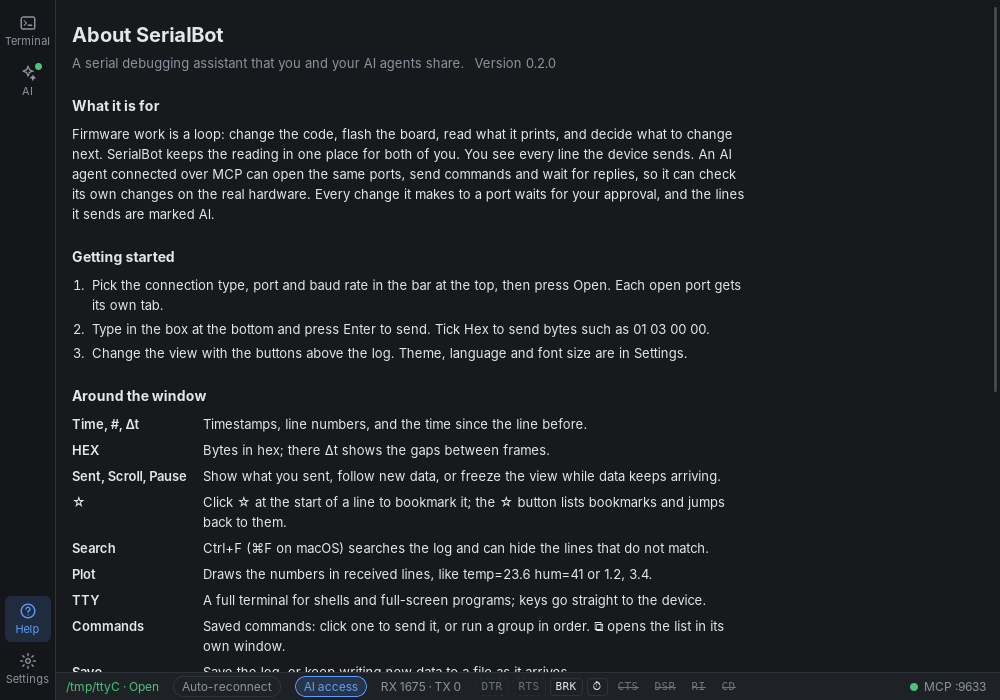 |
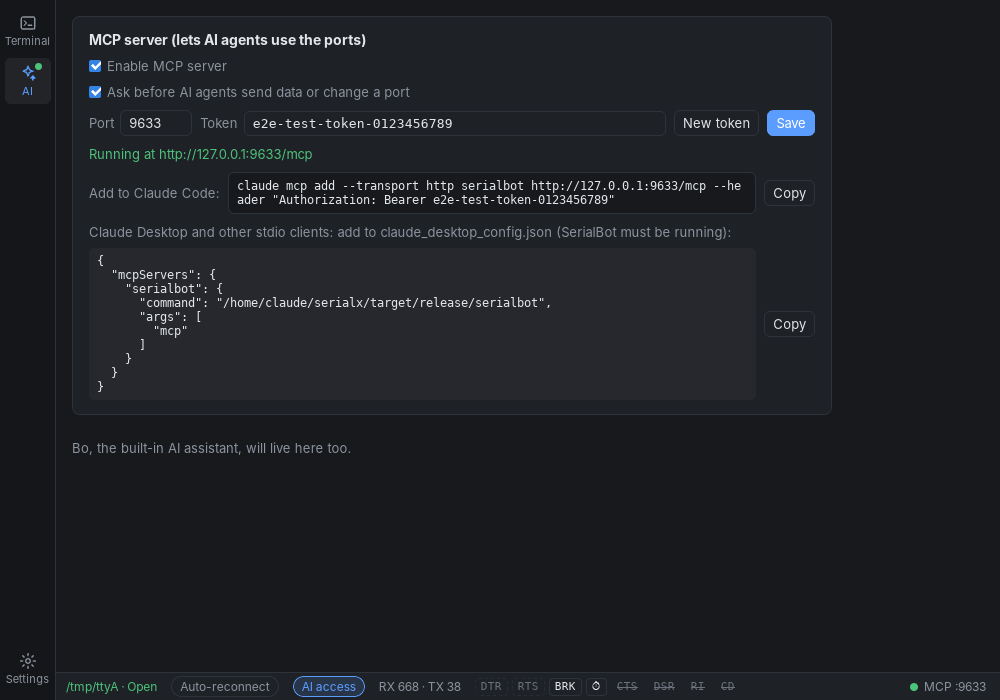
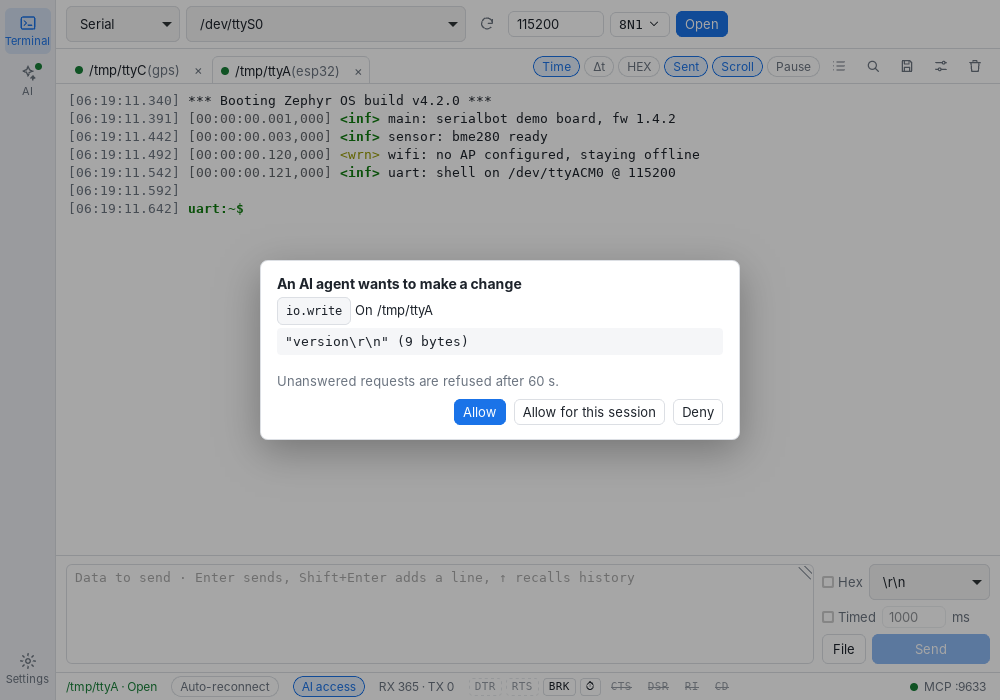 🤖 AI page: MCP server settings
 ⚙️ Settings
📦 Download
Get the file for your system from Releases:
| System | File | Notes |
|---|---|---|
| 🪟 Windows 10/11 | SerialBot_*_x64-setup.exe |
Installer (~4.5 MB, compressed), no admin rights needed |
| 🪟 Windows 10/11 | serialbot_windows_x64.exe |
Portable (~19 MB, uncompressed), just run it |
| 🍎 macOS 11+ | SerialBot_*_universal.dmg |
Apple Silicon and Intel (~11 MB) |
| 🐧 Ubuntu / Debian | SerialBot_*_amd64.deb |
~6 MB; sudo apt install ./SerialBot_*.deb |
| 🐧 Ubuntu / Debian arm64 | SerialBot_*_arm64.deb |
Raspberry Pi 4/5 (64-bit OS) and other ARM boards; sudo apt install ./SerialBot_*_arm64.deb |
| 🐧 Other Linux arm64 | SerialBot_*_aarch64.AppImage |
chmod +x, then run |
| 🐧 Other Linux | SerialBot_*_amd64.AppImage |
~80 MB (bundles its libraries); chmod +x, then run |
- macOS says the app "is damaged" or "can't be opened": the builds are not notarized yet. Run once:
xattr -dr com.apple.quarantine /Applications/SerialBot.app - Windows SmartScreen warns about an unknown publisher: click "More info" → "Run anyway".
- Linux can't open a port (permission denied): run this, then log out and back in:
sudo usermod -aG dialout $USER
🚀 Quick start
- 🔌 Plug in a USB-serial adapter, pick the port at the top and set the baud rate. Data bits, parity, stop bits and flow control are under
8N1 ▾. Then press Open. - 📥 The receive view shows timestamps by default. The chips at the top right switch Δt, HEX view, sent data, auto-scroll and pause. 🔍 searches; ⚙️ sets the encoding, frame gap, ANSI colors and highlighted keywords.
- 📤 Type a command in the box at the bottom and press
Enter. Tick HEX to send bytes such as01 03 00 00. - 🎛️ To reset a board, use DTR / RTS in the status bar, or ⏱ for a timed sequence.
[!TIP]
Keep flow control at "None" unless your board wires CTS. With RTS/CTS on and CTS inactive, nothing gets sent.
🤖 Let AI agents use your ports (MCP)
- Open AI on the left and tick Enable MCP server. It listens on
127.0.0.1only and requires a token. - Press Copy and run the command in a terminal, for example:
claude mcp add --transport http serialbot http://127.0.0.1:9633/mcp \ --header "Authorization: Bearer <your token>" - Ask Claude Code: "List the serial ports, open the ESP32 one and send
version." 🎉 - ✅ SerialBot asks before the agent opens the port or sends anything. Pick Allow for this session to stop being asked for that port, or untick "Ask before AI agents send data or change a port" on the AI page.
Claude Desktop (and other clients that only start stdio servers): copy the second snippet on the AI page into claude_desktop_config.json. It runs serialbot mcp, a small bridge to the running app, so SerialBot must be open with the MCP server on:
{ "mcpServers": { "serialbot": { "command": "/Applications/SerialBot.app/Contents/MacOS/serialbot", "args": ["mcp"] } } }
On Windows the command is the path of serialbot.exe (installed or portable); on Linux the path of the AppImage or /usr/bin/serialbot.
| Tool | What it does |
|---|---|
port.list / session.list |
List ports / open sessions |
session.open |
Open a port (optionally with an alias such as esp32) |
io.write / io.read |
Send data / read the timestamped log from a cursor |
io.wait_for |
Wait until received data matches a regex |
io.send_and_expect |
Send a command and wait for the expected reply |
io.signals |
Set DTR / RTS, read CTS / DSR / RI / CD |
session.close |
Close a session's port; its log stays readable |
session.release / session.reopen |
Hand the port to another tool (a flasher) and take it back; the log continues |
session.configure |
Change the baud rate without closing the port |
log.mark / log.query |
Set a named marker; summarize or search what happened after it |
command.list / command.call |
Further commands: rename, auto-reconnect, send BREAK |
🗺️ Roadmap
- Serial, TCP and UDP; many sessions; text / HEX, ANSI colors, encodings, frame split
- Send: history, timed send, command lists, files, checksums
- Signals: DTR / RTS, line states, BREAK, timed sequences
- Log: search, filter, Δt, keyword highlight, save and capture
- Built-in MCP server (HTTP and stdio), approvals, per-session AI access
- Installers for Windows, macOS and Linux (x64 / arm64), published automatically
- TCP server with several clients
- Command list in its own window
- Terminal mode (VT100, interactive shells)
- Waveform plots of received numbers
- Built-in AI assistant "Bo"
- JS scripts
- BLE
🛠️ Build from source
You need Rust (the version in rust-toolchain.toml installs itself) and Node 22+. Linux also needs some system libraries:
sudo apt install libwebkit2gtk-4.1-dev librsvg2-dev libayatana-appindicator3-dev libudev-dev
cd app && npm ci && npm run tauri dev     # run the desktop app
cargo test --workspace                    # Rust tests
cd app && npm test                        # frontend tests
cargo run -p serialbot-mcp                  # MCP server only, without a window
Every change ships with tests and must pass the format, clippy, test and coverage checks; see CLAUDE.md.
🤝 Feedback
Found a bug or have an idea? Open an issue with:
- 📷 a screenshot
- 💻 your OS
- 🔌 your USB-serial chip (CH340 / CP2102 / FT232 / CH9344 …)
For anything else, write to [email protected].
📄 License
The core is GPL-3.0-only. Plugin SDKs and device-side libraries will be MIT-licensed.
Yorumlar (0)
Yorum birakmak icin giris yap.
Yorum birakSonuc bulunamadi