aiw
Health Uyari
- License — License: Apache-2.0
- Description — Repository has a description
- Active repo — Last push 0 days ago
- Low visibility — Only 5 GitHub stars
Code Gecti
- Code scan — Scanned 12 files during light audit, no dangerous patterns found
Permissions Gecti
- Permissions — No dangerous permissions requested
Bu listing icin henuz AI raporu yok.
Fewer main-session tokens for Claude Code / Codex: hand off code reading, edits and tests to another model; the main session only writes the task and verifies.
aiw
Spend fewer main-session tokens: hand off reading code, editing files and running tests; the main session only writes tasks and verifies.
Works with Claude Code, Codex, pi and omp as the main session.
Set forward.command in your private seats.local.json to send ordinary assignments to another machine through your own command. Exit code 69 means unreachable and not queued, so aiw runs the task locally; other results are final. Before forwarding, aiw resolves roles locally and sends the ordered, deduplicated candidates as --chain seat-a,seat-b; the receiver uses only that chain, skips unknown or unavailable seats, and applies its usual write-capability checks without expanding its own fallback table. An explicit --chain has the same meaning locally; --no-fallback limits it to the first seat, and malformed chains are rejected before execution. Forwarding is off by default; see the forwarding protocol.
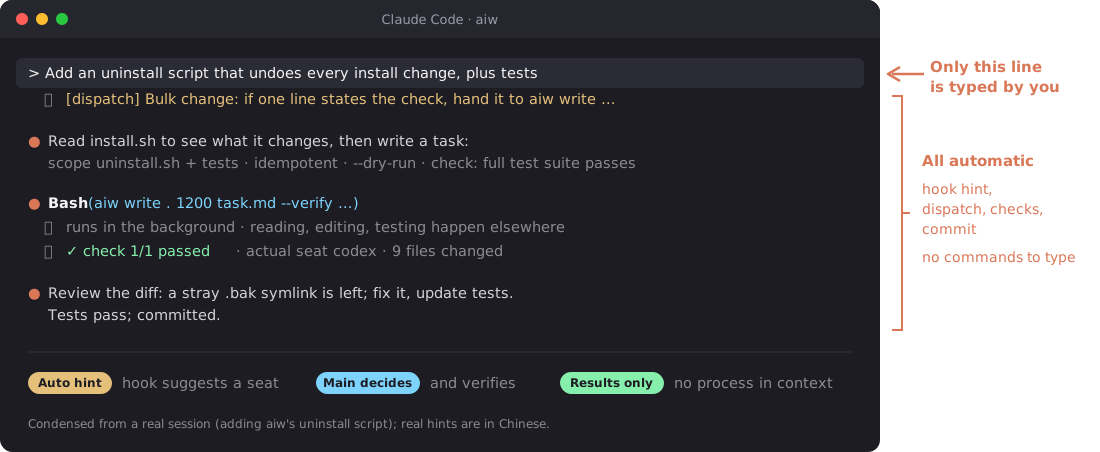
The 40-second tour below was made with motion-use; every line in its terminal is real aiw output from one dispatched task.
https://github.com/user-attachments/assets/b36de332-0783-4ff2-861c-26210eacbd93
Why aiw
- Fewer main-session tokens: the work happens elsewhere; only results come back. In the author's paired comparison the main session spent about a third less; in everyday long sessions, tasks touching 3+ files cost about a quarter of doing them directly.
- Nothing for you to manage: chat as usual. The main session decides whether to dispatch, to whom and how to verify. To switch models or add seats, just tell the main session; it edits the local configuration and checks it with
aiw doctor. - Minimal footprint: a few lines in the CLIs you have installed, backed up first, and it never edits your shell configuration;
--minimalinstalls just the command. To remove it, run~/.claude/aiw/uninstall.sh. - Lightweight: no service, nothing resident; it runs only when work is dispatched. Needs only Python 3.11+. The resident rules are about 1,300 characters; the hook adds a one- or two-line hint only on messages that match an assignment rule and nothing otherwise.
| Main session | Changes |
|---|---|
| Claude Code | One import line in ~/.claude/CLAUDE.md, one hint hook in settings.json, automatic compaction fallback at 400,000 tokens (existing settings preserved) |
| Codex | A rules block in ~/.codex/AGENTS.md, one hint hook in hooks.json |
| pi / omp | A rules block in ~/.pi/agent/AGENTS.md / ~/.omp/agent/AGENTS.md, no hook |
It also creates the ~/.local/bin/aiw symlink and never edits your shell configuration (it only prints a hint if ~/.local/bin is not on PATH). Codex, pi and omp are touched only if installed. --minimal creates just the symlink and leaves every file above alone. Preview the uninstaller with --dry-run; see what the installer changes and Uninstall.
Install
You need macOS (the only tested OS) and logged-in Claude Code or Codex CLI (at least one).
git clone https://github.com/Jerryx333/aiw.git ~/.claude/aiw && ~/.claude/aiw/install.sh
aiw doctor   # if it says ~/.local/bin is not on PATH, add it and open a new terminal
Then keep working as usual; there are no commands to learn.
To try the command without touching any configuration: ~/.claude/aiw/install.sh --minimal installs only the aiw command and leaves CLAUDE.md, settings.json, Codex configuration and your shell configuration alone; rerun without the flag later to connect the rules and hooks. The installer never edits your shell configuration.
printf '%s\n' 'Read this repository. Explain its entry points with file references. Do not edit files.' > /tmp/aiw-review.txt
aiw review "$HOME/.claude/aiw" 900 /tmp/aiw-review.txt --ro
The result prints to your terminal: [ai-worker] 实际执行方:… ("actual seat") names the seat that did the work; [ai-worker] 全文:… ("full text") points to the saved result. Every run keeps its task, full result and error output under state/runs/ in the aiw checkout; on failure the last line says 排查 ("troubleshoot") instead, so start with that directory's stderr.txt. Codex may ask you to trust the new hook when it next starts.
Questions you may have
Which models can it dispatch to? Do I configure it?No. A single installed CLI comes with a default split; to adjust it, tell the main session, which edits the local configuration (~/.config/aiw/seats.local.json) and runs aiw doctor. You can:
- Use a strong model in the main session and a cheaper one for routine work: for example, GPT-6 Astra with GPT-6.1 Sol in Codex, or Fable with Opus 5.5 in Claude (Codex pricing: credits per million tokens, GPT-6 Astra input 250 / output 1,250; GPT-6.1 Sol input 50 / output 250). All models on one account share the allowance; dispatching does not create extra allowance.
- Order candidates for edits, reviews and drafts; if the first is unavailable, the next is used. Any model that runs in a terminal can connect through agent-use.
- Have different models write and review code for a second check;
aiw panelcollects independent opinions.
See customization and roles and single CLI installations.
Will quality suffer?All assigned work is a draft for review. The main conversation checks files, evidence and test results before accepting it. The author ran a comparison: 4 real tasks (3–7 files each), each done once by the main conversation itself and once by assigning it to Codex, from the same instructions. Both versions passed the existing tests. In a blind review, GPT preferred the Codex version in 3 of 4 tasks and Claude preferred the Claude version in 3 (one tie). Each judge leaned toward its own model; neither side was clearly better.
Does assigning work also use the main model's tokens?Yes: writing instructions, reading results and checking them all use tokens, so it only suggests assignments; it does not make them automatically. How much it saves depends:
- On the 4 tasks above, each started from an empty session, assigning cut main-conversation usage by about a third in total, ranging from roughly even to half per task. The cost was 10–20 more minutes of waiting per task.
- In the author's daily use (about 300 tasks, not a controlled experiment), for tasks touching 3 or more files the median main-conversation cost when assigning was about a quarter of doing it directly. The gap is likely due to long sessions: everyday sessions often carry 100k–300k+ tokens of context, and every turn of editing code yourself is billed at that size.
- Small edits to 1–2 files have no comparison data; doing them yourself is usually cheaper.
To see your actual usage, use aiw tokens (local Claude Code main-session usage and context breakdown) and aiw weekly (assignment success rates, seat quality by task class, and token totals).
No. The resident rules (~/.claude/aiw/CLAUDE.md, or the block in Codex's AGENTS.md) are about 1,300 characters; details live in the reference and are read only when needed. The hook runs one local regex check per turn (about 70 ms) and injects a one- or two-line hint (100–300 characters) only when a message matches an assignment rule; otherwise it injects nothing. After aiw off, the notice appears once per session. The dispatched work never enters the main session; only results come back.
Medians from one week on the author's machine: code changes about 4 minutes (Codex reads code, edits files and runs tests); read-only reviews and code search about 2–3 minutes; text only about 20 seconds with free models, about 2 minutes with Claude. The main conversation can keep working meanwhile. For small, urgent work, doing it yourself is faster.
Will it mess up my repository?When write resolves to Codex, code-change work runs in the Codex sandbox: it can write only to the project directory (in a git worktree, also the Git directories git add needs) and has no network by default. When it finishes, it lists the changed files. Changes stay in your working tree for the main conversation to review before committing. With Claude only, claude-write uses restricted mode and a sandbox to edit workspace files, with no git add/commit. Read-only work cannot change files.
Codex and Claude use your own accounts and their billing. Connected free models can be marked for free-tier use only and automatically disabled when charging is detected. Detection happens after a call, so this does not guarantee zero cost.
Task instructions and attached material go to the service behind the model you assign. Models that only handle text cannot see your code by default; you must explicitly attach it. Do not send passwords, keys or private data to third-party models.
Can I use it with just one CLI installed?Yes. Codex only: edit code in the main session and assign reviews/drafts to another Codex session. Claude Code only: assign edits to the Opus 5.5 claude-write seat (requires Claude Code ≥ 2.1.259; restricted mode plus sandbox, project-directory edits only, no git add/commit), and reviews/drafts to Opus 5.5. With one family, review opens another context in that family; it is not a cross-family review. Panels require at least two seats; add an agent-use text seat if needed.
Seats pin Opus and never automatically select Fable. On Pro, Fable is billed by usage. On Max, Fable counts toward the regular weekly limit, can use at most half of it, and consumes allowance faster than other models. See Claude's official explanation.
Linux? Are the rules too forceful?Linux is untested; only macOS has been tested.
If the rules feel too forceful, override them with personal rules, remove @~/.claude/aiw/CLAUDE.md from ~/.claude/CLAUDE.md, or reinstall with install.sh --minimal to keep only the aiw command. To stop assignment suggestions too, remove the aiw hooks as described in Uninstall.
Advanced (optional)
Manual dispatch and all commands (the main session uses them; you need not)| Command | Purpose and example |
|---|---|
aiw write . 1200 task.txt |
Edit code (a Codex main session edits files itself) |
aiw review . 900 task.txt |
Read-only review, finding code |
aiw draft . 600 task.txt |
Drafts, rewrites, summaries |
aiw doctor |
Shows which model each role resolves to and checks the install |
aiw <seat> . 900 task.txt |
Assign to a named seat; common flags: --ro read-only, --worktree writes in an independent worktree, --net opens the network for Codex writes; details in the reference manual (Chinese) |
aiw panel |
Collect independent opinions: aiw panel . 600 task.txt --prior prior.md; pass your own judgment with --prior, then accept, reject or defer each opinion, without majority voting |
aiw map |
Apply one instruction per file: aiw map . 600 task.txt src/a.py src/b.py |
aiw goal init / verify |
Create a checklist with aiw goal init docs/goals/demo.json; edit tasks, verification commands and paths, then run aiw goal verify docs/goals/demo.json --full |
aiw off [30m/2h/3d/forever] / aiw on / aiw status |
Pause dispatch hints (until the next local midnight by default), resume, or check status; explicit assignments still work |
aiw rate |
Rate an assignment: aiw rate <run> ok|fixed|rework|discard [--note text]; find unrated runs with aiw rate --pending |
aiw note |
Save an observation: aiw note . "Check failed" --expected "Check passes" --evidence "test output" |
aiw sync |
Fast-forward aiw and installed agent-use/agent-use-adapters; rerun the installer to refresh rules/hooks |
aiw gc |
Clean old archives (30 days by default); preview: aiw gc 30 --dry-run |
Want other subscriptions, local models or free models to share the work? agent-use connects any model you can use in a terminal in the same way with a few configuration lines, no code; when one is unavailable it tries the next in your order; original responses and execution records are saved for the main conversation to check.
agent-use-adapters has ready-made Codex, Claude Code and OpenCode adapters. Install them with ~/.claude/aiw/install.sh --with-agent-use, which also registers providers such as opencode in agent-use; add seats yourself in your local configuration. Built-in Codex / Claude Code seats work without these two repositories.
flowchart LR
    main["Main session: plan and verify"] --> aiw["aiw: seats / roles / fallback"]
    aiw --> cli["Built-in CLI seats: Codex / Claude Code"]
    aiw --> au["agent-use: provider dispatch"]
    au --> adapters["agent-use-adapters: ready-made adapters"]
    au --> custom["Custom CLI adapter"]
    adapters --> tools["Codex / Claude Code / OpenCode CLI"]
    custom --> other["Your CLI"]
For setup steps, workspace seats, --text and other details, see the usage guide.
- Plan first, then assign small pieces with clear checks. Do tiny, urgent tasks yourself.
- Include the goal, context, scope, constraints and verification commands; supply text seats with material via
--attach. - Treat results as drafts: inspect changes, check sources, run tests and read the actual-seat line.
- Before a panel, write your judgment and archive it with
--prior. Useaiw goalfor large task lists.
See best practices for task templates, a recommended configuration and a daily workflow.
Status line and dashboard: aiw-boardaiw-board is an independent, read-only status line and dashboard; it does not assign tasks or write aiw state. It shows in-flight assignments, actual seats, panel groups, recent successes and failures, and today's count.
git clone https://github.com/Jerryx333/aiw-board.git
cd aiw-board
./install.sh --apply-settings
Installation backs up and replaces any existing ccstatusline configuration; --apply-settings modifies Claude Code settings after backing them up. Omit that flag to leave settings unchanged. After installation, open the full dashboard with aiw board.
Docs and contributing
Usage guide (installation, how it works, customization) · Best practices · Reference manual (Chinese; all commands and rules) · Contribution guide
Submit changes through a PR; run python3 tests/test_harness.py and python3 tests/mutation_check.py first. License: Apache-2.0.
Yorumlar (0)
Yorum birakmak icin giris yap.
Yorum birakSonuc bulunamadi