claude-second-brain
Health Gecti
- License — License: MIT
- Description — Repository has a description
- Active repo — Last push 0 days ago
- Community trust — 10 GitHub stars
Code Basarisiz
- rm -rf — Recursive force deletion command in .github/workflows/pack-test.yml
- spawnSync — Synchronous process spawning in bin/create.js
Permissions Gecti
- Permissions — No dangerous permissions requested
This is a scaffolding tool that quickly sets up a personal, LLM-powered knowledge base. It uses a single command to create a pre-configured Obsidian vault integrated with Claude Code, local semantic search, and GitHub version control.
Security Assessment
Overall Risk: Medium. The tool functions by spawning synchronous processes to execute shell commands, which is standard for a project scaffolder. However, the automated workflow files contain a recursive force deletion command (`rm -rf`). While this is likely just used to clean up temporary directories during testing, it is a potential risk if the environment variables or execution paths are ever manipulated. It does not appear to access sensitive data or request explicitly dangerous permissions, and no hardcoded secrets were found.
Quality Assessment
The project is very new and has a minimal user base, currently sitting at 10 GitHub stars. However, it is under active development, with repository updates pushed as recently as today. The code is distributed under the standard MIT license, meaning it is open-source and legally safe to use and modify.
Verdict
Use with caution — the tool is active and open-source, but its small community footprint and the presence of aggressive deletion commands in its workflows warrant a careful review of your directory paths before executing.
Fastest way to scaffold your LLM powered personal knowledge base - Obsidian, Claude Code, cmd, Github
:classical_building: claude-second-brain
Your notes don't compound. This wiki does.



The fastest way to start your personal knowledge base powered by Obsidian, Claude Code, qmd, and GitHub.
npx claude-second-brain
One command gives you a fully wired knowledge system:
- Claude ingests your sources and maintains a cross-linked wiki
- qmd powers local semantic search
- The scaffolded folder is your Obsidian vault — open it directly in Obsidian, with obsidian-git pre-configured for seamless sync
- GitHub is the source of truth — version history, anywhere access, and a backup you control
You've been reading papers, articles, and books for years. Drop a source in, run /ingest, and Claude reads it — extracts what matters, cross-links it to everything you already know, and files it. Ask a question six months later and get cited answers, not a list of files to re-read.
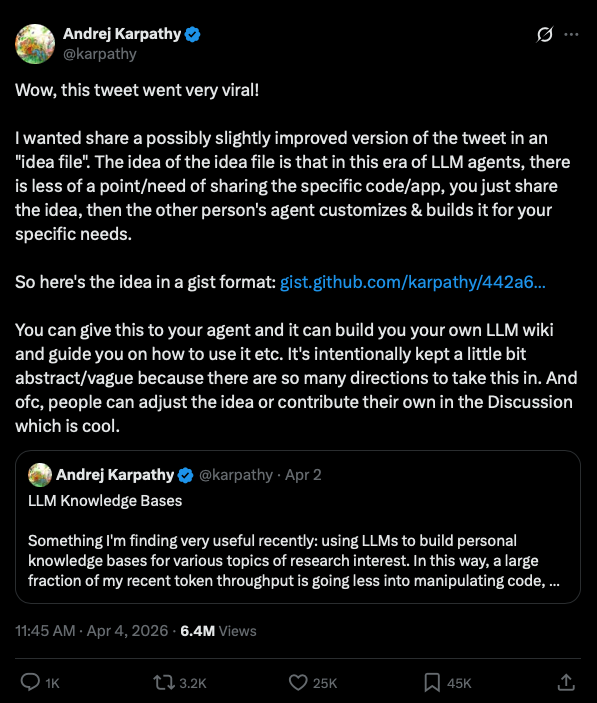
Inspired by Andrej Karpathy's approach to LLM-powered knowledge management — share an "idea file" with an LLM agent and let it build and maintain your knowledge base.
How this is different
This is not a RAG system. It's not a chatbot over your notes. It's an actively maintained, cross-linked wiki — five structured page types, YAML frontmatter, and a set of Claude Code skills that run the whole thing.
The schema (CLAUDE.md) is that idea file. Claude reads it every session.
The stack
| Tool | Role |
|---|---|
| Claude Code | Reads sources, writes wiki pages, cross-links, flags contradictions |
| qmd | Local hybrid search (vector + BM25) across your entire wiki |
| Obsidian | Graph view, backlinks, mobile reading — offline, no extra sync |
| GitHub | Source of truth — version history, Claude Code anywhere, Obsidian sync |
Everything is pre-configured. You bring the sources.
Get started in 3 steps
Step 1 — Scaffold
npx claude-second-brain
Creates your vault (the folder itself is the Obsidian vault), installs mise + bun, and runs git init with an initial commit.
Step 2 — Initialize inside Claude Code
cd my-wiki && claude
Then run:
/setup
Registers the qmd collections and generates local vector embeddings. First run downloads ~2GB of GGUF models — once.
Step 3 — Push to GitHub and open in Obsidian
git remote add origin https://github.com/you/my-wiki.git
git push -u origin main
Open my-wiki/ as a vault in Obsidian — the folder is already a valid Obsidian vault. The Git plugin is pre-configured — enable it and sync is automatic.
Claude Code skills included
The wiki ships with three slash commands that cover the full workflow. No manual prompting, no copy-pasting.
/ingest — Drop a file into sources/articles/, sources/pdfs/, or sources/personal/. Run /ingest. Claude summarizes the source, asks what matters most to you, creates a wiki/sources/ page, updates or creates related topic pages, flags any contradictions with existing knowledge, and logs everything.
/query — Ask anything about what you know. Claude runs hybrid semantic search across the wiki, reads the most relevant pages, and writes an answer with inline [[wiki/page]] citations. If the answer synthesizes multiple pages in a novel way, it offers to file it as a permanent wiki/qa/ entry.
/lint — Health-check the wiki. Surfaces orphan pages, broken links, unresolved contradictions, and data gaps. Reports findings and applies fixes where possible.
Access from anywhere
Edit anywhere — Claude Code on desktop or mobile
Claude Code's GitHub integration lets you open the repo and work from anywhere — ingest a source, run a query, or update a page from your phone.
Read anywhere — Obsidian desktop and mobile
Open the repo as an Obsidian vault. The bundled .obsidian folder pre-configures the obsidian-git community plugin — no setup required, just enable it. Your wiki syncs automatically on every commit. For iOS: put the repo folder inside iCloud Drive — Obsidian Mobile picks it up natively with no extra setup. Graph view, backlinks, offline reading — all working.
Browse anywhere — GitHub
It's a plain GitHub repo. View and edit files directly in the browser at any time.
How it works
┌─────────────────────┐        ┌─────────────────────┐        ┌─────────────────────┐
│   Drop in a source  │        │  /ingest in Claude  │        │     Wiki grows      │
│                     │        │        Code         │        │                     │
│  · article          │──────▶ │                     │──────▶ │  · cross-linked     │
│  · PDF              │        │  reads + extracts   │        │    pages            │
│  · personal note    │        │  key knowledge      │        │  · contradictions   │
│                     │        │                     │        │    flagged          │
└─────────────────────┘        └─────────────────────┘        │  · syntheses        │
                                                              │    written          │
                                                              └─────────────────────┘
Query it anytime with /query. Get answers with inline [[wiki/page]] citations, not a list of files.
Wiki structure
Five page types, all with YAML frontmatter:
| Type | File | Purpose |
|---|---|---|
overview |
wiki/overview.md |
Evolving high-level synthesis |
topic |
wiki/[concept].md |
A concept, domain, or idea |
entity |
wiki/[name].md |
A person, tool, company, or project |
source-summary |
wiki/sources/[slug].md |
One page per ingested source |
qa |
wiki/qa/[slug].md |
Filed answers to notable queries |
All pages cross-link with Obsidian [[wikilinks]]. Contradictions are flagged with [!WARNING] callouts. Full schema in CLAUDE.md.
Directory layout
my-wiki/
├── CLAUDE.md              ← The schema. Claude reads this every session.
├── sources/               ← Your raw inputs. Claude never modifies these.
│   ├── articles/
│   ├── pdfs/
│   └── personal/
├── wiki/                  ← Claude owns this entirely.
│   ├── index.md
│   ├── log.md
│   ├── overview.md
│   ├── sources/
│   └── qa/
└── scripts/qmd/           ← Semantic search setup and re-indexing
Roadmap
- GitHub Actions for scheduled re-indexing
- GitHub agentic workflows — auto-ingest on push, scheduled lint, auto-summary on new sources
- More Claude Code skills (source discovery, topic clustering)
Requirements
- mise — auto-installed by the CLI if missing
- Claude Code — the CLI that runs the wiki
- Obsidian — optional but recommended
License
MIT
Yorumlar (0)
Yorum birakmak icin giris yap.
Yorum birakSonuc bulunamadi