tally
Health Warn
- License — License: MIT
- Description — Repository has a description
- Active repo — Last push 0 days ago
- Low visibility — Only 5 GitHub stars
Code Fail
- rm -rf — Recursive force deletion command in scripts/build-release.sh
- rm -rf — Recursive force deletion command in scripts/release.sh
Permissions Pass
- Permissions — No dangerous permissions requested
No AI report is available for this listing yet.
macOS menu bar AI usage monitor for multiple Claude and Codex accounts: quota, rate limits, and a smart launcher for Claude Code.

Tally
by Jetto
Every AI subscription you own, at a glance, in your macOS menu bar,
plus a launcher that puts every session on the account whose quota goes furthest,
and a board that watches every session it started.




English · 繁體中文 · 简体中文 · 日本語 · 한국어
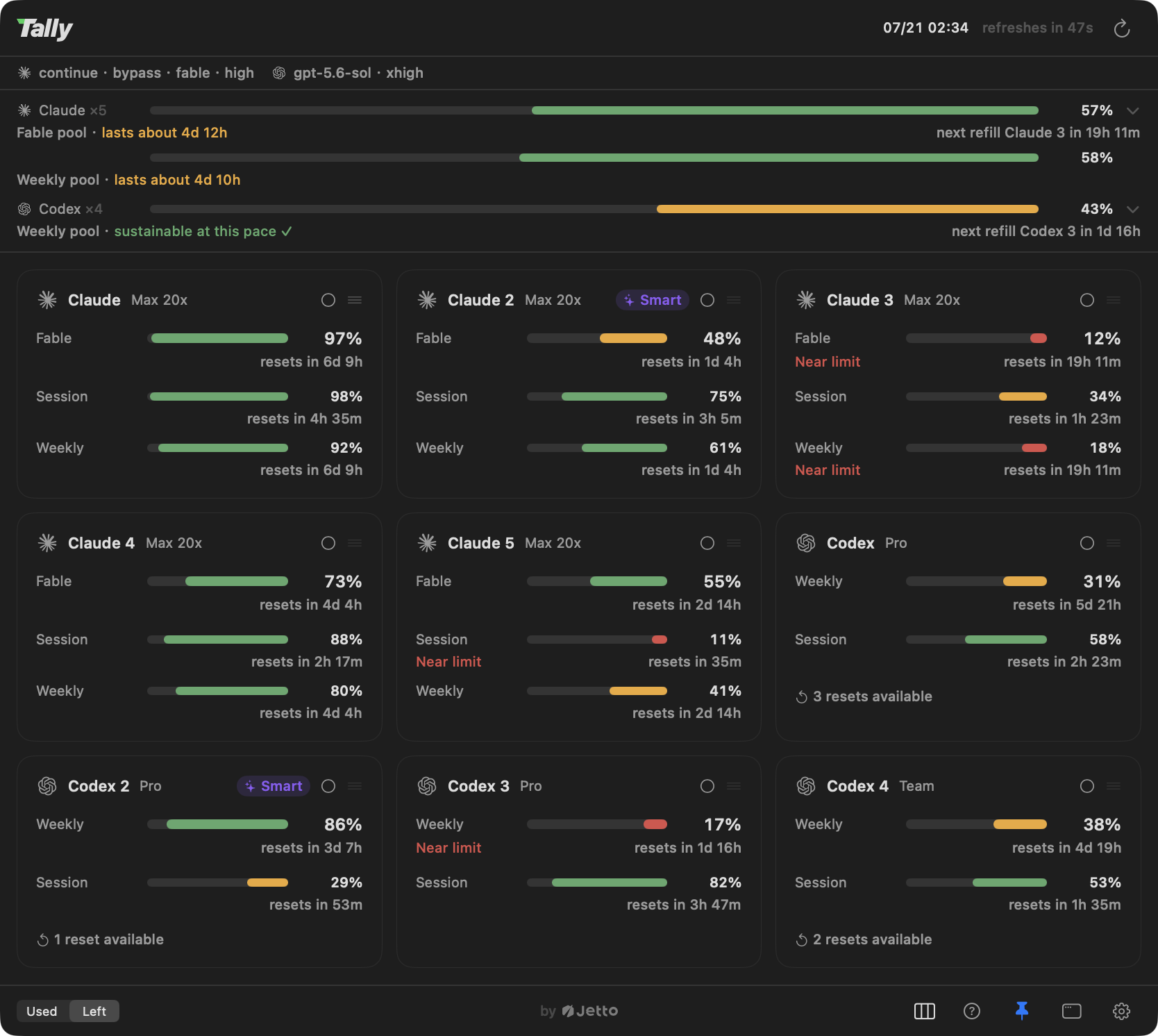
Tally is a native macOS menu bar AI usage monitor for Claude and Codex rate limits, built for
people who run multiple Claude (Max/Pro) and Codex subscriptions and are tired of guessing
which account still has room: every account's 5-hour session, weekly, and top-model quota windows
sit side by side under a fleet gauge that pools them into one combined budget and forecasts how
long it lasts at your measured pace, and the Smart pick starts every new session on the account
whose quota goes furthest right now, weighing reset times, not just remaining percent, then follows through
mid-conversation: rate-limit handoff, flagship-model rescue, a fresh account pick at every/clear, a typed heads-up in every session on an account that is running low, and a status-line
signal that shows which account is burning. A session board rounds it out: every conversation
Tally launched as a card, with who is blocked waiting on you and what each one is costing the
machine.

Why Tally
Menu bar usage meters already exist; what did not exist is one built for people who own several
subscriptions at once:
- Per-account cards, not a fallback chain. Every account renders as its own card, side by
side, because "which account still has room" is exactly the question a multi-subscription user
is asking. - Subscription quota, not spend estimates. Tally shows the same 5-hour / weekly / top-model
windows the vendors themselves enforce, instead of estimating dollars from token counts. - A launcher that acts on the answer. A dashboard's whole point is deciding where to work
next, so Tally makes that decision for you, every time, automatically, and keeps making it
while the session runs (cap handoff, model-degradation rescue, a free re-pick at every/clear, a typed heads-up when the account runs low). - The sessions themselves, on a board. No other usage tool sees the session level at all:
Tally shows every conversation it launched as a card, which one is blocked waiting on you,
and what each one is costing the machine, down to the process that is eating the memory.
Features
The dashboard
- Multi-account first. Every
~/.claude*login and Codex install is its own card: N accounts
side by side, not a single-account fallback chain. Drag cards to reorder; the order applies
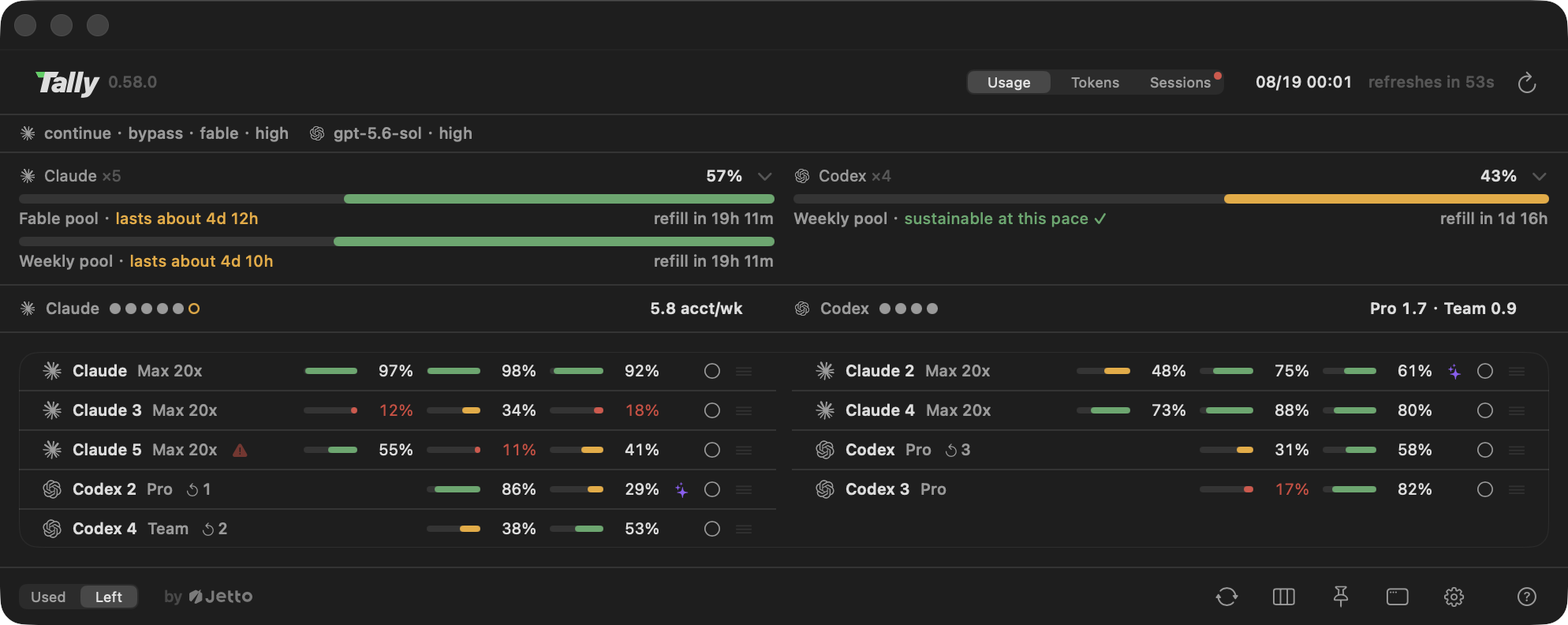
everywhere. - The fleet gauge. Each provider's accounts pooled into ONE meter: a continuous bar for the
combined weekly budget, the total in accounts' worth ("2.9/5 left"), and the next staggered
refill. A forecast estimates how long the pool lasts at your recently measured pace, counting
the quota each reset brings back: "lasts about 4d 10h" when you are outspending the refill
cycle, "sustainable at this pace" when you are not. No other usage meter pools accounts at all. - The usage advisor. Do you need another account? One line per provider under the gauges: a
filled pip per account you own, a hollow one when your measured pace asks for another, and the
running weekly demand as the figure to read ("5.8 acct/wk"). A fleet on two plans reads per tier
("Pro 1.7 · Team 0.9"), because one account-week of a $200 seat and of a $20 seat are not the same
quantity, and pooling them produces a number no subscription can be bought against. The hover
carries the breakdown per tier, the active burn rate, the starved hours, and the next refills;tally status --jsonpublishes the same split astierDemands. - Menu bar strip. One segment per provider by default, summing that provider's accounts into
the same pool the fleet gauge draws, badged with how many accounts it stands for; switch it to one
mark per account when you want them apart. Either way the segment stacks session over weekly, and
hover spells out the accounts, their numbers, and anyone missing from the pool. - Pinnable glass panel. Pin the dashboard as an always-on-top frosted-glass panel; drag the
header to place it anywhere. The account cards themselves render as glass over the panel's
backdrop (solid whenever you turn the translucency off, or the system asks for reduced
transparency). - Cards, or one row per account. Past half a dozen accounts a card grid outgrows the display,
so the panel carries a second density: every account on a single line, identity on the left, each
window as a small bar plus its figure, the launch controls shrunk to icons. It hides words, never
facts, so the window names, the resets and what each control does move into hover callouts (Tally
draws its own, on the panel's own glass, rather than waiting on the system tooltip). Each density
remembers its own column count behind the one picker, and the list's Auto asks the screen how many
rows fit side by side instead of counting the cards. - Your layout, one card at a time. A view-options card in the footer sets the density and the
column count with layout tiles (each tile drawing the layout it produces), switches the fleet
gauge and the advisor on or off, folds providers behind their gauges, and can seat the cards in a
section per provider; drag cards to reorder within it. A folded provider keeps its heading, which
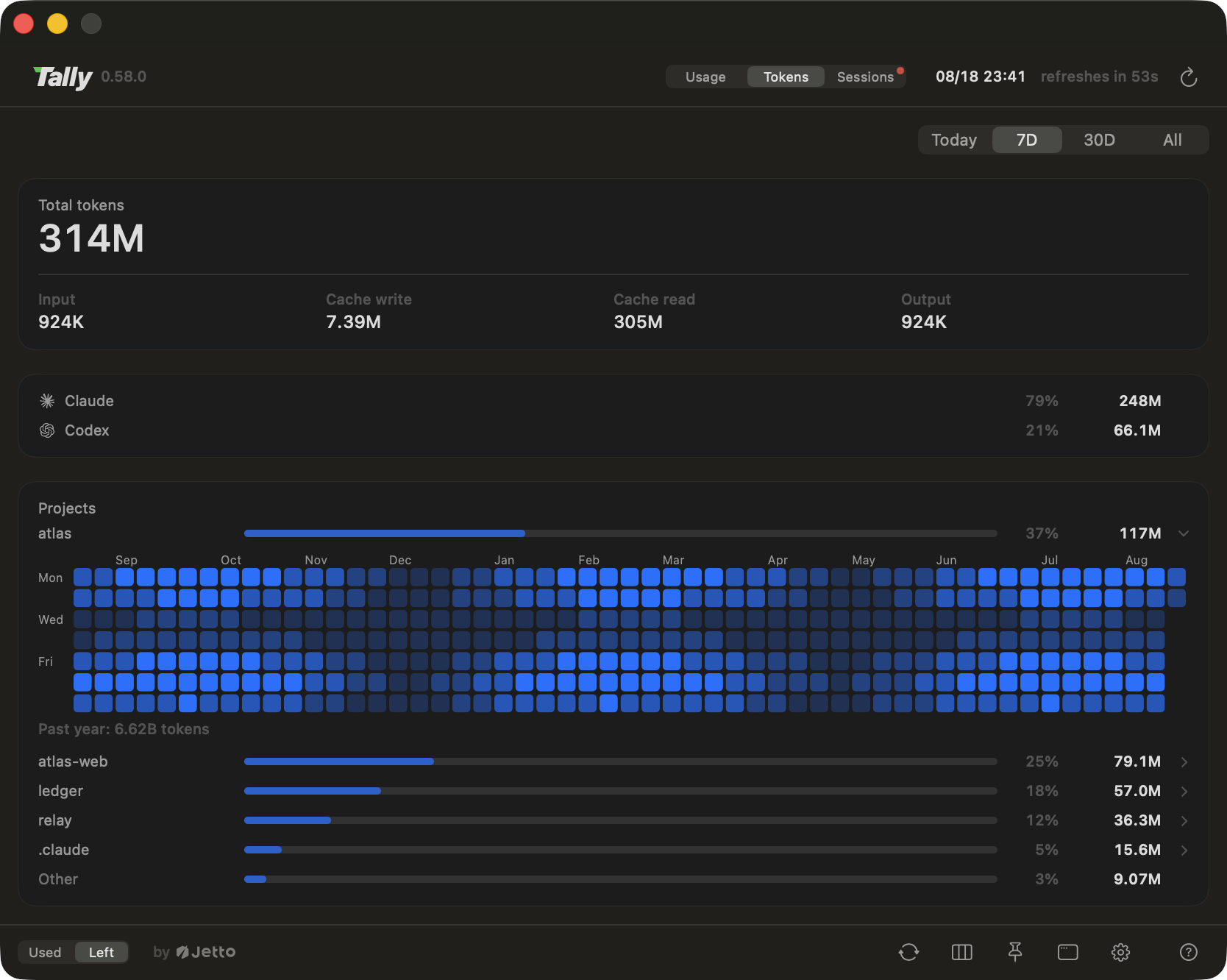
is how it comes back. A fleet too tall for the screen scrolls instead of falling off it. - Token usage, by project. A Tokens view behind a header switch on every surface: total
tokens over today / 7 days / 30 days / all time with the input, cache and output breakdown, a
per-provider split, and a per-project table that traces even agent and workflow sessions back
to the project they served. Click a project row and it opens into a year of daily activity, a
contribution-style heatmap graded on that project's own scale, with each day's total a hover
away. Read from the CLIs' own local transcripts, aggregated behind an incremental cache (a
refresh with nothing new costs well under a second), and it never leaves your machine. - Reset times everywhere. Every window shows its own reset; click any reset label to flip all of
them between countdown ("resets in 2d 4h") and exact time ("resets at 07/18 20:00"). - Login health at a glance. Hover a card for the account's signed-in email. Signed-out
accounts get a red chip and a notification; sessions that need/loginget their own warning
and a shortcut to open the affected session. When a Claude login deadline is available, Tally
warns within three days of expiry and when it has passed. Clicking to renew runs the provider's
official CLI sign-in in the background with browser consent (a visible Terminal is the fallback);
Tally does not directly modify credentials during that sign-in flow. - Add an account without leaving the app. Settings prepares the next account home, offers the
shared-harness default (one setup serving every account) with a plain privacy note, and drives
the same quiet sign-in; the new card appears when the browser hands back. An account you
already have can join the same shared harness later (tally share, or its row in Settings):
conversations, inbox and memory notes merge into the main account, nothing is deleted
(whatever is in the way is renamed and left in place), and the row says plainly what sharing
means: every account can then read every account's conversations. - Codex reset banking, visible and redeemable. Banked rate-limit resets show right on the
card ("3 resets available"), so you know your escape hatches before you hit a wall. Click to
redeem one, behind a confirmation that names the account, spells out the cost, and warns you
off when redeeming would mostly be wasted; the soonest-expiring credit goes first, and Tally
never spends one automatically.
The session board
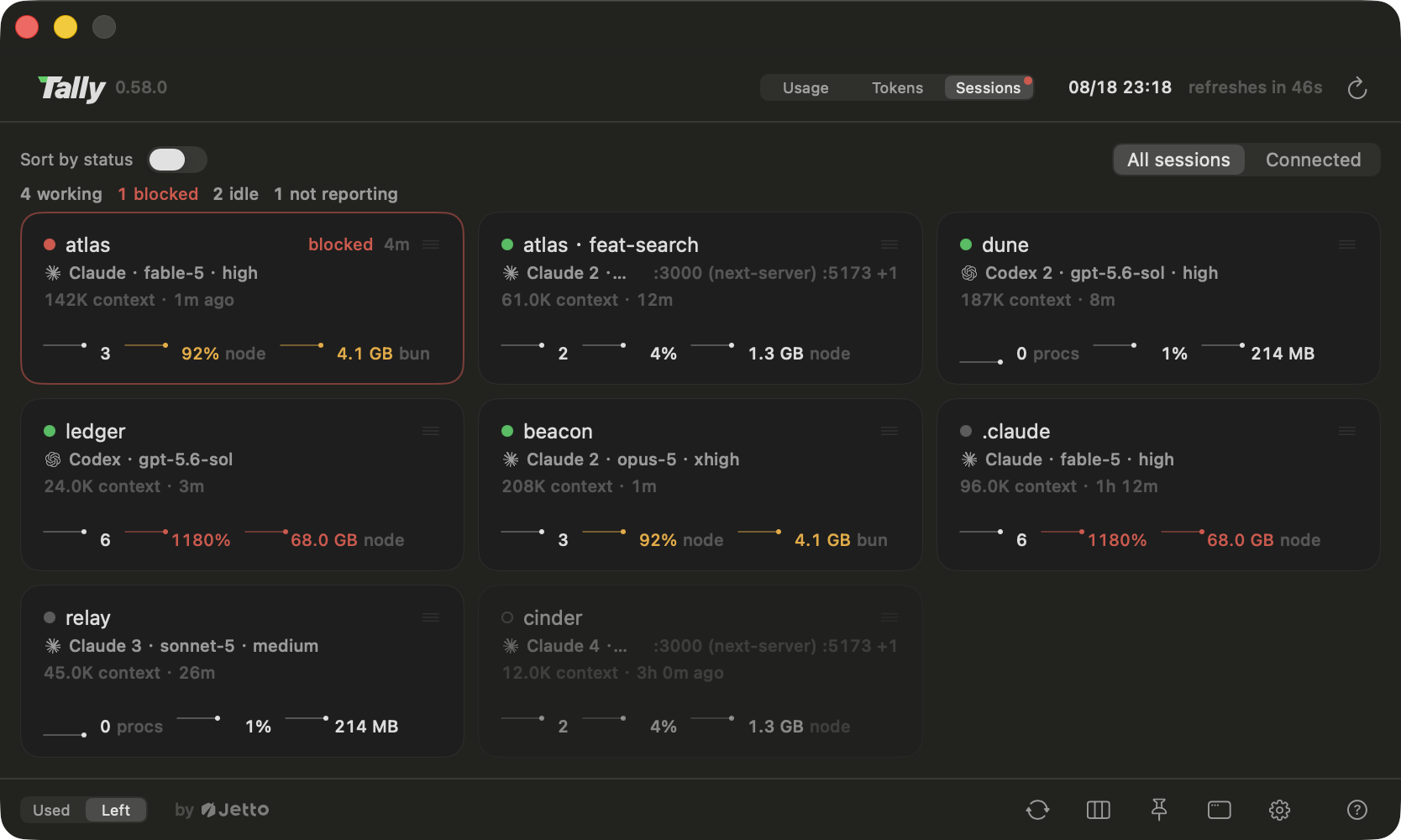
- Every conversation on one board. A third position on the header switch, next to Usage and
Tokens: one card per supervised session, saying what it is (account, model, effort, the
worktree it runs in), what it is doing right now, and how big the conversation has grown
("142k context"). Four states, published by the session's own supervisor rather than guessed
from the outside: working, blocked, idle, and an honest "not reporting" when nothing new
enough is attached. Click a card and Tally brings that session's terminal to the front.
Ghostty is the terminal Tally is built for and the one we recommend: the jump lands on the
exact tab, found by the session's own tty. On any other terminal the click still raises the
right app; exact-tab jumps for more terminals are on the roadmap. - Blocked means it is asking for you. The one state that needs a human, when Claude Code has
put up a permission request, a question, or a plan approval and nobody has answered, gets a
red card edge, a waiting timer, and a hover that spells out exactly what it wants ("Claude
needs your permission to use Bash"). A summary row counts working / blocked / idle / not
reporting across the whole board, and only the blocked count wears a color, only while it is
above zero. - A red dot even with the panel closed. The menu bar strip grows a small red dot the moment
any session is waiting on you, and drops it the moment none is; hover says how many. - What each session is costing the machine. Each card keeps a quarter hour of the whole
process tree under that session: CPU, memory and process count as sparklines with the current
figure and the period peak, the biggest eater named ("(bun)", "(Google Chrome Helper)"), plus
how many subagents it has out, which ports it is holding (the thing your nextpnpm devwill
collide with), and how fast it is writing to disk. Warnings key on mismatch, not size: a
session at 300% of a core mid-build is a build, while the same burn twenty seconds after the
turn ended is residue and gets an amber note; a session holding most of the machine's memory
gets a red one, and memory needs two witnesses (the tree's own figure plus the kernel's
pressure reading) before Tally says so. A reading must hold for seconds before a warning
appears, so one GC pause never flashes red. No other usage tool reads at the session level at
all, let alone the process level. - A board you can learn. Sort by status seats the cards the moment the board opens and
freezes them there (a board that re-sorted itself twice a second is a board nobody can learn);
drag one card and the order becomes yours. A filter narrows to connected sessions or shows
everything, dimming what is not reporting but keeping it clickable, and the board remembers a
column count of its own, separate from the dashboard's.
The launch control plane
Smart pick. New sessions start on the account whose binding quota window sustains the highest
spend rate: remaining percent divided by time to reset, across the 5-hour, weekly, and top-model
windows. Quota about to reset gets burned first (it would evaporate unused); quota that must last
days is preserved; hysteresis keeps noise-level differences from bouncing you between accounts.
The panel badge marks the current pick, with the reason in its tooltip.Three modes per provider. Smart (the algorithm decides at every launch), Manual (the circle
on a card pins that account; clicking the check releases it back to Smart, live, even for the
running session), or Off (a dashboard and nothing more).Mid-session follow-through. Hit a usage cap and tally resumes the same conversation on the
next-best account (3-per-10-minutes fuse; opt out with--no-handofforTALLY_AUTO_HANDOFF=0).
If the server silently downgrades your model, a sibling account that can still serve your primary
model takes the conversation over instead, and only when nobody can does your configured
fallback pairing apply. Non-urgent switches wait for a quiet moment between turns.Window boundaries are free moves. The moment you type
/clear, the conversation is empty:
no turn to interrupt, no context to reload, nothing to lose. So Tally asks the account
question again right there, once per unit of work rather than once per launch, and moves the
fresh window to the account with the most room when the one it is on is nearly dry. The
trigger is a fact, not a guess: Claude Code's own status line reports the new conversation id,
so a/clearswallowed by a prompt moves nothing.Early start. A 5-hour window only starts counting when you send something, so the day's
first reset lands five hours after you sit down, and every pause pushes the next one later.
Whenever a Claude account's window is closed, Tally opens it with one short message through the
official CLI, pinned to the cheapest model, so the clock runs while you sleep and resets land
earlier in your day. At most one message per account every 5 hours, an account already working
is left alone, and optional quiet hours keep it silent overnight. It never touches credentials,
tells you once before the first message ever goes out, and the settings row keeps the day's
honest tally: how many accounts started, were skipped on purpose, or could not start.The account that is running out says so. When an account's binding window drops under 15%,
Tally types one line into the composer of every session on it, naming the bottleneck window,
when it refills, how many sessions are sharing it, and which sibling account still has room:
"Wrap up and switch accounts, or wait for the reset." When no account has headroom it says
that instead, honestly. It re-arms at 30%, so an account hovering at the line speaks once, and
a window about to reset counts as full, because calling you off quota that is about to refill
would be working against you.Tell a running session what to do.
tally session send "<text>" --session <pid>sends one
line to the exact supervised terminal named by that session's supervisor or child PID intally status --json; it never uses the frontmost window. Claude keeps its existing send and
clear behavior. A Codex session advertises onlysendafter Tally has a trusted native binding,
a verified matching terminal, and a completed native turn. Codex accepts nonempty plain prompts
only, never slash commands, shell mode, or a bare Return. It queues while working, blocked, unknown, waiting
for permission, or while a person may be typing, then expires after 15 minutes. Quiet unexplained
input is refused immediately: send a real prompt in that exact Codex session, wait for it to
finish, then retry; clearing its composer alone cannot establish safety. Delivery is confirmed
only by Codex's matching new user message. A terminal write without that confirmation isunconfirmed-inputand is never retried automatically, including with custom Enter key mappings.
Monitoring-only Codex sessions require exit and relaunch throughtally codex. Requests are
limited to 200 UTF-8 bytes; served or refused outcomes are logged in~/.tally/logs/input.log.tally session clearremains the distinct Claude control that may reopen a cleared session on a healthier account.Parallel lines of work.
tally claude -w <name>opens the session in a git worktree,
creating../<repo>-<name>if needed, linking the project's Claude memory across, and running
the repo's own setup script; bare-wlists the existing lines to pick from.tally worktree tree / list / root / removeoversees them, andremoveretires a merged line cleanly: it
ends the line's sessions, removes the worktree and the branch, and keeps the transcripts
unless you say otherwise.Pin one conversation, or one repo.
tally account <name>moves the session you run it in
to another account at the end of the current turn, conversation intact, and keeps it there
untiltally account --autoreleases it.tally model <model> [effort]runs this one
conversation on that model for the rest of its life, surviving every relaunch (cap handoff,
reload, app update), which is what Claude Code's own/modelcannot promise once a supervisor
relaunches from its own command line.tally project set --model <m> [--account <n>]declares
what this repo, and every worktree of it, launches with; app defaults yield to it, flags you
type beat it. From inside Claude Code, the bundled/tallycommand switches the account or
the model without waking the model, and/tally-account//tally-modelwithout arguments
raise a native picker panel drawn by the app itself: one list, one click, and the answer goes
back to the CLI.Change your setup once, every session reloads.
tally reloadrestarts every supervised
session at its next quiet moment, so an edited hook, skill, or CLAUDE.md reaches every open
terminal without you walking them one by one. The conversation survives (the restart rides
the same resume path as a cap handoff), a session that is streaming or being typed into is
left alone, and a restart that is happening anyway also carries a session off an account that
is nearly dry.Launch defaults, in Settings. Default permission mode, start mode (continue vs new), model
and reasoning effort as one pairing, and a separate fallback pairing (fallback model + its own
effort + extra flags). Injected only when you didn't type the flag yourself: your own arguments
always win.Change the model once, every session follows. Re-point the default model or effort and
every running supervised session adopts it at its next quiet moment, resuming the same
conversation; no walking terminals to type/modelone by one. A model or effort you typed
yourself is never touched, and--no-followopts a session out.Shell integration. One click installs PATH shims so even bare
claude/codexcommands
follow your launch policy; one click removes them just as cleanly.Status line integration. Your Claude Code status line gains a purple ✦ Tally signal (this
session runs under Tally), the active account name, and the model and effort this session is
running; opt in to the full quota line and it carries the whole story in the app's own
palette: meter bars, percents and reset countdowns for the 5-hour window and this account's
weekly budget, following the panel's used/left toggle. The pooled fleet view stays in the app
and intally status, where there is room for it. An existing custom status line keeps running untouched with Tally's line appended,
is restored byte-for-byte on removal, and keeps working even if you delete Tally without
uninstalling.Claude Code skill. One click drops a small skill into every Claude account's skills
folder, teaching agent sessions to answer quota questions and pick accounts fromtally status --json(and to check the binding window before heavy multi-agent work);
removed just as cleanly. The same install adds the/tallycommand and registers the MCP
server behind the native picker panels.tallyCLI. Launch:tally claude [args…],tally claude --account <name>,tally claude -w <name>(worktrees),tally resume(move this directory's latest
conversation to another account),tally add <provider>(log in one more account: next free
number picked and the config directory created for you; the main account's harness,
CLAUDE.md/AGENTS.md, skills, hooks, agents, settings, and conversation history, is
symlinked in by default so one setup serves every account, opt out with--no-share),tally share(put an account you already have on that same harness). Inspect:tally status
(add--jsonfor a versioned machine-readable report: every account's windows, reset times,
which account a launch would land on right now, and what every supervised session is running,
ready for your own scripts, hooks, and agent skills),tally worktree tree|list|root,tally best-dir <provider>. Steer:tally account,tally model,tally project,tally session send|clear,tally reload. Maintenance:tally update,tally completion zsh,tally worktree remove. All script-friendly.Harness tools. Settings > Integrations > Harness installs or removes
the Tally harness skill and inbox reminders for both assistants together. Ask either
assistant to adapt the harness for your current project or user settings. Installing
the tools does not itself change project policy. Native hook trust needs separate
review. See the harness guide.
The chrome
- 5 languages. English, 繁體中文, 简体中文, 日本語, 한국어, switchable in-app, live.
- Native. Swift 6 + SwiftUI + AppKit, no Electron. The single third-party dependency is
Sparkle, the standard macOS update framework; one binary each
for the app and the CLI.
How it works (and what it never does)
- Usage via official CLIs. Usage is read through the providers' own official CLIs
(claude -p "/usage"andcodex app-server), which authenticate with their vendors and manage
their own credentials. Account discovery checks login attributes. One read-only exception is
Claude login deadline metadata: Tally temporarily reads the local credential document from
Keychain, or from.credentials.jsonwhen the Keychain item is absent, to extractrefreshTokenExpiresAt. Only dates leave this reader. It does not log, persist, or transmit
tokens, refresh logins, or modify credentials. - Read-only, with one named exception.
claude auth loginfinishes the OAuth round trip and
stops there, so a config home Tally created and signed in for you would still meet its first
session with the first-run wizard: a theme picker, and a request to sign in to the account that
just signed in. So after a login Tally itself drove (adding an account, or renewing one from a
card), it merges Claude Code's own note that the wizard is done,hasCompletedOnboarding, into
that one home's state file, and a home Tally creates is seeded with the folder-trust answers you
already gave on an existing account. A merge, never a replacement; a file it cannot parse is
refused rather than rewritten; a home that has been through the wizard is left byte for byte.
Never a credential, and never a scan for other homes to repair. - One poller, ever. Only the menu-bar app runs the CLIs (every minute by default,
relaxable to 2/5/15). Thetallylauncher reads a local snapshot
(~/.tally/snapshot.json: percentages and paths, never tokens), so opening ten terminals
costs zero extra reads. - Your own accounts only. Multi-account means your paid subscriptions on your machine.
Tally does not proxy, pool, share, or resell access, and account switching just launches the
official CLI with the config directory you already own. - Local only. No telemetry, no server, nothing leaves your machine except the provider usage
reads themselves.
Requirements
- macOS 14+
- Claude Code signed in; additional accounts are plain extra
config dirs (CLAUDE_CONFIG_DIR=~/.claude2 claudeand log in), and/or - Codex CLI signed in (
~/.codex)
Install
Download the latest notarized DMG from Releases,
drag Tally.app into Applications, and launch it. Updates arrive automatically in-app.
To use the tally CLI, link the copy bundled inside the app onto your PATH:
ln -s /Applications/Tally.app/Contents/Helpers/tally /usr/local/bin/tally
brew install xcodegen   # once
git clone https://github.com/jettoai/tally && cd tally
xcodegen generate
xcodebuild build -project Tally.xcodeproj -scheme Tally -configuration Release -destination 'platform=macOS'
xcodebuild build -project Tally.xcodeproj -scheme TallyCLI -configuration Release -destination 'platform=macOS'
Then move Tally.app from DerivedData to /Applications, and put the tally binary on your PATH:
ln -s <build-products>/tally /usr/local/bin/tally
Or skip the symlink and the aliases entirely: Settings → Integrations installs each piece
with one click and a clean removal, with an Install all switch over the set: the CLI tool, the
shell shims (bare claude / codex follow your policy), the status line signal, the session
board's notification hook, the subagent-count hooks, the quota warning hooks, the Artifact
publishing guard (a published artifact is private to the account that published it, so Tally holds
a publish going out under an account other than the one you browse with, and the row names that
account), and the Claude Code skill with its /tally command. Every hook row keeps the same
promise: whatever you already had registered on that event keeps running, and removal takes out
only Tally's own entry. Sharing an existing account's harness has a row here too, deliberately
left out of Install all: that one moves conversations between config homes, and a press meaning
"turn everything on" may not also mean that.
Optional shell sugar:
alias c='tally claude'
alias cc='tally claude --continue'
Localization
Tally ships in English, 繁體中文, 简体中文, 日本語, and 한국어, switchable live from Settings
with no relaunch. Every string lives in one Xcode String Catalog
(Tally/Resources/Localizable.xcstrings), so adding a
language is a single-file PR that fills in one more column. The bar is "reads like the OS, not
like a translation"; corrections to existing languages are as welcome as new ones.
Contributing
Issues and pull requests are welcome. To get building, follow "Build from source" above; two
conventions keep the project healthy:
project.ymlis the single source of truth;Tally.xcodeprojis generated by XcodeGen and
never edited by hand.- New user-facing strings go through the
L("…")helper and the String Catalog, with all five
languages filled in.
Keep each PR to one intent, and put the why in the description.
FAQ
How is Tally different from ccusage or other usage trackers?
Tools like ccusage are terminal CLIs that estimate token
spend from local logs, and most menu bar meters watch a single account. Tally is a native GUI
that shows the quota windows the vendors actually enforce (5-hour, weekly, top-model), across
multiple Claude and Codex accounts at once, and adds a launcher that acts on those numbers. The
Tokens view covers the "how much did I burn, and on what" question too, per project, straight
from the local transcripts, with no dollar guessing. And the session board goes a level deeper
than any of them: every running session as a card, who is blocked waiting on you, and what each
one is costing the machine, down to the process holding the memory. Read-only, on your own paid
subscriptions.
How does Tally handle Keychain access?
Usage comes through official CLIs, and account discovery probes attributes only. The Claude login
deadline reader also reads a credential document, but skips access when its preflight detects a
locked Keychain or does not establish that the reader is trusted; the deadline stays unknown.
Keychain state can change between that check and the read, so a permission prompt is still possible.
Signing in remains the official CLI's job; Tally's sign-in flow does not directly modify credentials.
What happens when every account is capped?
Nothing dramatic: the dashboard shows it, tally claude warns and launches the bare CLI, and
auto-handoff stays put rather than looping.
Does auto-handoff lose my conversation?
No: it resumes the same session transcript on the next account (additively; your original
transcript is never modified). An interrupted tool call may re-run once after the switch.
Will the status line integration break my custom status line?
No. Your own command keeps running exactly as before, fed the same session JSON; Tally only
appends its signal, skips the account name if you already show one, restores your original
registration byte-for-byte on removal, and falls back to running your command directly if the
tally binary ever disappears.
Acknowledgments
Tally builds on a trail mapped by some excellent projects:
- ccusage pioneered turning Claude Code's local logs into
usage insight, and showed how much developers want to see their numbers. - OpenUsage and
AIUsage proved the at-a-glance menu bar meter; Tally
exists because we wanted that glance across many accounts at once. - Sparkle powers the in-app updates.
License
Reviews (0)
Sign in to leave a review.
Leave a reviewNo results found