monofield
Health Uyari
- License — License: Apache-2.0
- Description — Repository has a description
- Active repo — Last push 0 days ago
- Low visibility — Only 5 GitHub stars
Code Basarisiz
- rm -rf — Recursive force deletion command in .claude/skills/od-contribute/install.sh
Permissions Gecti
- Permissions — No dangerous permissions requested
Bu listing icin henuz AI raporu yok.
MonoField (모노필드) — local-first AI workbench for code, builds, browser verification, design, and documents.
MonoField
code / design / documents
One workspace, every kind of work
Website · Download for Windows · Latest release · Open-source notices





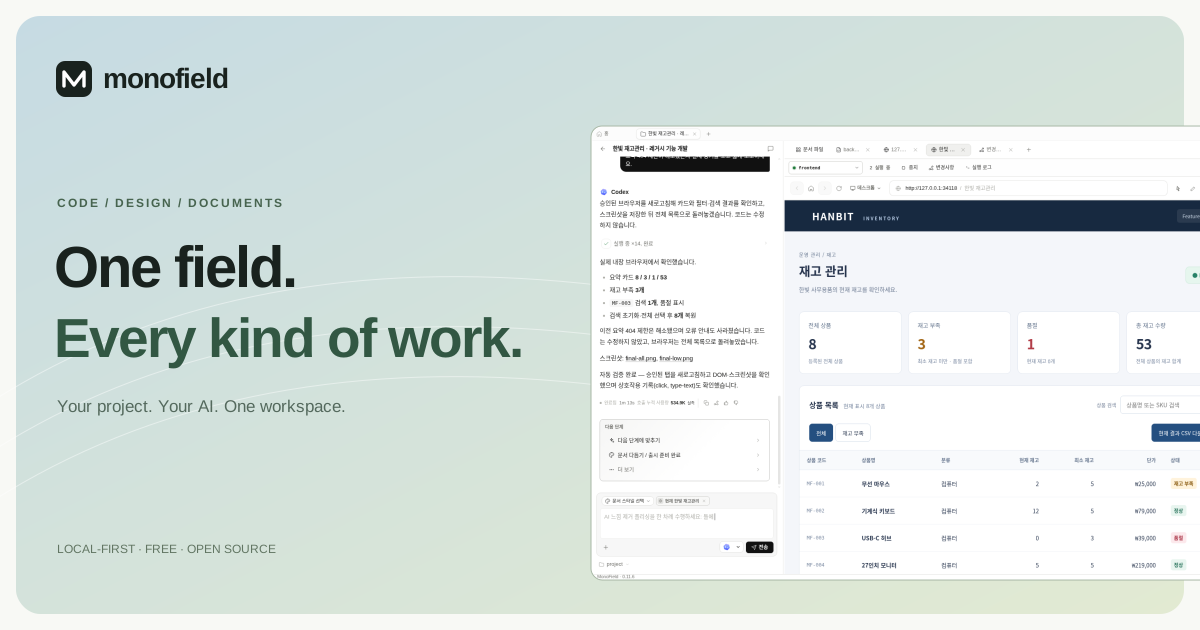
MonoField is a local-first desktop workbench for people who need to move from a
request to a result without losing the project context along the way. The
working folder, Git changes, run configuration, live browser, governed database
access, references, and deliverables stay attached to one project.
connect                         work                         prove
folder · files · browser     →  ask · edit · run          →  diff · build · UI check
database · rules · brand        compose · review · export    code · XLSX · PPTX · PDF
한국어 소개 — MonoField는 작업 폴더, Git 변경사항, 실행 화면, 승인된
데이터베이스, 참고 자료와 산출물을 하나의 프로젝트에 연결합니다. 코드 수정부터
인터페이스·화면 명세서, 프로토타입, 슬라이드와 export까지 같은 근거를 사용하고,
diff·빌드·브라우저 검증으로 결과를 확인합니다.
Two ways to work
| Software development | Documents / design | |
|---|---|---|
| Start with | A codebase or multi-project workspace | A brief, source files, code, browser evidence, or an empty draft |
| Work with | Git diff, discovered run configs, terminal and server logs, in-app browser, governed DB access | Brand systems, dictionaries, references, structured editors, previews and comments |
| Deliver | Reviewed code with build/test and UI evidence | Interface specs, screen specs, responsive pages, prototypes, decks, spreadsheets, PDFs and media |
The two project modes do not lock the conversation. Use Ask for explanation,
analysis, and review; use Docs when the task should produce or revise a
structured deliverable.
What makes it useful
- The folder is the execution boundary. The selected project is the root
used by the agent, run configuration, Git view, browser, and database policy. - The result stays reviewable. Compare before and after, inspect build and
test results, then verify the running interaction in an approved browser tab. - Database access is explicit. Credentials stay in the encrypted Desktop
vault; each project or module uses a selected read/write policy and audit
trail. - Documents can use real evidence. Generate interface and screen
specifications from selected code, browser state, approved schema, files,
dictionaries, and brand rules—then review and export the result. - Interface specs follow code changes. Analyze Git changes, prepare an AI
update request, compare the proposed fields, and apply a reviewed draft.
Field references and review states remain in JSON, XLSX, and HTML previews.
See the document change review guide.
PostgreSQL schema monitoring follows recorded database/API/screen dependencies
and shows the affected paths. See schema monitoring.
Native Codex development chat avoids app prompt overhead when no extra context is selected;
document updates support small change proposals. See token efficiency. - Guidance is built in. First-run onboarding is followed by a seven-step
development walkthrough or a four-step documents/design walkthrough. Both can
be opened again from the product guide. - Optional decision models. Configure hosted TypeSafe/JEV or a compatible
local server for typed classification, scoring, and uncertainty. The local
Laya option runs without a TypeSafe key; it is a separate model. See the
decision model guide. - Check the code you are reviewing. Run discovered project checks from the
Changes view, keep real exit codes and logs with a source fingerprint, and
prepare a repair request in your existing agent's composer. Changed source
invalidates old success. The same flow is available throughmonofield verify;
see change verification.
Runtime capability boundary
MonoField can connect to supported local CLI agents and to BYOK / OpenAI-
compatible endpoints, but these are not identical execution paths.
- A capable local CLI adapter can work against the selected project root and
participate in file edits, terminal commands, Git, browser verification, and
governed database workflows. - BYOK and OpenAI-compatible endpoints are available for conversation and
document generation. They do not automatically inherit Desktop file,
terminal, browser, or database tools. - Tool and model coverage depends on the installed adapter and its current
version. A detected third-party CLI should not be assumed to have full parity
with Codex, Claude Code, Gemini CLI, or OpenCode until its capabilities are
shown and verified in MonoField.
This boundary is displayed because the model is the engine—not the security or
tooling boundary.
Install
- Windows installer
- Portable package
- Release notes and checksums
- Microsoft Store — shown on the MonoField website
after the public listing is certified
The installer link downloads the EXE directly from the latest GitHub Release.
The current public Desktop build targets Windows 10/11. Direct-download builds
are unsigned, so Windows can show an unrecognized-publisher warning; verify the
download with the release's SHA256SUMS.txt. See
the user guide
for illustrated setup and real workflows.
Installed Desktop builds check the public release feed in the background. When
a newer version is available, MonoField shows a once-per-version update notice
with the release notes, direct download, and an optional GitHub Star link. If
Desktop notifications are enabled, the same notice can appear through Windows
while MonoField is in the background.
Run from source
Requirements: Node.js 24, pnpm 10.33.x, and at least one supported local CLI
agent for the complete development workflow.
# Windows native (run once; Corepack may require elevated Program Files access)
npm install -g [email protected]
pnpm install
pnpm build:web
pnpm dev:desktop
pnpm tools-dev status --json
Pick a working folder in MonoField to make it the active project root. Useful
focused checks:
pnpm check:contracts
pnpm check:web
pnpm build:web
pnpm check:daemon
The product and Desktop app are MonoField. The command-line entry point ismonofield.
Security and data boundary
Project files stay in the working folder you choose. Stored credentials are
referenced by connection ID and remain in the encrypted Desktop vault; they are
not inserted into model prompts. Database access follows the selected policy,
and writes require the corresponding permission or approval.
Local-first does not mean an external provider receives nothing. When you
choose an external runtime, the prompt and context explicitly sent for that run
are processed under that provider's terms. Review the provider, project policy,
and selected context before using confidential data.
See PRIVACY.md and SECURITY.md for the complete
boundary and reporting process.
Repository map
apps/
  daemon/          local API, agent runtimes, Git, DB and document services
  desktop/         Electron shell, encrypted vault and in-app browser
  web/             product UI
  monofield-site/  public website
packages/
  contracts/       shared API and prompt contracts
  components/      reusable UI primitives
plugins/           official and community workflows
tools/             development, packaging and release tooling
Open source and attribution
MonoField is an independent derivative of the Apache-2.0 licensed
Open Design project. It is not
affiliated with, endorsed by, or maintained by that project.
Required upstream and third-party notices remain in LICENSE,
NOTICE, and THIRD_PARTY_NOTICES.md. Release
requirements are documented in
docs/open-source-compliance.md.
If MonoField helps
If the project saved you a tool switch, made a change easier to verify, or gave
you a useful way to connect code with documents, please
star MonoField on GitHub. It helps other
people find the project and gives the maintainers a clear signal to keep going.
MonoField가 실제 작업에 도움이 됐거나 방향이 마음에 들었다면
GitHub Star로 응원해 주세요. 더 많은
사람이 프로젝트를 발견하고 계속 개선하는 데 큰 힘이 됩니다.
One workspace, every kind of work
Yorumlar (0)
Yorum birakmak icin giris yap.
Yorum birakSonuc bulunamadi