renderdoc-mcp
Health Uyari
- License — License: MIT
- Description — Repository has a description
- Active repo — Last push 0 days ago
- Low visibility — Only 5 GitHub stars
Code Gecti
- Code scan — Scanned 2 files during light audit, no dangerous patterns found
Permissions Gecti
- Permissions — No dangerous permissions requested
Bu listing icin henuz AI raporu yok.
An MCP server for RenderDoc: Empowering AI assistants to analyze GPU frame captures and debug graphics pipelines.
renderdoc-mcp

English | 中文
MCP (Model Context Protocol) server for GPU render debugging. Enables AI assistants (Claude, Codex, etc.) to analyze RenderDoc capture files (.rdc) through a standard MCP interface.
Features
- 20 MCP tools covering the full GPU debugging workflow
- Open and analyze
.rdccapture files (D3D11 / D3D12 / OpenGL / Vulkan) - List draw calls, events, render passes with filtering
- Inspect pipeline state, shader bindings, resource details
- Get shader disassembly and reflection data, search across shaders
- Export textures, buffers, and render targets as PNG/binary
- Performance stats, debug/validation log messages
- Automatic parameter validation with proper JSON-RPC error codes
Prerequisites
- Windows (MSVC compiler with C++17)
- CMake >= 3.16
- RenderDoc source code and build output (
renderdoc.lib+renderdoc.dll)
Download
Prebuilt Windows x64 binaries can be downloaded from the GitHub Releases page.
Each release zip includes:
renderdoc-mcp.exerenderdoc.dll- the extra RenderDoc runtime DLLs needed beside the executable
- license files
Keep all bundled files in the same directory as renderdoc-mcp.exe.
Build
# Basic (auto-detect renderdoc build output)
cmake -B build -DRENDERDOC_DIR=D:/renderdoc/renderdoc
cmake --build build --config Release

# Explicit build directory
cmake -B build \
  -DRENDERDOC_DIR=D:/renderdoc/renderdoc \
  -DRENDERDOC_BUILD_DIR=D:/renderdoc/renderdoc/build
cmake --build build --config Release
CMake Variables
| Variable | Required | Description |
|---|---|---|
RENDERDOC_DIR |
Yes | Path to renderdoc source root |
RENDERDOC_BUILD_DIR |
No | Path to renderdoc build output (if not in standard locations) |
Build output: build/Release/renderdoc-mcp.exe
Ensure renderdoc.dll is in the same directory as the executable. CMake will copy it automatically if found.
Client Configuration
Claude Code
Add to your Claude Code MCP settings (settings.json):
{
  "mcpServers": {
    "renderdoc": {
      "command": "D:/renderdoc/renderdoc-mcp/build/Release/renderdoc-mcp.exe",
      "args": []
    }
  }
}
Codex / Other MCP Clients
Any MCP client that supports stdio transport can use renderdoc-mcp. Point it to the executable path.
Demo
Example user-facing interaction with the bundled tests/fixtures/vkcube.rdc sample:
User: What information is inside vkcube.rdc?

AI: I inspected the capture through renderdoc-mcp. Here's a quick summary:

- It is a Vulkan capture with 6 events and 1 draw call.
- The main draw call is `vkCmdDraw()` at event 11, drawing 36 indices with 1 instance.
- At that event, the pipeline uses vertex shader `ResourceId::111` and fragment shader `ResourceId::112`, both with entry point `main`.
- The active render target is `ResourceId::130` in `R8G8B8A8_UNORM`, with a 500x500 viewport.
- The VS stage has a constant buffer `ubuf` (1216 bytes, 3 variables), and the PS stage reads a texture `tex` at bind point 1.
- The capture also includes a 256x256 `R8G8B8A8_SRGB` texture (`ResourceId::97`) and a 500x500 `D16` depth attachment (`ResourceId::153`).
- The capture log is clean: no debug/validation messages were reported.

If you want, I can also export the render target, inspect shader reflection, or list more resources.
Behind that answer, the AI can drive the MCP server with calls like:
open_capture({"path":"D:/renderdoc/renderdoc-mcp/tests/fixtures/vkcube.rdc"})
get_capture_info({})
list_draws({"limit":10})
goto_event({"eventId":11})
get_pipeline_state({})
get_bindings({})
list_resources({"type":"Texture"})
get_log({})
The same workflow can export the rendered result from event 11:
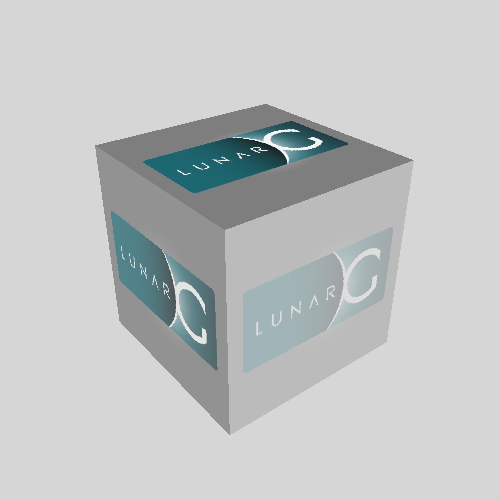
Tools (20)
Session
| Tool | Description |
|---|---|
open_capture |
Open a .rdc file for analysis. Returns API type and event count. |
Events & Draws
| Tool | Description |
|---|---|
list_events |
List all events with optional name filter |
goto_event |
Navigate to a specific event by ID |
list_draws |
List draw calls with vertex/index counts, instance counts |
get_draw_info |
Get detailed info about a specific draw call |
Pipeline & Bindings
| Tool | Description |
|---|---|
get_pipeline_state |
Get pipeline state (shaders, RTs, viewports). Supports optional eventId param. |
get_bindings |
Get per-stage resource bindings (CBV/SRV/UAV/samplers) from shader reflection |
Shaders
| Tool | Description |
|---|---|
get_shader |
Get shader disassembly or reflection data for a stage (vs/hs/ds/gs/ps/cs) |
list_shaders |
List all unique shaders with stage and usage count |
search_shaders |
Search shader disassembly text for a pattern |
Resources
| Tool | Description |
|---|---|
list_resources |
List all GPU resources with type/name filtering |
get_resource_info |
Get detailed resource info (format, dimensions, byte size) |
list_passes |
List render passes (marker regions with draw calls) |
get_pass_info |
Get pass details including contained draw calls |
Export
| Tool | Description |
|---|---|
export_render_target |
Export current event's render target as PNG |
export_texture |
Export any texture by resource ID as PNG |
export_buffer |
Export buffer data to binary file |
Info & Diagnostics
| Tool | Description |
|---|---|
get_capture_info |
Get capture metadata: API, GPUs, driver, event counts |
get_stats |
Performance stats: per-pass breakdown, top draws, largest resources |
get_log |
Debug/validation messages with severity and event filtering |
Tool Details
open_capture
Parameters:
| Name | Type | Required | Description |
|---|---|---|---|
path |
string | Yes | Absolute path to the .rdc file |
Response:
{ "api": "D3D12", "eventCount": 1247 }
list_draws
Parameters:
| Name | Type | Required | Description |
|---|---|---|---|
filter |
string | No | Filter by name keyword |
limit |
integer | No | Max results (default 1000) |
Response:
{
  "draws": [
    { "eventId": 42, "name": "DrawIndexed(360)", "flags": "Drawcall|Indexed", "numIndices": 360, "numInstances": 1, "drawIndex": 0 }
  ],
  "count": 1
}
get_shader
Parameters:
| Name | Type | Required | Description |
|---|---|---|---|
stage |
string | Yes | Shader stage: vs, hs, ds, gs, ps, cs |
eventId |
integer | No | Event ID (uses current if omitted) |
mode |
string | No | disasm (default) or reflect |
Response (disasm):
{ "stage": "ps", "eventId": 42, "disassembly": "ps_5_0\ndcl_globalFlags..." }
Response (reflect):
{
  "stage": "ps",
  "inputSignature": [...],
  "constantBlocks": [...],
  "readOnlyResources": [...],
  "readWriteResources": [...]
}
get_pipeline_state
Parameters:
| Name | Type | Required | Description |
|---|---|---|---|
eventId |
integer | No | Event ID to inspect (uses current if omitted) |
Response (D3D12 example):
{
  "api": "D3D12",
  "eventId": 42,
  "vertexShader": { "resourceId": "ResourceId::15", "entryPoint": "VSMain" },
  "pixelShader": { "resourceId": "ResourceId::16", "entryPoint": "PSMain" },
  "renderTargets": [{ "index": 0, "resourceId": "ResourceId::7", "format": "R8G8B8A8_UNORM" }],
  "viewports": [{ "x": 0.0, "y": 0.0, "width": 1920.0, "height": 1080.0 }]
}
For OpenGL and Vulkan captures, the pixel shader key is
fragmentShader.
get_bindings
Parameters:
| Name | Type | Required | Description |
|---|---|---|---|
eventId |
integer | No | Event ID (uses current if omitted) |
Response:
{
  "api": "D3D12",
  "stages": {
    "vs": {
      "shader": "ResourceId::15",
      "bindings": {
        "constantBuffers": [{ "name": "CBScene", "bindPoint": 0, "byteSize": 256 }],
        "readOnlyResources": [{ "name": "diffuseMap", "bindPoint": 0 }]
      }
    }
  }
}
list_resources
Parameters:
| Name | Type | Required | Description |
|---|---|---|---|
type |
string | No | Filter by type: Texture, Buffer, Shader, etc. |
name |
string | No | Filter by name keyword |
Response:
{
  "resources": [
    { "resourceId": "ResourceId::7", "name": "SceneColor", "type": "Texture", "format": "R8G8B8A8_UNORM", "width": 1920, "height": 1080 }
  ],
  "count": 1
}
export_texture
Parameters:
| Name | Type | Required | Description |
|---|---|---|---|
resourceId |
string | Yes | Resource ID (e.g. ResourceId::123) |
mip |
integer | No | Mip level (default 0) |
layer |
integer | No | Array layer (default 0) |
export_buffer
Parameters:
| Name | Type | Required | Description |
|---|---|---|---|
resourceId |
string | Yes | Resource ID |
offset |
integer | No | Byte offset (default 0) |
size |
integer | No | Byte count, 0 = all (default 0) |
get_log
Parameters:
| Name | Type | Required | Description |
|---|---|---|---|
level |
string | No | Minimum severity: HIGH, MEDIUM, LOW, INFO |
eventId |
integer | No | Filter by event ID |
Typical Workflow
1. open_capture        → Open a .rdc file
2. get_capture_info    → Check API, GPU, event counts
3. list_draws          → Find draw calls of interest
4. goto_event          → Navigate to a draw call
5. get_pipeline_state  → Inspect shaders, render targets, viewports
6. get_bindings        → See resource bindings per shader stage
7. get_shader          → Read shader disassembly or reflection
8. export_render_target → Save render target as PNG
9. get_log             → Check for validation errors
Protocol Details
| Property | Value |
|---|---|
| Transport | stdio (stdin/stdout) |
| Message format | Newline-delimited JSON-RPC 2.0 |
| MCP version | 2025-03-26 |
| Batch support | Yes (receive); initialize forbidden in batch |
| Logging | stderr |
Architecture
AI Client (Claude/Codex)
    |
    | stdin/stdout (JSON-RPC, newline-delimited)
    |
renderdoc-mcp.exe
    ├── McpServer        (protocol layer)
    ├── ToolRegistry     (tool registration + parameter validation)
    ├── RenderdocWrapper  (session state management)
    └── tools/*.cpp      (20 tool implementations)
    |
    | C++ dynamic linking
    |
renderdoc.dll (Replay API)
Single-process, single-threaded. One capture session at a time. ToolRegistry provides automatic inputSchema validation (required fields, type checking, enum validation) with proper JSON-RPC -32602 error responses.
Manual Testing
# Initialize
echo '{"jsonrpc":"2.0","id":1,"method":"initialize","params":{"protocolVersion":"2025-03-26","capabilities":{},"clientInfo":{"name":"test","version":"1.0"}}}' | renderdoc-mcp.exe

# List tools
echo '{"jsonrpc":"2.0","id":2,"method":"tools/list"}' | renderdoc-mcp.exe
License
This project is licensed under the MIT License.
RenderDoc itself is licensed under its own terms. See renderdoc license.
Yorumlar (0)
Yorum birakmak icin giris yap.
Yorum birakSonuc bulunamadi