floe-agent
Health Uyari
- License — License: MPL-2.0
- Description — Repository has a description
- Active repo — Last push 0 days ago
- Low visibility — Only 5 GitHub stars
Code Basarisiz
- exec() — Shell command execution in FloeAgent/FloeApp/Resources/js-packages/lodash.min.js
Permissions Gecti
- Permissions — No dangerous permissions requested
Bu listing icin henuz AI raporu yok.
Floe — a native iOS/iPadOS AI agent workspace for iPhone and iPad, built for private bring-your-own-key workflows.

Floe Agent for iPhone & iPad
Floe — Native iOS AI Agent
Your models. Your files. Your machines.
A private, bring-your-own-key AI agent workspace built natively for iPhone and iPad.
简体中文 · Website · User guide · Releases · Security




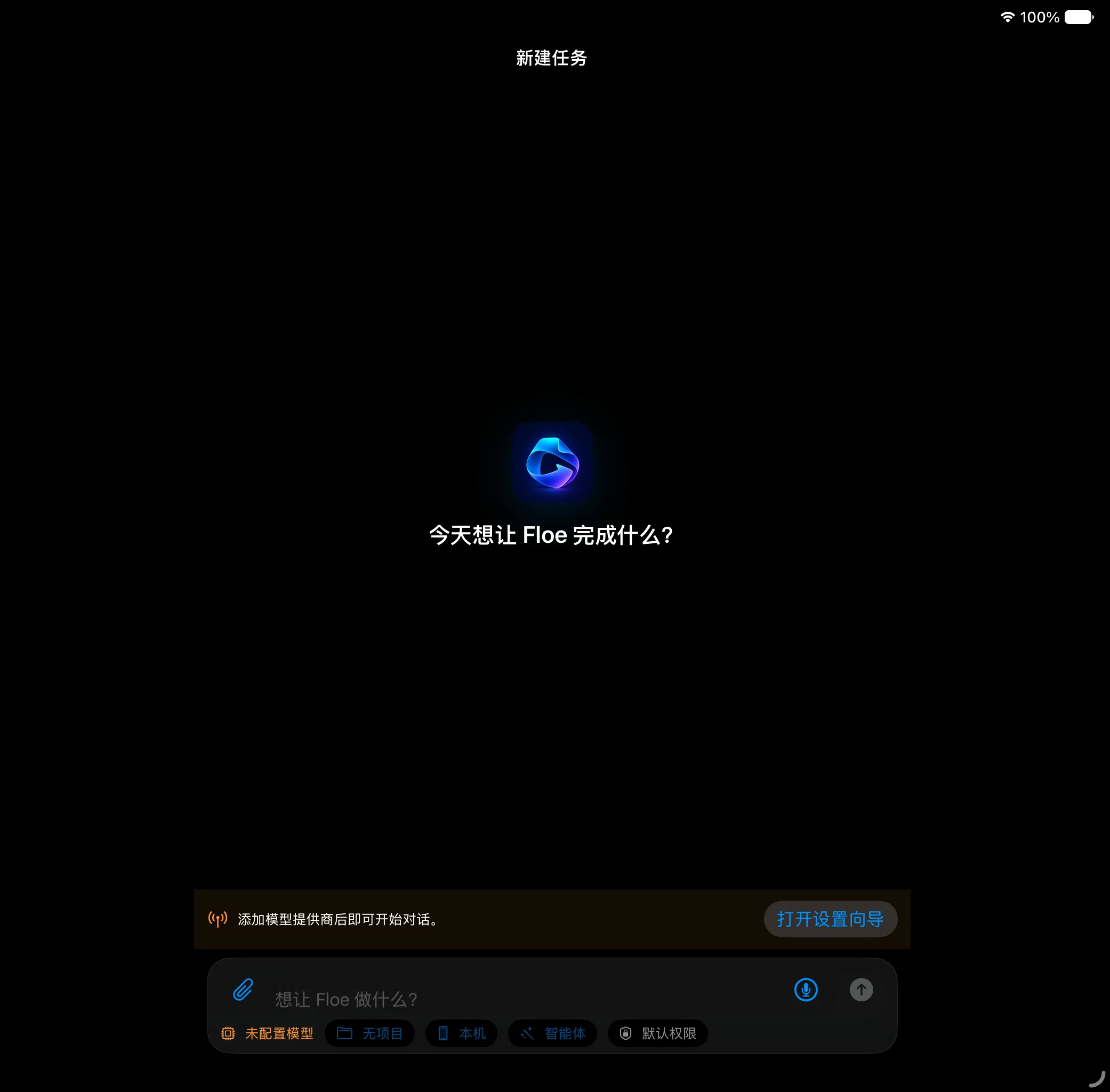
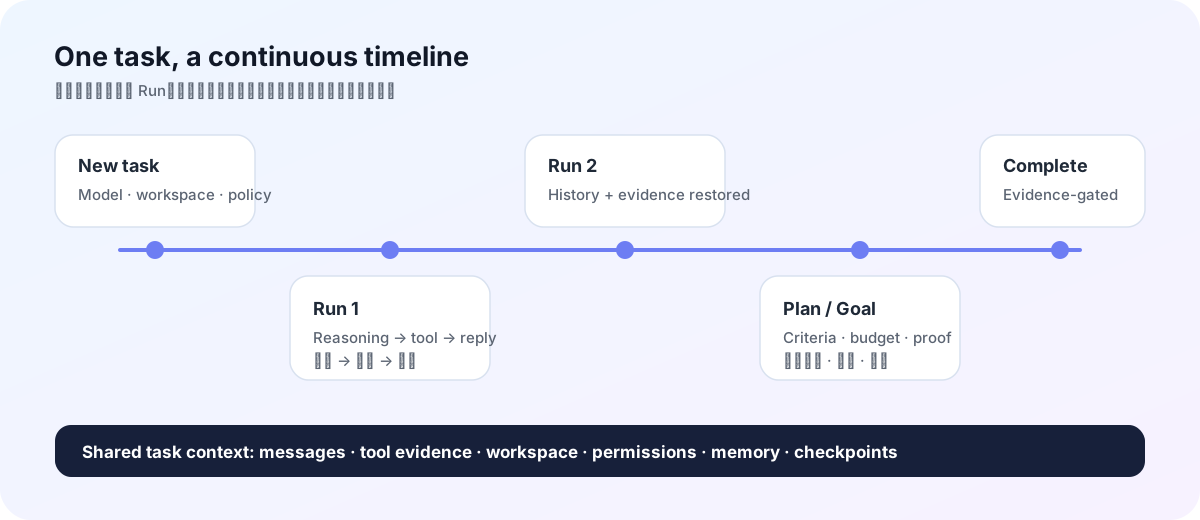
Floe Agent turns a model conversation into a durable task. Each message continues the same task, while every model execution becomes a separate run with its own progress, tool evidence, approvals, checkpoints, and recovery state. A task can use an app-managed private workspace or an explicitly selected project workspace.
Why Floe Agent
- Bring your own models. Connect compatible providers with credentials you control. Agent, vision, image-generation, and image-editing roles can be configured independently.
- Run on device when it fits. Use the iOS 27 Apple Foundation Model or downloaded MLX models. Local models have their own context and memory policy, while cloud-model context and tools remain unchanged.
- Keep work inspectable. Reasoning previews, tool calls, file changes, browser state, child agents, approvals, and errors live in one continuous timeline.
- Work where the files are. Use Files workspaces, local image tools, SSH terminals, jump hosts, VNC, and a visible WebKit browser without a Floe-operated relay.
- Build visual workflows inside the workspace. Each workspace can open one native infinite-canvas project with multiple canvases, direct touch navigation, editable content nodes, explicit generation-task nodes, artifact nodes, in-place node AI, and a scoped Canvas Assistant.
- Connect standard MCP servers. Add optional Streamable HTTP servers for ordinary Agent runs; every remote tool remains namespaced, locally policy-checked, and disabled for canvas by default.
- Manage source without leaving the workspace. Inspect changes and diffs, initialize a repository, stage, commit, branch, fetch, fast-forward pull, push, and connect GitHub from a lightweight native source-control surface.
- Create and revise Office files. Build DOCX, XLSX and PPTX files locally, preview them first, then open Floe's basic native editor for manual text, cell/formula, slide and speaker-note changes without uploading the document.
- Approve consequential actions. Task policies narrow file, network, browser, upload, credential, and remote-execution authority. Sensitive actions still require explicit confirmation.
- Resume honestly. Checkpoints, notifications, and background coordination preserve safe progress. iOS suspension and uncertain side effects are reported instead of hidden.
- Extend with audited skills. Skill Creator and Skill Finder install validated instruction and knowledge packages. A skill may bundle bounded UTF-8 Python scripts and exact-version pure-Python wheels: Floe audits them once at creation or installation, then permits only identical script and dependency fingerprints to run without repeated prompts. Native code, install hooks, changed code, and silent tool grants remain blocked.
- Automate with Apple platforms. App Intents expose immediate and scheduled Floe tasks to Shortcuts, while device-local controls govern Calendar, Reminders, Home, Maps, vision, documents, camera, location, and related integrations.
The task model
flowchart LR
    A["New task draft"] -->|"Send first message"| B["Task / conversation"]
    B --> C["Run 1"]
    B --> D["Run 2"]
    B --> E["Run N"]
    C --> F["Messages · tools · evidence"]
    D --> G["Plan · goal · memory"]
    E --> H["Checkpoint · recovery"]
    B --> I["One workspace owner"]
    I --> J["Private task workspace"]
    I --> K["Selected project workspace"]
The app normally opens directly into New Task. Sending the first message creates the task, workspace ownership, initial run, user message, attachments, and task policy atomically. Later messages create new runs inside the same task, so context does not fragment into unrelated jobs.
Get started
TestFlight
Signed builds are distributed through TestFlight when a testing group is available. The current source target is Floe Agent 1.4.86 (build 117); consult Releases and TestFlight for builds that actually completed every release gate. A source version or tag alone does not prove that Apple received or processed a build.
Unsigned IPA
GitHub prereleases include an unsigned IPA for advanced testers and downstream packagers:
- Download the IPA and
.sha256file from Releases. - Verify the checksum before opening or re-signing it.
- Inspect the source and attached SBOM, license inventory, test summary, and provenance.
- Sign the IPA with your own certificate and provisioning profile using a tool you trust.
[!WARNING]
The GitHub IPA is not the TestFlight/App Store package and cannot normally be installed as downloaded. Floe Agent does not provide signing certificates or a sideloading service.
Build from source
Requirements: macOS, a full Xcode installation with the iOS 26 SDK or newer, Swift 6.2+, and XcodeGen. Xcode 27 is required to compile the iOS 27 Foundation Models path used by the current release target.
git clone https://github.com/JiangNanGenius/floe-agent.git
cd floe-agent/FloeAgent
brew install xcodegen
xcodegen generate
scripts/local_build.sh
For focused checks:
swift build
swift test
DEVELOPER_DIR=/Applications/Xcode.app/Contents/Developer \
  xcodebuild -project FloeAgent.xcodeproj -scheme FloeAgent \
  -destination 'generic/platform=iOS Simulator' build
See the English user guide, 简体中文使用指南, and developer README for the complete setup path.
Core surfaces
| Surface | Purpose |
|---|---|
| New Task | Choose a model, workspace, execution target, skills, and task permissions before the first message. |
| Task thread | Continue the same conversation across runs and inspect reasoning, tools, evidence, questions, and approvals. |
| Task Center | Filter running, waiting, approval-required, failed, completed, and scheduled tasks. |
| Inspector | Review changes, files, browser, terminal/host, progress, and child agents. It is collapsed by default; current-task permissions live only below the chat composer. |
| Visible browser | Automate a real WKWebView, then hand control to the user for login, QR codes, verification, uploads, or other trusted interaction. |
| Source Control | Review repository status, diffs and history; stage, commit, branch and synchronize without destructive reset, clean, force-push or history rewriting. |
| Workspace Canvas | Arrange content → task → artifact flows on a native infinite surface. Refine a selected node in place with AI, save generation settings, then explicitly start and monitor the task. |
| Standard MCP | Connect optional Streamable HTTP tool servers for ordinary Agent runs, with per-server and per-tool controls. |
| Settings | Configure providers, auxiliary models, task defaults, execution, files, sync, remote hosts, data controls, and diagnostics. |
Models and image providers
The system-owned Apple Foundation Model appears in Settings → Local Models on every device. On iOS/iPadOS 27 it uses the Foundation Models framework and reports the system's real availability state, including device eligibility, Apple Intelligence being disabled, or the model still downloading. There is no API-key or model-download setting because iOS owns both. It answers ordinary conversation directly rather than requiring every turn to be phrased as an action. Downloaded Qwen and Gemma MLX models are separate: Floe checks safe load headroom, keeps at most one resident model, uses quantized device-budgeted KV/prefill settings, releases transient MLX caches after each generation, and supplies a bounded catalog of real task tools. All on-device models run in text-only mode to avoid loading a vision projector. Attached images are transcribed with Apple Vision OCR into a task-workspace text file; PDF inspection, rendering and OCR remain available, while semantic image.inspect is reserved for compatible cloud models.
Every enabled model has a separate Hide from primary model picker switch. It is off by default. Hiding a model removes it only from the New Task/Home model menu, so it can remain configured for auxiliary roles, internal routing and existing tasks.
OpenAI image generation/editing defaults to gpt-image-2. Google Gemini Images includes Nano Banana Pro (gemini-3-pro-image). Both provider entries accept an editable Base URL for compatible proxies; generation, editing and vision remain separate roles.
Workspaces, Git and approvals
Private task workspaces are created and bound atomically with the first message. Project workspaces retain their explicit Files scope. The Files inspector includes a lightweight Source Control tab, while Settings → GitHub & Source Control supports GitHub's official device authorization flow plus fine-grained token fallback. Credentials remain in the device Keychain, with repository listing, cloning, and creation available after connection.
Routine bounded reads, local workspace operations, image generation/inspection, OCR, read-only PDF work and LAN discovery do not wait for an approval-model round trip. The composer permission control saves immediately and can change a live task. Once the user requests installation, deployment, environment repair, or a Floe guardian update, ordinary system packages, package-source changes, dependency repair, and Floe's verified atomic guardian update do not interrupt for command-by-command approval. Destructive changes, credentials, uploads, payments, ambiguous broad remote commands and force/history-rewriting Git operations remain blocked or explicitly reviewed. A broad request such as “test all tools” can authorize safe diagnostics, but cannot silently expand into destructive or credential-bearing tests.
Python execution
Signed Floe builds bundle a fixed CPython 3.13 runtime and standard library as app resources. exec.localPython runs bounded source inside the app sandbox after the configured approval policy. Managed package installation accepts pure-Python packages only: archives are isolated, inspected, and reviewed by the configured package-review model before activation; native extensions, JIT, and executable payloads are rejected. For NumPy, pandas, SciPy, Matplotlib and other supported binary scientific packages, the Python tool directory explicitly routes the model to create a workspace HTML artifact that runs Pyodide in the visible browser and exchanges bounded JSON with the task. A configured SSH host remains the path for native packages or a full licensed runtime. Each route reports output, timeout, cancellation and capability failures explicitly.
Skills may carry bounded .py files plus exact pure-Python package requirements. Floe validates script paths and source, resolves and inspects universal wheels at install time, and records the approved script/package fingerprints. Later runs may reuse only that exact audited code with changing task input passed separately as JSON; edits, dependency changes, privileged operations, destructive file changes, credentials and external side effects return to the normal approval path.
Native Office documents
Floe can create DOCX documents, multi-sheet XLSX workbooks with values and formulas, and 16:9 PPTX decks with slide notes. The document package is generated and checked locally, without a web editor or office-cloud upload. Opening an Office file keeps the system preview as the first layer; Edit Office document enters a separate basic editor for manual Word text, spreadsheet cells/formulas, PowerPoint text and speaker notes. Saving applies only changed semantic fields, rewrites the OOXML package atomically, and preserves untouched package parts such as styles, media and relationships. Advanced layout fidelity, charts, macros, ActiveX and full desktop Office parity are not claimed.
For statistics without external packages, exec.localNumerical implements bounded R-, Stata- and MATLAB/Octave-compatible expressions, descriptive statistics, quantiles, correlation and simple OLS. It does not claim to bundle the proprietary Stata runtime: PyStata requires a licensed Stata installation, and native-extension packages such as pyreadstat must run on a configured host rather than inside the pure-Python iOS package sandbox.
Archive and credential sync
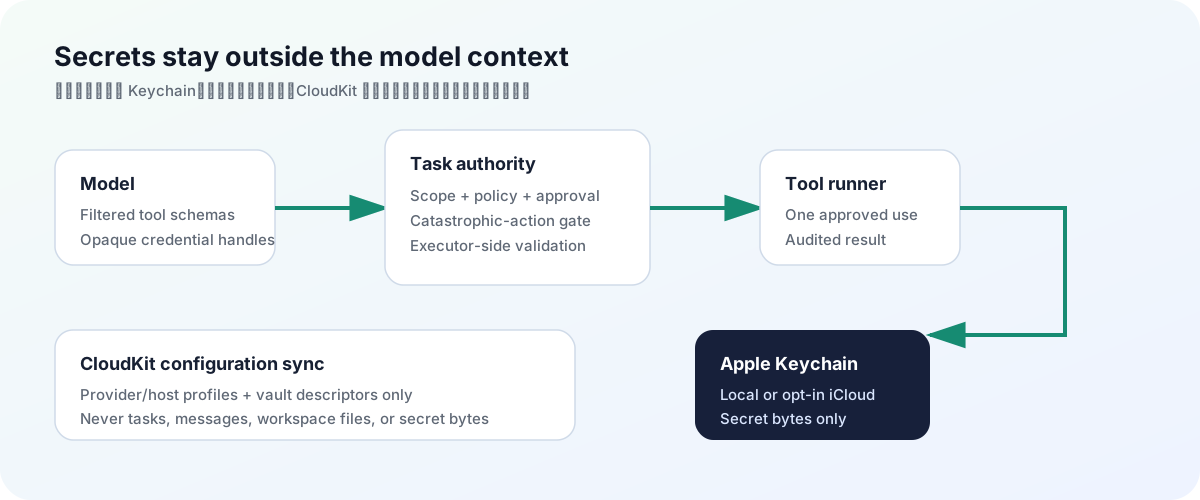
Settings → Data Management combines total/category storage accounting, safe cache cleanup, archived-task restore/single/batch deletion, and one Floe-global font library. Import a validated font once from Files or a public HTTPS URL and reuse it in Word/PDF work across every workspace; bounded install/system-font resolution bypass approval-model latency, while cross-workspace removal remains reviewed. The task list still supports swipe-to-archive and permanent deletion always requires confirmation. Configuration sync covers provider/model profiles and non-secret host metadata; API keys use iCloud Keychain. The separate Sync saved credentials switch is off by default and publishes only vault descriptors to CloudKit while SSH, VNC, website, and token secret bytes remain in Keychain. Task/workspace-scoped temporary credentials never sync.
Security boundary
flowchart TD
    M["Model request"] --> S["Per-task tool schema"]
    S --> V["Argument and scope validation"]
    V --> C["Catastrophic-action gate"]
    C --> A["Approval policy"]
    A --> R["Compiled tool runner"]
    R --> E["Audited result and evidence"]
    U["User takeover / explicit confirmation"] -.-> A
API keys belong in Keychain, model output is treated as untrusted input, and executor-side checks reject forged or out-of-scope tool calls. Browser login, credentials, uploads, payments, destructive operations, and broadly dangerous commands do not become safe merely because a task or Skill requested them.
Floe Agent does not provide a hosted model proxy, Floe account, remote relay, advertising SDK, model marketplace, arbitrary on-device execution of downloaded code, or a guarantee that iOS keeps a long-running connection alive indefinitely.
Documentation
| Read | English | 简体中文 |
|---|---|---|
| Product use | User guide | 使用指南 |
| Architecture | Architecture overview | Bilingual diagrams and terminology in the same document |
| Development | Contributing | 贡献指南 |
| Security | Security policy | 安全策略 |
| Support | Support | 支持 |
| Design | Design direction | Key terms include Chinese equivalents |
Internal plans, audits, validation notes and release handoffs are intentionally not published in this repository.
Project principles
- Keep credentials, files, and machines under user control.
- Make the current task, next decision, and supporting evidence legible.
- Prefer recoverability and honest interruption over pretending work continued.
- Make powerful access explicit, scoped, time-bounded, and stoppable.
- Treat model output, remote content, Skill packages, and tool arguments as untrusted input.
Contributing and license
Before a large or security-sensitive change, read CONTRIBUTING.md and open an issue describing the user problem, scope, security impact, and verification plan. Report vulnerabilities privately through the process in SECURITY.md.
Original Floe Agent code is licensed under the Mozilla Public License 2.0. Third-party components retain their own licenses and notices.
Yorumlar (0)
Yorum birakmak icin giris yap.
Yorum birakSonuc bulunamadi