kanbini
Health Warn
- License — License: MIT
- Description — Repository has a description
- Active repo — Last push 0 days ago
- Low visibility — Only 7 GitHub stars
Code Fail
- process.env — Environment variable access in .github/workflows/release.yml
- fs module — File system access in .github/workflows/release.yml
- process.env — Environment variable access in apps/desktop-e2e/playwright.config.ts
- spawnSync — Synchronous process spawning in apps/desktop-e2e/scripts/prepare.mjs
- process.env — Environment variable access in apps/desktop-e2e/scripts/run-headed.mjs
- process.env — Environment variable access in apps/desktop-e2e/scripts/screenshots.mjs
- network request — Outbound network request in apps/desktop-e2e/scripts/screenshots.mjs
Permissions Pass
- Permissions — No dangerous permissions requested
No AI report is available for this listing yet.
Free, offline, Trello-style kanban for Windows, macOS and Linux, with a local MCP server for live AI editing. Single-user, no accounts, no telemetry.
Kanbini


A kanban board that lives on your machine - and lets your AI move the cards.
Offline-first. Plain text on disk. No cloud, no accounts, no telemetry.
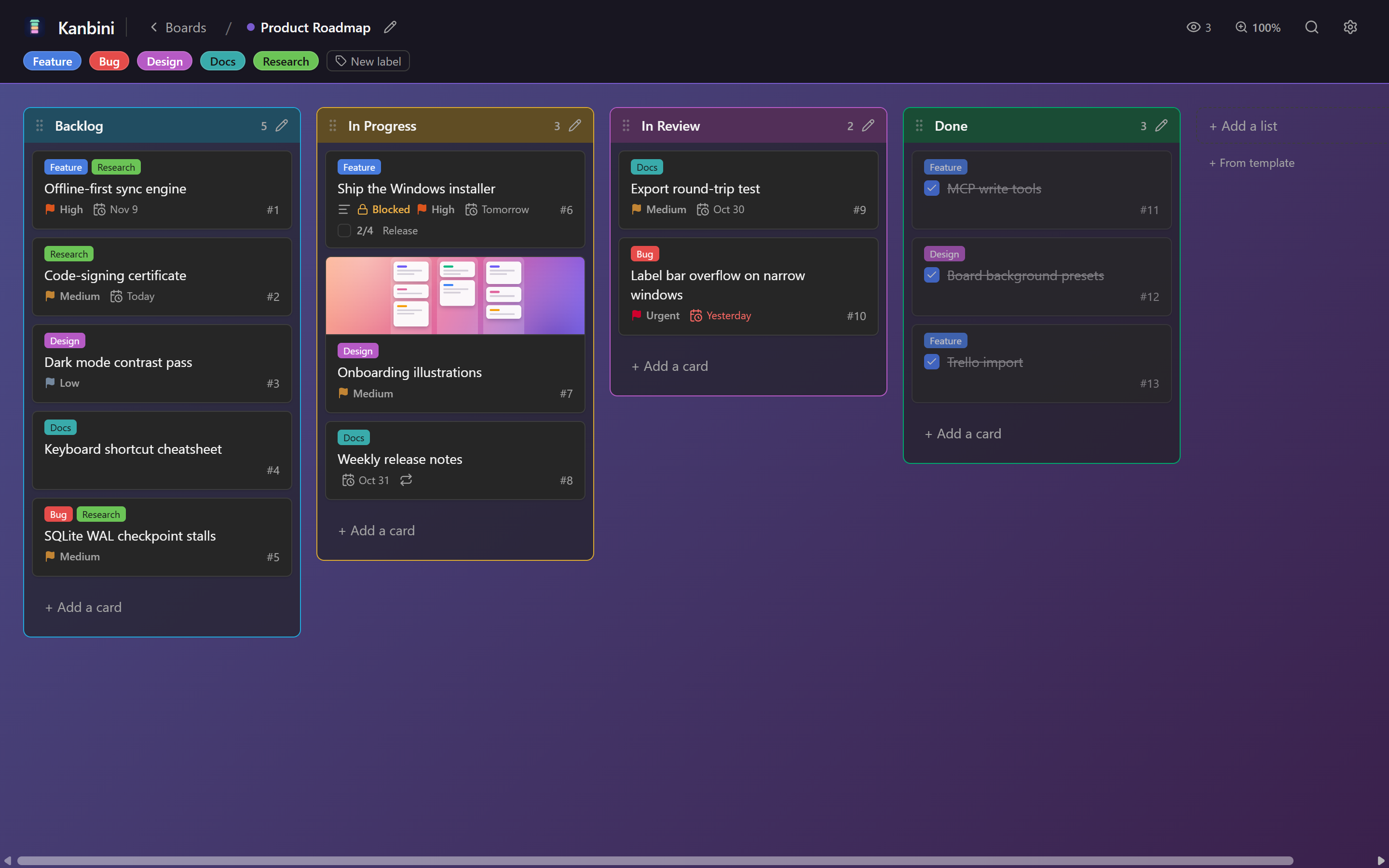
Kanbini is a Trello-style kanban app built for one person and their AI.
Your boards live in a local SQLite file and export to plain Markdown +
JSON, so you own your data outright. A built-in local MCP server lets
any AI that speaks MCP - Claude, ChatGPT, Cursor, or your own agent -
read and rearrange your board while you watch the cards move in real time.
The pitch is simple: your tasks shouldn't need an internet connection, a
login, or a monthly fee just to exist. Kanbini keeps your whole board in
a local file you fully own, runs as a fast native app, and - when you
want a hand - lets an AI pull up a chair and move the cards in real time
while you watch.
The name mashes kanban with konbini, the Japanese corner store
that never closes: a board that's yours, local, and always on.
Why Kanbini
- Offline by default. No accounts, no network, no telemetry. The only
things that ever leave your machine are the ones you explicitly turn on- link previews and one-way Obsidian export - both off by default.
- You own your data. Everything is a local SQLite file with
first-class, lossless plain-text export (Markdown + JSON), verified
byte-identical by a round-trip test. - AI-native. A token-gated local MCP server exposes read/write tools;
the AI's edits stream into the live UI as it works. - Free and open source under the MIT license.
Screenshots
| Agenda + all your boards | Card detail, with where the card lives |
|---|---|
 |
 |
| Waiting on, comments (one from the AI) + activity | Right-click menus with fly-outs |
 |
 |
| Select several cards, act on all of them | Ctrl+F search across every board |
 |
 |
| Swimlanes - group by priority | Light theme |
 |
 |
Features
- Boards, lists, cards with drag-and-drop (live cross-list reorder),
labels, due dates, priorities, per-list colours, and swimlanes (group
by priority). - Card depth - WYSIWYG description (saved as Markdown), checklists,
comments, local attachments (paste an image straight in), cover images,
and a per-card activity log. Cards with a description show a small marker
in the list. - Long boards stay readable - each list scrolls on its own, a card
can be collapsed to a one-line summary (or a whole list set to compact),
and a list can show just its first 10 / 20 / 50 cards with a "Show more"
button. - Multi-select - Ctrl/Cmd-click cards (or Shift-click for a range) to
pick several at once, then complete, set priority, re-label, move, or
delete them in bulk from a floating action bar (or a right-click menu) -
and drag the whole group between lists. - Local MCP server - a token-gated 127.0.0.1 control channel + stdio
server (@kanbini/mcp) with 30 read/write tools: cards, lists, boards,
labels, comments, checklists, attachments, archiving, list settings
(card limit, sort, colour, compact cards, how many to show), "waiting
on" links, search, and a cross-board agenda.
Edits stream into the open UI live. Seedocs/MCP.md. - Claude Code plugin -
/plugin marketplace add Jigglyy/kanbini,
then/plugin install kanbini@kanbini. Adds/kanbini:agenda,/kanbini:new-card, and/kanbini:log(write up this session's work
as a finished card), and needs no token or path: it finds the Kanbini
app you installed. Seeplugins/kanbini. - Scriptable HTTP API - the same token-gated 127.0.0.1 control channel
is also a plain local HTTP API (REST routes for reads + writes, plus a
batch endpoint that lands as one undo step) for non-MCP tools, scripts,
and automation. Loopback only. Seedocs/MCP.md. - Own your data - lossless plain-text export/import (
kanbini.json+cards/*.md+ attachment files); Backup + Restore live in Settings. - Daily backups - a copy of everything once a day, the last 7 days
kept, restorable in one click from Settings (and a copy of the current
state is kept before any restore). - Move or copy cards between boards - labels follow by name.
- Export a board to a file (
.kanbini), with or without its cards, and
import it as a new board on any Kanbini. - Cross-board search via a Ctrl/Cmd+F command palette.
- Repeating cards - make a card repeat daily, weekly, monthly, yearly,
or every N of those. Completing it adds the next one with its due date
moved on, labels and checklist carried over (unticked). - Waiting on - mark that a card can't start until another is done,
even one on a different board. The card shows "Blocked" until then. - Agenda on the home screen - what's overdue, due today, coming up
this week, and recently completed, across every board. Tick a card off
right there, or click it to jump to the card. - Templates for boards and lists.
- Undo / redo with full snapshot restore on delete. One Ctrl+Z takes
back everything an AI just changed on a board. - Customizable keyboard shortcuts.
- Runs in the tray if you like - closing the window can keep Kanbini
(and your AI tools' connection to it) running, with your recent boards
one click away. - Board backgrounds (colour / gradient / image) and continuous zoom.
- Trello import - bring an exported Trello board JSON in as a new board
(boards home > Import board). - Opt-in integrations (off by default): link previews and one-way
push to an Obsidian vault.
Install
Windows: the Releases
page has three downloads (the "Source code" ones are for developers).
All three use the same boards, in %APPDATA%\Kanbini.
Kanbini.Setup.X.Y.Z.exeinstalls Kanbini for your user (no admin
rights needed) with a Start menu entry and an uninstaller. To update,
run the newer installer.Kanbini-X.Y.Z-win-x64-portable.zipis the portable folder:
extract it anywhere and runKanbini.exeinside. Nothing is installed
and nothing goes in the registry. To update, replace the folder.Kanbini-X.Y.Z-win-x64-portable-single-file.exeis the same
portable app as one file: just run it. It unpacks itself into a
temporary folder each time (so it takes a few seconds longer to open)
and cleans that up when you close it. Connecting an AI to it needs
Node.js installed.
Builds are unsigned, so Windows SmartScreen warns on the first run
("More info", then "Run anyway").
macOS: download Kanbini-X.Y.Z-mac-universal.dmg (one app for
both Apple Silicon and Intel Macs), open it and drag Kanbini into
Applications. The app isn't notarized by Apple, so the first launch is
blocked with "Apple could not verify..." Click "Done", then go to
System Settings → Privacy & Security, scroll down and click "Open
Anyway". You only do this once. Boards live in~/Library/Application Support/Kanbini.
Linux (x64): two downloads, both using the same boards in~/.config/Kanbini.
Kanbini-X.Y.Z-linux-amd64.debfor Debian and Ubuntu:sudo apt install ./Kanbini-X.Y.Z-linux-amd64.deb. The best pick on
Ubuntu 24.04 and newer, because it sets up the browser sandbox that
release needs.Kanbini-X.Y.Z-linux-x86_64.AppImagefor any distro:chmod +x
it and run it. Needs FUSE 2 (libfuse2). On Ubuntu 24.04 and newer,
run it with--no-sandbox(or use the.deb). Connecting an AI to it
needs Node.js installed.
Or run it from source:
pnpm install
pnpm --filter @kanbini/desktop dev
It opens on a seeded sample board. After a fresh clone or any Electron
version bump, run the native rebuild once:
pnpm --filter @kanbini/desktop rebuild:native
To build it yourself, see docs/PACKAGING.md.
Each platform builds on its own OS (Windows on Windows, the .dmg on a
Mac, the AppImage + .deb on Linux or WSL2); the release workflow does
all three on GitHub Actions and boots each packaged app before
publishing. Windows is the platform used day to day; the macOS and Linux
builds are newer, so please open an
issue if something's off
there.
Web edition (Docker)
To share boards with other people, run the web edition: the same app
in a browser, served from a Docker container on a machine you control (a
home server or NAS). It adds accounts, optional 2FA, and shared
workspaces with viewer / editor / manager roles, and AI tools connect to
it over HTTPS. It's separate from the desktop app, which stays offline
and single-user. Setup, sign-in, workspaces and running it behind a
reverse proxy are in apps/web/README.md.
Wire up an AI
The MCP server speaks the standard Model Context Protocol, so any
MCP-capable client can drive your board while it's open. Claude Desktop
and Claude Code are what we test against, but ChatGPT desktop, Cursor, or
your own agent work the same way - one config shape covers them all. The
snippet + token live in the app under Settings → AI integration;
details in docs/MCP.md.
Develop
pnpm verify   # typecheck + unit tests + launch smoke (~20 s)
pnpm e2e      # Playwright end-to-end suite against the real Electron app
Exercise the MCP surface end-to-end (desktop app must be running):
pnpm --filter @kanbini/mcp run build         # one-time / after MCP changes
pnpm --filter @kanbini/mcp run smoke         # read-tool check
pnpm --filter @kanbini/mcp run smoke:write   # create → update → comment → checklist → delete
Prove the export/import round-trip is lossless (no live app needed):
pnpm --filter @kanbini/desktop run test:roundtrip
Layout
/apps
  /desktop      Electron main + hardened preload + control channel
  /renderer     React + Vite + Tailwind v4 + ShadCN
  /mcp          @kanbini/mcp - stdio MCP server
  /desktop-e2e  Playwright end-to-end suite
  /web          web edition: the app in a browser, for Docker
/packages
  /shared       zod schemas, channel names, id/order utils
  /db           Drizzle schema + migrations + data access
/docs           DESIGN.md, MCP.md, PACKAGING.md
- Design & architecture →
docs/DESIGN.md - MCP integration →
docs/MCP.md - Packaging →
docs/PACKAGING.md
Contributing
Issues and pull requests are welcome. pnpm verify should be green before
you push. New features in @kanbini/shared, @kanbini/db, or@kanbini/renderer should land with tests in the same change; bug fixes
should come with a regression test.
License
MIT © Jigglyy and Kanbini contributors.
Reviews (0)
Sign in to leave a review.
Leave a reviewNo results found