video-fetcher-to-markdown
Health Pass
- License — License: MIT
- Description — Repository has a description
- Active repo — Last push 0 days ago
- Community trust — 485 GitHub stars
Code Fail
- rm -rf — Recursive force deletion command in .scripts/verify-isolated-install.sh
- network request — Outbound network request in scripts/fetch_transcript.py
Permissions Pass
- Permissions — No dangerous permissions requested
No AI report is available for this listing yet.
Portable AI-agent skill: turn YouTube, Instagram, TikTok, X and other video links into Obsidian-ready Markdown notes: captions or local Whisper transcripts, frames, metadata and timestamps
Video Fetcher to Markdown
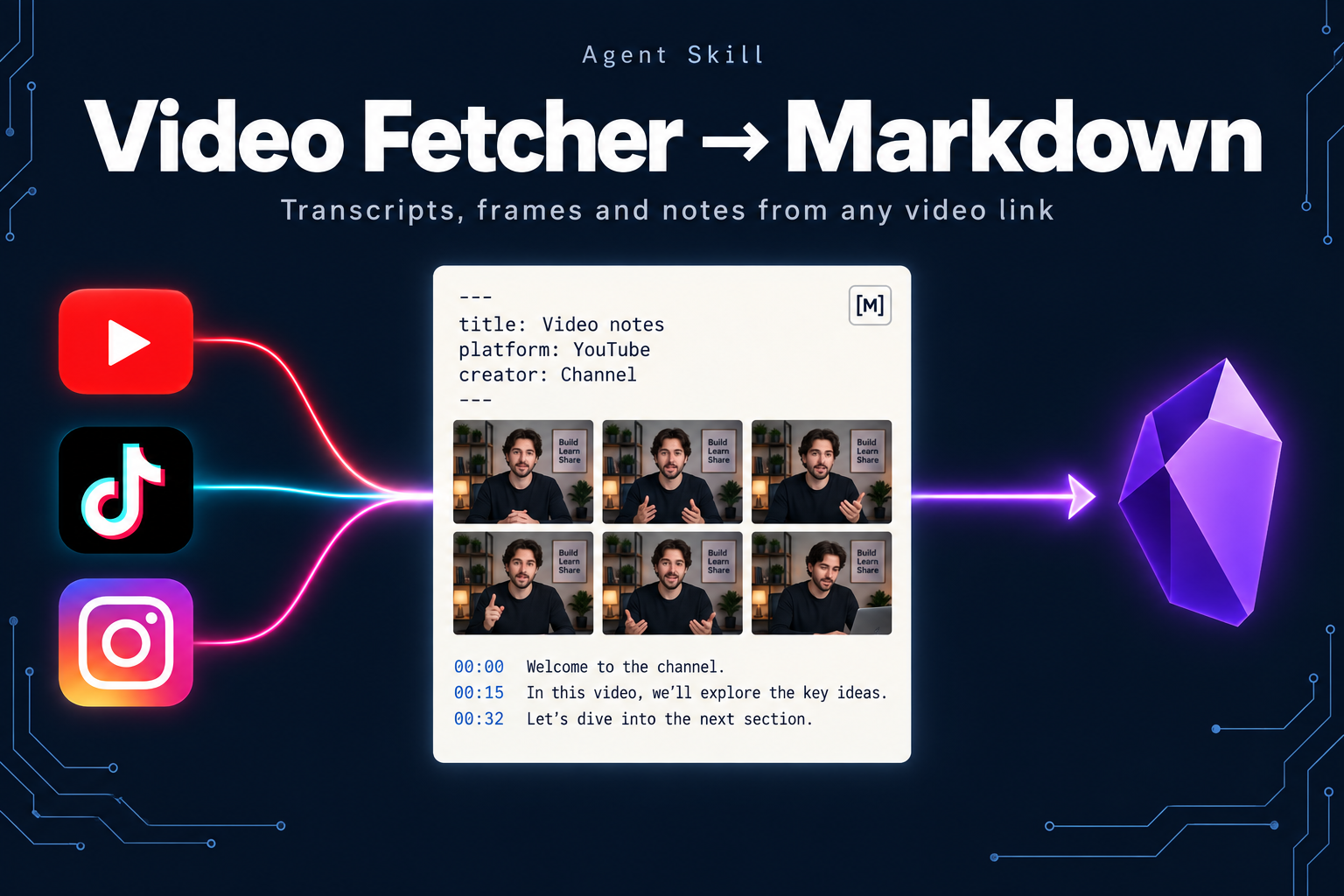
A video link in, a structured archival Markdown note out. Capture the transcript,
creator metadata, description, chapters, actual language, and provenance in one
Obsidian-ready file, without an API key. YouTube captions are read directly;
Instagram, TikTok, X, Vimeo, Facebook and other sites are transcribed on your own
machine with Whisper, with a contact sheet of frames for short videos.
npx skills add JimmySadek/video-fetcher-to-markdown
Read the v2.0.0 release notes
for other video sites, local Whisper transcription, frames, and the login-wall fallback.
Formerly YouTube Fetcher to Markdown. Existing installs keep working and keep
updating: the skill is still namedyoutube-fetcher, and GitHub redirects the old
address.npx skills updatebrings you v2.0.0.
What you get
Paste a YouTube link and receive a file such as:
~/yt_transcripts/2026-03-04_obsidian-the-king-of-learning-tools_[hSTy_BInQs8].md
---
title: "Obsidian: The King of Learning Tools (FULL GUIDE + SETUP)"
channel: "Odysseas"
url: "https://www.youtube.com/watch?v=hSTy_BInQs8"
video_id: "hSTy_BInQs8"
fetched: "2026-03-04"
source_project: "my-project"
language: "en"
caption_type: "manual"
duration: "36m 26s"
upload_date: "2024-04-24"
tags:
  - yt-transcript
---

# Obsidian: The King of Learning Tools (FULL GUIDE + SETUP)

## Video Details
| Field    | Value |
|----------|-------|
| URL      | https://www.youtube.com/watch?v=hSTy_BInQs8 |
| Channel  | Odysseas |
| Duration | 36m 26s |
| Uploaded | 2024-04-24 |
| Fetched  | 2026-03-04 |
| Source   | my-project |
| Language | en (manual) |

## Video Description
The creator's description, links, and chapter markers...

## Transcript
The complete caption text...
A video from another site gives the same kind of note, tagged media-transcript,
with platform, creator, transcription_engine and transcription_model in the
frontmatter, a Frames section that embeds the contact sheet with each tile's
time, and a Whisper transcript with timestamps:
~/yt_transcripts/2026-10-07_claude-motion-tips_[instagram-dehp8dpsimi].md
~/yt_transcripts/2026-10-07_claude-motion-tips_[instagram-dehp8dpsimi].frames.jpg
The YAML frontmatter makes a collection queryable through tools such as
Dataview, while the Markdown
remains portable to Logseq, other knowledge bases, and plain text workflows.
Why this exists
Most transcript extractors stop at raw caption text. An archival knowledge note
also needs the source URL, creator, capture date, actual language, description,
chapters, and a predictable filename. Video Fetcher to Markdown keeps that complete record
in one local file. Short social videos often show the real content on screen
(tool names, prompts, links) rather than saying it, so notes from those sites
include frames as well as words.
Features
- Manual and auto-generated captions with optional timestamps
- Clickable timestamps and chapters that jump to the moment in the video
- Ordered language preferences, regional variants, automatic selection, and strict language matching
- Explicit YouTube translation, labeled with source language and machine-translation provenance
- Title, channel, duration, upload date, description, and chapters when available
- Safe YAML frontmatter and Markdown tables for dynamic metadata
- File protection for every format, safe replacement, and refreshes that update existing notes in place
- Obsidian-vault and custom-directory output
- Plain text, JSON, SRT, and WebVTT export
- Bounded network requests, useful errors, and optional metadata-free capture
- No API keys and no hosted service
- Other sites (new): Instagram, TikTok, X, Vimeo, Facebook and anything else
yt-dlpsupports, plus YouTube videos without captions and local files, transcribed on your machine with Whisper - Frames (new): a contact sheet of the video for reading on-screen text, by default for videos up to 3 minutes
- Login walls (new): a clear exit code and a browser fallback for sites such as Instagram; your browser login is used only when you ask
Installation
Install the skill
npx skills add JimmySadek/video-fetcher-to-markdown
Or clone the canonical repository:
git clone https://github.com/JimmySadek/video-fetcher-to-markdown.git
Install runtime dependencies
Python 3.8–3.14 is supported for captions. Python 3.10 or newer is recommended
for current optional yt-dlp releases. From the cloned or installed skill
directory, use an isolated environment so your system Python stays unchanged:
python3 -m venv .venv
.venv/bin/python -m pip install -r requirements.txt
.venv/bin/python scripts/fetch_transcript.py --check-deps
On Windows PowerShell:
py -m venv .venv
.venv\Scripts\python.exe -m pip install -r requirements.txt
.venv\Scripts\python.exe scripts\fetch_transcript.py --check-deps
Activate that environment before using the python3 examples below (source .venv/bin/activate on macOS/Linux), or use the full interpreter path each time.
An agent should also use that interpreter. If your skill installation is read-only,
create the environment in a writable location and pass the full path torequirements.txt.
yt-dlp is optional for descriptions, chapters, duration, and upload dates:
.venv/bin/python -m pip install yt-dlp
# Windows: .venv\Scripts\python.exe -m pip install yt-dlp
Put its executable on PATH by activating the environment. Without it, oEmbed
still supplies title and channel when accessible. The script never installs
packages automatically. --no-metadata skips both metadata providers.
Other video sites need a few more command-line tools (ffmpeg, yt-dlp and a
Whisper tool); see Other video sites.
Usage
python3 scripts/fetch_transcript.py "https://youtu.be/VIDEO_ID"
An agent using the skill resolves scripts/fetch_transcript.py relative to its
installed SKILL.md; it does not depend on one fixed home-directory path.
Output location
The first configured option wins:
--outputfor one exact file--output-dirfor this runVIDEO_FETCHER_DIRfor a persistent directory (the olderYOUTUBE_FETCHER_DIRstill works)~/yt_transcripts/by default
# Save this note to an Obsidian vault
python3 scripts/fetch_transcript.py URL --output-dir ~/Notes/MyVault

# Set a persistent default
export VIDEO_FETCHER_DIR=~/Notes/MyVault
python3 scripts/fetch_transcript.py URL

# Save to one exact file
python3 scripts/fetch_transcript.py URL --output ~/Notes/video.md
Every format preserves an existing destination and exits with code 3, before
making a network request when the destination is already known. This is the same
in terminals and agent sessions; there is no hidden interactive prompt. --force
replaces the chosen file completely, including any annotations. A default
Markdown refresh reuses the existing note's path even if its title or capture date
has changed. An explicit --output is honored independently of other notes for
the same video, so distinct files can hold different languages or versions.
Writes use a temporary file beside the destination. Where the filesystem supports
hard links, a new file appears only once its UTF-8 content is complete. Other
filesystems use exclusive creation: they still refuse to open an existing file
for writing, but a new file can be visible during the write. Handled write failures
remove that partial file; abrupt termination or disk failure can leave it behind.
Forced refreshes replace a completed temporary file and preserve existing POSIX
permission modes. New notes use normal file-creation permissions.
If another process creates the destination during a fetch, the non-force write
still refuses to overwrite it. --stdout prints only the result
and creates no file, even when output-path options are present; diagnostics go to
stderr.
Languages and translation
# Prefer French, then German, with English as the final fallback
python3 scripts/fetch_transcript.py --lang fr,de -- URL

# Require Japanese captions; fail clearly if unavailable
python3 scripts/fetch_transcript.py --lang ja --strict-lang -- URL

# Capture available captions when you do not know their language
python3 scripts/fetch_transcript.py --lang auto -- URL

# Explicit YouTube machine translation of an available track into English
python3 scripts/fetch_transcript.py --lang auto --translate en -- URL

# Inspect caption tracks and supported translation targets
python3 scripts/fetch_transcript.py --list -- URL
Language preference outranks caption type. For each requested language, exact
codes are tried before regional variants (es can select es-MX); manual
captions win within that match. All requested languages precede English fallback.--strict-lang disables that fallback, while still allowing regional variants.
The default remains --lang en for compatibility.
auto selects a manual track if available, otherwise a generated track, using
YouTube's track order for ties. It does not establish the original audio
language. Selection and fallback are reported to stderr and recorded in the note.
Translation happens only with --translate, requires support from YouTube, and
is never described as a human translation.
Markdown records requested_language, source_language, language (the actual
output language), caption_type (the original track's type), translated, andtranslation_provider when applicable. metadata_source distinguishes yt-dlp,oembed, unavailable, and deliberately skipped metadata. Existing frontmatter
keys remain compatible. JSON keeps its existing array of {text, start, duration}
objects; raw exports have no provenance wrapper, so retain stderr or use Markdown
when that context matters.
Transcript and subtitle exports
python3 scripts/fetch_transcript.py --stdout --timestamps -- URL
python3 scripts/fetch_transcript.py --format txt --stdout -- URL
python3 scripts/fetch_transcript.py --format json --output captions.json -- URL
python3 scripts/fetch_transcript.py --format srt -- URL
python3 scripts/fetch_transcript.py --format vtt -- URL
text and markdown both produce an archival Markdown note; txt produces plain
caption text. Timestamped Markdown and chapter lists link to the corresponding
video time. Raw exports skip metadata requests. A raw ID starting with - works
after --; put all options before that separator.
Options
| Flag | What it does |
|---|---|
--output / -o |
Save to one exact file |
--output-dir |
Save inside a directory or knowledge vault |
--timestamps / -t |
Add linked Markdown timestamps or plain timestamps in txt |
--lang / -l |
One code, ordered comma-separated codes, or auto; default en |
--strict-lang |
Disable English fallback |
--translate |
Explicit YouTube machine translation to a target language |
--source / -s |
Override the capture-project name |
--format / -f |
text/markdown (default), txt, json, srt, or vtt |
--no-description |
Skip the description and chapters section |
--no-metadata |
Skip yt-dlp and oEmbed while retaining captions and source URL |
--timeout |
Connect/read timeout per HTTP request, in seconds; default 15 |
--stdout |
Print the result instead of saving it |
--list |
Show available caption languages |
--force |
Replace the destination or refresh an existing default note in place |
--check-deps |
Report dependency status |
Supported YouTube inputs
- Standard watch URLs, regardless of query-parameter order
youtu.beshort links/embed/,/shorts/,/live/, and legacy/v/links- Mobile and YouTube Music watch URLs
- Privacy-enhanced
youtube-nocookie.com/embed/links - A raw 11-character video ID
Lookalike hosts such as youtube.com.example.org are rejected.
Other video sites
scripts/fetch_media.py covers sites without YouTube captions. It downloads the
media with yt-dlp, converts the audio with ffmpeg, transcribes it locally with a
Whisper command-line tool, and saves the same kind of note, with a contact sheet of
frames for short videos.
python3 scripts/fetch_media.py --check-deps
python3 scripts/fetch_media.py --hint "Claude, HyperFrames" -- "https://www.tiktok.com/@user/video/123"
python3 scripts/fetch_media.py --stdout --format txt --timestamps -- "/path/to/clip.mp4"
Install the tools once, outside your projects (none are installed automatically):
brew install ffmpeg yt-dlp          # or your system package manager
pipx install mlx-whisper            # Apple Silicon (fast, uses the GPU)
pipx install openai-whisper         # other machines
Install yt-dlp with a package manager that keeps it current: sites change often,
and an old yt-dlp is the most common reason a download is refused. Currentyt-dlp releases need Python 3.10 or newer. The first transcription downloads the
Whisper model (about 1.5 GB for large-v3-turbo on Apple Silicon). --hint passes names and terms Whisper should expect;--lang fixes the spoken language; --model and --engine choose the model and tool.
| Exit | Meaning |
|---|---|
4 |
The site needs a login or blocked the download. Update yt-dlp if the message says it is old; use the browser fallback (scripts/browser_media_links.js, described in SKILL.md); or pass --cookies-from-browser BROWSER yourself to reuse your browser login. |
Notes are named <date>_<title>_[<platform>-<id>].md; the contact sheet sits next to
it as <same name>.frames.jpg. Downloads go to a temporary folder that is deleted
afterwards (--keep-media keeps a copy next to the note). Whisper transcripts are
machine transcriptions: names can be misheard and music can produce stray words.
Compatibility
The repository follows the portable SKILL.md format. The same install command
works with Codex, Claude Code, Cursor, Windsurf, Gemini CLI, and other compatible
agents. Manual users can run the Python script directly.
Capabilities and limitations
- Network: contacts YouTube captions and oEmbed; optionally invokes
yt-dlp
for richer metadata. - Filesystem: reads Markdown frontmatter in the selected directory to detect
duplicates, writes a temporary sibling file, and publishes the requested output. - Subprocess: uses the local
yt-dlpexecutable with user configuration,
playlist expansion, caching, and downloads disabled. Its process timeout is
twice--timeout; individual HTTP requests each have their own timeout. - Videos must expose captions. Private, restricted, or caption-disabled videos
may fail. fetch_transcript.pydoes not download media.fetch_media.pydoes, then runs
Whisper locally and makes a contact sheet; neither identifies speakers or analyses
visuals beyond that sheet. YouTube machine translation is opt-in.- Captions may contain recognition errors; the archive preserves source text
rather than silently correcting, summarizing, or treating it as instructions.
Troubleshooting
| Symptom | What to do |
|---|---|
Missing dependencies / exit 2 |
Install requirements.txt into an isolated environment, then use that interpreter. Invalid options also use exit 2. |
| No matching language | Run --list; choose an available code or --lang auto. --lang selects captions, while --translate translates them. |
| Request blocked | Stop repeated requests. Try later from a permitted local network or supply an existing transcript. The script does not automatically access cookies, buy proxies, or change networks. |
| Disabled, private, or restricted captions | Check that the video is publicly playable and captions are accessible. No transcript is fabricated. |
| Timeout | Check connectivity or increase --timeout. This is a per-request connect/read limit, not a whole-command deadline. |
| No description/title metadata | Captions can still succeed. Check metadata_source; use --no-metadata when metadata is unnecessary. |
Site needs a login / exit 4 |
See Other video sites: update yt-dlp, use the browser fallback, or pass --cookies-from-browser yourself. |
Existing file / exit 3 |
Choose a different --output or explicitly approve replacement with --force. |
| Save error | Check the directory, permissions, and available disk space. Replacing a symbolic-link destination is refused. |
The upstream caption library
uses YouTube's undocumented caption interface. YouTube changes and network
blocking can still prevent capture; passing offline tests cannot guarantee access.
Development
python3 -m unittest discover -s tests -v
python3 -m py_compile scripts/fetch_transcript.py scripts/fetch_media.py
bash .scripts/verify-isolated-install.sh
Tests substitute the external caption service while exercising real caption
objects, CLI formats, language choices, file preservation, failures, and timeout
configuration. The fetch_media.py tests replace yt-dlp, ffmpeg and Whisper at
the subprocess boundary, so they need none of them installed. They write only to
temporary directories. The installation probe
uses a temporary project; it does not replace your installed skill.
| Code | Meaning |
|---|---|
0 |
Success |
1 |
Invalid video input, fetch failure, or filesystem error |
2 |
Missing required dependency or invalid command-line options |
3 |
Existing note preserved; overwrite not approved |
4 |
fetch_media.py only: the site needs a login or blocked the download |
130 |
Cancelled by the user |
Maintaining and releasing
main is the canonical development branch. The automated master mirror is
retained for older raw-file links; do not delete it or develop on it.
The repository was renamed from youtube-fetcher-to-markdown on 2026-10-07. Never
create a new repository named youtube-fetcher-to-markdown on this account: it would
take over the old address and break GitHub's redirect for every existing install, clone
and link. Keep the skill name youtube-fetcher for the same reason: npx skills update
re-adds each install by that name. See
GitHub releases
for tagged versions and upgrade notes.
For a release, run the local checks above and the isolated install probe, open a
pull request, and wait for every Linux, Windows, and macOS CI job. Merge only the
checked revision, verify post-merge CI and the legacy mirror, then tag that exact
commit and publish its release notes. Verify installation from a fresh clone of
the public tag. Live caption tests are useful release evidence but are kept out
of CI because YouTube may block hosted runners.
The media providers record contains the v1.3
decisions and verification evidence. The
reliability and language record
contains the v1.2 verification evidence. The older
v1.1 distribution record
preserves historical channel decisions; dated adoption numbers are snapshots.
Directory promotion and external listings are separate from engineering releases.
License
MIT
Reviews (0)
Sign in to leave a review.
Leave a reviewNo results found