claude-code-pokemon
Health Uyari
- License — License: MIT
- Description — Repository has a description
- Active repo — Last push 0 days ago
- Low visibility — Only 5 GitHub stars
Code Basarisiz
- exec() — Shell command execution in plugin/hooks/commands.ts
Permissions Gecti
- Permissions — No dangerous permissions requested
Bu listing icin henuz AI raporu yok.
Pokémon Journey for Claude Code: catch Pokémon, watch them react to your coding, travel through 20 landscapes, level them up and evolve them.
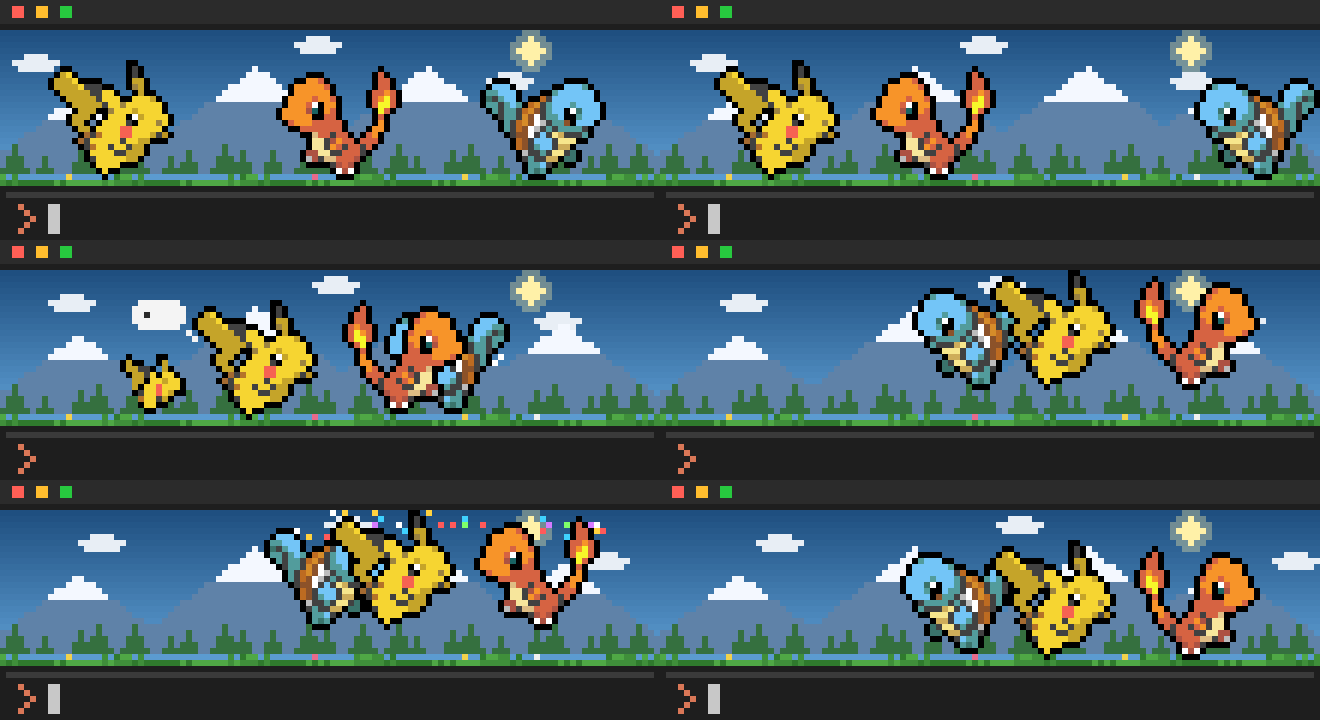
Pokémon Journey for Claude Code
Gotta code 'em all.
Your Pokémon journey through a tiny pixel world right above your Claude Code prompt.
They run while Claude works, cheer when your tests pass, faint when they fail,
and evolve as you ship.





Website · Install · What they do · Level up & evolve · PokéMart · Landscapes · Commands · FAQ · Known limitations
Install
Two commands inside Claude Code:
/plugin marketplace add JinHang02/claude-code-pokemon
/plugin install pokemon@claude-code-pokemon
Start a new session and a wild Pokémon will be waiting above your prompt. Want a specific partner?
/pokemon pikachu
One you already own takes the lead. One you don't is caught fresh and leads, and the old lead rests in your PC box with its level and what it holds. Nobody is sent away.
Made on macOS, with the test suite running on Linux on every push; Windows should work but hasn't been tried (see Known limitations). Needs Claude Code 2.1.287 or newer and a terminal with 24-bit color (iTerm2, Ghostty, kitty, WezTerm, Windows Terminal, the VS Code / Cursor terminal...). It's a Claude Code mod, and mods are on by default from 2.1.287. If your party doesn't show up, run
/plugin: the line under the tabs should listpokemonamong the active mods.
They react to your work
Nothing to configure. Your party watches what Claude is doing and reacts on its own.
 Claude is working A thought bubble pops up over your lead while the party hurries about. |
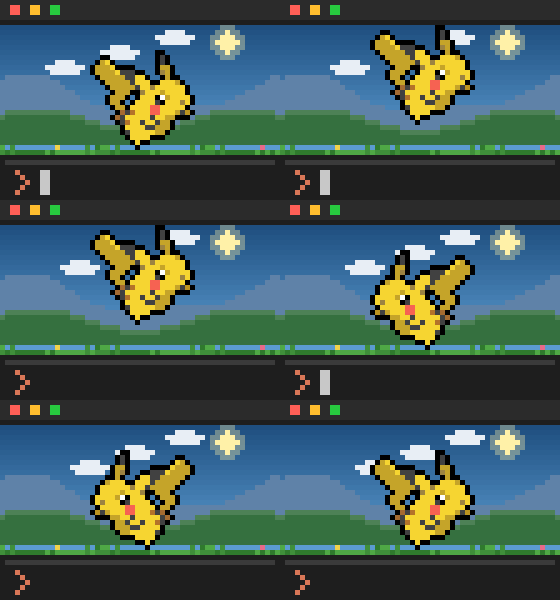 Claude finishes a reply A double hop with a spin. Your cue that it's your turn. |
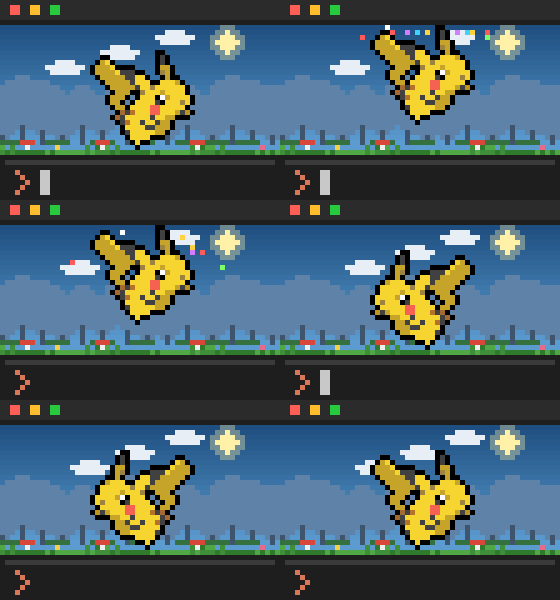 Tests pass · a commit lands Confetti. Lots of it. |
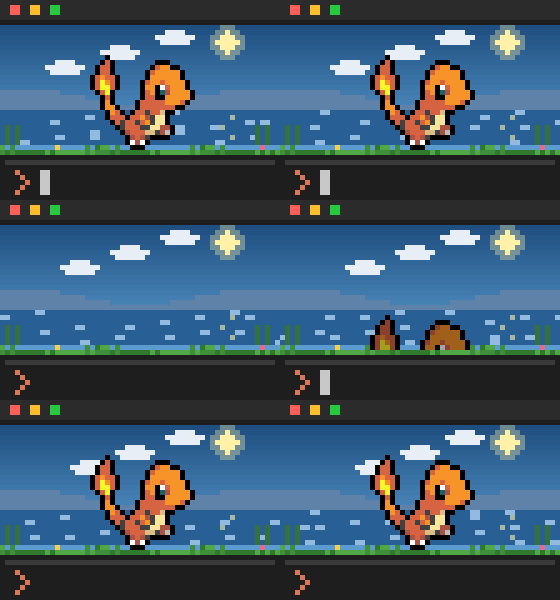 Tests or a build fail A battle-style faint: shudder, sink, a beat of silence, back up. |
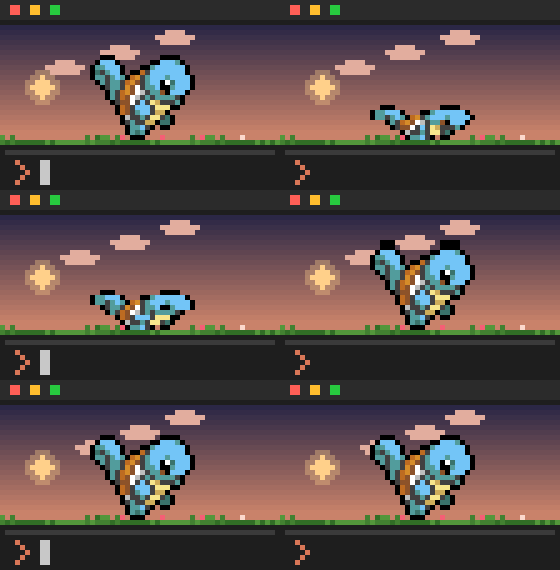 Context gets compacted Squashed flat for as long as /compact runs, then boing. |
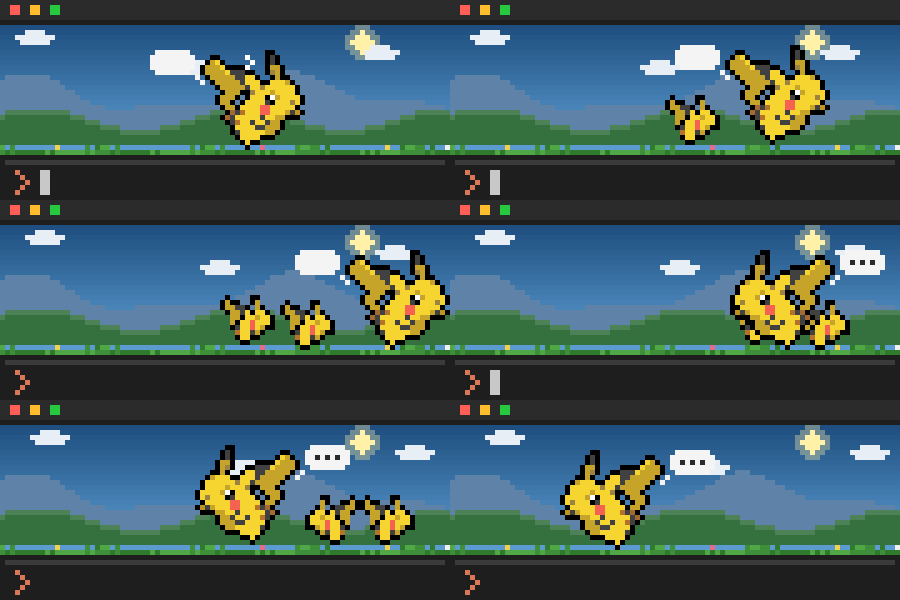 Claude launches subagents A little clone pops out of the grass for each one and follows along. |
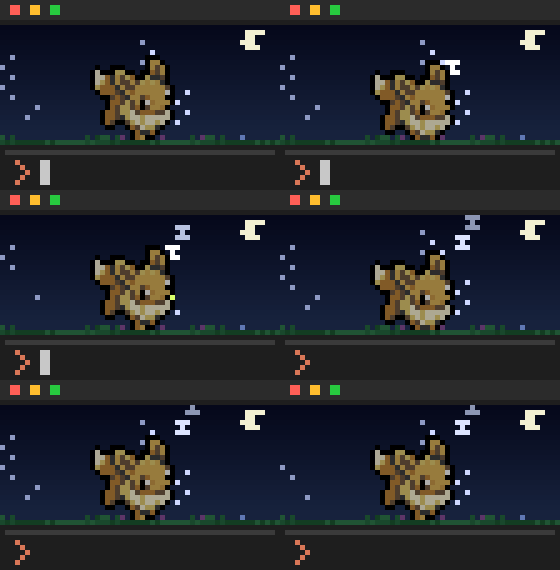 Nothing happens for 5 minutes They doze off. Do anything and they wake right up. |
Between all that they just live their lives: short strolls in any direction, stopping for a moment, looking around, changing their minds halfway, skipping in place.
Only real failures make them faint. A grep that finds nothing isn't a failure, so a plain command has to fail three times in a row before anyone keels over.
Even Claude Code's spinner joins in. While Claude works it says something Pokémon (its tip line, task list and token count stay just as they are), and the turn closes with a Poké Ball:
✻ Searching tall grass… (17m 46s · ↓ 12.3k tokens · thinking with xhigh effort)
◓ Caught for 18m 2s
Raise them into legends
Every Pokémon in your party earns experience from the work you and Claude get done:
| What happens | XP |
|---|---|
| Claude finishes a reply | +2 |
A test run passes (pytest, npm test, go test, cargo test...) |
+5 |
| A commit goes through | +10 |
A test run and a commit in one command (npm test && git commit) earn both. A Pokémon holding a Lucky Egg earns half as much again, rounded down (a test run's 5 XP is 7). Levels stop at Lv 100, as in the games.
What? Charmander is evolving! They evolve the way they do in the games:
- Level up: Charmander at Lv 16, Charmeleon at Lv 36.
- Evolution stones: Pikachu with a Thunder Stone, Eevee with a Water, Thunder or Fire Stone, and the rest.
- Trades: a trade with a held item needs that item (Onix a Metal Coat, Seadra a Dragon Scale), and a plain trade needs a Linking Cord (Haunter, Kadabra, Machoke).
- Friendship: Pichu, Togepi, Riolu and friends evolve after 10 hours together in your party while Claude Code is open. A Soothe Bell makes the time count one and a half times.
- Time of day: Riolu only by day, Rockruff into Midnight Lycanroc at night, Eevee into Espeon by day or Umbreon by night.
Regional forms evolve the way their region does.
You decide when. A Pokémon that can evolve by itself (level, friendship, time of day, a held item, a party member) gets gold motes rising around it, a one-off "Charmander is ready to evolve!", and waits for you:
/pokemon evolve charmander
A Pokémon that could go more than one way asks which: /pokemon evolve eevee espeon. Rather have them evolve by themselves, each always taking the branch the games give that Pokémon? /pokemon evolve auto (and /pokemon evolve manual to go back).
Then evolution gets its own screen, as in the games. The band makes way for an evolution scene: "What? EEVEE is evolving!", the old and new forms swapping in silhouette, faster and faster, a burst of light, and "Congratulations! Your EEVEE evolved into VAPOREON!". About ten seconds later the band is back, with Vaporeon walking where Eevee stood. Stones and trade items come from the PokéMart. Hand one over and it works at once:
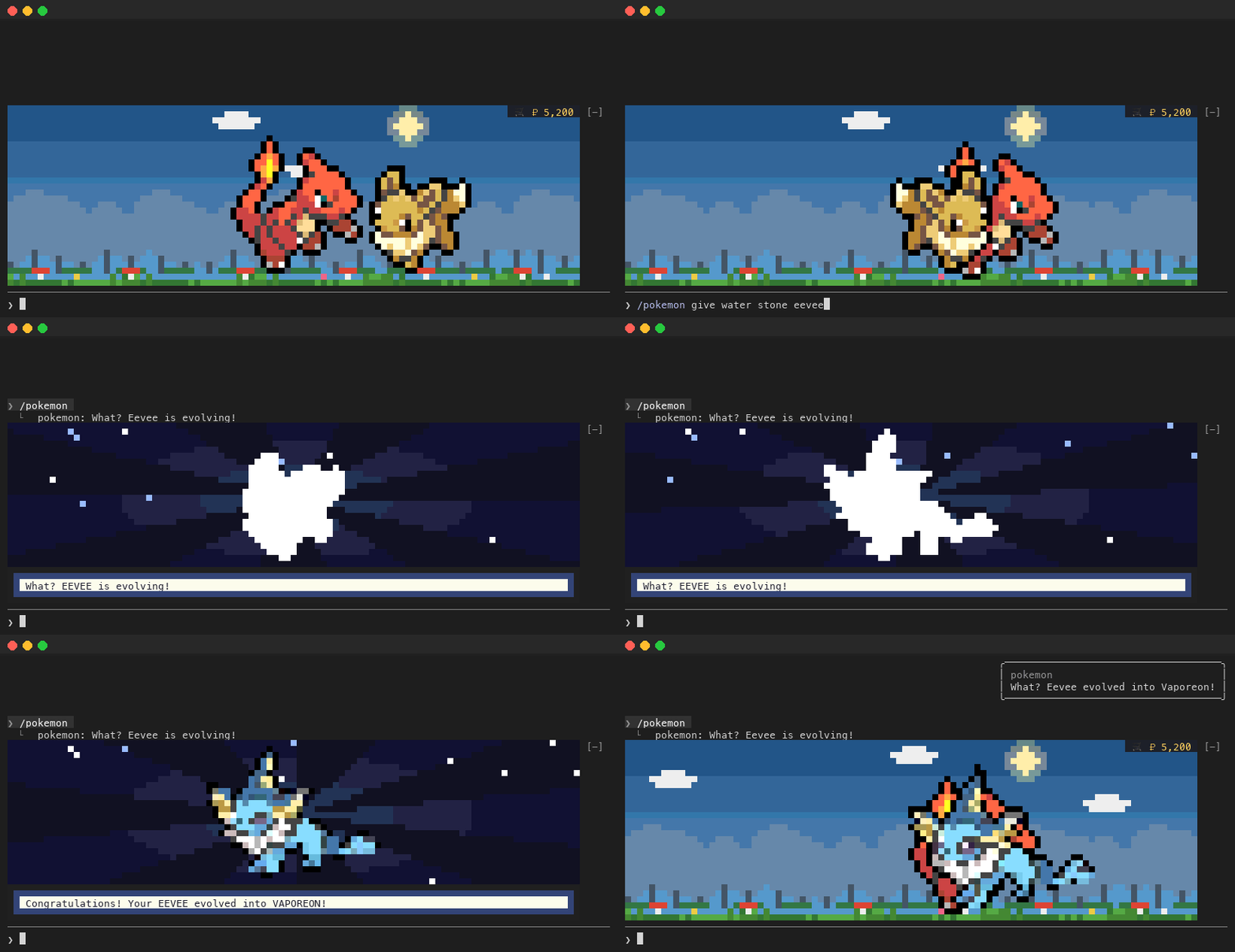
Pick the screen you grew up with. It's saved, so every window uses it:
| Style | What you see |
|---|---|
rays (the default) |
A dark stage with light rays turning behind and twinkling sparkles (Gen 4–5) |
white |
A plain white screen, the two forms swapping as dark silhouettes (Gen 1–2) |
gradient |
A blue-to-purple glow with sparkles rising (Gen 3) |
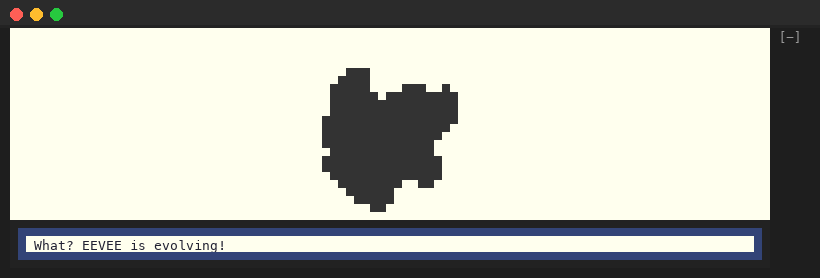 white |
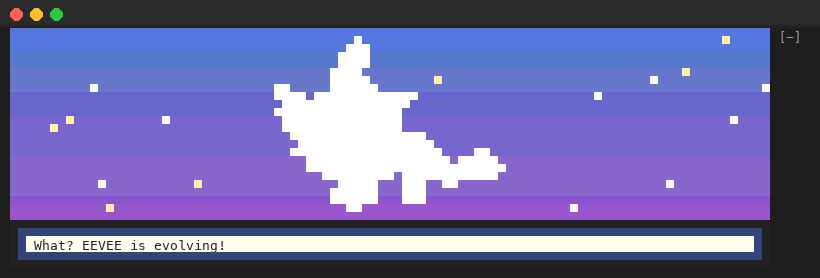 gradient |
/pokemon evolution              which screen you have, and the three to choose from
/pokemon evolution white        switch to the white screen
/pokemon-play evolve gradient   watch your lead evolve on the gradient screen once; nothing is saved
Good to know:
- It always finishes. There's no cancelling an evolution once it starts, unless the terminal gets too short for the screen: then it ends there, with its toast, and the band goes on with the new form. In manual (the default) nothing evolves until you ask; with
/pokemon evolve auto, an Everstone is still how to keep a Pokémon from evolving by itself. - The reply says "What? Eevee is evolving!", and the "What? Eevee evolved into Vaporeon!" toast comes when the screen ends.
- It waits for a wild visitor to leave (caught, fled or let go), and the evolution is saved at once all the same. An open PokéMart closes for it. Several evolutions at once (twins, a Rare Candy chain) play one after another.
- The prompt keeps working while it plays. The screen takes no keys or clicks, and one already playing finishes after a
/clear. A command that evolves another Pokémon meanwhile answers at once, and its screen plays after this one. If what it does can't be worked out within a second, the reply says so ("Giving the Water Stone to Eevee: what it does shows after the one on screen."), and a stone it can't use is told in a toast when its turn comes. - When Nincada evolves, its screen shows Ninjask, and Shedinja joins when it ends (into the PC box if the party is full).
- It needs a band at least 8 rows tall. Below that, the Pokémon flashes between white silhouettes in place, as before 1.5.0. On a narrow band the message shortens and always keeps the new form's name (the old one may be cut short): "CHARMANDER evolved into CHARMELEON!", then "CHARMANDER → CHARMELEON!".
- An evolution in another Claude Code window plays here too if it's less than 30 seconds old. A window you open later doesn't replay it.
/pokemon party says how long each one has been with you, what it holds and how it evolves:
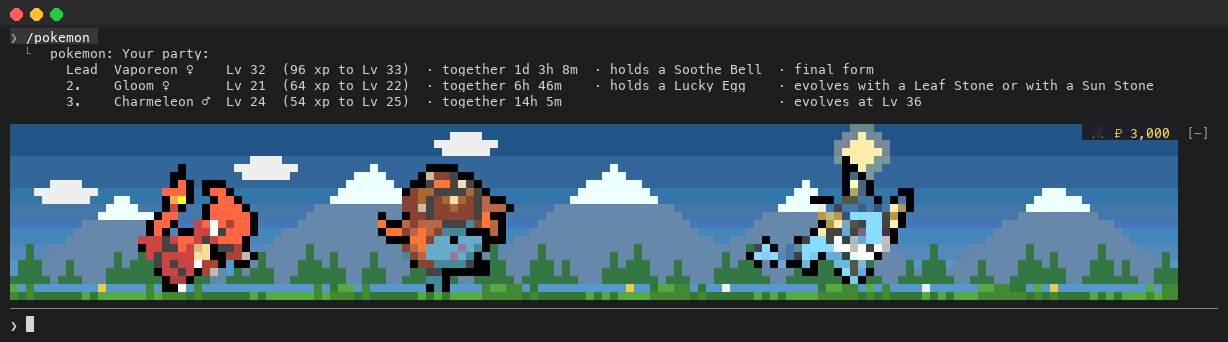
Love your Charmander just the way it is? Give it an everstone and it won't evolve, by itself or by /pokemon evolve. A stone or trade item you /pokemon give it still works:
/pokemon everstone charmander
Gotta see 'em all
905 Pokémon, Bulbasaur to Enamorus (Gen 1 to 8), plus 424 alternate forms: Megas, Gigantamax, Alolan, Galarian, Hisuian and more. Any of them can be shiny ✨ (1 in 32). Names are written as in the games (Farfetch'd, Mr. Mime, Nidoran♀, Ho-Oh, Type: Null), and you can type them with or without the punctuation: farfetchd, mr mime, nidoran f, ho oh.
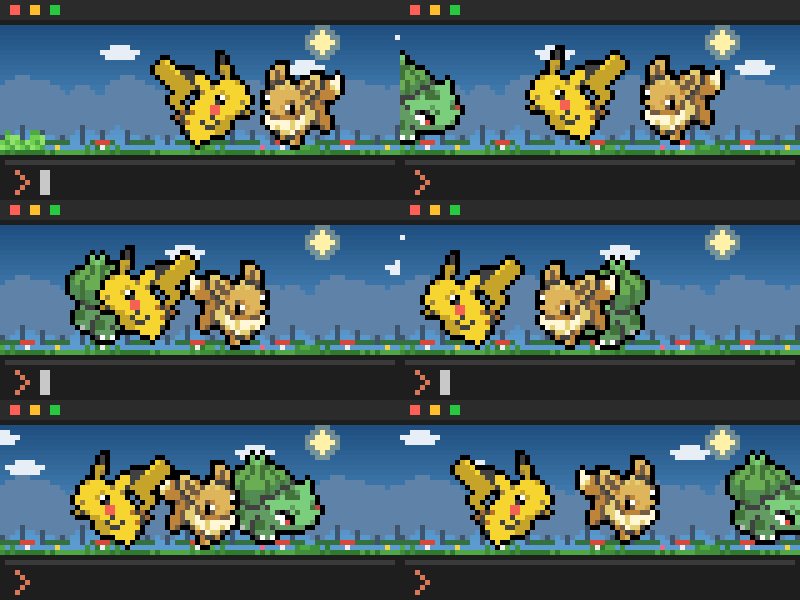
Every 10 to 20 minutes a wild Pokémon wanders through. The tall grass rustles at the edge, your party jumps and turns to it with a red ! speech bubble, and Claude Code tells you who it is: "A wild Bulbasaur appeared!". It roams the whole band, the ₽ corner too, stops halfway to look around, then moves on.
Who comes depends on where and when you are, as in the games. On average a Pidgey turns up about once in 190 visits, an Eevee once in 970 and a Dratini once in 1,900: ten Pidgey for every Dratini. Legendaries, mythicals and Ultra Beasts together come about once in 100. Water types gather at the lake, Ghosts come out at night, and a Pokémon you've never seen is 2.5 times as likely to step out of the grass:
| Where or when | Who's more likely |
|---|---|
| Meadow | Normal, Grass, Bug, Electric, Fairy, Flying |
| Hills | Ground, Normal, Fighting, Fire, Rock, Flying |
| Mountains | Rock, Ground, Steel, Ice, Dragon, Fighting, Flying |
| Lake | Water, Ice, Flying, Bug |
| Forest | Bug, Grass, Poison, Fairy, Normal, Dark |
| Dawn | Flying, Psychic |
| Day | Fire, Grass, Bug, Normal |
| Dusk | Flying, Psychic, Ghost |
| Night | Ghost, Dark, Poison, Psychic, Fairy |
| Legendary, mythical, Ultra Beast | about 1 in 100 |
| Never seen yet | ×2.5 |
A fitting place makes a Pokémon 4 times as likely and a fitting hour twice (Ghost 1.5 times at dusk), but anyone can still wander anywhere. Regional forms count their own types, so an Alolan Vulpix likes the mountains. Wild Pokémon never come as a Mega, Gigantamax, Primal, battle-only, costume, gift or event form, a Furfrou trim, or a form the games hand out through an item (Rotom's appliances, the Therian and Origin formes, Genesect's Drives, Sky Shaymin, Alcremie's sweets...): those you call with /pokemon <name>. Everything you meet goes into your Pokédex:
/pokedex

Pokédex: 37 / 905 seen · 4 caught · 2 shiny
  Gen 1  ▓░░░░░░░░░  21/151 seen · 3 caught · 1 shiny
  Gen 2  ▓░░░░░░░░░  9/100 seen · 1 caught · 1 shiny
  Gen 3  ░░░░░░░░░░  4/135 seen · 0 caught · 0 shiny
  ...
Shinies: Pikachu, Granbull
Recently seen: Bulbasaur, Golurk, Eevee, Charmander
Build a party of up to three and they'll travel together. Twins are welcome: two Eevees walk side by side, and each evolves its own way.
/pokemon add charmander
/pokemon add alolan vulpix
/pokemon party
Day, night and 20 landscapes
The meadow follows your local clock: a rising sun at dawn, drifting clouds by day, a setting sun at dusk, then stars, a crescent moon and fireflies after dark. And every hour your party wanders somewhere new: an open meadow, rolling hills, snowy mountains, a shimmering lake or the edge of a forest. Every session you have open shows the same place.
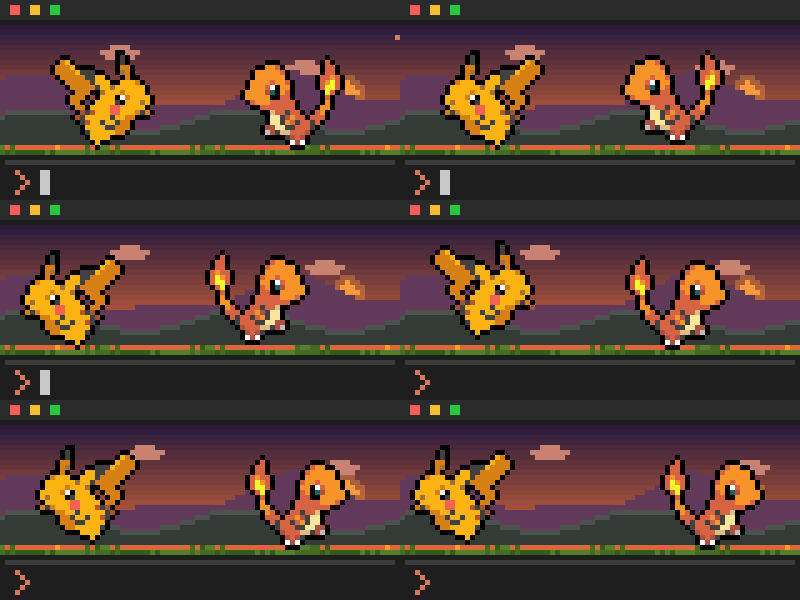
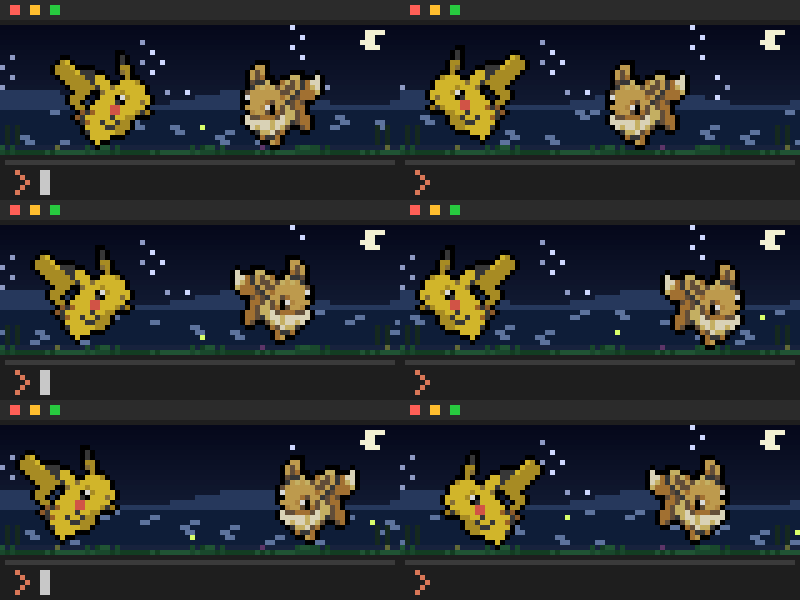
| Meadow | Hills | Mountains | Lake | Forest | |
|---|---|---|---|---|---|
| Dawn |  | 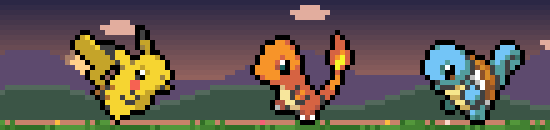 |  | 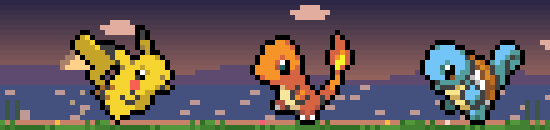 |  |
| Day |  |  |  |  |  |
| Dusk |  |  |  |  |  |
| Night |  | 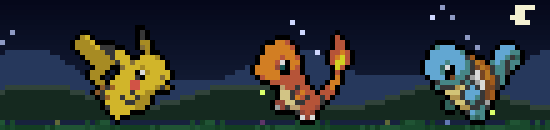 |  |  |  |
Can't wait an hour? /pokemon-play dusk lake (or any time and place) shows it for 15 seconds.
Catch 'em
When a wild Pokémon wanders by, click it to throw a Poké Ball. Aim for the Pokémon itself: a ball that lands on
grass or a gap in its sprite misses. A hit wobbles in the grass, and how often it holds follows the games' own
catch rates: a Caterpie every time, a Pikachu 3 times in 4, a legendary hardly ever. Break free and it may run. Claude Code passes clicks only in its fullscreen mode (/config, or "tui": "fullscreen" in settings), so turn that on to throw.
Catches join your party, twin or not, or your PC box when the party is full (/pokemon box, 30 to a page: /pokemon box 2 is the next, and /pokemon box eevee or /pokemon box shiny shows only those). /pokemon <name>
brings one out to lead and /pokemon add <name> into the party; /pokemon deposit <name> puts a party member in the
box, level and all. /pokemon release <name> sets one free, from the party or the box: "Bye bye, ✨ Eevee ♂ (Lv 16,
PC box)! It went back to the wild." A hold item it had goes back to your Bag; a free Everstone goes with it.
The box holds 960, as in the games. Once it's full, a new lead that would send the old one there and a deposit are
refused ("There's no more room in your PC box!"), and with the party full too no ball is thrown: the wild Pokémon
stays out for you to catch once you release one.
Two of a kind? Any command that names one asks which, and you add the number:
/pokemon release eevee
Which Eevee?
  #1 Eevee ♀ Lv 24 (party)
  #2 ✨ Eevee ♂ Lv 3 (PC box)
Add the number: /pokemon release eevee 2

/pokemon release eevee 2
Bye bye, ✨ Eevee ♂ (Lv 3, PC box)! It went back to the wild.
A long list shows the first ten, then how many more and how to narrow them down:
  … and 15 more. Fewer:
    /pokemon release shiny eevee
    /pokemon release eevee lv 1
Add the number: /pokemon release eevee 10
Any number still picks, and a number past the end lists them again. shiny and a level (lv 30, lv30 or level 30) can go anywhere: release eevee 2 shiny, release eevee lv 30. A number that belongs to a name stays part of it: zygarde 10 is Zygarde's 10% form, and porygon 2 is Porygon2 (unless you have two Porygon: then it's the second one).
Welcome to the PokéMart!
Your work pays in Pokédollars as well as XP, ten for every XP point. It's one wallet for the whole party, and everyone starts with ₽3,000, as in Pokémon Red and Blue.
| What happens | ₽ |
|---|---|
| Claude finishes a reply | ₽20 |
| A test run passes | ₽50 |
| A commit goes through | ₽100 |
Click 🛒 ₽ in the band's top-right corner and the PokéMart opens right there in the band. Pick a tab, pick an item, set how many, Buy. Thank you, come again!
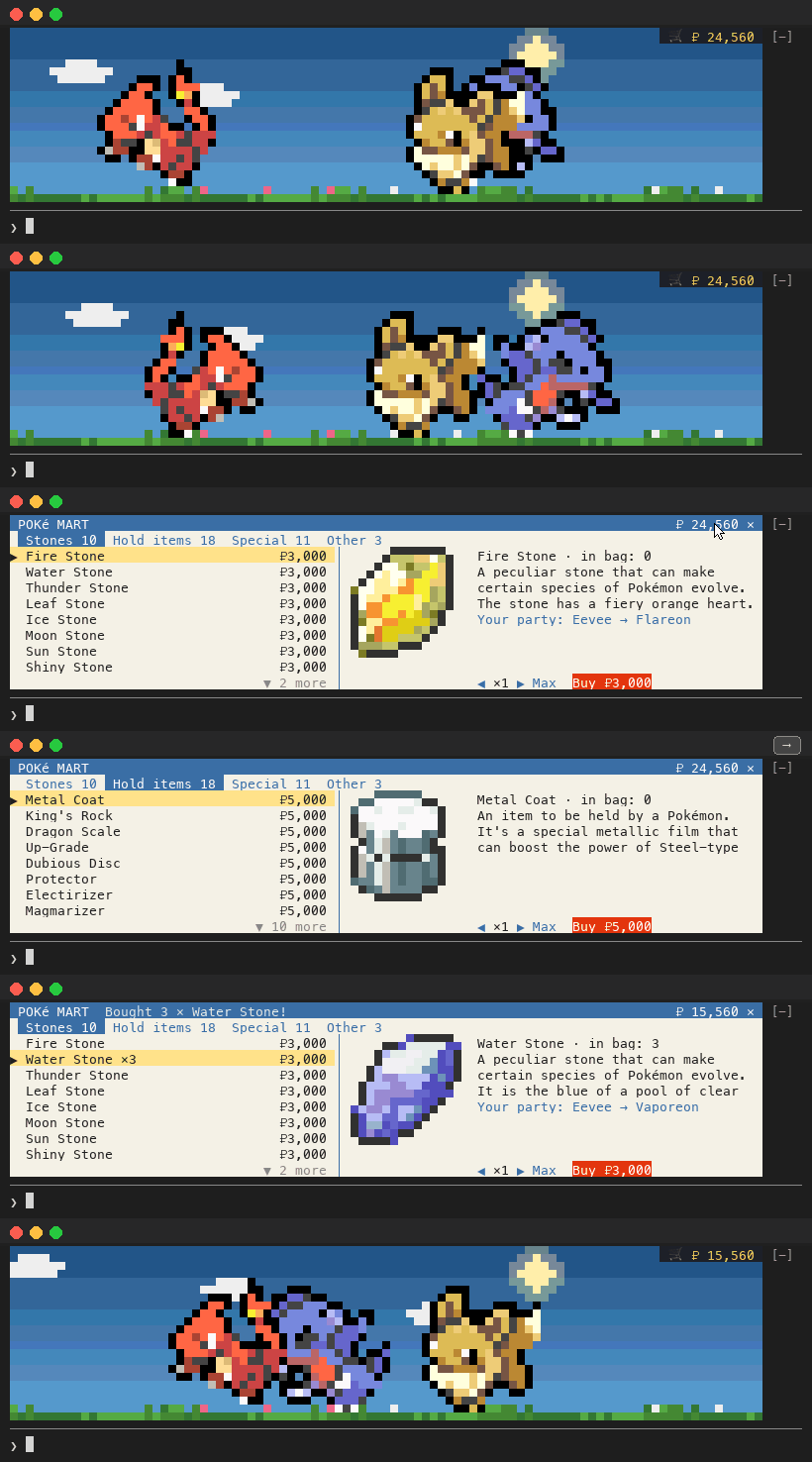
Every item has its picture and its description from the games, and a "Your party: Eevee → Vaporeon" line when it would evolve one of yours. On the shelves:
| Tab | What's on it | Price |
|---|---|---|
| Stones | Fire, Water, Thunder, Leaf, Ice, Moon, Sun, Shiny, Dusk and Dawn Stones | ₽3,000 |
| Hold items | Metal Coat, King's Rock, Dragon Scale, Up-Grade, Dubious Disc, Protector, Electirizer, Magmarizer, Reaper Cloth, Deep Sea Tooth and Scale, Prism Scale, Sachet, Whipped Dream, Razor Claw and Fang, Oval Stone, Strawberry Sweet | ₽5,000 |
| Special | The Linking Cord, Tart and Sweet Apples, Cracked and Chipped Pots, Black Augurite, Peat Block, the two Scrolls, Galarica Cuff and Wreath | ₽5,000 |
| Other | Rare Candy (one level), Lucky Egg (half as much XP again, rounded down), Soothe Bell (time together counts 1.5 times) | ₽4,800 / ₽10,000 / ₽4,000 |
Then hand them out. A stone or trade item evolves on the spot and is used up, a Rare Candy is one level, and a hold item is held: one per Pokémon, as in the games, so giving another puts the old one back in your Bag. An item that would do nothing is refused, and nothing is used up.
/pokemon give water stone eevee     What? Eevee is evolving!
/pokemon give lucky egg pikachu     Pikachu is now holding a Lucky Egg.
/pokemon take pikachu               the Lucky Egg goes back in the Bag
/pokemon bag                        what you have, your ₽, and who holds what
/pokemon buy fire stone 3           shop by typing; plain /pokemon buy lists the shelves

In the Mart: click into it, then ↑ ↓ choose, ← → change tabs, - + set how many (Max buys as many as you can afford), Enter buys and x closes. A buy you can't afford says how much more you need. Good to know:
- Clicks need Claude Code's fullscreen mode (
/config, or"tui": "fullscreen"in settings), for the ₽ button and the Mart as for Poké Balls. Without it,/pokemon martshows the Mart and/pokemon buydoes the shopping. - Click the Mart before using its keys, after
/pokemon marttoo: Claude Code gives the band the keyboard only on a click. Type anything that isn't a Mart key (/, a letter other thanx, a capitalX, a digit) and the Mart closes and what you typed goes to the prompt (if a dialog holds the prompt, a toast shows it). Enter right after a buy asks "Press Enter again to buy another Fire Stone."; a click on Buy always buys. - Esc doesn't close it: Claude Code keeps Escape for the prompt. Use
xor✕. - The mouse wheel doesn't move the list: Claude Code doesn't pass it to the band.
↑↓or▲▼do. - Item pictures need a band at least 8 rows tall, otherwise each item gets a coloured ◆.
- It fits from 40 columns: on a narrow band the tabs and buttons close up, and every one can still be clicked, with each price whole.
- The Mart stays shut while a wild Pokémon is out: catch it or let it go first.
Commands
| Command | What it does |
|---|---|
/pokemon |
A random Pokémon becomes your lead; the old lead goes into the PC box |
/pokemon <name> |
Pick your lead, spelled exactly; forms in any order: charizard mega y, galarian mr mime, shiny gengar. An owned one leads; a new one is caught and the old lead goes into the PC box. shiny <name> leads a shiny one you own, else catches a new one. Close misses get a suggestion |
/pokemon add [name] |
Grow your party (up to 3, twins welcome): from your PC box, or a new catch. No name: a random catch |
/pokemon release <name> [n] |
Set one free, from the party or the PC box (remove works too). A hold item goes back to your Bag, a free Everstone goes with it |
<name> <n> |
When a name fits more than one of yours, any command lists them numbered (the first ten, and how to narrow the rest): add the number to pick, as in /pokemon give rare-candy eevee 2. shiny or lv <n> narrows any name: /pokemon release eevee lv 30 |
/pokemon party |
Levels, XP to go, how each one evolves (♥ for friendship), held items and time together |
/pokemon box [name] [page] |
Your PC box, up to 960, 30 to a page (box 2). A name, shiny or lv <n> shows only those, with their places in the box: box eevee, box shiny. /pokemon <name> or add <name> brings one out |
/pokemon deposit <name> |
Move a party member into your PC box, level and all (your lead too; the party can't be emptied) |
/pokemon evolve <name> [into] |
Evolve a Pokémon that's ready (gold motes); name the branch when it could go more than one way: evolve eevee espeon |
/pokemon evolve manual | auto |
manual (the default): Pokémon wait for /pokemon evolve. auto: they evolve by themselves as soon as they can. A stone or trade item you give works at once either way |
/pokemon everstone <name> |
Give (or take back) a free Everstone: that Pokémon stops evolving by itself (a stone or trade item you give it still works) |
/pokemon evolution [style] |
The evolution screen: rays (the default), white or gradient. No style: which one you have, and the three to choose from |
/pokemon mart |
Open the PokéMart in the band (or click 🛒 ₽ in its corner) |
/pokemon buy [item] [count] |
Buy from the PokéMart by typing, for terminals without mouse clicks (item first or last; count 1 to 999, default 1). No item: list the Mart with prices |
/pokemon bag |
Your items by tab, your ₽, and who holds what |
/pokemon give <item> <name> |
Give an item (spaces or hyphens in its name, either order): a stone or trade item evolves it, a hold item is held, a Rare Candy is one level |
/pokemon take <name> |
Put its held item back in your Bag. Looks in the party, then the PC box; of several, the only holder, else it asks which |
/pokemon size small | normal | auto |
Sprite size. auto goes small on short terminals |
/pokemon off / on |
Put them in their Poké Balls (nothing drawn, no XP) or bring them back |
/pokemon help |
Every sub-command, one a line |
/pokemon-help |
Every command of the plugin and every word it takes. While you type /pokemon or /pokemon-play, the typeahead previews each word: give <item> <name>, then your Bag's items, then your party |
/pokedex |
Everything you've seen and caught, per generation, plus your shinies |
/pokemon-play <animation> |
Watch any animation on demand: hop, cheer, faint, sleep, squash, work, clones, evolve [style] (your lead's evolution on that screen, nothing saved), wild [shiny] [name]; or a time and place: dusk lake, night forest, mountains |
Make it look sharp
Most terminals (iTerm2, Ghostty, kitty, WezTerm...) show the sprites perfectly out of the box. A few things to know:
- VS Code / Cursor terminal: set
"terminal.integrated.minimumContrastRatio": 1. Their default of 4.5 "fixes" colors that sit close together, which turns pixel art into grey speckle. Also keep"terminal.integrated.gpuAcceleration"on"auto"so the blocks fill their cells exactly. - macOS Terminal.app draws the half-block characters from the font rather than filling each cell exactly, so thin lines can show between rows and edges look a little jagged, and a moving Pokémon can look skewed for a frame while the screen redraws. It works, but iTerm2, Ghostty, kitty or WezTerm show the pixel art crisp and smooth.
- A minimum-contrast setting you turned on yourself (iTerm2's Minimum contrast slider, Ghostty's
minimum-contrast) has the same effect. Turn it back off if the sprites look speckled. - Fullscreen mode gives your party the most room.
- Short on space?
/pokemon size smallhalves the band, and you can collapse it any time withctrl+x ctrl+a.
Optional: a Pokémon status line
Plugins can't set Claude Code's status line, but there's a battle-HUD script in extras/statusline.sh you can point it at. Your model as a nametag, project and branch as the route, tokens as EXP, your effort as a level, the context window you have left as an HP bar that drains from green to yellow to red, and how long the session has run:

Download it:
curl -fsSL -o ~/.claude/pokemon-statusline.sh https://raw.githubusercontent.com/JinHang02/claude-code-pokemon/main/extras/statusline.sh
Then add this to ~/.claude/settings.json:
"statusLine": {
  "type": "command",
  "command": "bash ~/.claude/pokemon-statusline.sh"
}
It needs bash, jq and perl (macOS and most Linux have bash and perl; install jq with brew install jq or your package manager). On Windows, run Claude Code from Git Bash or WSL.
Optional: Pokémon tips under the spinner
Plugins can't change the "Tip:" line under the spinner, but your own Claude Code settings can. Add this to ~/.claude/settings.json and restart Claude Code:
"spinnerTipsOverride": {
  "label": "Oak's tip",
  "excludeDefault": true,
  "tips": [
    "/pokemon-play wild calls a wild Pokémon out of the tall grass",
    "/pokemon everstone <name> keeps your partner just the way it is",
    "/pokedex shows every Pokémon you've seen, generation by generation",
    "Passing tests earn your party 5 XP, and a commit earns 10",
    "A wild Pokémon wanders by every 10 to 20 minutes. Watch the tall grass"
  ]
}
FAQ
Does it slow Claude down?Hardly. A frame takes a few milliseconds to draw. When nothing is moving it drops from 20 to 5 frames a second and skips frames that haven't changed. Network work like evolutions happens in the background and never holds up Claude's tools. The one busier time is the half minute or so a wild Pokémon can be aimed at: the band is drawn as coloured text at 10 frames a second, which costs about 20 to 35% CPU against about 10% the rest of the time. Does it send my code or prompts anywhere?
No. It only downloads: sprites from pokemon-colorscripts and evolution data from PokeAPI. Both are cached on your machine (
$XDG_CACHE_HOME/claude-code-pokemon if you set it, otherwise ~/.cache/claude-code-pokemon on macOS and Linux and %LOCALAPPDATA%\claude-code-pokemon on Windows), so after the first few sessions it barely touches the network. To decide how your party reacts, it looks at which tools Claude runs, the shell commands it runs (to spot test runs and commits) and whether they succeeded. None of that leaves your machine.
Where is my save?
In Claude Code's own per-plugin store under your Claude config directory. Your party, levels and Pokédex follow you from session to session. Why didn't my Pokémon evolve at Lv 30?
Evolution is manual by default: a Pokémon that can evolve waits, with gold motes rising around it and
ready to evolve in /pokemon party, until you run /pokemon evolve <name>. /pokemon evolve auto makes them evolve by themselves. If another Claude Code session is still running an older version of the plugin, restart it: an older version evolves them by itself.
Since 1.3.0, evolutions follow the games: a Pikachu needs a Thunder Stone, a Haunter a Linking Cord, a Pichu friendship. /pokemon party says what each one needs. Seventeen evolutions that need a move, steps or a battle in the games (Mime Jr., Yanma, Aipom, Poipole, Steenee, Lickitung, Clobbopus, Tangela, Bonsly, Stantler, Meltan, White-Striped Basculin, Piloswine, Galarian Yamask and Farfetch'd, Hisuian Qwilfish, and Eevee into Sylveon) still happen by level, at Lv 30 or 10 levels after the Pokémon reached its stage.
Yes. Every session shows the same party and they all earn XP for it, so working in three terminals levels your team three times as fast. Each session keeps the XP it earns under its own key, so no session ever overwrites another's XP, and sessions pick up each other's changes within about 10 seconds. Two windows changing the party, the Bag or ₽ at once keep both changes: each reads the save again just before it writes. Only two writes within the same few milliseconds can lose one of them. Subagents don't earn XP of their own; they show up as clones instead. How do I turn it off?
/pokemon off puts your party in their Poké Balls: nothing is drawn and no XP is earned, in every session, until /pokemon on. To just hide the band for a moment, collapse it with ctrl+x ctrl+a. To remove the plugin entirely, see Uninstall.
Does it work on Windows and Linux?
Linux, yes: the test suite runs on Linux on every push. Windows should, but nobody has tried it yet: the code has had a review for Windows, not a run. Nothing in it is tied to an operating system: the drawing is plain colored text, downloads are cached in the usual place for each system, and the time of day comes from your local clock. On Windows, use Windows Terminal (the old console can't show 24-bit color). If you try it, an issue saying how it went is very welcome. Does it work in the Claude desktop or web app?
Not yet. The scene is drawn with terminal cells, so it lives in the Claude Code CLI. A command said "Still working on it…"
Every
/pokemon command answers within a few seconds, so Claude Code never gives up on it. One still busy after six seconds (usually a slow download) answers "Still working on it… What comes of it is told in a notification when it's done." What it then does comes as a toast. A list (/pokemon party, /pokedex) toasts "Pokémon: /pokedex is ready. Run it again to see it." instead, so run it again.
What counts as a "test run" or a "commit"?
Commands Claude runs through its shell tool: test runners like
pytest, jest, vitest, go test, cargo test or npm test (also inside docker compose run), and git commit. A test run and a commit in one command (npm test && git commit) earn both. Commands you type in your own terminal aren't visible to the plugin.
Known limitations
- Windows is untested. It's made on macOS and the tests run on Linux; Windows has had a code review, not a run.
- Clicks need Claude Code's fullscreen mode (
/config, or"tui": "fullscreen"in settings): throwing Poké Balls, the ₽ button and the Mart. Without it,/pokemon martshows the Mart and/pokemon buyshops. - Pixel-exact aim needs a terminal that says where in a cell you clicked: kitty, Ghostty, iTerm2, WezTerm and foot do. Elsewhere, and through tmux, a click counts both pixels of the cell.
- More CPU while you can aim: for the half minute or so a wild Pokémon can be aimed at, the band costs about 20 to 35% CPU against about 10%.
- No Gen 9: the Pokémon end at Gen 8 (Enamorus), and Gen 9 items (the Gimmighoul Coin, Syrupy Apple, the Teacups...) aren't sold.
- Some evolutions keep a level: 17 that need a move, steps or a battle in the games go by level (FAQ), and a Pokémon holding a level-up item, or Mantyke, evolves within a minute rather than at the level-up itself.
- Restart every open window after upgrading. A window still running an older version writes the save its own way until it restarts. One on 1.2.0 erases your Bag, held items and ₽, and evolves by its old Lv 30 rule; one on 1.3.0 or 1.4.0 resets your evolution style. Any version without manual evolution evolves Pokémon by itself, whatever
/pokemon evolve manualsays. The CHANGELOG has the details. - Commands you run while an evolution screen plays already use the new form: the save has it from the start, so
/pokemon partyand/pokedexshow it, and a command that names the Pokémon needs its new name (/pokemon give rare candy charmeleonwhile "CHARMANDER is evolving!" is on screen). - Drawn in the terminal only: not in the Desktop app, the VS Code chat panel or the web (those sessions still earn XP).
How it works
A Claude Code plugin built on function hooks: TypeScript that runs inside Claude Code and can draw in its interface.
- Rendering: sprites arrive as truecolor ANSI art. They're parsed into a pixel grid, scaled to fit, and painted into a cell grid of
▀half-blocks, two pixels per cell, 20 times a second. - Reactions: hooks on
turn.start,turn.complete,tool.callandsession.compactfeed a small state machine: moods, roaming with easing and braking, particles, clones following the leader's path. - Saving: party, XP and Pokédex live in Claude Code's per-plugin store. Each session writes its XP under its own key, and every other change reads the save again just before it's written, so parallel sessions add up rather than undo each other.
- Layout: the plugin is
plugin/(all an install fetches):hooks/register.tsx(wiring),hooks/scene.ts(animation),hooks/backdrop.ts(landscapes),hooks/sprite.ts(sprites to cells),hooks/save.ts(party, XP, Pokédex),hooks/reactions.ts(what counts as a pass or a failure),hooks/evolution.ts(evolution chains),hooks/evolution-screen.tsandhooks/evolution-style.ts(the evolution screen),hooks/items.ts,hooks/shop.tsxandhooks/mart.tsx(items, wallet button and the PokéMart),hooks/lookup.tsandhooks/members.ts(names, and which one you mean),hooks/catch.tsandhooks/aim.tsx(the Poké Ball),hooks/item-icons.ts(item pictures),hooks/encounter.tsandhooks/species-data.ts(who wanders by),hooks/spinner.ts(spinner words), andtests/. The README images live on theassetsbranch.
Development
git clone https://github.com/JinHang02/claude-code-pokemon
cd claude-code-pokemon
claude --plugin-dir plugin       # run it from your clone, reloading as you edit
claude plugin test plugin        # the whole suite, a minute or two
claude plugin validate plugin/.claude-plugin/plugin.json --strict
node scripts/evolution-coverage.mjs   # regenerate specs/evolution-coverage.md
node scripts/evolution-fixture.mjs    # refresh the PokeAPI fixture the evolution tests read
node scripts/item-icons.mjs           # rebuild the item pictures
node scripts/species-data.mjs         # refresh catch rates, stages and types for the wild odds
Ideas, bug reports and pull requests are very welcome. CONTRIBUTING.md has the details.
Uninstall
/plugin uninstall pokemon@claude-code-pokemon
/plugin marketplace remove claude-code-pokemon
Then delete the download cache if you like: $XDG_CACHE_HOME/claude-code-pokemon if you set it, otherwise ~/.cache/claude-code-pokemon on macOS and Linux and %LOCALAPPDATA%\claude-code-pokemon on Windows.
Credits
- Sprites: pokemon-colorscripts by phoneybadger, built from PokéSprite
- Evolution data: PokeAPI
Disclaimer
This is an unofficial fan project. It's not affiliated with, endorsed or sponsored by Nintendo, Game Freak, Creatures Inc. or The Pokémon Company. Pokémon and all related names are trademarks of their respective owners. The plugin's code ships no sprites: they're downloaded at runtime from the projects above. The preview animations in this README (kept on the repository's assets branch, which an install never downloads) show those sprites as the plugin draws them.
The code is released under the MIT license.
Yorumlar (0)
Yorum birakmak icin giris yap.
Yorum birakSonuc bulunamadi